
Instagram DM compliance in 2026 means using Meta’s official Instagram Graph API, responding only to user-initiated triggers (comments, Story replies, keyword DMs), keeping sends inside your tool’s pacing cap (most tools throttle to roughly 200 DMs/hour, a convention the tools set, not a Meta-published number), and keeping promotional content inside the 24-hour messaging window. Browser bots, scraping, password sharing, cold DMs to non-engagers, and the deprecated CONFIRMED_EVENT_UPDATE message tags (effective April 27, 2026) trigger account restrictions or bans (developers.facebook.com, May 2026).
Most “Instagram banned my account” stories trace back to the same handful of mistakes. Creators copy a tactic from a 2022 YouTube tutorial. They install a Chrome extension that “automates everything.” They DM 500 people who liked a post. Two weeks later, action blocked. Then deactivated. Meta’s enforcement got dramatically stricter in 2025-2026, and the rules quietly changed underneath everyone.
This guide is the compliance reference for 2026. Every limit, every banned tactic, every recent API change, every penalty tier, with citations to Meta’s official documentation. Use it before you launch a new automation, when an old one stops working, or when you’re picking a tool to trust with your account.
Key Takeaways
- Allowed vs banned in one line: Allowed = official Graph API, user-initiated triggers, 24-hour window, opt-out path. Banned = browser bots, scraped DMs, password sharing, mass cold outreach, expired message tags.
- What Meta actually publishes: per-second limits on the Instagram API with Instagram Login path (100 calls/sec for text and links, 10/sec for audio and video) and 750 private replies per hour to comments on posts and reels (developers.facebook.com/docs/graph-api/overview/rate-limiting, July 2026). The widely-quoted “200 DMs/hour” is a tool-side pacing convention that appears nowhere in Meta’s documentation.
- 24-hour window is the default: You can send promotional content for 24 hours after a user’s last message. The HUMAN_AGENT tag extends to 7 days but only for real human replies, not bots.
- April 27, 2026 deprecation: Message tags CONFIRMED_EVENT_UPDATE, ACCOUNT_UPDATE, and POST_PURCHASE_UPDATE return error 100. Migrate to Utility Templates or the Marketing Messages API.
- Account type matters: Personal accounts cannot use DM automation. You need a Creator or Business (Professional) account. A linked Facebook Page is required only on the older Facebook Login path, not on the Instagram API with Instagram Login.
- Tools require Meta Tech Provider status, not Business Partner status: Tech Provider authorizes data processing on behalf of others; Business Partner is just an ads/marketing badge.
- Penalty escalation: Feature restriction, then 24-hour to 30-day temporary ban, then up to 180-day account suspension with appeal window, then permanent disable.

What Meta Actually Allows in 2026
Instagram DM automation is fully sanctioned when it runs through the Instagram Graph API and respects three principles: user-initiated triggers, the 24-hour messaging window, and rate limits. Meta publishes the rules openly at developers.facebook.com/docs/instagram-platform.
Allowed automation actions:
- Auto-reply to comments on your own posts and Reels when a user comments a trigger keyword
- Auto-reply to Story replies and mentions
- Auto-reply to inbound DMs containing keywords
- Send promotional content (links, offers, discount codes) to a user inside the 24-hour window after their last message
- Capture email addresses inside the DM conversation
- Tag and segment contacts for later opt-in messaging
- Send template-based notifications outside the 24-hour window only through a currently approved path: a Utility Template with the correct intent, or the Marketing Messages API after an in-window opt-in
Required permissions for any third-party automation tool:
- instagram_basic
- instagram_manage_messages (sometimes shown as instagram_business_manage_messages)
- instagram_manage_comments
- instagram_content_publish (only if the tool publishes posts on your behalf)
These permissions all require Meta App Review with screencasts, an opt-out path, and webhook handling for message deletions (developers.facebook.com/docs/instagram-platform/app-review, 2026).
For a deeper walkthrough of how the API works in practice, see our Instagram DM Automation Complete Guide.
Meta App Review: How Compliant Tools Actually Get Approved
Every third-party Instagram DM automation tool you can legally use went through Meta App Review before you ever saw it. Understanding this process tells you exactly why some tools work and others get pulled off the market overnight.
A SaaS company building DM automation must submit each permission scope individually for review (developers.facebook.com/docs/instagram-platform/app-review, 2026). For a typical DM tool that means submitting at least three: instagram_basic for profile reads, instagram_manage_messages for inbound and outbound DMs, and instagram_manage_comments for comment-trigger automation. instagram_content_publish is a separate review if the tool also publishes posts.
What Meta requires per submission in 2026:
- A screencast showing the exact user journey for that permission, end to end. Static screenshots are no longer accepted.
- A documented opt-out mechanism reachable from inside the DM conversation (not just a settings menu).
- Webhook handlers for message_deletions, so when a user deletes a message your stored copy is also deleted within a defined retention window.
- Privacy policy and terms of service published at a public URL.
- Data retention and deletion documentation.
- A human-agent escalation path for users who reply with help-seeking language.
The 2025-2026 review cycle is dramatically stricter than 2022. Multiple tool vendors report rejections for incomplete screencasts, missing opt-out flows, or inadequate webhook handling (botsailor.com, 2026). When a tool fails review, every connected user account loses the affected permission overnight. This is one of the main reasons unverified tools disappear: they cannot pass review and lose API access.
What this means for you as a creator: if a tool is currently sending DMs through the Graph API in 2026, it has cleared App Review. That fact alone is meaningful. Tools that ask for your password or run as a Chrome extension never went through this process and never will.
What Gets You Banned in 2026
Meta upgraded its ML detection in 2025, and enforcement is now dramatically faster and harder to appeal. The same behavior that earned a soft warning in 2022 triggers an immediate restriction now.
Hard bans (account suspended or permanently disabled):
- Browser automation and Chrome extensions that simulate user input. Instagram’s detection compares scripted timing to real touch input and catches it (help.instagram.com/740480200552298).
- Unofficial APIs and simulated logins. Meta has issued DMCA notices against unofficial Python libraries that wrap Instagram’s web flow (bot.space, 2026).
- Tools that ask for your Instagram password directly. Official Graph API tools use Facebook OAuth and never see your password. Anything else is scraping.
- Bought followers, fake engagement, follow/unfollow scripts, engagement pods. All are explicit Community Guidelines violations.
- Cold DMs to users who never engaged with you. There is no compliant API path for this in 2026. Any tool offering it is scraping (spurnow.com, 2026).
- Promotional content in unsolicited welcome messages or outside an open 24-hour window without a valid message tag.
Soft bans (feature restrictions, throttling, or warnings):
- Pushing past the pacing cap your tool enforces (commonly ~200 DMs/hour)
- Sending more than one automated DM per user per 24 hours from comment or Story triggers
- Using the HUMAN_AGENT tag for bot replies (Meta detects misuse)
- Reusing message tags after the April 27, 2026 deprecation date
- Aggressive sales language flagged by Meta’s spam classifier (ALL CAPS, urgency triggers, banned product categories)
For the broader safe-versus-unsafe tooling breakdown, our avoid Instagram bans guide covers tool verification step by step.
What Each Banned Tactic Actually Triggers
The escalation timeline matters because most creators get a chance to course-correct before a permanent disable. Here is what each common violation looks like in practice in 2026.
Browser automation and Chrome extensions. Meta’s detection layer compares scripted timing, mouse-movement entropy, and HTTP fingerprints to real touch input from the Instagram app (pixelscan.net, 2026). Detection usually happens within hours of installation, not days. The first visible signal is a generic “we noticed unusual activity” challenge, then login lockouts, then a 30-day temporary ban, then permanent disable on the next offense. Appeals at this point usually fail because the violation is logged at the device-fingerprint level.
Unofficial APIs and scraped libraries. Meta has issued DMCA takedowns against developers of popular Python and Node libraries that wrap Instagram’s web flow (bot.space, 2026). For end users, the consequence is identical to browser automation: detection is fast, the appeal path is narrow, and reinstatement is uncommon.
Cold DMs to non-engagers. There is no API path that allows this in 2026. A tool offering “DM your followers” or “DM anyone who hashtagged X” is doing one of two things: scraping Instagram (immediate ban risk) or quietly only messaging users who already engaged with you (the feature is misnamed). Real cold outreach typically triggers a 7-day messaging restriction on the first detected wave and a 30-day restriction on the second.
Bought followers, engagement pods, follow/unfollow scripts. Meta combines several signals: rapid follower acceleration, geographic clustering of new follower IPs, identical engagement patterns across accounts. The 2025 enforcement uplift now correlates these signals across tools. The visible consequence is a follower purge (Meta deletes the bought followers) plus a shadowban that suppresses your reach in Explore and hashtag pages for 14 to 90 days.
Promotional content in cold welcome messages. Even when a tool is fully API-compliant, sending a sales pitch as the first message to a user outside an open conversation window is flagged by the spam classifier. The classifier looks for pricing language, urgency triggers, and short sender history with the recipient. First offense is a feature restriction; repeat offenses escalate.
Banned Content Categories Inside DMs
Even compliant DMs from compliant tools can trigger account action if the content itself violates Community Guidelines. Meta enforces these inside DMs with the same classifiers used on public posts.
- Regulated goods: alcohol, tobacco, vaping, firearms, ammunition, explosives, fireworks
- Pharmaceuticals and supplements: prescription drugs, weight-loss supplements with medical claims, peptides, SARMs
- Adult content and services: pornography, escort services, paid sexual content (separate from creator-platform link sharing, which has its own review path)
- Cryptocurrency promotions with specific return claims, ICOs, “guaranteed yield” wording
- Multi-level marketing recruitment with income claims
- Counterfeit goods and unauthorized brand merchandise
- Health claims that imply diagnosis, treatment, or cure
- Financial services without proper licensing disclosure
- Hate speech, harassment, threats (zero tolerance, immediate action)
Sending any of these in a DM, even an automated one to a user who opted in, can result in account-level action. The “user asked for it” defense does not apply to content categories Meta has zero-tolerance rules around.
Allowed vs Banned: Quick Reference Table
| Action | Allowed in 2026 | Banned in 2026 |
|---|---|---|
| Comment-to-DM automation | Yes, via Graph API, 1 DM per user per 24h | No, if scraped or via browser bot |
| Story reply automation | Yes, inside 24h window | No, if cold-sent outside window |
| Keyword DM auto-reply | Yes, on inbound DMs | No, if outbound to non-engagers |
| Promotional content in DM | Yes, inside 24h window | No, in welcome/cold messages |
| HUMAN_AGENT tag (7-day window) | Yes, for real human agents only | No, for automated bot replies |
| CONFIRMED_EVENT_UPDATE tag | No, deprecated April 27, 2026 | Returns error 100 |
| Mass DM to followers/likers | No | Yes, instant restriction risk |
| Browser/Chrome extension automation | No | Yes, fast-track to ban |
| Password-sharing tools | No | Yes, account compromise risk |
| Personal account automation | No, API access blocked | Personal accounts cannot connect |
| Buying followers / engagement pods | No | Yes, ToS violation |
| Email capture inside DM | Yes, with explicit opt-in language | No, without consent disclosure |
If you serve EU customers, Meta’s rules are only half the picture. The Instagram DM automation GDPR compliance guide covers consent collection, data storage, and deletion requirements.
Rate Limits Decoded for 2026
Meta tightened rate limits significantly between 2024 and 2026. The old “5,000 calls per hour” guidance is gone (developers.facebook.com/docs/graph-api/overview/rate-limiting, 2026).
Current limits per Instagram account:
- ~200 automated DMs per hour is the pacing most tools enforce on a rolling 60-minute window. This is a tool-side safety cap, not a Meta-published limit. Meta’s own published ceilings are per-second (100 calls/sec for text and links) plus 750 private replies per hour to post and reel comments (developers.facebook.com/docs/graph-api/overview/rate-limiting, July 2026).
- 1 automated DM per user per 24-hour period from comment or Story triggers. This is new in 2026 and prevents the “DM same user three times from three different posts” pattern.
- Meta’s limits are per Instagram account, not per tool. Connecting both ManyChat and CreatorFlow to the same account does not double your headroom against Meta’s ceilings; they draw on the same account budget.
- Rate-limit hits do not delete messages. They queue and send in the next available window.
What this means in practice: A viral Reel that gets 400 trigger-word comments in 30 minutes will deliver the first 200 DMs immediately and queue the rest for the following hour. No spam penalty. No deleted messages. Just a brief delay.
Edge cases creators run into:
- Multiple workspaces, same Instagram account. If you connect the same Instagram account to two workspaces in the same tool (e.g. for a team handover), the ~200/hour pacing cap still applies once per account. The platform deduplicates.
- Agency managing multiple client accounts. Each client account gets its own ~200/hour pacing budget. An agency with 10 clients has 2,000 DMs/hour total, but spread across 10 separate Instagram accounts.
- Cross-tool migration. Switching from ManyChat to CreatorFlow does not reset the rate-limit counter. Meta tracks per-account, not per-app.
- Soft retry windows. When a tool hits the limit, well-built platforms apply exponential backoff (retry after 60s, then 5min, then 15min). Poorly built ones retry immediately and burn through API quota for unrelated calls.
For the full rate-limit breakdown, see our Instagram Graph API Rate Limits Explained.
The 24-Hour Window and Message Tags
Meta enforces a strict 24-hour conversation window for promotional messaging on Instagram. Inside the window you can send anything (within Community Guidelines). Outside the window, you need a valid message tag or the user must message you again.
Standard 24-hour window:
- Starts when the user sends you any message (DM, comment-triggered DM, Story reply)
- Resets every time the user sends a new message
- Allows unlimited messages including promotional content
HUMAN_AGENT tag (7-day extension):
- Extends the messaging window to 7 days
- Only valid when a real human agent responds, not automated bots
- Meta detects misuse and revokes the tag for accounts that abuse it (chatwoot.com, 2026)
One-Time Notifications (OTN) are not available on Instagram:
- OTN is a Messenger Platform feature. Meta does not offer it for the Instagram messaging API (developers.facebook.com, August 2026)
- For “notify me when it restocks” or “remind me about the launch” flows on Instagram, use a Utility Template or the Marketing Messages API after an in-window opt-in
Deprecated tags (effective April 27, 2026):
- CONFIRMED_EVENT_UPDATE
- ACCOUNT_UPDATE
- POST_PURCHASE_UPDATE
These tags now return error 100. Migrate immediately to Utility Templates or the Marketing Messages API. Tools that haven’t updated will simply stop sending after the deadline (developers.facebook.com/docs/messenger-platform/changelog, 2026).
Migration paths for the deprecated tags:
- CONFIRMED_EVENT_UPDATE (was used for event reminders, appointment confirmations) migrates to Utility Templates with the appropriate intent category. Templates require pre-approval per use case.
- ACCOUNT_UPDATE (was used for account status notifications, password resets, billing changes) migrates to Utility Templates under the “account_update” intent.
- POST_PURCHASE_UPDATE (was used for shipping notifications, order status) migrates to Utility Templates under the “post_purchase” intent.
The Marketing Messages API is a separate path for promotional re-engagement and requires explicit user opt-in inside the 24-hour window. It is not a drop-in replacement for the old tags but is the only compliant route for promotional content outside the window.
What breaks if you don’t migrate: Any automation scheduled to send post-window notifications using the old tags will fail with error code 100 starting April 27, 2026. Users will not receive shipping updates, appointment reminders, or account notifications. The visible symptom in your dashboard is a spike in failed sends with no other change.
Account Type Requirements
Instagram DM automation requires API access. API access requires a Professional account.
Personal account: No API access. No automation tools can connect. Switch to Professional first.
Creator account: Full API access. Recommended for individual creators, influencers, and personal brands.
Business account: Full API access. Required if you run ads or need advanced commerce features.
To switch: Instagram app, Settings, Account, Switch to Professional Account, then choose Creator or Business. Free, takes 30 seconds, fully reversible. You keep all followers, all posts, and all DMs.
Whether you also need a linked Facebook Page depends on which API path your tool uses. The Instagram API with Instagram Login connects your Instagram professional account directly. The older Messenger API for Instagram path runs on Facebook Login and does require a linked Page (developers.facebook.com/docs/instagram-platform, August 2026).
Meta Tech Provider vs Business Partner: What’s the Difference
Two different Meta programs that creators routinely confuse.
Meta Tech Provider is a compliance and technical authorization. Required for any company that processes or stores other users’ data through Meta APIs. Tech Providers act as licensed integrators and receive API keys to build software on behalf of clients. DM automation tools must hold this status to be compliant (inro.social, 2026; 360dialog.com, 2026).
Meta Business Partner is an advertising and marketing program. It signals expertise in running ads, creative production, or media strategy. It does not authorize data processing on behalf of other accounts.
The compliance check before you sign up for a tool:
- Does the tool show “Meta Tech Provider” or equivalent on its homepage?
- When you connect, does it open an official Facebook OAuth screen?
- Does it show specific permission requests (instagram_manage_messages, instagram_manage_comments)?
- Does it never ask for your Instagram password?
If all four are yes, the tool is compliant. If any one is no, walk away.
For a list of verified compliant options, see our best Instagram DM automation tools comparison.
Penalty Ladder: What Meta Actually Does When You Violate
Meta’s enforcement is graduated. Catching a violation early gives you a chance to fix it before things escalate.
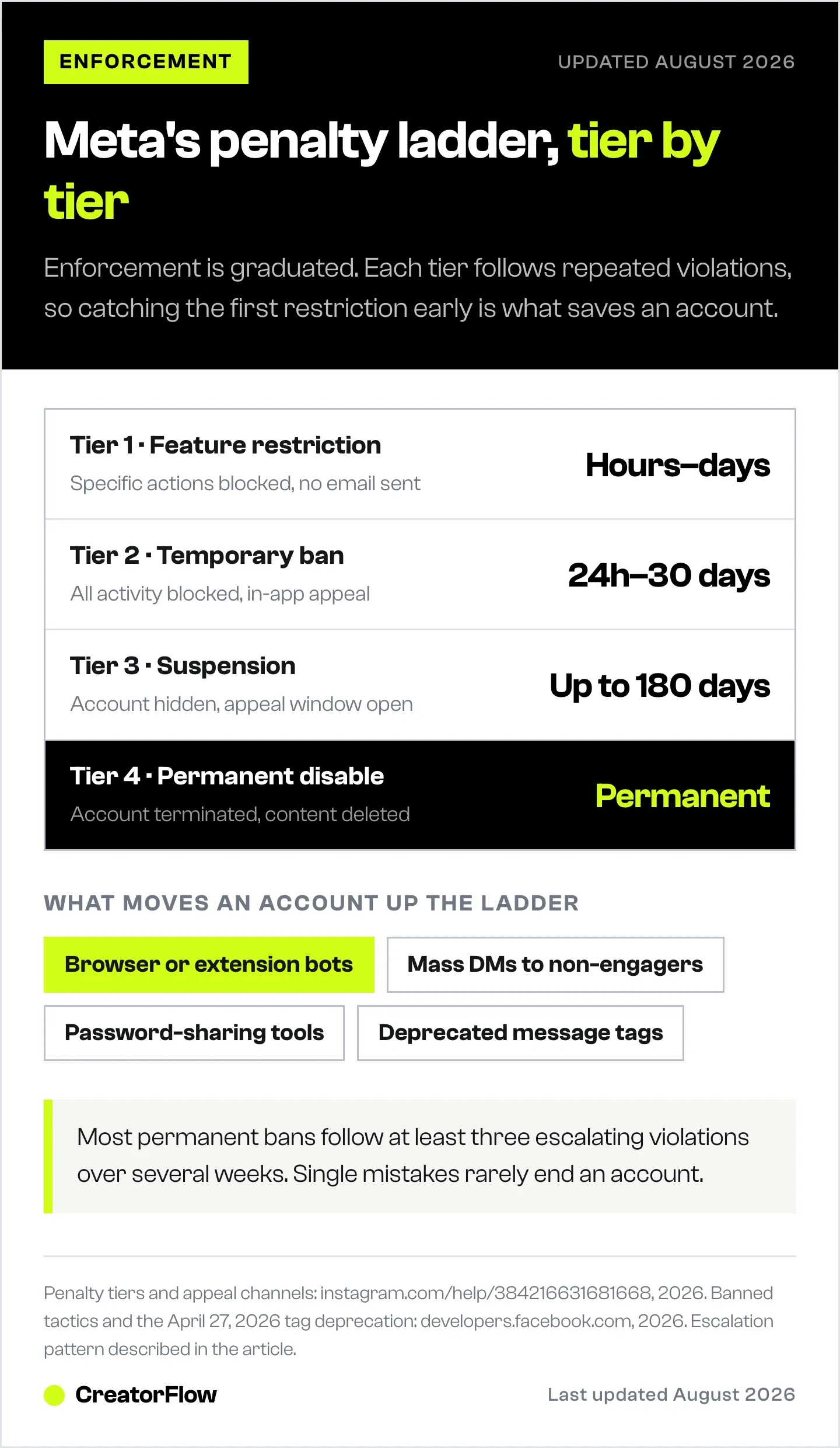
Tier 1: Feature Restriction (most common first response)
- Specific actions blocked (DM sending, commenting, following) for hours to days
- No notification email; you only see the in-app message when you try the action
- Usually triggered by exceeding rate limits or aggressive automation patterns
- Resolves automatically if behavior stops
Tier 2: Temporary Account Ban
- Lasts 24 hours to 30 days
- All account activity blocked
- Triggered by repeat Tier 1 violations or by using unauthorized tools
- In-app appeal available
Tier 3: Account Suspension
- Lasts up to 180 days with appeal window
- Account hidden from public; some appeals reinstate it
- Triggered by serious or repeated violations: scraping, mass-reported spam, banned content
- Appeal channels: in-app “Request a Review,” Help Center forms (instagram.com/help/384216631681668, 2026)
Tier 4: Permanent Disable
- Account terminated, content permanently deleted
- Triggered by Community Guidelines violations (CSE, illegal goods, repeated severe abuse) or unsuccessful appeals at Tier 3
- No reliable public data on appeal success rates; Meta does not publish them
Prevention beats appeals: Use only API-based tools, only message users who opted in, never exceed rate limits, never use deprecated tags, and include an opt-out instruction in your messages.
Concrete Examples of Each Tier
Tier 1 in the wild: A coach posts a viral Reel that gets 500 trigger comments in 20 minutes. Their automation tries to send 500 DMs immediately. The tool sends the first 200 under its own pacing cap and holds the next 300 in its queue for the following 60-minute window. No restriction, no warning, no impact. This is the system working as designed.
Tier 1 escalating to Tier 2: Same coach later imports a list of 2,000 followers (scraped or downloaded from a third-party tool) and tries to broadcast a “limited time offer” to all of them outside the 24-hour window. Meta blocks the send and logs a Tier 1 restriction. The coach repeats the attempt the next week with a different message. This time Meta logs a 7-day Tier 2 messaging restriction.
Tier 2 escalating to Tier 3: The same account, after the 7-day restriction lifts, installs a Chrome extension to “automate around” the API limits. Meta detects the browser-based pattern within hours. 30-day temporary ban issued. On the 31st day the account becomes accessible again, but the user reinstalls the extension. Meta moves to Tier 3 suspension with a 180-day appeal window.
Tier 3 to Tier 4: Account loses its first appeal because the violations are documented at the device-fingerprint level. User submits a second appeal explaining the misunderstanding. Second appeal denied. Account permanently disabled. All content, follower list, and saved DMs deleted from the account holder’s perspective.
The pattern: Most permanent bans involve at least three escalating violations across multiple weeks. Single mistakes rarely terminate accounts. The accounts that get killed are the ones whose owners ignored every preceding warning and used unauthorized tools as a workaround.
2025-2026 Changes That Affect Your Compliance
The DM compliance rules changed substantially in the last 18 months. If your workflow was set up before mid-2025, audit it against these updates.
January 8, 2025: Several Insights API metrics deprecated, including video_views (non-Reels), profile_views, website_clicks, phone_call_clicks, and text_message_clicks (developers.facebook.com blog, December 2025). If your reporting dashboard pulled these, it’s now broken.
February 1, 2026: The old Instagram share attachment was removed. Tools sharing content into DMs must now use the ig_post object format.
April 27, 2026: Message tags CONFIRMED_EVENT_UPDATE, ACCOUNT_UPDATE, and POST_PURCHASE_UPDATE return error 100. Sunsetting tools that haven’t migrated will simply stop sending. Confirmed compliant alternatives: Utility Templates, Marketing Messages API.
Mid-2025 onward: Meta’s ML detection layer was upgraded. Browser-automation patterns that previously slipped through are now flagged within hours. Multiple secondary sources cite hundreds of thousands of accounts removed in 2025 enforcement waves; treat specific numbers as directional rather than verified.
Instagram Basic Display API end-of-life: Tools relying on it for read-only data must migrate to the full Graph API (storrito.com, 2026).
For a broader view of the Instagram rules this year, see automated Instagram DMs: rules, risks, and what works.
Permission Scopes Explained: What You Are Actually Granting
When you connect an automation tool to your Instagram account, the OAuth screen lists permissions in technical language most creators skim past. Here is what each one actually means in 2026.
instagram_basic. The lowest tier. Gives the tool read access to your profile, your media, and basic account information. Required for any tool that needs to know which Instagram account it’s connected to. Does not allow message sending or comment management.
instagram_manage_messages (also rendered as instagram_business_manage_messages in newer documentation). Allows the tool to send and receive Instagram DMs on your behalf inside the standard 24-hour window. Required for any DM automation. This is the permission Meta scrutinizes most heavily during App Review.
instagram_manage_comments. Allows the tool to read comments on your posts and Reels in real time, which is what powers comment-to-DM automation. Without this, the tool cannot detect trigger words. Includes the ability to hide or delete comments, which some tools use for moderation features.
instagram_content_publish. Allows the tool to publish posts, Reels, and Stories on your behalf. Not required for DM automation specifically. Tools that combine scheduling and DM features will request this; pure DM tools should not.
pages_show_list, pages_read_engagement. Facebook-side permissions that appear when a tool connects through the older Facebook Login path, which reads your Instagram account via a linked Facebook Page. Tools on the Instagram API with Instagram Login path do not request them.
Permissions you should never grant:
- Any “manage” permission to a tool that has not gone through Meta App Review. The OAuth screen will show this if it’s an issue.
- Any permission requested by a Chrome extension. Extensions cannot legally request Graph API permissions; if one claims to, it’s lying or scraping.
- Permissions to a tool that asks for them outside of the Facebook OAuth flow.
You can audit and revoke granted permissions at any time. Open Instagram, Settings, Apps and Websites. The list shows every connected tool and the permissions each holds. Revoking is one click.
Compliance Checklist Before You Launch a New Automation
Run through this before activating any new automation in 2026.
- Tool is a verified Meta Tech Provider (check the homepage or about page)
- Connection flow uses official Facebook OAuth, not a password field
- Account is Professional (Creator or Business), and linked to a Facebook Page if your tool connects through Facebook Login
- Trigger is user-initiated (comment, Story reply, inbound DM) and not outbound to non-engagers
- Total automated DMs across all tools stay inside your tools’ pacing caps (commonly ~200 per hour combined)
- No automation sends more than 1 DM per user per 24-hour period from comment or Story triggers
- Promotional content stays inside the 24-hour window
- No use of deprecated message tags (CONFIRMED_EVENT_UPDATE, ACCOUNT_UPDATE, POST_PURCHASE_UPDATE)
- Email capture flows include explicit consent language
- Every DM includes an opt-out instruction (Reply STOP)
- HUMAN_AGENT tag, if used, only fires on real human responses
- Aggressive language (ALL CAPS, urgency, banned products) avoided to stay under spam classifier threshold
Distribute Your Content with a Compliant DM Engine
Manual DMs do not scale. Non-compliant automation gets you banned. The only way through is an automation tool built on the official Graph API, audited for the 2026 rule changes, and architected to respect rate limits automatically.
CreatorFlow is a Meta Tech Provider running on the official Instagram Graph API. Rate limits, the 24-hour window, the per-user per-24-hour cap, and message-tag deprecations are enforced automatically. You write the message and the trigger; the platform handles compliance.
Start with CreatorFlow free and turn every comment, Story reply, and keyword DM into a compliant distribution channel.
FAQ
Is Instagram DM automation legal in 2026?
Yes. Instagram DM automation is legal and explicitly sanctioned by Meta when the tool uses the official Instagram Graph API, the user initiated the conversation (comment, Story reply, inbound DM), and the automation respects rate limits and the 24-hour messaging window. Tools that scrape Instagram or simulate logins are not legal under Meta’s Terms of Service and risk both account ban and DMCA action against the developer.
What is the maximum number of automated DMs per hour in 2026?
There is no Meta-published “DMs per hour” maximum. Meta publishes per-second limits on the Instagram API with Instagram Login path (100 calls/sec for text and links, 10/sec for audio and video) and 750 private replies per hour to comments on posts and reels (developers.facebook.com/docs/graph-api/overview/rate-limiting, July 2026). The ~200 DMs/hour figure you see quoted everywhere is the pacing tools apply themselves to stay well clear of those ceilings, and it is shared across every tool connected to the account. Additionally, comment and Story triggers are capped at 1 DM per user per 24 hours, which is new in 2026.
What changed for Instagram DM compliance on April 27, 2026?
Three message tags were deprecated and now return error 100: CONFIRMED_EVENT_UPDATE, ACCOUNT_UPDATE, and POST_PURCHASE_UPDATE. Any tool still using these tags will fail to send messages outside the 24-hour window. Compliant alternatives are Utility Templates and the Marketing Messages API. Verify your automation tool released a 2026 update before this date.
Can a personal Instagram account use DM automation?
No. Personal Instagram accounts do not have Graph API access and cannot connect to any compliant DM automation tool. You must switch to a Creator or Business (Professional) account first, which is free, takes 30 seconds in the Instagram app settings, and is fully reversible. You keep all followers and content.
What is the difference between Meta Tech Provider and Meta Business Partner?
Meta Tech Provider is a compliance and technical authorization that allows a company to process and store other users’ data through Meta APIs. DM automation tools must hold this status. Meta Business Partner is an advertising and creative-services program; it does not authorize data processing. A Business Partner badge alone is not sufficient for a DM automation tool to be compliant.
Will Meta ban my account if I send too fast?
Probably not. Your tool paces its own sends and queues anything over its cap for the next 60-minute window, so messages arrive late rather than triggering a penalty. Repeated and sustained limit-busting, especially when combined with aggressive content patterns, can escalate to feature restrictions. Bans are generally reserved for browser-automation tools, scraping, password sharing, and cold outreach to non-engagers.
Does the HUMAN_AGENT tag let me send promotional DMs for 7 days?
Only if a real human agent is responding inside that window. The HUMAN_AGENT tag extends the messaging window from 24 hours to 7 days, but Meta explicitly prohibits using it for automated or bot messages and detects misuse. Using HUMAN_AGENT for bot replies is one of the fastest ways to lose API access for the affected app (chatwoot.com, 2026).
What permissions does an Instagram DM automation tool need to function?
A compliant DM tool requests instagram_basic for profile reads, instagram_manage_messages for sending and receiving DMs, and instagram_manage_comments for comment-trigger detection. Some tools also request instagram_content_publish for scheduling features. Each permission is reviewed individually by Meta App Review; tools that haven’t passed review cannot request these permissions through the official OAuth flow.
Can I appeal a Tier 3 Instagram suspension?
Yes. Meta provides a 180-day appeal window for most Tier 3 suspensions through the in-app “Request a Review” flow and the Help Center forms (instagram.com/help/384216631681668, 2026). Appeals submitted with specific evidence (your tool’s Meta Tech Provider status, screenshots of compliant automation flows, opt-in records) generally outperform generic appeals. Meta does not publish appeal success rates.
Are Meta’s messaging limits applied per tool or per account?
Per Instagram account. Connecting both ManyChat and CreatorFlow to the same account does not give you double the headroom. Meta’s published per-second ceilings are counted at the Graph API level against the account, not the tool, so switching tools also does not reset the counter. The ~200 DMs/hour figure is separate: it is the pacing each tool applies to itself, and it sits well below Meta’s ceilings.
What content categories are banned inside Instagram DMs in 2026?
The same categories Meta bans on public posts: regulated goods (alcohol, tobacco, vaping, firearms), pharmaceuticals with medical claims, adult services, cryptocurrency promotions with specific yield claims, MLM income claims, counterfeit goods, unlicensed financial services, and any hate speech or harassment. Meta runs the same classifiers on DM content as on public posts. The “user opted in” defense does not override these zero-tolerance categories.
Can an agency manage Instagram DM automation for clients without violating compliance?
Yes, when each client connects their own account through the agency’s tool via official Facebook OAuth. The agency cannot share a single tool seat across multiple unrelated client accounts using the same login; each Instagram account must be authorized individually. Tools that hold Meta Tech Provider status are designed for this multi-account model. See our white-label DM automation for agencies guide for the full agency workflow.
What happens to my saved DMs if my account is permanently disabled?
From your perspective they are deleted along with the rest of the account. Meta retains data internally for legal and compliance purposes for a defined period but does not return content to the disabled user. This is one of the strongest arguments for capturing emails inside DM automation flows: an email list survives an Instagram account termination, while everything stored inside Instagram does not.
Compliance facts verified from developers.facebook.com, help.instagram.com, and Meta platform changelogs as of May 2026. Meta updates Instagram API rules frequently; verify current documentation before relying on any specific limit. Individual enforcement outcomes vary.


