
AI agents for content creators are specialized AI roles, usually built inside Claude Code or a similar agent environment, that each own one slice of a creator’s workflow (research, writing, design, analytics) and pull from reusable skills to ship work. A typical creator stack runs a content agent, a research agent, and a designer agent. The piece almost every guide leaves out is the DM and distribution layer where the audience actually converts to revenue.
You finally set it up. A content agent that writes captions in your voice. A designer agent that spits out on-brand carousels. A research agent that pulls competitor hooks before you record. You hit publish on a Reel, it does 400K views, and your DMs explode with “link please?” Three hours later you start replying. The first 50 people are gone.
This guide takes the “AI marketing team” architecture that creators are copying from frameworks like the one Grace Leung outlined in her Claude Code walkthrough (postiz.com/blog/ai-marketing-team-claude-code-agents-skills, April 2026) and rebuilds it for the only metric creators actually get paid on: response speed in the inbox. It covers what an AI agent is for a creator, the five-agent template most stacks copy, why skills come before agents, where the workflow breaks for creators specifically, and how to wire a DM layer in.
Key Takeaways
- Definition: An AI agent is a specialized AI role with a job description and a curated set of skills it can call, not a chatbot you prompt one task at a time.
- The dominant template: Most creator AI stacks copy a five-agent setup (data analyst, content creator, market researcher, creative designer, campaign strategist) lifted from marketing-team frameworks.
- Skills come first: Build one skill per repeatable task before grouping into agents. Agents without skills are just personas with no playbooks.
- The gap: Claude Code agents run on your laptop. Instagram DMs arrive on Meta’s servers. No agent in any standard creator stack can reach the inbox where revenue happens.
- The fix: Add a DM automation layer (CreatorFlow, ManyChat, or similar) that connects through Meta’s official Instagram Graph API and runs alongside the content agents.
- Starter stack: Three skills (caption, carousel, hook research), two agents (content creator, research), one DM layer. Beats a twelve-skill mega-team for a solo creator’s first month.

What AI Agents Actually Are for Content Creators
An AI agent is not a smarter chatbot. It is a defined role inside an agent environment (Claude Code, Cursor, similar) with three things attached: a job description, a curated set of skills it can call, and a model it runs on.
A “content creator” agent for an Instagram creator might own three skills: a caption writer trained on your last 50 captions, a carousel designer that pulls from a folder of your branded templates, and a hook researcher that scrapes the top-performing Reels in your niche. When you give Claude Code a task that fits the role, it routes to the agent automatically, and the agent reaches for the right skill.
The difference from “I prompt ChatGPT for captions” is separation of concerns. A generalist assistant juggling research, writing, and design produces muddier output than three focused agents each holding one job description and one shelf of playbooks. This is the same logic that has run real marketing teams for decades. AI agents just compress the salary line.
For a deeper walkthrough of the Claude products underneath this (chat, Code, Cowork), see Claude AI for Instagram creators, brands, and agencies.
The Five-Agent Template Most Creator Stacks Copy
The architecture that has gone viral in 2026 follows the same five-role split:
| Agent | Owns | Typical skills |
|---|---|---|
| Data analyst | Performance reports, dashboards | Reels analytics parser, weekly KPI summary, A/B test reader |
| Content creator | Long-form and short-form copy | Caption writer, blog post writer, lead magnet writer |
| Market researcher | Trends, competitors, audience | Competitor scraper, trend tracker, persona synthesis |
| Creative designer | Visual assets | Carousel template, deck generator, ad creative |
| Campaign strategist | Coordination | Launch brief, content calendar, multi-channel plan |
This template was popularised by marketing-team frameworks like the one in the Postiz walkthrough mentioned above. It is a clean separation. It is also designed for an in-house marketing function, not a creator who is the brand, the talent, the customer support, and the salesperson at once.
Two things change when you port it to a creator workflow:
- The data analyst usually overlaps with what Instagram Insights and your link-in-bio tool already give you. Building a full agent for it is overkill for the first month.
- The campaign strategist is mostly you. Your taste is the strategy.
What is missing from the template entirely is the agent that handles the volume that actually arrives after a post goes live. There is no inbox agent.
Skills Come Before Agents (the Order Most Creators Get Wrong)
The standard mistake is to spin up five agents on day one, stare at the empty skills shelf, and abandon the setup by week two. The order that actually works:
- List your repeatable tasks. Write down everything you do every week. Captions. Hook research. Carousel design. DM template updates. Newsletter. Pull this from your last calendar, not from imagination.
- One skill per task. Each skill is a markdown file with a clear description, the inputs it needs, and a small reference library (your last 50 captions, three carousel templates, the brand voice guide). Skills are reusable, agent-agnostic playbooks.
- Group skills into agents only when there are enough of them. Two or three skills per agent is the floor. One skill in a single agent is just a skill with extra steps.
- Wire the project so Claude knows the routing. Update your project’s CLAUDE.md (or the equivalent system prompt) so the agent environment knows when to call the agent versus when to call a skill directly.
The reference-based approach matters more than the agent count. A caption writer skill that ships your voice needs your last 50 captions in its reference folder, not a “write like an Instagram creator” prompt. The reference is the moat.
For the deeper “how do I install this on Instagram specifically” version, see Instagram DM automation: how to set up in 5 min.
The DM Gap: Where the Workflow Breaks for Creators
Here is the architecture problem nobody flags in the AI marketing team posts. Claude Code agents run locally on your machine. They can read your files, call APIs you have keys for, and write outputs back to your project folder. What they cannot do is reach the Instagram inbox where a follower just sent “link please?”
Instagram DMs flow through Meta’s servers. The only sanctioned way for software to read or send DMs is Meta’s official Instagram Graph API, with OAuth authentication, rate limits (tools pace at roughly 200 automated DMs per hour, 24-hour messaging window), and Meta’s approved partner status. Your local Claude Code agent has none of that. It does not have your Instagram session, it cannot subscribe to the comment webhook, and even if you tried to bolt it on, you would either get banned (browser bots) or quickly hit Meta’s review process for unapproved API access.
So the picture for a typical creator running a Claude Code marketing team is:
- Content gets drafted in the project folder. Carousels render. Captions are written. The launch brief is ready.
- The post goes live. It does well.
- Forty to four hundred DMs arrive within the first hour.
- The agents have nothing to say. They are still on the laptop, in the project folder, waiting for the next prompt.
Response time on Instagram drives conversion. Replies inside 5 minutes convert at multiples of replies after 4 hours, because the buyer has not yet scrolled to the next creator. An AI workflow that drafts brilliantly but cannot answer the question “how do I get the link?” is producing inputs for a sales process it never closes. The content half is automated. The conversion half is still you, manually, at midnight.
Wiring the DM Layer Into the Workflow
The fix is not to make Claude Code talk to Instagram. That route is a ban-risk dead end. The fix is to add a second tool that does the inbox layer the same way Postiz adds a publishing layer for the content half: a Meta-approved DM automation platform that runs alongside your agents.
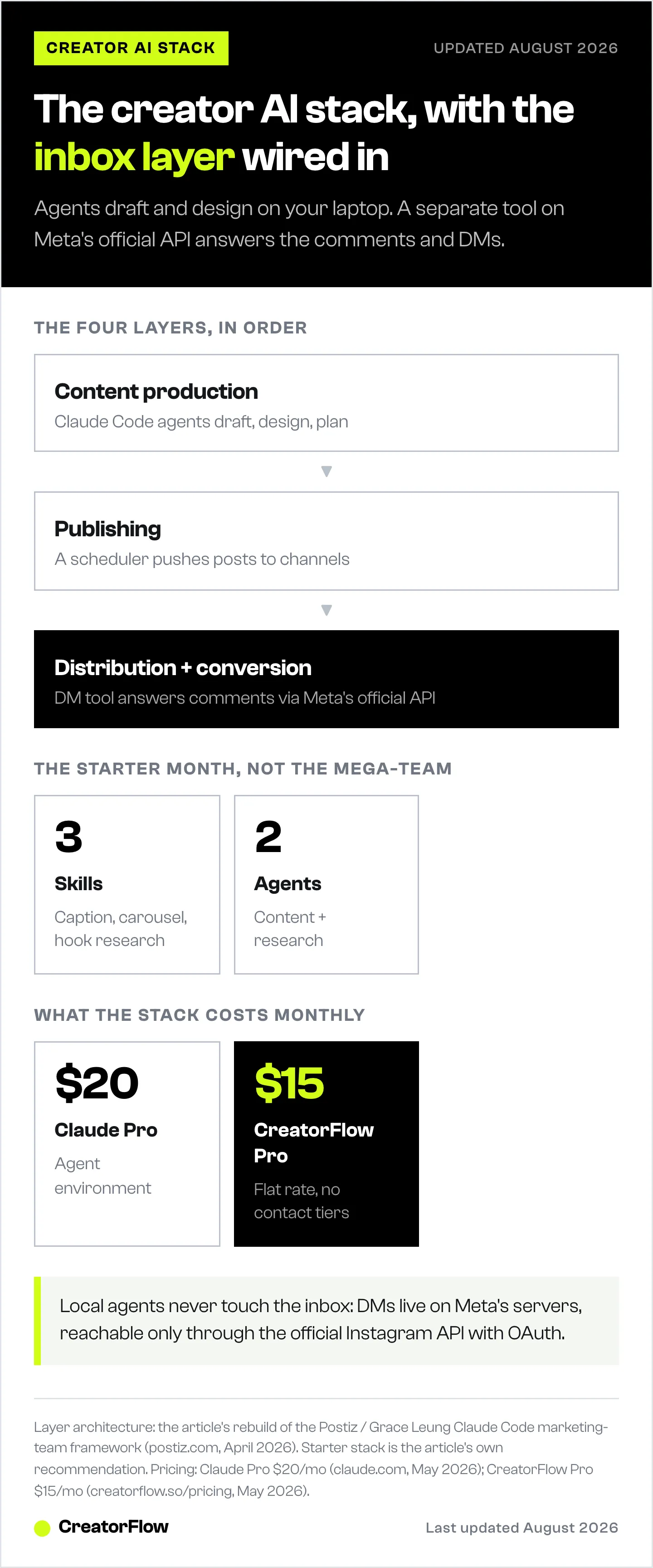
The integration shape is simple:
| Layer | Tool | What it does |
|---|---|---|
| Content production | Claude Code agents + skills | Drafts, designs, plans |
| Publishing | Postiz, Buffer, Later, native scheduler | Pushes content to channels |
| Distribution + conversion | CreatorFlow (or ManyChat, LinkDM) | Auto-replies to comments and DMs through Meta’s official API |
| Analytics | Tool-native dashboards + a data analyst skill | Reads conversion back into the loop |
CreatorFlow runs on Meta’s official Instagram Graph API, connects through OAuth (no password sharing), and handles three triggers your agents cannot: comment-to-DM, story reply-to-DM, and keyword-to-DM. When the content agent’s Reel goes live and someone comments your trigger word, CreatorFlow sends the DM with the link in 1 to 8 seconds. You pay $15/month flat (creatorflow.so/pricing, May 2026), no per-contact pricing scaling.
The data flow that closes the loop:
- Content creator agent drafts the caption with the trigger word baked in (“comment ROUTINE for the link”).
- Designer agent renders the carousel. You publish.
- CreatorFlow watches comments, sends the DM, captures the email if you have an email gate set, tracks the click.
- Next week, your data analyst skill reads CreatorFlow’s CSV export plus Instagram Insights and writes the report the campaign strategist (you) reads on Monday.
This is the architecture creators actually need. Production stays in Claude Code. Conversion stays on the API where Instagram lives. The agents and the inbox tool talk to each other through outputs (CSV exports, click data) rather than fighting over who controls the Instagram session.
For more on the agent-side of inbox automation specifically (LLM-driven DM responses for brands), see AI agents for Instagram DMs: how brands automate. For the wiring details (webhooks, MCP, and scheduler hand-offs), the guide on connecting AI agents to your Instagram workflow goes deeper. And if you are deciding how much of your business to rebuild around agents at all, start with future-proofing your creator business in the AI era.
A Starter Stack for a Solo Creator’s First Month
A twelve-skill, five-agent stack is a six-month build. The version that ships in a weekend and replaces 6+ hours per week:
Three skills:
- Caption writer. Reference: your last 50 high-performing captions. Inputs: topic, hook angle, CTA trigger word.
- Carousel designer. Reference: 3 to 5 of your branded carousel templates. Inputs: topic, slide count, hero stat.
- Hook researcher. Reference: a folder of saved competitor Reels. Inputs: niche keyword, time window.
Two agents:
- Content creator. Owns the caption writer and carousel designer skills.
- Research. Owns the hook researcher skill plus a weekly trend scrape.
One DM layer:
CreatorFlow on the Free plan to test, Pro ($15/month) once you confirm the volume justifies it. Set up two automations on day one: a comment-to-DM with your link and a keyword reply for “price.”
That is it. No campaign strategist agent. No data analyst agent. The Postiz/Buffer scheduler is a nice add but not required for week one. The whole thing fits in an afternoon and replaces the part of your week you actually want back.
For the volume case (multiple Instagram accounts, agency-style), see Instagram automation for agencies: managing multiple accounts.
What to Build First, What to Skip
Build first:
- The two skills you reach for every week (caption writer, carousel designer for most creators).
- The DM layer. Even before the agents. CreatorFlow alone, with no AI workflow at all, recovers more revenue per week than any content agent will, because comments-to-link conversion is the highest-intent funnel an Instagram creator has.
- One reference library per skill. Skills without references are just clever prompts.
Skip on day one:
- Agents with one skill. Wait until the skill shelf is real.
- The data analyst agent. Instagram Insights and CreatorFlow’s analytics dashboard cover 80% of what it would tell you, manually, in 10 minutes.
- The remote control / phone integration setup. It is impressive in demos and unused after week two for most solo creators.
- Custom MCP servers in week one. The reference-folder approach gets you 80% of the output with 10% of the configuration.
The point of the AI agent setup is not to look like a marketing team. It is to give yourself back the four hours a week you spend on tasks the AI does well, and to make sure the moment a Reel pops, the inbox does not become the new bottleneck.
For the comment-to-DM workflow specifically, see the comment-to-DM automation setup guide.
FAQ
What is an AI agent for a content creator?
An AI agent is a specialized role inside an agent environment like Claude Code, with a job description, a curated set of skills (reusable playbooks), and a model assignment. For a creator, it usually owns one slice of the workflow (writing, design, research, analytics) and replaces the equivalent freelancer or VA task.
Do I need Claude Code to build an AI creator workflow?
No. Claude Code is the most popular environment for the agents-and-skills pattern in 2026, but Cursor, Cline, and the Claude API directly all support similar setups. The architecture (skills first, agents second, references in folders) ports across tools. What matters is the separation of concerns, not the environment.
Can AI agents reply to Instagram DMs directly?
Not safely. Local AI agents do not have authenticated access to Meta’s Instagram Graph API, and any tool that logs into your Instagram account through a browser bot is a ban risk. The sanctioned approach is to use a Meta-approved DM automation tool (CreatorFlow, ManyChat, LinkDM) for the inbox layer, and let your AI agents handle production upstream.
What skills should I build first for a creator AI workflow?
The two tasks you actually do every week. For most Instagram creators, that is a caption writer (with your last 50 captions as reference) and a carousel designer (with your branded templates). Add a hook researcher if you publish Reels weekly. Skip the rest of the standard “marketing team” template until those three are working.
How is this different from just using ChatGPT?
ChatGPT is one generalist assistant juggling every task in one conversation, which dilutes context and produces softer output. An AI agent setup separates roles, attaches reference libraries to each role, and lets the orchestrator route tasks to the right specialist. The same logic that separates a copywriter from a designer in a real team applies inside Claude Code.
Will AI-generated content hurt my Instagram reach?
Instagram does not penalise AI-assisted content directly as of May 2026 (per Meta’s transparency guidelines, accessed May 2026), but the algorithm rewards engagement, and generic AI-generated text gets less of it. The fix is the reference library: skills that pull from your actual past captions and your actual brand templates produce output the algorithm cannot tell from your manual work, because it sounds like you.
How much does an AI creator stack cost per month?
A reasonable starter stack runs $35 to $55 per month. Claude Pro ($20/month) covers the agent environment. CreatorFlow Pro ($15/month) covers the DM layer. A scheduler if you want one (Postiz, Buffer, Later) adds $0 to $20. That is the full cost of replacing several hours of weekly work and a typical part-time VA hourly rate.
What replaces the data analyst agent?
For a solo creator, Instagram Insights plus your DM tool’s analytics dashboard cover most of what a data analyst agent would produce. CreatorFlow surfaces click-through rate, geographic breakdown, and conversion data per automation. Build the data analyst agent later, once you have enough campaigns running that manual review takes more than an hour a week.
AI agent architecture verified against Postiz / Grace Leung’s Claude Code walkthrough (postiz.com, April 2026), Anthropic Claude Code documentation (claude.com/claude-code, May 2026), and Meta’s Instagram Graph API documentation (developers.facebook.com/docs/instagram-api, May 2026). CreatorFlow pricing verified at creatorflow.so/pricing, May 2026. Individual results vary.


