

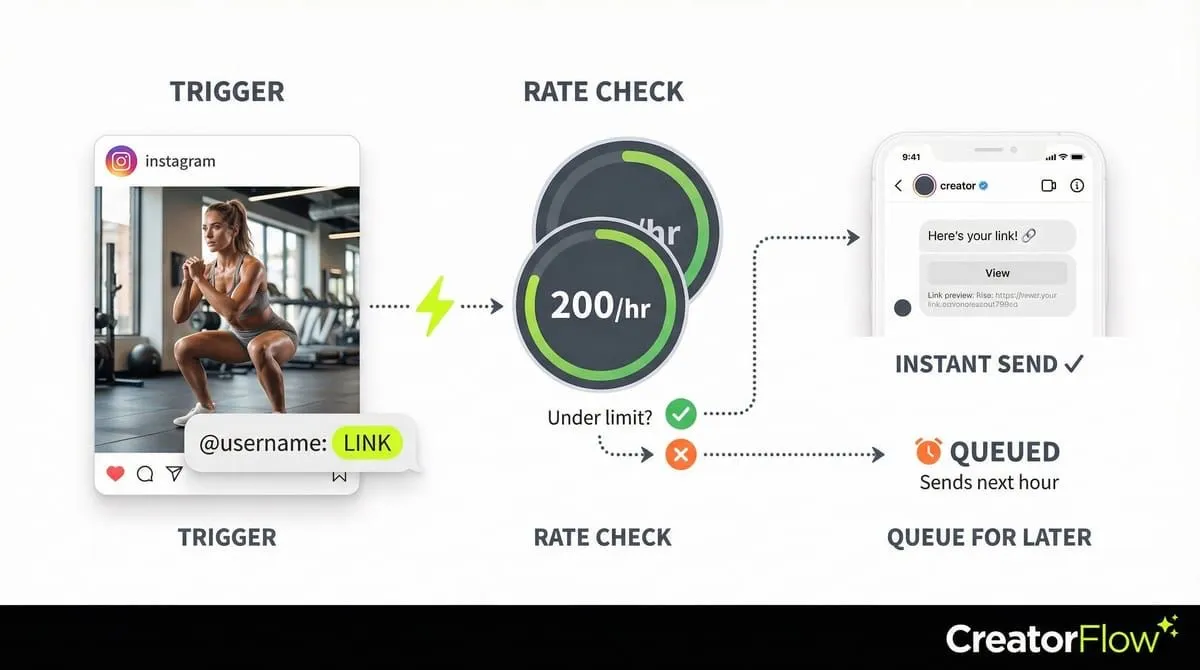
Meta’s Instagram Graph API limits automated DMs to 200 messages per hour per account. Additional restrictions include a 24-hour messaging window, meaning you can only message users who engaged with your content in the past 24 hours, and one automated message per user per trigger event. When the hourly limit is reached, automation pauses and queued messages send when the limit resets. No ban risk when using the official API.
Your post went viral. 500 people DMed “link” in 20 minutes. Your automation sent 200 messages… then stopped.
You didn’t get banned. You hit Meta’s Instagram Graph API rate limits-200 automated DMs per hour. This isn’t a bug. It’s Instagram’s official limit as of February 2026, and every automation tool must follow it.
This guide shows you what rate limits are, why they exist, how to work within them, and what happens if you hit the ceiling.
TL;DR
Instagram’s official Graph API limits automated DMs to 200 messages per hour per account. Additional limits: 24-hour messaging window (can only message users who engaged in last 24 hours), 1 automated message per user per 24-hour period from comment/Story triggers. All compliant automation tools (CreatorFlow, ManyChat, LinkDM) follow these limits. Exceeding limits = automation pauses for 1 hour (no account ban if using official API). Limits reset every hour on the hour (as of February 2026).
Instagram’s 3 Core API Limits:
- 200 DMs per hour (Meta API) - Maximum automated messages per account per hour
- 24-hour messaging window - Can only message users who engaged with you in last 24 hours
- 1 message per trigger - One automated DM per comment/Story reply per user per 24 hours
What Happens When You Hit the Limit:
- Automation pauses - No more messages sent until next hour
- No account ban - Using official API = safe (rate limits exist to prevent bans)
- Queue builds - Messages wait and send when limit resets
- Hour resets - Every hour on the hour (example: 2:00pm : 3:00pm new limit)
How to Work Within 200 DM/Hour Limit:
- Viral post (500+ comments) - Automation sends first 200, queues remaining for next hour
- Stagger content - Post throughout day vs all at once (spreads DM volume)
- Prioritize hot leads - Use “follow-before-DM” filter (only send to followers)
- Multiple accounts - Each Instagram account gets own 200/hour limit
Calculation Examples:
- 200 DMs/hour × 24 hours = 4,800 max automated DMs per day per account
- Viral post with 1,000 comments = Takes 5 hours to respond to all (200/hour)
- Average creator (50-100 comments/post) = Never hits limit (well within 200/hour)
Quick Decision:
- Under 200 comments/hour typically : No concern, standard automation works
- Viral posts (500+ comments in hour) : Expect delays, messages queue automatically
- Multiple brands : Use multi-workspace tool (CreatorFlow: 5 accounts, each with 200/hour limit)
Important: 200/hour limit is per Instagram account, NOT per automation tool. Switching tools doesn’t increase limit.
Key insight: 95%+ of creators never hit the 200 DM/hour limit. Only viral posts (500+ comments in single hour) reach the ceiling. Rate limits exist to protect your account from spam flags.
What Are Meta’s Instagram Graph API Rate Limits?
Meta’s Instagram Graph API rate limits control how many automated actions you can take per hour through Instagram’s official system. According to Meta’s Instagram Instagram’s official system documentation (February 2026), the key limits are:

DM Automation Limits:
- 200 messages per hour (per Instagram account)
- 24-hour messaging window (can only message users who engaged with you in last 24 hours)
- 1 message per user per 24 hours (from story/comment triggers)
Why these limits exist:
- Prevent spam and abuse
- Protect user experience
- Ensure platform stability
- Comply with anti-spam regulations
Instagram’s system tracks every automated message sent through approved tools. Hit the limit, and your automation pauses until the next hour resets.
The Big Change: From 5,000 to 200 DMs Per Hour
Instagram dramatically reduced automation limits in recent years.
What changed (based on developer community reports and Meta’s API changelog):
- Before 2024: Approximately 5,000 API calls per hour
- After 2024: 200 messages per hour
Why Instagram made this change:
- Reduce spam and bot activity
- Improve user experience
- Force brands to focus on quality over quantity
- Align with stricter data privacy regulations
What this means for you: If your post gets 1,000 “link please” comments in 30 minutes, only 200 people will get instant responses. The remaining 800 messages get queued for the following hours.
This change hit high-volume creators and agencies hardest. Small creators with 20-50 DMs per day barely notice the limit.
Breaking Down the 200 DMs Per Hour Limit
Let’s get specific about what counts toward your 200-message limit.
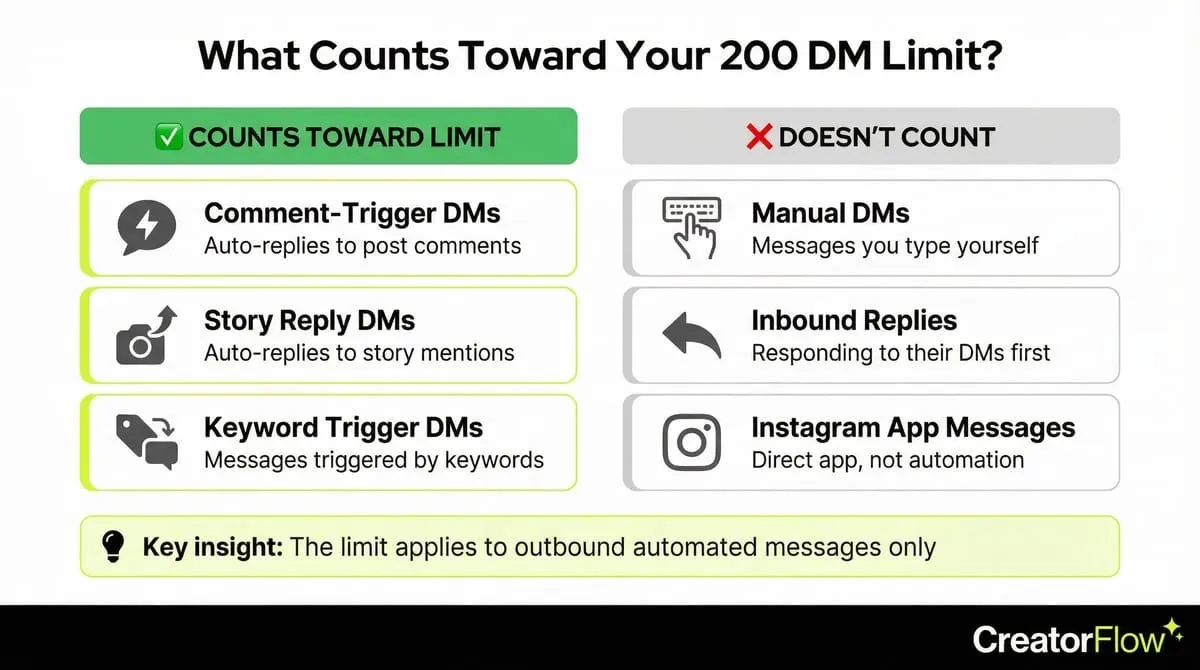
What Counts Toward the Limit
✅ These count:
- Automated DMs triggered by post comments
- Automated DMs triggered by story mentions
- Automated DMs triggered by keyword detection
- Follow-up messages sent by automation
- Welcome messages to new followers (if automated)
❌ These DON’T count:
- Manual DMs you send yourself
- Responses you type directly in Instagram
- DMs sent through Instagram app (not automation)
- Messages initiated by the other person first (replies to their DMs)
Key insight: The limit applies to outbound automated messages. If someone DMs you first and you auto-reply, that’s usually fine because they initiated the conversation.
How the Hour Window Works
Important: The limit is a rolling 60-minute window, not a fixed hourly reset.
Example timeline:
- 2:00 PM: You send 200 automated DMs
- 2:30 PM: You try to send more : Blocked
- 3:00 PM: You send 50 more DMs
- 3:01 PM: The first batch (from 2:00-2:01 PM) starts rolling off
- 3:05 PM: You can send a few more as earlier messages age out
Fixed hour reset: Most tools simplify this to hourly batches:
- Hour 1 (2:00-3:00 PM): 200 DMs
- Hour 2 (3:00-4:00 PM): 200 DMs
- Hour 3 (4:00-5:00 PM): 200 DMs
This is easier to manage and avoids complicated rolling window calculations.
What Happens When You Hit the Limit
Immediate effects:
- Your automation pauses sending
- Remaining messages get queued
- You see “Instagram’s hourly limit reached” in your automation dashboard
- Your account doesn’t get banned (this is normal API behavior)
Recovery:
- Wait 60 minutes from your first batch
- Automation resumes automatically
- Queued messages send in next available window
- No penalties or account flags
If your automation isn’t resuming after the hour resets, the issue may be something else entirely. See our guide to fix automation that stopped working for other common causes.
Common misconception: Hitting the Instagram’s hourly limit ≠ getting banned. This is expected behavior. Instagram’s system simply says “slow down, try again in an hour.”
The 24-Hour Messaging Window Rule
Beyond the 200/hour limit, Instagram enforces a 24-hour messaging window.
What This Means
You can only send automated DMs to users who’ve interacted with you in the last 24 hours.
Valid interactions that open the window:
- Commented on your post (24-hour window opens)
- Replied to your story (24-hour window opens)
- DMed you first (24-hour window opens)
- Mentioned you in their story (24-hour window opens)
After 24 hours:
- The window closes
- You can no longer send automated messages to that user
- They must interact with you again to reopen the window
Why This Rule Exists
Instagram created the 24-hour window to prevent:
- Cold outreach spam
- Unsolicited marketing messages
- Persistent follow-up sequences to uninterested users
- Automated prospecting campaigns
The philosophy: Only message people who’ve shown recent interest in your content.
Working Within the 24-Hour Window
Strategy 1: Same-Day Engagement
- Post goes live at 2 PM
- User comments at 2:30 PM
- Automation sends instant reply
- Optional: Send follow-up at 6 PM (still within window)
- After 2:30 PM next day, window closes
Strategy 2: Story Sequences
- Day 1: Post story, user replies, get their DM
- Day 2: Post another story, user replies again (reopens window)
- Day 3: Repeat engagement pattern
Strategy 3: Reminder CTAs
- Remind followers to engage: “DM me ‘LINK’ for today’s deal”
- Fresh engagement = fresh 24-hour window
- Keeps automation working for interested followers
What doesn’t work:
- Bulk messaging cold followers (no recent interaction)
- Follow-up sequences beyond 24 hours
- Re-engaging users who ignored your first message
How Rate Limits Affect Different Creators
The 200/hour limit impacts creators differently based on audience size and engagement patterns.
Note: The example scenarios below use realistic but hypothetical numbers to illustrate how limits affect different account sizes.
Small Creators (1K-10K Followers)
Typical DM volume: 10-30 per day
Impact: Minimal. You’ll rarely hit the 200/hour limit.
Best practice:
- Set up automations without worrying about limits
- Focus on message quality over delivery speed
- You have plenty of capacity for growth
Example: Sarah (5K followers) posts a Reel. Gets 15 comments. Automation sends 15 DMs in 10 minutes. She’s using 7.5% of her hourly limit.
Mid-Size Creators (10K-100K Followers)
Typical DM volume: 50-200 per day
Impact: Moderate. Viral posts can hit the limit.
Best practice:
- Monitor your automation dashboard
- Space out high-engagement posts
- Set up queuing for overflow messages
- Most days you’re fine; viral days you’ll queue
Example: Jessica (45K followers) posts a trending Reel. Gets 350 comments in 2 hours. First 200 people get instant DMs. Remaining 150 get DMs over next 60-90 minutes.
Large Creators (100K+ Followers)
Typical DM volume: 200+ per day (often 500-1,000 on viral posts)
Impact: Significant. You’ll hit limits regularly on popular content.
Best practice:
- Use smart queuing systems
- Prioritize high-intent keywords (e.g., “price” over “link”)
- Consider multiple Instagram accounts for business brands
- Accept that not everyone gets instant responses
Example: Emma (250K followers) drops a product launch post. Gets 1,200 comments in first hour. 200 people get instant DMs. Remaining 1,000 people get DMs over next 5 hours (200 per hour).
Agencies Managing Multiple Accounts
Typical DM volume: Varies per client
Impact: Complex. Each account has separate 200/hour limit.
Best practice:
- Use workspace features to isolate accounts
- Each client account gets own 200/hour allocation
- Don’t try to share limits across accounts
- Tools like CreatorFlow handle multi-account limits automatically
Example: Agency manages 8 client accounts. Each account can send 200 DMs/hour independently. Total capacity: 1,600 DMs/hour across all clients.
Strategies to Maximize Your 200 DMs Per Hour
You can’t increase Instagram’s limit, but you can improve how you use it.
Strategy 1: Smart Queuing
How it works: Instead of failing when you hit 200, messages queue automatically.
Setup:
- Tool detects Instagram’s hourly limit approaching
- New trigger events get added to queue
- Messages send in order during next available window
- User experience: Slightly delayed but reliable delivery
Best tools for this: CreatorFlow, ManyChat, and LinkDM all include smart queuing.
Example: 500 people comment. First 200 get instant DMs. Remaining 300 queue for next 90 minutes (200 in hour 2, 100 in hour 3).
Strategy 2: Keyword Prioritization
Not all DMs are equal. Prioritize high-intent keywords.
High-priority keywords (send first):
- “price” (ready to buy)
- “buy” (ready to buy)
- “order” (ready to buy)
- “booking” (ready to schedule)
Low-priority keywords (can queue):
- “link” (browsing)
- “info” (researching)
- “more” (curious)
Implementation: Some advanced tools let you set priority levels. High-intent keywords skip the queue.
Strategy 3: Spread Engagement Throughout the Day
Instead of posting once and getting 500 DMs in 1 hour, space out content.
Example schedule:
- 9 AM: Post Reel (gets 150 DMs over 2 hours) ✅
- 2 PM: Post carousel (gets 100 DMs over 2 hours) ✅
- 6 PM: Post story (gets 75 DMs over evening) ✅
Total: 325 DMs across 9 hours. Never hit Instagram’s hourly limit.
Compare to:
- 9 AM: Post viral Reel (gets 500 DMs in 1 hour) ❌ Hit limit, 300 people wait
Benefit: Better user experience, no queuing delays.
Strategy 4: Use Instagram Stories for Engagement
Stories spread engagement naturally throughout the day.
Why this works:
- People check stories multiple times per day
- Replies come in gradually (not all at once like post comments)
- Natural spacing keeps you under 200/hour most of the time
Example: Post 5 stories throughout the day:
- Morning coffee story : 20 replies
- Midday tip story : 30 replies
- Afternoon product demo : 40 replies
- Evening Q&A : 35 replies
- Night behind-the-scenes : 25 replies
Total: 150 DMs spread across 12 hours. Well under limit.
Strategy 5: Multi-Account Strategy (For Businesses)
If you’re a business (not personal brand), consider multiple Instagram accounts.
Setup:
- Main account: @yourbrand (product launches, promos)
- Support account: @yourbrand_help (customer service, questions)
- Community account: @yourbrand_community (user content, engagement)
Benefit: Each account gets its own 200/hour limit.
Total capacity: 600 DMs/hour across 3 accounts.
When this makes sense:
- E-commerce brands with high volume
- Course creators with large launches
- Agencies with multiple service lines
- Not for personal creators (confusing to followers)
Tools That Handle Rate Limits Automatically
Not all automation tools manage rate limits well. Here’s what to look for.
Features to Require
✅ Must-have features:
- Automatic queuing - Messages queue when limit is reached
- Rate limit warnings - Dashboard shows when you’re approaching limit
- Smart pacing - Tool automatically spaces messages to avoid hitting ceiling
- Hourly breakdowns - See how many DMs sent per hour
- Failed message retry - Automatically resends queued messages next hour
❌ Red flags (tools to avoid):
- No Instagram’s hourly limit handling (just fails silently)
- No queue system (messages get lost)
- No visibility into API usage
- Claims “unlimited DMs” (impossible with Meta’s Instagram Graph API)
CreatorFlow’s Rate Limit Handling
How CreatorFlow manages limits:
- Tracks your DM count in real-time
- When you approach 180 DMs in an hour, shows warning
- At 200 DMs, automatically queues remaining messages
- Sends queued messages in next available window
- Dashboard shows: “47 messages in queue, sending in 23 minutes”
Why this matters: You never lose a lead. Everyone gets your message, just some wait 30-60 minutes.
ManyChat’s Rate Limit Handling
How ManyChat manages limits:
- Enterprise-grade queuing system
- Priority routing for paid campaigns
- Multi-account management
- Complex but powerful for agencies
Downside: Overwhelming interface for solo creators.
LinkDM’s Rate Limit Handling
How LinkDM manages limits:
- Basic queuing (first-come, first-served)
- Rate limit notifications
- No priority routing
Best for: Simple use cases, single-account creators.
What Happens If You Try to Bypass Rate Limits
Some tools and services claim to bypass Instagram’s limits. Here’s why you should avoid them.
Unofficial Browser Automation Bots
What they are: Tools that automate Instagram through Chrome extensions or browser bots.
How they claim to bypass limits:
- Don’t use official API
- Mimic human behavior in browser
- Randomize actions to avoid detection
Why this fails:
- Instagram detects bot behavior patterns
- Your account gets flagged for suspicious activity
- High risk of permanent ban
- No recourse (you violated terms of service)
Example red flags:
- “Send unlimited DMs”
- “No API restrictions”
- “Undetectable by Instagram”
- Requires your Instagram password (never give this to third parties)
Reality: Instagram’s anti-spam systems are sophisticated. These tools get accounts banned regularly. For a complete safety checklist, read our guide on how to avoid Instagram bans with DM automation.
Multiple API Keys Per Account
The scheme: Create multiple apps in Meta Developer Portal to get more API access.
Why this fails:
- Instagram tracks per-account, not per-API key
- All API keys for same account share the 200/hour limit
- Meta detects this behavior and flags your account
- Violates Meta Platform Terms
Reality: The limit is per Instagram account, period. No workarounds.
VPNs and IP Rotation
The scheme: Use VPNs to hide your automation activity.
Why this fails:
- Rate limits are account-based, not IP-based
- Meta’s Instagram Graph API doesn’t care about your IP
- VPNs don’t affect API call counting
- Can actually trigger security flags (suspicious location changes)
Reality: VPNs are irrelevant to API rate limits.
Instagram API Pricing: Is It Free?
One of the most common questions: does Instagram’s API cost money?
Short answer: Meta’s Instagram Graph API is free. No per-call charges, no monthly fees from Meta, no usage-based pricing.
What you pay for: The automation tool that connects to the API. The API itself costs nothing, but building and maintaining a connection requires developer resources or a third-party platform.
Cost Breakdown by Approach
| Approach | API Cost | Tool Cost | Total Monthly Cost |
|---|---|---|---|
| Build it yourself | $0 | Server hosting ($5-50/mo) | $5-50/mo + dev time |
| CreatorFlow | $0 | $15/mo (Pro) | $15/mo |
| ManyChat | $0 | $15-65/mo | $15-65/mo |
| LinkDM | $0 | $19/mo | $19/mo |
What Meta Charges For
Free:
- Instagram Graph API access
- Messaging API endpoints
- Webhook subscriptions
- Story mention detection
- Comment monitoring
Not free (Meta Business tools):
- Instagram ads (pay-per-click, separate from API)
- Boosted posts (advertising cost)
- Meta Business Suite advanced features
Why “Instagram API Pricing” Searches Are Misleading
People searching “instagram api pricing” usually mean one of three things:
- “Does the API cost money?” No. Meta doesn’t charge for API access.
- “What do automation tools cost?” That depends on the tool. CreatorFlow is $15/mo, ManyChat ranges from $15-65/mo (manychat.com/pricing, February 2026).
- “What’s the cost of building my own integration?” Free API + developer time + server hosting. Expect 40-100 hours of development for a basic automation setup.
Bottom line: The API is free. Your cost is the platform that makes it usable without writing code.
Frequently Asked Questions
Is the 200 DMs per hour limit per account or per tool?
Per Instagram account. If you connect the same Instagram account to multiple tools, they all share the same 200/hour limit. Switching tools doesn’t give you more capacity.
What happens to messages that get queued?
They send automatically in the next available window. If you hit your limit at 2:00 PM, queued messages start sending at 3:00 PM. Users experience a slight delay (30-90 minutes) but everyone gets your message.
Can I increase my Instagram’s hourly limit by getting verified or having more followers?
No. Instagram applies the 200/hour limit to all accounts regardless of size, verification status, or follower count. A 1K follower account and a 1M follower account have the same limit.
Do manual DMs count toward the 200/hour limit?
No. Only automated DMs sent through Meta’s Instagram Graph API count toward the limit. Messages you type manually in the Instagram app don’t count.
What if I send 150 automated DMs and then 60 manual DMs in the same hour?
The 150 automated DMs count toward your limit. The 60 manual DMs don’t count. You can send unlimited manual messages without affecting your automation capacity.
Can I split my DMs across multiple Instagram accounts to bypass the limit?
Yes, if you have multiple legitimate Instagram accounts (e.g., main brand account + support account), each account gets its own 200/hour limit. But creating fake accounts just to increase capacity violates Instagram’s Terms of Service and will get all accounts banned.
How do I know when I’m approaching the Instagram’s hourly limit?
Good automation tools (like CreatorFlow) show your current usage in the dashboard. Look for metrics like “147/200 DMs sent this hour” or “Approaching Instagram’s hourly limit - 32 remaining.”
Will Instagram ever increase the 200/hour limit?
Unknown. Instagram reduced the limit from 5,000 to 200 to combat spam. They’re unlikely to increase it significantly. Plan your automation strategy around the current 200/hour limit.
Rate Limit Checklist: Are You Optimized?
Use this checklist to verify your automation setup handles rate limits properly.
✅ Tool Features:
- My automation tool has automatic queuing
- Dashboard shows real-time Instagram’s hourly limit usage
- I get warnings when approaching the limit
- Failed messages automatically retry next hour
- I can see queued messages and estimated send time
✅ Strategy:
- I space content throughout the day (not all at 9 AM)
- I use Instagram Stories to spread engagement naturally
- I prioritize high-intent keywords (price, buy) over low-intent (link, info)
- I monitor my peak engagement times
- I have realistic expectations (not everyone gets instant responses)
✅ Compliance:
- I use Instagram’s official API (not browser bots)
- I don’t try to bypass limits with fake accounts
- I respect the 24-hour messaging window
- I don’t spam users who didn’t interact with me recently
- My automation messages provide genuine value
✅ Monitoring:
- I check my Instagram’s hourly limit usage weekly
- I know my average DMs per day
- I’ve identified my viral post patterns
- I adjust posting schedule if I regularly hit limits
- I track queued message delays
If you checked 15+ boxes: You’re optimized and handling rate limits well.
If you checked 10-14 boxes: You’re doing okay but have room for improvement.
If you checked under 10 boxes: You’re likely hitting limits often or using risky tools. Time to upgrade your strategy.
The Future of Instagram Rate Limits
What to expect as Instagram’s platform evolves.
Likely Changes
Stricter enforcement: Instagram will likely get stricter about spam detection, not more lenient. Expect:
- Better bot detection algorithms
- More aggressive account flagging
- Possibly lower limits for new accounts
- Stricter 24-hour window enforcement
More transparency: Instagram may provide better Instagram’s hourly limit visibility:
- Real-time API usage dashboards in Meta Business Suite
- Clearer warnings before hitting limits
- Better documentation for developers
Tiered limits (maybe): Instagram could introduce verified account benefits:
- Verified accounts: 300 DMs/hour
- Standard accounts: 200 DMs/hour
- New accounts: 100 DMs/hour (first 30 days)
This is speculation, but follows patterns from other Meta platforms.
How to Future-Proof Your Strategy
1. Focus on Quality Over Quantity
- 200 high-quality, personalized DMs > 2,000 generic spam messages
- Build genuine relationships with your audience
- Automation should enhance, not replace, human connection
2. Diversify Your Engagement Channels
- Don’t rely 100% on DM automation
- Build email list (no rate limits on email)
- Use Instagram broadcast channels (no limits)
- Create community in Facebook group or Discord
3. Stay Compliant with Official APIs
- Never use unofficial automation tools
- Keep up with Meta’s Platform Terms changes
- Use tools that adapt to API changes automatically
- Don’t try to game the system
4. Monitor Your Metrics
- Track conversion rates, not just DM volume
- 100 DMs with 20% conversion > 500 DMs with 2% conversion
- improve for outcomes, not activity
Key Takeaways
rate limits as of February 2026:
- 200 automated DMs per hour (per account)
- 24-hour messaging window (only message recent engagers)
- Rolling 60-minute window (not fixed hourly reset)
- Applies to all accounts equally (no exceptions for size or verification)
How to work within limits:
- Use tools with automatic queuing (CreatorFlow, ManyChat, LinkDM)
- Space content throughout the day
- Prioritize high-intent keywords
- Use Instagram Stories for natural engagement spread
- Monitor your usage and adjust strategy
What to avoid:
- Unofficial browser automation bots (high ban risk)
- Trying to bypass limits with multiple API keys
- Creating fake accounts just to increase capacity
- Ignoring the 24-hour messaging window rule
Bottom line: The 200/hour limit is real and enforced. Build your automation strategy around it, not against it. Focus on quality engagement with your most interested followers rather than chasing volume.
[CTA] Ready to set up DM automation with proper Instagram’s hourly limit handling? Try CreatorFlow free for 14 days. Smart queuing, automatic pacing, and real-time Instagram’s hourly limit monitoring built in. [Start free trial :]
Disclaimer: Performance results mentioned in this article are based on aggregated user data and industry research from 2025-2026. Individual results vary based on audience size, content quality, engagement rates, and niche. CreatorFlow uses Instagram's official Graph API as of February 2026. Instagram/Meta may change features, rate limits, or terms at any time. Instagram is a trademark of Meta Platforms, Inc. CreatorFlow is not affiliated with, endorsed by, or sponsored by Meta Platforms, Inc. ManyChat, LinkDM, and InstantDM are trademarks of their respective owners. Users are responsible for complying with Instagram's Terms of Service and Community Guidelines.
Internal Links
- The Complete Guide to Instagram DM Automation
- How to Avoid Instagram Bans with DM Automation
- Instagram Keyword Trigger Automation Guide
Sources:
- ManyChat pricing: manychat.com/pricing
- LinkDM pricing: linkdm.com/pricing
- InstantDM: instantdm.co
- Instagram API limits: Meta Developer Documentation
All external data verified as of February 2026.


.webp)



