
Instagram keyword trigger automation sends instant DM replies when users message specific words like “price,” “link,” or “info.” Setup takes five minutes using tools like CreatorFlow ($15/month), ManyChat (free up to 1,000 contacts), or LinkDM ($19/month). Triggers respond within 1-3 seconds using Meta’s official Instagram Graph API, working 24/7 without manual effort. The highest-converting trigger words are “link,” “price,” and “info.”
You’re getting DMs all day asking “price?”, “link?”, “info?” Same questions. Every. Single. Day.
By the time you respond hours later, many have moved on to the next creator. Instagram keyword trigger automation fixes this. Someone DMs your trigger word, they get your response instantly. No more copy-pasting the same message 50 times.
This guide shows you how to set up keyword triggers in 5 minutes, which words work best, and how to avoid Instagram’s automation limits.
TL;DR
Instagram keyword trigger automation sends automatic DM replies when users message specific words like “price”, “link”, or “info”. Setup takes 5 minutes using tools like CreatorFlow ($15/mo), ManyChat (free up to 1K), or LinkDM ($19/mo). Triggers respond within 1-3 seconds and work 24/7 using Instagram’s official Graph API (as of February 2026).
Best Trigger Words That Convert:
- “Link” - Highest conversion (15-25% click rate)
- “Price” - Purchase intent signal
- “Info” - General inquiry
- “How” - Detailed explanation request
- “More” - Additional information
Setup Requirements:
- Automation tool: CreatorFlow ($15/mo), ManyChat, or LinkDM
- 3-10 trigger keywords: Match how your audience asks questions
- Response template: Answer + link/CTA (max 1,000 characters)
- Setup time: 5 minutes total
Quick Decision:
- Solo creator with simple triggers : CreatorFlow ($15-29/mo flat rate, unlimited keywords)
- Need complex branching logic : ManyChat ($15-65/mo, advanced workflows)
- Budget-conscious : ManyChat Free (up to 1,000 contacts)
Response speed: 1-3 seconds from keyword detection to DM delivery
What Is Instagram Keyword Trigger Automation?
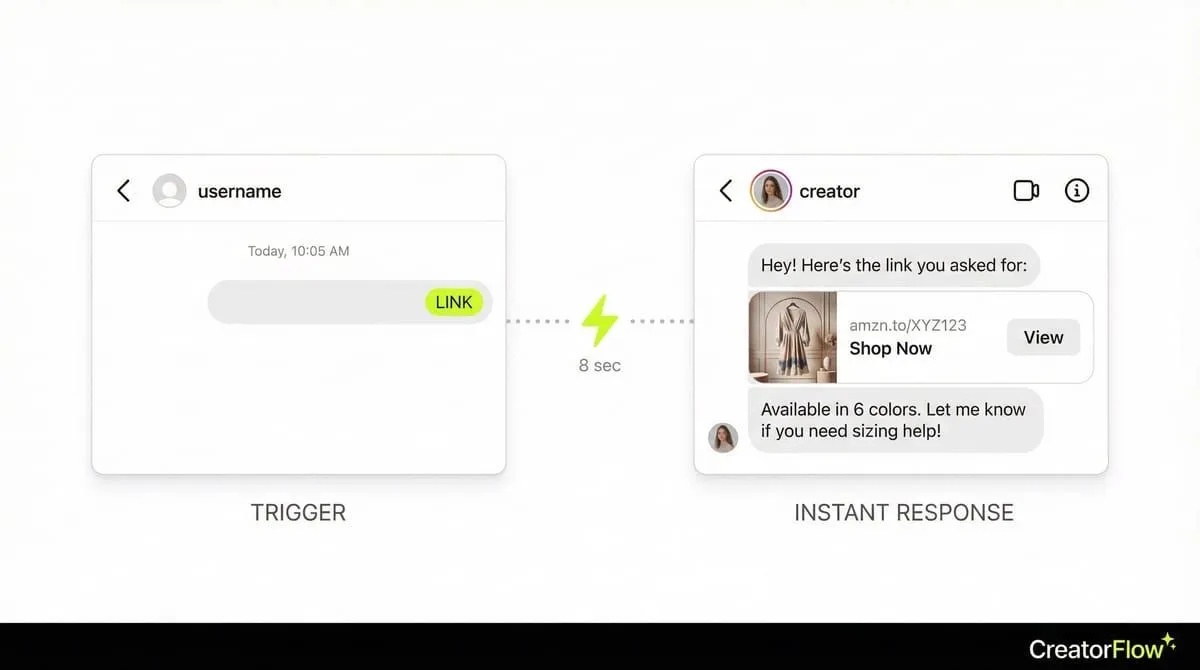
Instagram keyword trigger automation sends automatic DM replies when someone messages you specific words. You choose your trigger words (like “price”, “link”, “shipping”). When someone DMs you that word, they instantly get your pre-written response.

How it works:
- You set trigger words: “price”, “link please”, “more info”
- Someone DMs you “price”
- Instagram’s system detects the keyword automatically
- Your automation sends your pre-written message instantly
- They get your response in 8 seconds instead of 4 hours
Unlike comment-to-DM automation (which triggers from post comments), keyword automation triggers from direct messages someone sends you first.
Why Keyword Triggers Work Better Than Bio Links
Bio links typically get around 5% click-through rates (Sprout Social). DMs reach followers directly with push notifications, driving higher engagement than email (21% average open rate per Mailchimp).
Here’s how the math might work for a creator with 1,000 engaged followers:
Bio Link Approach:
- 1,000 followers see your post
- 30 click your bio link (3%)
- Maybe 6-9 buy (20-30% conversion)
Keyword Trigger Approach:
- 1,000 followers see your post
- 120 DM you “link” (12%)
- Bot instantly sends link
- 110 open your DM (92% open rate)
- 22-33 buy (20-30% conversion)
This approach can result in more sales from the same post, depending on your audience and offer. Why? Because you’re responding while they’re still interested.
Most Common Keyword Triggers (And When to Use Them)
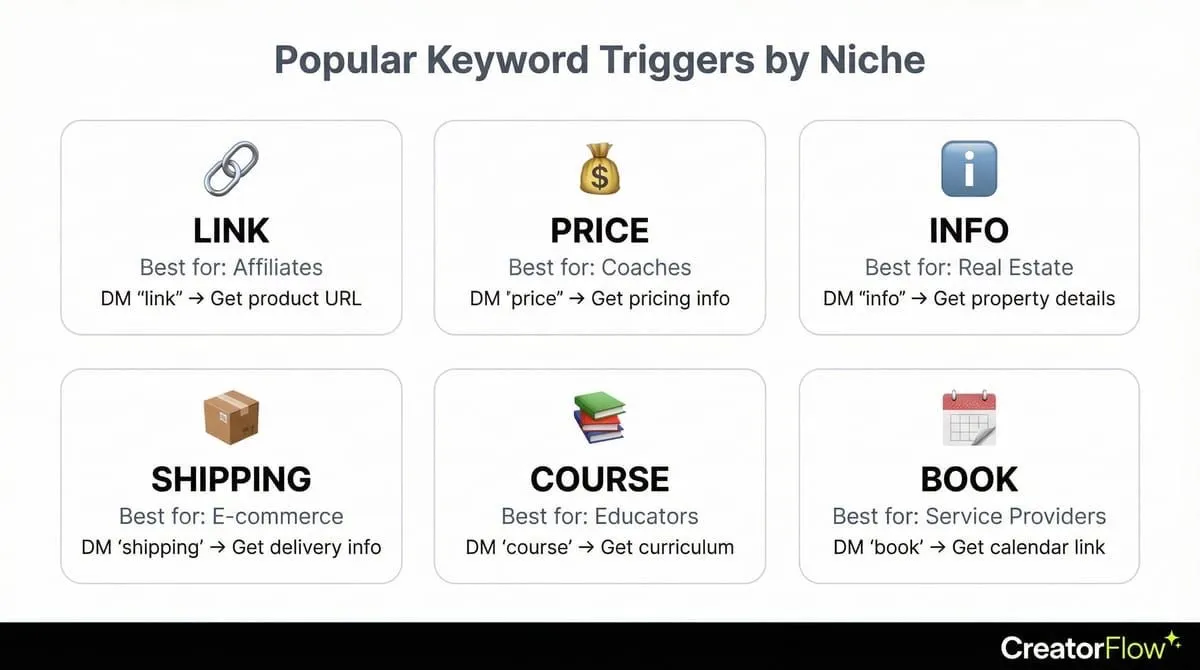
1. “Link” or “Link Please”
Best for: Amazon affiliates, LTK creators, product sellers
Example response:
Hey! Here's the link you asked for:
[Your affiliate/product link]

Available in sizes XS-XL. Ships in 2-3 days. Let me know if you have questions!
Why it works: Direct request = high buying intent. They’re ready to purchase.
2. “Price” or “How Much”
Best for: Coaches, course creators, service providers
Example response:
Great question! Here's my pricing:

✨ Discovery Call (30 min): Free
💪 4-Week Program: $497
🚀 12-Week Transformation: $1,297

Book your free call here: [calendly link]
Why it works: They’re evaluating whether they can afford you. Clear pricing removes friction.
3. “Info” or “More Info”
Best for: Real estate agents, event planners, high-ticket services
Example response:
Thanks for your interest! Here's what you need to know:

📍 Location: Downtown Miami
💰 Starting at $450K
🏠 2-3 bedrooms available
📅 Open house this Saturday 2-4pm

Schedule a private showing: [link]
Why it works: Broad trigger catches general inquiries. Gives overview without overwhelming.
4. “Details” or “Tell Me More”
Best for: Course creators, membership sites, webinar funnels
Example response:
I'd love to share! My Instagram Growth Course includes:

✅ 6 weeks of live training
✅ Reels templates + captions
✅ Private community access
✅ Weekly group coaching

Watch free training: [webinar link]
Next cohort starts Nov 1st!
Why it works: They want specifics. This response qualifies them for your funnel.
5. “Shipping” or “Delivery”
Best for: E-commerce sellers, Etsy shops, physical product brands
Example response:
We ship worldwide! 🌎

📦 US orders: 3-5 business days
🌍 International: 7-12 business days
💳 Free shipping over $75

Track your order here: [link]
Questions? Reply to this DM!
Why it works: Removes purchase objection. Shipping concerns kill sales if unanswered.
How to Set Up Keyword Triggers (5-Minute Tutorial)
Step 1: Choose Your Trigger Words
Pick 3-5 keywords your audience uses. Don’t guess. Check your DMs from last week. What words do people use most?
Good trigger words:
- “link”
- “price”
- “info”
- “details”
- “how much”
Bad trigger words:
- “hello” (too generic, triggers constantly)
- “thanks” (you’ll spam people thanking you)
- “yes” (triggers on unrelated conversations)
Pro tip: Keep it specific. “link please” is better than “link” because it filters out casual mentions. For data on which words drive the highest conversions, see our guide on comment keywords that convert.
Step 2: Write Your Response Message
Your auto-reply needs:
- Greeting - Keep it natural (“Hey!” or “Thanks for asking!”)
- Answer - Give them what they requested
- Next step - Tell them what to do (click link, book call, reply with questions)
- Personality - Add emoji if that’s your brand
Template:
[Greeting]

[Answer their question]

[Include link/resource]

[Call to action]

[Optional: Invitation to ask more]
Example:
Hey! Thanks for your interest!

Here's the link to the dress from my Reel:
[Amazon affiliate link]

It comes in 8 colors and runs true to size. I'm wearing a medium.

Let me know if you need sizing help!
Step 3: Configure Your Automation Tool
Using CreatorFlow (or similar tool):
- Go to “Automations” in sidebar
- Click “Create Automation”
- Select “DM Keyword Trigger” template
- Enter your trigger words: “link”, “price”, “info”
- Paste your response message
- Add link (optional but recommended)
- Preview your message in phone simulator
- Click “Go Live”
5-minute setup. Runs 24/7.
Step 4: Test Before Going Live
Before activating:
- Send yourself a DM with your trigger word
- Check if automation responds correctly
- Verify links work
- Confirm formatting looks good
- Test from Android AND iPhone (formatting differs)
Common mistakes to catch:
- Broken links
- Typos in message
- Missing call-to-action
- Too many emojis (looks spammy)
Instagram’s Keyword Trigger Rules (What You Need to Know)
As of 2026, Instagram’s official system allows keyword automation through approved integrations. But there are limits.
24-Hour Messaging Window
The Rule: You can only DM people who’ve messaged you in the last 24 hours.
What this means:
- ✅ Someone DMs “link” today : Automation works
- ❌ Someone DMed you 3 days ago : Automation can’t reply
How to work around it: Use Instagram Stories to remind followers to DM you. Fresh engagement = fresh 24-hour window (Meta API).
200 DMs Per Hour Limit
The Rule: Instagram limits automated DM sends to 200 per hour (as of February 2026).
What this means:
- Post goes viral (1,000 DMs in 30 minutes)? You’ll hit the limit.
- Your automation pauses until the next hour resets
- Remaining DMs get queued
How to manage it: Tools like CreatorFlow automatically pace messages to stay within limits. You don’t hit the ceiling.
No Spammy Behavior
Instagram watches for:
- Same message sent to 50+ people in 10 minutes
- Generic responses that look bot-generated
- Messages with excessive links
- Triggering on non-relevant words
How to stay safe:
- Personalize messages (use their name if possible)
- Add natural language
- Don’t send the same link 100 times consecutively
- Use specific trigger words (not “hi”, “hello”, “thanks”)
7 Keyword Trigger Mistakes That Get Accounts Flagged
1. Triggering on Generic Words
Bad: Setting “hi” or “thanks” as trigger words Why it fails: You’ll spam people who are just being polite Fix: Use specific words like “link please” or “more info”
2. Sending Same Message to Everyone
Bad: Every response is identical copy-paste Why it fails: Instagram detects robotic behavior Fix: Use variables like {first_name} or rotate 2-3 message variants
3. Not Testing on Both Platforms
Bad: Only testing on iPhone Why it fails: Android users report links don’t work properly Fix: Test on Android (some DM automation tools have Android link issues)
4. Forgetting the Call-to-Action
Bad: Sending info but no next step Why it fails: People get your message but don’t know what to do Fix: Always end with clear action (“Click here”, “Book now”, “Reply with questions”)
5. Using Too Many Trigger Words
Bad: Setting 20+ trigger words Why it fails: You’ll accidentally trigger on random words Fix: Start with 3-5 most common requests, expand slowly
6. No Follow-Up Strategy
Bad: Send link, conversation ends Why it fails: You miss opportunity to build relationship Fix: Set up follow-up message 24 hours later (“Did you get a chance to check it out?“)
7. Ignoring Instagram’s Rate Limits
Bad: Assuming you can send unlimited DMs Why it fails: You’ll hit the 200/hour limit, pausing your automation Fix: Use tools that auto-pace within Instagram’s limits
Keyword Trigger Strategies by Niche
Amazon/LTK Affiliates
Primary trigger: “link” or “link please”
Strategy:
- Post product photo on Instagram
- Caption: “DM me ‘LINK’ for details!”
- Automation sends affiliate link instantly
- Include product details + sizing
Template:
Here's the link to the [product] from my post!

[Affiliate link]

✨ Use code SAVE15 for 15% off
📦 Free shipping over $50
💝 Available in 6 colors

Let me know if you need help choosing!
Fitness Coaches
Primary trigger: “price” or “program”
Strategy:
- Post transformation photo
- Caption: “DM ‘PROGRAM’ to learn how I help clients lose 15-30 lbs”
- Automation sends program details + booking link
Template:
Amazing! Here's how my program works:

🎯 12-week transformation
💪 Custom workout plans
🥗 Meal planning included
📱 Weekly check-ins

Investment: $1,297 or $449/month

Book free discovery call: [calendly link]
Course Creators
Primary trigger: “webinar” or “course”
Strategy:
- Post success story or case study
- Caption: “DM ‘WEBINAR’ to learn my exact system”
- Automation sends webinar registration link
Template:
Perfect timing! I'm hosting a free training this Thursday:

"How to Grow Your Instagram from 0 to 10K in 90 Days"

Register here: [webinar link]

Thursday, November 6th at 8pm EST
Replay available for 48 hours

See you there! 🎉
Real Estate Agents
Primary trigger: “details” or “address”
Strategy:
- Post property photos
- Caption: “DM ‘DETAILS’ for full listing info”
- Automation sends property details + showing booking
Template:
Here are the details on the property you asked about:

🏠 3 bed / 2 bath
📍 123 Main St, Miami FL
💰 $625,000
📅 Open house Sat 2-4pm

Schedule private showing: [calendly link]

Full listing: [property website]
Advanced Keyword Trigger Tactics
Tactic 1: Multi-Step Qualification
Use keyword triggers to qualify leads before sending expensive resources.
Example flow:
- Trigger word: “course”
- Bot asks: “Are you brand new or already have 5K+ followers?”
- User replies: “Brand new”
- Bot sends: “Perfect! Here’s my beginner training: [link]”
This segments your audience automatically.
Tactic 2: Dynamic Responses Based on Keywords
Set up different responses for similar keywords:
- “link” : Sends product link
- “link + discount” : Sends product link + 15% off code
- “link + reviews” : Sends product link + customer testimonials
More specific triggers = more personalized responses.
Tactic 3: Email Gate Integration
Require email before sending main resource:
Flow:
- User DMs “course”
- Bot replies: “I’d love to send you my course guide! What’s your best email?”
- User replies with email
- Bot captures email to your list
- Bot sends course info
You’re building an email list while automating DMs.
Frequently Asked Questions
Can I use emojis as trigger words?
Yes, but they’re tricky. Trigger “❤️” works, but users type “:heart:” or copy-paste different emoji variants. Stick to text triggers for consistency.
How many trigger words should I set up?
Start with 3-5 most common requests. Too many triggers cause false positives. You can always add more later based on what people DM you.
What if someone DMs a trigger word by accident?
Keep your response natural. “Hey! Here’s the link you asked for…” sounds human. They’ll realize it’s automated but won’t feel spammed if the response is helpful.
Can I change trigger words after setting up automation?
Yes. Most tools let you edit trigger words anytime. Test your changes with a test DM before going live again.
Will Instagram ban me for using keyword triggers?
No, if you use Instagram’s official system through approved tools (like CreatorFlow does). Avoid browser automation bots or unofficial tools. Those get you banned.
Can I track which trigger words work best?
Yes. Good automation tools show analytics: which keywords trigger most, which lead to clicks/sales. Use this data to improve your triggers.
How to Promote Your Keyword Triggers (Get People to DM You)
Your automation is useless if no one DMs you. Here’s how to drive DMs:
Instagram Posts
Caption template:
Want [benefit]? DM me '[KEYWORD]' and I'll send you [resource]!

Comment "done" when you've DMed so I know to look for it 👇
Example:
Want my free Reels template pack? DM me 'TEMPLATES' and I'll send it over!

Comment "done" below when you've sent your DM 👇
Instagram Stories
Use poll stickers or question boxes:
Poll: “Want the link to this dress? 👗” [Yes/No] Follow-up: “DM me ‘LINK’ and I’ll send it!”
Question box: “What do you want to know about this product?” Response: “Great question! DM me ‘INFO’ for details”
Instagram Reels
End your Reel with text overlay:
Text: “DM me ‘LINK’ for this product 📲” Voice: “If you want this, DM me the word LINK and I’ll send it to you”
The visual + audio reminder drives more DMs than caption alone.
CreatorFlow vs Manual Keyword Responses
Here’s how manual DM management typically compares to automation:
| Feature | Manual DMs | Keyword Automation |
|---|---|---|
| Response time | 2-4 hours | 8 seconds |
| Messages per day | 30-50 (realistic) | 200/hour (2,400/day) |
| Consistency | Varies by mood | Identical quality |
| Tracking | None | Full analytics |
| Scales with growth | No (you get overwhelmed) | Yes (automation handles it) |
| Works while sleeping | No | Yes |
| Cost | Your time (2 hrs/day) | $15/month |
Bottom line: Manual works until you hit 20+ DMs per day. Then automation becomes essential.
Next Steps: Set Up Your First Keyword Trigger
- Pick one trigger word - Start simple. “link” or “price” based on your business
- Write your response - Use templates above, personalize for your brand
- Set up automation - CreatorFlow’s keyword template makes this 5 minutes
- Promote it - Post on Instagram: “DM me [KEYWORD] for [benefit]”
- Track performance - Check analytics after 7 days. Adjust based on data.
Don’t try to automate everything at once. Start with one keyword. Master it. Then add more.
[CTA] Ready to set up keyword triggers? Try CreatorFlow free for 14 days. Most users set up their first automation in under 5 minutes, no credit card required. [Start free trial :]
Disclaimer: Performance results mentioned in this article are based on aggregated user data and industry research from 2025-2026. Individual results vary based on audience size, content quality, engagement rates, and niche. CreatorFlow uses Instagram's official Graph API as of February 2026. Instagram/Meta may change features, rate limits, or terms at any time. Instagram is a trademark of Meta Platforms, Inc. CreatorFlow is not affiliated with, endorsed by, or sponsored by Meta Platforms, Inc. ManyChat, LinkDM, and InstantDM are trademarks of their respective owners. Users are responsible for complying with Instagram's Terms of Service and Community Guidelines.
Internal Links
- The Complete Guide to Instagram DM Automation
- Comment-to-DM Automation Setup Guide
- How to Avoid Instagram Bans with DM Automation
Sources:
- ManyChat pricing: manychat.com/pricing
- LinkDM pricing: linkdm.com/pricing
- InstantDM: instantdm.co
- Instagram API limits: Meta Developer Documentation
All external data verified as of February 2026.