

Instagram DM automation stops working for 12 specific, fixable reasons. The most common are hitting the ~200 DMs/hour pacing cap tools enforce, expired 24-hour messaging windows, disconnected accounts, and missing API permissions. In most cases, running through a 4-step diagnostic checklist (connection status, permissions, trigger configuration, and error logs) identifies and fixes the problem in under 15 minutes.
Your automation worked perfectly for weeks. Instant replies, leads captured, sales coming in. Then it stopped cold. No DMs going out. Followers asking why you never responded. This happens to almost every creator who runs DM automation at some point.
This guide covers all 12 failure reasons with step-by-step fixes for each, so you can get your automation back online fast.
Key Takeaways
- 12 common failure reasons: Tool pacing caps (about 200 DMs/hour, set by tools, not Meta), an expired messaging window, account disconnection, missing permissions, deleted trigger posts, keyword mismatches, spam flags, personal account switch, API outages, tool bugs, and policy changes
- Most common fix: Check if you hit your tool’s 200 DMs/hour pacing cap (a tool-side convention, not a Meta limit), which resets every 60 minutes
- Messaging windows: Meta allows one private reply to a comment within 7 days of the comment. DMs and story replies get 24 hours from the person’s last message, and chats started from a Click-to-Direct ad get up to 7 days (since 28 September 2026)
- Spam flag recovery: Stop all automation for 48-72 hours, vary message templates, and avoid sending identical text to large batches of people
- Troubleshooting takes 15 minutes: Run through the 4-step diagnostic checklist covering connection status, account permissions, trigger configuration, and technical errors
- Bottom line: Most automation failures are caused by API rate limits, expired messaging windows, or disconnected accounts, and all are fixable within minutes
You set up Instagram DM automation two weeks ago. It worked perfectly-instant replies, dozens of leads captured, sales coming in. Then yesterday, nothing. No DMs going out. Confused followers asking why you didn’t respond. Potential sales walking away.
This isn’t rare. Instagram automation fails for specific, fixable reasons. This guide diagnoses the 12 most common failures (from Meta’s Instagram Graph API changes to permission issues) and shows you exactly how to fix each one.
What Instagram DM Automation Actually Is (And Why It Breaks)
Instagram DM automation sends messages when someone triggers an action-commenting on your post, mentioning you in a Story, or messaging a keyword. It works through Meta’s Instagram Graph API, the official system Meta provides for business accounts.
Here’s what makes it fail: Meta’s Instagram Graph API has strict rules. Message too fast, lose certain permissions, or miss the messaging window, and your automation stops cold.
The 2026 reality? Most tools pace sends at roughly 200 DMs/hour to stay well clear of Meta’s per-second ceilings, which Meta’s rate-limiting documentation sets at 100 calls/second for text and 750 private replies to comments per hour (checked October 2026). Meta also changes messaging rules during the year, so tools that worked last year might not handle this year’s restrictions.
The 12 Reasons Your Instagram DM Automation Failed or Stopped Working
1. Automation Tool Pacing Limit Reached (about 200 Messages Per Hour)
What happened: Most automation tools pace sends at about 200 DMs per hour (a tool-side convention, not a Meta-published cap). Your viral post got 500 comments in 30 minutes. Your automation hit the ceiling and stopped.
How to identify this:
- Automation worked initially, then stopped during high engagement
- You see “hourly rate limit exceeded” in activity logs
- DMs resume after waiting an hour
The fix:
- Check your automation dashboard for rate limit warnings
- Enable smart pacing features (spreads messages across the hour)
- Prioritize which posts get automation (don’t automate everything)
- For viral posts, expect delays-your tool queues the overflow and sends it as the pacing window rolls forward
Prevention: Use tools that automatically pace messages to stay under 200/hour. CreatorFlow paces sends at about 200 DMs/hour, well under Meta’s per-second limits.
Real numbers: The 200 DMs/hour figure is a tool-side pacing convention rather than a Meta-published cap, so there is no exception to request from Meta. Meta’s own published limits are per-second, plus 750 private replies to comments per hour on the Instagram Login API (Meta’s rate-limiting documentation, checked October 2026).
2. The 24-Hour Messaging Window Expired
What happened: Meta limits when a business can message someone. For a DM or story reply, you have 24 hours after the person’s last message. For a comment, Meta allows one private reply within 7 days of the comment, and a follow-up only after the person replies. Chats that start from a Click-to-Direct ad get up to 7 days from the first message (since 28 September 2026, per Meta’s developer documentation). Outside these windows, Instagram blocks the send.
How to identify this:
- Automation fails with a “window expired” or “outside allowed window” error
- Older comments or messages don’t trigger DMs anymore
- Recent ones work fine
The fix:
- Check when the user last engaged (comment or message timestamp)
- If the window has closed, you can’t DM them automatically
- Manual option: Reply to their comment publicly to re-engage
- Set up automation to respond within minutes, not hours
Prevention: Don’t delay automation. The faster you respond after someone engages, the safer you are from this window closing.
3. User Hasn’t Followed You Back (One-Sided Relationship)
What happened: Instagram prioritizes two-way relationships. If someone comments but doesn’t follow you, your automated DM can land in their “Message Requests” folder, where many messages go unread.
How to identify this:
- DMs sent but marked as “Pending”
- Low open rates on automated messages
- Users report they never received your DM
The fix:
- Ask for a follow before you send the link (some tools, including CreatorFlow’s Follow Gate, add this step; the person follows and confirms, then gets the link)
- Add a public reply encouraging them to follow you
- For non-followers, send a shorter initial message to test engagement
- Check your automation settings for “follower-only” restrictions
Prevention: Many tools can ask people to follow before the link is sent. This can also grow your follower count.
4. Instagram Account Disconnected from Automation Tool
What happened: Instagram periodically requires re-authentication for security. Your automation tool lost connection to your account.
How to identify this:
- Dashboard shows “Reconnect Instagram” warning
- All automations stopped at once (not just one)
- You changed your Instagram password recently
The fix:
- Go to your automation tool’s settings
- Click “Reconnect Instagram Account”
- Log in with Instagram (tools on Meta’s Instagram Login API, like CreatorFlow) or with Facebook (tools on the Facebook Login API)
- Grant all requested permissions
- Confirm connection successful in dashboard
Prevention: Some platforms require re-authentication every 60 days. Set a calendar reminder to check connection status monthly.
Pro tip: If you changed your Instagram password, email, or enabled two-factor authentication, you’ll need to reconnect your automation tool immediately.

5. Missing Instagram Permissions (Messaging Scope Removed)
What happened: When you connected Instagram, you didn’t grant the messaging permission, or Instagram revoked it due to policy violations.
How to identify this:
- Connection shows as active but DMs don’t send
- Permission error in activity logs
- Tool can read comments but can’t send DMs
The fix:
- Open the place where you approved the tool: Instagram app settings (apps and websites) for Instagram Login tools, or Meta Business Suite settings for Facebook Login tools
- Check connected apps and their permissions
- Look for the messages permission
- If missing, disconnect and reconnect your automation tool
- Ensure you check ALL permission boxes during reconnection
Prevention: During initial setup, carefully review every permission request. Skipping even one can break automation.
Technical note: On the Instagram Login API, comment-to-DM automation needs the instagram_business_basic, instagram_business_manage_comments and instagram_business_manage_messages permissions. The Facebook Login API uses the older names instagram_basic, instagram_manage_comments and instagram_manage_messages (Meta’s Instagram Platform documentation, checked October 2026). Missing any of these stops automation cold.
6. Automation Trigger Changed on Instagram
What happened: You set up automation for a specific post. You later edited that post, archived it, or deleted it. The trigger disappeared, so automation stopped.
How to identify this:
- Only one automation stopped (others still work)
- The connected post no longer exists or was modified
- Trigger shows “Post not found” error
The fix:
- Open your automation editor
- Check which post the trigger is connected to
- If post was deleted, select a new post
- If post was edited, reconnect the trigger
- Save and test the automation
Prevention: Don’t delete or significantly edit posts that have active automations. Archive them instead to preserve automation links.
7. Keyword Trigger Mismatch (Case Sensitivity & Spelling)
What happened: Your automation looks for “LINK” but users are commenting “link” or “Link plz”. Some tools are case-sensitive or require exact matches. CreatorFlow matches whole words and ignores case, with up to 20 keywords per automation, so “link” matches “Link please” but not “linked”.
How to identify this:
- Some comments trigger automation, others don’t
- Similar keywords work differently
- Misspellings or variations don’t trigger DMs
The fix:
- Check your keyword list for case sensitivity settings
- Add all variations: “link”, “LINK”, “Link”, “link please”, “send link”
- Use “contains” matching instead of “exact match”
- Test common misspellings (“linkk”, “lin”, “likn”)
- Update keywords monthly based on what users actually type
Example: A trigger word “program” misses “programme” (UK spelling) and “programs” (plural) when the tool matches whole words. Add both as extra keywords.
Prevention: Add 5-10 variations of each keyword. People type differently-your automation should catch them all.
8. Instagram Flagged Your Messages as Spam
What happened: You sent identical messages to 100+ people in a short time. Instagram’s spam detection flagged your account and throttled your automation.
How to identify this:
- Sudden drop in DM delivery rates
- Instagram sent you a warning about spam behavior
- Messages marked as “Failed” in activity logs
- Users report your DMs landed in “Message Requests”
The fix:
- Stop all automation immediately (give Instagram 48 hours)
- Vary your message templates (don’t send identical text)
- Add personalization: use first names, reference their comment
- Reduce message frequency to under 100/day initially
- Use high-quality, relevant messages (avoid salesy spam language)
Prevention: Instagram’s AI detects patterns. Avoid:
- Identical messages to large batches of people
- Messages with multiple links
- All-caps text or excessive emojis
- Generic spam phrases (“Click here!”, “Limited time!”)
Recovery time: Meta does not publish how long a spam restriction lasts. Check Account Status in your Instagram settings for any restriction, and keep automation paused until it clears.
9. Instagram Business Account Converted to Personal
What happened: Someone accidentally switched your account from Business to Personal. Meta’s Instagram Graph API only works with Business or Creator accounts.
How to identify this:
- Your Instagram profile no longer shows Insights
- “Professional Dashboard” disappeared
- All automations stopped simultaneously
- Can’t access Instagram Shopping features
The fix:
- Open Instagram app → Settings → Account
- Switch to Professional Account
- Choose “Business” or “Creator” (both work with the API)
- Reconnect your automation tool
- Grant all permissions again
Prevention: Lock down account access. Only trusted team members should have admin permissions that allow account type changes.
10. Meta’s Instagram Graph API Outage or Maintenance
What happened: Instagram’s servers or Meta’s API went down temporarily. Most outages last hours, not days.
How to identify this:
- Everything was working, suddenly stopped
- Multiple automation tools fail simultaneously
- DownDetector shows Instagram outage reports
- Meta’s status page shows “Degraded Performance”
The fix:
- Check Meta’s status page: metastatus.com
- Check DownDetector for Instagram
- Wait it out-no action needed on your end
- Automation resumes automatically when Instagram recovers
Prevention: None. These are Instagram’s infrastructure issues, not yours. Queue messages during outages will send once service restores.
11. Automation Tool Bug or Update Broke Functionality
What happened: Your automation tool pushed a software update that introduced bugs, or their integration with Meta’s Instagram Graph API broke.
How to identify this:
- Multiple users reporting same issue simultaneously
- Tool’s social media mentions increase with complaints
- Recent update notification in your dashboard
- Other features also malfunctioning
The fix:
- Check the tool’s status page or Twitter for known issues
- Contact support with specific error messages
- Ask if others are experiencing the same problem
- Switch to backup manual responses temporarily
- If serious, consider switching tools
Prevention: Use established tools with transparent status pages and responsive support. Avoid brand-new automation platforms still working out bugs.
Red flags: If a tool frequently breaks, has slow support response times (over 48 hours), or doesn’t acknowledge bugs publicly, consider migrating to a more reliable platform.
12. Instagram Changed API Rules (Policy Update)
What happened: Meta occasionally updates its Instagram Graph API policies. Features that worked yesterday might be restricted today.
How to identify this:
- Mass reports of specific feature failures across all tools
- Meta announces policy changes in developer blog
- Previously allowed message types now rejected
- New restrictions on messaging frequency or content
The fix:
- Read Meta’s developer blog for recent announcements
- Check your automation tool’s knowledge base for updates
- Adjust your automation to comply with new rules
- Remove any newly-prohibited message content
- Update your strategy based on new limitations
Recent example: On 5 October 2026, Meta turned off phone-number and email quick replies in Instagram messaging. Flows that asked people to tap their email had to switch to asking them to type it (developers.facebook.com, October 2026).
Prevention: Follow Meta’s developer blog and your automation tool’s updates. Some changes come with a transition period, and some take effect on the announced date.
Step-by-Step Troubleshooting Checklist
When your automation stops, work through this diagnostic checklist:
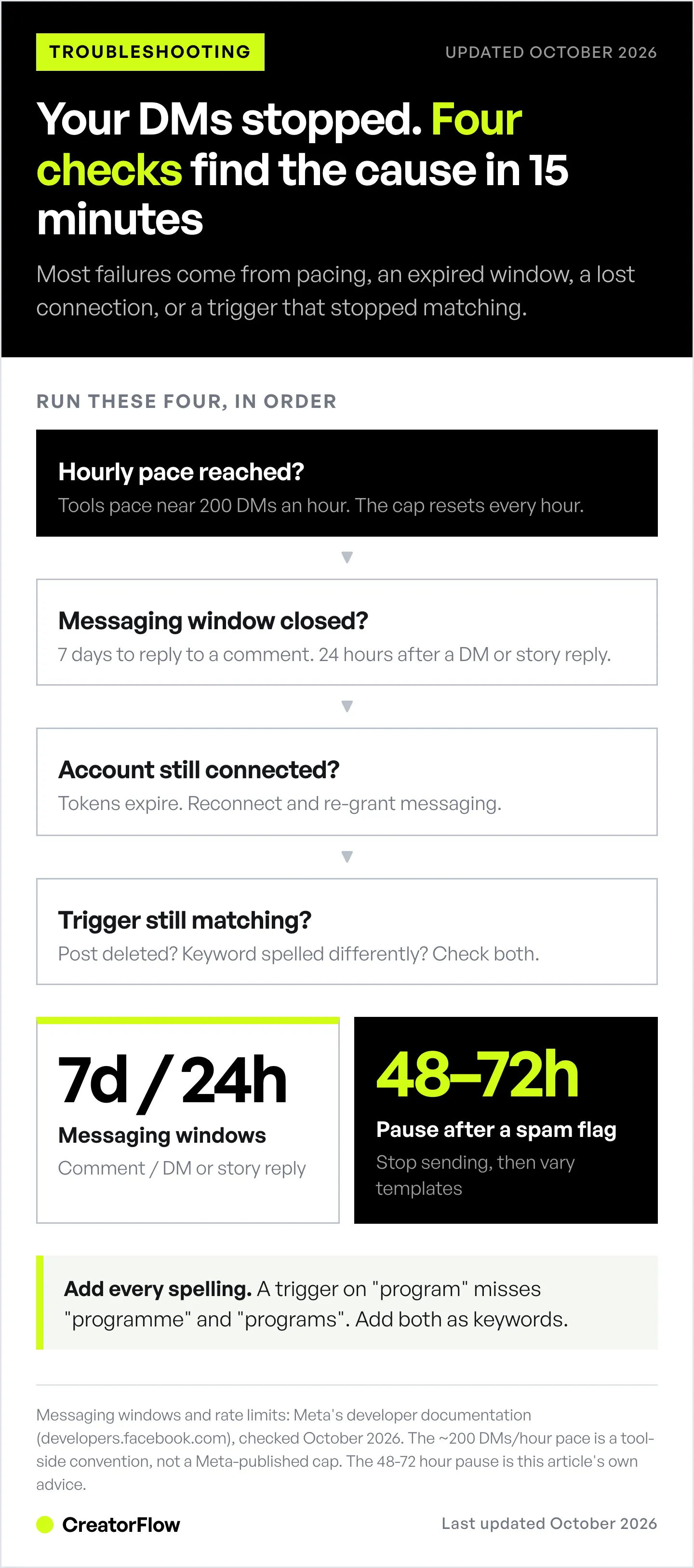
Immediate Checks (2 minutes):
- Is your Instagram account still connected? (Check dashboard)
- Did Instagram send you any warnings or notifications?
- Is Instagram itself experiencing issues? (Check DownDetector)
- Did you hit your tool’s 200 DMs/hour pacing cap? (Check activity log)
Account Status Checks (5 minutes):
- Is your account still a Business/Creator account? (Check Instagram settings)
- Do you have all required permissions? (Check Facebook Business Suite)
- Have you changed passwords recently? (Requires reconnection)
- Is your account under any Instagram restrictions? (Check notifications)
Automation Configuration Checks (5 minutes):
- Does the trigger post still exist? (Check connected posts)
- Are your keywords accurate and varied? (Check trigger settings)
- Is the messaging window still open? (7 days for a comment, 24 hours for a DM or story reply)
- Are your message templates flagged as spam? (Review content)
Technical Checks (5 minutes):
- Check your automation tool’s status page for known issues
- Review activity logs for specific error messages
- Test automation with a dummy account (comment yourself)
- Verify API connection in tool settings
- Check if recent tool updates introduced bugs
If still broken: Contact your automation tool’s support with:
- Exact time automation stopped working
- Specific error messages from activity logs
- Screenshots of your settings
- Whether this affects all automations or just one
Most issues resolve within these checklists. If not, it’s likely a Meta Instagram Graph API issue or tool-specific bug requiring support intervention.
Meta’s Instagram Graph API Limits You Need to Know (2026)
Understanding Instagram’s technical constraints prevents most failures:
Message Limits (Meta):
- 100 calls/second for text and links, 10/second for audio and video
- 750 private replies per hour to comments on posts and Reels
- One private reply per comment, within 7 days of the comment; follow-ups only after the person replies
- 24-hour messaging window after the person’s last message for DMs and story replies; up to 7 days for chats started from a Click-to-Direct ad (since 28 September 2026)
- No bulk broadcasting allowed (each message needs a trigger)
- Individual DMs only (no group message automation)
Tool pacing (not Meta):
- ~200 DMs per hour: a tool-side pacing convention, not a Meta-published cap
Content Restrictions:
- Maximum 1,000 characters per DM
- Links allowed but affect deliverability slightly
- Phone-number and email quick replies turned off since 5 October 2026 (people type their email instead)
Account Requirements:
- Must be Business or Creator account
- A linked Facebook Page is needed only for tools on the Facebook Login API; the Instagram Login API does not need one
- Must have granted all API permissions
- Cannot be under Instagram restrictions or warnings
Behavioral Limits (common tool guidance, not Meta rules):
- Identical messages to large batches of people risk spam flags
- Rapid-fire messaging triggers throttling
- Too many failed delivery attempts pause sending
- Excessive link-only messages reduce deliverability
Recovery:
- Tool pacing caps reset on a rolling hour
- Spam restrictions last as long as Instagram sets; check Account Status in the app
Source: Meta’s rate-limiting documentation and Instagram Platform messaging docs (developers.facebook.com, checked October 2026).
The platform limits are enforced automatically by Meta; the pacing conventions are enforced by your tool. Either way, cross one and your automation stops.
How to Prevent Future Automation Failures
Setup Best Practices:
- Use tools with built-in rate limit protection (smart pacing)
- Grant all Instagram permissions during initial connection
- Keep Instagram and Facebook passwords secure and stable
- Enable two-factor authentication but maintain access tokens
- Choose Business account (not Personal) from the start
Ongoing Maintenance:
- Check automation dashboard weekly for warnings
- Review activity logs for failed messages monthly
- Update keyword triggers based on actual user comments
- Vary message templates to avoid spam detection
- Monitor Instagram for policy announcements
Message Quality Standards:
- Personalize messages (use names, reference their comment)
- Keep DMs under 300 characters for higher open rates
- Avoid spam trigger words (FREE, CLICK HERE, LIMITED TIME)
- One link per message maximum
- Test messages yourself before going live
Account Health:
- Maintain Instagram Community Guidelines compliance
- Don’t buy followers or engagement
- Avoid third-party “growth hacking” services
- Respond to some DMs manually (shows genuine engagement)
- Keep follower/following ratio balanced
Technical Hygiene:
- Reconnect automation tool monthly (prevents token expiration)
- Archive old posts instead of deleting them
- Document your automation settings (for quick troubleshooting)
- Use backup manual response system during high-traffic periods
- Test automation after any Instagram account changes
Monitoring Checklist (Weekly 5-Minute Audit):
- Automation dashboard shows no warnings
- Message delivery rate above 85%
- No spam flags or Instagram warnings
- All connected posts still exist
- Account still connected to automation tool
- Recent messages are being delivered
- No unusual activity log errors
Following these practices prevents most failures. The rest are Instagram’s own API issues, outside your control.
Instagram Automation Tools Comparison (Reliability Focus)
Not all automation tools handle failures equally. Here’s what separates reliable platforms from problematic ones:
Must-Have Reliability Features:
1. Smart Rate Limiting
- Automatically paces messages under 200/hour
- Distributes sends evenly across the hour
- Pauses during rate limit errors
- Resumes automatically when limit resets
2. Real-Time Error Reporting
- Activity logs showing exactly what failed
- Push notifications for connection issues
- Clear error messages (not just “failed”)
- Troubleshooting suggestions in dashboard
3. Auto-Reconnection Systems
- Detects disconnected accounts
- Prompts immediate reconnection
- Saves queued messages during outages
- Resends failed messages automatically
4. Messaging Window Management
- Warns when a messaging window is about to close
- Automatically skips expired triggers
- Tracks user engagement timestamps
- Suggests optimal response times
5. Spam Prevention Built-In
- Message variation suggestions
- Personalization token support (names, comments)
- Content warning for spam trigger words
- Automatic message pacing to avoid flags
Comparing Popular Tools (checked October 2026):
| Tool | Paid price (billed monthly) | Free plan | Best For |
|---|---|---|---|
| CreatorFlow | $15/mo flat (Pro) | 500 DMs/month | Solo creators, Instagram-only |
| LinkDM | $19/mo (Pro, 3 accounts) | 1,000 DMs/month | Instagram-first creators |
| ManyChat | $17-199/mo (by active contacts) | 25 active contacts | Multi-platform, agencies |
| InstantDM | $12/mo Legend Pro ($9.99/mo billed annually) | 500 automations/month | Budget-conscious creators |
CreatorFlow ($15/month Pro, or $12/month billed annually)
- Paces sends at about 200 DMs/hour
- Real-time phone preview (see DMs before sending)
- Template-based setup (under 2 minutes)
- Instagram-only focus (optimized for the platform)
LinkDM ($19/month Pro, per linkdm.com/pricing, October 2026)
- Free plan with 1,000 DMs/month
- Pro covers 3 accounts and 25,000 DMs/month
- Instagram-first, used by 60,000+ creators, brands and agencies
ManyChat ($17-199/month billed monthly, or $14-139/month billed annually, per manychat.com/pricing, October 2026)
- Multi-platform (Instagram, Facebook Messenger, WhatsApp, TikTok, Telegram, SMS, email)
- Advanced automation features
- Flow builder built for multi-step, multi-channel journeys
- Per-contact pricing that scales with your contact list
InstantDM ($12/month Legend Pro, or $9.99/month billed annually, per instantdm.com/pricing, October 2026)
- Focused on core comment-to-DM triggers
- Legend Pro sends up to 800 DMs/hour
- Lowest monthly price of the four
Key Reliability Indicator: Look for tools that publicly acknowledge Meta’s Instagram Graph API changes and show how they’ve adapted. Tools that ignore Meta’s policy updates will break repeatedly.
Migration tip: If your current tool fails frequently, switching platforms takes 30-60 minutes. Export your contacts first, then set up automations in the new tool using existing templates.
When to Switch Automation Tools (Red Flags)
Sometimes your automation isn’t broken-your tool is unreliable. Consider switching if:
Red Flag #1: Frequent Unexplained Failures
- Automations stop weekly without clear cause
- Support can’t explain why failures happen
- “It should work” is their only answer
- Other users report identical issues
Red Flag #2: Slow or Unhelpful Support
- Response times exceed 48 hours
- Support blames Instagram for tool-specific bugs
- No status page for known issues
- Generic responses that don’t address your problem
Red Flag #3: Outdated API Integration
- Tool’s pacing settings are misconfigured or outdated
- Still references deprecated API features
- Error messages mention outdated Instagram endpoints
- Tool’s last update was 6+ months ago
Red Flag #4: Hidden Limitations
- “Unlimited” plans have undisclosed caps
- Features advertised but don’t actually work
- Pricing increases without feature improvements
- Essential features locked behind expensive tiers
Red Flag #5: Poor Transparency
- No public roadmap or changelog
- Policy changes announced after implementation
- No communication during outages
- Defensive or dismissive responses to criticism
When to stay vs switch:
Stay if:
- Failures are rare (less than once per month)
- Support responds within 24 hours with solutions
- Tool acknowledges bugs and provides timelines
- Recent updates show active development
- Core features work consistently
Switch if:
- Multiple failures per month
- Support is unresponsive or unhelpful
- Tool feels abandoned (no updates in months)
- Better alternatives exist at similar prices
- Your business is losing sales due to tool failures
Migration process (minimal downtime):
- Sign up for new tool (don’t cancel old one yet)
- Export contacts from old tool
- Set up automations in new tool (test thoroughly)
- Run both tools simultaneously for 48 hours
- Monitor new tool for failures
- Once confident, cancel old tool subscription
Cost of switching: 2-4 hours of setup time, $0 if switching during trial period, potential double subscription for one month during transition.
Catching the Next Break Before It Costs You
Every fix above is reactive. The cheaper habit is noticing early, because the expensive part of a broken automation is not the outage, it is the days between the outage and finding out.
Run a weekly 60-second check:
- Comment your own trigger keyword on your own recent post. The DM should arrive within seconds. This one test covers most failure modes at once.
- Compare trigger fires against comment counts on your last few posts. A consistent gap means something is dropping silently.
- Check your link clicks. A live automation with zero clicks across a week is usually a broken link rather than a quiet audience.
- Confirm your Instagram connection has not expired. Permission refreshes are the most common silent break and they never fix themselves.
Put it on the same day each week. Four checks, one minute, and you find problems in days rather than in a month of missed leads. The troubleshooting guides cover what to do when a check fails.
When the cause turns out to be the connection itself, our guide to fixing an Instagram account that will not connect covers the reconnect path.
FAQ
Why did my Instagram automation work yesterday but not today?
Meta’s messaging windows are the most common culprit. You can reply to a DM or story reply automatically within 24 hours of the person’s last message, and send one private reply to a comment within 7 days of the comment. Outside those windows, Instagram blocks the send. Your tool’s 200 DMs/hour pacing cap also resets every hour, so if you hit it yesterday, extra messages waited or failed until the cap reset.
How do I know if Instagram flagged my account for spam?
Instagram doesn’t send explicit “you’re flagged for spam” notifications. Instead, watch for these signs: sudden drop in DM delivery rates (below 70%), messages landing in recipients’ “Message Requests” instead of main inbox, “Failed to send” errors in your automation activity logs, or Instagram warning notifications about “unusual activity.” If you suspect spam flagging, pause all automation for 48-72 hours and vary your message templates before resuming.
Can I automate Instagram DMs without getting banned?
Yes, with low risk, if you use Instagram’s official API through tools that passed Meta’s App Review. Accounts that use “browser bots” or third-party scrapers face the highest ban risk, because those tools break Instagram’s Terms of Service. Automation tools like CreatorFlow, ManyChat, and LinkDM use Meta’s official API, which is permitted for Business and Creator accounts. No tool can promise zero risk. Stay within your tool’s pacing (about 200 DMs/hour), respect Meta’s messaging windows, and avoid spammy content.
What’s the difference between Instagram DM automation and bots?
DM automation uses Instagram’s official Graph API to send triggered messages based on user actions (commenting, mentioning, messaging keywords). This is approved by Meta for business accounts. “Bots” typically refers to unauthorized third-party scrapers that simulate browser activity to control Instagram accounts-these violate Instagram’s Terms of Service and risk permanent bans. Only use tools that explicitly state they use Meta’s Instagram Graph API.
Why do some users get my automated DMs and others don’t?
Several factors affect DM deliverability: (1) Non-followers often receive DMs in “Message Requests”, where many go unread, (2) Meta’s messaging windows: if someone messaged over 24 hours ago, or commented over 7 days ago, automation can’t reach them, (3) Users who blocked you or turned off DMs from businesses won’t receive messages, (4) Instagram’s spam filters might flag your messages if they’re too promotional or identical across many recipients. Ask people to follow before you send the link, and personalize messages to improve deliverability.
How long does it take for Instagram automation to start working after setup?
Most automation tools activate within 1-5 minutes after you click “Go Live.” However, Instagram’s webhook system (which notifies your automation tool about comments/messages) can have 1-5 second delays. During high-traffic periods or Meta’s Instagram Graph API slowdowns, delays can extend to 30-60 seconds. If your automation isn’t working after 5 minutes, check your account connection status and trigger configuration for errors.
Can Instagram automation work for personal accounts?
No. Meta’s Instagram Graph API only works with Business and Creator accounts. Personal accounts cannot connect to automation tools because they don’t have access to Meta’s Business API. To use automation, you must switch to a Business or Creator account in Instagram settings. This switch is free and reversible, and you’ll gain access to Instagram Insights and other professional features alongside automation capability.
Take Control of Your Instagram Automation
Instagram automation failures are frustrating, but they’re almost always fixable. Most issues come down to Meta’s Instagram Graph API limits, permission problems, or basic configuration errors-not mysterious technical problems.
The key? Use reliable tools that adapt to Instagram’s changing rules. Automation platforms that don’t pace sends or track Meta’s messaging windows will keep breaking. Choose tools designed specifically for Instagram’s current API requirements.
Ready for automation that works? CreatorFlow, a Meta Tech Provider (since December 2025), connects with your Instagram login and answers comment keywords, Story replies and keyword DMs with the message you wrote. It paces sends at about 200 DMs/hour, and setup from a template takes under 2 minutes. Start on the Free plan (500 DMs/month) or a 14-day Pro trial.
Start your free trial or explore automation templates built for Instagram’s 2026 API.
Disclaimer: Figures in this article come from the sources cited in it. Individual results vary based on audience size, content quality, engagement rates, and niche. CreatorFlow uses Meta's official Instagram API. Instagram/Meta may change features, rate limits, or terms at any time. Instagram is a trademark of Meta Platforms, Inc. CreatorFlow is not affiliated with, endorsed by, or sponsored by Meta Platforms, Inc. ManyChat, LinkDM, and InstantDM are trademarks of their respective owners. Users are responsible for complying with Instagram's Terms of Service and Community Guidelines.
Related guides:


