
Key Takeaways
- Operational efficiency multiplier: 1 trained team member can manage 20-25 client Instagram automations with proper systems
- Critical systems: Naming conventions ([ClientName][AutomationType][Date]), template library organization, weekly QA checklist
- Tools stack: CreatorFlow for automation + Notion for documentation + Asana/Monday.com for project management + client reporting dashboards
- Hiring trigger: When QA takes more than 8 hours/week or client onboarding exceeds 3 days
Agencies managing Instagram DM automation for 10 or more clients need standardized operational systems to avoid cross-client errors and scale efficiently. This includes workspace separation (one per client), naming conventions, template libraries, weekly QA checklists, and project management tools. With proper systems, one trained team member can manage 20-25 client automations while maintaining quality and response accuracy.

How an Agency Manages Instagram Automation for 10+ Clients
One workspace per client, one naming format, one shared template library, one weekly QA block. That separation is what stops Client A’s link landing in Client B’s DM. With those systems in place, one trained operations manager handles 20-25 client automations, spending about 22 hours a week across QA, new setups, client calls, and reporting. Add a second manager at roughly 45 clients.
The Agency Scaling Challenge: From 5 to 50 Clients
You’ve landed 10 Instagram automation clients. Revenue looks great. Then reality hits.
Client A’s affiliate link goes to Client B’s product. A story reply automation never activated for Client C. Client D’s approval got lost in Slack. Your team is drowning in spreadsheets.
This isn’t a tools problem. It’s an operations problem.
According to research from social media management platforms in 2026, agencies managing multiple accounts manually consume 6-10 hours per week per platform without proper workflows (Hostinger, February 2026). With Instagram DM automation, that overhead multiplies, unless you implement systems from day one.
If you’re still pitching automation services, check our Instagram automation proposal template for agencies first. Here’s the framework that lets one trained operations manager handle 20-25 client automations without chaos.
Core Operational Principle: Separation + Standardization
Every agency automation disaster starts the same way: mixing client contexts.
The rule: Every client exists in a completely isolated operational container.
Client Separation Layers
Layer 1: Platform Workspaces
- 1 CreatorFlow workspace = 1 client Instagram account (never mix)
- Workspace naming: [ClientName] - [Industry] (e.g., “Acme Fitness - Health & Wellness”)
- Each workspace gets a unique login invitation (never share credentials)
Layer 2: Template Library Folders
- Organize by industry first, then by automation type
- Path structure: Templates / [Industry] / [AutomationType]
- Example: Templates / E-commerce / Comment-to-DM-Product-Link
Layer 3: Documentation Hierarchy
- One Notion page per client (from template)
- Standard sections: Account Access, Brand Voice, Automation Goals, QA Checklist, Performance Log
- Never mix client notes in shared documents
Why this matters: In 2026, 78% of marketers automate over 25% of their tasks with AI (Eclincher, February 2026). Without separation, automation errors compound across clients.
Naming Conventions That Scale
Bad naming: “Story Reply 1”, “New Automation”, “Test DM”
Good naming: [ClientName][AutomationType][Date]
Standard Format Examples
Comment-to-DM Automations:
- AcmeFitness-CommentDM-ProductLink-Jan2026
- BeautyBrand-CommentDM-DiscountCode-Jan2026
- CoachJane-CommentDM-BookingLink-Jan2026
Story Reply Automations:
- AcmeFitness-StoryReply-EmailCapture-Jan2026
- BeautyBrand-StoryReply-FAQResponse-Jan2026
Keyword Trigger Automations:
- AcmeFitness-Keyword-PricingInfo-Jan2026
- CoachJane-Keyword-WorkWithMe-Jan2026
Why This Format Works
- Alphabetical client grouping: All Acme Fitness automations cluster together
- Clear automation type: Instantly know what it does
- Date tracking: Know when it was created (helps with QA and audits)
- Searchable: Can filter by client, type, or date
Time savings: 3-5 minutes per automation setup × 200 automations/year = 10-16 hours saved annually just from consistent naming.
Template Library: Industry-Specific Message Banks
Don’t write every automation from scratch. Build a template library organized by industry and use case.
Template Structure by Industry
E-commerce Templates:
- Product link delivery: “Hey [Name]! Here’s the link to [Product]: [URL]”
- Discount code delivery: “Thanks for asking! Use code [CODE] for 20% off: [URL]”
- Shipping/returns FAQ: “Great question! We ship worldwide in 3-5 days. Here’s our full shipping policy: [URL]”
Coaching/Consulting Templates:
- Booking link: “I’d love to chat! Book a free 15-min call here: [CalendlyURL]”
- Pricing inquiry: “My 1:1 coaching is $X/month. Here’s what’s included: [URL to pricing page]”
- Lead qualifier: “Quick question before we hop on a call - what’s your biggest challenge with [topic] right now?”
Affiliate Marketing Templates:
- Amazon affiliate link: “Here’s the [product] I mentioned: [AffiliateURL] (Amazon affiliate link)”
- Product review request: “I reviewed it here: [BlogURL]. The link to buy is in the description!”
Service-Based Business Templates:
- Service inquiry: “We’d love to help with [service]. Here’s our portfolio: [URL]”
- Quote request: “I’ll send you a custom quote! Can you DM me your email?”
Template Variables
Use placeholders that you replace per client:
- [Name] = First name (if available)
- [Product] = Client’s product name
- [URL] = Client’s specific link
- [CODE] = Discount code
- [CalendlyURL] = Booking calendar link
Storage: Keep templates in a shared Notion database with columns for Industry, Use Case, Template Text, Variables, and Last Updated.
Update cadence: Review templates quarterly. Instagram’s messaging best practices evolve, stay current.
Weekly QA Checklist: Catch Errors Before Clients Do
The best agencies QA every automation before activation AND weekly post-launch.
Pre-Activation QA (100% of automations)
Checklist before turning on ANY automation:
- Test message sent: Send yourself a test DM (use CreatorFlow’s preview feature)
- Link verification: Click every link in the message (broken links = lost revenue)
- Spelling/grammar: Run through Grammarly or similar
- Brand voice match: Read message in client’s voice (formal vs casual)
- Correct account: Triple-check you’re in the right client workspace
- Pacing check: CreatorFlow paces sends at around 200 DMs/hour as a behavioral cap to stay below Meta’s per-second API limits, verify the client’s expected volume fits within that
- 24-hour window: Automation only triggers for users who engaged in last 24 hours (Meta’s rule for general DMs; the Human Agent tag extends this to 7 days)
- Screenshot for records: Save a screenshot of automation settings + test message
Time investment: 5-7 minutes per automation × 200 setups/year = 16-23 hours (worth every minute to avoid client churn)
Weekly Active Automation Audit
Every Monday morning, audit all active automations:
Audit Checklist:
- Performance check: Any automations with <5% response rate? (Investigate message quality)
- Link health: Run all client URLs through a link checker (products get discontinued, pages move)
- Pacing violations: Check whether any clients regularly hit the tool’s hourly send cap (Phyllo, February 2026)
- Duplicate automations: Any client has 2+ automations for the same trigger? (Causes confusion)
- Outdated messaging: Any promotions expired? Seasonal messaging need updates?
Reporting: Log findings in each client’s Notion page under “Weekly QA Log” with date, issue, and resolution.
Frequency: 2-3 hours every Monday for 20-25 active clients
Client Communication Cadence: Set Expectations Early
Agencies fail when clients don’t know what to expect. Set a communication rhythm from day one.
Standard Cadence Framework
Week 1 (Onboarding):
- Kickoff call: Goals, brand voice, approval process (use our client onboarding playbook for the full checklist)
- Access setup: Client grants Instagram access via OAuth
- Template selection: Show client relevant industry templates
- First automation setup: Simple comment-to-DM (quick win)
- Test + approve: Client tests the automation before launch
Weeks 2-4 (Active Setup):
- Weekly check-in: 15-min Zoom to review performance
- Async updates: Slack/email with automation performance snapshots
- Approval workflow: New automations go through client approval (Notion task assignment)
Month 2+ (Ongoing Management):
- Bi-weekly async reports: Performance dashboard shared via Notion or Google Data Studio
- Monthly strategy call: Review analytics, propose new automations
- Quarterly template refresh: Update messaging based on performance data
Approval Workflow (Critical for Agencies)
3-Step Approval Process:
- Draft in Notion: Write automation copy in client’s Notion page
- Tag client for approval: @mention client in Notion (or send Slack message with link)
- Launch only after written approval: “Approved” comment required before activation
Why this matters: Most agency-client conflicts trace back to miscommunication. Written approvals create accountability.
Tool: Notion’s task assignment feature lets clients approve without logging into your automation platform, this reduces friction and speeds approvals.
Team Training: From Chaos to 3-Day Onboarding
A trained operations manager can handle 20-25 clients. An untrained one struggles with 5.
Day 1: Systems + Philosophy
Morning (2 hours):
- Agency operations philosophy: Separation + Standardization
- Walk through 3 live client examples
- Naming convention practice: Rename 10 test automations
Afternoon (2 hours):
- Template library tour: Show where everything lives
- Notion documentation structure: How to create new client pages
- QA checklist walkthrough: Why each step matters
Day 2: Hands-On Client Setup
Morning (2 hours):
- Shadow existing client onboarding (watch you do it)
- Take notes on approval workflow and communication
Afternoon (3 hours):
- Set up a test client automation (end-to-end)
- Run through pre-activation QA checklist
- Present to you for feedback
Day 3: Solo Flight with Safety Net
Full Day:
- Assign 2-3 real client automations to set up
- You review before activation (quality gate)
- Debrief at end of day: What went well, what was unclear
Outcome: By end of week 1, new team member can handle 3-5 clients independently.
Scaling: Each trained team member adds capacity for 20-25 clients.
Tools Stack: Automation + Documentation + Project Management
The right tools multiply efficiency. The wrong tools create new problems.
Core Stack Recommendation
Tier 1: Automation Platform
- CreatorFlow (Instagram DM automation)
- Why: Multi-workspace design built for agencies
- Pricing: $30/month (Growth plan) = 5 workspaces, 10K DMs/workspace
- Capacity: 5 clients per Growth plan = $6/client/month
- ROI: Charge clients $99-299/month, profit $93-293/client
Tier 2: Documentation Hub
- Notion (client documentation + template library)
- Why: Databases, templates, task assignments, client portals
- Pricing: Free for small teams, $8/user/month for unlimited
- Use cases: Client pages, template library, QA logs, approval workflows
Tier 3: Project Management
- Asana or Monday.com (task tracking + deadlines)
- Why: Visualize all client tasks, assign team members, set deadlines
- Pricing: Asana free for <15 team members, Monday.com $9/user/month
- Use cases: Onboarding checklists, weekly QA tasks, client launch timelines
Tier 4: Reporting (Optional but Powerful)
- Google Data Studio (free) or Databox ($72/month)
- Why: Auto-generate client performance dashboards
- Integration: Pull data from CreatorFlow API (if available) or manual CSV uploads
- Client-facing: Send monthly dashboard link instead of PDF reports
Integration Workflows
Asana → Notion:
- New client signed? Asana task triggers Notion template creation (via Zapier)
CreatorFlow → Google Sheets → Data Studio:
- Weekly export of automation performance
- Sheets formula calculates CTR, response rate, conversion rate
- Data Studio visualizes trends for client reports
Slack → Everything:
- Asana task due reminders
- Notion page updates
- Weekly QA summary posted to #operations channel
When to Hire: Capacity Triggers You Can’t Ignore
You’re one person managing 20 clients. When do you hire #2?
Hiring Trigger Signals
Signal 1: QA Overload
- If weekly QA audit takes >8 hours, you’re at capacity
- Math: 20 clients × 25 minutes/client = 8.3 hours
- Hire when: You hit 20-22 active clients
Signal 2: Onboarding Backlog
- If new client onboarding takes >3 business days, you need help
- Standard: 1-2 days from contract to first automation live
- Hire when: 3+ clients waiting in onboarding queue
Signal 3: Reactive Mode
- If you’re constantly firefighting (client urgently needs X updated)
- Standard: 80% proactive work, 20% reactive
- Hire when: Ratio flips to 50/50 or worse
Signal 4: Revenue Math
- If agency profit per client is $150-250/month
- Team member cost: $3K-5K/month (depending on location/experience)
- Hire when: 20 clients × $200 profit = $4K/month (covers 1 ops manager)
Hiring Strategy: Ops Manager vs Specialist
Ops Manager (First Hire):
- Handles 20-25 clients end-to-end
- Does onboarding, QA, client communication, reporting
- Salary: $40K-60K/year (varies by region)
Specialist (Second Hire):
- Focuses on one area (e.g., QA only, or onboarding only)
- Allows Ops Manager to focus on strategy and client relationships
- Salary: $30K-45K/year
Scaling Path:
- 1-20 clients: Solo (you)
- 21-45 clients: You + 1 Ops Manager
- 46-70 clients: You + 2 Ops Managers
- 71-100 clients: You + 3 Ops Managers + 1 QA Specialist
Rate Limit Management: The 200 DMs/Hour Pacing Cap
Meta’s official Instagram API publishes per-second rate limits on the Instagram Login path (100 calls/sec for text and links, 10/sec for audio and video, 750/hour for post-comment private replies). Tools like CreatorFlow pace sends at around 200 DMs per hour per Instagram account as a conservative behavioral cap, well below Meta’s documented limits and below spam-trigger thresholds. Agencies must track this per client.
Per-Client Pacing Tracking
Good news for agencies: Each Instagram account has an isolated send queue.
- 10 client accounts = 2,000 DMs/hour combined practical capacity (200 × 10 under the tool-paced cap)
- CreatorFlow’s Growth plan: 10,000 DMs/workspace/month = 333 DMs/day average
Monthly capacity check:
- Client posts 5-10 times/month
- Average 50-100 comments per post
- At 80% DM response rate: 40-80 DMs per post
- Total: 200-800 DMs/month per client (well under the 10K monthly plan limit)
When Clients Hit the Pacing Cap
High-volume client triggers:
- Viral post (10K+ comments in 24 hours)
- Influencer collaboration (3K+ comments)
- Product launch (5K+ comments)
How to handle this:
- Prioritize high-intent comments: Set automation to only respond to comments with specific keywords
- Stagger responses: Spread DM delivery over 24-48 hours (instead of all at once)
- Upgrade workspace: Move high-volume clients to dedicated workspace with higher monthly DM limits
Communication: Warn clients upfront: “If your post gets 10K+ comments, automation paces sends at around 200/hour per account. We’ll prioritize high-intent commenters first.”
Agency-Specific Feature Must-Haves
Not all Instagram automation tools are built for agencies. Here’s what you need:
Non-Negotiable Features
1. Multi-Workspace Support
- Separate workspaces per client (not just separate automations in one workspace)
- Workspace isolation prevents cross-contamination
- CreatorFlow Growth plan: 5 workspaces. Beyond that, CreatorFlow runs an application-based agency program at creatorflow.so/agency-program (no pricing is published; you apply by email)
2. Team Permissions (If Managing 5+ Clients)
- Role-based access: Admin vs Editor vs Viewer
- Client-specific permissions: VA can only access Client A, not Client B
- CreatorFlow’s Growth plan includes up to 5 team members per workspace
3. White-Label Reporting (Optional but Powerful)
- Export performance reports with your agency branding
- Most platforms don’t offer this, Data Studio is workaround
4. API Access (Advanced Agencies)
- Pull automation performance data programmatically
- Build custom dashboards or integrate with CRM
- CreatorFlow: Check if API available (contact sales for agency needs)
Real-World Capacity Benchmarks
Based on agency data from 2026 social media management platforms:
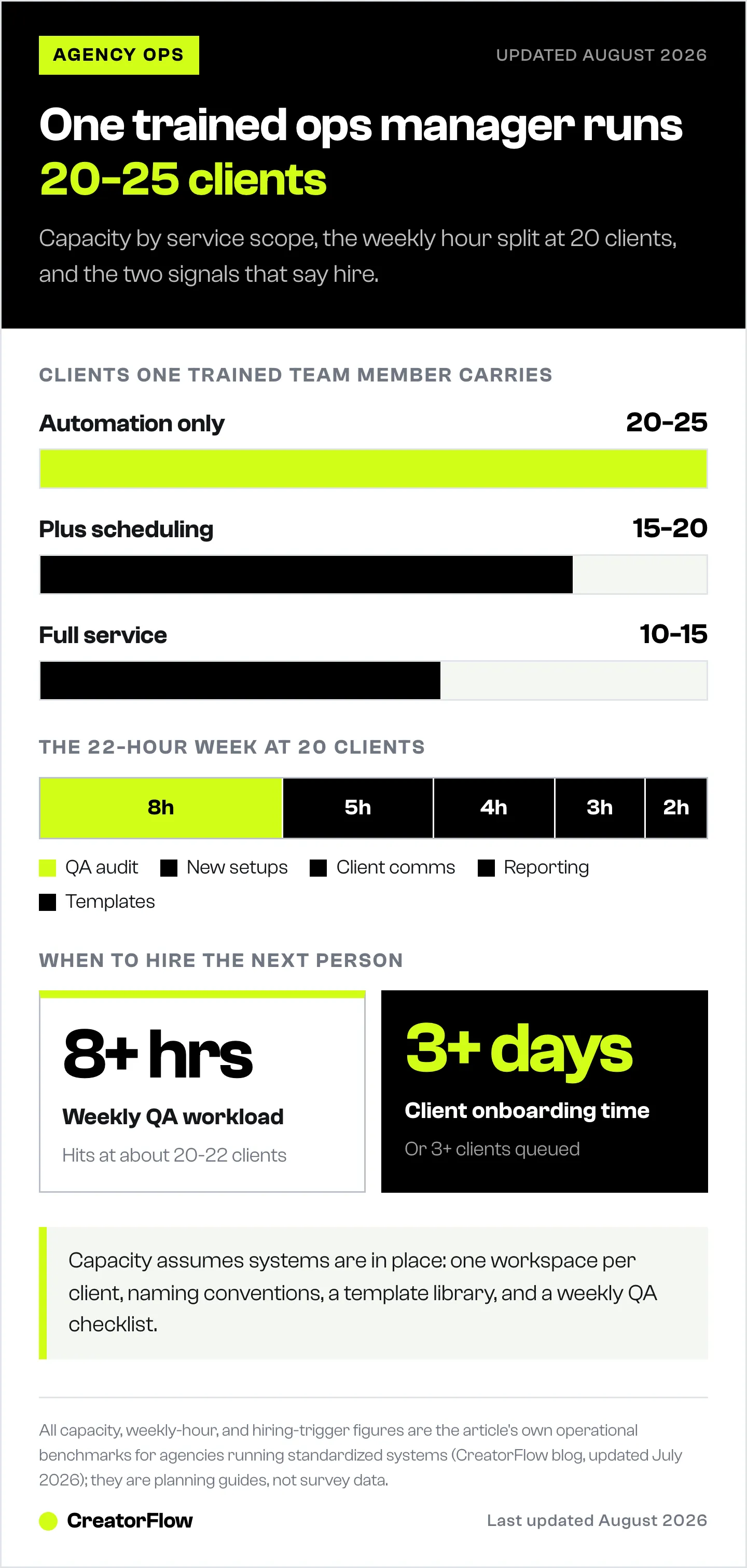
1 Trained Operations Manager Can Handle:
- 20-25 clients (Instagram DM automation only)
- 15-20 clients (if also managing content scheduling)
- 10-15 clients (if full-service: content + automation + community management)
Weekly Time Breakdown (20 Clients):
- 8 hours: Weekly QA audit
- 5 hours: New automation setups (2-3 new automations/week)
- 4 hours: Client communication (async + calls)
- 3 hours: Performance reporting (monthly reports amortized weekly)
- 2 hours: Template updates and documentation
- Total: 22 hours (leaves 18 hours for firefighting, strategy, meetings)
Revenue Model:
- Charge clients: $99-299/month for Instagram DM automation management
- 20 clients at $150 average = $3,000/month revenue
- Operations Manager cost: $4,000/month (salary + benefits)
- Profit margin: $3,000 - $4,000 = Break-even at 27 clients
Agency pricing tip: Bundle Instagram DM automation with content management to increase ARPU (Average Revenue Per User) to $400-800/month. See our guide on how to sell Instagram DM automation as an agency service for detailed pricing strategies.
Common Operational Mistakes (and How to Avoid Them)
Mistake 1: No Documented Approval Process
Problem: You set up an automation. Client later claims they never approved it. Conflict.
The fix: Written approval required for every automation. Use Notion comments, email confirmations, or Asana task approvals. No exceptions.
Mistake 2: Shared Template Library (No Version Control)
Problem: You update a template for Client A. Client B’s automation (using same template) now says the wrong thing.
Prevention: Copy templates per client, don’t reference shared master. Or use Notion database views filtered by client.
Mistake 3: Manual Performance Tracking
Problem: Manually compiling performance reports takes 2-3 hours per client per month.
Here’s how: Set up automated data pulls. Export CreatorFlow analytics weekly to Google Sheets, visualize in Data Studio. Build once, reuse forever. Our agency reporting guide has templates you can clone.
Mistake 4: No Onboarding SOP
Problem: Every new client setup is slightly different. Team members forget steps. Quality suffers.
The fix: Create onboarding checklist template in Asana or Notion. Clone for each new client. Assign tasks, set deadlines, track completion.
Mistake 5: Reactive QA (Only Check When Clients Complain)
Problem: Client discovers broken link 2 weeks after automation launched. Lost revenue, damaged trust.
How to avoid this: Weekly proactive QA audit. Catch issues before clients do. Position as “we caught this for you” instead of “sorry we missed this.”
FAQ
How many client Instagram accounts can one person realistically manage?
20-25 clients for Instagram DM automation only, assuming proper systems (naming conventions, template library, weekly QA). If managing full social media (content + automation + community management), capacity drops to 10-15 clients per team member.
What’s the best tool for managing multiple client Instagram automations?
CreatorFlow’s multi-workspace design is built for agencies. Growth plan ($30/month) includes 5 workspaces (5 clients). ManyChat covers 6 channels (Instagram, Messenger, WhatsApp, SMS, TikTok, Email) and uses contact-tier pricing, Free (25 active contacts), Essential $17 (250), Pro $39 (2,500), Business $99 (7,500), Advanced $199 (25,000) billed monthly, or $14/$29/$69/$139 billed annually (manychat.com/pricing, July 2026), which fits multi-channel agencies but stacks up if you only need Instagram. Tools without workspace separation per client carry cross-contamination risk.
How do I prevent mixing up client automations?
Three-layer separation: (1) Platform workspaces (1 workspace per client), (2) Naming conventions ([ClientName][AutomationType][Date]), (3) Documentation hierarchy (1 Notion page per client). Never skip these systems, every agency disaster starts with mixing client contexts.
Should I charge clients per DM sent or flat monthly rate?
Flat monthly rate ($99-299/month) is more predictable for both you and client. Per-DM pricing creates billing complexity and clients hesitate to use automation fully. Position as “unlimited DMs up to your tool’s monthly plan limit.”
How long does client onboarding take with proper systems?
1-2 business days from contract signature to first automation live. Day 1: Kickoff call, access setup, template selection. Day 2: First automation setup, client approval, test, launch. Without systems: 5-7 days (too slow, clients lose confidence).
When should I hire my first operations team member?
When weekly QA takes over 8 hours (signal: 20-22 active clients) OR new client onboarding exceeds 3 business days OR you’re 50%+ reactive instead of proactive. Revenue check: $4K/month profit covers one $3K-5K/month operations manager.
What’s the biggest mistake agencies make with Instagram automation?
No pre-activation QA checklist. Broken links, wrong client workspace, spelling errors, all preventable with a 5-minute checklist. Best agencies QA before launch AND weekly post-launch. Reactive QA (only checking when clients complain) destroys trust and retention.
Do I need project management software for 10 clients?
Yes. Asana (free <15 users) or Monday.com ($9/user/month) prevent dropped tasks. Use for: onboarding checklists (clone per client), weekly QA task assignments, client launch timelines, approval workflows. Without PM tool, clients fall through cracks.
Conclusion: Operations > Tools
The agencies that scale to 50+ Instagram automation clients aren’t using secret tools. They’re using boring, repeatable systems:
- Naming conventions that prevent mix-ups
- Template libraries that eliminate redundant work
- Weekly QA checklists that catch errors before clients
- Documented approval workflows that prevent conflicts
- Capacity-based hiring triggers that maintain quality
One trained operations manager + proper systems = 20-25 clients managed flawlessly.
Two trained operations managers = 40-50 clients.
The math scales linearly once systems are in place.
Start here:
- Implement naming convention today ([ClientName][AutomationType][Date])
- Build template library this week (start with your top 3 industries)
- Create Notion template for client documentation
- Set recurring Monday 9am calendar block: Weekly QA Audit
Operationalize first. Scale second.
Ready to automate Instagram DMs for your agency clients? CreatorFlow’s multi-workspace design lets you manage 5 clients per Growth plan ($30/month). Setup takes under 5 minutes per client. Meta Tech Provider, minimal ban risk on the official API.
Get Started Free, 500 DMs/month free per workspace
Sources
- Hostinger: Best Social Media Automation Tools 2026
- Eclincher: Best Social Media Automation Tools for 2026
- Phyllo: Instagram API Rate Limit Guide
- Meta Developer Docs: Instagram Platform rate limits (developers.facebook.com, May 2026)
- Sked Social: Instagram Automation Tools 2026
- ManyChat pricing: manychat.com/pricing (May 2026)