

Instagram automation features are wrappers on eleven trigger events Meta publishes in its Instagram Platform webhooks: comments, live comments, story replies, story mentions, direct messages, button taps and message reactions among them. Nine features do the commercial work: comment-to-DM, keyword triggers, story reply automation, story mention replies, ice breakers, default replies, lead capture, link tracking and human handoff. Each carries a documented limit.
Every feature list you will read names the same nine things and tells you what they do. None of them tells you that a comment-to-DM can only fire once per comment, that it expires seven days after the comment was posted, or that a Live comment reply is dead the second the broadcast ends. Those rules decide whether a feature works for your use case, and they come from Meta, not from the tool you pick.
This guide maps each feature to the Meta event that triggers it and the published limit that binds it. It is for creators and store owners deciding which features they actually need before paying for any of them.
Key Takeaways
- Features are wrappers on eleven events: Meta’s Instagram webhooks publish messages, messaging_postbacks, comments, live_comments, message_reactions, messaging_referral, messaging_seen, mentions, story_insights, story_replies and story_mentions (developers.facebook.com, August 2026)
- Comment-to-DM has three hard caps: one private reply per comment, a 7-day window from when the comment was created, and 750 private replies per hour per account (developers.facebook.com, August 2026)
- Live comments are the strictest feature: private replies to Instagram Live comments can only be sent during the broadcast, and none can be sent once it ends
- The 24-hour window governs everything after the first message: businesses have up to 24 hours to respond to a user, and messages inside that window may carry promotional content
- The 7-day extension is for humans, not bots: Meta’s Human Agent tag lets a real agent respond up to 7 days out, which rules it out as an automated follow-up mechanism
- Story replies and story mentions are different features: one fires when someone answers your story, the other when someone tags you in theirs, and Meta publishes them as separate events
- Bottom line: pick features by the trigger your audience actually uses, then check the window that trigger opens before you build a flow on top of it
What Instagram Automation Features Actually Are
An Instagram automation feature is a product name for a rule that listens to one Meta webhook event and sends one message through one of two paths. The paths are a private reply, which answers a comment, and a standard message, which continues a conversation in the inbox. Everything sold as a feature sits on that foundation. Understanding the event underneath tells you what the feature can and cannot reach.
Meta publishes eleven event types for the Instagram API with Instagram Login. Each one corresponds to a thing a person did: sent you a message, tapped a button, commented on a post, commented during a Live, reacted to a message, arrived through a referral link, viewed a message, mentioned someone in a message, interacted with a story, replied to a story, or tagged you in a story (developers.facebook.com, August 2026).
If you are still deciding whether any of this is permitted in the first place, start with what Instagram automation is and which types Meta allows. This matters commercially because a feature can only be as good as the event beneath it. A tool cannot build a “message everyone who viewed your profile” feature, because Meta publishes no such event. When a feature sounds too good, check whether the trigger exists.
Automation of this kind is also the sanctioned kind. It responds only to people who contacted you or engaged with your content first, which is the line separating approved messaging tools from the follow and unfollow bots that put accounts at risk. Our guide to Instagram automation best practices covers where that line sits in practice.
The 9 Instagram Automation Features at a Glance
Nine features cover what creators and stores actually buy automation for. The third column is the part most feature lists leave out, and it is the part that determines fit.
| Feature | Meta event it listens to | The limit that binds it |
|---|---|---|
| Comment-to-DM | comments | One private reply per comment, 7 days from the comment |
| Live comment reply | live_comments | Only during the broadcast, none after it ends |
| Story reply automation | story_replies | Their reply opens a 24-hour messaging window |
| Story mention reply | story_mentions | Their mention opens a 24-hour messaging window |
| Keyword DM trigger | messages | 24 hours from their message |
| Button taps in a flow | messaging_postbacks | 24 hours from their tap |
| Ice breakers | messaging_postbacks | Shown only to people with no prior conversation |
| Default reply | messages | 24 hours, fires on messages no other rule claims |
| Human handoff | send path, not an event | Human Agent tag, 7 days, real people only |
Sources: Meta Instagram Platform webhooks reference, private replies documentation and Messenger Platform policy (developers.facebook.com, August 2026).
Comment-to-DM: One Reply, Seven Days
Comment-to-DM sends a private message to someone who comments on your post or Reel. Meta calls this a private reply. Three published rules bind it: you get exactly one private reply per comment, the window is seven days from when the comment was created, and your app can make 750 private reply calls per hour per Instagram professional account for comments on posts and reels (developers.facebook.com, August 2026).
The one-reply cap is the one that changes how you build. You cannot send a link, wait, then send a reminder to the same commenter using private replies. The second message needs the person to answer the first, which opens a normal 24-hour messaging window. Every multi-step comment funnel works this way underneath, whatever the interface calls it.
The seven-day window is more generous than most people assume. A comment left on an older Reel still qualifies for a week, which is why evergreen posts keep producing DMs long after the post date. Past seven days, the comment stops being reachable through this path.
Private replies also work on ads, so a comment on a promoted post is reachable on the same terms as an organic one. Setting the whole thing up takes a few minutes: our walkthrough on how to automate Instagram comments covers the trigger and message configuration step by step.
Live Comment Replies Expire With the Broadcast
Private replies to Instagram Live comments can only be sent while the broadcast is running. Once the Live ends, Meta sends no further private replies to those comments (developers.facebook.com, August 2026). The rate limit is also different: 100 calls per second per Instagram professional account for Live comments, against 750 per hour for comments on posts and reels.
Treat this as a feature with a fuse. It suits a product drop or a launch where the offer and the Live are the same event. It does not suit anything you expect to keep converting afterwards, because the reachable audience disappears with the stream.
Story Replies and Story Mentions Are Two Different Features
Meta publishes story_replies and story_mentions as separate webhook events, and they capture opposite behaviours. A story reply happens when someone answers a story you posted. A story mention happens when someone tags your account in a story they posted (developers.facebook.com, August 2026).
The commercial use differs just as much. Story replies catch intent you created: you asked a question in a story, they answered, and the answer is a warm inbound message. Story mentions catch advocacy: a customer showed your product to their audience, and a thank-you with a discount arrives while they still care.
Both are inbound messages from the person, so both open the standard 24-hour messaging window. That makes them easier to build on than comment-to-DM, which spends its single private reply immediately. Our guide to Instagram story reply automation covers the trigger setup and message patterns for the first of the two.
Keyword Triggers and What Counts as a Match
A keyword trigger starts an automation when a message or comment contains a word you chose. It is not a separate Meta event. It is a filter your tool applies to the comments and messages events after they arrive, which is why keyword behaviour varies between tools while the underlying window does not.
That distinction has a practical consequence. Matching rules, variations, casing and near-misses are decided by the tool, so they are worth testing before you print a keyword on a Reel. The window your reply lives inside is decided by Meta and is identical everywhere.
Instagram’s own free version of this is deliberately narrow: Meta Business Suite caps custom keywords at five exact-match keywords or phrases per automation, runs on desktop only, and documents a 15-minute delay before sending unless you reply yourself first (facebook.com/business/help, July 2026). We covered the full free stack in Instagram built-in automation.
The 24-Hour Window Decides What You Can Send Next
Standard messaging gives businesses up to 24 hours to respond to a user, and messages sent inside that window may contain promotional content (developers.facebook.com, August 2026). This single rule shapes every flow longer than one message.
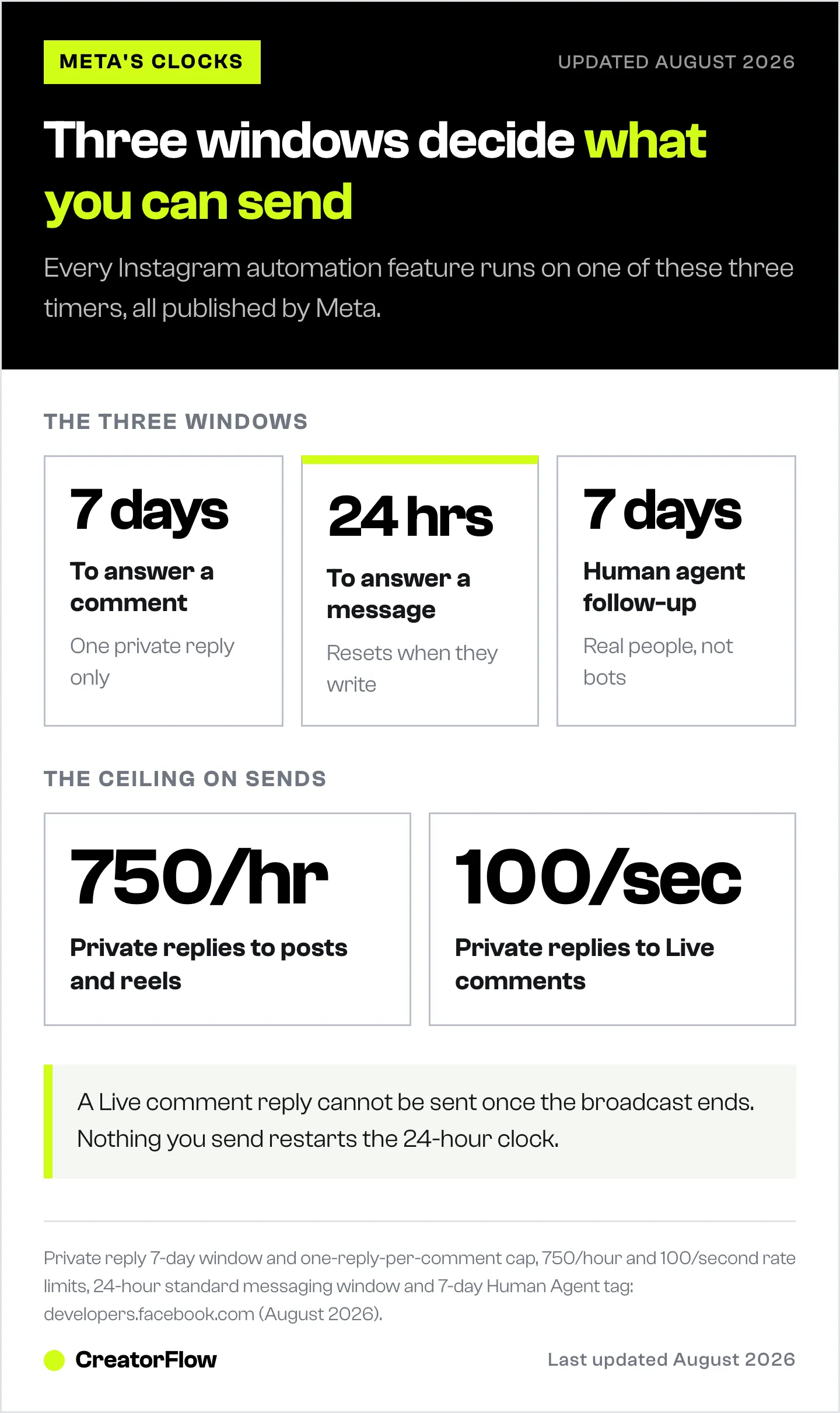
Read it as a clock the person starts and you spend. They message, reply to a story, tag you, or tap a button, and the clock resets to 24 hours. Nothing you send restarts it. A flow that waits a day before its follow-up is a flow that will find the window closed.
Outside the window, Meta’s Human Agent tag allows a response up to seven days after the user’s last message. Meta’s policy is explicit that this tag is for a human agent manually responding, which is what makes it unsuitable as an automated follow-up mechanism. Anything promising automated messages on day three is either using the tag against policy or describing something else.
The design conclusion is simple. Front-load value into the first message, then use the reply it earns to open a real conversation. That is why single-message link delivery outperforms elaborate drip sequences on this platform, and why Instagram DM automation is built around instant response rather than scheduled nurture.
Lead Capture, Link Tracking and Gating
Three features sit on top of the messaging layer rather than beside it. They do not need their own trigger, because they run inside a conversation an event already opened.
Lead capture collects an email or phone number inside the DM thread and stores it against the contact. The value is that the address arrives attached to a known action: the post they commented on, the keyword they used. That context is what makes the list worth mailing later.
Link tracking counts clicks on the links you send and attributes them back to the automation and post that sent them. Without it, you know how many DMs went out and nothing about what happened next.
Gating places a condition before the link. A follow gate asks for a follow first; an email gate asks for an address first. Both convert a link request into something you keep after the click.
CreatorFlow covers this layer directly: comment-to-DM, story reply and keyword triggers on the trigger side, then email capture, link tracking, geographic analytics on clicks, follow gate and email gate on top, at $15 per month flat on Pro regardless of audience size. The full breakdown is in what CreatorFlow does.
What the Bigger Platforms Add
ManyChat is the most widely used tool in this category and is an official Meta Business Partner. Its Instagram feature set covers comment-to-DM, keyword triggers, story mention replies, AI replies with up to 250,000 characters of brand context, lead capture, conversation starters, live chat and a default reply, all built in a visual flow builder (manychat.com, August 2026). It also automates Messenger, WhatsApp, TikTok and Telegram from the same account, which is the main reason to choose it.
Its pricing is per active contact across five tiers. Billed monthly it runs $17 for Essential at 250 contacts, $39 for Pro at 2,500, $99 for Business at 7,500 and $199 for Advanced at 25,000, with a free plan capped at 25 active contacts. Billed annually those become $14, $29, $69 and $139 per month. Essential covers Instagram, TikTok, Messenger and Telegram; WhatsApp, SMS and email start at Pro (manychat.com/pricing, August 2026).
The scope difference is the deciding factor rather than the feature names. Multi-channel coverage and contact-scaled pricing suit teams running several platforms. Instagram-only work at a flat rate suits creators whose audience is on one platform. Our side-by-side on the best Instagram DM automation tools compares the field on both axes.
Which Features You Actually Need
Match the feature to the trigger your audience already uses, not to the longest list.
- You post Reels and get “link?” comments. Comment-to-DM plus link tracking. This is the highest-volume path on Instagram and the one worth setting up first.
- You run polls and questions in stories. Story reply automation. The intent is already warm because you asked for it.
- Customers tag you in their stories. Story mention replies. A thank-you and a code while the post is still live.
- People DM you the same question daily. Keyword triggers plus a default reply for everything the keywords miss.
- You are building an email list. Lead capture with an email gate, so the link costs an address.
- You sell something that needs a conversation. Human handoff, so a real person can take over inside the window.
Most accounts need three of these, not nine. The features you skip cost nothing; the ones you configure badly cost you the window.
What Instagram Gives You Free
Instagram professional accounts include six native automation tools plus AI Auto Replies on a staged rollout: FAQs and Saved Replies in the app, then Instant Reply, Away Message, Custom Keywords and Comment to Message in Meta Business Suite on desktop (help.instagram.com and facebook.com/business/help, July 2026).
The free stack answers people. Its constraints are the five-keyword cap, the desktop-only setup and the documented 15-minute delay on keyword automations. What it does not carry is the commercial layer above: click attribution, email capture, gating and per-post reporting. Start free if you only need coverage, and add a tool when the question becomes which post produced the sale.
FAQ
What are the main Instagram automation features?
Nine features cover the practical work: comment-to-DM, live comment replies, story reply automation, story mention replies, keyword DM triggers, button taps inside a flow, ice breakers, default replies and human handoff. Lead capture, link tracking and gating sit on top of these as a commercial layer rather than as separate triggers.
How long do I have to reply to an Instagram comment automatically?
Seven days from when the comment was created, and you get exactly one private reply per comment (developers.facebook.com, August 2026). Comments on Instagram Live are the exception: private replies to those can only be sent while the broadcast is running.
What is the 24-hour rule on Instagram DMs?
Businesses have up to 24 hours to respond to a user, and messages inside that window may include promotional content (developers.facebook.com, August 2026). The clock starts each time the person messages, replies to a story, tags you or taps a button. Nothing you send restarts it.
Can I send an automated follow-up after 24 hours?
Meta’s Human Agent tag allows a response up to seven days after the user’s last message, but its policy states the tag is for a human agent manually responding. That makes it a support mechanism rather than an automated sequence. The reliable approach is to earn a reply inside the first window.
Are story replies and story mentions the same feature?
No. Meta publishes them as two separate webhook events. A story reply fires when someone answers a story you posted. A story mention fires when someone tags your account in a story they posted. Both open a 24-hour messaging window.
How many automated DMs can I send per hour?
For private replies to comments on posts and reels, Meta documents 750 calls per hour per Instagram professional account (developers.facebook.com, August 2026). Automation tools pace their sends well below that ceiling, commonly around 200 DMs per hour, as a conservative safety practice rather than a Meta-published hourly limit.
Do I need a paid tool for Instagram automation features?
Not to start. Instagram’s native tools cover instant replies, away messages, FAQs and up to five exact-match keywords free, though keyword automations run on desktop and carry a documented 15-minute delay (facebook.com/business/help, July 2026). A paid tool adds click attribution, email capture, gating and per-post reporting.
Will using these features get my account banned?
Automation that runs on Meta’s official API and responds only to people who contacted you or engaged with your content first is the sanctioned use. The activity Instagram’s Terms of Use prohibit is faked engagement: mass auto-liking, follow and unfollow loops, and scraping. The two are separate categories of software.
Feature behaviour and limits verified from Meta’s Instagram Platform webhooks reference, private replies documentation, Graph API rate limiting page and Messenger Platform policy as of August 2026. ManyChat pricing and feature scope verified at manychat.com as of August 2026. Individual results vary.


