
CreatorFlow automates Instagram DMs. When someone comments on your post, replies to your story, or sends you a keyword, CreatorFlow sends them a DM with your link, your offer, or your content. Automatically. 24 hours a day.
That’s the short version. This guide covers every feature, what it does, and why it matters for your Instagram business.
Key Takeaways
- CreatorFlow has three automation types: comment-to-DM, story reply, and keyword DM reply, each triggered by a different user action
- Pre-DM options (Follow Gate, Email Gate, Opening DM) let you grow followers or collect emails before sending your link
- The Contacts page stores every person who interacts with your automations, with CSV export for email platforms
- Insights shows which automations get clicks, which markets generate the most engagement, and when your audience is most active
- All automations run through Meta’s official Instagram Graph API, which means minimal ban risk when using the official API and no password sharing
- Setup takes 5 minutes: sign in with Google, connect Instagram, pick a template, go live
The Problem CreatorFlow Solves
You post a reel. 50 people comment “LINK.” Now you have to open Instagram, tap into DMs, paste the same link 50 times, and hope you don’t miss anyone. By the time you’re done, 20 minutes are gone and three people have already moved on.
This happens every time you post. Every time you run a promotion. Every time someone asks for your pricing, your booking link, or your free guide.
The work is repetitive, time-sensitive, and scales badly. At 10 comments a day, you can handle it. At 50, you’re spending an hour on copy-paste. At 200, you’re losing sales because people who don’t get an instant reply lose interest.
CreatorFlow replaces that entire cycle. Comment comes in, DM goes out. No delay, no manual work, no missed messages.
The Three Types of Automations
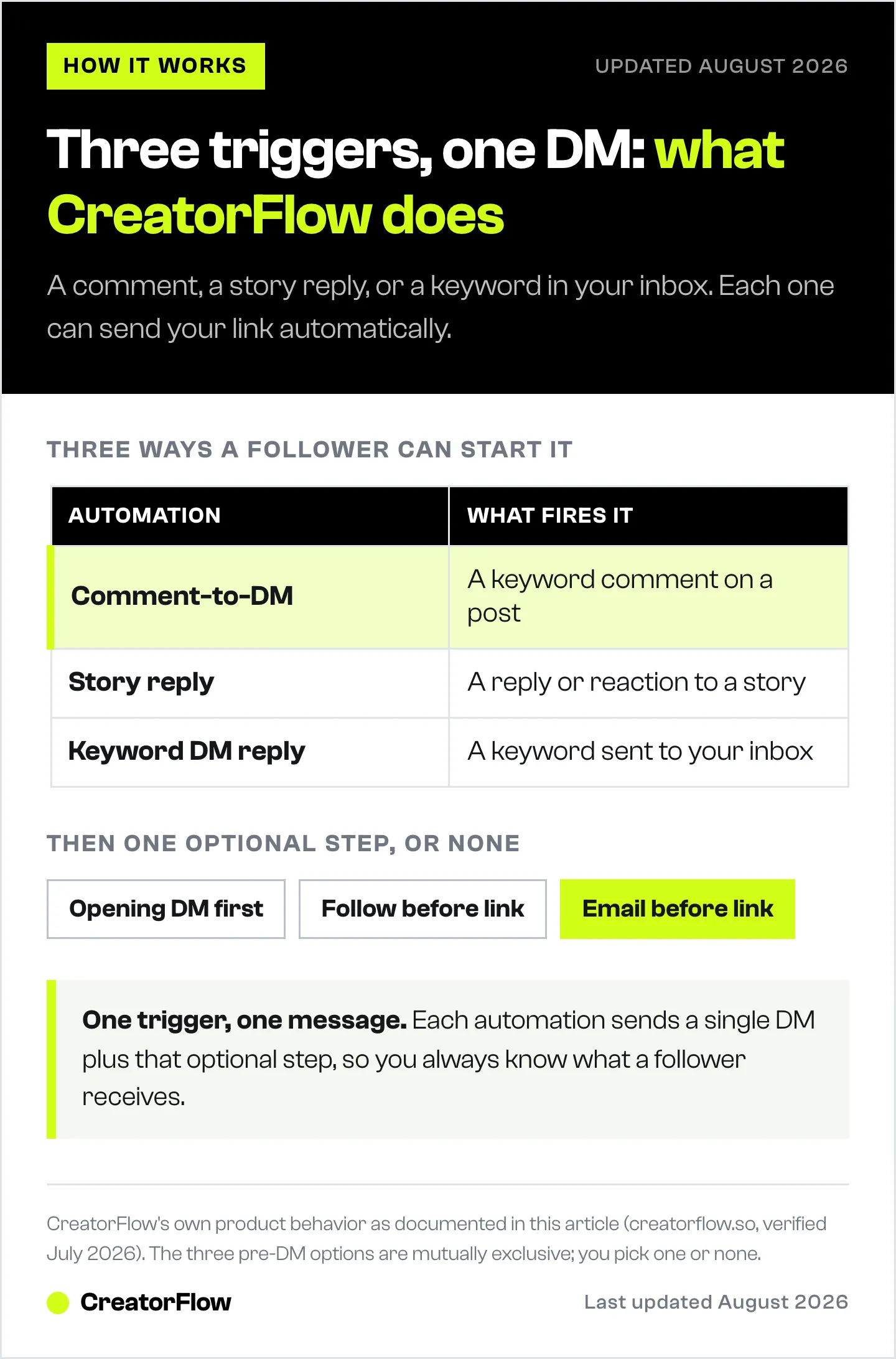
CreatorFlow has three automation types. Each one responds to a different trigger.
Comment-to-DM
Someone comments a keyword on your post or reel. CreatorFlow sends them a DM.
How it works:
- You pick a trigger: a specific post, your next post, or any post
- You set a keyword (or choose “any word” to trigger on all comments)
- You write the DM message and add your link
- When someone comments the keyword, they get your DM instantly
This is the automation most creators start with. It turns passive engagement (comments) into active business outcomes (link clicks, email captures, sales). A comment that says “LINK” becomes a DM with your product page, affiliate link, or booking calendar in under 3 seconds.
You can set up to 20 keywords per automation. Common ones: link, shop, order, buy, price, discount, info, details. Or use “any word” to respond to every comment.
Best for: affiliate marketers sharing product links, e-commerce sellers promoting discount codes, coaches offering free resources, anyone who posts “comment X to get Y” content.
For a full setup walkthrough: How to Set Up Comment-to-DM Automation
Story Reply Automation
Someone reacts to or replies to your Instagram story. CreatorFlow sends them a DM.
How it works:
- You select a story (or set it for future stories)
- Any reaction or reply triggers the automation
- They get your DM with your link or message
Stories disappear in 24 hours, but the leads they generate don’t have to. Someone who taps a fire emoji on your story is engaged right now. Sending them a DM while they’re still paying attention captures that interest before it fades.
Story automations are underused. Most creators focus on post comments and ignore story engagement entirely. That’s a missed opportunity: story replies feel more personal than post comments, and the DM response feels like a natural conversation, not a marketing message.
Best for: product drops, flash sales, event announcements, “reply to this story for the link” content.
For more on story automations: Instagram Story Reply Automation Guide
Keyword DM Reply
Someone DMs you a specific keyword. CreatorFlow sends an automatic reply.
How it works:
- You set a keyword (e.g., “PRICE,” “BOOKING,” “MENU”)
- When someone DMs you that word, they get your pre-written response
- Works 24/7, including when you’re asleep or creating content
You answer the same questions every day. “How much?” “Where do I book?” “What’s your menu?” “Do you ship internationally?” Each answer is the same link or the same paragraph you’ve typed dozens of times.
Keyword DM replies eliminate that repetition. Set up your five most common questions as keywords, write the answers once, and never type them again. Your DMs become a self-serve FAQ that works around the clock.
Best for: service businesses (booking links), restaurants (menu/ordering), coaches (pricing info), anyone who gets the same DM questions repeatedly.
For keyword trigger setup: Instagram Keyword Trigger Automation Guide
Pre-DM Options: What Happens Before They Get Your Link
Every automation has an optional step between the trigger and the final DM. You can add one of three pre-DM options, or skip them entirely.
These are mutually exclusive. Pick one or none. You can’t stack them.
Opening DM
A simple intro message before your main DM. Use it to set context or add a personal touch.
Example: “Hey! Thanks for commenting. Here’s what you asked for” followed by the main DM with your link.
When to use: when you want the DM to feel like a two-message conversation instead of a single automated blast.
Follow Gate
Before getting your link, the person gets a DM asking them to follow you. Two buttons appear: “Visit Profile” and “I’m following.”
What it does for your business: Grows your follower count from every automation. Someone who comments “LINK” on your reel follows you before getting the link. Over time, every post generates both engagement and follower growth.
The trade-off: Follow Gate adds a step. Some people will click “I’m following” without actually following (there’s no API-level verification). Expect a small percentage to bypass it. You’ll also lose some people who don’t want to follow before getting the content.
When to use: when follower growth is a priority alongside link distribution. Works well for giveaways, exclusive content, and audience building campaigns.
Email Gate
Before getting your link, the person gets a DM asking for their email address. They type it directly into the chat. CreatorFlow validates the format, saves it to your Contacts, and then sends the main DM.
What it does for your business: Turns every DM automation into a list-building machine. Email is the one audience channel Instagram can’t take away. Algorithm changes, account suspensions, reach drops: none of that touches your email list.
The trade-off: Bigger friction than Follow Gate. Fewer people will share their email than will tap “I’m following.” But every email you collect is a direct line to a potential customer that you own permanently.
When to use: lead magnets, free guides, course previews, newsletter building. Any time the content behind the link is valuable enough that giving an email feels like a fair exchange.
For a full guide on Email Gate strategy: How to Collect Emails Through Instagram DM Automation
Public Reply: Comment Back Before DM-ing
Separately from pre-DM options, you can set a public comment reply. When someone comments your keyword, CreatorFlow posts a visible reply on the post before sending the DM.
Example: someone comments “LINK.” CreatorFlow replies publicly: “Sent you a message! Check your DMs” and then sends the private DM with the actual link.
Why this matters:
Public replies create social proof. Other people scrolling through comments see “Sent you a message!” and think: “I should comment too.” It turns one person’s comment into a visible trigger for others to engage.
You can write multiple reply variations. CreatorFlow rotates through them so the public replies don’t look robotic. Three to five variations is the sweet spot.
Templates: Start in 60 Seconds
The Templates page gives you pre-built automations for common use cases. Click a template, customize the message and link, and go live.
Template categories:
| Category | Templates |
|---|---|
| Featured | Send link on keyword, Send link on story reaction, Require follow before link, Auto-reply to DMs |
| Sell and earn | Share affiliate links, Send discount codes, Promote your products, Share pricing info |
| Capture leads | Require email before link, Collect emails from story replies |
| Book clients | Share booking link, Send calendar link |
Each template pre-fills the automation builder with sensible defaults: trigger type, keyword suggestions, DM copy, and link placement. You change the message, drop in your link, and you’re live.
The biggest drop-off in any automation tool is the blank screen. People sign up, open the builder, stare at empty fields, and leave. Templates remove that friction. You’re not building from scratch. You’re editing something that already works.
If you’re new to CreatorFlow, start with “Send link on keyword.” It’s the most popular template for a reason: comment triggers a DM with your link. Simple, proven, effective.
For template ideas: Instagram DM Automation Templates
Contacts: Your Instagram CRM
Every person who interacts with your automations appears in your Contacts page. If they shared their email through Email Gate, that’s stored too.
What you see per contact:
| Field | What It Shows |
|---|---|
| Contact | Instagram username and display name |
| The email they shared (if Email Gate was used) | |
| Source | Which automation captured them |
| Last Interaction | When they last triggered an automation |
Three metric cards at the top: Total Contacts, With Email, Active Today.
Export to CSV
Click “Export to CSV” and download your entire contact list. Import it into Mailchimp, ConvertKit, Beehiiv, Loops, or any email platform that accepts CSV files. Every major platform does.
Instagram doesn’t give you your audience’s contact information. You have followers, but you can’t email them, text them, or reach them outside of Instagram. CreatorFlow bridges that gap. Every email collected through Email Gate is a contact you own outside of Instagram.
There’s no native integration with email platforms yet. CSV export is the bridge. Export after each campaign or once a week to keep your email list current.
For a full guide: How to Collect Emails Through Instagram DM Automation
Analytics: Know What’s Working
CreatorFlow’s Analytics page (called “Insights” in the app) shows you what’s happening with your automations. Not vanity metrics. Business metrics.

Key Metrics
Three cards at the top of the page: DMs Sent, Link Clicks, Leads Collected. These are your top-line numbers. If they’re going up, your automations are working. If they’re flat or declining, something needs adjusting.
Automation Performance
Every automation listed with its CTR (click-through rate). CTR tells you which DM messages get people to tap your link and which ones get ignored.
Example: three automations. One has a 35% CTR, the others are at 10%. The 35% automation has a better message. Study the difference. Often it’s one sentence of context before the link: “Here’s the discount code for the jacket from my reel” converts better than “Here you go!”
Content Performance
Which posts and reels trigger the most automations. Shows Total Comments, Keyword Comments, and Trigger Rate per post.
High Trigger Rate means your keyword matches what people naturally type. Low Trigger Rate means your keyword is off. Either change it or switch to “any word.”
Geographic Distribution
Which countries and cities generate the most link clicks. This is aggregate engagement data, not follower data (Instagram doesn’t share follower locations through its API).
Why this changes your strategy: If 60% of clicks come from Brazil, a Portuguese caption on your next post will resonate with your biggest market. If all clicks come from your city, you have a local audience. If clicks come from countries you didn’t expect, there’s demand you didn’t know about.
All geographic data is aggregated. CreatorFlow shows country and city-level engagement patterns to help you understand which markets respond to your content.
Engagement Trends
When your automations fire most (hourly and daily charts). Shows peak hours for DM sends and link clicks.
If DMs spike at 8 PM but clicks peak at 10 AM the next day, your audience reads DMs later. Schedule posts so automations fire when people are ready to act, not when they’re about to sleep.
Activity Log
The last 50 DM interactions. Shows which automation was triggered, whether the DM was delivered, and if a public reply was sent. Useful for troubleshooting: if a DM wasn’t delivered, the log tells you why (user doesn’t follow you, rate limit hit, or 24-hour window expired).
For the full analytics guide: CreatorFlow Insights: Track Link Clicks and Audience Location
Multi-Workspace: Manage Multiple Instagram Accounts
Each workspace connects to one Instagram account. If you manage multiple accounts (your personal brand plus your business, or client accounts), you create a separate workspace for each.
Workspace features:
- Custom name and color (so you can tell them apart)
- Independent automations, contacts, and analytics per workspace
- Team members with roles: Owner (full access), Admin (manage), Member (view only)
- Switch between workspaces from the sidebar dropdown
Plan limits:
| Plan | Workspaces | Team Members |
|---|---|---|
| Free ($0/mo) | 1 | 1 |
| Pro ($15/mo) | 2 | 1 |
| Growth ($30/mo) | 5 | 5 per workspace |
Each Instagram account gets its own isolated environment. Automations, contacts, and analytics don’t bleed between accounts. Invite team members to specific workspaces with appropriate access levels.
For workspace management: How to Manage Multiple Instagram Accounts with Workspaces
Where CreatorFlow Focuses
CreatorFlow is built around one job: turn Instagram engagement into a delivered link, a captured email, or a booked call, in seconds, with a setup you finish in one sitting. That focus shapes the scope.
Instagram, end to end. Comment-to-DM, story reply, and keyword DM triggers, plus the Follow Gate and Email Gate that sit in front of them. One platform, done properly, rather than a thin layer across six.
One trigger, one message. Each automation sends a single DM plus an optional pre-DM step. Predictable by design: you always know exactly what a follower receives and why. Build longer journeys by running separate automations on separate triggers.
Links, not embeds. Drop your Calendly, Acuity, TidyCal, Shopify, or affiliate URL straight into the message. Link tracking then tells you the click-through rate per automation and the country and city those clicks came from.
Contacts you own and can move. Email Gate captures addresses inside the DM, and CSV export hands you the list for Mailchimp, ConvertKit, Beehiiv, Klaviyo, or anywhere else you send email. Native syncs are on the roadmap.
Greeting new followers. Run a WELCOME keyword or a pinned welcome post on “any post” scope so new followers who engage get an instant reply. See how to auto-DM new Instagram followers for the full set of greeting flows.
If you want fast, simple Instagram DM automation that works reliably, keeps you on the right side of Meta’s rules, and takes minutes to set up, that is exactly what CreatorFlow is built for.
Meta Tech Provider: Why That Matters
CreatorFlow is a Meta Tech Provider (verified December 2025). This means:
- CreatorFlow uses Meta’s official Instagram Graph API
- Meta has reviewed and approved the application
- Minimal ban risk when you stay within the approved API and tool-side pacing
- No browser extensions, no screen scraping, no gray-area workarounds
Unofficial automation tools use browser automation or reverse-engineered APIs. Instagram actively detects and blocks these. Accounts get action-blocked, shadow-banned, or suspended. The tool might work for weeks, then your account gets restricted with no warning.
CreatorFlow keeps ban risk minimal because it operates through the channel Meta built for exactly this purpose. Your automations run through the same infrastructure that Meta designed for business messaging. The permission dialog you see during setup (“CreatorFlowSO-IG”) is Meta’s own authorization screen.
This is a real, practical difference. Not a marketing claim. It determines whether your automations keep running next month.
For more on Instagram automation safety: How to Avoid Instagram Bans When Using DM Automation
DM Limits: What You Need to Know
Two pacing rules shape how automated DMs go out:
- ~200 DMs per hour (tool-side pacing convention used to stay well under Meta’s per-second rate limits)
- 24-hour messaging window: After the first DM, you have 24 hours to exchange messages. After that, the conversation expires
CreatorFlow plan limits:
| Plan | Monthly DMs | Workspaces | Price |
|---|---|---|---|
| Free | 500 | 1 | $0/mo |
| Pro | 5,000 per workspace | 2 | $15/mo |
| Growth | 10,000 per workspace | 5 | $30/mo |
All plans include unlimited automations. The DM count is per workspace, not per account.
What happens when you hit the hourly pacing cap? DMs may be delayed by seconds or minutes during high-volume periods as the ~200/hour tool-side pacing window rolls forward. What happens when you hit your monthly DM limit? New automations pause until the next billing cycle. DMs are not queued; they simply won’t trigger until your limit resets. Your automations stay configured and resume automatically when the new cycle begins.
For the full breakdown: Instagram API Rate Limits Explained
Multi-Language App
The CreatorFlow app interface is available in English, Portuguese, and Spanish. Switch languages from the workspace dropdown menu.
This isn’t content translation. It’s the entire app: navigation, buttons, settings, error messages. If your team speaks Portuguese, they can use CreatorFlow in Portuguese. DM messages you write stay in whatever language you write them in. You control the content. CreatorFlow translates the interface.
The Setup Takes 5 Minutes
Not a figure of speech. Here’s the actual process:
- Sign in with Google (30 seconds). No email/password form. Google sign-in only.
- Connect your Instagram account (2 minutes). Enter your username, authorize through Meta’s OAuth screen. Requires a Business or Creator account with a linked Facebook Page.
- Pick a template and customize (2 minutes). Choose “Send link on keyword,” swap in your link and message, pick your post, save.
- Your automation is live. Next comment with your keyword triggers a DM.
After that, automations run continuously. You don’t need to keep CreatorFlow open. You don’t need to check it daily. The DMs go out whether you’re creating content, sleeping, or on vacation.
For the full setup walkthrough: Instagram DM Automation: How to Set Up in 5 Min
Who Gets the Most Value from CreatorFlow
CreatorFlow is built for people who monetize through Instagram and lose time (or sales) managing DMs manually. For concrete plays by use case, see the 12 ways creators, coaches, and agencies use CreatorFlow.
Affiliate marketers who post product content and need to send affiliate links to everyone who comments. One automation per product post. Set it and let it run.
E-commerce sellers running discount campaigns. “Comment SAVE20 to get 20% off” turns engagement into orders without manual DM work.
Coaches and consultants who offer free resources to attract clients. A free guide PDF behind an Email Gate builds your list while you sleep.
Service businesses that answer the same booking questions daily. Set up keyword replies for PRICE, MENU, BOOK, HOURS, and your DMs handle themselves.
Content creators who want to know which content drives the most clicks, which markets their audience concentrates in, and which DM messages convert best. Analytics turns gut feelings into data.
Want to watch CreatorFlow in action? Follow @creatorflow.so on Instagram for setup walkthroughs and real automation examples.
FAQ
Is CreatorFlow safe for my Instagram account?
Yes. CreatorFlow is a Meta Tech Provider. It uses Instagram’s official Graph API, meaning Meta has reviewed and authorized how CreatorFlow interacts with your account. Ban risk is minimal when you stay within the approved API and tool-side pacing. No automation tool can guarantee zero risk.
Does CreatorFlow work with personal Instagram accounts?
No. Instagram’s API requires a Business or Creator account. Personal accounts cannot connect. Switching to a Business or Creator account is free and takes 30 seconds in Instagram settings. Nothing changes about your followers or content.
How do I start conversations with new followers?
CreatorFlow triggers on the three moments a new follower actually reaches out: a comment on your post or Reel, a story reply or reaction, and a keyword sent to your DMs. The pattern that works best is a pinned welcome post or a permanent story highlight with a keyword like WELCOME, set to “any post” scope so it keeps running on everything you publish. New followers who engage get a reply in seconds, and because they messaged first, you get the full 7-day comment window or 24-hour story window to keep talking.
Meta does run a follow-event trigger, but it is a gated beta: eligibility is decided by Meta on an account-by-account basis, and accounts under roughly 1,000 followers or with low engagement are generally not admitted (manychat.com/use-case/follow-to-dm and help.manychat.com, July 2026). Full detail on where that stands, and the greeting flows that run on any account today, is in how to auto-DM new Instagram followers.
How many messages does one automation send?
Each automation sends one DM, plus an optional pre-DM step (the comment reply or gate that comes first). That keeps every automation predictable: one trigger, one message, one link. Build multi-step journeys by running separate automations on separate triggers, and use the Email Gate when you want the conversation to continue off Instagram, where you own the list.
How is CreatorFlow different from ManyChat?
CreatorFlow focuses on Instagram-only DM automation with simpler setup and flat-rate pricing (not per-contact). ManyChat supports multiple channels (Instagram, Facebook, WhatsApp, SMS, email) with more complex flows and per-contact pricing. If you only need Instagram and want something fast to set up, CreatorFlow is built for that. See the full comparison.
What happens if someone comments after I delete the post?
The automation stops triggering for that post once it’s deleted. Automations tied to “any post” or “next post” continue working on other content.
Do I need to keep CreatorFlow open for automations to work?
No. Automations run on CreatorFlow’s servers 24/7. Once activated, they work whether you’re logged in, asleep, or offline. You don’t need to keep a browser tab open.
Can two people on my team manage the same Instagram account?
Yes. Workspace settings include team member invitations with three roles: Owner (full access), Admin (can manage automations and settings), and Member (view only). Invite team members by email.
What does “unlimited automations” mean?
Every plan, including Free, allows unlimited automations. There’s no cap on how many automations you create. The limit is on DMs sent per month (500 on Free, 5,000 on Pro, 10,000 on Growth).
Which platforms does CreatorFlow cover?
Instagram, specifically: comments on posts and Reels, story replies and reactions, and keyword DMs. Every feature is built for how Instagram actually behaves, from the 7-day comment messaging window to the Follow Gate. If your funnel runs across several messaging channels at once, a multi-channel platform will suit that shape better; see the full comparison.
What happens when I hit my monthly DM limit?
When you hit your monthly DM limit, new automations pause until the next billing cycle. The DMs are not queued; they simply won’t trigger until your limit resets. Your automation configurations stay intact and resume automatically when the new cycle begins.
Is there a free plan?
Yes. The Free plan includes 500 DMs per month, 1 workspace, and unlimited automations. No time limit.
Can I track how many people click my links?
Yes. CreatorFlow tracks every link click. Analytics shows click-through rate (CTR) per automation and geographic distribution of engagement (which countries and cities generate clicks). See CreatorFlow Insights: Track Link Clicks and Audience Location for the full guide.
Can I collect emails through DM automations?
Yes. Enable Email Gate in Step 3 of the automation builder. The person receives a DM asking for their email before getting your link. Emails are saved to your Contacts page and exportable as CSV. See How to Collect Emails Through Instagram DM Automation for the full guide.
Does CreatorFlow work in languages other than English?
The app interface supports English, Portuguese, and Spanish. Your DM messages can be written in any language. The website is available in 8 languages.

