

Instagram lets you add up to five accounts to the app on one device and switch between them from your profile, with no logging out, according to the Instagram Help Center (checked October 2026). That handles posting. It does not handle the inbox. Comments and DMs land on every account at once and cannot be batched, which is where multi-account setups break first.
Most guides on how to manage multiple Instagram accounts hand you the same list of tips no matter how many accounts you run. That is the wrong shape for the problem. Instagram puts a hard architectural break at five simultaneous logins per device, so the correct setup at two accounts, at five, and at fifteen is genuinely different work with different costs.
This guide is organized by account count. It covers the limits Instagram enforces, the three separate caps that everyone conflates, what breaks at each tier, and how to keep the accounts from bleeding into each other once a second person is involved.
Key Takeaways
- The app limit is five: You can add up to 5 accounts to the Instagram app on one device and switch between them without logging out (help.instagram.com, October 2026). This is a login-slot cap, not a cap on accounts you may own
- Three different limits get confused: accounts you can own, accounts you can stay logged into on one device, and accounts linked in Meta’s Accounts Center are three separate things with three separate rules
- Posting scales, the inbox does not: content work batches on a Sunday afternoon, while comments and DMs arrive all day on every account and cannot be batched
- Two accounts needs no tools: the native app plus per-account notification settings covers it at zero cost. Tooling starts paying for itself around the third account
- Past five accounts the app stops helping: you move to desktop, Meta Business Suite, and delegated access, because you can no longer hold every account in one app session
- Team access without passwords: Meta Business Suite grants role-based access to specific accounts, so a VA or contractor never receives a login
How many Instagram accounts can you have?
There is no published cap on how many Instagram accounts one person may create. The cap that exists is on simultaneous logins: you can add up to 5 accounts to the Instagram app on a single device and switch between them without logging out (help.instagram.com, October 2026). Owning a sixth account is fine. Keeping it logged in alongside the other five on the same phone is not.
That distinction matters because it decides your workflow, not your strategy. Running eight brands is allowed. Running eight brands from one phone is not, and any guide that tells you Instagram limits you to five accounts total is describing the login slots and calling them ownership.
Whether you should run more accounts is a separate question from whether you can. Splitting an audience across accounts splits the follower count and the engagement that feeds each one. The case for splitting is strongest when the audiences genuinely do not overlap, which is why some affiliates run one account per affiliate niche instead of one mixed feed.
How to add and switch between Instagram accounts
Adding an account takes a few taps. Open your profile, tap your username at the top of the screen, and choose to log into an existing account. Enter the username and password of the account you want to add, or create a new one from the same screen. To switch, tap your username at the top of your profile and pick the account you want (help.instagram.com, October 2026). As a shortcut, tapping and holding your profile picture in the bottom-right corner also opens the account list.
Two things to know about how this behaves in practice.
You are only ever logged into one account at a time. The device stores credentials for the others so switching feels instant, but the session is single. Anything that reads “your account” in the app reads whichever one is active right now.
Notifications arrive from every added account, in one stream, whether or not that account is active. This is the setting most people never touch and the one that causes the most damage, because it turns five accounts into five times the interruptions with no visual separation between them.
The three limits people confuse
Three separate caps get treated as one, and the confusion sends people looking for workarounds they do not need.
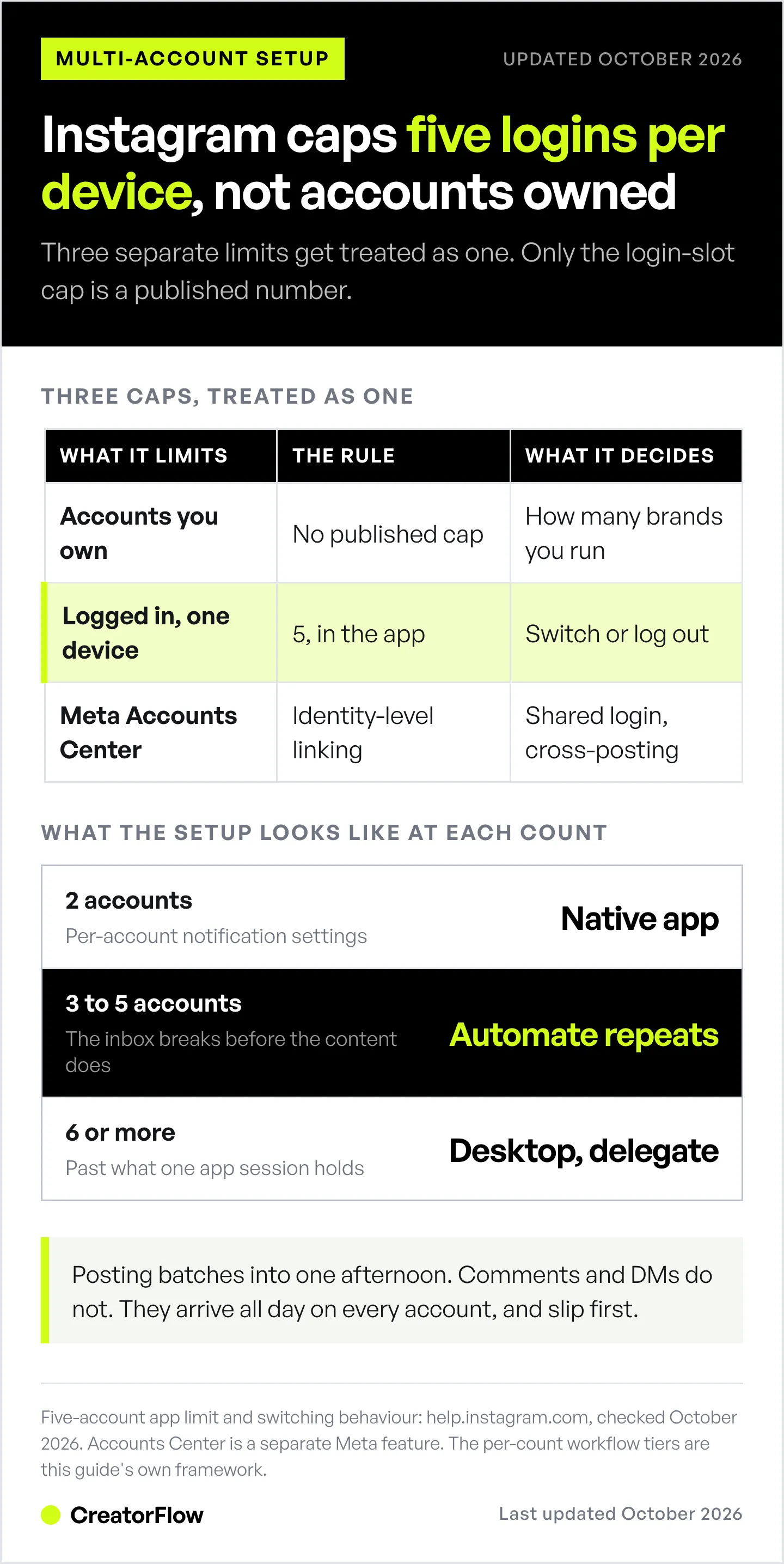
| What it limits | The rule | What it affects |
|---|---|---|
| Accounts you own | No published cap | How many brands or niches you can run |
| Accounts logged in on one device | 5, per the Instagram app | Whether you can switch or must log in and out |
| Accounts in Meta’s Accounts Center | Identity-level linking, separate feature | Shared login, cross-posting, ad and payment settings |
Accounts Center is the one that surprises people. It links profiles at the identity level so you can log in once and move between them, and it also syncs things you may not want synced across a personal account and a business account. It is a convenience layer, not the switcher, and linking two accounts there is a different decision from adding them to the same app.
If you have ever found two accounts unexpectedly connected under one login, that was Accounts Center, not the five-account switcher. They can be separated again from the same settings screen.
What gets harder with each account you add
Multi-account work splits cleanly into two halves, and only one of them scales the way people expect.
The proactive half is content: planning, shooting, editing, captions, scheduling. It is heavy but it batches. Five accounts of content is one long Sunday instead of one short one, and a scheduler holds the queue for the rest of the week.
The reactive half is comments, DMs, story replies, and mentions. It does not batch. It arrives continuously, on every account, and it is the half that decides whether a follower who asked for a link becomes a customer. Five accounts means five inboxes filling in parallel while you are looking at one of them.
This is why account count feels manageable right up until it does not. The content workload grows in a straight line and you can see it coming. The inbox workload grows in a straight line too, but it arrives in real time, so it is the first thing to slip the week you get busy. The same split shows up when managing accounts across several platforms at once, only worse, because each platform has its own inbox.
How to manage multiple Instagram accounts at each count

Two accounts
The native app covers this. Add the second account, set per-account notification preferences so you can tell which one is buzzing, and use a single content calendar with a column for which account each post belongs to.
Do not buy tooling yet. At two accounts the switching cost is a few seconds and the inbox volume is one person’s worth of replies. Tools add a subscription and a second place to check.
The one thing worth doing early: give each account a visibly different profile picture and a different theme in your camera roll folders. Most wrong-account posts happen because two thumbnails look alike at a glance.
Three to five accounts
This is where the setup has to change, and where most people stall because they change the wrong half.
The instinct is to buy a scheduler. Scheduling is worth centralizing at this point, and a tool that holds all your accounts in one calendar removes a real chunk of admin. It also solves the half of the problem that was already survivable.
The half that breaks here is the inbox. Three to five accounts generates enough comment and DM volume that replies start arriving faster than one person clears them, and the response gap is where the money leaks. A follower who comments asking for a link and waits four hours has already moved on.
The fix is to automate the predictable messages so the unpredictable ones get your attention. Every account has a set of questions that repeat: where is the link, how much is it, do you ship here, how do I book. Those answer themselves through a keyword or comment trigger. What is left is the genuine conversation, which is small enough for one person again.
Six or more accounts
Past five you exceed what one app session holds, and the workflow changes shape.
You move the center of gravity to desktop. Meta Business Suite handles multiple accounts from a browser without the five-slot constraint, and a dedicated tool holds the automations. The phone becomes the device you use for the two or three accounts you personally create for, not the control panel for all of them.
Delegation stops being optional. At this count you are either giving someone else access or you are the bottleneck. That means role-based access, which is the next section.
You also need written separation. A short voice reference per account, a naming convention for automations, and one document that says what is live where. Without it, the accounts drift into each other and nobody can audit what is running.
How to stop posting from the wrong account
The wrong-account post is the single most expensive mistake in multi-account management, and it has three reliable causes: identical-looking profile pictures, muscle-memory switching, and drafting content in a shared place with no account label.
Fix all three structurally rather than through care.
Make the accounts look different in the switcher. Different profile picture, different enough that you can tell them apart at thumbnail size while distracted. This is the cheapest fix and it prevents the most incidents.
Confirm the active account before you post, not after. Build the habit of reading the username at the top of the screen as the last step before publishing. It costs a second.
Label content at the point of creation. Every draft caption, image, and Reel gets its destination account attached in your calendar or file name. A file called “promo-final” is an incident waiting to happen. A file called “menswear-promo-final” is not.
Keep the voices genuinely separate. Cross-posting mistakes are easier to catch when the accounts do not sound alike, which is one more reason keeping brand voice separate across accounts is a safety practice and not only a branding one.
How to give your team access without sharing passwords
Meta Business Suite grants team members access to specific Instagram accounts with defined permission levels, so a VA, contractor, or agency never receives a password. The account owner adds people by email and assigns a role per account. Access is revoked from the same place when someone leaves, without changing any login.
This matters beyond convenience. A shared password cannot be scoped, cannot be audited, and cannot be withdrawn from one person without disrupting everyone else who has it. Role-based access does all three.
For agency work the same principle extends to your automation tooling: a client’s account should be reachable by the people assigned to it and nobody else. That structure is what lets agencies run automation across a client roster without every operator seeing every client.
CreatorFlow’s Growth plan covers 5 workspaces, so each account keeps its own automations, contacts and analytics (creatorflow.so/pricing, October 2026).
How to handle comments and DMs across every account

Sort the incoming volume into three groups and treat each one differently.
Predictable and repeated. Link requests, prices, shipping questions, booking enquiries. These are the bulk of the volume and they have one correct answer each. Automate them with a comment or keyword trigger so the reply sends in seconds instead of hours. Instagram DM automation covers how the triggers work and what Meta’s messaging rules allow.
Common but variable. Questions where the answer depends slightly on who is asking. Keep saved templates you adapt in a few seconds rather than writing from scratch.
Genuinely one-off. Real conversations, partnership enquiries, complaints. These get you, personally, and clearing the first two groups is what buys the time for them.
Run this per account, not globally. Each account gets its own triggers, its own keywords, and its own templates, because a fitness account’s link request and a beauty account’s link request should not send the same message. Once you are past a handful of automations across several accounts, keep a written keyword map so two accounts never end up fighting over the same trigger word.
What managing multiple Instagram accounts costs
The number that decides your bill is the pricing unit, not the sticker price. Tools in this space charge per account, per contact, per seat, or flat, and the same setup can swing by hundreds of dollars depending on which one you pick.
| Tool | Pricing unit | Entry price | Accounts covered |
|---|---|---|---|
| CreatorFlow | Flat, per plan | $0 Free, $15/mo Pro, $30/mo Growth | 1 Free, 2 Pro, 5 Growth |
| LinkDM | Flat, per plan | $0 Free, $19/mo Pro, $99/mo Platinum+ | 1 Free, 3 Pro, 10 Platinum+ |
| ManyChat | Per active contact | $17/mo Essential (250 contacts) | Priced by contacts, not accounts |
CreatorFlow prices flat per plan: Free covers 1 workspace and 500 DMs a month, Pro is $15/month ($12 billed annually) for 2 workspaces and 5,000 DMs per workspace, Growth is $30/month ($24 billed annually) for 5 workspaces, 10,000 DMs per workspace, and priority support, as listed on the CreatorFlow pricing page (checked October 2026).
LinkDM also prices per plan: Free covers 1 Instagram account and 1,000 DMs a month, Pro is $19/month ($182/year) for 3 accounts and 25,000 DMs, Platinum+ is $99/month ($832/year) for 10 accounts and 300,000 DMs, according to LinkDM’s pricing page (checked October 2026). LinkDM reports more than 60,000 creators, brands and agencies using the platform.
ManyChat prices on active contacts rather than accounts, across Instagram, Facebook, WhatsApp, SMS, TikTok, Telegram, and email: Essential $17/month for 250 contacts, Pro $39/month for 2,500, Business from $99/month for 7,500, Advanced $199/month for 25,000, billed monthly. Billed annually, those are $14, $29, $69 and $139 a month, per ManyChat’s pricing page (checked October 2026). A free plan covers 25 active contacts. The unit means your bill tracks audience growth rather than account count, which suits multi-channel work and prices differently from a per-account model.
Scheduling is a separate line item from the inbox. Schedulers price per channel, per brand, per social set, or per seat, and a fifteen-account setup ranges widely across them. The breakdown lives in the social media management tools cost comparison.
FAQ
How many Instagram accounts can you have on one phone?
Five. You can add up to 5 accounts to the Instagram app on a single device and switch between them without logging out (help.instagram.com, October 2026). You can own more than five accounts. The cap applies to how many stay logged in at once on one device, so a sixth account means logging in and out, using a second device, or moving that account to desktop.
Is it against Instagram’s rules to have multiple accounts?
No. Instagram supports multiple accounts as a built-in feature, which is why the app has an account switcher and an official help article explaining how to add accounts. What does violate the rules is creating accounts to impersonate someone, to fake engagement, or to evade a prior enforcement action. Running separate accounts for separate brands, niches, or clients is normal use.
How do I switch between Instagram accounts quickly?
Tap your username at the top of your profile and select the account you want. That is the method Instagram’s Help Center describes. Tapping and holding your profile picture in the bottom-right corner also opens the account list. Both work without entering a password once the account has been added.
Should I run one Instagram account or several?
Run several when the audiences genuinely do not overlap and each one can sustain its own content. Splitting divides your follower base and the engagement that feeds reach on each account, so two half-fed accounts usually perform worse than one well-fed one. The clearest case for splitting is different buyers: a fashion audience and a home-goods audience rarely want the same feed.
How do agencies manage multiple client Instagram accounts?
Through delegated access rather than shared logins. The client grants access to specific accounts through Meta Business Suite, the agency assigns internal roles per client, and automation tooling is scoped so each operator sees only their assigned accounts. This keeps client data separated, makes access reversible when a contract ends, and means no password ever changes hands.
Can you automate DMs on multiple Instagram accounts at once?
Yes, with a tool that connects each account through Meta’s official Instagram API. Each account gets its own triggers, keywords, and message templates, kept separate so one account’s automation never fires on another. CreatorFlow covers 2 accounts on Pro and 5 on Growth, each in its own workspace with its own automations, contacts, and analytics (creatorflow.so/pricing, October 2026).
What is the fastest way to stop mixing up accounts?
Make them look different in the switcher and label content at the point of creation. Distinct profile pictures prevent the glance-level mistake, and a destination account attached to every draft file or calendar entry prevents the planning-level one. Reading the active username as the final step before publishing catches whatever gets past both.
Running more than one Instagram account? CreatorFlow keeps each account in its own workspace, with separate automations, contacts, and link analytics per account, so the right message always goes to the right audience. Start with CreatorFlow
Related Articles
- Instagram DM Automation: How to Set Up in 5 Min - the automation layer that clears repeat questions
- Managing Multiple Instagram Brand Accounts Safely - brand voice separation for in-house teams
- Multiple Instagram Accounts for Affiliate Marketing - when splitting by niche raises commissions
- How to Manage Multiple Social Media Accounts at Scale - the same problem across every platform
- Instagram Keyword System for Multiple Offers - stop automations colliding as they multiply
Instagram’s five-account limit and its add and switch steps checked on help.instagram.com in October 2026. CreatorFlow, LinkDM and ManyChat pricing and LinkDM’s user count checked on creatorflow.so, linkdm.com and manychat.com in October 2026. Individual results vary based on account count, audience size, and niche.
Sources:
- Instagram account limits and switching: help.instagram.com
- CreatorFlow pricing and workspaces: creatorflow.so/pricing
- LinkDM pricing and user count: linkdm.com/pricing
- ManyChat pricing and contact tiers: manychat.com/pricing, help.manychat.com
Disclaimer: Instagram is a trademark of Meta Platforms, Inc. CreatorFlow is not affiliated with, endorsed by, or sponsored by Meta Platforms, Inc. ManyChat and LinkDM are trademarks of their respective owners. Platform features, limits, and pricing may change at any time. Users are responsible for complying with Instagram's Terms of Service and Community Guidelines.


