

To manage multiple social media accounts, split the work into two systems. The proactive layer covers planning, batching, and scheduling content from one dashboard. The reactive layer covers comments and DMs that arrive in real time and cannot be batched. Centralize both, template your repeat replies, and automate the reactive load per account. Scheduling is the easy half. Engagement is where multi-account setups break.
Run five accounts and the math turns on you. Five content calendars is annoying but doable, you batch it on a Sunday and the week is planned. Five inboxes filling with comments and DMs every hour is a different problem. That load does not batch. It arrives all day, across every account, and it is the first thing to slip the moment you get busy.
This guide gives you a system for both halves: how to structure the proactive work so it takes hours instead of days, and how to systematize the reactive work so replies do not depend on you sitting at a screen. It is written for social media managers, agencies, and creators running more accounts than one person can watch in real time. The average person now bounces between roughly 6.75 social platforms a month (Sprout Social, 2026), so most brands run several accounts by default, not by choice.
Key Takeaways
- Split the workload in two: Proactive work (planning and scheduling) batches easily. Reactive work (comments and DMs) does not. Treat them as separate systems with separate tools.
- Scheduling is the solved problem: One dashboard, a shared content calendar, and a Sunday batch session handle the proactive half for almost any number of accounts.
- Engagement is the real bottleneck: Reactive load scales linearly with every account you add, and it is the work that quietly gets dropped first.
- Automate the reactive layer per account: Templated replies and comment-to-DM automation cut hours of manual inbox work without making responses feel robotic.
- Keep accounts physically separate: Workspaces stop the wrong caption or the wrong DM from reaching the wrong account, which is the disaster that erodes trust fastest.
- Run a fixed weekly rhythm: A repeatable cadence beats a full calendar. Named recurring content compounds, ad hoc posting does not.
- Tool cost scales on different axes: Some tools price per channel, some per brand, some per contact, some flat per account. The model matters more than the sticker price once you scale.
Why managing multiple social media accounts gets harder with each one
Multi-account management gets harder because the reactive workload grows with every account while your hours stay fixed. Scheduling ten posts is not much slower than scheduling two, you batch it once. But ten accounts produce ten streams of comments and DMs that arrive independently, all day, and each one expects a timely human reply. That is the load that outpaces a single person first.
Most “I am drowning” moments in social media management trace back to the inbox, not the calendar. The calendar is a planning problem, and planning is something you can front-load into one focused session. The overwhelm comes from the reactive tail: the notifications that keep coming after the posts go out. Miss them and engagement drops, replies go cold, and the audience you spent months building learns that DMing you is a dead end.
Adding accounts multiplies three things at once: profiles to keep consistent, feeds to fill, and inboxes to answer. The first two are batchable. The third is not, and it is the one that decides whether your accounts feel alive or abandoned.
The two-layer system: proactive work vs reactive work
The system that makes multiple accounts manageable separates proactive work from reactive work, the same split that runs through any social media marketing strategy. Proactive work is everything you decide in advance: content pillars, the calendar, the assets, the scheduled queue. Reactive work is everything triggered by someone else: comments, DMs, mentions, replies. Build one system to batch the proactive half and a second system to absorb the reactive half. Trying to run both from the same manual workflow is what burns people out.
Here is why the split matters. Proactive work rewards batching. You sit down once, plan a month, queue it, and walk away. The cost barely moves whether you run two accounts or twenty, because the work happens in one block. Reactive work punishes batching. You cannot answer Tuesday’s DMs on Sunday, they have not arrived yet, and by the time you do sit down, the sender has moved on.
Once you see the two layers clearly, the tooling decision gets simple. You need a scheduler for the proactive layer and an engagement system for the reactive layer. They are different jobs, and the tools that are great at one are usually only adequate at the other.
Layer 1: Systematize the proactive work
Systematize the proactive layer by planning content in advance and scheduling every account from a single dashboard. Pick one scheduler, connect all your profiles, build a shared content calendar with named recurring series, and batch a month of posts in one session. On Instagram you can batch and schedule Instagram posts in the app or through Meta Business Suite before you pay for a tool at all. This turns “what do I post today” from a daily decision into a weekly one, and it holds up whether you run three accounts or thirty.
The building blocks of a working proactive layer:
- A single source of truth for content. One media library, tagged by account, campaign, and format, so you are not digging through folders every time you schedule.
- A content calendar that covers every account. Plan pillars and recurring series first, then fill gaps. Our content calendar guide for multiple accounts walks through the structure.
- Named, recurring series. A weekly series with a name and a slot compounds. Ad hoc one-off posts do not. Structure at the content level frees you to think at the strategy level.
- Batch scheduling. Queue a month in one block instead of logging in daily.
Schedulers built for this each price on a different axis, which becomes the deciding factor at scale. Later organizes accounts into “social sets” and includes a social inbox, starting at $25/month for one set (later.com, July 2026). Buffer prices per channel, starting around $6 per channel each month on its Essentials plan, which stays cheap for a few profiles and adds up across many (buffer.com, July 2026). Metricool prices per brand, with its Starter plan covering up to five brands at $25/month billed monthly, and pairs scheduling with analytics (metricool.com, July 2026). PostNext, built by the same team as CreatorFlow, prices per connected account: Premium covers 15 accounts across Instagram, TikTok, X, LinkedIn, YouTube, Threads, and Bluesky for €19/month, or €11/month billed annually, and keeps a separate brand profile with its own voice and channels for each brand you run (postnext.io, September 2026).
Any of these solves the proactive layer well. The choice comes down to how their pricing model lines up with your account count, which is the comparison in the cost section below.
Layer 2: Systematize the reactive work (comments and DMs)
Systematize the reactive layer by triaging incoming engagement and automating the responses you send over and over. Route every account’s comments and DMs into one view, sort them into “automate,” “template,” and “handle personally,” then let software cover the first two buckets. Most incoming messages across accounts are variations of the same handful of questions, which means most of the reactive load can run without you typing each reply.
Start by triaging. Across any set of accounts, incoming messages fall into three groups:
- Repeatable and predictable. “Link?”, “How much?”, “Where do I sign up?”, “Send me the guide.” These are the bulk of the volume, and they are the ones you can automate outright.
- Repeatable but personal. Common questions that still want a human touch. These get saved templates you tweak before sending, not full automation.
- Genuinely one-off. Real conversations, complaints, partnership feelers. These are the only messages that truly need you, and clearing the first two groups is what frees the time to answer them well.
A scheduler’s social inbox handles the unifying part: it pulls messages from every connected account into one place so you reply without switching apps. That solves the switching problem, but you are still typing every reply yourself. At high volume across many accounts, unifying is not enough. You need the predictable group to answer itself.
That is where automation earns its place, and where a system that prevents DM overwhelm and burnout makes the difference between accounts that feel responsive and accounts that feel dead.
How to automate replies across accounts without sounding robotic
Automate the reactive layer with trigger-based replies: when a follower comments a keyword or sends a specific phrase, the tool sends your pre-written message in seconds. Done well, it does not read as a bot, because the reply is your copy, sent instantly, to a person who asked for exactly that thing. The goal is not to fake conversation. It is to deliver the link, guide, or booking page the moment someone requests it.
The tool you pick depends on which platforms your accounts live on:
- Multi-platform accounts. If your accounts span Instagram, Facebook, and WhatsApp, ManyChat automates replies across all three from one builder. It prices on active contacts, starting at $17/month for 250 contacts on its Essential plan after the March 2026 restructure (manychat.com, July 2026), so cost tracks audience size rather than account count.
- Instagram-heavy accounts. If Instagram is where most of your reactive load lives, a purpose-built Instagram tool goes deeper on that one platform. CreatorFlow handles comment-to-DM automation, keyword triggers, and Story-reply automation through Meta’s official Instagram API, at a flat $15/month for two accounts or $30/month for five (creatorflow.so, July 2026). Flat per-account pricing means the bill does not climb as an account’s audience grows.
For the mechanics of trigger words, keyword matching, and the messaging window, our Instagram DM automation guide covers setup end to end. The principle transfers to any platform: identify the top five questions each account gets, write a clear reply for each, and let the trigger deliver it. You stay in the loop for the conversations that matter and hand the repetitive volume to the system.
Keep every account separate: workspaces and brand voice
Keep accounts separate with workspaces, one isolated space per account or brand, each with its own templates, automations, and voice guidelines. Separation is what stops the single worst multi-account mistake: the menswear caption posted to the kids’ brand, or a client’s DM automation firing on the wrong client’s audience. One mismatched message can undo months of positioning, and the risk compounds with every account you add.
Two things drift when accounts share a workspace: content and voice. Content drift is the wrong asset going to the wrong place. Voice drift is subtler, the accounts slowly start sounding the same because one person is writing for all of them without a reset between contexts. Both are prevented by structure, not willpower.
Practical separation for teams running many accounts:
- One workspace per account or brand. Physical separation beats a mental note. Here is how to run multiple Instagram accounts from separate workspaces without the login-logout churn.
- A voice reference per account. A short card with tone, banned words, and example posts. It keeps each brand voice from bleeding into the next, which matters most when managing several brand accounts under one roof.
- Scoped team permissions. For agencies managing multiple client accounts, each team member sees only the accounts they own, so nothing crosses wires.
What a multi-account tool stack costs
A realistic multi-account stack pairs one scheduler for the proactive layer with one engagement tool for the reactive layer. The total depends less on sticker price than on the pricing axis, because per-channel, per-brand, and per-contact models scale differently once you pass a handful of accounts. Map your account count and audience size against the model before you commit.
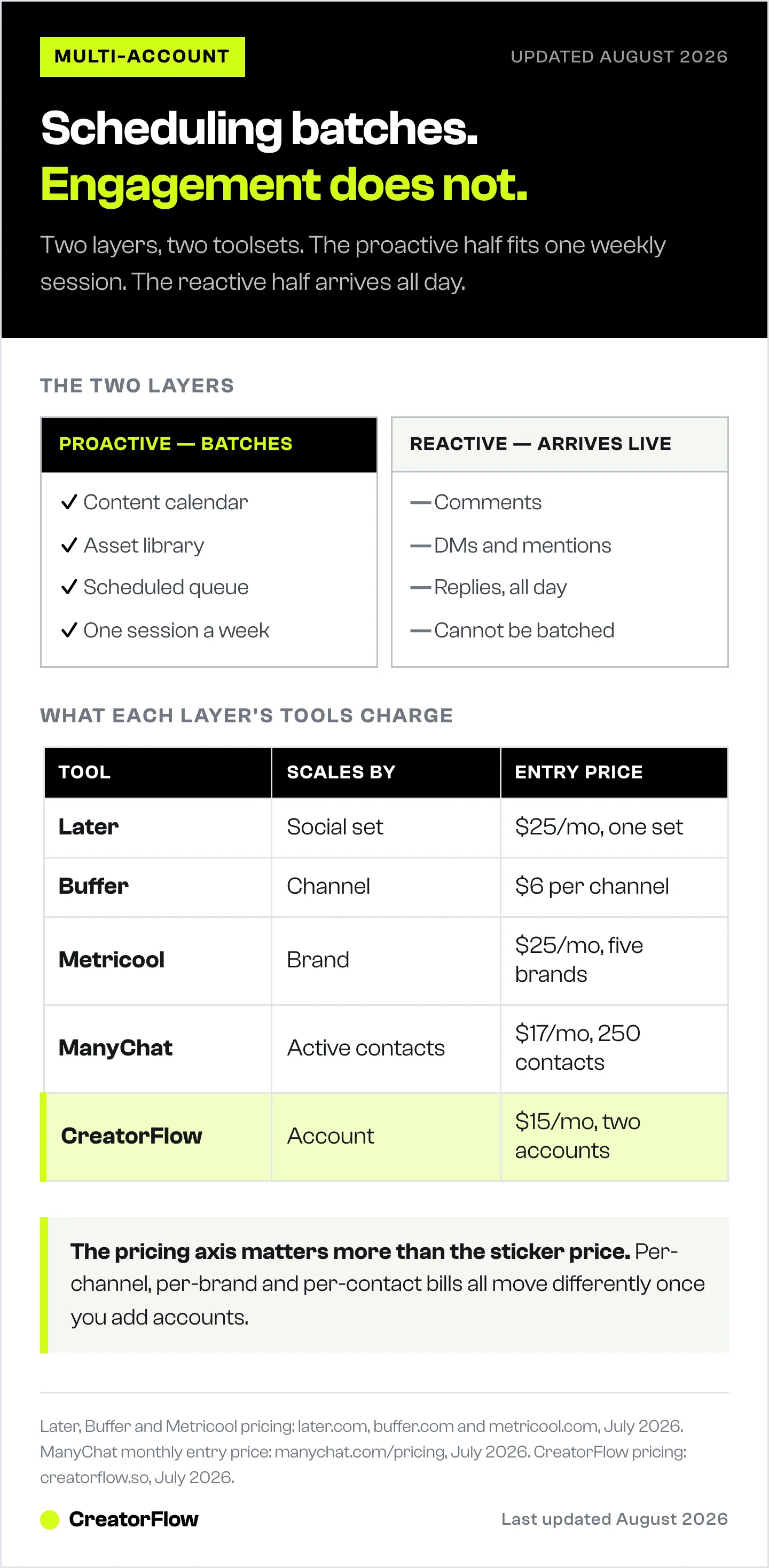
| Tool | Best-fit layer | Pricing model | Entry price (Jul 2026) |
|---|---|---|---|
| Later | Proactive: scheduling + inbox | Per social set | $25/mo (1 set) |
| Buffer | Proactive: scheduling | Per channel | $6/channel/mo (Essentials) |
| Metricool | Proactive: scheduling + analytics | Per brand | $25/mo (up to 5 brands) |
| ManyChat | Reactive: automation (multi-platform) | Per active contact | $17/mo (250 contacts) |
| CreatorFlow | Reactive: automation (Instagram) | Flat per account | $15/mo (2 accounts) |
How to read the models against your setup:
- Per channel (Buffer) stays cheap for a few profiles and rises with each platform you connect. Best when you run a small number of accounts across many platforms.
- Per brand or social set (Metricool, Later) bundles a client’s profiles together, which fits agencies that think in clients rather than channels.
- Per connected account (PostNext) gives one user a fixed block of accounts on any mix of platforms, which fits a solo manager running many profiles.
- Per contact (ManyChat) climbs with audience size, not account count, so a few large accounts can cost more than many small ones.
- Flat per account (CreatorFlow) keeps the bill predictable as any single account’s audience grows, which suits creators and affiliates scaling reach on Instagram.
There is no single winner. A small agency running Instagram-first clients might pair Metricool for scheduling with CreatorFlow for reactive automation. A brand spread across five platforms might pair Buffer with ManyChat. Match the model to your shape.
For a side-by-side of what each publishing tool charges, see our breakdown of social media management tools priced by real account setup.
A weekly operating rhythm for multiple accounts
A weekly rhythm turns multi-account management from a daily scramble into a repeatable routine. Fix a small number of recurring blocks, plan proactive work in one session, and let the reactive layer run automated in between. The cadence, not the calendar, is what keeps every account consistent when you are managing more of them than you can watch live.
A simple rhythm that scales:
- Monday, plan (60 to 90 minutes). Review last week’s performance across accounts. Slot this week’s posts into the calendar, prioritizing named recurring series.
- Monday or Tuesday, batch (2 to 3 hours). Create and schedule the week’s content for every account in one block. Tag assets as you go.
- Daily, triage (15 to 20 minutes). Skim the unified inbox. Automation has already cleared the predictable messages, so you only handle the personal and one-off ones.
- Friday, audit (30 minutes). Spot-check profile consistency, confirm automations fired correctly, and note what to adjust next week.
The point of the rhythm is that most of the reactive work happens without you, so your live hours go to strategy and the conversations that move the account. That is the difference between managing five accounts and being managed by them.
FAQ
How do you manage multiple social media accounts without getting overwhelmed?
Separate the work into a proactive layer and a reactive layer, then batch the first and automate the second. Plan and schedule content in one weekly session so posting is not a daily decision. Route all comments and DMs into one place and let automation clear the predictable messages. The overwhelm almost always comes from the reactive tail, so that is the layer to systematize first.
What is the best way to manage multiple social media accounts?
Use one scheduler for the proactive layer and one engagement tool for the reactive layer, with a fixed weekly rhythm connecting them. Keep each account in its own workspace so content and voice never cross. There is no single best tool, the right pairing depends on how many accounts you run, which platforms they live on, and how large their audiences are.
How many social media accounts can one person manage?
It depends far more on the reactive load than the account count. With scheduling batched and the predictable comments and DMs automated, one person can realistically manage 10 to 15 accounts. Without automation, the reactive volume usually caps a single manager at three to five accounts before response times slip and engagement drops.
Should you use one tool or multiple tools to manage several accounts?
Most setups need at least two: a scheduler for planning and publishing, and an engagement tool for automating replies. Schedulers unify your inbox but still require you to type every response, so at high volume you add an automation tool on top. Use one of each layer rather than stretching a single tool across a job it was not built for.
How do you handle DMs and comments across multiple accounts?
Triage them into three groups: predictable messages you can automate, common questions you answer with saved templates, and genuine one-off conversations you handle personally. Automate the first group with keyword and comment triggers so links and answers send instantly. This clears most of the volume and leaves your live time for the messages that need a human.
How do you keep brand voice consistent across multiple accounts?
Give each account its own workspace and a short voice reference card covering tone, banned words, and example posts. Separation stops one account’s style from bleeding into another when the same person writes for all of them. Templates scoped per account, rather than generic ones reused everywhere, keep replies on-brand even when volume is high.
Can you automate multiple social media accounts safely?
Yes, when you use tools that connect through each platform’s official API rather than logging in on your behalf. On Instagram, that means a Meta-approved tool that respects the platform’s messaging window and rate pacing. Automating the reactive layer this way keeps accounts compliant while removing the repetitive work, so automation supports the accounts rather than putting them at risk.
Tool pricing verified from later.com, buffer.com, metricool.com, and manychat.com as of July 2026. CreatorFlow pricing and features from creatorflow.so. Platform-usage figure from Sprout Social, 2026. Individual results vary based on account count, audience size, and platform mix.
Sources:
- Later pricing: later.com/pricing
- Buffer pricing: buffer.com/pricing
- Metricool pricing: metricool.com/pricing
- ManyChat pricing: manychat.com/pricing
- Social platform usage: Sprout Social social media statistics, 2026


