

Instagram DM automation for agencies lets you manage multiple client accounts from one dashboard, with separate workspaces, centralized analytics and, in some tools, team permissions. Instead of switching between 8 Instagram apps and manually copy-pasting links for 2-3 hours per day, multi-account automation handles comment-to-DM replies across all clients in seconds. At 2-3 hours a day, that manual work adds up to 10-15 hours a week.
The biggest challenge for agencies isn’t setting up automation for one account. It’s scaling to 10+ clients without cross-contaminating messages, sharing passwords, or losing track of which account uses which triggers and links.
This guide covers multi-workspace setup, team permissions, client onboarding, pricing comparisons, and the exact workflow to scale from 5 to 50+ client accounts.
Key Takeaways
- Time savings: An agency that copy-pastes links for 2-3 hours a day spends 10-15 hours a week on work that comment-to-DM automation does in seconds
- Workspace separation: Each client gets an isolated workspace with separate automations and analytics to prevent cross-contamination
- Tool scaling path: CreatorFlow Pro covers 2 workspaces at $15/month and Growth covers 5 at $30/month. LinkDM Platinum+ covers 10 accounts at $99/month. ManyChat bills each Instagram account as its own account, from $39/month on Pro ($29 billed annually), priced by active contacts
- OAuth security: No password sharing required for client onboarding, clients connect via Meta’s official API and can revoke access anytime
- Client onboarding time: Standard setup takes 10-15 minutes per client (create workspace, connect Instagram, configure first automation)
- Bottom line: Start with a pilot client, document the process, then scale using standardized onboarding checklists and monthly reporting templates

How Instagram Automation Works for Agencies
Agency Instagram automation runs one client account per workspace. Each workspace holds its own trigger keywords, message templates, links, and analytics, so nothing crosses between clients. Clients connect through Meta’s official OAuth flow, so no passwords change hands and they can disconnect anytime. You work from a single dashboard, switch workspaces from a dropdown, and pull per-client numbers when it is time to report.
Why Agencies Need Multi-Account DM Automation
You’re managing 8 client Instagram accounts. Each gets 100+ “link please” comments daily. Your team copy-pastes links for 2-3 hours across all accounts. That’s 10-15 hours per week on manual DM work that automation handles in seconds.
The manual problem:
- Team members switch between 8 Instagram apps
- Different clients have different products, links, messaging
- No centralized analytics, pulling reports from each account individually
- Password sharing creates security nightmares
- One team member leaving means re-logging everything
The multi-account automation solution:
- All client accounts in one dashboard
- Separate workspaces per client (no cross-contamination)
- Team permissions control who sees what, in tools with team roles
- OAuth connection (no passwords shared)
- Centralized analytics for client reporting
The efficiency gain: most of those 10-15 weekly hours of copy-pasting links go back to the team.
How Multi-Account Management Works
Workspace Structure
Each client gets their own workspace. Think of it like folders in Google Drive, completely separate, no overlap.
Workspace contains:
- Connected Instagram account
- Custom automations for that client
- Analytics specific to that account
- Message templates and triggers
Example agency setup:
| Workspace | Client | Automations |
|---|---|---|
| Workspace 1 | FitnessBrand | Comment-to-DM for protein link |
| Workspace 2 | BeautyStore | Story reply automation |
| Workspace 3 | CoachSarah | Calendly booking automation |
| Workspace 4 | TravelBlogger | Affiliate link automation |
| Workspace 5 | LocalRestaurant | Menu link automation |
Each workspace operates independently. Changes to FitnessBrand don’t affect BeautyStore.
Team Permissions
Not everyone needs full access. Tools with team roles, such as ManyChat and Respond.io, let you split access like this. Proper permissions prevent accidents and maintain security.
Typical agency roles:
| Role | Access Level | Use Case |
|---|---|---|
| Owner/Admin | Full control, billing, delete | Agency owner |
| Manager | Edit automations, view all analytics | Account manager |
| Team Member | View analytics, limited editing | Junior staff |
| Client | View-only analytics | Client login for reports |
Why this matters:
- Interns can view but not delete automations
- Clients see their own stats without accessing other clients
- Account managers handle day-to-day without billing access
- One person leaving doesn’t compromise security
Client Onboarding Workflow
Standard process for adding new clients (10-15 minutes):
Step 1: Create Workspace (2 minutes)
- Log into your automation tool
- Click “Add Workspace” or “Add Account”
- Name it after the client
Step 2: Connect Instagram (3-5 minutes)
- Click “Connect Instagram”
- Client logs into their Facebook/Instagram via OAuth
- Grant permissions for messaging
- No passwords shared, secure OAuth token
Step 3: Set Up First Automation (5-8 minutes)
- Create trigger keyword (e.g., “LINK” or “INFO”)
- Write automated DM message
- Add product/booking link
- Test with sample comment
- Activate
Step 4: Assign Team Access (1-2 minutes, in tools with team roles)
- Invite team members by email
- Set permission level
- Send client view-only access (if included)
Documentation tip: Create an onboarding checklist for your team. Every new client follows the same 4-step process.
Setting Up Multi-Account Automation: Step-by-Step
Option A: CreatorFlow (Up to 5 Workspaces)
Best for smaller agencies managing up to 5 clients with Instagram-first needs.
Workspaces by plan (as of October 2026):
- Free: 1 workspace
- Pro ($15/mo): 2 workspaces
- Growth ($30/mo): 5 workspaces, 10,000 DMs per workspace
Setup Process:
- Create account: Go to CreatorFlow, sign up
- Add first workspace: Connected automatically to your Instagram
- Add client workspaces:
- Click “Workspaces” in sidebar
- Click ”+ Add Workspace”
- Name it (e.g., “ClientName”)
- Connect client’s Instagram via OAuth
- Switch between workspaces: Dropdown menu in top-left
- Set up automations: Create triggers and messages per workspace
Scope:
- Instagram end to end, built around how Instagram actually behaves
- Growth adds up to 5 workspaces, priority support and a dedicated account manager
- Agencies can also apply to CreatorFlow’s agency partner program, which pays a 30-40% recurring revenue share and includes a free agency account
Best for: Solo agency owners and small agencies with 5 or fewer clients.
Option B: ManyChat (10+ Accounts)
Best for growing agencies needing advanced features and multi-platform support.
Plan limits (as of October 2026):
- Free: 25 active contacts
- Pro: $39/month ($29 billed annually), 2,500 active contacts, 3 channels, 3 users
- Advanced: $199/month ($139 annually), 25,000 active contacts, 10 users, API access
- One Instagram account per ManyChat account, and each account carries its own plan, according to an answer in ManyChat’s community forum
Pricing Reality: ManyChat Essential starts at $17/month for up to 250 contacts. Business is $99/month for up to 7,500 contacts, and Advanced is $199/month for up to 25,000 contacts. Annual billing drops those to $14, $69, and $139 per month (manychat.com/pricing, checked October 2026). For an agency, multiply by the number of client accounts.
Setup Process:
- Create account: Go to ManyChat, sign up
- Connect first Instagram: Business/Creator account via Facebook
- Add additional accounts:
- Click your profile picture and choose “Manage accounts”
- Create a new ManyChat account for the next client
- Connect that client’s Instagram to it
- Set up team:
- Go to Settings → Team
- Invite members by email
- Assign roles (Admin, Editor, Viewer)
- Create automations per account: Each account has separate flows
Advanced Features:
- Conditional logic (if user says X, respond Y)
- Multi-step qualification flows
- Facebook Messenger + WhatsApp + SMS
- Zapier integration for CRM sync
- Advanced adds API access for custom integrations
Best for: Agencies with 10-30+ clients needing advanced automation logic.
Option C: Enterprise Solutions (50+ Accounts)
For large agencies, contact sales teams directly:
- ManyChat Advanced: $199/month per account, 25,000 active contacts, API access
- Respond.io: $99, $199 or $349/month billed monthly, or $79, $159 or $279/month billed yearly (respond.io/pricing, checked October 2026), team inbox, AI agents
- Custom builds: API access for building proprietary solutions
Client Reporting & Analytics
Agencies need to prove ROI. Here’s what to track and report per client.
Key Metrics per Workspace
| Metric | What It Measures | Target |
|---|---|---|
| Triggers | Comments/DMs that activated automation | Varies by content volume |
| DMs Sent | Automated messages delivered | 95%+ of triggers |
| Click Rate | Link clicks from DMs | 15-30% |
| Conversion Rate | Clicks that convert (sales, bookings) | 5-15% |
| Response Rate | Users who replied to automated DM | 10-20% |
Monthly Client Report Template
[Client Name] - Instagram DM Automation Report
Month: April 2026

SUMMARY
- Total triggers: 2,450
- DMs sent: 2,401 (98% delivery rate)
- Link clicks: 612 (25.5% click rate)
- Estimated conversions: 45

AUTOMATION PERFORMANCE
- "LINK" trigger: 1,800 triggers, 28% click rate
- "BOOK" trigger: 650 triggers, 22% click rate

TOP PERFORMING POSTS
1. Reel (Jan 15): 340 triggers
2. Carousel (Jan 22): 280 triggers
3. Story mention (Jan 8): 195 triggers

RECOMMENDATIONS
- Test new trigger word for coaching offer
- Add a follow-up for people who reply to the first DM
- Create Story-specific automation
Tools for Enhanced Reporting
- UTM tracking: Add UTM parameters to all links for Google Analytics tracking
- Link shorteners: Bit.ly or similar to track clicks outside automation tool
- Looker Studio (formerly Google Data Studio): Pull automation + GA data into one client-facing dashboard
- Zapier: Auto-log conversions to Google Sheets or CRM
Common Multi-Account Challenges (And Solutions)
Challenge 1: Client Doesn’t Want to Share Login
Problem: Client worried about giving agency access to their Instagram.
Solution: OAuth authentication. Client logs in themselves, grants specific permissions (messaging), never shares password. They can revoke access anytime from their Facebook settings.
Script for explaining to clients:
“We connect through Facebook’s official system. You’ll log in yourself and approve our tool to send messages on your behalf. You keep your password private and can disconnect us anytime. It’s the same way Hootsuite or Later connects.”
Challenge 2: Different Clients, Different Products
Problem: Each client has unique products, links, and messaging styles.
Solution: Workspace separation. Each workspace has its own:
- Trigger keywords
- Message templates
- Product links
- Tone of voice settings
One client uses “LINK” → Amazon affiliate. Another uses “BOOK” → Calendly. No overlap.
Challenge 3: Team Member Turnover
Problem: Employee leaves. All their connected accounts at risk.
Solution:
- Use agency’s master email for admin accounts
- In tools with team roles, individual team members get their own logins
- When someone leaves, remove their access
- Admin accounts stay connected
Never let individual team members be the sole admin on client accounts.
Challenge 4: Scaling Past Your Current Plan
Problem: Your plan covers 5 workspaces. You have 8 clients.
Solutions:
- Apply to the agency program: CreatorFlow’s agency partner program is application-based, pays a 30-40% recurring revenue share and includes a free agency account
- Prioritize: Automate the highest-ROI clients first
- Hybrid: Multi-channel clients on ManyChat, Instagram-first clients on CreatorFlow
Most agencies revisit their tooling somewhere around 10-15 clients.
Challenge 5: Client Wants to See Results
Problem: Client asks “Is this working?” but doesn’t understand DM metrics.
Solution: Translate to business outcomes:
- Instead of “612 link clicks” → “612 people interested enough to click your product”
- Instead of “25% click rate” → “1 in 4 commenters visited your sales page”
- Instead of “45 conversions” → “$4,500 in attributed revenue”
Create monthly reports in business language, not marketing metrics.
Pricing Comparison: What It Actually Costs
Cost Per Client Model
| Tool | Base Cost | Clients Included | Cost Per Additional Client |
|---|---|---|---|
| CreatorFlow Pro / Growth | $15 / $30 per mo | 2 / 5 | Up to 5 on Growth; agency partner program by application |
| ManyChat Pro | $39/mo per account ($29 billed annually) | 1 | Another plan per account, priced by contacts |
| LinkDM Pro / Platinum+ | $19 / $99 per mo | 3 / 10 | Platinum+ covers 10 accounts |
| Respond.io | $99/mo ($79 billed yearly) | Team features | Contact sales |
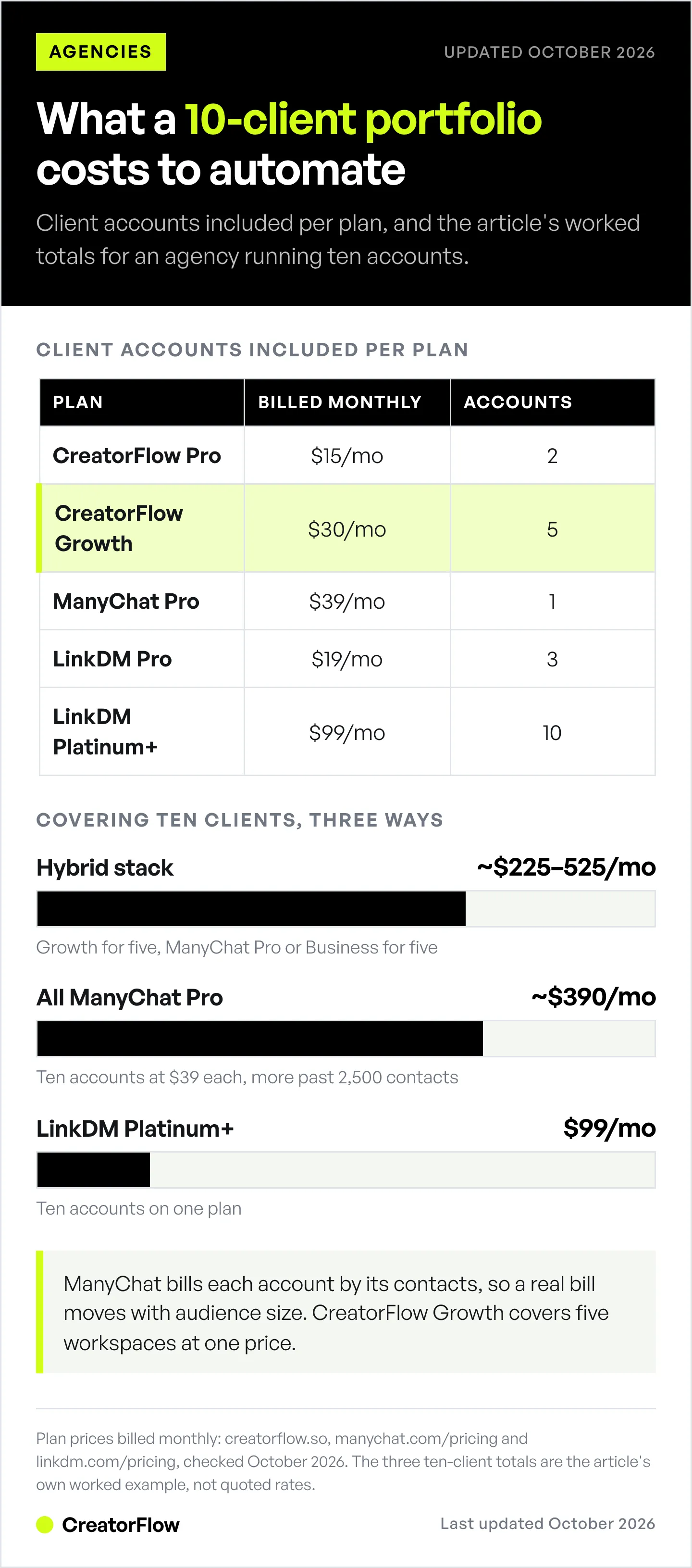
Agency Economics Example
Agency with 10 clients:
Option A: CreatorFlow + ManyChat Hybrid
- 5 low-volume clients on CreatorFlow Growth: $30/mo
- 5 multi-channel clients on ManyChat: $39-$99/mo each on Pro or Business, depending on contacts ($195-$495/mo)
- Total: ~$225-$525/mo
Option B: All ManyChat
- 10 accounts on Pro at $39/mo each, up to 2,500 contacts per account
- Total: ~$390/mo, more if a client passes 2,500 contacts
Option C: LinkDM Platinum+
- 10 accounts on one plan
- Total: $99/mo
All prices billed monthly, checked October 2026.
The right choice depends on contact volume, feature needs, and team size.
Client Billing Models
How agencies charge clients for DM automation:
| Model | Structure | Pros | Cons |
|---|---|---|---|
| Included | Part of retainer | Simpler billing | Eats into margins |
| Add-on | $50-200/mo extra | Direct revenue | Client may decline |
| Performance | % of attributed sales | Aligns incentives | Complex tracking |
| Setup + Maintenance | $300 setup + $50/mo | Covers time | Lower ongoing revenue |
Most agencies include basic automation in retainer, charge add-on fees for advanced workflows.
Best Practices for Agency DM Automation
1. Standardize Onboarding
Create a checklist. Every new client follows the same process:
- Collect Instagram Business account access
- Connect via OAuth (client does this)
- Create workspace with naming convention
- Set up 1-2 core automations
- Test with sample triggers
- Assign team permissions (in tools with team roles)
- Send client their view-only access (if your tool has it)
2. Name Workspaces Consistently
Use a naming convention:
- ✅ Good: ClientName_IG or ClientName_Instagram
- ❌ Bad: fitness client or new one
When you have 15 workspaces, naming matters.
3. Document Client-Specific Settings
For each client, maintain:
- Trigger keywords and what they send
- Brand voice notes (casual? professional?)
- Approved link destinations
- Contact for escalations
Store in Notion, Google Docs, or your project management tool. Pair these documents with a shared content planning workflow for agencies so posting schedules and DM triggers stay in sync across every client.
For a version of this tailored to agency owners, see CreatorFlow for agencies.
4. Set Response Boundaries
Automation handles first touch. Define when humans take over:
- Automated: First DM with link/resource
- Human: Follow-up questions, complaints, complex requests
Don’t try to automate everything. Some conversations need humans.
5. Monthly Audit Cycle
Every month:
- Review click rates (under 15%? rewrite message)
- Check for broken links
- Update seasonal content
- Remove discontinued products/offers
- Pull and send client reports
FAQ
How many Instagram accounts can I manage from one tool?
Depends on the tool. CreatorFlow Growth: 5 workspaces. LinkDM Platinum+: 10 accounts. ManyChat connects one Instagram account per ManyChat account, and each account has its own contact-based plan, so you can add as many as you pay for. Most agencies start with 5-10 client accounts and migrate to higher-tier tools as they grow.
Do clients need to share their Instagram password?
No. All modern tools use OAuth authentication through Facebook. Clients log in themselves and grant permissions. They never share passwords and can revoke access anytime.
Can different team members manage different client accounts?
Yes, with tools that support team permissions (ManyChat, Respond.io). You assign specific team members to specific accounts with role-based access (admin, editor, viewer).
What’s the best tool for 5 clients vs 20 clients vs 50 clients?
5 clients: CreatorFlow Growth ($30/mo), simple, flat-rate, Instagram-first. 10-20 clients: LinkDM Platinum+ ($99/mo for 10 accounts) or ManyChat, which bills each account separately ($17-$199/mo each, by contacts) and adds team features and multi-platform channels. 50+ clients: ManyChat accounts at volume or Respond.io (from $99/mo billed monthly), depending on channel needs.
How do I report results to clients?
Pull metrics from your automation tool: triggers, DMs sent, click rate, conversions. Translate to business outcomes (revenue, leads, bookings). Send monthly summary reports. Consider Looker Studio (formerly Google Data Studio) dashboards for real-time client access.
What if a client’s automation violates Instagram rules?
All tools covered here use Instagram’s official API, which keeps ban risk minimal. Respect the 24-hour messaging window, and note that the ~200 DMs/hour figure is a tool-side pacing convention, not a Meta-published limit. Don’t automate cold outreach, only respond to user-initiated interactions (comments, story replies, keyword DMs).
Get Started with Multi-Account Automation
For smaller agencies (5 clients or fewer):
- Start with CreatorFlow Pro ($15/mo), or Growth ($30/mo) for up to 5 workspaces
- Create one workspace per client
- Set up core automations
- Move up a tier as your client roster grows
For growing agencies (10+ clients):
- Evaluate ManyChat Pro pricing based on contact volume
- Set up team permissions and roles
- Create standardized onboarding process
- Build monthly reporting templates
The time it gives back, most of the 10-15 hours a week spent copy-pasting links, covers the tool cost in the first month.
Related Articles
- Best Instagram DM Automation Tools Compared (2026)
- Comment-to-DM Automation Setup Guide
- How to Manage Multiple Instagram Accounts
- Instagram Graph API Rate Limits Explained
- What is a DM Funnel? Complete Guide
- How to Manage Multiple Social Media Accounts at Scale
Sources
- CreatorFlow Pricing: creatorflow.so/pricing and agency program (October 2026)
- ManyChat Pricing: manychat.com/pricing (October 2026)
- ManyChat accounts and billing: ManyChat community forum (October 2026)
- LinkDM Pricing: linkdm.com/pricing (October 2026)
- Respond.io Pricing: respond.io/pricing (October 2026)
- Instagram Graph API Documentation: developers.facebook.com (April 2026)


