
An Instagram content calendar is a planning system that maps out what you post, when you publish, and which format you use across days or weeks. It replaces the daily “what should I post?” panic with a structured workflow. Creators who batch content with a calendar cut planning time by 50-60% and post 3-5x more consistently than those who wing it. Six tools handle this in 2026: Later ($25/mo), Hootsuite ($99/mo), Buffer (free-$5/channel/mo), Metricool (free-$22/mo), Notion (free), and Google Sheets (free).
You post a Reel on Monday. Get decent engagement. Then nothing for 5 days because you ran out of ideas. By the time you post again, the algorithm has moved on. Your followers forgot you exist. The cycle repeats.
This is the #1 reason creators stall between 1K and 10K followers. Not content quality. Not the algorithm. Inconsistency.
A content calendar fixes this. You plan a week or two ahead, batch your content creation into focused sessions, and publish on a predictable schedule that trains both the algorithm and your audience to expect you. This guide walks through the exact system: what goes in the calendar, which tools to use, how to build one in under an hour, and how to pair it with DM automation so every post converts.
Key Takeaways
- Consistent posters earn ~5x more engagement per post than inconsistent posters, based on Buffer’s analysis of 100K+ users (buffer.com/resources/how-often-to-post-on-instagram, April 2026)
- Batch planning saves time: Creators using a content calendar cut planning time by 50-60% compared to brainstorming from scratch daily
- 6 tools compared: Later ($25/mo), Hootsuite ($99/mo), Buffer (free for 3 channels), Metricool (free for 50 posts/mo), Notion (free), and Google Sheets (free)
- Optimal posting frequency: 3-5 feed posts per week yields about 12% more reach per post vs. 1-2 posts per week; beyond 5x shows diminishing returns (buffer.com/resources/how-often-to-post-on-instagram, April 2026)
- Best time to post: Wednesday 11 AM - 1 PM local time, based on 9.6 million posts analyzed by Buffer (buffer.com/resources/when-is-the-best-time-to-post-on-instagram, April 2026)
- Content pillars are the backbone: Pick 3-5 recurring themes (education, entertainment, promotion, behind-the-scenes, community) and rotate through them weekly
- Bottom line: Spend 2-3 hours on Sunday building your week’s calendar, batch-create content, schedule it, and pair each post with a keyword CTA + DM automation to turn engagement into revenue on autopilot

Why a Content Calendar Changes Everything
The creators posting consistently for years don’t have more willpower than you. They have a system. An Instagram content calendar is that system.
What a content calendar does:
- Eliminates the daily “what do I post?” decision fatigue
- Ensures a balanced content mix (not 5 product promos in a row)
- Creates space between planning and creating, which improves quality
- Keeps teams aligned when multiple people touch your account
- Reveals gaps before they happen (a whole week without a Reel, no educational content for 10 days)
What happens without one:
- Posting spikes and gaps that confuse the algorithm
- Reactive content that chases trends instead of building authority
- Burnout from the pressure to create something original every single day
- Missed opportunities during launches, holidays, and cultural moments
Instagram’s algorithm evaluates your posting patterns over your last 9-12 posts to categorize your account and decide who to show your content to (Hootsuite, hootsuite.com/blog/instagram-algorithm, April 2026). Sporadic posting sends mixed signals. Consistent, pillar-based posting trains the algorithm to understand your niche and surface your content to the right audience.
For a full walkthrough of choosing your recurring themes, read our guide on Instagram content pillars that attract ideal clients.
What Goes in an Instagram Content Calendar
Your calendar needs enough structure to be useful without becoming a chore to maintain. Here are the fields every Instagram content calendar should include:
Core fields (required):
| Field | Purpose | Example |
|---|---|---|
| Date and time | When the post goes live | Tues, April 15 at 12 PM EST |
| Content type | Format of the post | Reel, Carousel, Single image, Story |
| Topic/caption draft | What the post is about | ”3 signs your automation is broken” |
| Content pillar | Which theme it falls under | Education, Promotion, BTS |
| CTA | What you want people to do | Comment “GUIDE” for free PDF |
| Visual status | Is the asset ready? | Draft, Filming, Edited, Done |
| Publish status | Where in the workflow | Planned, Scheduled, Published |
Extra fields for teams:
| Field | Purpose |
|---|---|
| Assignee | Who creates this piece |
| Approval status | Pending, Approved, Needs revision |
| Notes for designer | Specific visual direction |
| Hashtag set | Pre-researched hashtag groups |
| Link/UTM | Trackable URL for CTA |
Solo creator shortcut: You can strip this down to Date, Content type, Topic, Pillar, and CTA. Five columns. That’s it. The goal is a calendar you’ll maintain, not a spreadsheet you’ll abandon by week two.
Build content pillars first
Before filling in your calendar, you need content pillars. These are 3-5 recurring themes you rotate through so you always know what to post.
Example pillar frameworks by niche:
Fitness creator:
- Workouts (40%) - Exercise tutorials, form breakdowns
- Nutrition (20%) - Meal prep, supplement reviews
- Client wins (20%) - Transformations, testimonials
- Day-in-the-life (10%) - BTS, relatable moments
- Promos (10%) - Program launches, affiliate links
- Strategy (30%) - Marketing tips, business frameworks
- Mindset (20%) - Lessons learned, perspective shifts
- Client results (20%) - Case studies, revenue screenshots
- Personal brand (20%) - Story-based content, values
- Offers (10%) - Course launches, free resources
E-commerce brand:
- Product showcase (30%) - Features, styling, use cases
- Education (25%) - How-tos, buying guides
- UGC/Social proof (20%) - Customer photos, reviews
- Behind-the-scenes (15%) - Production, team, sourcing
- Promotions (10%) - Sales, limited drops, bundles
The pillar split doesn’t need to be exact. The point is having a framework that prevents you from posting 5 product promos in a row or going two weeks without educational content.
For 15 proven content formats you can plug into these pillars, check our repeatable Instagram content ideas guide.
6 Content Calendar Tools Compared (2026)
Every tool below works for Instagram content planning. The right one depends on your budget, team size, and whether you need scheduling built in.
1. Later - Best for Visual Planners
Later is built around Instagram’s visual nature. Its drag-and-drop calendar lets you preview how your grid will look before publishing, which matters if aesthetic cohesion is part of your brand.
Pricing: Starter plan at $25/month includes 1 social set and scheduling. Growth plan at $45/month adds unlimited posts and analytics. No free plan (14-day trial only) (later.com/pricing, April 2026).
Best for: Solo creators and small brands who care about grid aesthetics.
Strengths:
- Visual grid preview before publishing
- Optimal posting time suggestions
- Linkin.bio tool for driving traffic
- Hashtag suggestions built in
Limitations:
- Free plan discontinued in 2024 (14-day trial only)
- Limited analytics on Starter plan
- No DM automation or engagement features
2. Buffer - Best Free Option
Buffer uses a queue-based system. You set posting times in advance, drop content into the pipeline, and it publishes automatically. The free plan covers 3 channels with up to 10 posts per channel per month.
Pricing: Free plan for 3 channels (10 posts/channel/month). Essentials at $5/month per channel adds unlimited posts and analytics. Team at $10/month per channel adds collaboration (buffer.com/pricing, April 2026).
Best for: Budget-conscious creators who want a simple scheduling system.
Strengths:
- Genuinely useful free tier
- Clean, minimal interface
- AI-assisted caption writing
- Start Page (link-in-bio alternative)
Limitations:
- 10 posts/month on free plan is restrictive for daily posters
- No grid preview feature
- Basic analytics compared to Later or Hootsuite
3. Metricool - Best for Analytics + Planning
Metricool combines content planning with analytics in a single dashboard. You can schedule posts, track performance, and analyze competitor accounts from one place.
Pricing: Free plan includes 1 brand and 50 posts/month. Starter at $22/month adds 5 brands and unlimited posts. Advanced at $54/month adds competitor tracking and custom reports (metricool.com/pricing, April 2026).
Best for: Data-driven creators and agencies who want planning + analytics in one tool.
Strengths:
- 50 posts/month free is generous
- Competitor analysis built in
- Supports 10+ platforms
- Best time to post suggestions based on your data
Limitations:
- Interface is more complex than Buffer or Later
- Some features locked behind higher tiers
- Less Instagram-specific than Later
4. Hootsuite - Best for Teams and Agencies
Hootsuite is the enterprise option. It handles multi-platform publishing, social listening, analytics, and team collaboration at scale. The price reflects that positioning.
Pricing: Professional plan at $99/month includes 10 social accounts and unlimited posts. Team plan at $249/month adds 3 users and approval workflows. Enterprise pricing is custom (hootsuite.com/plans, April 2026).
Best for: Agencies and brands managing multiple accounts with team workflows.
Strengths:
- Centralized dashboard for all platforms
- Advanced analytics and custom reports
- Social listening and brand monitoring
- Approval workflows for teams
Limitations:
- Expensive for solo creators ($99/month minimum)
- Built for teams, so a solo creator meets features they will not use
- No visual grid preview like Later
5. Notion - Best for Custom Workflows
Notion isn’t a social media tool, but thousands of creators use it as a content calendar because it’s flexible enough to build exactly what you need. Combine databases, Kanban boards, and calendar views to create a planning system that fits your workflow.
Pricing: Free for personal use (unlimited blocks). Plus at $10/month adds file uploads and advanced features. Templates for content calendars are available for free in the Notion community (notion.so/pricing, April 2026).
Best for: Creators who want a customizable planning system and don’t need auto-scheduling.
Strengths:
- Completely customizable (build your dream calendar)
- Free for personal use
- Content library + calendar + kanban in one workspace
- Thousands of free templates available
Limitations:
- No auto-scheduling to Instagram (manual publishing required)
- No Instagram-specific features (grid preview, hashtag suggestions)
- Requires setup time to build your system
6. Google Sheets - Best for Simple and Free
Google Sheets is the zero-cost option. Build a spreadsheet with columns for date, content type, caption, hashtags, and status. Share it with your team. Done.
Pricing: Free.
Best for: Anyone who wants a simple, no-frills planning system without learning a new tool.
Strengths:
- Completely free
- Everyone knows how to use it
- Easy to share and collaborate
- No learning curve
Limitations:
- No auto-scheduling (manual publishing)
- No analytics, grid preview, or hashtag tools
- You have to build the calendar yourself
- Doesn’t scale well for teams managing multiple accounts
Quick Comparison Table
| Tool | Price | Features (Auto-Schedule, Grid Preview) | Analytics | Best For |
|---|---|---|---|---|
| Later | $25/mo+ | Auto-schedule, Grid preview | Yes | Visual planners |
| Buffer | Free-$5/mo | Auto-schedule | Basic | Budget creators |
| Metricool | Free-$22/mo | Auto-schedule | Advanced | Data-driven creators |
| Hootsuite | $99/mo+ | Auto-schedule | Advanced | Teams/agencies |
| Notion | Free-$10/mo | Manual only | No | Custom workflows |
| Google Sheets | Free | Manual only | No | Simple planning |
How to Build Your Instagram Content Calendar in 1 Hour
Here’s the step-by-step process. Block 60 minutes on Sunday and follow these six steps.
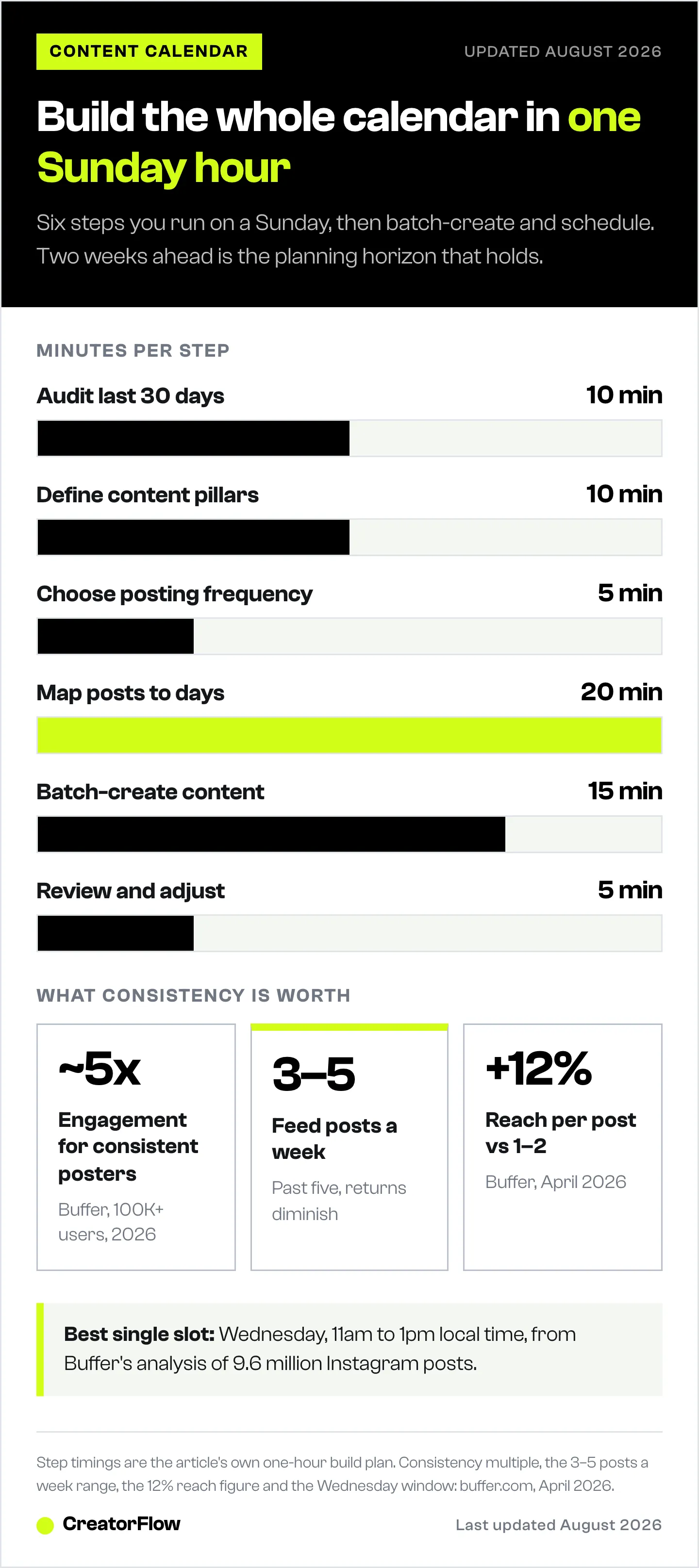
Step 1: Audit your last 30 days (10 minutes)
Open Instagram Insights and answer these questions:
- Which 3 posts got the most saves?
- Which Reels had the highest reach?
- What content types performed best (Reels vs Carousels vs Singles)?
- What topics generated the most comments?
- When were your followers most active?
Write down the patterns. This data shapes your calendar, not guesswork.
Step 2: Define your content pillars (10 minutes)
Pick 3-5 recurring themes based on what works (Step 1) and what your audience needs. If you already have pillars, review whether they still match your goals.
Need help here? Our full content pillars guide walks through the framework.
Step 3: Choose your posting frequency (5 minutes)
Be honest about what you can sustain. A realistic schedule you follow beats an ambitious one you abandon.
Recommended starting points:
- Beginners: 3 feed posts per week + daily Stories
- Growing creators: 5 feed posts per week + daily Stories + 1 Live per week
- Established accounts: Daily feed posts + multiple Stories + weekly Lives
Adam Mosseri (Instagram Head) has confirmed that consistency matters more than volume. Three posts per week, every week, outperforms seven posts one week and zero the next.
Step 4: Map posts to your calendar (20 minutes)
Open your tool of choice (or a blank spreadsheet) and fill in:
- Assign content pillars to days (e.g., Monday = Education, Wednesday = BTS, Friday = Promotion)
- Write a one-line topic for each slot
- Note the content type (Reel, Carousel, Single image)
- Add a CTA for each post (what you want people to do)
- Plan 2 weeks ahead, not more
Example week for a fitness creator:
| Day | Pillar | Topic | Format | CTA |
|---|---|---|---|---|
| Mon | Education | 3 form mistakes on squats | Reel | Comment “FORM” for checklist |
| Tue | Nutrition | High-protein meal prep under $5 | Carousel | Comment “MEALS” for recipes |
| Wed | BTS | My morning routine at 5 AM | Stories | Poll: “Are you a morning person?” |
| Thu | Client Win | Sarah’s 12-week transformation | Reel | Comment “PLAN” for program details |
| Fri | Promo | Spring program enrollment open | Single image | Link in bio |
Step 5: Batch-create your content (15 minutes of planning)
Content batching means creating multiple pieces in one focused session instead of making one post per day. Here’s how to organize it:
- Mondays: Write all captions for the week (30-60 min)
- Tuesdays: Film all Reels and photos in one session (1-2 hours)
- Wednesdays: Edit and schedule everything (30-60 min)
- Rest of week: Engage with comments, respond to DMs, create Stories in real-time
This batching structure means you spend about 3-4 hours per week on planned content instead of 1-2 hours every single day. That’s 3-10 hours saved per week.
For batch-friendly content formats, check our guide on repeatable Instagram content ideas.
Step 6: Review and adjust weekly (5 minutes)
Every Sunday before planning the next week:
- Check what hit and what flopped
- Move underperforming content types to a different day or format
- Spot any pillar imbalances
- Add timely hooks for trending topics
The calendar is a living document, not a rigid script. Adjust it based on what the data tells you.
Pair Your Calendar with DM Automation
A content calendar tells you what to post and when. DM automation tells you what happens after someone engages. Together, they turn your Instagram from a content machine into a lead generation system.
How the system works:
- Your calendar ensures you post consistently (3-5x per week)
- Every post includes a keyword CTA (“Comment GUIDE for the free PDF”)
- DM automation instantly sends the resource when someone comments the keyword
- The DM captures their email before delivering the link
- You build your email list, deliver value, and never miss a lead
Example flow:
Your calendar says “Wednesday = Education Reel about meal prep.” You create the Reel, end it with “Comment MEALS for my free recipe PDF,” and set up a comment-to-DM automation in CreatorFlow. Every comment triggers an instant DM. You don’t touch your phone.
This is the difference between creators who get engagement and creators who get revenue. The calendar drives the engagement. The automation captures the value.
For the full setup walkthrough, read our Instagram DM automation guide.
What CreatorFlow adds to your calendar workflow:
- Instant DM replies when someone comments your trigger word (under 10 seconds)
- Email capture within the DM conversation (build your list while you sleep)
- Link tracking so you know which posts drive the most clicks
- Works with any scheduling tool (Later, Buffer, Metricool, or manual posting)
Get started with CreatorFlow for free - 500 DMs/month.
Content Calendar Templates You Can Copy
If you don’t want to build from scratch, start with one of these. Our own free Instagram content calendar template includes 180+ key dates and a weekly planning process built for creators.
Google Sheets template: HubSpot offers a free social media content calendar template with monthly planning, platform-specific tabs (including Instagram), and a content repository. Download it at hubspot.com/social-media-content-calendar (email required).
Notion templates: Search “Instagram content calendar” in the Notion template gallery. Dozens of free options with database views, Kanban boards, and calendar layouts.
Later templates: Later provides a free content calendar template on their blog that you can adapt to Google Sheets or Notion.
DIY in 5 minutes: Open a new Google Sheet. Create columns for Date, Day, Pillar, Topic, Format, Caption Draft, CTA, Status. Fill in 2 weeks. That’s your V1.
Common Content Calendar Mistakes
Planning too far ahead. Two weeks is the sweet spot. Anything beyond that feels stale by publish day and kills your flexibility to respond to trends.
Overcomplicating the system. If your calendar has 15 columns and color-coded conditional formatting, you’ll abandon it by week three. Start simple. Add complexity only when you need it.
Ignoring your data. A calendar based on “what I feel like posting” isn’t a strategy. Check your Insights before planning each week. Double down on formats and topics your audience responds to.
Not including CTAs. Every post should ask the audience to do something: comment a keyword, save the post, share it, visit a link. Without a CTA, engagement stops at a like.
Treating it as a rigid script. Breaking news in your niche? Trending audio that fits your brand? Push a planned post to next week and ride the wave. Flexibility within structure is the goal.
Forgetting Stories. Your calendar should include Stories, even if the entries are less detailed. Stories keep you visible between feed posts and drive direct engagement through polls, questions, and reply stickers.
FAQ
How often should I post on Instagram in 2026?
3-5 feed posts per week is the recommended range for most creators and brands. Instagram Head Adam Mosseri has confirmed that consistency matters more than volume. Posting 3 times per week, every week, outperforms posting daily for one week and disappearing the next. Add daily Stories to stay visible between feed posts.
What’s the best free Instagram content calendar tool?
Google Sheets and Notion are both free and flexible enough for content calendar use. For a tool with built-in scheduling, Buffer’s free plan covers 3 channels at 10 posts per channel per month, and Metricool’s free plan allows 50 posts per month across 1 brand (buffer.com/pricing, metricool.com/pricing, April 2026).
How far in advance should I plan my Instagram content?
Two weeks ahead works for most creators. That gives you enough runway to batch content and stay consistent without locking yourself into posts that feel outdated by publish day. For product launches or campaigns, plan those 4-6 weeks out while keeping your regular content on a shorter horizon.
Can I use a content calendar with DM automation?
Yes, and you should. Your content calendar determines what you post and when. DM automation handles what happens after someone engages. Add a keyword CTA to each post in your calendar (like “Comment LINK for the free guide”), then set up comment-to-DM automation to respond instantly. This turns your content calendar into a lead generation system.
What’s the difference between a content calendar and a content planner?
Most creators use the terms interchangeably. If there’s a distinction, a content calendar focuses on the publishing schedule (what goes live when), while a content planner includes the brainstorming and strategy phase (content pillars, audience research, campaign goals). In practice, a good content calendar handles both.
Do I need a paid tool for my content calendar?
No. Google Sheets or Notion work for solo creators and small teams. Paid tools like Later ($25/month) or Buffer ($5/month per channel) add convenience features like auto-scheduling, analytics, and grid previews. If you’re posting 3-5 times per week, the time saved by auto-scheduling pays for itself.
Related Reading
- How to Schedule Instagram Posts: 5 Methods
- Instagram Content Pillars: Attract Ideal Clients
- 15 Instagram Post Ideas for Engagement
- Instagram Content Hooks: 50 Templates That Stop the Scroll
- Instagram DM Automation: How to Set Up in 5 Min
- Instagram Marketing Calendar: US and EU Key Dates
Sources
- Social Insider, “Instagram Engagement Rate,” socialinsider.io/blog/instagram-engagement-rate (accessed April 12, 2026)
- Hootsuite, “Instagram Algorithm 2026,” hootsuite.com/blog/instagram-algorithm (accessed April 12, 2026)
- Later, “Pricing,” later.com/pricing (accessed April 12, 2026)
- Buffer, “Pricing,” buffer.com/pricing (accessed April 12, 2026)
- Metricool, “Pricing,” metricool.com/pricing (accessed April 12, 2026)
- Hootsuite, “Plans,” hootsuite.com/plans (accessed April 12, 2026)
- Notion, “Pricing,” notion.so/pricing (accessed April 12, 2026)
- HubSpot, “Free Social Media Content Calendar Template,” hubspot.com/social-media-content-calendar (accessed April 12, 2026)


