
To schedule an Instagram post: open the app and tap Create, select your photo or video, add your caption, tap More options, turn on Schedule this post, pick a date and time, then tap Schedule. You need a public account. Instagram allows 25 scheduled posts per day, up to 30 days ahead, covering photos, carousels, and Reels (help.instagram.com, August 2026).
Five methods work in 2026: Instagram’s native scheduler, Meta Business Suite, third-party tools like Buffer and Later, the Content Publishing API, and scheduling paired with DM automation. This guide compares all five on cost, what each one can queue, and where each one breaks.
Posting live, every day, at the right hour is the part most creators drop first. Scheduling fixes that. Set your posts to publish automatically at the exact times your audience is online. No alarms. No “I forgot to post today” panic. Your content goes out whether you’re sleeping, working, or on vacation.
This guide covers five ways to schedule Instagram posts in 2026 - from Instagram’s built-in scheduler to third-party tools that handle your entire content calendar. Pair scheduling with Instagram DM automation and your content works around the clock. You’ll learn which method fits your workflow, what each one costs, and the best times to hit publish based on data from 9.6 million posts.
Key Takeaways
- 5 scheduling methods available: Native Instagram app, Meta Business Suite, third-party tools, Content Publishing API, and scheduling paired with DM automation
- All public accounts can schedule now: Since March 1, 2026, Instagram has extended scheduling to Personal public accounts (previously Professional-only)
- Best free option: Metricool offers 50 posts/month free; Meta Business Suite is unlimited but requires a Business account
- Best posting time: Wednesday at 12 PM or 6 PM shows the highest engagement across 9.6 million posts analyzed by Buffer
- Scheduling does not hurt reach: Hootsuite’s 2026 research found no measurable difference between scheduled and manually published posts
- Bottom line: Batch-create content on Sunday, schedule it for optimal times, and pair with DM automation to convert comments into leads on autopilot

What Changed in March 2026: Scheduling for Everyone
Instagram made a significant change on March 1, 2026. Scheduling, insights, and trending audio tools are now available to all public accounts. Previously, you needed a Professional (Creator or Business) account to access these features. Instagram’s own help page now states the only requirement is a public account (help.instagram.com/439971288310029, August 2026).
| Account Type | Scheduling Access | Other Features |
|---|---|---|
| Personal (public) | Full scheduling access | Insights, trending audio. No Trial Reels, Channels, or monetization |
| Professional (public) | Full scheduling access | Full access including monetization and ads |
| Private account | No scheduling | No scheduling, insights, or trending audio |
What you can schedule natively:
- Single image posts
- Carousel posts
- Reels (with some audio restrictions)
What you cannot schedule natively:
- Stories (use Meta Business Suite or third-party tools)
- Live videos (calendar reminders only)
- Collaborative/co-author posts
- Reels with licensed music or AR effects (may fall back to reminder)
Scheduling limits: Up to 25 posts per day, 30 days in advance (help.instagram.com/439971288310029, August 2026).
Method 1: Schedule Directly in the Instagram App
The fastest way to schedule. No extra tools, no cost, no setup.
Step-by-Step Setup
- Open Instagram and tap + to create a new post or Reel
- Add your photo/video, caption, hashtags, location, and tags as normal
- Before hitting “Share,” tap Advanced Settings at the bottom
- Toggle Schedule this post to on
- Pick your date and time (up to 30 days out)
- Tap Schedule to confirm
Your post is now queued. Find all scheduled posts under your profile in the Scheduled content section. You can edit the caption or reschedule before it goes live.
When to Use This Method
- You’re scheduling 1-3 posts ahead
- You prefer working on mobile
- You don’t need a visual content calendar
- You want zero cost
Limits
- 25 scheduled posts per day maximum
- 30 days in advance maximum
- No bulk scheduling (one post at a time)
- Mobile-only workflow
- Cannot schedule Stories
Best For
Solo creators who post 1-2 times per day and want zero extra tools or costs.
Method 2: Schedule via Meta Business Suite (Free)
Meta Business Suite adds two things the native app can’t do: Story scheduling and desktop scheduling. It’s free and works on both web and mobile.
What You Can Schedule
- Posts (single image, carousel)
- Reels
- Stories (the only free method to schedule Stories)
- Cross-post to Facebook simultaneously
Step-by-Step Setup
- Go to business.facebook.com or open the Meta Business Suite app
- Click Create Post or Create Reel or Create Story
- Select your Instagram account
- Add your content, caption, and settings
- Click the dropdown arrow next to “Publish” and select Schedule
- Pick your date and time
- Click Schedule
Requirements
- Instagram Business account connected to a Facebook Page
- Free Facebook Page (takes 2 minutes to create)
- Creator accounts work for most features, but some API-based scheduling requires Business
Known Limitations
- Cannot schedule carousels with music from the web interface
- The workflow runs through a separate desktop product rather than the Instagram app itself
- Same 25 posts/day and 30-day limits apply
Best For
Creators and small businesses who need Story scheduling and desktop access without paying for third-party tools.
Method 3: Use a Third-Party Scheduling Tool
Third-party tools add features Instagram and Meta Business Suite don’t offer: visual grid planners, AI caption writers, optimal time suggestions, bulk scheduling, multi-platform publishing, and team collaboration.
Top 5 Instagram Scheduling Tools Compared (April 2026)
| Tool | Free Plan | Cheapest Paid | Best For | Standout Feature |
|---|---|---|---|---|
| Buffer | Yes (3 channels, 10 posts) | $5/mo per channel | Budget-conscious creators | Per-channel pricing |
| Metricool | Yes (1 brand, 50 posts) | $22/mo | Analytics-focused marketers | Free plan + competitor analysis |
| Later | No (14-day trial) | $25/mo | Visual-first planners | Grid preview + Linkin.bio |
| Planoly | Limited (30 uploads total) | $16/mo | Instagram-focused creators | Visual grid planner |
| Hootsuite | No | $199/mo | Enterprise/agency teams | Unified inbox + AI assistant |
Pricing verified April 2026. Sources: buffer.com/pricing, metricool.com/pricing, later.com/pricing, planoly.com/pricing, hootsuite.com/plans
Buffer - Best Value for Solo Creators
Pricing: Free (3 channels, 10 scheduled posts) | $5/month per channel (unlimited posts) | $10/month per channel for teams (buffer.com/pricing, April 2026)
Why creators pick it: Per-channel pricing means you pay only for what you use. One Instagram account costs $5/month with unlimited scheduled posts. Add TikTok for another $5. No forced bundles.
Key features:
- AI Assistant for caption generation
- First comment scheduling (post hashtags as first comment)
- Hashtag manager
- Start page (link-in-bio)
- Approval workflows on Team plan
Outside scope: Buffer does not include a visual grid preview. If you want to see the layout before you publish, map it in the free Instagram feed planner first.
Metricool - Best Free Option
Pricing: Free (1 brand, 50 posts/month) | $22/month Starter (5 brands, 2,000 posts) | $54/month Advanced (metricool.com/pricing, April 2026)
Why creators pick it: The free plan is the most generous of any scheduling tool - 50 posts/month for 1 brand. Paid plans include competitor analysis (track up to 100 competitor profiles on Starter).
Key features:
- SmartLinks (link-in-bio tool)
- Competitor analysis (5 free, 100 on Starter)
- Analytics with PDF/PPT export
- Looker Studio integration (Advanced)
- Annual billing saves ~18% (two months free)
Outside scope: The free plan covers Instagram and Facebook posting only (metricool.com/pricing, April 2026).
Later - Best for Visual Planning
Pricing: $25/month Starter (1 social set, 30 posts) | $45/month Growth (3 social sets, 150 posts) | $80/month Advanced (6 social sets, unlimited) (later.com/pricing, April 2026)
Why creators pick it: The visual content calendar and grid preview let you see exactly how your Instagram feed will look before publishing. Drag-and-drop scheduling.
Key features:
- Visual grid preview (see your feed layout)
- Linkin.bio (link-in-bio with analytics)
- Best time to post suggestions
- Hashtag suggestions
- AI caption writer
Outside scope: No free plan, 14-day trial only. At $25/month for 30 posts, Later works out to about $0.83 per scheduled post, the highest per-post price in this table (later.com/pricing, April 2026).
Planoly - Best Instagram-First Experience
Pricing: $16/month Starter (1 social set, 60 uploads) | $28/month Growth (unlimited uploads, 3 users) | $43/month Pro (2 social sets, 6 users) (socialrails.com/blog/planoly-pricing, April 2026)
Why creators pick it: Built specifically for Instagram from day one. The visual planner is intuitive and the grid preview is the best in class.
Key features:
- Visual grid planner with drag-and-drop
- AI caption writer
- Analytics dashboard
- Hashtag manager
- Social inbox (Growth plan and above)
Outside scope: The free plan is capped at 30 uploads in total, not 30 per month. A social set covers 9 platforms, with Instagram as the primary focus.
Hootsuite - Best for Teams and Agencies
Pricing: $199/month Standard (1 user, 10 accounts) | $399/month Advanced (per seat, unlimited accounts) (hootsuite.com/plans, napoleoncat.com/blog/hootsuite-pricing, April 2026)
Why teams pick it: Enterprise-grade features: unified inbox across all platforms, AI assistant (OwlyGPT), bulk scheduling (350 posts at once on Advanced), Salesforce integration.
Key features:
- Bulk scheduling (up to 350 posts)
- OwlyGPT AI assistant
- Unified social inbox
- Competitor benchmarking
- Sentiment analysis
Scope: Advanced is priced per seat, so a team of 5 costs about $2,000/month ($399 x 5). Hootsuite is built for agency and enterprise workflows rather than solo accounts.
Method 4: Schedule via Instagram’s Content Publishing API
For developers and teams building custom solutions. Instagram’s Content Publishing API lets you schedule posts programmatically.
Requirements
- Instagram professional account (Business or Creator). A Facebook Page is needed only if your app uses the Facebook Login path; the Instagram Login path connects without one (developers.facebook.com/docs/instagram-platform/overview, September 2026)
- Meta developer account with an approved app
- Access token with the content publishing permission
- Technical knowledge (REST API calls)
API Limits
- 100 API-published posts per 24-hour moving period per account, and the API can publish single images, videos, Reels, carousels and Stories (developers.facebook.com/docs/instagram-platform/content-publishing, September 2026)
- Non-messaging Instagram endpoints are rate-limited on a rolling 24-hour formula (calls within 24 hours = 4800 x number of impressions), not a flat hourly cap (developers.facebook.com/docs/graph-api/overview/rate-limiting, September 2026), see our Instagram API rate limits explained for the full breakdown
- Personal accounts cannot use the Content Publishing API. Both Business and Creator accounts can
Best For
SaaS companies, agencies building internal tools, or developers creating custom scheduling workflows. Not for individual creators.
Method 5: Combine Scheduling with DM Automation
Here’s where scheduling gets strategic. You schedule your post to go live at peak engagement time. Then you pair it with comment-to-DM automation that sends links, lead magnets, or booking calendars to everyone who comments a trigger word.
How the Combo Works
- Sunday: Batch-create 5 posts for the week
- Schedule: Set each post to publish at optimal times (see best times below)
- Set automation: Create a comment-to-DM trigger for each post
- Monday-Friday: Posts go live automatically. Comments trigger instant DMs. You do zero manual work.
Example Workflow
Tuesday 9 AM: Your scheduled Reel goes live showing a morning routine.
Caption includes: “Comment ROUTINE for my full product list with links”
9:01 AM: First comment drops: “ROUTINE”
9:01 AM: CreatorFlow sends an instant DM with your affiliate links.
You: Still asleep. Or at the gym. Or working. Doesn’t matter.
By pairing scheduling with DM automation, you handle both content distribution AND audience conversion on autopilot.
Tools like CreatorFlow ($15/month, flat rate) handle the DM automation side, and it is worth seeing how DM tool pricing compares side by side if you are budgeting for a scheduler and an automation tool at the same time. You schedule posts with any method above, then CreatorFlow watches for trigger comments and sends your pre-written DMs automatically using Meta’s official Instagram Graph API.
Does Scheduling Hurt Your Reach?
No. Hootsuite’s research found no measurable difference in reach or engagement between natively scheduled posts and manually published ones (Hootsuite, 2026). The algorithm treats them identically.
The only scenario where scheduling could affect performance: posting at a time when your audience isn’t active. The algorithm prioritizes recency, so posting when your followers are online matters more than how the post was published.
Best Times to Post on Instagram (2026 Data)
Buffer analyzed 9.6 million Instagram posts to find optimal posting times (buffer.com/resources/when-is-the-best-time-to-post-on-instagram, April 2026). Here’s what the data shows:
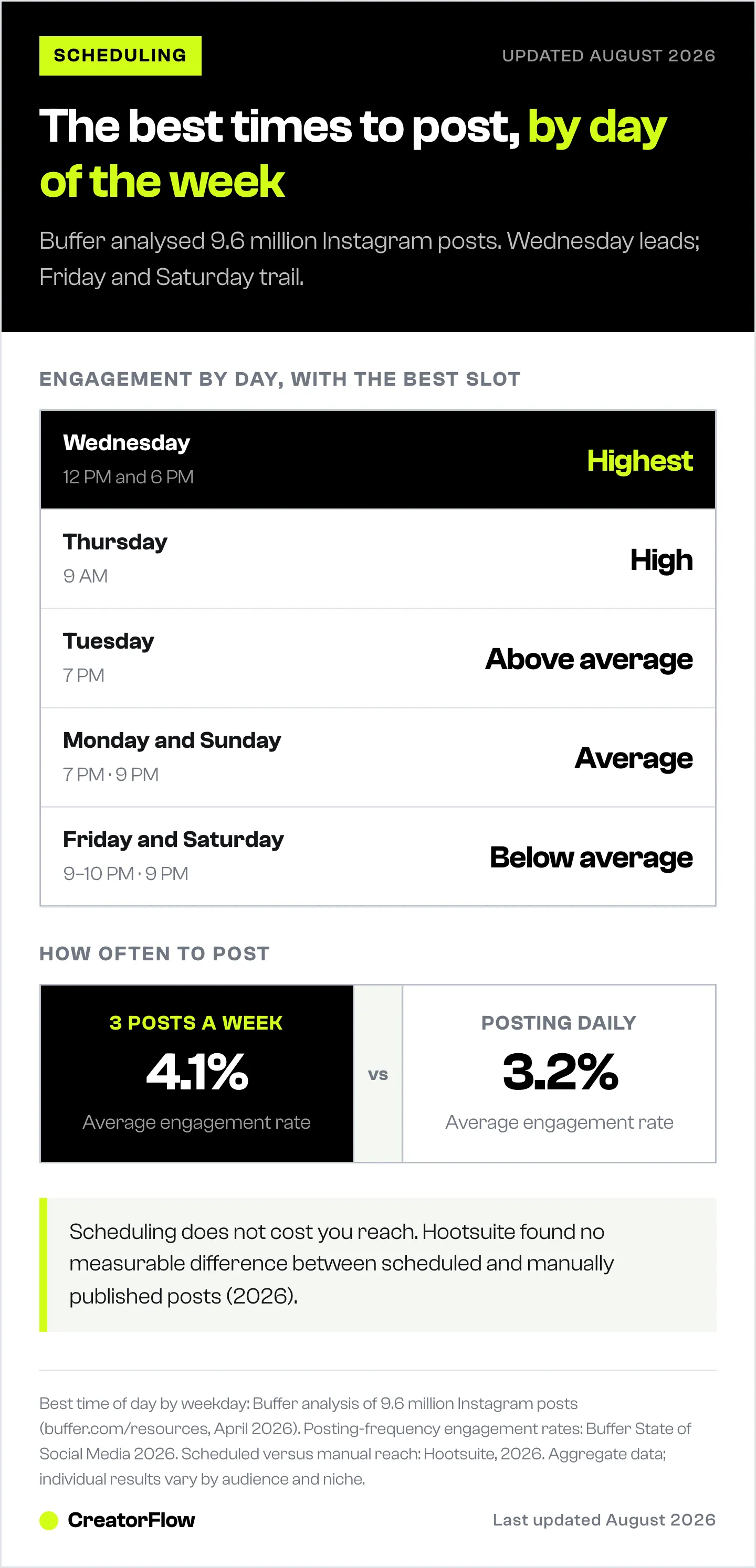
| Day | Best Time(s) | Engagement Level |
|---|---|---|
| Monday | 7 PM | Average |
| Tuesday | 7 PM | Above average |
| Wednesday | 12 PM, 6 PM | Highest |
| Thursday | 9 AM | High |
| Friday | 9-10 PM | Below average |
| Saturday | 9 PM | Below average |
| Sunday | 9 PM | Average |
Highlights from this data:
- Best day: Wednesday (highest engagement across all time zones)
- Best single time slot: Wednesday at 12 PM or 6 PM
- Evening dominance: 6-11 PM consistently outperforms morning hours
- Worst days: Friday and Saturday show lower engagement
- Dead zone: 1-5 AM receives the lowest engagement regardless of day
Content Format Performance
| Format | Avg. Engagement Rate | Reach |
|---|---|---|
| Carousels | 0.50% | Lower reach than Reels, same engagement rate |
| Reels | 0.50% | 36% more reach than carousels |
| Single images | 0.45% | Lowest reach, steady engagement |
Data from Social Insider Instagram Benchmarks and Buffer State of Social Media 2026
Takeaway: Reels get the most reach, and carousels engage at the same rate on less reach. Schedule mostly Reels and carousels, and use single images sparingly.
Posting Frequency
Buffer’s 2026 State of Social Media report found that accounts posting 3 times per week averaged 4.1% engagement, while daily posters averaged 3.2% (buffer.com/resources, 2026). Fewer, higher-quality posts outperform a daily content treadmill.
Instagram head Adam Mosseri recommends 1-2 Stories daily and a couple of feed posts per week (Buffer, 2026). Consistency beats volume.
Instagram Scheduling Limits Reference
| Limit | Value | Source |
|---|---|---|
| Max scheduled posts per day | 25 | Instagram Help Center |
| Max scheduling window | 30 days in advance | Instagram Help Center |
| Non-messaging API calls | 4800 x impressions per rolling 24 hours | developers.facebook.com |
| API-published posts per 24 hours | 100 per account | developers.facebook.com |
| Story duration after publishing | 24 hours (then disappears) | |
| Messaging window for DM automation | 24 hours after engagement | Meta Graph API docs |
How to Build a Weekly Instagram Scheduling Workflow
Stop posting randomly. Here’s a repeatable weekly system:
Sunday: Content Batch Day (2-3 hours)
- Create 5-7 posts for the week (mix of Reels, carousels, single images)
- Write captions with CTAs (“Comment LINK for…” if using DM automation)
- Select hashtags (3-5 relevant hashtags per post)
- Choose cover images for Reels
Sunday Evening: Schedule Everything (30 minutes)
- Open your scheduling tool of choice
- Set each post to your best times (start with Wednesday 12 PM, Thursday 9 AM, Tuesday 7 PM)
- Preview your grid layout (if using Later or Planoly)
- Set up DM automation triggers for each post (if using CreatorFlow)
- Double-check all links work
Monday-Friday: Monitor and Engage (15 min/day)
- Check that scheduled posts published correctly
- Respond to comments that need personal replies (not automated)
- Engage with your community (reply to DMs, comment on others’ posts)
- Check automation analytics (DMs sent, link clicks, email captures)
Saturday: Review and Adjust (30 minutes)
- Check which posts performed best (reach, saves, shares)
- Note which posting times drove the most engagement
- Review DM automation stats (CTR, emails collected)
- Plan next week’s content themes based on what worked
What this replaces: one 2-3 hour Sunday block plus about 15 minutes a day, instead of a posting session every single day.
Common Scheduling Mistakes (and How to Fix Them)
Mistake 1: Scheduling and Forgetting
Scheduling doesn’t mean ignoring your account. Instagram’s algorithm rewards active accounts. If you schedule 5 posts but never reply to comments or engage with others, your reach drops.
Fix: Schedule posts, but spend 15 minutes daily engaging. Reply to comments within the first hour of posting (this signals to Instagram that your post is generating conversation).
Mistake 2: Ignoring Time Zones
If your audience is in London but you schedule for 9 AM Pacific, your post goes live at 5 PM GMT. That might work, or it might miss the sweet spot entirely.
Fix: Check Instagram Insights for where your followers are located. Schedule based on their time zone, not yours.
Mistake 3: Only Scheduling Feed Posts
Reels reach further than static posts, with 36% more reach than carousels in the benchmark data above. Stories drive direct engagement. If you’re only scheduling single-image posts, you’re leaving reach on the table.
Fix: Schedule a mix: 2-3 Reels, 1-2 carousels, and daily Stories (via Meta Business Suite or third-party tools).
Mistake 4: Using the Same Hashtags on Every Post
Instagram’s algorithm treats repeated identical hashtag sets as potential spam. Your reach decreases over time.
Fix: Create 3-4 hashtag sets of 3-5 relevant tags each. Rotate between them. Focus on niche-specific hashtags rather than broad, high-volume ones.
Mistake 5: Not Pairing Scheduling with Automation
You schedule a post that gets 200 comments asking for a link. But you’re in meetings all day. By the time you respond, most of those commenters have moved on.
Fix: Set up comment-to-DM automation before your post goes live. Every “link please” comment gets an instant automated DM with your link. Zero manual work.
FAQ
Can I schedule Instagram Stories?
Not directly in the Instagram app. Stories can be scheduled through Meta Business Suite (free) or third-party tools like Later, Buffer, and Planoly. In Meta Business Suite, go to Create Story, add your content, then click Schedule instead of Share. Stories still disappear after 24 hours regardless of how they’re published.
How many Instagram posts can I schedule at once?
Instagram allows up to 25 scheduled posts per day, up to 30 days in advance (help.instagram.com, August 2026). Third-party tools like Hootsuite support bulk scheduling of up to 350 posts at once (on Advanced plans). There’s no limit on how many posts you can have scheduled in total - the 25/day limit applies to new schedules created per day.
Is scheduling posts bad for Instagram engagement?
No. Hootsuite tested this directly and found no measurable difference in reach or engagement between scheduled and manually published posts (Hootsuite, 2026). The algorithm treats them identically. What matters is posting when your audience is active, not how the post was published.
Do I need a Business account to schedule Instagram posts?
Not since March 1, 2026. Instagram extended scheduling to all public accounts, including Personal accounts (almcorp.com, April 2026). You still need a Professional account for monetization, ads, Trial Reels, and Channels. Meta Business Suite and third-party API-based scheduling still require a Business account connected to a Facebook Page.
Can I schedule Reels with trending audio?
It depends. Reels using original audio or royalty-free music can be scheduled and auto-published. Reels with licensed/copyrighted music or AR effects may fall back to a reminder-based system where you get a notification to publish manually. This applies to both native scheduling and third-party tools, as it’s an API limitation set by Meta.
What’s the best free Instagram scheduling tool?
Metricool offers the most generous free plan: 50 posts per month for 1 brand across Instagram and Facebook (metricool.com/pricing, April 2026). Buffer’s free plan covers 3 channels with 10 scheduled posts per channel. Meta Business Suite is completely free with unlimited scheduling but requires a Business account.
Can I schedule Instagram posts from my computer?
Yes. Three ways: (1) Meta Business Suite at business.facebook.com - free, works with any browser. (2) Instagram.com - Instagram’s web version supports scheduling for Business accounts. (3) Any third-party tool (Buffer, Later, Hootsuite, etc.) - all offer desktop web interfaces.
What happens if my scheduled post fails to publish?
Instagram and Meta Business Suite will notify you if a scheduled post fails. Common causes: your account got disconnected, the image file is corrupted, or your account was temporarily restricted. Third-party tools typically retry failed posts and send email alerts. Always check your scheduled posts the morning they’re set to publish, especially for time-sensitive content.
Can I edit a scheduled Instagram post?
In the native Instagram app, go to your profile, tap the hamburger menu, and select Scheduled content. From there you can edit captions, hashtags, and reschedule the date/time. Meta Business Suite allows editing in the Planner calendar. Most third-party tools also allow editing scheduled content before publish time.
Make Scheduling Work Harder with DM Automation
Scheduling gets your content in front of people at the right time. DM automation converts that attention into action. The two work together:
Scheduling alone: Post goes live at peak time. People comment. You respond hours later. Most have already moved on.
Scheduling + DM automation: Post goes live at peak time. People comment your trigger word. They get an instant DM with your link, lead magnet, or booking calendar. You respond in seconds, automatically, 24/7.
CreatorFlow handles the DM automation side for $15/month flat rate. No per-contact pricing. No complex workflow builders. Set up your trigger word, write your message, and every comment converts automatically.
Start your free trial at creatorflow.so
Disclaimer: Tool pricing and features mentioned in this article were verified as of May 2026. Pricing may change without notice. Instagram/Meta may update scheduling features, API limits, or terms at any time. Instagram is a trademark of Meta Platforms, Inc. CreatorFlow is not affiliated with, endorsed by, or sponsored by Meta Platforms, Inc. Buffer, Later, Hootsuite, Planoly, and Metricool are trademarks of their respective owners. Best posting times are based on aggregate data and individual results vary based on audience, niche, and content type.


