

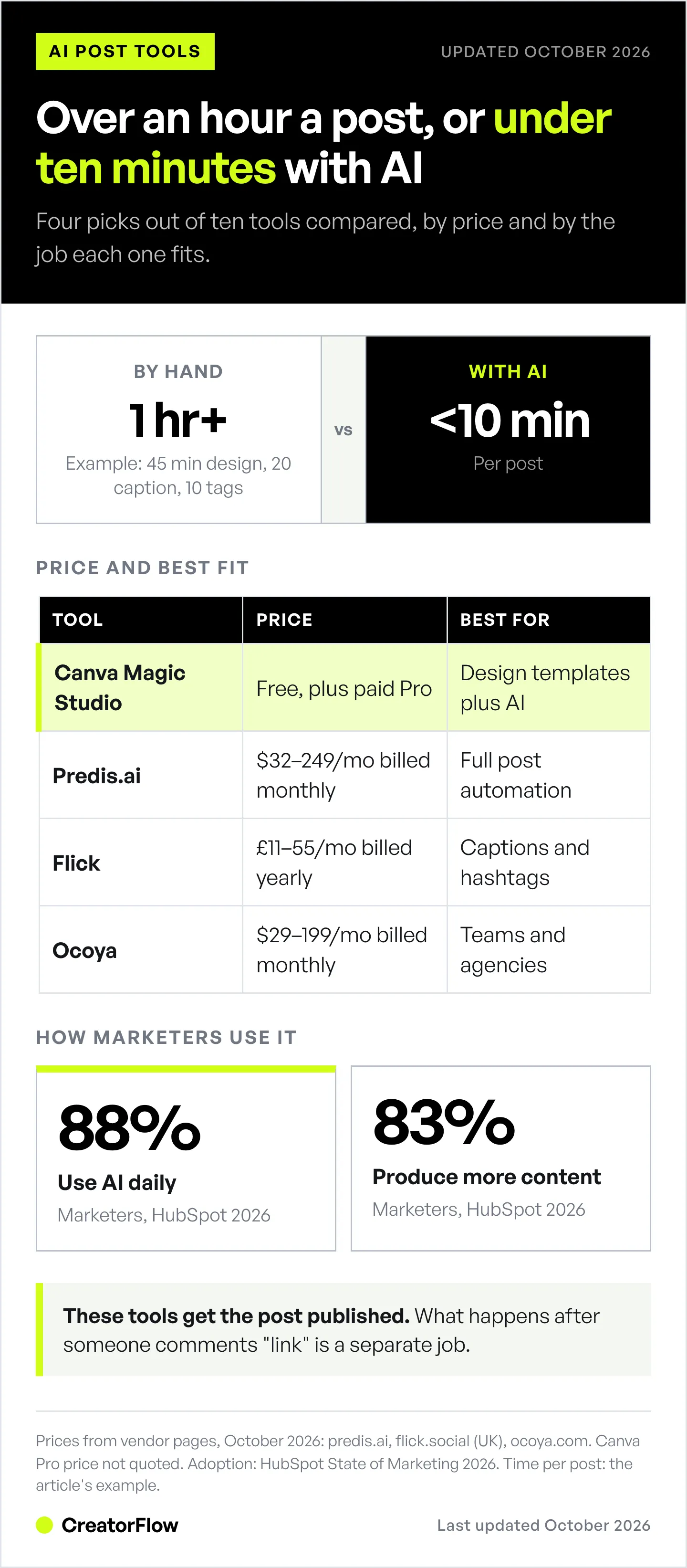
The best AI Instagram post generators in 2026 are Canva Magic Studio for design-first creators (free plan plus a paid Pro plan), Predis.ai for full post automation including visuals, captions, and scheduling ($32-249/month billed monthly, less billed yearly), and Flick for Instagram-specific caption and hashtag optimization (from £11/month billed yearly). Most tools offer a free plan or a free trial with limited monthly generations. The right choice depends on whether you need image generation, caption writing, or an all-in-one workflow from ideation to publishing.
You spend 45 minutes designing one Instagram post. Another 20 minutes writing the caption. Then 10 more picking hashtags. That’s over an hour per post. Five posts a week? That’s a part-time job.
AI Instagram post generators cut that to under 10 minutes per post. They handle the visual design, write captions matched to your brand voice, suggest hashtags, and some even schedule the post for you.
But “AI post generator” means different things depending on the tool. Some generate images only. Others write captions only. A few do both, plus scheduling and analytics. Picking the wrong one wastes money on features you don’t need.
This guide breaks down 10 AI Instagram post generators by what they do, what they cost, and which type of creator each one fits best.
For prompt-specific workflows with ChatGPT, Gemini, and Claude, see our AI prompts for Instagram content creation guide. For ChatGPT-specific deep dives, check our ChatGPT for Instagram content creation guide.
Key Takeaways
- Best overall: Canva Magic Studio (free plan plus paid Canva Pro) for design templates + AI text + image generation
- Best for full automation: Predis.ai (from $32/month billed monthly, after a 3-day free trial) generates visuals, captions, hashtags, and publishes posts
- Best for Instagram-only: Flick (from £11/month billed yearly) for AI captions, hashtag research, and Instagram scheduling
- Best free option: Canva Free or Adobe Express Free for basic AI-assisted design
- Best for mobile: Picsart (free app; Pro €12.99/month) for on-the-go editing with AI tools
- Best for teams/agencies: Ocoya ($29-199/month) for multi-platform content at scale
- AI label rule: Since 31 August 2026, Instagram can limit recommendations for unlabeled profiles built around an AI-generated person (creators.instagram.com, August 2026)

What Is an AI Instagram Post Generator?
An AI Instagram post generator uses machine learning to create some or all parts of an Instagram post: the visual (image, carousel, or video), the caption, the hashtags, and sometimes the scheduling. These tools fall into three categories:
Visual generators create images, graphics, and templates using AI. You describe what you want or pick a template, and the tool produces a design sized for Instagram. Examples: Canva Magic Design, Adobe Express, Picsart.
Caption generators write post captions, suggest hashtags, and optimize text for engagement. You input your topic or content pillar, and the AI writes copy in your brand voice. Examples: Flick, Copy.ai, ChatGPT.
All-in-one generators combine visual creation, caption writing, hashtag suggestions, and scheduling into a single workflow. You input a topic, the tool produces a complete post, and you publish directly. Examples: Predis.ai, Ocoya, Simplified.
As of February 2026, 88% of marketers use AI daily in their workflows, with 83% saying generative AI lets them produce significantly more content than before (HubSpot State of Marketing, 2026).
10 Best AI Instagram Post Generators Compared
1. Canva Magic Studio
Best for: Creators who want design templates with AI assistance
Canva’s Magic Studio bundles 25+ AI tools inside the editor you probably already use. Magic Design generates 8-12 template variations from a text prompt. Magic Write creates captions, and Magic Switch resizes content across formats (e.g., turn a feed post into a Story or carousel).
Pricing:
- Free: Limited monthly AI uses
- Pro: Paid plan with more AI uses, premium templates and brand kit (the price changed several times in 2026; check canva.com/pricing)
- Teams: Paid per-user plan
What it does well:
- 250,000+ templates sized for Instagram feed, Stories, Reels covers
- Magic Design turns text prompts into complete designs
- Magic Switch repurposes one design across all Instagram formats
- Brand Kit keeps fonts, colors, and logos consistent
- Direct publishing to Instagram
Limitations:
- AI image generation quality varies (better for graphics than photos)
- No hashtag research or Instagram analytics
- AI credit limits on lower tiers
- No competitor analysis
Best for: Solo creators and small businesses who need professional designs without hiring a designer. The free tier is generous enough to test whether AI-assisted design works for your workflow.
(canva.com/magic, February 2026)
2. Predis.ai
Best for: Full post automation (visual + caption + hashtag + scheduling)
Predis.ai is the closest thing to a “one-click Instagram post” tool. Input a topic, and it generates the visual, writes the caption, suggests hashtags, and shows an engagement prediction score before you publish. It also offers competitor analysis so you can see what’s working in your niche.
Pricing (predis.ai/pricing, October 2026):
- Free trial: 3 days on any plan
- Core: $32/month billed monthly (1 brand, 1,300 credits, about 325 images or 33 videos)
- Rise: $79/month billed monthly (4 brands, 3,200 credits, Auto Posting)
- Enterprise+: $249/month billed monthly, or $212/month billed yearly (unlimited brands, 10,000 credits)
- Yearly billing is cheaper on every plan. The Core and Rise discounts changed during October 2026, so check the pricing page
What it does well:
- Generates complete posts: image + caption + hashtags in one step
- Engagement Indicator predicts post performance before publishing
- Competitor analysis shows what content works in your niche
- Supports 18+ languages
- Publishes to Instagram, TikTok, LinkedIn, Facebook, Pinterest, Google Business Profile and X
Limitations:
- Credit-based system: Core’s 1,300 monthly credits cover about 325 images or 33 videos
- Visual quality depends heavily on your brand setup
- Brand configuration takes setup time before output matches your look
- No built-in photo editing beyond AI generation
Best for: Small businesses and marketing teams who want the fastest path from idea to published post. The engagement prediction feature is unique and helps prioritize content.
(predis.ai/pricing, October 2026)
3. Flick
Best for: Instagram-specific caption writing and hashtag optimization
Flick built its reputation on Instagram hashtag analytics, and its AI Caption Generator extends that expertise to writing. The AI writes captions for Instagram’s formats, suggests relevant hashtags based on your niche, and tracks which combinations drive the most engagement.
Pricing (flick.social, October 2026, UK prices billed yearly):
- Solo: £11/month (4 social profiles, 30 posts/profile/month)
- Pro: £24/month (8 profiles, unlimited posts, 2 users)
- Agency: £55/month (20 profiles, 5 user logins)
- 7-day free trial; yearly billing saves 20% over monthly
What it does well:
- AI captions tailored to Instagram content formats (Reels, carousels, feed)
- Hashtag research with performance data (not generic suggestions)
- Direct connection between caption writing and Instagram scheduler
- Customizable writing rules (tone, length, perspective)
- Content calendar with visual planning
Limitations:
- No AI image generation (captions and hashtags only)
- Instagram-focused (limited support for other platforms)
- Smaller template library than Canva or Adobe
- Hashtag data is the core value; caption AI is secondary
Best for: Creators who already have their visual workflow figured out and need help with captions and hashtags. Flick’s hashtag research is stronger than any other tool on this list.
(flick.social/learn/pricing, October 2026)
4. Adobe Express
Best for: Creators already using Adobe apps who want AI-powered design
Adobe Express brings Firefly AI image generation into a simple drag-and-drop editor. Generate images from text prompts, remove backgrounds, and create Instagram posts using thousands of professionally designed templates. The AI features are powered by Adobe Firefly, trained on licensed content, which Adobe describes as commercially safe.
Pricing:
- Free: Limited monthly AI credits, basic templates
- Premium: Paid plan with more AI credits, premium templates and Adobe Stock assets
- Teams: Paid per-user plan with brand kit and collaboration tools
- Check adobe.com/express for current prices
What it does well:
- Firefly AI generates commercially safe images (trained on licensed content)
- Professional template library rivaling Canva
- Background removal and image enhancement AI
- Direct integration with Photoshop, Illustrator, Lightroom
- Resize for any Instagram format in one click
Limitations:
- AI credits are capped per month on every plan
- No caption writing AI built in
- No Instagram scheduling or publishing
- No hashtag suggestions or analytics
Best for: Creators already using Adobe tools who want to extend their workflow with AI image generation. The commercially safe AI training is a strong differentiator for brands worried about copyright.
(adobe.com/express, February 2026)
5. Ocoya
Best for: Multi-platform content teams and agencies
Ocoya combines AI copywriting, graphic design, and post scheduling into one platform. Its AI assistant generates captions, suggests content ideas, and creates visuals. The scheduling tool covers Instagram, TikTok, Facebook, LinkedIn, Twitter/X, and Pinterest from one dashboard.
Pricing (ocoya.com, October 2026, billed monthly):
- Starter: $29/month (1 user, 5 social profiles, 300 AI credits)
- Team: $79/month (5 users, 20 profiles, 1,500 credits)
- Agency: $199/month (20 users, 100 profiles, 5,000 credits)
- 7-day free trial; yearly billing gives 2 months free
What it does well:
- AI copywriting with brand voice customization
- Visual design editor with templates
- Multi-platform scheduling from one dashboard
- Hashtag generator with performance data
- Team collaboration with approval workflows
Limitations:
- Image generation is one feature among many rather than the core product
- Multi-user access starts on the Team plan at $79/month
- Built around multi-platform teams rather than a single solo account
- Template library is smaller than dedicated design tools
Best for: Agencies and marketing teams managing multiple Instagram accounts alongside other social platforms. The multi-platform scheduling alone justifies the price if you’re posting to 3+ platforms.
(ocoya.com, October 2026)
6. Later
Best for: Visual planning and Instagram scheduling with AI assistance
Later started as an Instagram scheduling tool and has added AI features for caption generation and content suggestions. Its visual calendar lets you drag-and-drop posts to plan your feed aesthetic. AI credits generate captions and hashtag suggestions, though they’re limited on lower tiers.
Pricing (later.com, October 2026):
- Starter: $25/month, or $18.75/month billed yearly (1 social set)
- Growth: $50/month, or $37.50/month billed yearly (2 social sets)
- Scale: $110/month, or $82.50/month billed yearly (6 social sets)
What it does well:
- Visual feed planner shows how posts look together before publishing
- Best-time-to-post suggestions based on your audience data
- Linkin.bio integration for Instagram traffic
- UGC content collection tools
- Instagram-first with strong scheduling reliability
Limitations:
- AI credits are capped per plan
- No AI image generation
- Pricing is set around scheduling and social sets, not AI usage
- Scheduling and visual planning are the core product; AI is an add-on
Best for: Creators who care deeply about feed aesthetics and need reliable Instagram scheduling. The AI features are nice-to-have additions, but Later’s core value is visual planning and scheduling.
For a deeper comparison of scheduling and automation tools, see our Instagram creator tool stack guide.
(later.com, October 2026)
7. Picsart
Best for: Mobile-first creators who edit on their phone
Picsart combines photo editing, AI image generation, and template-based design in one mobile app. The AI Image Generator creates visuals from text prompts, AI backgrounds customize product shots, and thousands of templates cover Instagram’s formats.
Pricing (picsart.com, October 2026, EU prices shown):
- Free: Free app with basic tools
- Pro: €12.99/month, or €9.16/month billed yearly (500 AI credits a month)
- Ultra: €40.99/month, or €32.75/month billed yearly per seat (5x Pro usage)
What it does well:
- Mobile-first editing (create posts from your phone)
- AI Image Generator converts text prompts to images
- AI Background Generator creates custom photo backgrounds
- Thousands of Instagram-sized templates
- Quick edits: remove objects, enhance photos, add effects
Limitations:
- No caption writing AI
- No scheduling or publishing
- No hashtag suggestions
- Built mobile-first; the desktop editor covers fewer tools
Best for: Creators who do most of their content creation on mobile and need quick visual editing with AI enhancement. Pair it with a caption tool like Flick or ChatGPT for a complete workflow.
(picsart.com, October 2026)
8. ChatGPT (Text and Image Generation)
Best for: Custom content with maximum creative control
OpenAI’s ChatGPT writes text and generates images in the same chat, which makes it the most flexible AI post generator on this list. ChatGPT writes captions, brainstorms content ideas, and creates content calendars. Its image generation creates custom images from detailed text descriptions. No templates, no limitations on what you can create.
Pricing (chatgpt.com, October 2026):
- Free: ChatGPT with limited image generation
- Go: $8/month
- Plus: $20/month (higher limits)
- Pro: from $100/month, with $200 and $500 tiers
- Business: $25/user/month, or $20/user/month billed annually
What it does well:
- Unlimited creative flexibility (no templates to constrain you)
- ChatGPT writes captions in any voice, style, or format
- Image generation creates a custom image for each post
- Memory feature stores your brand voice and content pillars
- Works for every content type (captions, scripts, ideas, calendars)
Limitations:
- No Instagram-specific templates or sizing
- No scheduling or publishing
- No hashtag research with performance data
- Requires prompt engineering skill for consistent quality
- Generated images may need cropping or resizing for Instagram formats
Best for: Advanced creators who want complete creative control and don’t mind a DIY workflow. The combination is powerful but requires more effort than template-based tools.
For carousel-specific prompt frameworks, see our Claude AI Instagram carousels guide.
(chatgpt.com, October 2026)
9. Simplified
Best for: Budget-conscious creators wanting an all-in-one free tool
Simplified combines AI writing, AI image generation, graphic design, video editing, and social media scheduling in one platform. The free tier is surprisingly generous, making it a strong starting point for creators who can’t justify $20+/month for separate tools.
Pricing:
- Free: Limited AI generations, basic design tools
- Paid plans: Several team tiers with more AI credits and a brand kit; check simplified.com for current prices
What it does well:
- All-in-one: design + write + schedule + publish
- Generous free tier for testing
- AI writer trained on marketing copy patterns
- Rewrite and improve existing captions
- Social media calendar with multi-platform publishing
Limitations:
- Broad feature coverage rather than depth in any one area
- Image generation is one module inside a wider suite
- Template variety smaller than dedicated design tools
- Free tier has watermarks on some exports
- Many modules in one interface
Best for: New creators exploring AI tools who want to try everything in one place before committing to specialized tools. Start here, then graduate to dedicated tools as your needs clarify.
(simplified.com, February 2026)
10. Promeo
Best for: Video-first Instagram creators (Reels and Stories)
Promeo specializes in AI-powered video and image content for social media. Its Magic Designer turns text prompts into video ads and social posts. With 20,000+ templates and millions of royalty-free assets, it’s built for creators who prioritize Reels and video Stories over static feed posts.
Pricing:
- Free: Basic templates and limited AI features
- Premium: Low-cost paid plan with the full template library, AI tools and no watermarks; check cyberlink.com/promeo for the current price
What it does well:
- Magic Designer creates video posts from text prompts
- AI Product Shooting generates product images without a photoshoot
- 20,000+ templates for Instagram Reels, Stories, and feed posts
- Millions of royalty-free images and music tracks
Limitations:
- No caption writing AI
- No scheduling or publishing
- Limited to visual/video creation
- Smaller user community than Canva or Adobe
- Some advanced features require the premium plan
Best for: Reels-focused creators who need fast video content on a small budget.
(cyberlink.com/promeo, February 2026)
AI Instagram Post Generator Comparison Table
| Tool | Price | Caption AI | Image AI | Scheduling | Best For |
|---|---|---|---|---|---|
| Canva Magic Studio | Free + paid Pro | Yes | Yes | Yes | Design-first creators |
| Predis.ai | $32-249/mo | Yes | Yes | Yes | Full post automation |
| Flick | £11-55/mo billed yearly | Yes | No | Yes | Instagram hashtags + captions |
| Adobe Express | Free + paid Premium | No | Yes | No | Existing Adobe app users |
| Ocoya | $29-199/mo | Yes | Yes | Yes | Agencies and teams |
| Later | $25-110/mo ($18.75-82.50 billed yearly) | Limited | No | Yes | Visual feed planning |
| Picsart | Free + €12.99-40.99/mo | No | Yes | No | Mobile-first editing |
| ChatGPT | Free-$20/mo (Pro from $100) | Yes | Yes | No | Custom creative control |
| Simplified | Free + paid plans | Yes | Yes | Yes | Free all-in-one starter |
| Promeo | Free + paid Premium | No | Yes | No | Video/Reels content |
(Monthly billing unless noted; vendor pricing pages, October 2026.)
How to Choose the Right AI Post Generator
The best tool depends on what part of post creation slows you down most.
If you struggle with design: Start with Canva Magic Studio or Adobe Express. Both generate professional visuals from text prompts and have Instagram-sized templates ready to go.
If you struggle with captions: Flick or ChatGPT will save the most time. Flick gives you Instagram-optimized captions with hashtag data. ChatGPT offers unlimited creative flexibility.
If you want everything automated: Predis.ai or Ocoya handle the full workflow from idea to published post. Predis generates complete posts in one click. Ocoya adds multi-platform scheduling.
If you’re on a tight budget: Canva Free, Simplified Free, or Promeo’s free plan deliver real value without a monthly commitment. Layer in ChatGPT Free for captions.
If you manage multiple accounts: Ocoya, Later, or Flick’s Agency plans handle multi-account workflows with team collaboration and approval processes.
If your posts feature a physical product: None of the ten above solve the hardest part, which is making the same product look like the same product in every post. They generate images from a text description, so the label, shape, and color shift between generations. DesignerBox starts from a photo of your actual item instead and produces packshots, flat lays, styled scenes, and on-model shots around it. Free tier is 112 credits (watermarked), Basic is €15/month, and Pro at €35/month adds the commercial licence, or €6 and €15 per month billed yearly (designerbox.ai/pricing, October 2026). Pair it with Canva or Flick for layout and captions, since it does not write copy or schedule posts. Disclosure: DesignerBox is built by the same team as CreatorFlow.
Combine AI Post Generators with DM Automation
AI post generators create the content. DM automation converts the engagement that content generates into actual revenue.
Here’s the workflow:
- Generate your post with any tool from this list
- Add a comment CTA like “Comment GUIDE for my free Instagram growth checklist” (our free Instagram post generator drafts the post and the CTA together)
- Set up DM automation to instantly send the lead magnet when someone comments the keyword
- Ask for their email in the DM conversation (the person types it in, since Meta turned off email quick-reply buttons in Instagram messaging on 5 October 2026)
- Nurture the lead through your email sequence
This turns every AI-generated post into a lead generation machine. The post attracts attention. The comment CTA drives engagement. The DM automation delivers the value and captures the lead, all without manual work.
CreatorFlow is an Instagram DM automation tool that covers steps 3 and 4: it sends your DM when someone comments the keyword, and its Email Gate (Pro and Growth plans) asks for an email before sharing the link. You set up the keyword trigger once, and every future post with that CTA keeps sending it.
Two example stacks (monthly billing, October 2026):
- $0 a month: Canva Free for visuals, ChatGPT Free for captions, CreatorFlow Free for up to 500 DMs a month.
- $60 a month: ChatGPT Plus ($20) for captions and images, Later Starter ($25) for scheduling, CreatorFlow Pro ($15) for 5,000 DMs a month, Email Gate and link click tracking.
For specific DM templates that convert, see our Instagram DM automation templates guide.
Common Mistakes with AI Post Generators
Posting AI output without editing. AI-generated captions sound generic when you don’t add your personal voice. Use AI as a starting draft, then add your own stories, opinions, and personality.
Using the same tool for everything. No single AI tool excels at every part of post creation. A combination like Canva (visuals) + Flick (captions + hashtags) + CreatorFlow (DM automation) often covers more ground than one all-in-one tool.
Ignoring brand voice setup. Every AI tool performs better when you configure your brand voice, content pillars, and audience details. Skip the setup, and you’ll get generic output that sounds like every other account.
Over-relying on AI images for every post. Mix AI-generated graphics with real photos, user-generated content, and behind-the-scenes shots. Feeds that look entirely AI-generated lose the authenticity that builds trust on Instagram.
Not tracking what works. AI tools generate content fast. But volume without analysis is a waste. Track which AI-generated posts get the most engagement, saves, shares, and DMs. Double down on what works.
FAQ
Is it safe to post AI-generated content on Instagram?
Yes, for most creators, with two checks. Review every output before you post, because AI images can still come out close to existing work; Adobe trains Firefly on licensed content for extra copyright safety. Meta also asks creators to label photorealistic AI content that could mislead viewers. Since 31 August 2026, Instagram can limit recommendations for unlabeled profiles built around an AI-generated person (creators.instagram.com, August 2026). Our guide to the Instagram AI-generated profile label covers who needs it.
Can AI post generators replace a social media manager?
For solo creators and small businesses, AI tools cover a large share of the production work a social media manager does: ideation, design, caption writing, hashtag research, and scheduling. You still need a human for community management, responding to DMs and comments (or automating DMs with tools like CreatorFlow), brand strategy decisions, and crisis management. For larger brands, AI tools augment the social media team rather than replace it.
What is the best free AI Instagram post generator?
Canva Free offers the best balance of design templates and AI features at no cost. You get a limited monthly allowance of AI uses, thousands of templates, and basic design tools. Pair it with ChatGPT Free for captions and you have a complete, zero-cost workflow. Simplified Free is the runner-up for creators who want writing, design, and scheduling in one free tool.
Do AI-generated posts get less engagement than manual posts?
No published evidence shows that AI-assisted posts get less engagement. Instagram ranks posts on signals such as watch time, likes and sends (Adam Mosseri, January 2025), not on which tool made them. The exception is accounts built around an AI-generated person: since 31 August 2026, unlabeled ones can lose recommendations. For everyone else, relevance to your audience matters more than whether AI helped create the post.
How many Instagram posts per week should I create with AI?
Most creators find 4-7 posts per week optimal: 3-4 feed posts (mix of carousels, single images, and Reels) plus 2-3 Stories. AI tools cut most of the design and writing time, which makes this volume realistic for one person. Start with 3 posts per week and increase as you build comfort with your AI workflow. For content strategy frameworks, see our Instagram content hooks and templates guide.
Pricing for Predis.ai, Flick, Ocoya, Later, Picsart, ChatGPT and DesignerBox re-checked on vendor pages in October 2026, along with Instagram’s AI-generated profile label and Meta’s email quick-reply change. Canva, Adobe Express, Simplified and Promeo prices could not be confirmed on the vendor page in October 2026 and are not quoted. Features are as of February 2026. Prices may change.
Sources:
- Canva Magic Studio (canva.com/magic, February 2026)
- Predis.ai pricing (predis.ai/pricing, October 2026)
- Flick pricing (flick.social/learn/pricing, October 2026)
- Adobe Express (adobe.com/express, February 2026)
- Ocoya pricing (ocoya.com/pricing, October 2026)
- Later pricing (later.com/pricing, October 2026)
- Picsart pricing (picsart.com/pricing, October 2026)
- ChatGPT pricing (chatgpt.com, October 2026)
- Simplified (simplified.com, February 2026)
- Promeo (cyberlink.com, February 2026)
- HubSpot State of Marketing 2026 (hubspot.com/marketing-statistics)
- Instagram AI-generated profile label (creators.instagram.com, August 2026)
- Meta Instagram messaging changelog (developers.facebook.com, October 2026)


