

The best marketing tools for OnlyFans creators in 2026 cover DM automation, content scheduling, bio links, email marketing, and design. A complete stack costs $15-100/month and handles repeat work like link replies, post scheduling, and email follow-ups. The most important tool is Instagram DM automation, because it answers high-intent link requests within seconds instead of hours.
Without automation, you’re drowning in 200+ daily DMs, copy-pasting the same link 50 times, and losing high-intent subscribers to faster-responding creators. Content creation suffers because you spend all your time on admin work.
This guide covers 7 tools that form the complete OnlyFans marketing stack, ranked by impact on subscriber growth.
Key Takeaways
- Most critical tool: Instagram DM automation (CreatorFlow at $15/month) answers link requests within seconds, while a manual reply can take hours
- Full stack cost: A complete marketing setup runs $15-30/month (essential) to $100+/month (scale), covering DM automation, bio links, scheduling, design, and email
- 7 tools covered: CreatorFlow (DM automation), Linktree/Beacons (bio links, free-$15/month), Later/Buffer (scheduling, $6-25/month), Canva (design, free or Canva Pro), Kit.com (email, free up to 10,000 subscribers), TrendTok (research, in-app subscription), and Notion (planning, free-$12/month)
- Time savings: Automation handles repeat replies, posting, and email follow-ups, so more of your week goes to content creation
- Priority order: Start with DM automation, then add bio link management, then content scheduling, then email marketing as budget allows
- Bottom line: If you only invest in one tool, make it Instagram DM automation. It has the most immediate impact on subscriber conversion because it responds to high-intent prospects in seconds
The 7 Best Marketing Tools for OnlyFans Creators
If you’re figuring out how to promote your OnlyFans effectively, the answer is a focused stack of onlyfans marketing tools. Here’s what you actually need to scale Instagram to OnlyFans conversions:
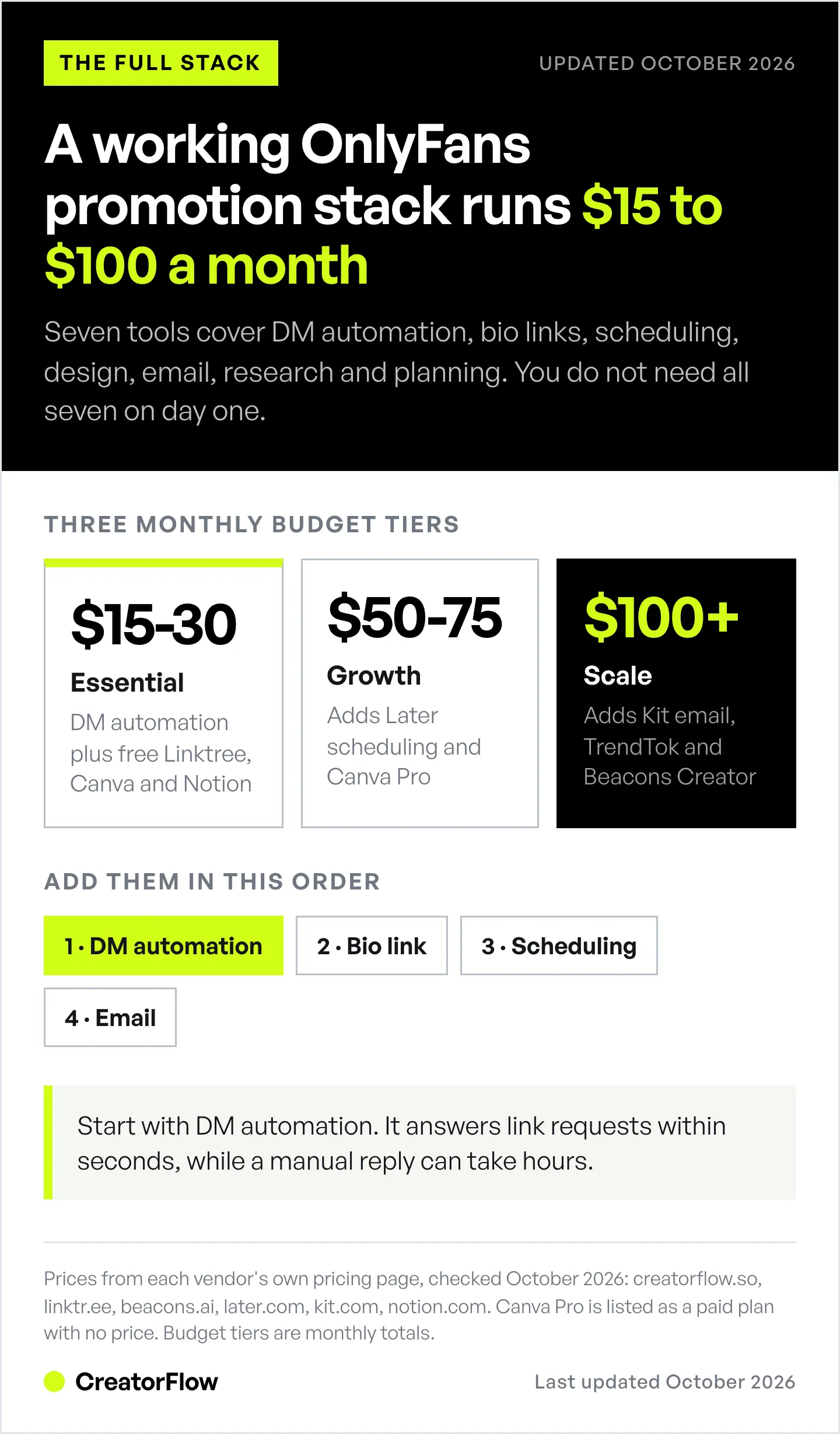
| Tool | Primary Function | Best For | Price Range |
|---|---|---|---|
| CreatorFlow | Instagram DM automation | Instant subscriber link delivery | $15/mo |
| Linktree / Beacons | Bio link management | Centralizing all your links | Free - $15/mo |
| Later / Buffer | Content scheduling | Planning Instagram content | $6-25/mo |
| Canva | Visual content creation | Designing posts and stories | Free, or Canva Pro (paid) |
| Kit.com | Email marketing | Nurturing leads to subscribers | Free up to 10,000 subscribers |
| TrendTok | Content research | Finding viral content ideas | In-app subscription (iOS) |
| Notion | Content planning | Organizing content calendar | Free - $12/mo |
Let’s break down exactly how to use each tool and which one matters most for subscriber growth.
Follow CreatorFlow on Instagram for More Tips
We also share tips and automation strategies on Threads - follow us there too!
1. CreatorFlow - Instagram DM Automation (Most Critical Tool)
What it does: Automatically sends your subscription link when someone comments trigger words or replies to Stories.
Why it’s essential: Instagram is where you find subscribers. DM automation is how you convert them.
Here’s the problem you’re solving: Someone comments “link?” on your post. You’re creating content, so you see it 5 hours later. By then, they’ve forgotten about you and subscribed to someone else who responded instantly.
How CreatorFlow works:
- Comment-to-DM automation: Someone comments “link”, “subscribe”, or “interested” → they instantly get a DM with your subscription link and pricing (learn more about comment-to-DM automation setup)
- Story reply automation: You post a Story teasing new content → followers reply with keywords → instant DM with subscription details
- Keyword triggers: Set up custom triggers like “PPV”, “custom”, “pricing” → automatic responses explaining your tiers
- Email Gate (Pro): Ask for an email before the link goes out, so you can reach people who did not subscribe yet
Setup time: 5 minutes. You connect Instagram, set your trigger words, write your DM template.
Example scenario: You post a teaser Reel. Get 147 comments asking for your link. Without automation, you respond to maybe 30 of them (the rest give up waiting). With automation, all 147 get the link within seconds of commenting.
Pricing: $15/month (Pro, 5,000 DMs) or $30/month (Growth, 10,000 DMs per workspace), or $12 and $24 a month billed annually. The free plan includes 500 DMs a month. No per-contact fees, per CreatorFlow’s pricing page (checked October 2026).
Why OnlyFans creators choose CreatorFlow:
- Phone preview shows exactly how DMs look before sending
- Instagram-only focus (no complicated multi-platform setup)
- Built-in compliance with Instagram’s API (minimal ban risk when using the official API)
- Templates you can adapt for subscription offers
- Workspace feature for managing multiple Instagram accounts
2. Linktree / Beacons - Bio Link Management
What it does: One link in your Instagram bio that houses all your subscription links, free content, and other platforms.
Why you need it: Your Instagram bio holds up to 5 links, and you may want to send traffic to more places than that: OnlyFans, free trials, exclusive content, and other platforms. A link-in-bio page puts all of them behind one link.
Beacons vs Linktree:
- Beacons: Built specifically for creators. Includes email capture, tipping, digital product sales. The Free and Creator ($10/month) plans keep a 9% fee on sales; Creator Plus ($30/month) removes it, per Beacons’ help center (checked October 2026).
- Linktree: More polished design, better analytics. Pricing: Free plan available (email and phone collection included), Starter $8/month, Pro $15/month, billed monthly (linktr.ee, October 2026).
Setup strategy for OnlyFans creators:
- Top link: Your main OnlyFans subscription (free trial or discounted link)
- Second link: Exclusive content preview or welcome message
- Third link: Free content (Instagram-only photos/videos to build trust)
- Email capture: Collect emails before directing to OnlyFans (not all visitors subscribe immediately)
Pro tip: Use Beacons’ email capture feature. Someone who doesn’t subscribe today might subscribe next week if you’re in their inbox with content teasers.
Pricing:
- Linktree Free (sufficient for most creators), Starter $8/mo, Pro $15/mo for deeper analytics
- Beacons Free tier includes email capture and sales
3. Later / Buffer - Content Scheduling
What it does: Schedule Instagram posts, Stories, and Reels in advance so you’re not posting manually 5x daily.
Why it matters: Consistency drives follower growth. Posting at optimal times (even when you’re asleep) maximizes reach.
Later vs Buffer:
- Later: Visual content calendar, best for Instagram-heavy creators. Starter is $25/month, or $18.75/month billed yearly, per Later’s pricing page (checked October 2026).
- Buffer: Cleaner analytics, multi-platform if you’re also on X (Twitter). Essentials is $6 per channel monthly, or $5 billed yearly, per Buffer’s pricing page (checked October 2026).
How OnlyFans creators use scheduling:
Batch create content once a week (Sunday afternoon). Schedule 3-5 posts per day for the next 7 days. You’ve now automated your Instagram presence without logging in every 2 hours.
Content types to schedule:
- Teaser posts (morning)
- Behind-the-scenes (midday)
- Exclusive content previews (evening - highest engagement)
- Subscriber testimonials (builds trust)
- Q&A responses from DMs
Don’t schedule: Stories with polls/questions where you want real-time engagement. Schedule your static Stories, but respond to interactive ones live.

4. Canva - Visual Content Creation
What it does: Design Instagram posts, Stories, Reels covers, and promotional graphics without hiring a designer.
Why you need it: Instagram is visual. Clear, consistent graphics make teasers and offers easy to read in a fast scroll.
Canva for OnlyFans creators:
Free version includes thousands of templates. Canva Pro (paid plan) adds brand kit, background remover, and premium templates.
Templates OnlyFans creators use most:
- Instagram Story templates (polls, Q&A, “link in bio”)
- Post templates (quote cards, testimonials, content teasers)
- Reel cover images (consistent branding)
- Subscription tier graphics (showing pricing and what’s included)
- Promotional banners (50% off, free trial offers)
Time-saving feature: Create one template, duplicate it 20 times, change the text. You’ve now got a month of branded content in 15 minutes.
Pro tip: Use Canva’s Brand Kit feature to store your colors, fonts, and logos. Every graphic you create automatically matches your aesthetic.
5. Kit.com (formerly ConvertKit) - Email Marketing
What it does: Captures emails from Instagram followers and nurtures them into paid subscribers through automated email sequences.
Why email matters: Not everyone subscribes immediately. Email gives you multiple touchpoints to convert them.
The Instagram-to-Email-to-Subscription funnel:
- Offer free content in exchange for email (via DM automation or bio link)
- Send 5-7 emails over 2 weeks showcasing your best content
- Pitch your OnlyFans subscription on email 5 with a discount code
- Continue emailing weekly with content previews and exclusive offers
Kit.com pricing: Free up to 10,000 subscribers. The paid Creator plan is $33/month billed yearly at 1,000 subscribers, per Kit’s pricing page (checked October 2026).
What to send subscribers:
- Welcome email with free exclusive content
- Behind-the-scenes of your content creation process
- Subscriber testimonials and reviews
- Special offers (50% off first month)
- Content previews (photos/videos)
Why it converts: An email subscriber has already said yes once and reads your teasers over several days, so the subscription pitch lands on someone who knows your content.
6. TrendTok - Content Research Tool
What it does: TrendTok Analytics is an iOS app that finds trending TikTok sounds and hashtags so you’re not guessing what to post. You can adapt the same trends for Instagram Reels.
Why it matters: Posting what’s already proven to go viral increases your reach. More reach means more potential subscribers.
How to use TrendTok:
Search your niche (fitness, fashion, lifestyle). TrendTok shows you:
- Trending sounds in your niche
- Trending hashtags
Pricing: Free to download, with weekly, monthly, and yearly in-app subscriptions listed on the App Store (checked October 2026). Prices vary by country, so check the listing before you subscribe.
Alternative: Manual research. Spend 30 minutes daily scrolling through Instagram and TikTok identifying trends. TrendTok automates this research.
7. Notion - Content Planning & Organization
What it does: All-in-one workspace for content calendars, DM templates, subscriber notes, and business planning.
Why you need it: Your brain can’t remember 47 content ideas, 12 DM templates, and subscriber preferences. Notion stores everything.
Notion setup for OnlyFans creators:
Content Calendar Database:
- 30 days of planned posts with captions, hashtags, and posting times
- Content type tags (teaser, promo, BTS, subscriber feature)
- Performance tracking (engagement, subscriber conversions)
DM Template Library:
- New subscriber welcome message
- Pricing and tier explanations
- Custom content request responses
- Re-engagement messages for expired subscribers
Subscriber Management:
- Notes on subscriber preferences
- Custom content requests tracking
- Renewal reminders
- VIP subscriber list
Pricing: Free for personal use. The Plus plan is $12 per member monthly, or $10 billed annually, per Notion’s pricing page (checked October 2026).
Ready to automate your Instagram DMs? Set up comment-to-DM automation in 5 minutes → Try CreatorFlow free for 14 days
How to Stack These Tools (Complete System)
Here’s one way to combine these tools into a weekly routine:
Morning (30 minutes):
- Check Later/Buffer to confirm scheduled posts are live
- Open CreatorFlow to review overnight DM activity and link clicks
- Respond to any custom questions automation didn’t handle
Content creation day (Sunday, 2-3 hours):
- Use TrendTok to research trending content for the week
- Batch create 21 Instagram posts/Reels in Canva
- Schedule everything in Later for the next 7 days
- Update CreatorFlow DM templates based on common questions from the week
Email marketing (weekly, 30 minutes):
- Check Kit.com email performance
- Update email sequence based on what’s converting
- Send weekly broadcast to entire email list with content preview
Total time investment: about 3-4 hours per week for this routine.
The One Tool You Can’t Skip
If you only invest in one tool, make it Instagram DM automation (read our complete guide to Instagram DM automation). For a detailed comparison of DM automation tools specifically, see our OnlyFans DM automation tools comparison.
Here’s why: When considering the best ways to promote OnlyFans, Instagram is your primary subscriber acquisition channel. DMs are where conversion happens. Everything else (content scheduling, design tools, email) supports getting people to DM you. But if you can’t convert those DMs into subscribers because you’re responding too slowly, none of the other tools matter.
The break-even arithmetic: Say 100 people a week ask for your link, and faster replies turn only 2 more of them into subscribers at $10/month. That is $20 a month in new revenue from one week of inquiries, more than CreatorFlow Pro’s $15/month. Plug in your own inquiry count and subscription price.
(Example calculation for illustration. Individual results vary based on your pricing and audience.)
Tool Combinations by Budget
Budget: $15-30/month (Essential)
- CreatorFlow ($15) - Instagram DM automation
- Linktree Free - Bio link management
- Canva Free - Content creation
- Notion Free - Content planning
This covers the core of Instagram to OnlyFans conversion.
Budget: $50-75/month (Growth)
- CreatorFlow ($15)
- Later ($25)
- Canva Pro (paid plan)
- Kit.com Free (under 10,000 subscribers)
- Notion Free
Adds content scheduling for consistency and better visual branding.
Budget: $100+/month (Scale)
- CreatorFlow ($15)
- Later ($25)
- Canva Pro (paid plan)
- Kit.com Creator ($33/month billed yearly at 1,000 subscribers)
- TrendTok (in-app subscription)
- Beacons Creator ($10)
Full automation stack for creators treating OnlyFans as a serious business.
Common Marketing Automation Mistakes
Mistake #1: Over-automating personal responses
Don’t automate everything. Use automation for initial responses and link delivery. When someone asks a specific question about custom content, respond personally.
What to automate:
- “Link?” → Instant link delivery
- “How much?” → Pricing information
- “What do you offer?” → Tier breakdown
What to keep personal:
- Custom content requests
- Subscriber questions about specific content
- Re-engagement of previous subscribers
Mistake #2: Not testing DM templates
Your automated DM is the first message potential subscribers see. Check our DM automation templates guide for proven message formats. Test different versions:
- Short and direct (“Here’s my OnlyFans: [link]. $9.99/month, new subscribers get 50% off.”)
- Detailed value proposition (“Access 200+ exclusive photos, 50+ videos, daily posts, and direct messaging. First month 50% off: [link]”)
- Question-based (“What type of content are you looking for? I offer [describe tiers]. Link: [link]”)
Track which template converts best and use that one.
Mistake #3: Sending links without context
Bad automated DM: “Here’s my link: [OnlyFans URL]”
Good automated DM: “Thanks for asking! I post daily exclusive content, respond to all DMs, and run subscriber-only giveaways. First month is 50% off right now: [link]. Questions? Just ask!”
Context increases conversion. People need to know what they’re subscribing to.
Mistake #4: Not following up
Someone asks for your link. You send it. They don’t subscribe. That’s not the end.
Instagram lets a business send more messages only after the person replies, and only inside the 24-hour window that reply opens (developers.facebook.com, October 2026). So follow up where the rules allow: answer by hand when they reply, collect an email with the Email Gate so you can send a promo later, or post a Story reminder such as “Still thinking about it? 50% off this week only.” See our guide on how Instagram DM automation works for setup details.

Tracking What’s Working
Marketing automation is only valuable if you know what’s driving subscriptions. Track these metrics:
Instagram metrics:
- Post engagement rate on teaser content
- Story completion rate
- DM delivery rate from automation (every trigger comment should get a DM)
- Link click rate from DMs
Conversion metrics:
- Instagram followers → email subscribers
- Email subscribers → OnlyFans subscribers
- Instagram DM conversations → OnlyFans subscribers
Compare each number with your own last month, not with someone else’s account.
Tool-specific analytics:
- CreatorFlow: Which trigger words drive most conversations, and link clicks by country and city (Pro)
- Later: Which post times get highest engagement
- Kit.com: Which emails have the highest open and click rates
- Linktree: Which links get most clicks
Review these weekly. Double down on what works, cut what doesn’t.
Budget for a Good Month, Not an Average One
Marketing stacks get expensive at exactly the moment they start working, because most tools in this category meter on activity.
Per-contact pricing rises with the number of people engaging you. Per-message pricing rises with sends. Flat-rate-per-workspace pricing does not rise at all until you change plans, which makes it easier to forecast when your traffic is spiky.
CreatorFlow sits in the flat group at $15/month for 5,000 DMs and $30/month for 10,000, with automations pausing at the cap rather than billing past it. See the plans.
FAQ
Is Instagram DM automation against Instagram’s rules?
No, when using Instagram’s official Graph API. Tools like CreatorFlow are built on Instagram’s approved system for business automation. Browser bots and unofficial tools violate Instagram’s terms and risk account bans. Stick with Meta-approved automation tools (learn how to avoid Instagram bans with DM automation).
Instagram allows automation that responds to user-initiated actions (they comment first, you auto-respond). The official API does not allow cold outbound DMs to people who have not messaged or commented first.
How much time do marketing automation tools actually save?
The saving equals the time you spend today on repeat replies, scheduling, and email. A creator who pastes the same link 50 times a day gets most of that time back. That time typically gets reinvested into content creation, which drives more subscriber growth. Individual time savings vary based on current manual processes.
Can I use the same marketing tools if I’m on other platforms besides Instagram?
Yes. Most tools listed work across platforms:
- Later and Buffer support Twitter, TikTok, Facebook
- Kit.com works with any email signup source
- Canva content works anywhere
CreatorFlow is built for Instagram end to end. For DM automation on X (Twitter) or TikTok, pick a tool built for that platform.
Do I need all 7 tools to be successful?
No. Start with DM automation (CreatorFlow) and bio link management (Linktree free). These handle subscriber conversion. Add other tools as you scale and have budget.
Priority order: DM automation → Bio link → Content scheduling → Email marketing → Everything else.
What if I can’t afford paid tools right now?
Start with free versions:
- Linktree Free for bio links
- Canva Free for content creation
- Notion Free for planning
- Kit.com Free (up to 10,000 subscribers)
CreatorFlow offers 500 free DMs/month on its free tier (creatorflow.so/pricing, October 2026), which is enough for most small creators. If you outgrow it, the $15/month paid plan typically pays for itself in 1-2 additional subscribers per month. If you’re getting 50+ DMs weekly asking for your link, the conversion improvement covers the cost immediately.
How do I know which tool will give me the best ROI?
Track revenue before and after implementing each tool. DM automation typically shows ROI within days (higher conversion rate from inquiries). Content scheduling shows ROI over weeks (more consistent posting increases follower growth). Email marketing shows ROI over months (long-term relationship building).
Start with tools that have immediate impact (DM automation), then add tools with compounding benefits (email, scheduling).
Can I manage multiple Instagram accounts with these tools?
Yes:
- CreatorFlow: Workspaces for managing multiple accounts (2 on Pro, 5 on Growth)
- Later: Plans are sold by social set, with Growth at $50/month billed monthly
- Linktree: One link tree per account (free)
- Canva: Brand kits for each account
If you’re running multiple creator personas or managing other creators’ accounts, look for tools with workspace/team features.
Are these tools legal to use for OnlyFans promotion?
Yes. All tools mentioned (CreatorFlow, Linktree, Later, Canva, Kit.com, Notion) are legitimate business tools used by creators across all industries. They’re designed for marketing automation and content management, which are legal business activities. However, you’re responsible for ensuring your content and marketing practices comply with Instagram’s Community Guidelines, OnlyFans Terms of Service, and applicable laws in your jurisdiction.
Which tool should I invest in first if I’m just starting?
Start with CreatorFlow for Instagram DM automation ($15/month). DM automation has the most immediate impact on subscriber conversion because it responds to high-intent prospects instantly. Once that’s converting well, add Linktree (free) for bio link management, then Canva (free) for content creation. These three tools handle the core of growing subscribers from Instagram.
Next Steps: Setting Up Your Marketing Automation
Week 1: DM Automation
- Sign up for CreatorFlow free trial
- Connect your Instagram account (2 minutes)
- Set up 5 trigger words: “link”, “subscribe”, “interested”, “price”, “how much”
- Write your automated response template with subscription link
- Test it by commenting trigger words from a friend’s account
Week 2: Content System
- Create Canva account (free)
- Design 7 Instagram post templates (1 for each day)
- Sign up for Later or Buffer free trial
- Schedule 14 posts (2 weeks of content)
Week 3: Email Capture
- Create lead magnet (free exclusive content preview)
- Set up Kit.com account (free)
- Create 5-email welcome sequence
- Update Linktree with email capture
- Add the Email Gate to your CreatorFlow automation (Pro plan)
Week 4: Optimization
- Review analytics from all tools
- Identify highest-converting posts and DM templates
- Double down on what works
- Cut or improve what doesn’t
By the end of 30 days, you’ll have a complete automated marketing system running with minimal daily input.

Conclusion: The Best OnlyFans Marketing Starts with Automation
You can respond to 50 DMs manually per day. You can’t respond to 200. You can post to Instagram 3x daily if you’re disciplined. You can’t maintain that schedule for months without burning out.
The best onlyfans marketing combines great content with the right onlyfans marketing tools to handle repetitive tasks at scale. This lets you focus on creating content and building subscriber relationships.
The tools in this guide aren’t about replacing the personal touch that makes OnlyFans successful. They’re about removing bottlenecks so you can be more personal with more people.
Start with Instagram DM automation. It has the most immediate impact on subscriber conversion. Add other tools as you grow.
Ready to automate Instagram DM responses and increase subscriber conversion? Start CreatorFlow free with 500 DMs a month, and set up comment-to-DM automation in under 5 minutes.
Explore our dedicated solution for OnlyFans creators to see all features built specifically for your niche.
Disclaimer: Figures in this article come from the sources cited in it. Individual results vary based on audience size, content quality, engagement rates, and niche. CreatorFlow uses Meta's official Instagram API. Instagram/Meta may change features, rate limits, or terms at any time. Instagram is a trademark of Meta Platforms, Inc. CreatorFlow is not affiliated with, endorsed by, or sponsored by Meta Platforms, Inc. ManyChat, LinkDM, and InstantDM are trademarks of their respective owners. Users are responsible for complying with Instagram's Terms of Service and Community Guidelines.


