

The best automation tools for OnlyFans creators use Instagram DM automation to send subscription links, pricing tiers, and welcome messages instantly when followers comment trigger keywords or reply to Stories. Automation replies in seconds rather than the hours a manual reply usually takes, so the link lands while the person is still on your post. Paid plans range from $12 to $199 per month on monthly billing, most tools also have a free plan, and all run on Meta’s official Instagram API.
You’re getting 200+ daily DMs asking for your link. You spend 3 hours copy-pasting the same message. By the time you respond, half your prospects found another creator. Automation eliminates this bottleneck entirely.
This guide compares 5 Instagram automation tools for OnlyFans creators: pricing, features, and which converts the most subscribers. Learn more about how Instagram DM automation works. Looking for the full marketing stack beyond DM automation? See our complete OnlyFans marketing tools guide.
Key Takeaways
- Top 5 tools compared: CreatorFlow ($15/month flat), ManyChat ($17 to $199/month monthly billing), LinkDM ($19/month), InstantDM ($12/month, or $9.99/month billed annually), and Inrō (from €12.99/month) all run on Meta’s official Instagram API (vendor pricing pages, October 2026)
- Response speed matters: an automated reply lands in seconds, while a manual reply usually lands hours later, after the person has scrolled on
- Flat pricing holds at scale: CreatorFlow stays $15/month regardless of audience size, while ManyChat scales to $199/month at 25,000 contacts on monthly billing
- Time savings: automating the repeat questions leaves you answering only the custom ones, which is where most of the daily DM hours go
- Follow-ups follow Meta’s rules: after the first automated DM, Meta allows a follow-up only once the person replies, inside a 24-hour window (developers.facebook.com, October 2026)
- Bottom line: Most solo OnlyFans creators should start with CreatorFlow for flat-rate pricing and 5-minute setup, then consider Inro if you need full CRM features at $10K+/month revenue
Why OnlyFans Creators Need Instagram Automation
The manual DM problem:
You post a teaser on Instagram at 10am. By 11am, 87 people have commented asking for your link. You are filming, so you start replying at 2pm. Four hours is long enough for most of that attention to move on: people leave the app, the post drops out of their feed, and someone else answered them first.
With automation:
The post goes live at 10am and all 87 people get a DM with your subscription link within seconds of commenting. Nobody waits, and nobody gets missed.
Where the time goes:
Manual DM handling means typing the same three answers all day. Automated handling means you only open the conversations that need a real reply: custom requests, specific questions, existing subscribers. The repeat questions are the bulk of the volume, and those are the ones automation takes off your plate.
The 5 Best Instagram Automation Tools for OnlyFans Creators
These are the best onlyfans growth tools for Instagram subscriber conversion. Each tool doubles as an onlyfans management tool, handling DM responses, link delivery, and follow-ups so you can focus on content. Here’s what actually works in 2026:
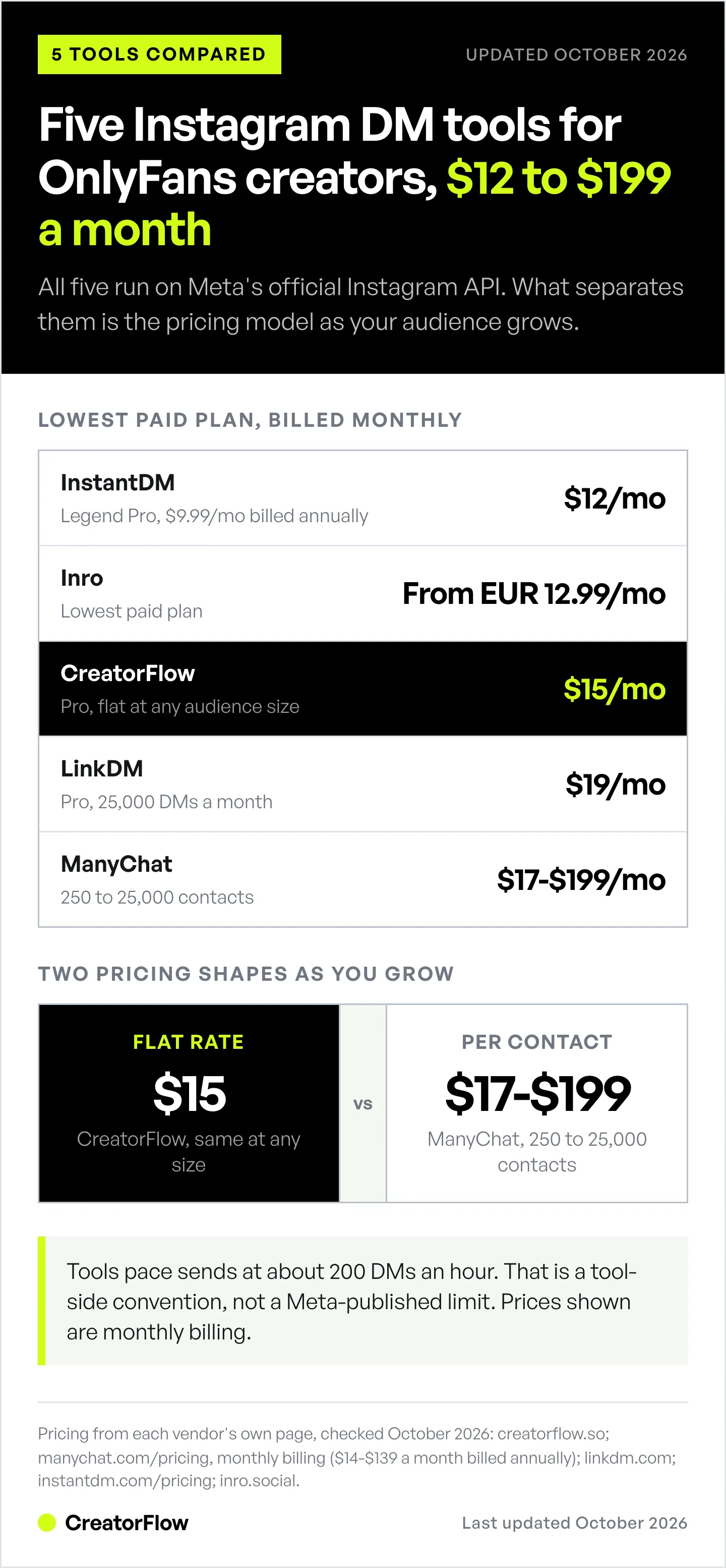
| Tool | Best For | Pricing | Key Feature | Safety |
|---|---|---|---|---|
| CreatorFlow | Solo creators, simple setup | $15/mo flat | Phone preview, workspace management | Official API ✅ |
| ManyChat | Multi-platform automation | $17-$199/mo billed monthly | Facebook + Instagram + WhatsApp | Official API ✅ |
| LinkDM | Established platform | $19/mo | Speed/simplicity | Official API ✅ |
| InstantDM | Lowest entry price | $12/mo, or $9.99/mo billed annually | Up to 800 DMs/hour on Legend Pro | Official API ✅ |
| Inrō | Content creators needing CRM | From €12.99/mo | Creator CRM | Official API ✅ |
Let’s break down each tool for OnlyFans creators specifically.
1. CreatorFlow - Best for Solo OnlyFans Creators
Pricing: Free plan with 500 DMs/month; $15/month for Pro ($12/month billed annually), $30/month for Growth ($24/month billed annually), flat regardless of audience size (creatorflow.so/pricing, October 2026)
Who it’s for: Solo OnlyFans creators who primarily use Instagram and need simple, fast automation without technical complexity.
What makes it stand out: Phone preview feature. You see exactly how your DMs look on a mobile device before sending. For OnlyFans creators where first impression matters, this prevents awkward formatting or broken links.
Key Features for OnlyFans Creators:
Comment-to-DM automation:
- Trigger words: “link”, “subscribe”, “OF”, “pricing”, “how much”
- Instant response with subscription link and pricing tiers
- Customizable templates for different content offerings
- Learn more about comment-to-DM automation setup
Story reply automation:
- Post teaser Stories → followers reply → instant DM with offer
- Works with text and emoji replies to your Story
- Different responses for different Story types
Gates and recovery (Pro and Growth):
- Follow Gate asks people to follow you before the link is sent
- Email Gate collects an email before the link is sent
- Rewind goes back and DMs everyone who already commented on your recent posts
Workspace management:
- Run multiple Instagram accounts from one dashboard
- Useful if you manage multiple creator personas
- Each account has independent automation rules
Setup complexity: 5 minutes. Connect Instagram, add trigger words, write DM template. No flowchart builders or technical config.
Scope:
- Built end to end for Instagram: comment triggers, Story replies, keyword DMs, and link click tracking
- Built-in contact CRM with CSV export on Pro, so the addresses you collect move into Mailchimp, Kit, Flodesk or any email platform
Best for:
- Solo creators with 1-3 Instagram accounts
- Creators who want set-it-and-forget-it automation
- OnlyFans creators prioritizing Instagram subscriber conversion
Try it: CreatorFlow offers 14-day free trial
2. ManyChat - Best for Multi-Platform Automation
Pricing: $17/month for up to 250 contacts (Essential), scaling to $199/month for 25,000 contacts (Advanced) on monthly billing; $14-$139/month billed annually (verified from manychat.com/pricing, October 2026)
Who it’s for: OnlyFans creators managing Instagram + Facebook + WhatsApp and needing complex automation workflows.
What makes it stand out: Multi-platform support. If you’re promoting on Facebook Messenger, Instagram, and WhatsApp simultaneously, ManyChat automates all three from one platform. It also covers TikTok, Telegram, SMS and email.
Key Features for OnlyFans Creators:
Instagram + Facebook + WhatsApp:
- One automation system across three platforms
- Unified subscriber management
- Cross-platform campaigns
Visual flow builder:
- Drag-and-drop automation design
- Conditional logic (if they click link X, send message Y)
- Complex subscriber journeys
Broadcast messages (WhatsApp, Telegram and Messenger, not Instagram):
- Send announcements to your entire subscriber list
- Segment by engagement, interests, tags
- Schedule promotional campaigns
Scope notes for OnlyFans creators:
- The flow builder is built for multi-step journeys, so there is more to configure than a single-trigger tool
- Pricing is per active contact, so the monthly cost moves with audience size
- Best fit when you need branching logic across more than one channel
Pricing breakdown:
- 250 contacts: $17/month (Essential)
- 2,500 contacts: $39/month (Pro)
- 7,500 contacts: $99/month (Business), 25,000 contacts: $199/month (Advanced)
Best for:
- Creators using multiple platforms
- Agencies managing multiple creators
- Creators who want to build branching flows
Outside its main focus:
- Creators who only need Instagram comment-to-DM
- Solo creators who want a price that does not move with contact count
3. LinkDM - Best Established Market Leader
Pricing: $19/month for Pro, up to 3 Instagram accounts and 25,000 DMs a month; a free plan covers 1,000 DMs (linkdm.com, October 2026)
Who it’s for: OnlyFans creators who want proven reliability and don’t need advanced features.
What makes it stand out: 60,000+ creators, brands, and agencies (linkdm.com, October 2026), and a track record since 2021. LinkDM describes itself as a certified Meta Business Partner (linkdm.com, October 2026).
Key Features for OnlyFans Creators:
Fast setup:
- Advertised “60-second setup”
- Pre-built templates for common scenarios
- Simple trigger word configuration
Reliable infrastructure:
- LinkDM publishes a 99.9% uptime figure (linkdm.com, August 2026)
- Runs on Meta’s official Instagram API
- Built for teams as well as solo creators
Basic automation:
- Comment-to-DM
- Story replies
- Keyword triggers
- Link click tracking
Scope:
- Instagram-first coverage
- Focused on the core comment-to-DM, story reply, and keyword triggers rather than branching workflows
Best for:
- Creators who prioritize reliability over features
- OnlyFans creators with straightforward needs
- Users wanting established platform with large community
Pricing consideration: LinkDM is $19/month against CreatorFlow’s $15/month on monthly billing. The $4 difference buys a longer track record and a larger user base. Decide whether that matters more to you than the price.
4. InstantDM - Best Budget Option
Pricing: Free plan with 500 automations/month; Legend Pro $12/month, or $9.99/month billed annually (instantdm.com/pricing, October 2026)
Who it’s for: OnlyFans creators who want the lowest entry price and clear hourly send limits.
What makes it stand out: A low entry price, a free plan that includes AI comment replies, and hourly send limits stated on each plan. InstantDM describes itself as an Official Meta Business Partner and reports 30,000+ creators and brands (instantdm.com, October 2026).
Key Features for OnlyFans Creators:
Stated hourly limits:
- Legend Pro: unlimited automations, up to 800 DMs/hour
- Trendsetter: up to 2,000 DMs/hour
- Trendsetter Pro: no hourly cap
Basic automation:
- Comment-to-DM triggers
- Story reply automation
- AI comment replies
Scope:
- Hourly send pacing is part of each plan, so very high-comment posts on Legend Pro are delivered over a longer window
- Focused on comment-to-DM and Story replies rather than inbox or CRM features
Pricing tiers (instantdm.com/pricing, October 2026):
- Legend Pro: $12/month, or $9.99/month billed annually (unlimited automations, up to 800/hour)
- Trendsetter: $29.99/month, or $24.99/month billed annually (single account, up to 2,000/hour)
- Trendsetter Pro: $59.99/month, or $49.99/month billed annually (no hourly cap)
- Multi-account plans: Multi Starter and Multi Pro, priced per account
Best for:
- OnlyFans creators with small-medium audiences (under 50K followers)
- Creators who want the lowest entry price
- Creators who want hourly limits stated up front
Outside its main focus:
- Users wanting inbox management or CRM features
5. Inrō - Best OnlyFans CRM and Subscriber Management
Pricing: Free plan (100 active contacts); paid plans from €12.99/month (inro.social, October 2026). Inrō describes itself as a Meta Tech Provider.
Who it’s for: OnlyFans creators who need subscriber relationship management, not just automation. If you’re searching for the best onlyfans crm, Inro is the closest thing to a dedicated CRM built for creators.
What makes it stand out: Creator CRM with contact profiles, conversation history and content performance tracking. It works as both an onlyfans management tool and a contact intelligence platform.
Key Features for OnlyFans Creators:
Instagram DM automation:
- Comment-to-DM, Story replies, keyword triggers (standard features)
Creator CRM:
- Contact profiles with conversation history
- Content performance analytics (which posts drive DMs)
- VIP contact tagging
Unified inbox:
- All Instagram DMs in one organized inbox
- Filter by new subscribers, VIPs, custom requests
- Bulk actions and tagging
Campaign management:
- Launch promotional campaigns to subscriber segments
- Track campaign performance (open rates, conversions)
- A/B test messaging
Scope:
- Setup covers the full CRM, so it takes longer to configure than a single-trigger tool
- Built for creators who want subscriber records and analytics alongside the automation
Best for:
- OnlyFans creators treating this as serious business ($10K+/month revenue)
- Creators managing 500+ active subscribers
- Users wanting detailed analytics and subscriber insights
Outside its main focus:
- Beginners or part-time creators who just need basic automation
- Creators under $2K/month revenue who only need the automation, not the CRM layer

Feature Comparison: What Actually Matters
Beyond pricing, here’s what features impact subscriber conversion:
Response Speed (Most Critical)
All tools offer instant responses when someone comments. Delivery usually takes seconds with any of the five, and very busy posts are paced by each tool’s hourly limit.
Why it matters: Users expect instant responses on Instagram. A link that lands while the person is still on your post gets more clicks than one that arrives hours later.
Phone Preview
CreatorFlow shows a real-time phone preview of the DM while you build the automation.
Why it matters for OnlyFans creators: Your DM is the first impression. If your link looks broken, formatting is weird, or emojis don’t display correctly on mobile, conversion drops.
Phone preview lets you see exactly what subscribers see before sending.
Multi-Account Management
Workspace features:
- CreatorFlow: ✅ Yes (2 accounts on Pro $15/mo, 5 on Growth $30/mo)
- ManyChat: ✅ Yes (check plan details for multiple accounts)
- LinkDM: ✅ Yes (3 accounts on Pro $19/mo, 10 on Platinum+ $99/mo)
- InstantDM: ✅ Yes (Multi Starter and Multi Pro plans, priced per account)
- Inrō: ✅ Yes (included in Pro plan)
Matters if: You run multiple Instagram personas or manage other creators’ accounts.
Follow-Ups
Meta sets the rule for every tool: a comment allows one private reply within 7 days. A follow-up is allowed only after the person replies, inside a 24-hour window (developers.facebook.com, October 2026). Tools with flow builders, such as ManyChat, can automate the next step once someone replies.
Why it matters: End your first DM with a question. A reply opens the 24-hour window, so you can answer personally and keep the conversation going.
Safety & Compliance
All 5 tools use Instagram’s official Graph API (compliant and safe when respecting rate limits, with minimal ban risk).
Avoid:
- Browser extension bots (simulate human activity, violate Instagram terms)
- “Unlimited” tools without API verification
- Tools requiring your Instagram password (major security risk)
All tools in this guide are safe when used correctly. Stick with official API-based tools to minimize ban risk (learn how to avoid Instagram bans with DM automation).
Pricing Comparison: What You Actually Pay
Let’s calculate real costs at different subscriber levels:
All prices below are monthly billing unless noted (vendor pricing pages, October 2026).
New Creator (1,000 Instagram followers, 50 DM conversations/day, about 1,500 DMs a month)
CreatorFlow: Pro $15/month = $180/year, or $144/year billed annually (5,000 DMs a month) LinkDM: Pro $19/month = $228/year, or $182/year billed annually InstantDM: Legend Pro $12/month = $144/year, or about $120/year billed annually ManyChat: $39/month (Pro, 2,500 contacts) = $468/year Inrō: from €12.99/month; check the tier for your contact count
Lowest monthly price: InstantDM Legend Pro ($12). CreatorFlow Pro ($15) includes Follow Gate, Email Gate and link click tracking.
Growing Creator (10K Instagram followers, 200 DM conversations/day, about 6,000 DMs a month)
CreatorFlow: Growth $30/month = $360/year (10,000 DMs a month per workspace) LinkDM: Pro $19/month = $228/year (25,000 DMs a month) InstantDM: Legend Pro $12/month = $144/year (unlimited automations, up to 800/hour) ManyChat: $99/month (Business, 7,500 contacts) = $1,188/year Inrō: check the tier for your contact count
What changes at this stage: flat-rate tools (CreatorFlow, LinkDM, InstantDM) stay predictable, while ManyChat moves with your contact count.
Established Creator (50K+ followers, 500+ DM conversations/day, about 15,000 DMs a month)
CreatorFlow: Growth $30/month = $360/year for 10,000 DMs per workspace, plus DM top-up packs for the extra volume LinkDM: Pro $19/month = $228/year (25,000 DMs a month) InstantDM: Legend Pro $12/month = $144/year (up to 800/hour), or Trendsetter $29.99/month for up to 2,000/hour ManyChat: $199/month (Advanced, 25,000 contacts) = $2,388/year Inrō: check the tier for your contact count
What changes at this stage: monthly DM allowances and hourly limits start to matter more than the entry price.
Price increases to watch:
- ManyChat: pricing scales with your contact count
- Inrō: CRM features may require higher tiers
- InstantDM: moving to multi-account plans (Multi Starter, Multi Pro) for several accounts raises the monthly cost
Tools with flat pricing:
- CreatorFlow: $15 regardless of audience size, for up to 5,000 DMs a month on Pro
- LinkDM: $19 regardless of audience size, for up to 25,000 DMs a month on Pro
For OnlyFans creators, flat pricing often makes more sense because your DM volume grows as your subscriber base grows. You don’t want your automation costs tripling as you succeed.
Ready to try Instagram automation? Start with CreatorFlow’s 14-day free trial → Set up in 5 minutes
Which Tool is Right for You?
Choose CreatorFlow if:
- You’re a solo OnlyFans creator focused on Instagram
- You want flat-rate pricing with no per-contact fees
- Phone preview matters (see exactly how DMs look on mobile)
- You need simple setup (5 minutes, no complexity)
- You manage 1-5 Instagram accounts (2 on Pro, 5 on Growth)
Best for: Most solo OnlyFans creators who need straightforward Instagram automation.
Choose ManyChat if:
- You’re promoting on Instagram + Facebook + WhatsApp simultaneously
- You have budget for contact-based pricing ($17-$199/month on monthly billing, depending on contact count)
- You like visual flow builders
- You need complex conditional logic in automation
- You’re managing an agency with multiple creators
Best for: Multi-platform power users and agencies.
Choose LinkDM if:
- You prioritize brand reputation and Meta certification over pricing
- You want an established platform (60,000+ users, since 2021)
- Basic automation is sufficient (no advanced features needed)
- You’re okay paying $4/month more than CreatorFlow Pro for a longer track record
Best for: Creators who value an established track record.
Choose InstantDM if:
- You want the lowest entry price ($12/month, or $9.99 billed annually)
- Your posts rarely bring more than 800 keyword comments an hour (the Legend Pro limit)
- You have small-medium audience (under 50K followers)
- Basic automation is sufficient
Best for: Budget-first creators with simple automation needs.
Choose Inrō if:
- You’re earning $10K+/month from OnlyFans
- You need a full CRM with contact analytics
- You manage 500+ active subscribers
- Campaign management matters
- Your budget fits a plan from €12.99/month upward
Best for: Established creators treating OnlyFans as full-time business.
Common Automation Mistakes OnlyFans Creators Make
Mistake #1: Using browser bots instead of API-based tools
Browser bots (extensions that control your Instagram session) violate Instagram’s terms. They simulate human clicking and typing, which Instagram’s AI detects.
What happens: Account shadow ban or permanent suspension.
Solution: Only use tools built on Instagram’s official Graph API (all 5 tools in this guide are safe). Learn how to avoid Instagram bans with DM automation.
Mistake #2: Sending links without context
Bad automated DM:
“Here’s my OnlyFans: [link]”
Good automated DM:
“Thanks for asking! I post daily exclusive content, respond to all DMs, and offer custom requests. New subscribers get 50% off first month: [link]. Questions? Just reply!”
Context helps because people know what they’re subscribing to.
Mistake #3: Ending the DM without a question
You send a DM with your link. They don’t click, and the conversation stops there.
Reality: Meta allows a follow-up only after the person replies, inside a 24-hour window (developers.facebook.com, October 2026). An automated “still interested?” message to someone who never replied is not allowed.
End your first DM with a question (“Want a preview first?”). When people reply, answer them personally inside those 24 hours with a reminder or limited-time offer.
Mistake #4: Over-automating personal conversations
What to automate:
- Initial link delivery
- Pricing and tier information
- General FAQs
What to keep personal:
- Custom content requests
- Specific subscriber questions
- Re-engagement of past subscribers
- VIP subscriber conversations
Automation handles repetitive tasks. You handle personal relationships.
Mistake #5: Not testing DM templates
Your automated DM is the first impression potential subscribers see. Test 2-3 versions:
Version A (Direct):
“Here’s my OnlyFans: [link]. $9.99/month, new subscribers get 50% off this week only.”
Version B (Value-focused):
“I post 3-5 times daily: exclusive photos, videos, behind-the-scenes, and I respond to every DM. First month 50% off: [link]”
Version C (Question-based):
“What type of content are you looking for? I offer exclusive photos, videos, customs, and 1-on-1 messaging. Check it out: [link]”
Track which version converts best (click-through rate and subscription rate) and use that template.

Setting Up Your First Automation (30-Minute Guide)
Step 1: Choose your tool (5 minutes)
For most OnlyFans creators: Start with CreatorFlow ($15/month, 14-day free trial).
Why: Flat price, simple setup, phone preview, no per-contact fees.
Step 2: Connect Instagram (2 minutes)
- Sign up for your chosen tool
- Click “Connect Instagram”
- Log in on Meta’s own screen (CreatorFlow uses Instagram Login; some tools use Facebook Login and need a linked Facebook Page)
- Grant permissions for DM sending
Step 3: Set trigger words (5 minutes)
Add keywords that indicate someone wants your subscription link:
Essential triggers:
- link
- subscribe
- interested
- OF (short for OnlyFans)
- pricing
- how much
- join
Niche-specific triggers (if applicable):
- custom (for custom content)
- PPV (pay-per-view)
- bundle
- sale
Step 4: Write your DM template (10 minutes)
Your template should include:
- Friendly greeting
- Brief value statement (what they get)
- Pricing with current offer
- Your OnlyFans link
- Call to action
Example template:
Hey! Thanks for asking 😊
I post daily exclusive content: photos, videos, behind-the-scenes, and I respond to every DM personally. New subscribers also get access to my full library (200+ photos, 50+ videos).
First month is 50% off right now ($9.99 instead of $19.99): [your OnlyFans link]
Questions? Just reply here! I’m happy to tell you more about what I offer 💕
Step 5: Check the phone preview (2 minutes)
If using CreatorFlow: Click phone preview to see exactly how your DM looks on mobile. Adjust formatting, check link works, verify emojis display correctly.
If using other tools: Send a test DM to a friend’s account and check how it looks on their phone.
Step 6: Prepare your reply for people who answer (5 minutes)
Meta allows a follow-up only after the person replies, inside 24 hours. Save a reply you can send when someone answers your DM:
Thanks for writing back! Running a special this week only: 50% off first month + free custom photo when you subscribe 💕
Here’s the link again: [your OnlyFans link]
Step 7: Test everything (3 minutes)
- Comment one of your trigger words on your own post from a friend’s account
- Verify you receive the automated DM
- Check formatting, link works, message tone is right
- Adjust and re-test if needed
You’re live. Automation now handles all trigger word responses instantly.

Tracking Automation Performance
You can’t improve what you don’t measure. Track these metrics weekly:
DM Automation Metrics
Response rate: How many trigger comments result in successful DM delivery?
- Target: 95%+ (if lower, check automation is working correctly)
Open rate: How many people open your automated DM?
- Compare week over week; it should be high because they asked for it
Click-through rate: How many people click your OnlyFans link?
- Compare by post and by DM template
Conversion rate: How many link clicks become paying subscribers?
- Compare offers: test a promotional offer against your standard price
Instagram Content Performance
Track which posts drive most DM conversations:
- Teaser content (showing but not revealing)
- Behind-the-scenes content
- Subscriber testimonials/reviews
- Q&A posts
- Exclusive content previews
Double down on content types that generate most automation triggers.
Tool-Specific Analytics
CreatorFlow: Dashboard shows DMs sent, link clicks and click-through rate per automation, plus clicks by country and city (link click tracking and geographic analytics on Pro and Growth)
ManyChat: Detailed flow analytics showing drop-off points in automation sequences
LinkDM: Link click tracking and basic engagement metrics
InstantDM: DM delivery reports and hourly sending volume
Inrō: CRM analytics on contacts, conversations and campaigns
Review weekly: Identify your best-converting trigger words, highest-performing DM templates, and content types that drive subscribers. improve based on data.
Volume Is the Variable That Decides Your Bill
Creators in this niche often see traffic arrive in spikes rather than a steady line, which makes the billing model more consequential than the sticker price.
If a tool charges per contact, a single post that lands drives the bill up in the same month it drives your revenue up. If it charges per message, high-volume campaigns cost more to run. A flat rate per workspace holds the number still and caps your exposure to a good week.
CreatorFlow prices flat: $15/month for 5,000 DMs on Pro, $30/month for 10,000 on Growth. If you need more in a busy month, Pro and Growth offer DM top-up packs. Details on the pricing page, and the workflow itself is covered on drive conversions.
FAQ
Is Instagram automation safe for OnlyFans promotion?
Yes, when using Instagram’s official Graph API. All 5 tools in this guide (CreatorFlow, ManyChat, LinkDM, InstantDM, Inrō) use Instagram’s approved API, which is safe and compliant with Instagram’s Terms of Service.
Avoid browser bots, password-based tools, or anything requiring “Instagram account credentials.” Those violate Instagram’s terms and risk permanent bans.
Instagram allows automation that responds to user-initiated actions (they comment first, you auto-respond). Mass outbound DMs to strangers are prohibited.
Will Instagram ban my account for using automation?
It is unlikely if you use tools built on Meta’s official Instagram Graph API and follow Meta’s rules. The API exists specifically for business automation.
You will get banned if you:
- Use browser bots or unofficial tools
- Send mass DMs to people who didn’t engage with you
- Automate follow/unfollow or fake engagement
- Violate Instagram’s content policies (separate from automation)
Stick with tools in this guide and follow Instagram’s content guidelines to keep ban risk minimal.
Which automation tool converts best for OnlyFans?
No single tool converts better than another. Conversion depends more on your DM template and offer than the tool. All 5 tools deliver DMs with similar speed and reliability.
What impacts conversion:
- DM template quality (clear value proposition, pricing, offer)
- Response speed (all tools are fast enough)
- Phone preview (CreatorFlow shows a live preview of what subscribers see)
- A question at the end of the DM, so people reply and you can follow up inside Meta’s 24-hour window
Focus on improving your message, not switching between tools. Test 3-5 DM templates to find what converts best for your audience.
Can I automate Instagram and Twitter simultaneously?
Not with the same tool. Instagram automation tools focus on Instagram DMs because that’s where OnlyFans subscriber conversion happens.
For Twitter: Use separate Twitter-specific automation tools like Tweet Hunter or Hypefury.
Exception: ManyChat supports Instagram, Facebook Messenger, WhatsApp, TikTok, Telegram, SMS and email, but not X (Twitter) (manychat.com/pricing, October 2026).
How many DMs can I send before Instagram limits me?
Most tools pace sends at around 200 DMs per hour per account to stay well under Meta’s per-second rate limits (as of October 2026; this is a tool-side pacing convention, not a Meta-published hourly figure). Meta itself limits private replies to post and Reel comments to 750 an hour (developers.facebook.com, October 2026).
What this means in practice:
- Post gets 500 comments → takes 2.5 hours to DM everyone
- Post gets 1,000 comments → takes 5 hours to DM everyone
Tools follow the ~200/hour pacing convention and queue automatically.
If you regularly get 1,000+ comments per post, you’ll hit hourly limits. This is normal and not a problem: automation continues sending as soon as the hourly window resets.
Do I need different automation for different OnlyFans tiers?
Yes. Set up different trigger words for different subscription tiers:
Free tier promotion:
- Trigger: “free”, “trial”
- DM: Free subscription link with upsell to paid tiers
Standard tier:
- Trigger: “link”, “subscribe”, “join”
- DM: Standard subscription link and pricing
VIP tier:
- Trigger: “VIP”, “custom”, “premium”
- DM: VIP tier benefits and pricing
Most automation tools (CreatorFlow, ManyChat, Inrō) support multiple trigger word sets with different response templates.
Can automation handle custom content requests?
No. Automation handles standardized responses only.
What automation can answer:
- “What’s your link?” → Automated link delivery
- “How much?” → Automated pricing info
- “What do you offer?” → Automated tier breakdown
What needs personal response:
- “Do you offer custom [specific request]?”
- “Can I see a sample of your [specific content type]?”
- “I have a special request…”
Use automation for repetitive questions, respond personally to custom requests and specific inquiries. This is the right balance. Learn more about setting up comment-to-DM automation.
Should I use multiple automation tools simultaneously?
No. Pick one tool and improve it.
Problems with multiple tools:
- Different tools may trigger duplicate DMs (poor user experience)
- Harder to track which tool drives conversions
- Unnecessary cost (paying for overlapping features)
Exception: Using Instagram automation (CreatorFlow) + email automation (Kit.com) + content scheduling (Later) makes sense because they serve different purposes and don’t overlap. See our Instagram DM automation tool comparison for details.
Don’t use CreatorFlow + LinkDM simultaneously. Pick one, improve your templates, track results.
How long does it take to see results from Instagram automation?
Most creators see immediate results within 24-48 hours. From day one, every keyword comment gets an answer in seconds instead of whenever you next open the app. Subscriber conversion improvements typically show within the first week as you improve your DM templates based on click and conversion data. The biggest impact is usually seen in week 2-3 once you’ve A/B tested different message templates and identified what converts best for your specific audience.
Next Steps: Get Started with Automation
This week:
-
Choose your automation tool (30 minutes)
- For most creators: Start with CreatorFlow ($15/mo, 14-day trial)
- For multi-platform needs: ManyChat
- For established creators needing CRM: Inrō
-
Set up basic automation (1 hour)
- Connect Instagram account
- Add 5-7 trigger words
- Write DM template with your subscription link
- Test with a friend’s account
-
Create content that drives DMs (ongoing)
- Teaser posts with clear call-to-action
- Stories asking people to reply LINK
- Behind-the-scenes content building curiosity
- Subscriber testimonials proving value
Next week:
-
Analyze first results (30 minutes)
- Check DM open rates
- Check link click rates
- Check subscription conversion rates
-
improve based on data (1 hour)
- Test new DM templates
- Adjust trigger words based on what your audience actually says
- Refine the question at the end of your DM so more people reply
Next month:
- Scale what works
- Identify content types driving most automation triggers
- Create more of that content
- Expand trigger word list based on common questions
- Add campaign-specific keywords for offers (discounts, limited-time bundles)
Goal: Automate 80% of repetitive DM conversations so you focus on content creation and personal subscriber relationships.
Conclusion: The Right Tools for OnlyFans Creators
You can manually respond to 50 DMs per day. You can’t manually respond to 200 without sacrificing content creation time. The right combination of onlyfans automation tools and onlyfans management tools removes that bottleneck. Our walkthrough on how to respond to 100+ Instagram DMs daily shows the split between what to automate and what to answer yourself.
Instagram automation handles the repetitive conversations (link requests, pricing questions, tier explanations) so you focus on creating content that drives subscribers and building relationships with existing subscribers. There is a page built specifically for OnlyFans creators that walks through the setup end to end: CreatorFlow for OnlyFans creators.
Start with basic automation (trigger words + DM template + your subscription link). improve based on results. Scale as you grow.
Ready to automate Instagram DM responses? CreatorFlow offers a 14-day free trial with 5-minute setup, phone preview, and flat-rate pricing with no per-contact fees. Try CreatorFlow free for 14 days →
Disclaimer: Figures in this article come from the sources cited in it. Individual results vary based on audience size, content quality, engagement rates, and niche. CreatorFlow uses Meta's official Instagram API. Instagram/Meta may change features, rate limits, or terms at any time. Instagram is a trademark of Meta Platforms, Inc. CreatorFlow is not affiliated with, endorsed by, or sponsored by Meta Platforms, Inc. ManyChat, LinkDM, and InstantDM are trademarks of their respective owners. Users are responsible for complying with Instagram's Terms of Service and Community Guidelines.


