
Instagram comment tracking is the practice of following a comment through to a measurable outcome: the DM it triggered, the link click it produced, and the signup or sale at the end. Instagram Insights counts comments but never identifies who left them, so the tracking has to happen in the automation layer and the destination page. Four steps sit between a comment and a sale, and three of them cost nothing to measure.
A Reel gets 340 comments. Your Insights screen shows 340. Two weeks later someone asks what those comments were worth and the honest answer is that you have no idea. The number went up, revenue may or may not have moved, and nothing in the app connects the two.
This guide breaks the comment-to-revenue chain into four measurable steps, shows which step usually leaks, and gives you a free way to instrument the whole thing before you pay for a CRM to do it.
Key Takeaways
- Insights counts comments, it does not identify commenters: Instagram gives you likes, comments, saves and shares as aggregate interaction counts, with no per-person record you can follow (help.instagram.com, August 2026)
- The data expires in 90 days: account Insights only covers the past 90 days, so any tracking that lives only in the app has a three-month memory (help.instagram.com, August 2026)
- The chain has four steps: comment, DM delivered, link clicked, action completed, and each one needs its own number
- The biggest leak is invisible in every dashboard: a private reply lands in the Requests folder rather than the Inbox when the commenter does not follow you (developers.facebook.com, August 2026)
- You get one message per comment: Meta allows a single private reply per comment, sendable within 7 days, and the conversation only continues if the person answers (developers.facebook.com, August 2026)
- Three of the four steps are free to measure: keyword-per-post naming, per-automation click tracking and UTM parameters cover everything before the purchase
- A CRM earns its price at the last step: connecting a signup to lifetime revenue needs a customer database, and in Klaviyo the funnel and cohort analysis for that sits in Marketing Analytics, a separate subscription starting at $100 per month for up to 13,500 active profiles (help.klaviyo.com, August 2026)
What Is Instagram Comment Tracking?
Instagram comment tracking connects public comments to outcomes you can count. Rather than reporting comment volume, you record which post produced the comment, whether the automated DM reached the person, whether they clicked, and what they did next. The result is a per-post number in currency or signups instead of a per-post number in engagement.
Comment volume on its own is a weak predictor of revenue. A post can collect hundreds of comments from people who never intended to buy, while a quieter post drives every sale that month. Tracking replaces the guess with a chain you can inspect at each link.
What Instagram Insights Shows, and What It Leaves Out
Instagram Insights is free on every Business and Creator account and it does one part of this job well. It reports Views, Accounts reached, Interactions and Accounts engaged per post, and it splits Accounts engaged into followers and non-followers (help.instagram.com, August 2026).
Two limits shape what you can build on top of it.
The first is identity. Interactions is defined as the number of actions people take on your content, including likes, comments, saves and shares (help.instagram.com, August 2026). It is a count. There is no exportable list of who commented, so nothing in Insights can be joined to an email address, an order, or a click. The fields Meta does return about an engaged follower are covered in our breakdown of Instagram first-party data.
The second is memory. Account Insights covers any time period within the past 90 days and no further (help.instagram.com, August 2026). A quarter-old post that still earns comments has no retrievable history. Anything you want to compare year over year has to be recorded somewhere else while the window is open.
| What you want to know | In Insights? | Where it actually lives |
|---|---|---|
| How many comments a post got | Yes | Insights, for 90 days |
| Which accounts commented | No | The automation tool’s contact log |
| Whether the DM was delivered | No | The automation tool |
| Whether the person opened the DM | No | Not exposed by Instagram to any tool |
| Whether they clicked the link | No | Link tracking or UTM plus analytics |
| Whether they bought | No | Your store or payment processor |
That table is the whole argument for tracking outside the app. Five of the six answers are not in Instagram.
The Four Steps Between a Comment and a Sale
Every comment-driven sale passes through four steps. Give each one a number and the vague question “did social work” turns into a specific question about which step to fix.
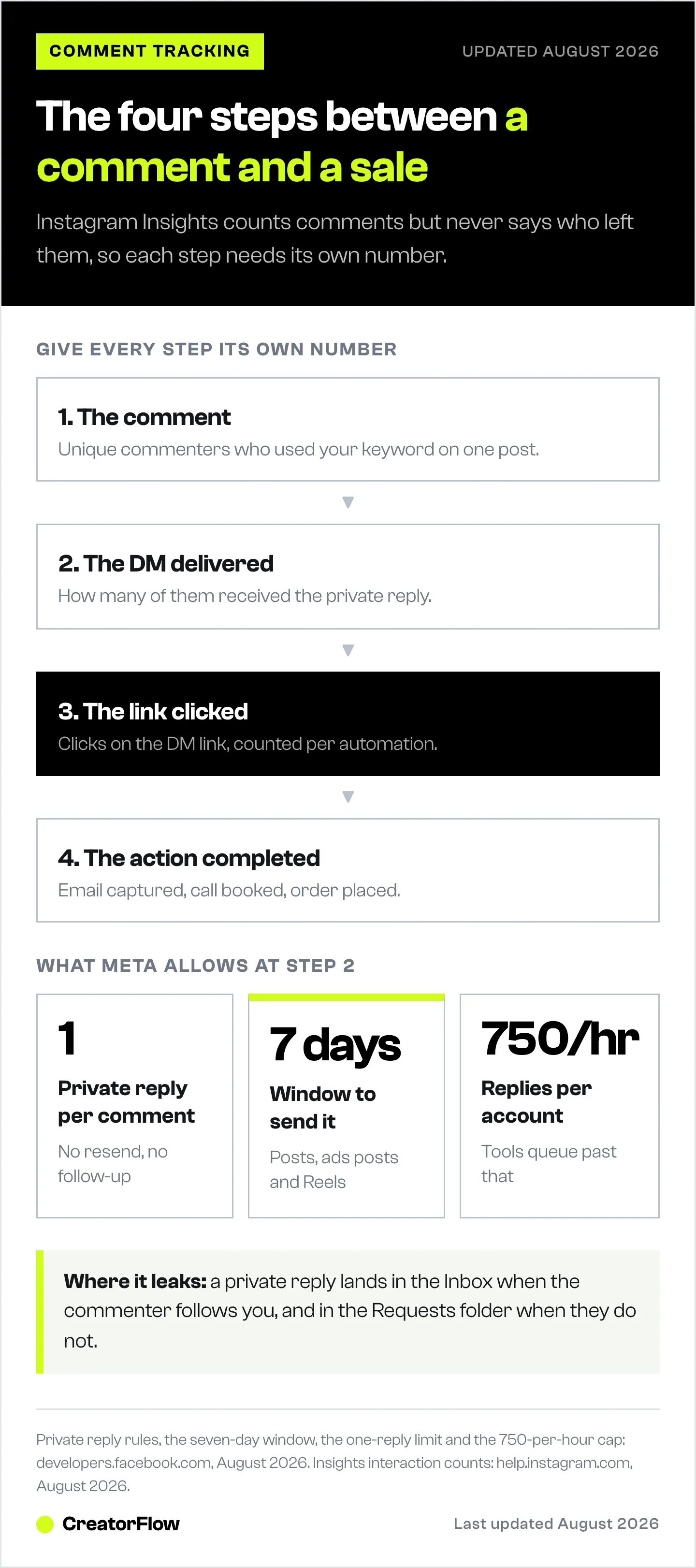
Step 1: the comment. Unique commenters who used your trigger keyword on a specific post. Not total comments, which include replies and conversation. The automation tool records this because it has to match the keyword to fire.
Step 2: the DM delivered. How many of those commenters received the private reply. Meta allows one private reply per comment, and it must be sent within 7 days of the comment for posts, ads posts and Reels (developers.facebook.com, August 2026). The gap between step 1 and step 2 is usually keyword matching: near-misses, plurals and typos that the tool did not catch. Our guide to why keyword matching fires on the wrong comment covers the fixes.
Step 3: the link clicked. Clicks on the link inside that DM, attributed to the automation that sent it. This is the first step that reflects genuine interest rather than curiosity.
Step 4: the action completed. The email captured, the call booked, the order placed. This is the only step that needs something outside Instagram and outside the DM tool.
Steps 1 through 3 sit entirely inside your automation tool. Step 4 needs a destination that reports back.
Where the Chain Actually Leaks
The largest single loss in most comment funnels happens between step 2 and step 3, and no dashboard displays it, because the loss happens inside the Instagram app.
Meta’s documentation is direct about it. A private reply is delivered to the Instagram user’s Inbox folder if that user follows the professional account, and to the Requests folder if they do not (developers.facebook.com, August 2026). Message Requests are a separate tray. Plenty of people never open it.
Instagram reports the message as sent either way, and it never reports whether the tray was opened. So a low click rate on a well-written DM is often a folder problem rather than a copy problem, and the ratio of follower to non-follower commenters on a post predicts it.
Two consequences follow, and both are measurable:
- Split your click rate by follower status. Compare clicks from commenters who follow you against clicks from those who do not. A wide gap confirms the folder effect rather than weak copy, and it tells you the Reel reached beyond your audience.
- Treat viral posts as a different funnel. A Reel that reaches mostly non-followers will show a poor click rate for a mechanical reason. Judging it against a post that reached your existing audience compares two different things.
The second constraint is that you get one attempt. Meta allows only one message to the person who commented, and the conversation can continue only when they respond, inside the standard 24-hour messaging window (developers.facebook.com, August 2026). There is no follow-up, no resend, no second DM to people who did not click. Every improvement has to come from the first message.
Volume has a ceiling too. Meta caps private replies to comments on posts and Reels at 750 per hour per Instagram professional account (developers.facebook.com, August 2026). Tools queue past that. On a post that goes wide, the comments arriving after the cap are answered later, so response time becomes a variable worth recording alongside the rest.
How to Track Instagram Comments Without a CRM
Three of the four steps cost nothing beyond the automation tool you already run. Set them up in this order.
Give every post its own keyword. One keyword per post, or one per offer. Reusing “LINK” across forty posts destroys attribution at the source, because the tool cannot tell which Reel produced which contact. Distinct keywords make step 1 exact rather than estimated. A naming pattern that stays readable past twenty automations is covered in our walkthrough of comment keywords that convert.
Read click rate per automation, not per account. Account-level click totals hide the thing you want. What matters is which automation, and therefore which post, earned the clicks. CreatorFlow reports clicks and click-through rate for each automation, plus the country and city those clicks came from, on Pro and above. The link tracking guide walks through reading it weekly.
Put a UTM on every link in every DM. This is the step that closes the loop to revenue without a CRM. Tag the source, the medium and the campaign, then read the results in whatever analytics your destination already runs. A consistent scheme looks like this:
| Parameter | Value | Why |
|---|---|---|
| utm_source | Separates Instagram from every other channel | |
| utm_medium | dm | Separates automated DMs from bio link and Stories |
| utm_campaign | post slug or keyword | Ties the visit back to one specific post |
| utm_content | variant name | Lets you compare two DM wordings |
With those four parameters, a Shopify or Stripe checkout attributes the order to the exact Reel that started it, and you never touched a CRM. The full setup, including the Google Analytics 4 configuration, is in our Instagram DM automation analytics guide.
Record the numbers monthly. Insights forgets everything older than 90 days. A five-column sheet with post, keyword, unique commenters, clicks and completed actions preserves the history Instagram deletes, and it is the only way to compare this quarter to last year.
When a CRM Is Worth the Extra Cost
Step 4 is where a customer database starts to pay. If someone captured from a comment in March buys in June and again in October, only a system holding the whole customer record can tell you that the March Reel is still earning.
Klaviyo Social Marketing does this natively for ecommerce brands, capturing commenters as profiles that carry the Instagram username and the keyword they typed. It is a reasonable fit for a brand already running Klaviyo email, and we reviewed it in full in our breakdown of Klaviyo Social Marketing.
Two facts to price into that decision, both from Klaviyo’s own documentation:
- Klaviyo bills on active profiles, defined as any profile that can be emailed through Klaviyo regardless of consent status (help.klaviyo.com, August 2026). Every commenter you capture is a billable profile from the day it is created, whether or not it ever buys.
- The funnel and cohort analysis used to trace a signup to revenue lives in Marketing Analytics, which is not included in the base email and profiles plan and starts at $100 per month for up to 13,500 active profiles (help.klaviyo.com, August 2026).
The arithmetic decides it. A store with repeat purchases and a lifetime value per customer well above the per-profile cost gets a clear return from that. An account whose revenue comes from affiliate commissions or a single digital product usually gets the same answer from UTM parameters and its existing checkout data, at no extra cost. Our comparison of a DM funnel and an email funnel works through where each model stops paying for itself.
How to Set Up Comment Tracking in One Afternoon
- Pick one post and one keyword. Use a word tied to that specific offer, not a generic one.
- Build the automation with the keyword recorded. Any tool that logs the trigger word gives you step 1 for free.
- Add UTM parameters to the link in the DM. Source instagram, medium dm, campaign set to the post keyword.
- Confirm the destination reports the visit. Comment on your own post from a second account and check the tagged visit appears in your analytics.
- Log the four numbers after seven days. Unique commenters, DMs sent, clicks, completed actions. Seven days matches Meta’s private reply window, so the post has finished converting by then.
- Split step 3 by follower status. If non-follower clicks trail follower clicks badly, the Requests folder is your bottleneck, not your copy.
- Repeat on the next post with a new keyword. Three posts gives you a baseline. Ten gives you a pattern worth acting on.
The first pass takes about an hour. After that, each new post costs a keyword and a UTM string.
What to Do With the Numbers
Comment tracking earns its keep when it changes what you post, not when it fills a report.
If step 1 is high and step 3 is low, the offer in the DM does not match what the comment was asking for. If step 1 is low on a post with strong reach, the call to action in the caption is doing the damage, not the automation. If step 4 is low while step 3 is healthy, the problem moved off Instagram and onto your landing page.
That diagnosis is only possible when each step carries its own number. One aggregate figure, whether it is comment count or revenue, tells you the outcome and hides the cause. Our guide to Instagram comments that signal a buyer is ready covers which comments deserve a tracked automation in the first place.
FAQ
Can you see who commented on an Instagram post in Insights?
No. Instagram Insights reports Interactions as a count of actions including likes, comments, saves and shares, with no per-person breakdown and no export of individual commenters (help.instagram.com, August 2026). The commenter identity is visible on the post itself and inside automation tools that connect through Meta’s API, but not in the analytics screen.
How far back does Instagram comment data go?
Account Insights covers any period within the past 90 days, whether you use a preset range or a custom one (help.instagram.com, August 2026). Anything older is unavailable in the app, which is why exporting or recording the numbers monthly matters if you want year-over-year comparison.
Why do comment-triggered DMs get low click rates?
Often because of where the message lands. Meta delivers a private reply to the Inbox when the commenter follows the account and to the Requests folder when they do not (developers.facebook.com, August 2026). A post that reached mainly non-followers produces a lot of messages sitting in a tray people rarely open. Split your click rate by follower status before rewriting the message.
How long do you have to reply to an Instagram comment with a DM?
Seven days from when the comment was created, for comments on posts, ads posts and Reels. Only one private reply can be sent per comment, and the conversation continues only if the person responds, within the standard 24-hour messaging window (developers.facebook.com, August 2026). Comments on Instagram Live are stricter: the reply has to go out during the broadcast.
How do you attribute a sale to a specific Instagram post?
Give each post its own trigger keyword, then put UTM parameters on the link inside the DM with the campaign value set to that keyword. The order in your checkout then carries the campaign tag, which maps back to one post. This works with any analytics your destination already runs and needs no CRM.
Do you need a CRM to track Instagram comments?
Not for the first three steps. Unique commenters, DMs sent and link clicks are all reported by the automation tool, and UTM parameters carry attribution through to a purchase in your existing checkout analytics. A CRM earns its cost at the fourth step, when you want one profile to hold every later purchase so you can measure lifetime value by acquisition post.
How many comment-triggered DMs can be sent per hour?
Meta allows 750 private replies per hour per Instagram professional account for comments on posts and Reels (developers.facebook.com, August 2026). Tools queue anything above that and send it as capacity frees up, so a post that goes wide will show a longer average response time on its later comments.
What is a good click rate on a comment-triggered DM?
There is no published cross-account benchmark worth quoting, because the number moves with follower ratio, offer type and niche. Build your own baseline from three to five posts, then compare each new post to it. The comparison you control beats an industry average measured on accounts unlike yours.
Turn Tracked Comments Into Repeatable Revenue
Once you can see which post earned the clicks, the next post writes itself. CreatorFlow is a Meta Tech Provider (since December 2025) that answers comments with a DM in seconds, records the keyword that triggered each contact, and reports click-through rate and buyer location for every automation. Pro is $15 a month flat, whatever your list size does.
Instagram Insights behaviour and Meta private reply rules verified at help.instagram.com and developers.facebook.com in August 2026. Klaviyo billing and Marketing Analytics pricing verified at help.klaviyo.com in August 2026. Platform limits change; re-check before planning around them. Individual results vary.


