
Your automation replied to the wrong comment because most tools match keywords as substrings, not as whole words. A keyword of “link” fires on “linked”, “blinking”, “LinkedIn” and “thinking of it”. The comment never had to be a request. It only had to contain those four letters somewhere. Choosing a longer, more deliberate keyword fixes almost every case of this.
It is an unsettling thing to watch. Someone leaves a compliment on your Reel and receives a DM with a product link they never asked for. It reads as spam, because from their side it is.
This guide explains what the matcher is actually doing, the four ways a keyword misfires, and how to pick one that only fires on intent.
Key Takeaways
- Matching is usually “contains”, not “equals”. If the keyword appears anywhere inside the comment, the automation fires
- Short words are the main cause. Three and four letter keywords appear inside dozens of ordinary words
- Case is ignored. “LINK”, “Link” and “link” are the same trigger, which is helpful and not the problem
- Emoji, accents and punctuation change matching in ways that are easy to test and easy to get wrong
- “Any word” triggers reply to every comment. Useful in a few narrow cases, wrong in most
- The fix is a deliberate keyword that nobody types by accident, named in your caption
- Test from a second account. Testing from your own account cannot produce a DM
How Keyword Matching Actually Works
When someone comments, the tool takes the comment text and checks whether your keyword appears inside it. If yes, the automation fires.
That is the whole mechanic, and the important word is “inside”. The comment does not need to equal your keyword. It does not need to start with it. The keyword only needs to appear somewhere in the text.
So a keyword of “link” matches all of these:
- “link” (intended)
- “link please” (intended)
- “I linked this to my friend” (not intended)
- “blinking at the price” (not intended)
- “found you on LinkedIn” (not intended)
- “thinking about buying” (not intended, and it contains “inking” but not “link”, so this one is safe)
Read that list again and notice how ordinary the accidental matches are. None of those people were asking for anything.
The Four Ways Instagram Automation Replies to the Wrong Comment
1. The keyword is too short
This is the dominant cause. Every additional letter makes accidental matching less likely, and the drop is steep.
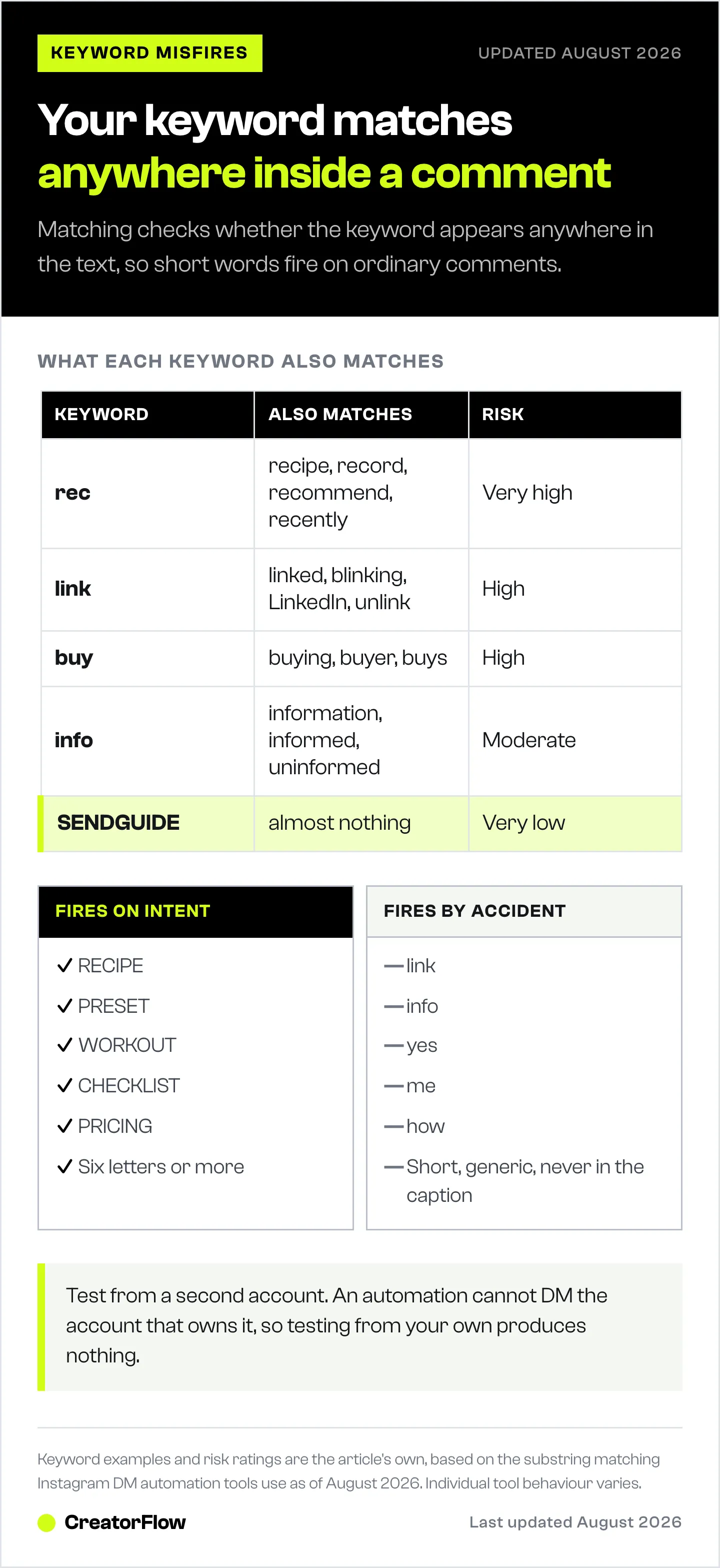
| Keyword | Also matches | Risk |
|---|---|---|
| ”link” | linked, blinking, LinkedIn, unlink | High |
| ”buy” | buying, buyer, buys | High |
| ”rec” | recipe, record, recommend, recently | Very high |
| ”info” | information, informed, uninformed | Moderate |
| ”guide” | guided, guidelines | Moderate |
| ”SENDGUIDE” | almost nothing | Very low |
Anything under five letters should be assumed unsafe unless it is a made-up word.
2. The keyword is a fragment of a common word
Length alone is not sufficient. A six letter keyword still misfires if it lives inside a word people use.
“Course” sits inside “of course”, which is one of the most common phrases in any comment section. A fitness creator using “course” as a trigger will DM everyone who writes “of course you look great”.
Before committing to a keyword, say it in your head inside three ordinary sentences. If it fits comfortably in any of them, pick something else.
3. Emoji, accents and punctuation
Three behaviours worth testing rather than assuming.
Emoji are separate characters. A comment of “link 🔥” contains “link” and matches normally. A keyword that is only an emoji is unreliable across devices, because the same emoji can be sent in different variant forms.
Accents do not always normalise. If your audience writes in Portuguese, Spanish or French, a keyword like “guia” may not match a comment containing “guía”. If your audience uses accents, add both spellings as separate keyword variants.
Punctuation attached to a word usually still matches, because the keyword is found inside the longer string. “link!” contains “link”. Trailing punctuation is rarely the cause of a miss.
4. The trigger is set to “any word”
Most tools offer an option to reply to any comment regardless of content. It does exactly what it says: everyone who comments gets the DM.
There are narrow cases where this is right. A giveaway post where every comment is an entry. A single post whose entire purpose is delivering one thing.
For anything else it is the wrong setting, because it removes the signal that separates a person asking for your link from a person saying “nice shot”. If you are seeing DMs go to people who wrote compliments, check this setting first. It is a faster diagnosis than auditing your keyword.
How to Pick a Keyword That Cannot Misfire
Four rules, in order of importance.
- Six letters or more. Length is the cheapest protection available
- Not a fragment of a common word. Test it inside three ordinary sentences first
- Specific to the offer, not generic. “PRICING” is better than “INFO” because fewer casual comments contain it
- Named explicitly in your caption. Write “comment PRICING and I’ll send the details” so the people who want it type it exactly
Good keywords tend to be the thing itself in capitals: RECIPE, PRESET, WORKOUT, CHECKLIST, TEMPLATE, PRICING. Capitals do not affect matching, since case is ignored, but they read as an instruction in a caption and people copy them accurately.
Weak keywords are short, generic, and never stated in the caption: link, info, yes, me, how, want.
Give Each Post Its Own Keyword
The stronger version of this fix solves accuracy and reporting at the same time.
Instead of one keyword across every post, give each post or each product its own. A skincare creator posting three products uses three keywords rather than “link” three times.
Two things improve at once. Accidental matches drop, because a specific keyword appears in fewer ordinary comments. And attribution becomes automatic, because the keyword tells you which post earned the click without any guessing.
This is the pattern our heaviest users run, most of them with 20 to 30 separate automations, one per product post. Our guide to running a keyword system across multiple offers covers a naming convention that stays readable at that scale, and Instagram comment keywords that convert covers the wording that gets people to type it.
Test It Before It Goes Wide
One step catches most problems before an audience sees them, and it is the step people skip.
Test from a second Instagram account, not your own. An automation cannot DM the account that owns it. Testing from your own account produces no message, which reads as a broken automation and sends people troubleshooting a problem that does not exist.
Use a second account, a friend, or a personal account you already have. Comment the exact keyword, confirm the DM arrives, then comment something ordinary that contains a fragment of the keyword and confirm no DM arrives. That second test is the one that catches the misfire.
If nothing arrives on either test, the cause is upstream of keyword matching, and our guide to comment-to-DM not sending works through the wider list.
What to Do About the Ones Already Sent
If people have already received DMs they did not ask for, the practical response is short.
Change the keyword first so it stops happening. Then, if anyone replied confused, answer them normally. A brief human reply resolves it, and the volume is usually small.
There is no need to make an announcement. The people affected got one unexpected message, not a campaign.
FAQ
Why did my Instagram automation DM someone who did not ask?
Because keyword matching checks whether your keyword appears anywhere inside the comment. A keyword of “link” fires on “linked”, “blinking” and “LinkedIn”. The commenter did not have to be asking for anything, only to have typed those letters in sequence.
Does Instagram keyword matching care about capital letters?
No. Matching ignores case, so “LINK”, “Link” and “link” all trigger the same automation. Writing keywords in capitals in your caption is still worth doing, because it reads as an instruction and people copy it accurately.
What is a good keyword length for Instagram DM automation?
Six letters or more. Shorter keywords appear inside too many ordinary words. Anything under five letters should be treated as unsafe unless it is a word you invented for the purpose.
Should I use the “any word” trigger option?
Only when every comment on the post genuinely deserves the same reply, such as a giveaway entry post. For normal posts it removes the distinction between someone asking for your link and someone leaving a compliment.
Do emoji and accents affect Instagram keyword triggers?
Emoji are separate characters and do not usually block a match, though an emoji-only keyword is unreliable across devices. Accents may not normalise, so if your audience writes with accents, add both the accented and unaccented spellings as separate keyword variants.
Why does my automation not fire when I test it myself?
An automation cannot send a DM to the account that owns it. Testing from your own account produces no message even when everything is configured correctly. Always test from a second account.
How do I stop my automation replying to compliments?
Check whether the trigger is set to “any word”, which replies to every comment. If it is set to a keyword, the keyword is probably too short or sits inside a common word. Replace it with something six letters or longer that is specific to the offer.
The Short Version
Pick a keyword nobody types by accident, name it in the caption, give each post its own, and test from a second account before it goes wide. That sequence removes nearly every case of an automation replying to the wrong person.
CreatorFlow supports up to 20 keyword variants per automation, so you can cover spelling differences and both accented and unaccented forms on the same trigger, and it is a Meta Tech Provider (since December 2025). Our complete guide to Instagram DM automation covers the full setup from a connected account to a working automation.
Keyword matching behaviour described reflects standard substring matching used by Instagram DM automation tools as of August 2026. Individual tool behaviour varies.


