

Instagram automation is software that handles Instagram tasks for you: publishing scheduled posts, replying to comments and DMs, and pulling reports. Most of it runs through Meta’s official Instagram API, which only lets you message someone after they comment, reply, or message you first. Automation that acts without that trigger, like follow-and-like bots, goes against Instagram’s Terms of Use.
Ask about automation in a creator forum and half the replies will call it botting. That reputation comes from one specific kind of tool, the kind that logs into your account with your password and taps buttons on your behalf. The other kinds run on an API Meta built, documents publicly, and updated as recently as September 2026.
This guide separates the two. You will get the four categories the word covers, the single rule that decides whether Meta permits a given automation, the exact message windows the API enforces, and what it costs to run.
Key Takeaways
- The word covers four different jobs: publishing, conversations, engagement bots, and reporting. Three are permitted, one is not.
- One rule decides everything: a person has to act first. Comment, story reply, or DM. No trigger, no message.
- Meta publishes the limits: its Instagram Platform documentation gives you 7 days to privately reply to a commenter, one message per comment, and a 24-hour window to answer a DM (checked October 2026).
- Follow-and-like bots are the risky kind: Instagram names third-party apps that “offer likes or followers” as a reason accounts get restricted (help.instagram.com, August 2026).
- Conversation automation is where the money is: comment-to-DM sends links, files, and booking pages while the person is still looking at the post.
- Entry cost is zero: CreatorFlow, ManyChat, and LinkDM all run free tiers. Paid plans start at $15/month for CreatorFlow Pro, $17/month billed monthly for ManyChat Essential and $19/month for LinkDM Pro (checked October 2026).
What Is Instagram Automation?
Instagram automation is any software that carries out an Instagram action without you tapping the screen. That includes a post going live at 7am while you sleep, a DM landing two seconds after someone comments “LINK”, and a weekly report of which Reel drove the most saves. The software connects to your professional account through Meta’s Instagram API, using a permission screen rather than your password.
The category is broad enough that two people arguing about it are often discussing different tools entirely. A social media manager means scheduling. A coach means auto-replies. Someone burned in 2019 means a follow-unfollow bot. All three are technically automation, which is why the term needs unpacking before it means anything useful.
Scale is what makes it worth the effort. Instagram passed 3 billion monthly active users, a number Meta confirmed on its Q3 2025 earnings call. An account with even modest reach collects more comments, story replies, and questions than one person can answer at a reasonable hour.
The Four Types, and Which Ones Meta Allows
There are four jobs people hand to software, and they sit in different places on Meta’s rulebook. Publishing, conversations, and reporting all run through the official API. Engagement bots do not, which is the entire reason automation has a bad name.
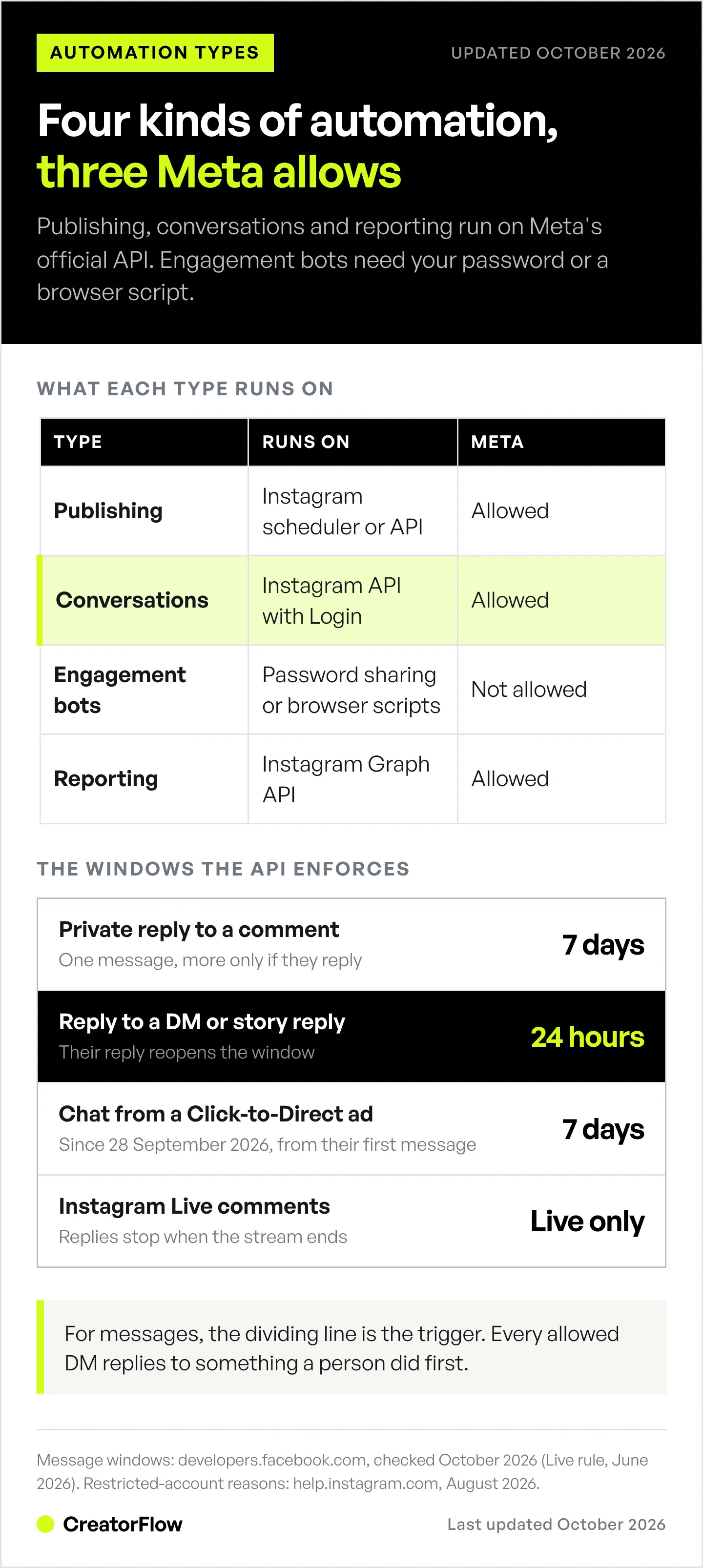
| Type | What it does | Runs on | Permitted |
|---|---|---|---|
| Publishing | Schedules posts, carousels, Reels | Instagram’s own scheduler or the Content Publishing API | Yes |
| Conversations | Auto-replies to comments, story replies, keyword DMs | Instagram API with Instagram Login | Yes |
| Engagement bots | Auto-follows, auto-likes, auto-comments, mass DMs | Password sharing or browser scripts | No |
| Reporting | Pulls reach, saves, clicks, follower data | Instagram Graph API | Yes |
Publishing automation is the oldest kind. Instagram’s own scheduler covers posts, carousels, and Reels up to 30 days ahead, and since March 2026 it works on any public account rather than professional ones only. Third-party schedulers add calendars, approvals, and multi-account views on top. Our guide to scheduling Instagram posts compares the five routes.
Conversation automation is what most creators mean now. Someone comments a keyword on your Reel and the software sends them a DM with the link, the recipe, the discount code, or the booking page. Same for story replies and for DMs containing a keyword you set.
Engagement bots operate the account as if they were you. They follow accounts in a hashtag, like posts to attract attention back, and send cold DMs to people who never interacted with you. These need your login credentials or a browser extension, because Meta’s API will not do any of it.
Reporting automation reads data rather than writing it. Follower counts, story completion, link clicks by country. Low risk, no messaging involved.
How Does Instagram Automation Work?
A conversation automation runs on a loop with four steps. You register a trigger, Meta watches for it, Meta notifies the tool, and the tool sends one message back through the API. The whole cycle takes a few seconds, and none of it involves your password.
Here is the sequence for the most common setup, a comment-to-DM:
- You connect the account. Instagram shows a permission screen listing what the app may do. You approve it. The tool receives a token, not your credentials.
- You pick a post and a keyword. Something like “GUIDE” on a specific Reel.
- A follower comments the keyword. Meta fires a webhook to the tool’s server with the comment ID and the commenter’s Instagram-scoped ID.
- The tool sends a private reply. It appears in the commenter’s inbox if they follow you, or in their message requests folder if they do not (developers.facebook.com, June 2026).
Two details surprise people. First, the API never gives the tool your password, so revoking access takes one tap in Instagram’s settings. Second, Meta caps the pace. Its published limits are per second rather than per hour, and automation tools add their own conservative ceiling of roughly 200 DMs per hour on top as a behavioural safety margin. For the full technical path, including what the webhook payload contains, see how Instagram DM automation works.
Is Instagram Automation Allowed by Meta?
Yes, when the automation responds to something a person did. Meta built the messaging API for exactly this and states the condition plainly: “Conversations only begin when an Instagram user sends a message to your app user” (developers.facebook.com, May 2026). Automation that starts the conversation itself, or that collects data by imitating a logged-in human, is a different matter.
Instagram’s Terms of Use prohibit attempts to “create accounts or access or collect information in unauthorized ways”, including “collecting information in an automated way without our express permission”. The help page on restricted accounts is more specific about what triggers a review. It lists giving your username and password to a third-party app, using “apps that offer likes or followers”, and using “an app or service to interact with Instagram in unauthorized ways” (help.instagram.com, August 2026).
That gives you a clean test with one question: did a real person act first? A comment, a story reply, an inbound DM. If the answer is yes and the tool uses the official API, you are inside the rules. If the automation reaches out on its own, you are not, whatever the vendor’s marketing says.
One rule catches people out even on approved tools. Where local law requires it, an automated chat has to disclose that it is automated, at the start of a thread or when a human takes over. Meta names California and Germany specifically and suggests wording such as “You are interacting with an automated experience” (developers.facebook.com, May 2026). If your audience includes either market, put that line in your first message. A fuller breakdown of the risk sits in our answer to is Instagram automation safe.
What the Rules Let You Send
The API enforces four windows, and every compliant tool inherits them. Knowing the numbers explains most of the behaviour creators find confusing, like why a reply to a week-old comment never arrives.
| Rule | The limit | Why it matters |
|---|---|---|
| Private reply to a comment | Within 7 days of the comment | Old comments cannot be answered by automation |
| Messages per comment | One | No follow-up chain unless they reply |
| Reply to a DM or story reply | Within 24 hours | Silence past a day closes the thread |
| Instagram Live comments | During the broadcast only | Replies stop when the stream ends |
Source: developers.facebook.com, June 2026.
Two practical consequences. A follower who replies to your automated message reopens a fresh 24-hour window, which is why asking a question in the first message works better than sending a bare link. And a human-agent tag exists for teams that need longer to answer, extending the response window to 7 days for genuine human replies. Since September 28, 2026, chats that start when someone taps a Click-to-Direct ad and sends a message also get up to 7 days from that first message.
Text messages also cap at 1,000 bytes, roughly 1,000 plain characters, which is more than enough for a link and a sentence of context. Every trigger carries its own version of these limits, laid out in our list of nine automation features and the rule that caps each one.
What Creators and Businesses Automate on Instagram
The tasks worth automating share a shape: a question you answer the same way many times a day, where speed changes the outcome.
- Link delivery. A Reel asks people to comment a word, and the product, recipe, or affiliate link arrives while they are still watching. This is the single most common use.
- Lead capture. The message asks for an email address before sending a guide or discount, so Instagram engagement becomes a list you own.
- Booking. Coaches and service businesses send a calendar link to anyone who asks about availability.
- Repeat questions. Sizing, shipping, ingredients, opening hours. The same reply, delivered instantly, at 2am.
- Story replies. A reply to your Story triggers a follow-up, which turns a passive viewer into a conversation.
- Follower gates. A message can ask for a follow before it sends the link, which converts a commenter into a follower.
The pattern behind all six is distribution. The content earns attention on the feed, and the automation moves that attention somewhere you control, whether that is a store, a calendar, or an inbox.
What It Costs to Automate Instagram
Every major tool runs a free tier, so testing costs nothing but setup time. Paid plans separate on how they count: some price by contacts reached, others by messages sent.
- CreatorFlow: Free plan with 500 DMs a month and unlimited automations. Pro is $15/month, or $144 a year, and adds the follow gate, email gate, CSV export, and click analytics by country.
- ManyChat: Covers Instagram, Facebook Messenger, TikTok, Telegram, WhatsApp, SMS, and email, with a flow builder and live chat. Free plan holds 25 contacts. ManyChat’s pricing page lists paid tiers at $17, $39, $99, and $199 a month billed monthly, or $14, $29, $69, and $139 a month billed annually, scaling by contact count from 250 to 25,000 (checked October 2026).
- LinkDM: Free covers 1,000 DMs a month. LinkDM’s pricing page lists Pro at $19/month for 3 accounts and 25,000 DMs, and Platinum+ at $99/month for 10 accounts and 300,000 DMs (checked October 2026).
Pick the counting method that matches your growth. Contact-based pricing tracks audience size, message-based pricing tracks activity. Our breakdown of what automation costs at different audience sizes runs the maths for each model.
How to Set Up Your First Automation
Start with one post and one keyword. A single working automation teaches more than a week of comparing feature tables.
- Switch to a professional account. Settings, then Account type and tools. Creator or Business both work.
- Connect a tool. Approve the permission screen. This takes under two minutes and never asks for your password.
- Pick a post that already gets questions. Your best-performing Reel is the obvious candidate.
- Choose a keyword people would type anyway. “LINK”, “GUIDE”, “PRICE”. Short, obvious, one word.
- Write the message. Open with context, include the disclosure line if your audience includes California or Germany, then the link. Ask a question at the end to invite a reply.
- Test it from a second account. Comment the keyword and watch the DM arrive.
- Tell people the keyword. Say it in the caption, on the Reel, and in the first pinned comment.
Then read the numbers after a week. Comments on the post, DMs sent, clicks on the link. The gap between those three tells you whether the problem is reach, the message, or the offer. Our step-by-step walkthrough covers each trigger type in detail if you want the full version of how to set up Instagram automation.
FAQ
Is Instagram automation against Instagram’s rules?
Not when it replies to something a person did. Meta’s messaging API exists for automated replies to comments, story replies, and DMs, and its documentation states that conversations begin only when a user messages you first (developers.facebook.com, May 2026). Automation that follows, likes, or cold-DMs on its own is a different category and does go against Instagram’s Terms of Use.
Can Instagram automation get my account banned?
It can, if the tool works by logging in as you. Instagram lists password sharing with third-party apps and services that “offer likes or followers” among the reasons accounts get restricted for unauthorized access (help.instagram.com, August 2026). Tools built on the official API connect through a permission screen instead, which is why they carry minimal risk. No tool can promise zero risk.
What is the difference between an automation tool and an Instagram bot?
Access method. API-based automation is granted specific permissions by Meta and can only reply within published windows. A bot operates your account directly, usually through your password or a browser script, and performs actions Meta never authorised. The first is documented on developers.facebook.com. The second is what Instagram’s help pages warn about.
Does Instagram have built-in automation?
Some. A professional account includes saved replies, frequently asked questions, away messages, and instant replies inside the app, plus native post scheduling. Those cover speed of typing rather than triggered workflows. Keyword-triggered comment-to-DM, email capture, follow gates, and click analytics come from third-party tools built on the API.
Do I need a business or creator account to automate DMs?
For conversation automation, yes. Messaging and comment permissions are only available to professional accounts, which is a free switch in Instagram’s settings. Native post scheduling opened to all public accounts in March 2026, so publishing automation no longer requires the switch.
How fast does an automated DM arrive?
Usually within a few seconds of the trigger. Meta sends the webhook as soon as the comment is posted, and the tool replies immediately, subject to its own pacing. The visible delay is generally between one and eight seconds.
Can I automate Instagram DMs to people who do not follow me?
Yes, provided they engaged first. Someone who comments on your post or replies to your story can be messaged whether or not they follow you, though the message lands in their requests folder rather than their inbox. Sending to accounts that never interacted with you is cold outreach, which the API does not permit. Other platforms draw that line differently, and TikTok counts only a message as engagement, never a comment. The Instagram DM automation glossary defines the rest of the terms.
Turn Comments Into Conversations
CreatorFlow is built for the conversation layer. Someone comments your keyword and the DM goes out with your link. On Pro and Growth, the follow gate and email gate turn that moment into a follower or a subscriber, and click analytics show you which post and which country the traffic came from. Setup takes under two minutes, and the free plan covers 500 DMs a month.
Message windows (7-day private reply, one message per comment, 24-hour DM window, 7-day Click-to-Direct ad chats) checked against Meta’s Instagram Platform documentation in October 2026. Pricing checked on creatorflow.so, manychat.com/pricing and linkdm.com/pricing in October 2026. Instagram help-center quotes and other API behaviour verified in August 2026. Individual results vary.


