

Instagram comment-to-DM automation stops sending for 8 common reasons: expired authentication tokens, trigger word mismatches, rate limits, missing API permissions, or spam flags. The fix is usually simple. If the automation is new and has never sent a DM, three setup checks come first: test from a second account, make sure the automation is live, and make sure the keyword is a whole word. If it worked before and stopped, reconnecting your Instagram account resolves the majority of cases in under 30 seconds, because a password change or an expired token ends the connection.
If your automation was working yesterday and stopped today, you’re not alone. This is one of the most common issues creators face with DM automation, and it rarely means something is permanently broken.
This guide walks you through 8 specific fixes in order of likelihood, so you can diagnose the problem and get your comment-to-DM automation sending again in minutes. If the DM is sending but nobody answers it, the issue sits in delivery rather than setup, and the four gates a handoff has to clear explains where it dies.
Key Takeaways
- New automation, no DM yet: Test from a second account, check the automation is live and not a draft, and use a keyword people type as a whole word
- Worked before, then stopped: Reconnecting your Instagram account solves the majority of issues, since long-lived access tokens last 60 days and a password change ends them at once
- Rate limit: Many automation tools pace sends at about 200 DMs per hour as a safety convention (Meta’s published limits are 100 messages per second plus 750 private replies to comments per hour), messages queue automatically if exceeded
- Messaging window: An automated private reply must go out within 7 days of the comment, so set up automation before posting, not after
- Required permissions: The tool needs basic access plus permission to manage comments and messages (on the Instagram Login path: instagram_business_basic, instagram_business_manage_comments, instagram_business_manage_messages); missing any one breaks automation
- Spam prevention: Vary your message templates, keep messages under 300 characters, use one link per message, and avoid ALL CAPS
- Bottom line: Start with Fix #1 (reconnect account) and work down the list, most issues resolve in under 5 minutes
Start Here: Three Checks Before Anything Technical
If your automation has never sent a single DM, the cause is almost always one of these three. None of them is a fault.
1. You are testing from your own account
Rule this out first. It is the most common cause of “the automation is live but nothing sends”, and it is not a fault at all.
An automation cannot send a DM to the account that owns it. If you comment your own keyword on your own post, no message will ever arrive, no matter how correctly everything is configured. The automation is working. It simply has nobody to message.
Test from a second Instagram account, a friend’s account, or a personal account you already have. Comment the exact keyword and confirm the DM arrives there.
If a second account does receive the message, nothing is broken and you can stop reading. If it does not, go to check 2.
2. The automation is still a draft
An automation only sends after you turn it on. A saved automation that was never switched to live stays a draft, and a draft sends nothing.
Open your automations list and look at the status of the one you are testing. If it is not live, turn it on, then comment from your second account again.
3. The keyword is not a whole word in the comment
In CreatorFlow, keywords ignore case but must appear as a whole word. “link” matches “link please” and “LINK”, but not “linked” or “links”. Phrases with more than one word, like “sign up”, work too. A keyword that is only an emoji or only a symbol does not trigger reliably.
So if your keyword is “guide” and people comment “guides”, no DM goes out. Add the forms people actually type as extra keywords. You can add up to 20 per automation.
If all three checks pass and the DM still does not arrive, work through the causes below.
Why Is My Comment-to-DM Automation Not Sending?
Comment-to-DM automation stops sending for 8 common reasons: trigger word mismatch, disconnected Instagram account, hit your tool’s ~200 DMs/hour pacing cap, messaging window expired, missing permissions, post was edited or deleted, account switched to Personal, or Instagram flagged messages as spam. Most issues fix in under 5 minutes by reconnecting your account or adjusting your trigger settings.
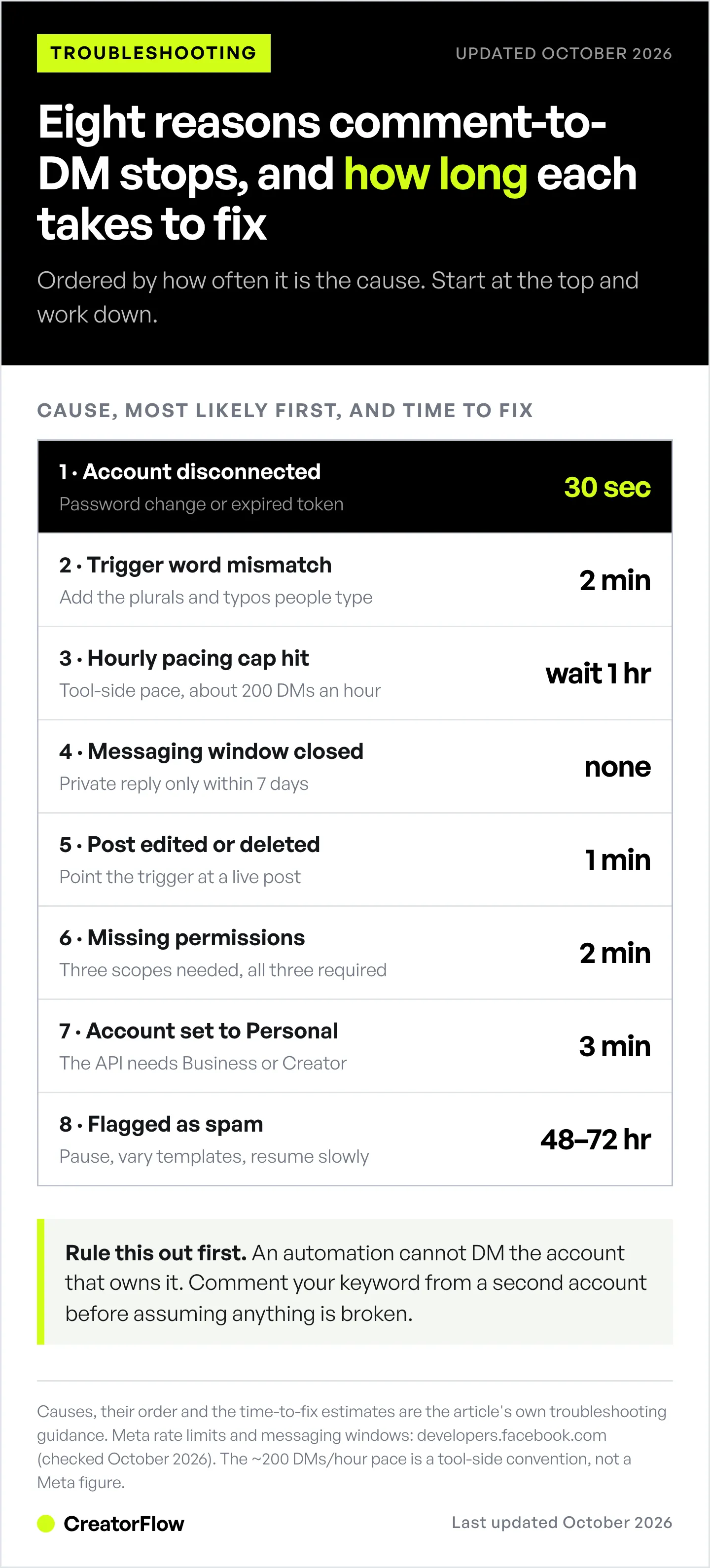
This guide walks you through each fix in order of likelihood. Start with Fix #1 and work down.
Fix #1: Reconnect Your Instagram Account
The most common fix. Instagram periodically expires authentication tokens. When this happens, your automation tool loses permission to send DMs. Learn more about how Instagram DM automation works and authentication requirements.
Signs this is your issue:
- All comment automations stopped at once
- Dashboard shows “Reconnect” or “Connection expired” warning
- You recently changed your Instagram password
How to fix:
- Open your automation tool (CreatorFlow, ManyChat, etc.)
- Go to Settings → Connected Accounts
- Click “Reconnect Instagram”
- Log in through Instagram (or through Facebook, if your tool uses Facebook Login)
- Grant ALL requested permissions
- Test by commenting from a second Instagram account
Time to fix: 30 seconds
Why this happens: Long-lived Instagram access tokens last 60 days. Tools refresh them in the background, but a password change or a security check can end the connection early.
Fix #2: Check Your Trigger Words
Second most common issue. Your trigger word is “LINK” but users are commenting “link”, “Link plz”, or “linnk” (typo).
Signs this is your issue:
- Some comments trigger DMs, others don’t
- Similar keywords behave differently
- You’re using exact match instead of contains match
How to fix:
- Open your automation settings
- Find your comment trigger
- Switch from “exact match” to “contains”
- Add these variations:
- Lowercase: link, guide, free
- Uppercase: LINK, GUIDE, FREE
- Mixed: Link, Guide, Free
- Common typos: linkk, lin, lnk
- With context: “send link”, “link please”, “I want the link”
Example trigger word list:
link
LINK
Link
send link
link please
link pls
lnk
Time to fix: 2 minutes
In CreatorFlow: case does not matter, so you do not need LINK, Link and link as separate keywords. Matching is by whole word, so plurals and typos (links, linkk) each need their own keyword. You can add up to 20.
Pro tip: Check your recent comments. What are people actually typing? Add those exact variations. For more guidance, see our keyword trigger automation guide.
Fix #3: You Hit Your Tool’s Hourly Pacing Cap
Happens during viral moments. Many automation tools pace sends at about 200 DMs per hour as a safety convention. Meta’s own published limits are 100 messages per second plus 750 private replies to comments per hour. If your post got 500 comments in 30 minutes and your tool paces at 200 an hour, automation paused after the first 200.
Signs this is your issue:
- Automation worked initially, then stopped mid-post
- Activity log shows “Rate limit exceeded”
- DMs resume after waiting an hour
How to fix:
- Wait 1 hour (limit resets automatically)
- Check if your tool has “smart pacing” and enable it
- For future viral posts, expect delays, your automation tool enforces this pacing strictly
Time to fix: Wait 1 hour (no action needed)
Prevention: Use tools with built-in rate limit protection. CreatorFlow automatically paces messages to stay under 200/hour, even during high engagement.
Technical note: The 200 DM/hour pacing is a tool-side convention, not a figure in Meta’s docs. Meta documents per-second messaging limits and the 750-per-hour cap on private replies to comments in its rate-limiting documentation (checked October 2026). Read more about Instagram Graph API rate limits.
Fix #4: The Messaging Window Expired
Instagram’s strict rule. An automated private reply to a comment must go out within 7 days of the comment. Comment on Monday, try to DM the following Tuesday? Blocked. Inside an ongoing chat, you have 24 hours after the person’s last message (up to 7 days for chats that start from a Click-to-Direct ad, since 28 September 2026).
Signs this is your issue:
- Old comments don’t trigger DMs
- Recent comments work fine
- Error log says the messaging window has closed
How to fix:
- You can’t DM them automatically anymore (Instagram blocks it)
- Workaround: Reply to their comment publicly with your link
- Prevention: Turn the automation on before you post. On CreatorFlow Pro, Rewind can DM people who already commented on your recent posts.
Time to fix: None for old comments, prevent future issues
Why this exists: Instagram prevents spam by requiring recent engagement before automated messaging.
Fix #5: Your Trigger Post Was Edited or Deleted
Breaks the connection. When you set up comment-to-DM, it links to a specific post. Edit the caption significantly, archive it, or delete it? The trigger breaks.
Signs this is your issue:
- Only ONE automation stopped (others work)
- You recently edited the connected post
- Dashboard shows “Post not found” error
How to fix:
- Open your automation editor
- Check which post the trigger connects to
- If post was deleted → Select a new post
- If post was edited → Reconnect the trigger
- Save and test
Time to fix: 1 minute
Prevention: Don’t delete posts with active automations. Archive them instead, this preserves automation links. Caption edits are also different from comment edits; for how Instagram handles changing comments themselves, see how to edit comments on Instagram.
Fix #6: Missing Instagram Permissions
Permission gap. During setup, you may have skipped a permission checkbox. Without “instagram_manage_messages” permission, automation can read comments but can’t send DMs.
Signs this is your issue:
- Account shows as connected
- Tool can see comments but DMs don’t send
- Permission error in activity logs
How to fix:
- Disconnect your automation tool from its account settings
- Reconnect it
- Check ALL permission boxes during reconnection, including message access
- If your tool uses Facebook Login, you can also check the app’s permissions in Meta Business Suite settings
Time to fix: 2 minutes
Technical note: On the Instagram API with Instagram Login, the scopes are instagram_business_basic, instagram_business_manage_comments, and instagram_business_manage_messages. On the Facebook Login path they are instagram_basic, instagram_manage_comments, and instagram_manage_messages. Missing any one breaks automation.
Fix #7: Account Switched to Personal
API access lost. Someone accidentally switched your account from Business/Creator to Personal. Instagram’s API only works with professional accounts.
Signs this is your issue:
- Instagram Insights disappeared
- “Professional Dashboard” is gone
- All automations stopped at once (not just comment-to-DM)
How to fix:
- Open Instagram → Settings and activity → Account type and tools
- Tap “Switch to professional account”
- Choose Business or Creator
- Reconnect your automation tool
- Grant all permissions again
Time to fix: 3 minutes
Prevention: Limit who has admin access to your Instagram account.
Fix #8: Instagram Flagged Your Messages as Spam
Throttled by Instagram. Sending identical messages to 100+ people in a short time triggers spam detection.
Signs this is your issue:
- Sudden drop in delivery rates
- DMs landing in “Message Requests” instead of inbox
- Instagram sent you a warning about “unusual activity”
- “Failed to send” errors in logs
How to fix:
- Stop all automation for 48 hours (let Instagram reset)
- Vary your message templates (don’t send identical text)
- Add personalization (use their name, reference their comment)
- When resuming, start slow (under 50 DMs/day initially)
- Remove spam trigger words: “FREE!!!”, “LIMITED TIME”, “CLICK NOW”
Time to fix: 48-72 hours recovery
Prevention:
- Personalize every message
- Keep messages under 300 characters
- One link per message maximum
- Avoid ALL CAPS and excessive emojis
If DMs are landing in Message Requests or Instagram warned you about unusual activity, run an account health check to confirm whether your account is restricted. For more on maintaining safe automation practices, read how to avoid Instagram bans with DM automation.
Quick Diagnostic Flowchart
Answer these questions in order:
-
Did all automations stop at once?
- Yes → Try Fix #1 (Reconnect account)
- No → Continue
-
Are some comments triggering but others aren’t?
- Yes → Try Fix #2 (Check trigger words)
- No → Continue
-
Did it stop during a high-engagement post?
- Yes → Try Fix #3 (Rate limit, wait 1 hour)
- No → Continue
-
Are only old comments failing?
- Yes → Fix #4 (messaging window expired)
- No → Continue
-
Did you recently edit or delete the trigger post?
- Yes → Try Fix #5 (Reconnect trigger)
- No → Continue
-
Check your tool’s activity log. What error message appears?
- “Permission denied” → Fix #6
- “Account not professional” → Fix #7
- “Spam detected” or “Throttled” → Fix #8
When to Contact Support
If you’ve tried all 8 fixes and automation still isn’t working:
Contact your automation tool’s support with:
- Exact time automation stopped
- Specific error messages from activity logs
- Screenshots of your trigger settings
- Whether this affects all automations or just one
Check for platform-wide issues:
- Your tool’s status page
- DownDetector for Instagram
- Meta’s developer status: developers.facebook.com/status
Most issues resolve with Fixes #1-3. If you’re past Fix #4, it’s either a configuration problem or Instagram-side restriction.
Preventing Future Issues
Weekly 2-minute check:
- Account shows “Connected” (not expired)
- Trigger posts still exist
- Recent comments are triggering DMs
- No warning messages in dashboard
- Message delivery rate above 85%
Setup best practices:
- Add 5-10 trigger word variations
- Enable smart pacing if available
- Don’t delete posts with active triggers
- Reconnect account monthly (prevents token expiration)
- Personalize message templates
Need help setting up your automation from scratch? Follow our comment-to-DM automation setup guide.
Message quality rules:
- Under 300 characters
- One link maximum
- No spam phrases (FREE!!!, ACT NOW)
- Include personalization
- Sound human, not robotic
If the account never finished connecting in the first place, start with why an Instagram account will not connect instead.
FAQ
Why do some comments trigger DMs but not others?
Three possibilities: (1) Trigger word mismatch, users are typing variations you haven’t added (in CreatorFlow the keyword must appear as a whole word, so “links” does not match “link”), (2) Messaging window, comments older than 7 days can’t get an automated DM, (3) Non-followers, DMs to non-followers often land in “Message Requests” where they go unread. Fix by adding keyword variations and asking commenters to check their message requests.
How long until my comment-to-DM starts working after setup?
Most tools activate within 1-5 minutes. Test by commenting your trigger word on your own post from a different account (or have a friend comment). If nothing happens after 5 minutes, check your account connection and trigger settings.
Can I send comment-to-DMs to non-followers?
Yes, as long as they commented first, but DMs to non-followers often land in “Message Requests”, where many go unread. Their replies land there too, which is why Instagram message requests not showing is worth reading alongside this guide. A line in your caption such as “check your requests” helps people find the DM.
What’s the maximum comments I can auto-reply to per hour?
Meta caps private replies to comments at 750 per hour per account, on top of a 100-per-second limit for messages (developers.facebook.com, October 2026). Many automation tools pace sends lower, at about 200 DMs per hour, as a safety convention. The pacing applies regardless of account size or verification status. If you hit this cap, messages queue and send as the hour rolls over.
Will fixing these issues recover missed comments?
For comments within the last 7 days, yes, if your tool queues failed messages or can resend them. On CreatorFlow Pro, Rewind DMs people who already commented on your recent posts. For comments older than 7 days, no, Instagram’s messaging window has closed. You can reply to old comments publicly, but automated DMs won’t send.
Does this affect Story reply automation too?
Fixes #1, #3, #6, #7, and #8 affect all Instagram automation (including Story replies). Fixes #2, #4, and #5 are specific to comment-to-DM triggers. If your Story replies also stopped, focus on the account-level fixes first.
Get Back Online
Most comment-to-DM issues fix in under 5 minutes. Start with Fix #1 (reconnect your account) and work through the list. If you’re hitting rate limits frequently or dealing with spam flags, consider a tool with better built-in protections.
CreatorFlow’s Free plan includes 500 DMs a month.
Sources: Meta Instagram Platform documentation (developers.facebook.com/docs/graph-api/overview/rate-limiting, checked October 2026). Per-second rate limits and messaging windows verified against official Meta developer documentation; the ~200 DMs/hour figure is a tool-side pacing convention.


