

Instagram message requests not showing usually means the message was routed, not lost. Instagram picks the folder at delivery: messages from people you follow land in your Chats list, messages from non-followers sit in Requests, and filtered ones go to a folder Instagram now labels Spam, which sends no notification at all (help.instagram.com, August 2026). Check all three before assuming something broke.
Someone tells you they messaged you two days ago. Your inbox shows nothing. No badge, no push alert, no error. The instinct is to start flipping settings, and that is the one move that makes the message harder to find, because it changes the evidence before you have read it.
This guide covers where Instagram actually puts an inbound DM, why the folder name in most troubleshooting articles no longer matches your app, and the extra rules that apply once your account is professional and connected to an automation tool.
Key Takeaways
- Placement is decided at delivery, not by a fault. Messages from followers go to Chats. Messages from non-followers go to Requests. A request has to be accepted before it appears in your Chats list (help.instagram.com, August 2026)
- Hidden Requests is now called Spam. Instagram’s current help page and app flow both use Spam, so guides telling you to open Hidden Requests are pointing at a label most accounts no longer show
- Spam sends no notification. Instagram states plainly that you will not receive notifications for spam, so a silent inbox proves nothing about whether a message arrived
- The message filter is off by default. Hide unwanted message requests ships off on adult accounts and on automatically for Teen Accounts, which flips the usual assumption about what to check first
- Your best automation leads sit in Requests. When a non-follower replies to your automated DM, Meta routes that reply to your Requests folder, not Primary (developers.facebook.com, October 2026)
- Requests go stale at 30 days. Meta stops returning Requests threads with no activity for 30 days through the API, so a connected tool can lose sight of a message that is still visible in the app
Where Instagram Puts a Message Request
Instagram sorts an inbound DM the moment it arrives, using one input: whether you already have a relationship with the sender.
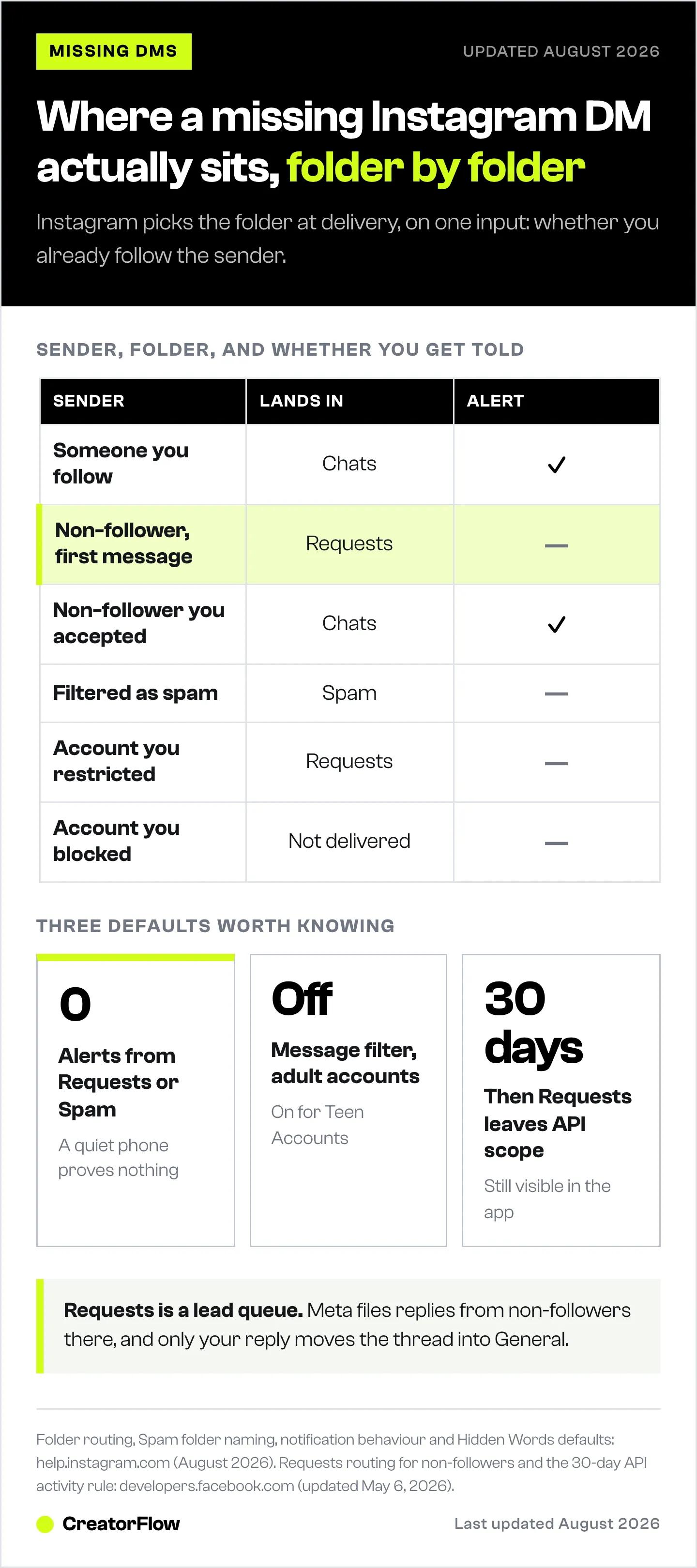
If you follow the sender, the message goes straight to your Chats list. If you do not, it becomes a message request. Instagram is explicit that you need to accept a request before it shows up in Chats, and that messages from people you follow appear in Chats directly (help.instagram.com, August 2026).
Once you accept, the rule stops applying to that person. Instagram states that after someone accepts a message request, future messages from that sender go directly to the inbox. If a sender sees an error instead, the account has turned requests off, which “This account can’t receive your message” explains.
| Sender | Where it lands | Notification |
|---|---|---|
| Someone you follow | Chats | Yes |
| Non-follower, first message | Requests | No |
| Non-follower you already accepted | Chats | Yes |
| Filtered as scam or offensive | Spam | No |
| Account you restricted | Requests | No |
| Account you blocked | Not delivered | No |
That table answers most “missing DM” reports on its own. The message is usually one tap away in Requests, and the reason you never saw a badge is that Instagram never sent one.
Hidden Requests Is Now Called Spam
Most troubleshooting guides tell you to open Requests and then tap Hidden Requests. Instagram’s live help page uses a different word.
The current page is titled “View, delete, or report spam on Instagram” and it reads: message requests that may be offensive, unwanted, contain spam or are hidden based on your Hidden Words preferences will appear in a separate Spam folder. The navigation it gives is Messages, then requests, then Spam (help.instagram.com, August 2026).
The rename is partial. Instagram’s Limits page summary still refers to Hidden Requests, so both labels exist across Meta’s own documentation right now. What matters for finding a message is the app in front of you: open Requests and look for whichever second folder your version shows.
Two details on that folder are worth knowing before you open it. Instagram says you will not receive notifications for spam. It also says the filter does not apply to people you have already connected with, so a past customer sending you a blunt message will not be filtered out of view.
The folder is also mobile-only. Instagram notes that Hidden Words preferences for spam are not supported on web browsers or Meta Quest, which is why a message can be invisible on desktop and sitting there on your phone.
Why No Notification Arrived
Delivery and notification are separate systems on Instagram, and the gap between them explains most of the panic.
Requests and Spam are both quiet by design. Instagram sends no alert for spam, and message requests from non-followers do not surface the way a normal chat does. A silent phone is the expected behaviour for a cold inbound message, not evidence of a bug.
Before you file this as a notification fault, open the app and check Chats, Requests and Spam by hand. If the message is there, you have a placement question rather than a delivery question, and the fix is a review habit rather than a settings change.
The Eight Places a Missing Instagram DM Can Be
A missing Instagram DM can sit in eight places. Work through them in order, from most to least common.
- Requests. Open Messages, then tap requests at the top. First contact from any non-follower waits here.
- Spam. Inside requests, open the second folder. Filtered requests never generate a notification.
- Search by handle. Search the exact username inside Messages. An accepted thread that has scrolled far down the list looks missing without being missing.
- Message controls. Settings, then How others can interact with you, then Messages and story replies, then Message controls. This is where you choose whether requests from people on Instagram reach the Message Requests folder or are not received at all (help.instagram.com, August 2026).
- Hidden Words. Settings, then How others can interact with you, then Hidden Words. Check both the automatic filter and your custom list of words, phrases, numbers and emojis, which applies to message requests as well as comments.
- Limits. Limits temporarily moves new messages from recent followers or non-followers into the hidden folder and hides their comments, for up to four weeks, without notifying them. It runs on mobile only.
- Restricted list. Instagram states that restricting someone moves your existing chat from the main Direct inbox to Message Requests, and sends their future messages there too.
- Blocked list. Blocking is the one state where the message genuinely does not exist. Instagram says messages sent by a blocked person are not received and are not delivered later if you unblock them.
If the messages you are missing are ones you tried to send rather than receive, that is a different problem with its own causes, and our breakdown of Instagram DM limits and what triggers a block covers the volume side.
Record where you find the message before you accept, delete or unrestrict it. The folder is the evidence that tells you which setting to adjust, and accepting the thread erases it.
Which Setting Sent It There
Each missing-DM symptom points to one Instagram setting once you know the routing rule.
| What you see | Check first | Then check |
|---|---|---|
| Non-followers say they cannot message you | Message controls audience setting | Blocked list, account status |
| One sender missing, everyone else fine | Restricted list, then blocked list | Whether they used a second account |
| Requests stopped arriving after a viral post | Limits, and its end date | Message controls |
| Message found only in the second folder | Hidden Words custom list | Automatic filter toggle |
| Message visible but no alert ever came | Nothing, this is expected | Notification settings for real chats |
| Story replies missing from Chats | Requests and Spam | Message controls |
| Nothing missing on phone, missing on desktop | Nothing, spam view is mobile-only | Whether you checked requests on mobile |
One correction worth making, because it inverts the usual advice: the message filter is off by default. Instagram’s page states that Hide unwanted message requests is off by default on standard accounts, while Hide unwanted comments is on by default. Teen Accounts are the exception, where both are turned on automatically and users under 16 need a parent or guardian’s permission to change them.
So if you never touched that toggle on an adult account, filtering is probably not what moved your message. Look at Limits, Restrict and your custom word list first.
Your custom list deserves a real audit if you run offers. Words added during a spam wave tend to overlap with the language buyers use, and a list entry matching a legitimate enquiry moves it out of view with no warning to either side. Our guide to Instagram comment moderation and Hidden Words covers how to build a list that filters abuse without filtering leads.
Your Best Automation Leads Sit in Requests
Replies to your automated DMs from people who do not follow you land in Requests, and that routing rule costs creators money.
When you run comment-to-DM automation, Meta treats your automated message as a private reply. You get one message per comment, it has to go out within seven days of that comment, and the conversation only continues if the person answers you (developers.facebook.com, October 2026).
Here is what happens when they do answer. Meta’s messaging documentation states that all new conversations from Instagram users who are not followers of your account appear in the Requests folder, and that all new conversations from followers appear in Primary (developers.facebook.com, October 2026).
Read that against how comment-to-DM works. A large share of the people who comment your trigger word do not follow you yet. They receive your automated DM, they reply asking for the price or the link, and Instagram files that reply in Requests with no notification. The highest-intent message your funnel produced all week is sitting in the folder you never open.
Meta adds one more rule to the same page: only after you respond to a message does the conversation move to the General folder, regardless of your inbox settings. Your reply is what promotes the thread out of Requests.
Timing matters too. Meta gives a connected app 24 hours to answer a message a user sends (developers.facebook.com, October 2026). A reply that waits two days in Requests is past that window for any automated follow-up, so only a person can answer it, by hand in the app. Since 28 September 2026, chats that start when someone taps a Click-to-Direct ad and sends a message get up to 7 days from that first message instead (developers.facebook.com, October 2026).
The practical fix is a habit, not a setting. Open Requests every day you run an active campaign, and treat it as the lead queue rather than the junk pile. For the automation side of the same problem, our guide on why comment-to-DM stops sending covers keyword misses, expired windows and account reconnection.
Requests Expire After 30 Days for Connected Tools
Meta publishes a 30-day deadline on the Requests folder that almost nobody quotes.
Its messaging documentation states that messages in the Requests folder that have not been active for 30 days will not be returned in API calls (developers.facebook.com, October 2026).
That produces a specific and confusing outcome for anyone running an inbox tool: a message can still be visible in the Instagram app while being invisible to every connected app, because the thread crossed 30 days with no activity. Nothing is broken. The message has simply aged out of API scope.
Two related lines from the same page explain the rest of the mismatch reports:
- Folder information is not shared. Meta states that inbox folders are not supported and that messages delivered by the Messenger Platform do not include the folder information shown in the Instagram app. A connected tool cannot tell you whether a message is in Primary, Requests or Spam, because it never receives that field.
- Reading in a tool does not mark it read. Meta states that webhook notifications and messages delivered by the API are not considered read in the Instagram app inbox, and that a message only counts as read once a reply is sent.
So a tool showing a DM your app still flags unread is behaving exactly as documented. If the message shows in Instagram but not in your tool at all, that is a different question, and the Instagram DM automation permissions checklist walks through account type, login path, message access and app routing in order. If sending stopped rather than receiving, start with the causes in Instagram DM automation stopped working.
A Routine That Stops You Losing Inbound DMs
Once inbound DMs are a real revenue source, placement needs a routine rather than an occasional search.
Daily during an active campaign:
- Open Requests and clear it within 24 hours, treating it as a lead queue
- Open the Spam folder underneath it
- Search the handles of anyone you are expecting to hear from
- Check whether Limits switched on after a spike in reach
Weekly:
- Review Message controls and confirm the audience setting still matches what you want
- Scan the Restricted and Blocked lists for accidental entries
- Re-read your Hidden Words custom list against the words your current offer uses
- Reply to anything sitting in Requests, because your reply is what moves the thread into General
After connecting or changing an inbox tool:
- Confirm the message appears natively in Instagram first
- Confirm the same message reaches the tool
- Note that a thread quiet for 30 days will drop out of API results
The routine will not force every stranger’s message into your main inbox. It does turn a missing DM into something you can locate in about a minute.
CreatorFlow automates that first answer on Instagram. A keyword comment, a story reply or a keyword sent by DM gets an automatic reply from CreatorFlow, so the person hears back even while Requests is unread. On the Pro and Growth plans, link click tracking and geographic analytics show which of those conversations turned into clicks.
FAQ
Why are my Instagram message requests not showing up at all?
Message controls is the first setting to check, because it can stop requests from arriving at all. In Settings, under How others can interact with you, open Messages and story replies, then Message controls. Instagram lets you choose whether requests from people on Instagram reach your Message Requests folder or are not received at all (help.instagram.com, August 2026). If that is set to not receive them, no request will appear anywhere.
Where is the Hidden Requests folder on Instagram?
Instagram’s current help page calls it Spam and puts it inside requests: open Messages, tap requests at the top, then tap Spam. Some app versions still show the older Hidden Requests label. The folder is not available on web browsers or Meta Quest, so check on your phone.
Why did I get no notification for a message request?
Because Instagram does not send one. Its help page states you will not receive notifications for spam, and requests from non-followers do not alert like normal chats. A quiet phone is expected behaviour for cold inbound messages rather than a sign of a fault.
Do story replies go to message requests?
Yes, if the sender does not follow you. Story replies follow the same routing rule as any other first message: a non-follower’s reply becomes a message request and waits for you to accept it before it joins your Chats list.
Why does my automation tool show a DM that Instagram does not?
Two documented reasons. Meta does not send folder information to connected apps, so a tool cannot tell you which folder a message is in. And a message delivered by the API is not marked read in the Instagram app until you send a reply (developers.facebook.com, October 2026). Both produce a mismatch between the two views without anything being wrong.
Can a blocked person’s messages arrive later if I unblock them?
No. Instagram states that messages sent by a blocked person are not received and are not delivered later if you unblock them. Blocking is the only state on this list where the message genuinely does not exist rather than sitting in a folder.
Does turning off safety settings fix missing message requests?
It is rarely the right first move. The message filter is off by default on adult accounts, so it is often not the cause, and switching off Limits during a harassment spike removes protection you may need. Find the message first, note which folder it was in, then change the one setting responsible.
Why do people who reply to my automated DM never show in my main inbox?
Meta routes all new conversations from non-followers to the Requests folder, and only moves a thread to General once you reply (developers.facebook.com, October 2026). Since many commenters do not follow you yet, their replies collect in Requests. Clearing Requests at least once a day during a campaign is the fix, because after 24 hours a connected tool can no longer send an automated reply to that message.
Find the Folder Before You Change the Setting
Missing Instagram message requests are nearly always a placement question. The message is in Requests, in the folder now called Spam, held by Limits, redirected by Restrict, or filtered by a word you added months ago.
Check the four folders first, note where the message was, then change the single setting that explains it. That order keeps the evidence intact and usually ends the search in under a minute.
Instagram inbox routing, message controls, Hidden Words defaults, Limits, Restrict and Block behaviour verified from help.instagram.com as of August 2026. Inbox folder behaviour, the 30-day Requests rule, the 24-hour reply window, private reply windows and read-state behaviour re-checked on developers.facebook.com in October 2026. Meta may change these controls and labels at any time. Individual results vary.


