
“This account can’t receive your message” means the person has set Instagram to refuse message requests from people outside the groups they allow, usually accounts that don’t follow them. It points to a setting on their side, and nothing is wrong with your account. You can’t override it. They have to follow you, message you first, or change the setting.
The full version reads: “This account can’t receive your message because they don’t allow new message requests from everyone.” It usually appears when you DM someone for the first time: a creator you want to collaborate with, a customer who asked a question in the comments, or a brand contact. Your message never arrives, and nothing tells you whether to wait, retry or give up.
This guide explains what the setting does, which other settings do and don’t cause this error, how to get a conversation started anyway, how to turn requests back on if the account is yours, and what it means for businesses that use DM automation. Each cause below is checked against Instagram’s Help Center and Meta’s developer documentation.
Key Takeaways
- It is the recipient’s setting: they chose not to receive message requests from people like you, and the error names that reason.
- Private accounts are not the cause: Instagram says you can send a message to anyone. Restrict, Limits and Hidden Words hide messages without showing you an error.
- Teen Accounts are stricter: adults can’t start private chats with teens they are not connected to.
- Get them to start the chat: a message from them, or a follow from them, opens the door. An ig.me link or a public reply makes asking easy.
- Businesses get the same rule: conversations begin when the person messages you. A reply to a comment goes to their Requests folder if they don’t follow you.
- Bottom line: there is no documented way around this setting, for people or for tools. Build ways for people to message you first.
What “This Account Can’t Receive Your Message” Means
It means your message was refused before it reached the person. Instagram lets each user choose whether message requests go to a Message Requests folder or are not received at all (help.instagram.com, September 2026). This person picked “not at all” for a group you belong to, usually people who don’t follow them. The error text says so: “they don’t allow new message requests from everyone”.
A normal message request works differently. When you message someone who doesn’t follow you, the message arrives as a request for them to accept. Until they accept, it holds text only, so photos, videos and voice notes wait. Once they accept, your future messages go straight to their inbox.
Messages from people they follow land in their main Chats list. That is why a follow from them clears the error.
What Causes It, and What Doesn’t
Only one setting is tied to this exact error: the recipient refusing message requests from your group. Several other settings are often blamed, but Instagram’s Help Center says they hide or move your message without telling you. Instagram does not document what you see when someone has blocked you, or what an adult sees when messaging a Teen Account.
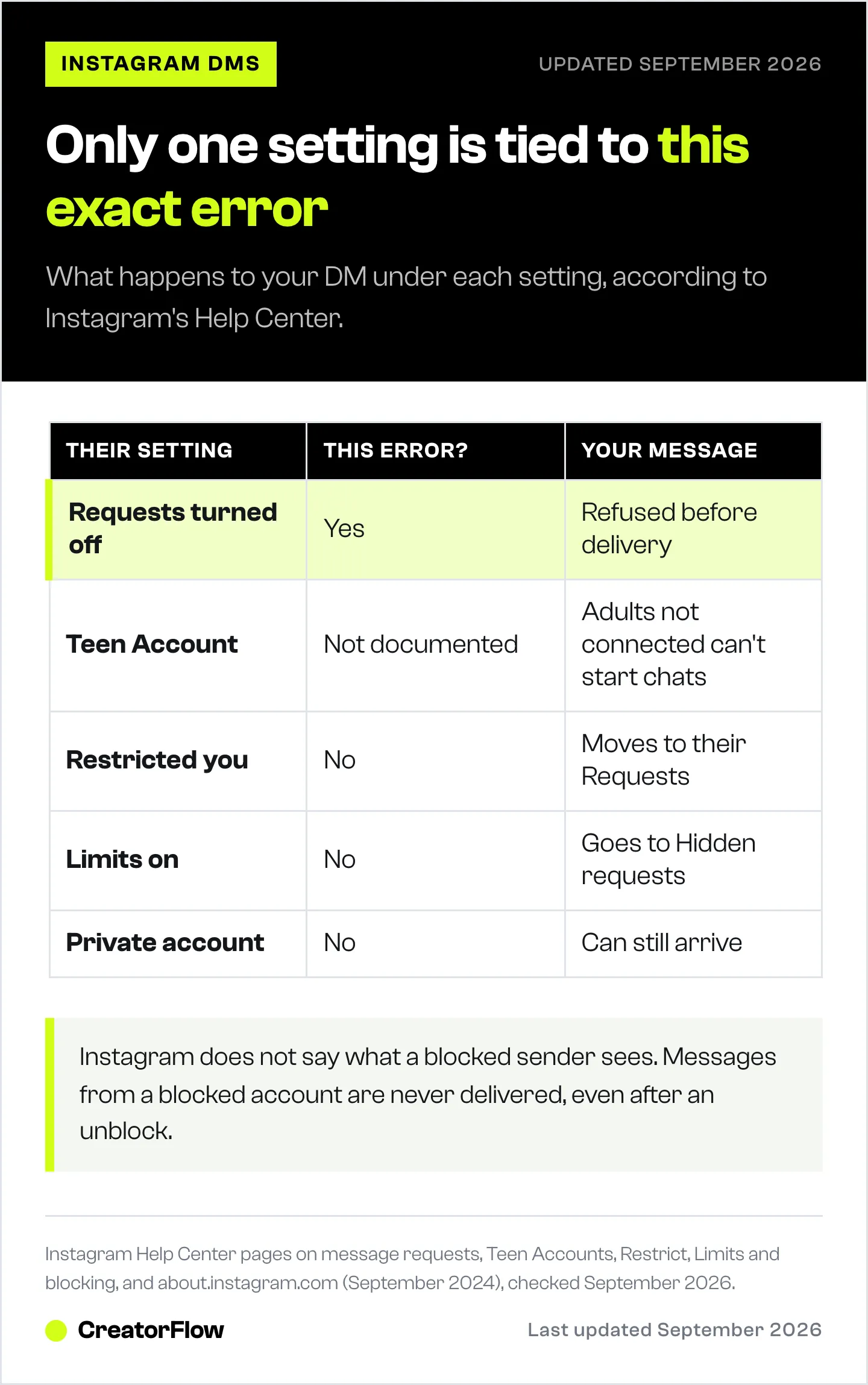
| Cause | Shows this error? | What happens to your message |
|---|---|---|
| They turned off message requests from your group | Yes, the error names this reason | Refused before delivery |
| They have a Teen Account and you are an adult they aren’t connected to | Wording not documented | Adults can’t start private chats with teens they aren’t connected to |
| They restricted you | No | Moves to their Message Requests, and you are not told |
| They turned on Limits | No | New chats go to their “Hidden requests” folder for up to four weeks |
| Hidden Words or the spam filter caught it | No | Goes to their spam folder, and you are not told |
| They blocked you | Not documented by Instagram | They never receive it, even if they unblock you later |
| Their account is private | No | Instagram says you can send a message to anyone |
About Teen Accounts. Since September 2024, Teen Accounts only get messages from accounts they follow or have been connected with, and teens under 16 need a parent’s approval to loosen that (about.instagram.com). Meta also uses AI to find teens who listed an adult birthday and places them under the same protections (about.fb.com, June 2026). So even an account that looks adult may fall under teen rules.
About blocks. Instagram does not notify people when they are blocked, and it does not describe what the blocked sender sees. If you also can’t find their profile or see “Instagram User” in an old chat, the account may be blocked, deactivated or deleted. Treat that as a guess, not a diagnosis.
How to Get Your Message Through
You can’t make Instagram deliver a refused message, so the goal is to get the other person to open the conversation. Once they message you, you are inside their inbox. Once they follow you, your messages go to their Chats. Following them yourself can also help, if their settings accept requests from followers.
- Ask them to message you first. Reply to a comment of theirs, mention the reason in a public reply, or put a line in your bio. Keep the ask specific: “DM me COLLAB and I’ll send the details.”
- Share a link that opens a chat with you. An ig.me link opens a conversation with your account in the Instagram app. Put it in your bio, email signature or website. Meta notes these links don’t work on Instagram on the web.
- Give them a reason to follow you. If they follow you, the error goes away for your messages.
- Use another channel. Most creators and businesses list an email address or website. For collaborations, email is often the better first contact anyway.
Two habits prevent problems of your own. Keep first messages text only, because media is blocked until a request is accepted. Don’t send the same message to many strangers: Instagram limits accounts that send messages people don’t want, and if you keep going after a warning, it stops you from messaging “for a period of time” (help.instagram.com, September 2026).
How to Turn Message Requests Back On
If people tell you they can’t message you, the fix is in your own settings. In the app, go to your profile, tap the menu, then under “How others can interact with you” tap Messages and story replies > Message requests. Choose to receive requests in your Message Requests folder instead of not receiving them. On a computer the last step is called Message controls.
While you are there, check the settings that hide messages without an error:
- Limits: under “How others can interact with you”, open Limit interactions and turn it off.
- Restricted accounts: remove anyone you restricted by mistake.
- Hidden Words: “Hide unwanted message requests” sends suspected spam to a separate folder. Check it for real messages.
Teen Accounts change it differently. Teens aged 16 or 17 can change message settings themselves unless their account is supervised. Teens under 16 send a request to a parent through supervision (help.instagram.com, September 2026).
Business accounts keep one exception. Instagram says changing your message request setting does not affect messages that come through your Messaging Ads. If you want fewer cold DMs but still run click-to-message ads, turning requests off keeps your ad conversations. If the requests you do receive are hard to find, see message requests that don’t show up.
What It Means for Businesses and DM Automation
Businesses follow the same rule through Meta’s API: a conversation begins when the person messages you, from your feed, posts, story mentions or other channels. After that, you have 24 hours to reply. A comment is different. It allows one private reply within 7 days, which lands in their inbox if they follow you and in their Requests folder if they don’t (developers.facebook.com, June 2026).
Meta’s documentation does not say whether a private reply reaches someone who accepts no message requests at all, or a teen who doesn’t follow the business. It also does not say which error code each cause returns. If your automation logs show one of the codes below, the recipient side refused the message:
| Code | Meta’s error text |
|---|---|
| 551 | ”This person isn’t receiving messages from you right now.” |
| 551 / 1545041 | ”This person isn’t available right now.” |
| 200 / 1545041 | ”Message Not Sent: This person isn’t available right now.” |
| 10 / 2018108 | ”They can’t receive your messages right now.” |
The refusal comes from the recipient’s side, so the fix is the same as for a person: get them to start the conversation. Keyword DMs and story reply automation are built for that, because the person writes to you first and your reply goes back inside the same 24-hour window. For the other timing rule, see the 24-hour reply window. If a campaign reached only part of your audience, why a DM reaches only some followers covers the other reasons.
Similar Instagram Message Errors
Several Instagram errors look alike. Only some of them come from the recipient’s settings. This table groups them by what the source says, and marks where Instagram has not explained the cause.
| Message you see | What it means |
|---|---|
| ”You can’t message this account unless they follow you” | The account refuses messages from strangers, reported for the same setting |
| ”Not everyone can message this account” | A message restriction on their side. Instagram does not say which setting |
| ”Message failed to send” | No official definition. Check your connection, sending limits, or media in a first request |
| ”This message is no longer available” | Usually a message that was unsent or deleted |
| ”Instagram User” as the chat name | Usually a deactivated, deleted or banned account |
FAQ
Does “this account can’t receive your message” mean I’m blocked?
Not necessarily. The error names the person’s message request setting as the reason. Instagram does not document what a blocked sender sees, so if their profile and posts are still visible to you, the setting is the more likely cause.
Can I message someone who doesn’t allow message requests?
Not directly. Your message is refused before delivery. They need to follow you, message you first, or change their settings.
How do I allow message requests from everyone on Instagram?
Profile > menu > Messages and story replies > Message requests, then choose to receive requests in your Message Requests folder. On a computer, the option is called Message controls.
Why can’t I message someone on Instagram unless they follow me?
Because they set Instagram to refuse requests from people they don’t have a connection with. When they follow you, your messages go straight to their Chats list.
Can you message a private account on Instagram?
Yes. Instagram says you can send a message to anyone. A private account hides posts, not the inbox, so this error comes from their message settings.
Why can’t adults message teens on Instagram?
Teen Accounts only receive messages from accounts they follow or have been connected with, and adults can’t start private chats with teens they aren’t connected to. Teens under 16 need a parent’s approval to change this.
Does this error affect comment-to-DM automation?
The rule behind it applies to every tool. Meta’s documentation does not say whether a private reply to a comment reaches someone who refuses all requests, so design around it: invite people to message you first with a keyword, and your reply goes into a conversation they started.
Message request settings, Teen Account rules, Restrict, Limits, Hidden Words, blocking and messaging limits from Instagram’s Help Center and about.instagram.com, checked September 2026. Private reply rules, the 24-hour window and error codes from Meta’s Instagram Platform and Messenger Platform documentation on developers.facebook.com, checked September 2026. Instagram does not publish this error’s text in its Help Center; the wording is as users report it.


