

An ig.me link is Instagram’s official shortlink that opens a direct message conversation with any Instagram account. The format is ig.me/m/username, where you replace “username” with any Instagram handle. No tools or apps are needed to create one. ig.me links work anywhere: websites, emails, social bios, and printed materials. Many people also add ?text= to pre-fill a message, but Meta does not document that parameter, so test it before you print it.
Someone wants to DM you on Instagram. They’re on your website, your email, or another social platform. They have to open Instagram, search your name, find the right account, tap Message, and type something.
That’s 5 steps too many. ig.me links cut it to one click.
This guide covers every ig.me link format, where to use them, and how to combine them with DM automation for hands-free lead capture.
Key Takeaways
- What is ig.me? Instagram’s official shortlink domain. ig.me/m/yourusername opens a DM conversation with your account directly.
- How to create your ig.me link: Type https://ig.me/m/yourusername (replace “yourusername” with your Instagram handle). That’s it. No tools needed.
- ig.me link formats:
- DM link: https://ig.me/m/username (opens a direct message)
- Pre-filled DM: https://ig.me/m/username?text=Hi (opens DM with pre-typed message; not documented by Meta, so test it)
- Profile link: keep https://instagram.com/username, and always include /m/ in a DM link
- Best uses for ig.me links: the Links field on your profile, email signatures, website contact buttons, QR codes for physical marketing, other social media profiles.
- Combine with automation: When someone clicks your ig.me link and sends a message, DM automation tools like CreatorFlow can auto-respond with links, resources, or booking calendars.
Can You Send Links in Instagram DMs?
Yes. Instagram direct messages accept links, and the person receiving one can tap the URL to open it. You can paste a link by hand, pre-fill one with an ig.me link, or have an automation tool send it the moment someone comments or messages your keyword. Automated DMs sent through Meta’s official Instagram API carry links the same way a typed message does.
Four ways a link gets into an Instagram DM:
| Method | How the link arrives | Best for |
|---|---|---|
| Typed by hand | You paste the URL into the chat and send it | One-off replies |
| Pre-filled ig.me link | ig.me/m/username?text=LINK opens the DM with your keyword already typed | Traffic coming from outside Instagram |
| Keyword auto-reply | Someone sends your keyword in a DM and the tool replies with the link | Delivery around the clock |
| Comment-to-DM auto-reply | Someone comments your keyword on a post or Reel and the link lands in their DMs | Reels and feed posts |
The rest of this guide covers the ig.me side of that table: every link format, where to place it, and how to set up the automatic reply.
What Is an ig.me Link?
ig.me is Instagram’s official link shortener domain. It creates direct links to Instagram actions without needing the full instagram.com URL. Because the other person starts the chat, an ig.me link also helps when an account can’t receive your message because it refuses requests from strangers.
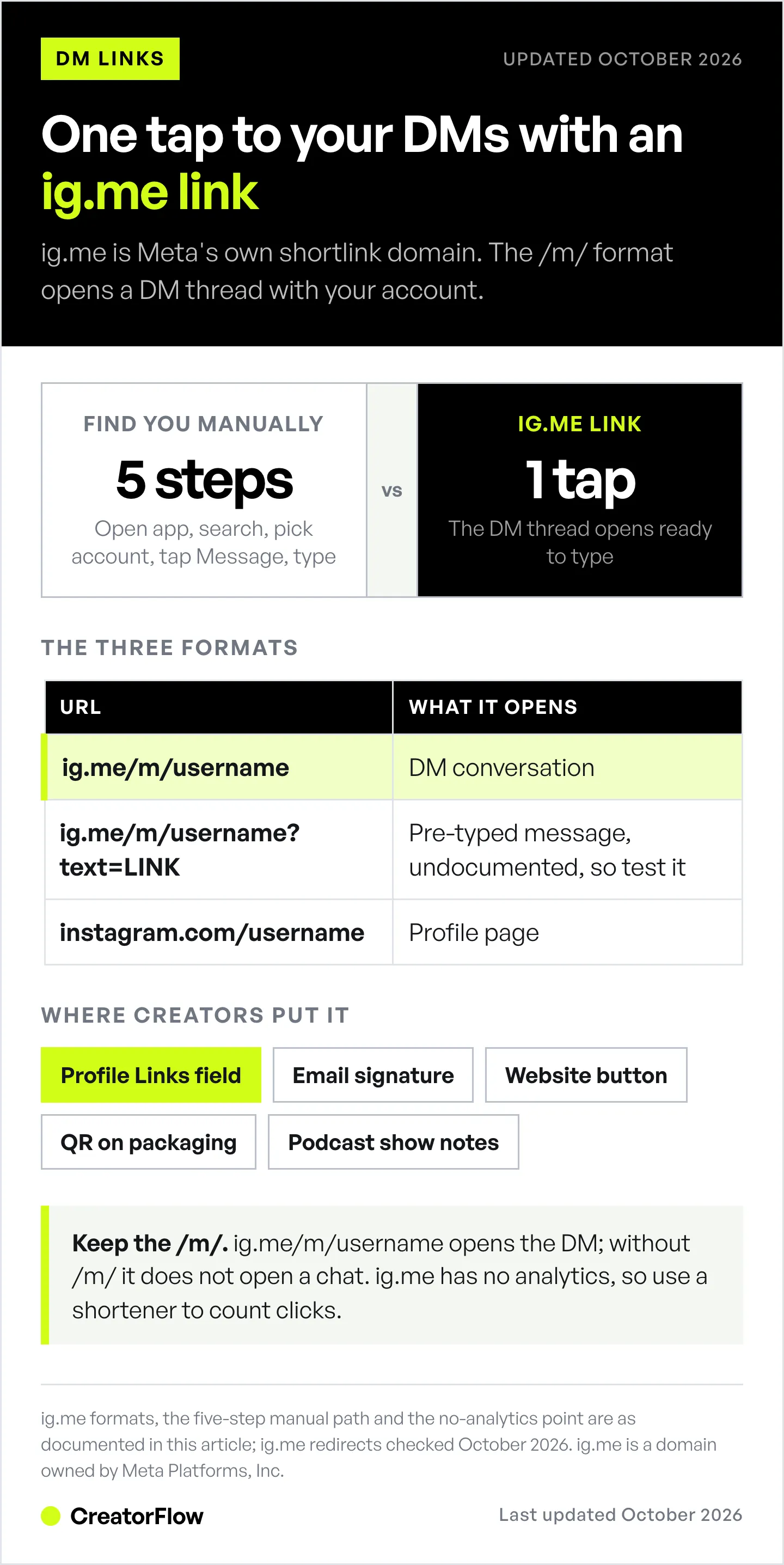

The most common format:
https://ig.me/m/yourusernameWhen someone clicks this link:
- The Instagram app opens on their phone
- A DM conversation with your account opens immediately
- They can type and send a message right away
How it differs from instagram.com links:
| Link Type | URL | What It Opens |
|---|---|---|
| ig.me DM link | ig.me/m/username | Direct message conversation |
| Instagram profile | instagram.com/username | Profile page |
| Instagram post | instagram.com/p/postID | Specific post |
| Instagram Reel | instagram.com/reel/reelID | Specific Reel |
The ig.me link is the only format that takes users straight to your DMs.
How to Create Your ig.me Link
Step 1: Build the URL
Replace yourusername with your exact Instagram handle (no @ symbol):
https://ig.me/m/yourusernamePrefer a ready-made version? The free Instagram chat link generator builds the link from your username and gives you a QR code for print.
Examples:
- Handle @fitcoach_sarah → https://ig.me/m/fitcoach_sarah
- Handle @bakery.nyc → https://ig.me/m/bakery.nyc
- Handle @creatorflow.so → https://ig.me/m/creatorflow.so
Step 2: Test the Link
Tap your link on a phone that is logged into a different Instagram account. It should:
- Open the Instagram app
- Show a DM conversation with your account
- Allow the person to type and send a message
Common mistakes:
- Including the @ symbol (ig.me/m/@username won’t work)
- Typo in username
- Using a private account (DMs may be restricted)
Step 3: Add a Pre-filled Message (Optional)
You can pre-fill the message field so users don’t have to think about what to type:
https://ig.me/m/yourusername?text=Hi, I'm interested in your servicesHow it works: The link opens the DM conversation with “Hi, I’m interested in your services” already typed in the message field. The user still needs to tap “Send.”
Pre-filled message examples:
For coaches:
https://ig.me/m/yourusername?text=I'd like to book a free consultationFor e-commerce:
https://ig.me/m/yourusername?text=I have a question about your productsFor affiliates:
https://ig.me/m/yourusername?text=Send me the link pleasePro tip: Pre-filled messages that include trigger keywords work with DM automation. If your automation tool is set to respond to “link” or “book,” the pre-filled message triggers an instant auto-reply once the person taps Send.
Where to Use ig.me Links
1. Instagram Bio
Put the ig.me link in the Links field (Edit profile > Links), not in the bio text. A URL typed into the bio text is not tappable; the Links field holds up to 5 tappable links. Then point to it in the bio text.
Bio example:
Fitness Coach | Online Programs
12-week plans for busy parents
Tap the link below and send PLAN to get started
Why this works: The link opens a chat with the keyword your automation listens for, so the visitor gets an answer without searching for the Message button. For the wording around the link, see how to write an Instagram bio, or draft one with our free Instagram profile generator.
2. Email Signatures
Add your ig.me link to every email you send.
Signature example:
Sarah Chen | Fitness Coach
Book a free consultation: https://ig.me/m/fitcoach_sarah
Every email becomes a potential DM conversation.
3. Website Contact Pages
Replace or supplement your contact form with an ig.me link.
HTML button example:
<a href="https://ig.me/m/yourusername" target="_blank">
  Message us on Instagram
</a>
Why this works: Some customers would rather message you in an app they already use than fill in a form. The chat has no spam folder, and your reply arrives as a notification on their phone.
4. Other Social Media Profiles
Add your ig.me link to:
- Twitter/X bio
- LinkedIn profile
- TikTok bio
- YouTube channel description
- Facebook page About section
Cross-platform benefit: Drives followers from other platforms directly into your Instagram DMs, where your automation can handle the conversation.
5. QR Codes for Physical Marketing
Convert your ig.me link into a QR code for:
- Business cards
- Product packaging
- Event displays
- Restaurant menus
- Store window signs
How to create: Any QR code generator works. Enter https://ig.me/m/yourusername and download the QR image.
6. Paid Ads and Promotions
Use ig.me links in:
- Google Ads landing pages
- Sponsored content
- Influencer collaborations
Why the format matters here: an ig.me link skips the profile-browsing step and opens a conversation, so the click and the reply happen in the same tap. Set up the reply side first, using the Instagram click-to-DM ads playbook.
ig.me link vs Click-to-Direct ad: Meta’s Click-to-Direct ads use a Send message button, not a link, and the reply window differs. A chat started from an ig.me link gets 24 hours from the person’s last message. Since September 28, 2026, a chat started from a Click-to-Direct ad gets up to 7 days (developers.facebook.com, October 2026).
7. Podcast Show Notes and Video Descriptions
Questions about today's episode? DM me: https://ig.me/m/yourusernameListeners and viewers who are already engaged with your content are warm leads. An ig.me link captures them before they forget.
ig.me Links + DM Automation
An ig.me link starts the chat, and DM automation answers it. CreatorFlow automates that answer on Instagram. A Meta Tech Provider (since December 2025), it sends your saved reply within seconds when someone messages you a keyword, comments a keyword on a post or Reel, or replies to your Story.
How It Works
- You share your ig.me link (website, email or QR code)
- Someone clicks it and sends a message (e.g., “link please”)
- Your DM automation tool detects the keyword
- An instant auto-reply sends the requested resource
The result: 24/7 lead capture without manual work.
Example: Affiliate Marketer
ig.me link with pre-filled text:
https://ig.me/m/yourusername?text=WORKOUTAutomation setup:
- Keyword trigger: “WORKOUT”
- Auto-reply: “Here’s the workout plan I use! [affiliate link]. Want the meal plan too? Reply MEALS.”
Result: Everyone who taps the ig.me link and sends WORKOUT gets an instant DM with your affiliate link. No manual DM sending needed.
Example: Coach or Consultant
ig.me link with pre-filled text:
https://ig.me/m/yourusername?text=I'd like to book a consultationAutomation setup:
- Keyword trigger: “consultation” or “book”
- Auto-reply: “Thanks for reaching out! Here’s my calendar to pick a time: [Calendly link]. Looking forward to chatting!”
Result: Potential clients book themselves without you lifting a finger.
Example: E-commerce Store
ig.me link on product packaging:
https://ig.me/m/yourusername?text=REORDERAutomation setup:
- Keyword trigger: “REORDER”
- Auto-reply: “Ready to reorder? Here’s your direct link: [product link]. Use code LOYAL10 for 10% off!”
Result: Physical customers become repeat DM buyers.
Setting Up Automation with CreatorFlow
- Connect your Instagram account to CreatorFlow
- Create a keyword trigger (e.g., “link”, “book”, “info”)
- Write your auto-reply message with the resource
- Share your ig.me link everywhere
- Messages auto-respond 24/7
For a full setup walkthrough, see our comment-to-DM automation guide.
ig.me Link Troubleshooting

Link Opens Instagram but Not the Chat
Cause: You’re using ig.me/username instead of ig.me/m/username. When we tested it in October 2026, ig.me/username without /m/ sent a browser to the Instagram home page, not to a chat.
Fix: Make sure to include the /m/ in the URL:
- Wrong: https://ig.me/yourusername
- Correct: https://ig.me/m/yourusername
Link Doesn’t Work on Desktop
Cause: Meta’s developer documentation says ig.me links “are currently not supported on Instagram Web” (developers.facebook.com, October 2026). On a computer, the click may land on instagram.com without opening a chat.
Fix: Nothing you can do directly. ig.me links work on phones with the Instagram app installed.
Workaround: Add “(open on your phone)” next to ig.me links on desktop-heavy channels like email, or add a QR code people can scan with their phone.
Pre-filled Message Doesn’t Appear
Cause: Meta does not document the ?text= parameter for ig.me links, and some Instagram app versions ignore it.
Fix: Test on both iOS and Android. Android has its own set of causes, covered in Android Instagram DM links not working. If unreliable, skip the pre-filled message and add instructions instead:
DM me the word "LINK" for a free guide: https://ig.me/m/yourusernameLink Shows “User Not Found”
Cause: Typo in username, or the account was recently renamed/deleted.
Fix: Double-check your exact Instagram handle. Test the link yourself from a different account.
Messages from ig.me Clicks Don’t Trigger Automation
Cause: Your automation is set to trigger only on comment keywords, not DM keywords.
Fix: Enable DM keyword triggers in your automation tool. In CreatorFlow, create a keyword DM automation for the same word, next to your comment automation. The full setup sits in the Instagram keyword trigger guide.
ig.me Link Best Practices
Keep the URL Clean
Good:
https://ig.me/m/yourusernameBad (unnecessary parameters):
https://ig.me/m/yourusername?utm_source=email&utm_campaign=springUTM tags do nothing on an ig.me link, because the click never reaches a page that runs analytics. Meta documents one parameter, ref, which passes a short label to the messaging app connected to your account (developers.facebook.com, October 2026). It only helps if your tool reads it. For simple tracking, use a link shortener (like Bitly) that wraps the ig.me link, or track the click on the other side of the conversation with Instagram DM link tracking.
Tell People What to Expect
Don’t post a naked link. Tell them what happens when they click.
Good: “DM me ‘LINK’ for the free workout plan: ig.me/m/fitcoach_sarah”
Bad: “ig.me/m/fitcoach_sarah”
Use Action Words as Pre-filled Text
Pre-filled messages should be short keyword triggers, not full sentences.
Good pre-fills:
- ?text=LINK
- ?text=BOOK
- ?text=FREE
- ?text=PRICE
Bad pre-fills:
- ?text=Hey I saw your post and I’m interested in learning more about your coaching program and pricing
Short keywords are easier for automation to detect and for users to send. In CreatorFlow, keywords match as whole words and ignore capital letters, with up to 20 keywords per automation. So ?text=LINK and “Send me the link please” both trigger a “link” automation, but “linked” does not.
Create Multiple ig.me Links for Different Campaigns
UTM tags do nothing on ig.me links, but you can use different pre-filled messages to track sources:
- Website: ig.me/m/username?text=WEBSITE
- Email: ig.me/m/username?text=EMAIL
- Business card: ig.me/m/username?text=CARD
Set up different automation responses for each keyword to know where leads come from.
FAQ
Is ig.me an official Instagram domain?
Yes. ig.me is owned and operated by Meta (Instagram’s parent company). It’s the official shortlink domain for Instagram, similar to how m.me works for Messenger. Because the domain is Meta’s own, it reads as a first-party link rather than an unknown shortener.
Can I use ig.me links for business accounts?
Yes. ig.me links work with personal accounts, creator accounts, and business accounts. Messages from people who don’t follow you may land in your message requests instead of your main inbox. Open Message controls in your Instagram settings to see where new messages go.
Do ig.me links work internationally?
Yes. ig.me links work in every country where Instagram is available, and the link opens the Instagram app whatever the person’s location or language. The limit is the device, not the country: Meta says ig.me links are not supported on Instagram Web, so they work best on phones.
Can I customize my ig.me link?
Only the end of it. The format is fixed at ig.me/m/yourusername, and you can’t change the domain or create custom slugs. You can add a pre-filled keyword with ?text=, after testing it. For branded short links, wrap your ig.me link in a service like Bitly.
Do ig.me links expire?
No. As long as your Instagram account exists and is active, your ig.me link works indefinitely. If you change your username, the old link stops pointing to you, so update every shared ig.me link and reprint any QR code.
Can I track clicks on my ig.me link?
Not inside Instagram, because ig.me doesn’t provide analytics. To count clicks, wrap your ig.me link in a link shortener (Bitly, Short.io) and read its dashboard. To count conversations by source, give each placement its own pre-filled keyword, such as WEBSITE or CARD.
What’s the difference between ig.me/m/username and instagram.com/direct/t/username?
ig.me/m/username is the official shortlink that opens a DM thread with an account. instagram.com/direct/t/threadID opens a specific existing thread and needs a thread ID you usually don’t have. For sharing with the public on a website, email or QR code, always use the ig.me/m/ format.
Related guides:
- Comment-to-DM Automation Setup Guide
- Instagram DM Automation Templates
- Instagram Keyword Trigger Automation Guide
- The Complete Guide to Instagram DM Automation
- Android Instagram DM Links Not Working: 7 Fixes
Checked in October 2026: ig.me redirects, Meta’s ig.me developer documentation and Meta’s messaging windows. Instagram/Meta may change features, links, or terms at any time. ig.me is a domain owned by Meta Platforms, Inc.


