

Editing Instagram comments means modifying your published comment text without deleting and reposting it. Instagram is testing a comment editing feature as of May 2026, but most accounts don’t have access yet. Edited comments display an “Edited” label visible to everyone. For those without access, the only fix remains deleting and reposting, which costs you likes, thread position, and timing advantage in the algorithm.
For years, the only fix was deleting the comment and reposting. You’d lose your likes, your position in the thread, and your timing advantage in the algorithm.
Instagram is changing that. A comment editing feature is rolling out in testing as of May 2026. Some accounts have it. Most don’t. This guide covers how the new edit feature works, what to do if you don’t have it yet, and how to turn your comment strategy into an automated revenue machine. If you want to go deeper on automation safety, check out our guide on how to avoid Instagram bans with DM automation.
Key Takeaways
- Comment editing status (May 2026): Instagram is testing a comment edit feature in select regions, but most accounts do not have access yet
- Edit label visibility: Edited comments display an “Edited” label visible to everyone in the thread
- Only workaround without edit access: Delete the comment and repost it, losing all likes, thread position, and reply context
- Comment-to-like ratio benchmark: A healthy ratio is 2-5%. Below that, your content is not sparking conversation
- Hourly comment limits: Established accounts can post 60-100 comments per hour, verified accounts up to 120
- Bottom line: Use Instagram’s native moderation tools (Hidden Words, pinned comments, Restrict) to manage comments, and set up comment-to-DM automation to turn engagement into revenue

Can You Edit Comments on Instagram?
Yes and no.
Instagram is actively testing a comment editing feature as of May 2026. Some accounts in select regions (including Canada and parts of Europe) have access. Meta has made no official announcement, and the feature doesn’t appear in Instagram’s Help Center (developers.facebook.com/docs/instagram-platform, accessed April 12, 2026).
Here’s where things stand:
| Detail | Status |
|---|---|
| Feature availability | Limited testing (not all accounts) |
| Official announcement | None from Meta |
| Help Center documentation | Does not exist yet |
| API support | No edit endpoint in Instagram Graph API |
| Permanent or temporary | Unknown (Meta sometimes kills test features) |
The testing was first reported by PiunikaWeb on March 13, 2026, and confirmed by multiple users across different regions.
If you don’t see the “Edit” option under your comments, you don’t have access yet. There’s no way to force-enable it.
How Instagram Comment Editing Works
For accounts with access, the process is straightforward:
Step 1: Open the post containing your comment.
Step 2: Find your comment in the thread.
Step 3: Tap the three-dot menu or look for the “Edit” option below your comment (it appears alongside “Reply” and “Share on Threads”).
Step 4: Revise your text.
Step 5: Save your changes.
After saving, your comment displays an “Edited” label visible to everyone in the thread. This transparency mechanism works similar to how Threads handles edited posts.
What we know vs. what’s unconfirmed
Confirmed:
- You can only edit your own comments (not comments others leave on your posts)
- An “Edited” label appears after changes
- The edit option sits alongside Reply and Share on Threads
Unconfirmed:
- Whether there’s an edit time window (Threads has a 15-minute limit, but no limit has been reported for Instagram comments)
- Whether other users get notified when you edit
- Whether an edit history is visible to others
- Whether edited comments affect algorithmic ranking or moderation
What to Do If You Don’t Have Comment Editing
Most Instagram users still don’t have the edit feature. Here’s your playbook:
The delete-and-repost method
This is the only universal option:
- Find your comment
- Tap and hold (or swipe left on iOS)
- Select “Delete”
- Retype your corrected comment
- Post it
The downsides are real:
- You lose any likes your original comment received
- You lose your position in the thread (newer comments appear lower)
- Thread continuity breaks if someone already replied to your original comment
- You lose the timing advantage (early comments get more visibility)
Minimize the damage
Before commenting, take 3 seconds to proofread. It sounds obvious, but most comment typos happen because creators rush to respond while multitasking.
For important comments (on brand partners’ posts, potential clients, collaborators):
- Draft the comment in your Notes app first
- Copy and paste into Instagram
- Double-check before posting
Use text replacement shortcuts
Set up keyboard shortcuts on your phone for common phrases you type in comments. This reduces typos on repeated messages:
- iOS: Settings > General > Keyboard > Text Replacement
- Android: Settings > System > Language & Input > Personal Dictionary
Why Comments Matter More Than You Think
Comment editing is a nice quality-of-life fix. But the real opportunity with comments is strategic, not cosmetic.
Comments are Instagram’s second-strongest engagement signal
Instagram’s algorithm in 2026 weighs engagement signals in this order:
| Signal | Weight | Why |
|---|---|---|
| DM shares | Highest | Active content distribution |
| Comments (4+ words) | High | Indicates real conversation |
| Saves | High | Content worth revisiting |
| Watch time | Medium-High | Completion rate for Reels |
| Likes | Medium | Devalued compared to 2024 |
| Short comments/emojis | Low | Algorithm filters spam |
A comment like “What brand is the vitamin C serum? I’ve been looking for one under $30” carries significantly more algorithmic weight than a fire emoji.
Posts that hit strong comment engagement in the first 60 minutes get promoted to Explore and suggested posts. Comments aren’t vanity metrics. They’re distribution triggers.
2026 Instagram engagement benchmarks
Average engagement rates continue to drop. Standing out requires intentional comment strategy.
| Content Format | Avg. Engagement Rate (2026) |
|---|---|
| Carousels | 0.50% |
| Reels | 0.52% |
| Static Images | 0.37% |
The average engagement rate across all formats is 0.48%, down 24% year-over-year (Socialinsider, 2026 Instagram Benchmarks, accessed April 12, 2026).
A healthy comment-to-like ratio sits between 2-5%. If your posts get 1,000 likes but fewer than 20 comments, your content isn’t sparking conversation.
Instagram Comment Limits You Should Know
Whether you’re editing comments or posting new ones, these limits apply:
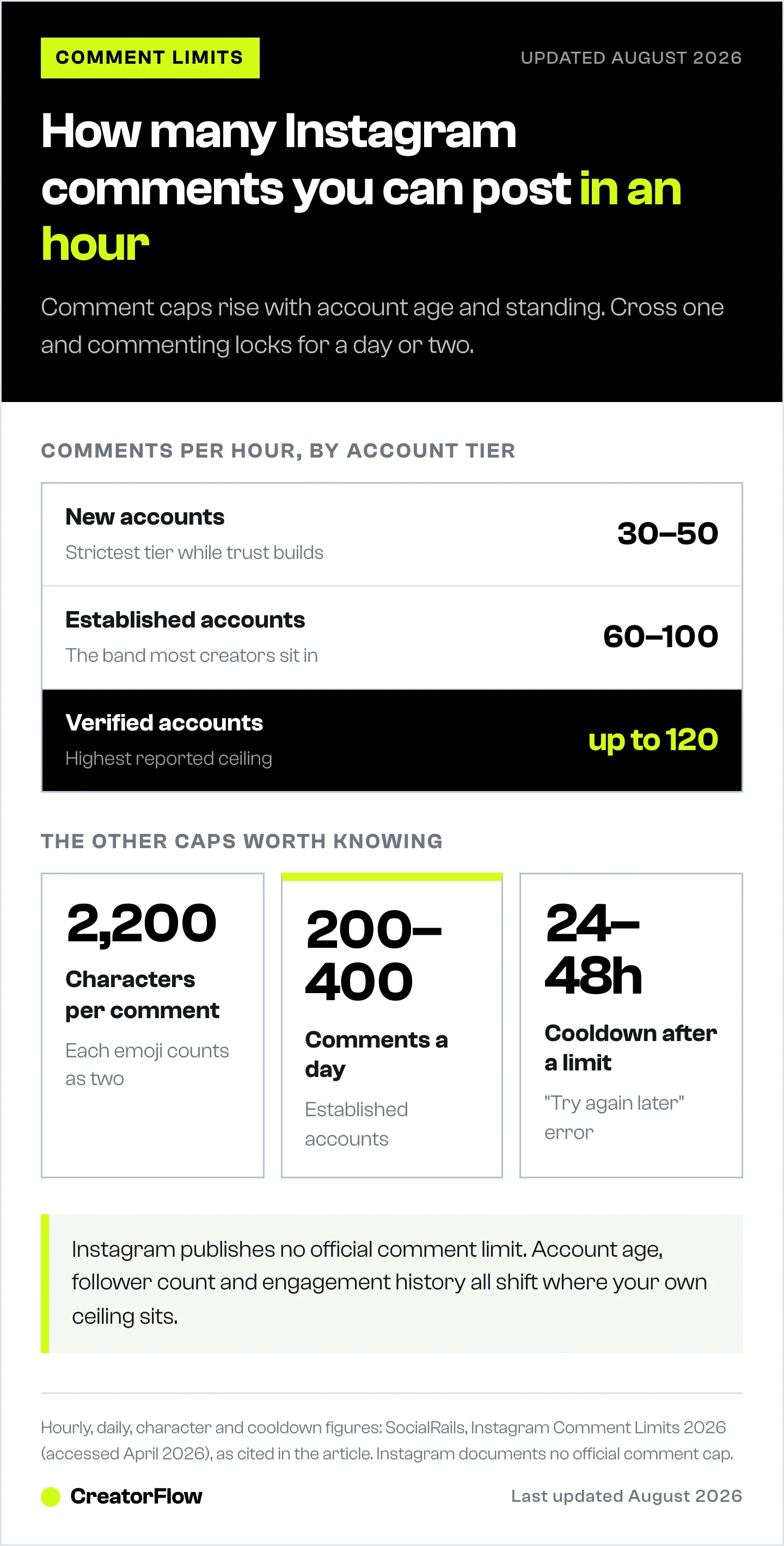
| Limit | Specification |
|---|---|
| Characters per comment | 2,200 maximum |
| Emoji count | Each emoji = 2 characters |
| Comments per hour (new accounts) | 30-50 |
| Comments per hour (established) | 60-100 |
| Comments per hour (verified) | Up to 120 |
| Comments per day (established) | 200-400 |
Exceeding these limits triggers a “Try again later” error with a 24-48 hour cooldown. Account age, follower count, and engagement history all affect your specific limits (SocialRails, Instagram Comment Limits 2026, accessed April 12, 2026).
Comment Management Tools Built Into Instagram
Beyond editing, Instagram offers several native comment management features:
Hidden Words filter
Go to Settings > Privacy > Hidden Words. Add specific words, phrases, or emojis you want automatically hidden from your comments. Spam, hate speech, and competitor mentions can be filtered without manual moderation.
Pinned comments
Pin your best comments to the top of any post. This sets the tone for the conversation and encourages higher-quality responses. Pin a question to spark discussion, or pin a customer testimonial for social proof.
Restrict accounts
Restricting a user makes their comments visible only to them. They don’t know they’ve been restricted. This handles trolls without the confrontation of blocking.
Bulk delete
Select multiple comments at once and delete them in a batch. Useful for cleaning up spam waves after a post goes viral.
Turn Comments Into Automated Conversions
Here’s where comment strategy gets interesting for business.
Editing a typo fixes a mistake. Automating what happens after someone comments creates revenue.
The comment-to-DM automation flow
- You post a Reel: “Comment GUIDE for my free Instagram growth checklist”
- A follower comments: “GUIDE”
- Within 2 seconds, they receive a DM with your download link
- The DM captures their email address
- You’ve turned a comment into a lead, automatically
This uses Meta’s official Instagram Graph API. No password sharing, and minimal account risk when you respect Instagram’s rate limits and Terms of Service. Learn more about how Instagram DM automation works under the hood.
What you can automate
- Affiliate links: Someone comments “link” on your product review. They instantly get the Amazon affiliate link via DM.
- Lead magnets: Someone comments “guide.” They get your PDF, checklist, or video link in their DMs within seconds.
- Booking calendars: Someone comments “book.” They receive your Calendly or Acuity link.
- Product pages: Someone comments “price.” They get a direct link to your Shopify product page.
The average creator spends 2-4 hours per day responding to DMs manually. Comment-to-DM automation handles this in real time, 24/7.
Tools for comment-to-DM automation
| Tool | Price | Best For |
|---|---|---|
| CreatorFlow | $15/mo (flat rate) | Solo creators, flat pricing, fast setup |
| ManyChat | $17-199/mo (scales by contacts) | Agencies, multi-platform (manychat.com/pricing, July 2026) |
CreatorFlow uses flat-rate pricing with no per-contact fees. Set up takes under 5 minutes. You connect your Instagram Professional account via OAuth, choose your trigger keywords, write your DM templates, and activate.
How to Get More Comments
Comment editing only matters if you’re getting comments. Here are the highest-impact strategies:
Ask direct questions. End every caption with a specific question. Not “What do you think?” but “Coffee or matcha for morning focus? Drop your pick below.”
Use keyword CTAs. Tell people exactly what to comment. “Comment RECIPE for my full meal prep guide” gives them a clear action and triggers your automation.
Create “this or that” content. Binary choices lower the barrier to commenting. “Gym at 6am or 9pm?” generates more responses than open-ended questions.
Reply to every comment within 1 hour. 40% of users expect a response within an hour. Replying fast signals to the algorithm that your post generates active conversation, which triggers broader distribution.
Pin a question as your first comment. Pin a thought-provoking question to the top of your comment thread. This sets the tone and gives visitors an immediate prompt to respond.
For the full breakdown, see our guide on how to get more comments on Instagram.
FAQ
Can you edit Instagram comments in 2026?
Instagram is testing a comment editing feature as of May 2026, but it’s only available to select accounts in limited regions. Meta has not made an official announcement. If you don’t see an “Edit” option below your comments, you don’t have access yet. The only alternative is deleting the comment and reposting it.
Do edited Instagram comments show a label?
Yes. When you edit a comment (if you have access to the test feature), an “Edited” label appears on the comment. This label is visible to everyone in the thread, similar to how Threads marks edited posts.
Is there a time limit for editing Instagram comments?
No time limit has been confirmed for Instagram comment editing. Threads (another Meta platform) has a 15-minute edit window, but no similar restriction has been reported for Instagram’s test feature as of May 2026.
Can you edit comments on other people’s Instagram posts?
No. The editing feature only works on your own comments. You cannot edit comments that other people leave on your posts. For managing comments on your posts, use Instagram’s built-in moderation tools: Hidden Words filter, pinned comments, restrict, and bulk delete.
What happens when you delete and repost an Instagram comment?
You lose all likes on the original comment, your position in the thread changes (the new comment appears at the bottom), and any reply threads connected to the original comment break. The reposted comment is treated as a brand new comment by the algorithm.
How many comments can you post per hour on Instagram?
New accounts can post 30-50 comments per hour. Established accounts can post 60-100 per hour. Verified accounts can post up to 120 per hour. Exceeding these limits triggers a “Try again later” error with a 24-48 hour cooldown (SocialRails, April 2026).
Can you automate responses to Instagram comments?
Yes. Comment-to-DM automation uses Meta’s official Instagram Graph API to send a DM when someone comments a specific keyword on your post. This is safe when used correctly and compliant with Instagram’s Terms of Service. Tools like CreatorFlow let you set this up in under 5 minutes.


