

You get more comments on Instagram by asking for them in a form that is easy to answer: a specific question, a this-or-that choice, a fill-in-the-blank, or a keyword CTA. Comments are one of the five interactions Instagram’s Feed ranking watches most closely, though Adam Mosseri names watch time, likes, and sends as the top three signals overall. Pairing a CTA like “Comment LINK for the guide” with DM automation turns each comment into a delivered link.
You spend 3 hours on a Reel. It gets 500 views and zero comments. Meanwhile, someone posts “Coffee or tea?” and gets 200 comments. The difference is the prompt at the end of the caption.
This guide covers 12 strategies to increase your Instagram comments, with templates you can use on your next post.
Key Takeaways
- Comments matter on Feed posts: Instagram lists commenting among the five interactions its Feed ranking watches most closely. Reels and Explore lean on watch time, likes, saves, and shares (about.instagram.com)
- First-hour window: Comment engagement in the first 60 minutes lands while Instagram is still deciding how far to distribute the post
- Highest-converting CTA: “Comment [KEYWORD] for the link” paired with comment-to-DM automation turns every comment into an automated conversion
- Comment rate targets: As rough targets, under 0.5% needs work, 0.5-1% is average, 1-3% is good, and 3%+ is excellent
- Reply strategy: Replying to every comment doubles your count, and a fast reply often earns a reply back from the same person
- Bottom line: Pick 2-3 of the 12 strategies in this guide, test them over 10 posts, and add comment-to-DM automation to convert keyword comments into leads automatically

Do Comments Help Your Instagram Reach?
Comments help your Instagram reach mainly on Feed posts. Instagram’s ranking explainer lists commenting among the five interactions Feed ranking watches most closely. Reels and Explore rankings do not list comments among their top predictions (about.instagram.com, May 2023).
Adam Mosseri, head of Instagram, said in January 2025 that the three signals that matter most for ranking are watch time, likes, and sends. Likes weigh slightly more with followers, and sends weigh slightly more with people who do not follow you yet (instagram.com/@mosseri, January 2025). In a September 2026 video series he repeated that ranking runs on predictions of watching and sharing, and that recency matters, Social Media Today reported.
| Surface | Interactions Instagram predicts most closely | Comments listed? |
|---|---|---|
| Feed | Time spent on the post, comment, like, share, profile-photo tap | Yes |
| Reels | Reshare, watch to the end, like, visit the audio page | No |
| Explore | Likes, saves, shares | No |
(Instagram Ranking Explained, about.instagram.com, May 2023.)
Rule of thumb: on Feed posts and carousels, ask for comments. On Reels, ask for a share first, and use a keyword comment when you have a link to deliver.
Quality beats volume. A comment like “what brand is the vitamin C serum?” starts a thread you can answer and a DM you can send. Three fire emojis do not.
The first-hour window matters. Early comments land while Instagram is still deciding how far to push a post, and recency is one of the factors Mosseri names.
The Comment-to-Conversion Pipeline
A keyword comment can trigger a private DM with your link, which turns a comment into a click. Most creators miss this part.
The old way:
- Post content
- Get comments
- Feel good about engagement
- Comments die in 24 hours
- No business outcome
The new way:
- Post content with keyword CTA (“Comment LINK for the guide”)
- Get comments with your trigger word
- Automation instantly sends DM with your link/resource
- Comments become leads, sales, email subscribers
- Every engagement = business outcome
If you’re using comment-to-DM automation, every keyword comment is a potential automated conversion.
More comments = more DMs sent = more links clicked = more revenue.
12 Strategies to Get More Comments on Instagram
Content Strategies
1. End Every Post with a Question
Ending a post with a question is the simplest way to get comments.
Don’t end with “Link in bio.” End with a question that invites response.
Instead of: “Here’s my morning routine. Link in bio for products.”
Use: “Here’s my morning routine. What’s the ONE thing you can’t skip in yours?”
Why it works: Questions create an open loop. Viewers feel compelled to answer. It’s human psychology, we don’t like leaving questions unanswered.
Best question formats:
- “What’s your go-to…?”
- “Which do you struggle with most?”
- “What would you add to this?”
- “Am I missing anything?”
Pro tip: Ask questions your audience actually has opinions about. “What’s your favorite color?” generates nothing. “What’s the skincare product you’ve repurchased 5+ times?” generates passionate responses.
2. Create “This or That” Content
Binary choices are irresistible. They require minimal effort to answer but create strong engagement.
Examples:
- “Morning workout or evening workout?”
- “Coffee shop or home office?”
- “Carousel or Reel for tutorials?”
- “$100 now or $200 in a month?”
Why it works: Low cognitive load. People can answer in 1-2 words. But they still feel invested in defending their choice.
Format variations:
- Photo carousel showing both options
- Split-screen Reel comparing two approaches
- Poll in Stories (but also post as feed content for comments)
Engagement hack: Take a stance. “Morning workouts are superior. Change my mind.” Stating an opinion invites people to agree or disagree, both generate comments.
3. Share Controversial (But Professional) Takes
Hot takes drive comments. People can’t resist weighing in.
Not controversial: “Consistency is important for Instagram growth.”
Controversial: “Posting daily is overrated. I grew faster posting 3x/week with better content.”
Why it works: Controversy creates camps. Supporters want to validate. Skeptics want to challenge. Both groups comment.
Safe controversy zones:
- Challenge common advice in your niche
- Share counterintuitive results from your experience
- Reveal an unpopular opinion you genuinely hold
- Question industry “best practices”
Warning: Stay professional. “Hot takes” that attack people, spread misinformation, or create genuine harm will backfire. Controversy should spark conversation, not conflict.
4. Use Fill-in-the-Blank Captions
The comment-completion format works because it gamifies engagement.
Examples:
- “The tool that changed my business: _______”
- “If I could only use one Instagram feature, it would be _______”
- “My biggest mistake as a creator was _______”
- “The advice I wish I’d ignored: _______”
Why it works: People love sharing their experiences. Fill-in-the-blank provides a structure that makes commenting feel easy and purposeful.
Pro tip: Start by answering your own prompt in the caption. This shows the type of response you’re looking for and lowers the barrier for others.
CTA Strategies
5. “Comment [WORD] for the Link”
The “Comment [WORD]” CTA is the comment strategy built for creators who monetize, and the foundation for comment-to-DM automation.
How it works:
- Create content featuring a product/resource
- End with: “Comment LINK and I’ll DM you the product list”
- Set up automation to instantly DM everyone who comments “LINK”
- Every comment = automated conversion opportunity
Effective trigger words:
- LINK
- RECIPE
- GUIDE
- FREE
- PRICE
- WORKOUT
- ROUTINE
- LIST
Why it works: You’re trading value (the link/resource) for engagement (the comment). Both sides win. And with automation, you capture every lead instantly.
Example caption: “This $15 skincare routine cleared my skin in 3 weeks. Comment ROUTINE and I’ll DM you the exact product list with links.”
Paired with automation, this is the CTA that most reliably turns a comment into a click.
6. Ask for Recommendations
People love being helpful. Asking for recommendations positions them as experts.
Examples:
- “I’m looking for podcast recommendations. What should I listen to?”
- “Best cafes in [city] for working? Drop your favorites below”
- “What book changed your perspective on [topic]?”
- “Anyone tried [product category]? Looking for suggestions.”
Why it works: Recommendation requests make followers feel valued. They’re sharing expertise, not just reacting. This creates higher-quality engagement.
Pro tip: Actually engage with recommendations. Thank people. Ask follow-up questions. This turns a one-comment interaction into a thread, and threads signal high engagement to the algorithm.
7. Run Polls in Comments
Move beyond Story polls. Run polls directly in your feed comments.
Format:
- Post an image/carousel presenting options
- Caption: “Vote in comments! A or B?”
- First comment: “Option A: [description]”
- Second comment: “Option B: [description]”
Why it works: Comment polls generate both comments AND replies (people discussing their choices). Those threads bring people back to the post.
Advanced tactic: Reveal results in a follow-up post. “Last week I asked A or B. Here’s what you said + my take on the results.” This creates content series that keep followers engaged.
8. Create Caption Contests
Caption contests turn your audience into content creators.
How it works:
- Post an image without context
- Ask followers to caption it
- Feature best captions in Stories or a follow-up post
- Optional: Give a prize (free product, feature, shoutout)
Why it works: Creative prompts generate more thoughtful engagement. People invest more effort, which increases both comment quality and the likelihood they’ll return to see responses.
Pro tip: Respond to creative captions with genuine appreciation. “This one made me laugh out loud” creates positive reinforcement that encourages future engagement.
If you scale a prize contest into a full giveaway, tracking entries by hand gets messy fast and you need a fair way to draw the winner from your comments. This comparison of the best Instagram giveaway tools covers free and paid options for running them cleanly.
Engagement Strategies
9. Reply to Every Comment (Especially First Hour)
Replying doubles your comment count. If 50 people comment and you reply to all 50, you now have 100 comments.
But timing matters more than volume.
Reply fast: Answering within a few minutes keeps the thread alive while the post is still being distributed, and often earns a reply back from the same person.
The 1-hour window: Most people who comment are still on the app for a short while after posting. Reply while they are there and you often get a second comment back.
Practical approach:
- Post content
- Stay available for 30-60 minutes
- Reply to every comment as it comes in
- After the first hour, batch replies twice daily
What to say: Don’t just reply “Thanks!” Add substance:
- Ask a follow-up question
- Share a related tip
- Reference something specific they said
- Point them to relevant content
Example reply: “Great question! The vitamin C serum is from [brand]. I actually covered my full routine in [this post], check it out for the complete list.”
10. Ask Follow-Up Questions
Turn single comments into conversation threads.
Instead of: “Thanks for sharing!”
Try: “I love that approach! Have you found it works better in the morning or evening?”
Why it works: Follow-up questions extend conversations. Extended conversations signal to Instagram that your content creates meaningful engagement. Plus, the original commenter often returns to answer, another comment logged.
Follow-up templates:
- “How long did that take you?”
- “What made you decide to try that?”
- “Did you combine it with anything else?”
- “What was the biggest challenge?”
This transforms passive engagement into active dialogue.
11. Pin Your Best Comments
Pinning highlights valuable contributions and encourages similar engagement.
What to pin:
- Questions you want to answer publicly
- Testimonials or success stories
- Comments that add genuine value
- Questions others might have
Why it works: Pinned comments appear first. New viewers see high-quality engagement immediately, which sets expectations and encourages participation.
Strategic pinning: Pin comments that invite response. A pinned question like “Does this work for [specific situation]?” will generate additional comments from people with the same question or experiences to share.
12. Feature Commenters in Stories
Recognition creates loyalty. Featuring commenters publicly rewards engagement.
How to feature:
- Screenshot a great comment
- Share to Stories with a response or shoutout
- Tag the commenter
- Encourage others to engage for future features
Why it works: Public recognition triggers two responses:
- The featured person feels valued and becomes more engaged follower
- Others see the feature and want the same recognition, so they comment more
Template: “Best comment this week goes to @[username]. They asked about [topic], and here’s my answer…”
This creates a positive feedback loop where commenting = potential recognition = more commenting. The same loop works in Stories themselves: these 9 strategies for getting more Story replies apply the engagement playbook to the Story format.
Best CTAs for Comment-to-DM Automation
If you are running comment-to-DM automation, these CTAs will maximize your conversions.
High-Converting Keyword CTAs
| Niche | Trigger Word | CTA Example |
|---|---|---|
| Affiliate | LINK | ”Comment LINK and I’ll DM you the product list” |
| Fitness | WORKOUT | ”Comment WORKOUT for my 4-week program PDF” |
| Recipes | RECIPE | ”Comment RECIPE and I’ll send the full ingredients list” |
| Business | GUIDE | ”Comment GUIDE for my free Instagram growth checklist” |
| Fashion | OUTFIT | ”Comment OUTFIT for all the links to this look” |
| Coach | BOOK | ”Comment BOOK to get my free discovery call calendar” |
CTA Best Practices for Automation
Keep trigger words simple. “LINK” beats “PLEASESENDMETHELINK.”
Use ALL CAPS in captions. Makes the trigger word stand out visually.
Specify what they’ll get. “Comment LINK for the guide” means they know what to expect.
Deliver immediately. Automation should send within 10 seconds. Speed = trust.
Add value beyond the link. Your automated DM should include a pro tip, bonus resource, or personal touch.
Example automated DM:
Hey! Here’s the skincare routine with all the product links:
[your-link.com]Pro tip: Start with the vitamin C serum. It made the biggest difference for me.
Questions? Reply to this message!
This approach transforms comments from vanity metrics into automated conversions.
The Comment-to-DM Automation Workflow
The comment-to-DM workflow runs in five steps:
Step 1: Create content with keyword CTA Post Reel showing your morning routine. Caption: “This 10-minute routine changed everything. Comment ROUTINE for the full product list with links.”
Step 2: Automation watches for trigger word Your tool monitors comments for “ROUTINE.” CreatorFlow, for example, is an Instagram DM automation tool that watches a post’s comments for your keyword and sends the matching DM. It matches whole words and ignores capitals, so “routine pls” counts and “routines” does not.
Step 3: Instant DM delivery Within seconds, commenter receives: “Here’s the full routine with links: [link]. Let me know how it works for you!” Meta allows one private reply per comment, sent within 7 days of the comment (developers.facebook.com, October 2026).
Step 4: Lead captured You now have a warm lead who took action. If they reply, Meta’s 24-hour messaging window opens and you can keep the conversation going (developers.facebook.com, October 2026).
Step 5: Let it run This runs 24/7. While you sleep, create, or live your life, automation captures every opportunity.
Ready to set this up? Check out our Comment-to-DM Automation Setup Guide, you can have your first automation running in 5 minutes.
Measuring Your Comment Success
Track these metrics to gauge improvement:
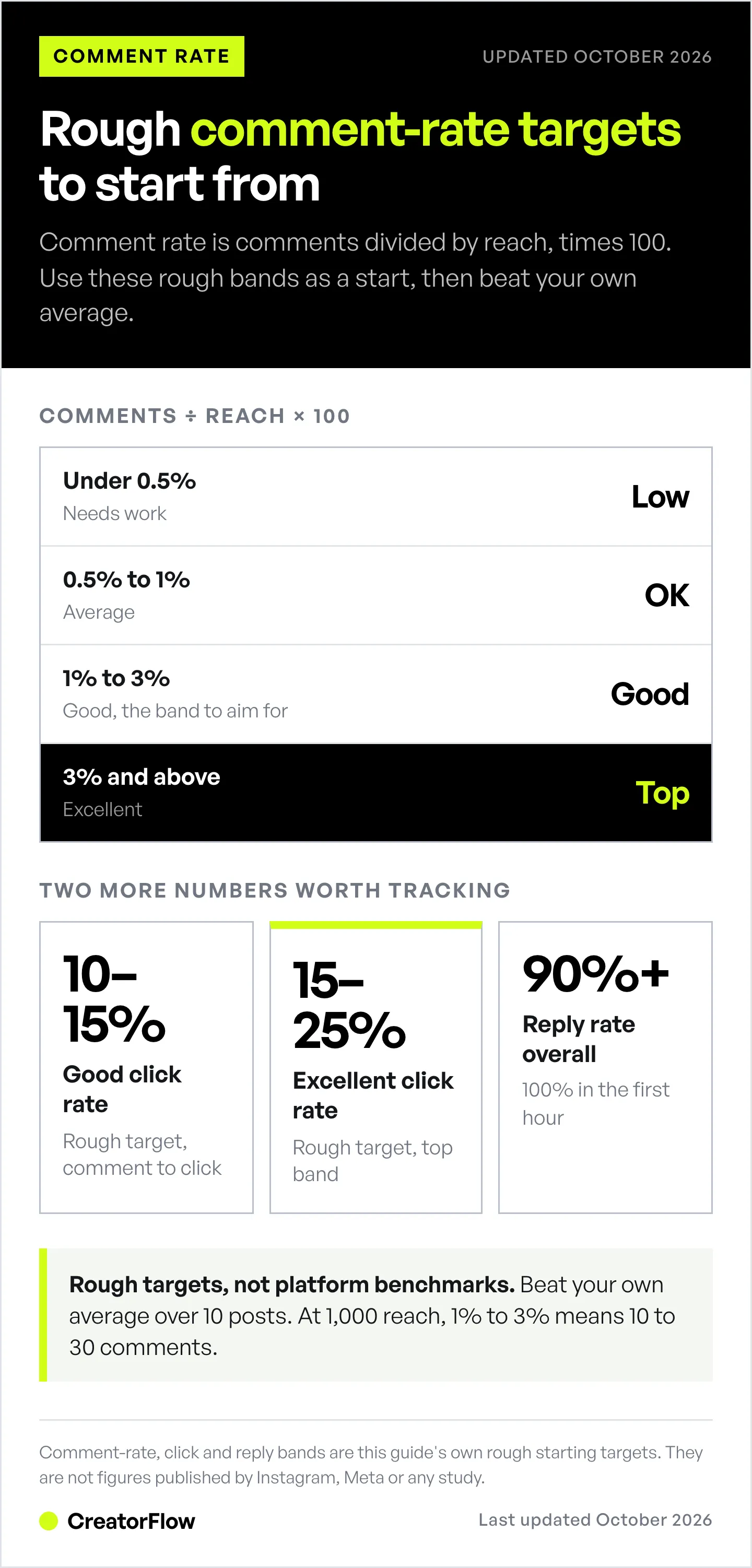
Comment rate: Comments divided by Reach times 100
- Under 0.5% = Needs work
- 0.5-1% = Average
- 1-3% = Good
- 3%+ = Excellent
Comments per post (baseline first):
- Track your average over 10 posts
- Set improvement goal (50% increase)
- Test strategies systematically
Reply rate: What percentage of comments get replies?
- Aim for 100% in first hour
- 90%+ overall
Conversion rate (if using automation): Link clicks divided by Comments triggered times 100
- 10-15% = Good (rough target)
- 15-25% = Excellent (rough target)
These bands are rough starting targets, not published platform benchmarks. Your own baseline over 10 posts is the number to beat.
Frequently Asked Questions
Do comments matter more than likes for the Instagram algorithm?
No, not according to Instagram. Adam Mosseri said in January 2025 that watch time, likes, and sends are the three signals that matter most for ranking. Comments still count in Feed, where Instagram lists commenting among the five interactions it predicts most closely (about.instagram.com, May 2023). They also bring people back to a post, and a keyword comment lets you send the commenter a private DM.
What’s the best time to post for maximum comments?
When your specific audience is most active. Check Instagram Insights, then Your Audience, then Most Active Times. No Instagram source names one best hour for everyone. Post shortly before your followers’ busiest hour, and stay on the app to reply while comments arrive.
How many comments should I aim for per post?
Depends on your audience size. A better metric is comment rate (comments divided by reach times 100). Aim for 1-3%. For a post reaching 1,000 people, that’s 10-30 comments. Focus on rate improvement over raw numbers.
Do contests actually work for getting more comments?
Yes. Contests are one of the easiest ways to spike comment volume, because entering costs the reader one word. The key is making participation simple (comment to enter) and prizes relevant (not $1,000 cash that attracts random people, but $100 worth of your products that attracts your target audience).
How quickly should I reply to comments?
Within the first hour, while the commenter is still on the app. A fast reply often earns a reply back, which adds another comment to the post and keeps the conversation live. After the first hour, batch replies twice daily.
Can comment-to-DM automation get my account banned?
Ban risk is minimal when you use tools built on Meta’s official Instagram API (CreatorFlow, ManyChat, and LinkDM all are), though no tool can promise zero risk. The behaviour that does put accounts at risk: browser bots that log into your account, mass-DMing people who never engaged, and buying fake engagement. Stick to API-based tools and only message people who commented your trigger word.
Conclusion: Comments = Conversions
More Instagram comments give you threads to answer, reasons for people to come back to a post, and keyword triggers that deliver your link.
The 12 strategies:
- End with a question
- Create “this or that” content
- Share controversial takes
- Use fill-in-the-blank captions
- “Comment [WORD] for the link”
- Ask for recommendations
- Run polls in comments
- Create caption contests
- Reply to every comment (first hour)
- Ask follow-up questions
- Pin best comments
- Feature commenters in Stories
Pick 2-3 strategies. Test them over the next 10 posts. Measure your comment rate before and after.
Then add comment-to-DM automation to turn every keyword comment into an automated conversion.
More comments lead to more threads, more return visits, and more automated DMs, and those DMs lead to clicks.
The flywheel starts with getting that first comment. Start with strategy #5 today: “Comment LINK for [your resource].” Set up automation. Watch the leads roll in.
Ready to turn comments into automated conversions? CreatorFlow lets you set up comment-to-DM automation in 5 minutes. Every keyword comment triggers an instant DM with your link.
Start your free trial at creatorflow.so
Related Articles
- Comment-to-DM Automation Setup Guide - Turn every keyword comment into an automated DM
- Instagram Hooks: 50 Templates That Stop Scroll - Grab attention in the first 3 seconds
- Instagram DM Automation: Complete Guide - Master all types of Instagram automation
- Instagram Keyword Trigger Automation - Set up keyword-based DM responses
Disclaimer: Ranking signals are quoted from Instagram's ranking explainer (May 2023) and Adam Mosseri (January 2025), and Meta's private-reply and messaging-window rules were re-checked in October 2026. Comment-rate and click-rate bands are rough targets, not platform benchmarks. Individual results vary based on audience size, content quality, niche, and engagement history. Instagram/Meta may change algorithm factors, features, or terms at any time. Instagram is a trademark of Meta Platforms, Inc. CreatorFlow is not affiliated with, endorsed by, or sponsored by Meta Platforms, Inc. Users are responsible for complying with Instagram's Terms of Service and Community Guidelines.


