
Instagram comment automation automatically sends direct messages to followers when they comment on your posts or Reels. When someone leaves a comment with your trigger word (like “link” or “interested”), the automation tool detects it and instantly DMs them your response, typically a product link, booking calendar, or lead magnet. It uses Meta’s official Instagram API, which keeps you compliant with Instagram’s Terms of Service.
You post a Reel about your new product. Within 20 minutes, you get 47 comments asking “Where can I buy this?” By the time you respond 3 hours later, they’ve moved on to the next creator. You’ve lost 25+ potential sales. Comment automation is one of nine Instagram automation features, and it carries the tightest rule of the set: one private reply per comment.
Instagram comment automation fixes this. Someone comments “link,” they get your product URL in their DMs within seconds. No more copy-pasting. No more lost sales because you were asleep or busy.
This guide shows you exactly how to automate Instagram comment replies, which tools use Meta’s official API (so you stay compliant), and how to set up comment-to-DM automation in under 5 minutes.
Key Takeaways
- Best tool overall: CreatorFlow ($15/mo), fastest setup, flat-rate pricing, modern UI, Instagram-only focus.
- Best for agencies: ManyChat (Essential $17/mo to Advanced $199/mo, scales by contacts), multi-platform support, complex workflows.
- Best free option: CreatorFlow free plan, 500 DMs/month, one Instagram workspace.
- Setup time: 5-10 minutes for all major tools.
- Safety: All tools mentioned here use Meta’s official Instagram API. Minimal ban risk when respecting tool-enforced pacing.

What Is Instagram Comment Automation?
Instagram comment automation automatically sends direct messages to followers when they comment on your posts or Reels. When someone leaves a comment with your trigger word (like “link” or “interested”), the automation tool detects it and instantly DMs them your response.
The technology uses Meta’s official Instagram API to monitor your posts for new comments. When a comment matches your trigger word, the API sends an automated DM to that user. Per Meta’s Developer Documentation (developers.facebook.com, February 2026), this is supported and compliant when using API-based tools.
Instagram comment automation solves three problems:
- Speed: Instant replies (under 10 seconds) vs manual responses (3-4 hours average delay)
- Scale: Handle 100+ comments automatically vs manually typing the same message 100 times
- Coverage: Replies work 24/7 even when you’re sleeping, working, or offline
If even 50% of your comments are “link please?” requests, that’s dozens of manual DM responses per post. At 5 posts per week, you’re manually sending hundreds of repetitive DMs weekly. Instagram comment automation eliminates this time sink completely.
How Instagram Comment Automation Works
Instagram comment automation follows a simple 4-step process that runs automatically in the background.
1. You Connect Your Instagram Business Account
Using OAuth authentication (the “Login with Facebook” button), you connect your Instagram Business or Creator account to an automation tool like CreatorFlow, ManyChat, or LinkDM. This creates a secure connection using Meta’s official Instagram API.
Important: Your Instagram account must be a Business or Creator account. Personal accounts cannot use the Instagram API. Switch your account type in Instagram Settings → Account → Switch to Professional Account.
2. You Set Your Trigger Words
Choose which comments will trigger automatic DM responses. Common trigger words:
- Product links: “link,” “shop,” “buy,” “purchase,” “store”
- Lead magnets: “guide,” “template,” “checklist,” “download,” “free”
- Booking calls: “book,” “call,” “consult,” “appointment,” “schedule”
- Affiliate links: “Amazon,” “LTK,” “code,” “discount”
You can set multiple trigger words. The automation tool checks every new comment against your trigger list. For help picking high-performing keywords, see our guide on Instagram keyword triggers.
3. Followers Comment on Your Posts
When someone comments with your trigger word (like “link please”), Instagram’s API instantly alerts your automation tool about the new comment.
4. They Receive an Instant DM
Within seconds, the follower receives your automated DM with your link, lead magnet, or next steps. The message comes from your Instagram account and looks identical to a manual DM you’d send yourself.
Instagram’s 24-Hour Window Rule: Meta’s API allows automated DMs to users who have messaged your account within the past 24 hours OR who interact with you publicly via comment/reaction triggers (Meta Developer Documentation, February 2026). The Human Agent tag extends this window to 7 days for human follow-up. This prevents spam while allowing genuine engagement automation.
Why Automate Instagram Comments (Real Benefits)
Save 2-4 Hours Daily on Repetitive DMs
Instagram comment automation eliminates repetitive DM work:
- Before automation: 50 “link please” comments = 50 manual copy-paste DM responses = 25 minutes
- After automation: 50 “link please” comments = 0 minutes (automated instantly)
For creators posting 5x per week with 30+ comments per post, this saves 10-12 hours weekly on DM management alone.
Capture Sales While You Sleep
Instagram is a global platform. If you’re in Los Angeles and someone in Singapore comments on your post at 3 AM Pacific time, waiting 8 hours until you wake up means they’ve already moved on.
Instagram comment automation works 24/7:
- Someone comments “link” at 2 AM your time
- They get your product URL in seconds
- They click, browse, and buy while you sleep
- You wake up to sales notifications
Increase Conversion Rates with Speed
Response time directly impacts conversion rates on Instagram. The faster you respond, the more likely followers click your link and convert. Automation delivers instant responses every single time, compared to hours of delay when responding manually.
Build Your Email List via Instagram
Use Instagram comment automation to capture email addresses directly within DMs. Here’s the flow:
- Follower comments your trigger word
- They receive automated DM: “Want the free guide? Reply with your email!”
- They reply with their email address
- Your automation tool captures it and adds to your email list
- You send them the lead magnet
CreatorFlow, ManyChat, and LinkDM all support email capture within Instagram DMs. Learn more in our full guide on collecting emails through Instagram DMs.
Best Tools to Automate Instagram Comments
CreatorFlow - Best for Solo Creators and Affiliates
Pricing: $15/mo flat rate (Pro plan with 5,000 DMs/month and 2 workspaces, as of February 2026). Free plan: $0/mo with 500 DMs/month and 1 workspace.
Best for: Solo creators, affiliate marketers, coaches, content creators who only need Instagram automation.
Strengths:
- Fastest setup time (under 5 minutes average)
- Modern, clean UI
- Flat-rate pricing (no surprise bills as your audience grows)
- Template-first approach (pre-built automation templates vs building from scratch)
- Meta Tech Provider (since December 2025)
Scope:
- Instagram-first, with every feature built around how Instagram behaves
- 20,000+ creators and brands
- Template-based setup: one trigger, one message, with longer journeys built as separate automations
When to choose CreatorFlow: You’re a solo creator or small team, you only need Instagram automation, you prefer simple template setup over complex workflow builders, and you want flat-rate pricing that won’t scale with your audience size.
ManyChat - Best for Agencies and Multi-Platform
Pricing (manychat.com/pricing, July 2026): Free plan (25 contacts), Essential $17/mo (250 contacts), Pro $39/mo (2,500 contacts, all channels), Business $99/mo (7,500 contacts), Advanced $199/mo (25,000 contacts). Annual billing drops those to $14, $29, $69, and $139 per month.
Best for: Agencies managing multiple client accounts, businesses needing multi-platform automation (Instagram + Facebook + WhatsApp + SMS + TikTok).
Strengths:
- Multi-platform support (Facebook Messenger, Instagram, WhatsApp, SMS, TikTok, Telegram, email)
- Advanced workflow builder with complex conditional logic
- Large template library
- 10+ years in market with established user base
Considerations:
- The flow builder targets multi-platform automation; its depth fits agencies more than solo creators
- Contact-based pricing scales with audience growth
- Outside scope for Instagram-only solo creators (paying for channels you won’t use)
- Average setup time: 30-45 minutes (vs 5 minutes for CreatorFlow)
When to choose ManyChat: You need multi-platform automation, you’re an agency managing multiple clients, you need advanced conditional logic and complex workflows, or you’re already familiar with ManyChat’s workflow builder.
Compare CreatorFlow vs ManyChat head to head, or see the full DM automation tools comparison.
LinkDM - Established Market Leader
Pricing: $19/mo flat rate (linkdm.com, July 2026). Free plan available with limited DMs/month.
Best for: Creators who want an established tool with a large user base.
Strengths:
- 50,000+ creators, brands, and agencies (linkdm.com, July 2026)
- Quick setup (average 5-8 minutes)
- Free plan available
- Story @mention automation
Considerations:
- Instagram-first scope; multi-channel automation is outside what linkdm.com lists (July 2026)
- At $19/mo, priced above CreatorFlow’s $15/mo Pro plan
When to choose LinkDM: You prefer a tool with a long track record, you want the free plan to test before upgrading, or you value the larger creator community.
Pricing Comparison Table
| Tool | Monthly Price | Free Plan | DMs/Month | Best For |
|---|---|---|---|---|
| CreatorFlow | $15 (Pro) | Yes (500 DMs) | 5,000 | Solo creators, affiliates |
| LinkDM | $19 | Yes (limited) | High volume on Platinum | Established user base |
| ManyChat | $17-199 (5 tiers) | Yes (25 contacts) | Based on contacts | Agencies, multi-platform |
Pricing verified February 2026 from official websites. All prices subject to change.
How to Set Up Instagram Comment Automation (Step-by-Step)
Step 1: Choose Your Automation Tool
Pick one of the three tools above based on your needs:
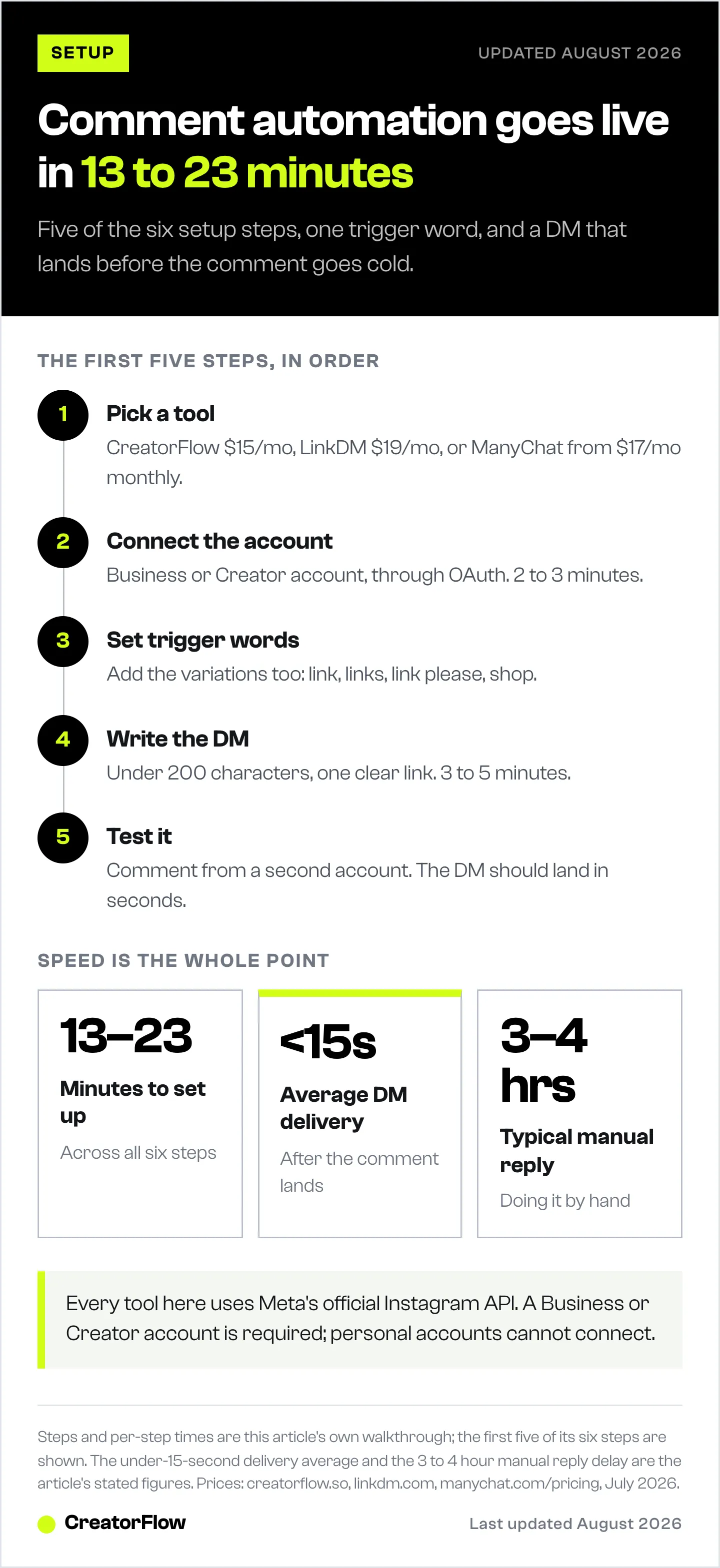
- Solo creator, want fastest/cheapest: CreatorFlow ($15/mo)
- Established tool, larger user base: LinkDM ($19/mo)
- Multi-platform, agency needs: ManyChat ($17-199/mo)
All three use Meta’s official Instagram API, so they’re equivalent on the safety dimension.
Step 2: Connect Your Instagram Business Account
- Sign up for your chosen tool (CreatorFlow, LinkDM, or ManyChat)
- Click “Connect Instagram Account”
- Log in using “Login with Facebook” (OAuth authentication)
- Select your Instagram Business or Creator account
- Grant permissions when prompted (required for the API connection)
Troubleshooting: If you see “This account type is not supported,” your Instagram account is still a Personal account. Switch to Business/Creator in Instagram Settings.
Time required: 2-3 minutes
Step 3: Create Your First Comment Trigger
- Go to “Automations” or “Flows” section in your tool
- Click “Create New Automation”
- Select “Comment-to-DM” automation type
- Enter your trigger word(s). Examples: “link,” “shop,” “buy,” “guide”
- You can add multiple trigger words (comma-separated)
Pro tip: Use common variations. If your trigger is “link,” also add “links,” “link pls,” “link please,” “where to buy,” “shop.” For more on picking the right trigger words, check our keyword trigger automation guide.
Time required: 1-2 minutes
Step 4: Customize Your Automated DM Message
Write the message followers will receive when they comment your trigger word. Keep it natural and helpful:
Template for product links:
Hey! Here's the link you asked for:

[Your Product URL]

Questions? Reply to this DM!
Template for lead magnets:
Thanks for your interest!

Here's your free [Guide Name]:
[Download Link]

Reply with any questions!
Template for booking calls:
Ready to chat?

Book your free 15-min call here:
[Calendly Link]

Looking forward to connecting!
Best practices:
- Keep it under 200 characters (feels more human)
- Include an emoji or two (not excessive)
- End with a question or call-to-action
- Use their first name variable if available: “Hey {name}!” (most tools support this)
For more templates across every niche, see our Instagram DM automation templates guide.
Time required: 3-5 minutes to write and test
Step 5: Test Your Automation
Before going live, test with a demo account or ask a friend to help:
- Enable “Test Mode” in your automation tool
- Have someone (or use a second account) comment your trigger word on a test post
- Check if the DM arrives within 10 seconds
- Verify the message looks correct, links work, formatting is clean
- Test with different trigger word variations
Time required: 2-3 minutes
Step 6: Activate and Monitor Performance
- Switch from Test Mode to Live Mode
- Activate your automation
- Monitor performance for first 24 hours:
- How many comments triggered the automation?
- How many DMs were sent successfully?
- What’s the click-through rate on your link?
- Any errors or failed sends?
Most tools provide analytics dashboards showing:
- Total DMs sent
- Click-through rates
- Conversion tracking (if you added UTM parameters to links)
- Most common trigger words
Time required: 5-10 minutes initially, then check weekly
Total setup time: 13-23 minutes from start to live automation
For a deeper walkthrough with screenshots and troubleshooting, see our comment-to-DM automation setup guide.
Advanced Instagram Comment Automation Strategies
Pair Comment Automation with Story Reply Automation
Don’t stop at post comments. Automate story replies too. When followers reply to your Instagram Stories, trigger the same automated DM.
Use case: Post a story about your new product. Add a “Reply with SHOP for the link!” sticker. Anyone who replies “SHOP” gets your product URL instantly.
CreatorFlow, ManyChat, and LinkDM all support story reply automation alongside comment automation.
How to set up Instagram story reply automation
Use Follow-Before-DM Logic
Some tools let you set “follow-before-DM” logic: only send automated DMs to people who follow your account. This prevents random users from spamming your trigger words and wasting your DM quota.
Example: Someone who doesn’t follow you comments “link.” They receive a public comment reply: “Follow us and comment again for the link!” This filters out non-engaged users and grows your follower count simultaneously.
ManyChat and CreatorFlow Pro support follow-before-DM logic.
Automation handles the replies; moderation handles the rest. For filtering spam, restricting accounts, and cleaning up negativity, see how to hide comments on Instagram.
Track Conversions with UTM Parameters
Add UTM parameters to your automated DM links to track which Instagram posts drive the most sales:
Example:
https://yourstore.com/product?utm_source=instagram&utm_medium=dm_automation&utm_campaign=reel_feb15Track in Google Analytics which Instagram posts generated clicks, conversions, and revenue. This tells you which content types drive the most automated DM conversions.
Set Up Delayed Follow-Ups
After someone receives your initial automated DM, schedule a follow-up message 24 hours later if they haven’t responded:
- Initial DM (immediate): “Here’s your link: [URL]”
- Follow-up DM (24 hours later): “Did you get a chance to check out the link? Any questions?”
Delayed follow-ups can recover missed opportunities. Keep it to 1-2 follow-ups max to avoid being spammy.
Capture Emails Within Instagram DMs
After sending your initial automated DM with a link, ask for their email to send additional resources:
Flow:
- Follower comments “guide”
- Automated DM: “Want the free guide? Reply with your email address!”
- They reply: “sarah@email.com”
- Automation captures email, adds to your email list
- You send the guide + add them to your email sequence
CreatorFlow and ManyChat support email capture within Instagram DM flows.
See our full guide on collecting emails via Instagram DM automation.
Instagram Comment Automation Safety and Compliance
Is Instagram Comment Automation Safe?
Yes, when using Meta’s official Instagram API. CreatorFlow, ManyChat, and LinkDM all use Instagram’s official API, which complies with Instagram’s Terms of Service.
What’s safe:
- API-based tools (CreatorFlow, ManyChat, LinkDM)
- Comment-to-DM automation via Instagram API
- Story reply automation via Instagram API
- Following Instagram’s rate limits and respecting tool-enforced pacing
What will get you banned:
- Browser automation bots (not using official API)
- Third-party Instagram scrapers
- Exceeding Instagram’s rate limits
- Sending DMs to users outside Meta’s allowed messaging windows
According to Meta’s Developer Documentation (developers.facebook.com, February 2026), using the Instagram API for automated messaging is officially supported when you stay inside the documented permissions.
For a deeper dive on staying safe, see our guide on avoiding Instagram bans with DM automation.
Instagram’s Rate Limits for Comment Automation
Meta publishes the following rate limits for Instagram API messaging (developers.facebook.com/docs/graph-api/overview/rate-limiting, February 2026):
- 100 messages/second for text and links on the Instagram Login path (per app)
- 10 messages/second for audio and video
- 750 post-comment private replies per hour
- 24-hour standard messaging window for replies
Tools (including CreatorFlow) typically pace sends at ~200 DMs/hour as a behavioral safety cap to stay well under these per-second ceilings and avoid spam triggers, that’s a tool-side convention, not a Meta-published hourly limit.
What this means in practice:
If you post a viral Reel that gets 500 comments in one hour asking for your link, your tool can comfortably send 200+ automated DM responses in that first hour without bumping into Meta’s published per-second ceilings. Most creators never come close to these limits, the typical Instagram post generates far fewer comments than the per-hour cap.
Meta Tech Provider Status
When choosing an Instagram automation tool, look for “Meta Tech Provider” or “Meta Business Partner” status. These indicate the tool has been reviewed and approved by Meta.
As of February 2026:
- CreatorFlow: Meta Tech Provider (since December 2025)
- ManyChat: Meta Business Partner
- LinkDM: Listed in Meta’s partner directory
FAQ
Can you automate Instagram comment replies?
Yes, you can automate Instagram comment replies using tools like CreatorFlow, ManyChat, or LinkDM. These tools use Meta’s official Instagram API to automatically send DMs when followers comment on your posts with specific trigger words. This is supported by Instagram when using API-based tools (as of February 2026).
How much does Instagram comment automation cost?
Instagram comment automation costs $0-19/month depending on the tool (pricing verified July 2026). CreatorFlow offers a free plan ($0/mo) with 500 DMs/month and a Pro plan ($15/mo) with 5,000 DMs/month. LinkDM has a free plan and a $19/mo paid plan. ManyChat ranges from a free tier (25 contacts) up through Essential ($17), Pro ($39), Business ($99), and Advanced ($199) on monthly billing ($14/$29/$69/$139 billed annually). Most solo creators use the $15-19/mo plans.
Will I get banned for automating Instagram comments?
Ban risk is minimal when using official API-based tools like CreatorFlow, ManyChat, or LinkDM. These tools use Meta’s Instagram API, which is officially supported by Instagram. You will get banned if you use browser automation bots, third-party scrapers, or tools that don’t use Meta’s official API. Stick to API-based tools and respect tool-enforced pacing.
What’s the difference between comment automation and DM automation?
Comment automation specifically triggers automated actions based on Instagram post/Reel comments. When someone comments your trigger word, they receive an automated DM. DM automation is broader and includes comment-to-DM, story reply automation, keyword triggers in DMs, and direct message flows. Most Instagram automation tools (CreatorFlow, ManyChat, LinkDM) include both comment automation and broader DM automation features.
Can you automate Instagram comments on Reels?
Yes, Instagram comment automation works on Reels, carousel posts, photo posts, and video posts. When you set up a comment trigger in CreatorFlow, ManyChat, or LinkDM, it monitors all your Instagram content types for comments matching your trigger words. Reels often generate the most comments due to high engagement rates, making them ideal for comment automation campaigns.
How fast do automated Instagram DMs send?
Automated Instagram DMs send within seconds after someone comments your trigger word. The speed depends on the automation tool’s server response time and Instagram’s API processing. CreatorFlow, ManyChat, and LinkDM all deliver DMs in under 15 seconds on average. This is significantly faster than manual responses, which average 3-4 hours delay.
Can you use Instagram comment automation for affiliate links?
Yes, Instagram comment automation works for affiliate marketing. When followers comment “link” or “shop,” they receive your Amazon affiliate link, LTK shop link, or other affiliate URLs via automated DM. Many affiliate marketers and Amazon influencers use comment automation to instantly deliver product links without manually copy-pasting DMs 100+ times daily.
How Amazon influencers use Instagram DM automation
Do I need an Instagram Business account for comment automation?
Yes, you must have an Instagram Business or Creator account to use comment automation. Personal Instagram accounts cannot access the Instagram API, which is required for automation tools. Switch your account in Instagram Settings for free. This takes 30 seconds.
Can you capture emails with Instagram comment automation?
Yes, you can capture email addresses using Instagram comment automation. After someone comments your trigger word and receives your automated DM, you can ask them to reply with their email address. Tools like CreatorFlow and ManyChat can capture email replies and add them to your email list automatically. This lets you build an owned email list from Instagram engagement.
How to collect emails via Instagram DM automation
How many Instagram accounts can you automate with one tool?
It depends on the tool and plan. CreatorFlow Free supports 1 workspace, CreatorFlow Pro supports 2, and CreatorFlow Growth supports 5. LinkDM Pro supports 3 accounts and Platinum supports 10. ManyChat varies by plan tier. If you manage multiple Instagram accounts, choose a plan that supports multiple workspaces.
How to manage multiple Instagram accounts with workspace automation
Ready to automate Instagram comment replies? CreatorFlow offers a free plan with 500 DMs/month and 5-minute setup.
Sources:
- Meta Instagram API Documentation: developers.facebook.com/docs/instagram-platform (accessed February 2026)
- ManyChat pricing: manychat.com/pricing (accessed July 2026)
- LinkDM pricing and user count: linkdm.com (accessed February 2026)
- CreatorFlow pricing: creatorflow.so/pricing (accessed February 2026)
All external data verified as of February 2026.
Related reading: