
Automated Instagram DMs are messages sent through software when a follower takes a specific action on your content. They are allowed when they use Meta’s official Graph API and respond only to user-initiated actions like comments, story replies, and keyword DMs. Most tools pace sends at around 200 DMs/hour and respect Meta’s 24-hour messaging window. Tools that ask for your password bypass the official API and risk bans.
The confusion is real. Some creators swear by automated DMs and credit them for doubling their revenue. Others have horror stories about restricted accounts and lost followers. The difference comes down to one thing: how you automate.
This guide breaks down the real rules behind automated Instagram DMs, what Meta allows, what gets accounts flagged, and how to set up automation that’s safe, compliant, and profitable.
Key Takeaways
- What Meta allows: Automated responses to user-initiated actions only (comments, story replies, DMs). Cold outreach to people who haven’t engaged is banned
- Rate limits: Most tools pace sends at ~200 DMs/hour as a behavioral cap (not a Meta-published limit); Meta enforces a 24-hour automated messaging window from last user engagement and a 7-day human agent follow-up window
- Safe tools: CreatorFlow ($15/month flat), ManyChat (from $17/month (Essential, 250 contacts; $14 billed annually)), and LinktoDM ($15/month flat) all use Meta’s official Instagram Graph API with OAuth authentication (verified July 2026)
- Unsafe tools: Any tool that asks for your Instagram password, runs as a browser extension, or promises unlimited DMs with no rate limits violates Meta’s Developer Policies
- Top mistakes that get accounts flagged: Sending identical messages to thousands of users, ignoring the 24-hour window, running multiple automation tools on the same account, and not connecting a Facebook Page
- Bottom line: Use one official API-based tool per account, write varied messages for different triggers, and stay within the 24-hour messaging window to automate safely

What Are Automated Instagram DMs?
Automated Instagram DMs are messages sent through software when a follower takes a specific action. Someone comments “LINK” on your Reel, and they receive your affiliate link in their inbox within seconds. Someone replies to your Story, and they get a booking calendar. No manual work.
The technology behind it is Meta’s Instagram Graph API, the official system that lets approved tools send messages on your behalf. Your automation tool connects to Instagram through this API, watches for trigger events, and delivers your pre-written messages automatically.
Three main types exist:
Comment-to-DM: A follower comments a keyword on your post or Reel. They receive a DM with your link, lead magnet, or booking page within 5-10 seconds.
Story Reply Automation: Someone replies to your Instagram Story. They get an automated response with whatever you’ve configured: a discount code, a PDF, or a follow-up question.
Keyword Trigger: Someone sends you a DM containing a specific word (like “PRICE” or “COACHING”). They receive a pre-written response instantly.
All three types work through the same system: user action triggers a webhook notification to your tool, which sends the message through the official API.
The 3 Core Rules for Automating Instagram DMs
Instagram DM automation comes down to three rules Meta enforces. First, a qualifying interaction has to happen before you send an automated message: a comment, a Story reply, or a DM from the user. Second, automated messages stay inside a 24-hour window that opens on that interaction and resets each time the user replies. Third, the automation has to run through a Meta-approved tool on the official API, not a password bot.
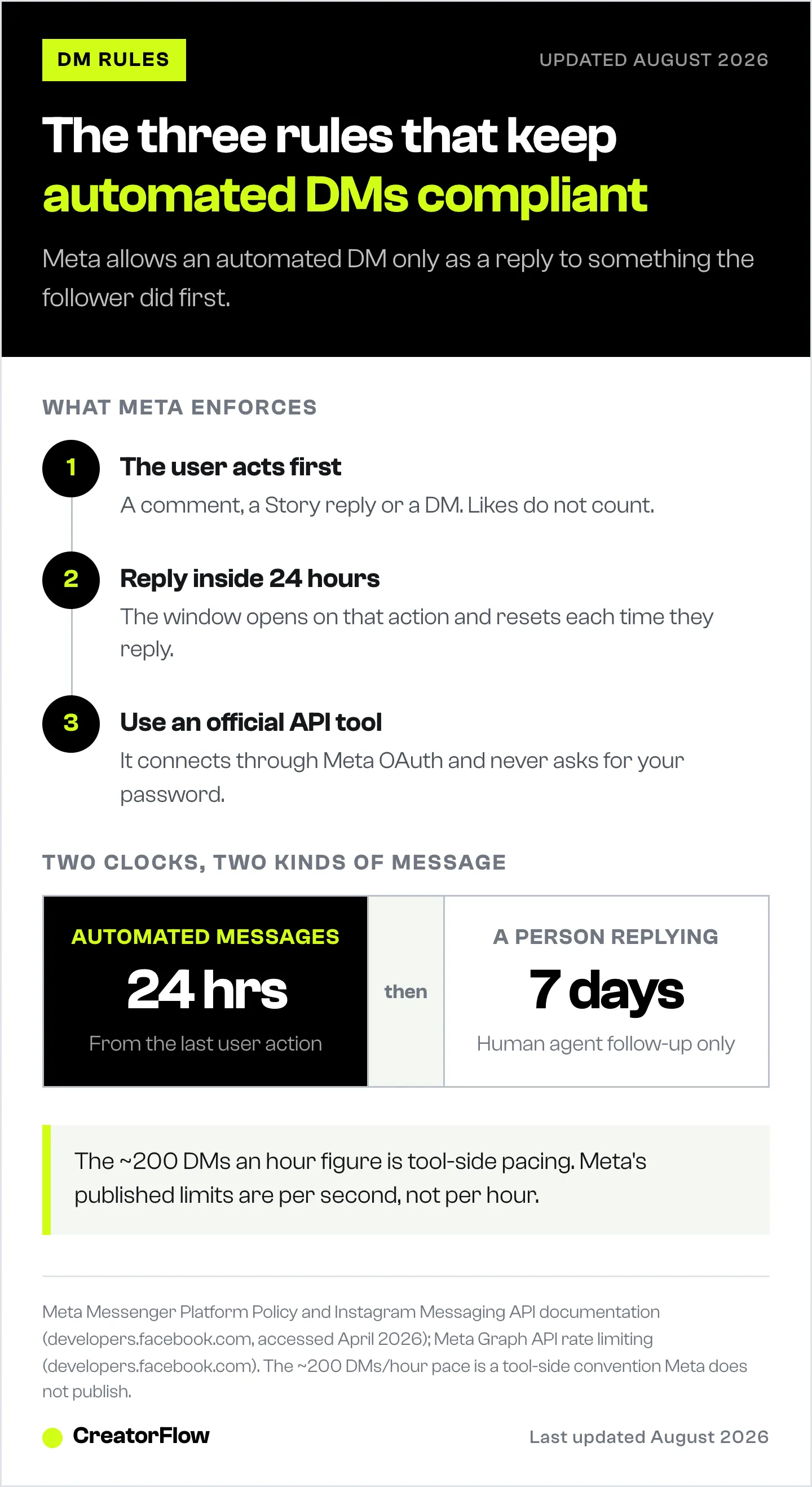
Everything else is detail on how each rule works and what breaks it.
Rule 1: A qualifying interaction has to come first. You cannot send the first message. Meta only opens messaging after the user does something: comments on a post, replies to a Story, or sends you a DM. Likes and profile visits do not count. This is what separates compliant automation from cold-DM spam, and it is the rule most “banned” stories break.
Rule 2: Stay inside the 24-hour window. The qualifying interaction opens a 24-hour window for automated and promotional messages, and the clock resets with every new user reply. If someone comments on your Reel at 9am and replies to your automated DM at 3pm, you get a fresh 24 hours from 3pm. Once 24 quiet hours pass, automated messages stop going through, though a real person can keep replying for up to 7 days.
Rule 3: Use a Meta-approved tool. Automation has to run through Meta’s official API. The fastest way to check a tool: it connects through “Login with Facebook” and never asks for your Instagram password. Anything that wants your password directly or promises to “bypass” Meta’s messaging limits is the kind of tool that gets accounts flagged.
Meta’s Official Rules for Automated DMs (April 2026)
Meta’s messaging policy is specific about what automated DMs can and cannot do. These rules apply to every tool, including ManyChat, CreatorFlow, and LinktoDM.
What’s Allowed
User-initiated conversations only. Your automation can respond to someone who comments, replies to a Story, or sends a DM. You cannot send the first message to someone who hasn’t engaged with your content (Meta Messenger Platform Policy, accessed April 12, 2026).
Automated responses within the 24-hour window. After a user interaction, you have 24 hours to send automated messages. This window resets with each new user interaction. Promotional content, links, and automated sequences are all allowed within this window (Instagram Messaging API documentation, accessed April 12, 2026).
Human-agent follow-up within 7 days. After the 24-hour automated window closes, a real person can continue the conversation for up to 7 days. Automated or promotional content is restricted to that first 24 hours.
The Rate Limits
| Limit | Amount | What Happens If Exceeded |
|---|---|---|
| DMs per hour (tool pacing) | ~200 per account | Automation pauses for 1 hour, no ban |
| Messaging window | 24 hours from last engagement | Automated messages blocked after window |
| Human agent window | 7 days from last user message | All messaging blocked after window |
| Accounts per tool | Varies by tool | Check your plan limits |
The ~200 DMs/hour pacing convention applies per Instagram account, not per tool. Running two automation tools on the same account doesn’t give you 400/hour. They share the same pool. Meta’s actual published rate limits are per-second, not per-hour (Meta Graph API Rate Limiting, accessed April 12, 2026).
What’s Banned
Cold outreach. You cannot send automated DMs to users who haven’t engaged with your content. No “Hey, check out my product” messages to random followers. This is the single most common reason accounts get restricted.
Broadcast messaging. Meta paused access to DM broadcast lists in February 2024. As of April 2026, mass broadcast messaging through the API is not available (ManyChat Help Center, accessed April 12, 2026).
Unofficial tools. Any tool that uses browser automation, screen scraping, or requires your Instagram password violates Meta’s Developer Policies. These tools simulate human behavior instead of using the official API, and Instagram’s detection systems catch them.
Safe vs. Unsafe Automation: How to Tell the Difference
The line between safe and unsafe automation is clear. Here’s how to evaluate any tool before connecting your Instagram account.
Safe Automation (Official API)
How it works: You connect your Instagram Business or Creator account through Meta’s OAuth system. No password sharing. The tool receives webhook notifications when users engage and sends messages through the Graph API.
Signs a tool is safe:
- Connects through “Login with Facebook” or Meta OAuth
- Never asks for your Instagram password
- Listed in Meta’s app directory
- Mentions “Instagram Graph API” or “Meta-approved”
- Respects rate limits automatically
- Only sends messages to users who engaged first
Safe tools (verified April 2026):
| Tool | Price | API Method | Safety |
|---|---|---|---|
| CreatorFlow | $15/mo flat rate | Official Graph API | Meta Tech Provider |
| ManyChat | From $17/mo (Essential, 250 contacts) | Official Graph API | Meta Business Partner |
| LinktoDM | $15/mo flat rate | Official Graph API | Official API integration |
Sources: creatorflow.so/pricing, manychat.com/pricing, linktodm.com/pricing (all accessed April 12, 2026).
Unsafe Automation (Bots and Scrapers)
How it works: These tools log into your account using your username and password, then simulate clicks and typing in a browser to send messages. Instagram’s systems detect this behavior.
Signs a tool is unsafe:
- Asks for your Instagram password
- Runs as a browser extension
- Promises “unlimited DMs” with no rate limits
- Offers cold outreach to non-followers
- Doesn’t mention Meta’s API or Graph API
- Unusually cheap or free with no clear business model
What happens when you use unsafe tools:
- Temporary action block (24-72 hours)
- Feature restriction (DMs disabled)
- Account suspension (permanent in repeat cases)
- Lost followers who received flagged messages
Instagram’s automated behavior detection has gotten significantly better. The platform tracks message velocity, content patterns, login locations, and API call sources. Browser-based bots get caught because their behavior patterns don’t match legitimate API calls. If that detection has already flagged you, follow the steps for Instagram’s automated behavior warning.
5 Mistakes That Get Accounts Flagged
Even with safe tools, certain behaviors trigger Instagram’s spam detection. Avoid these. If you suspect you already tripped something, check your account health before sending another automated DM.
1. Sending Too Many DMs Too Fast
The ~200/hour tool pacing convention exists for a reason. But even within that cap, sending 200 identical messages in 10 minutes looks spammy. Space your messages naturally. Most automation tools handle this automatically, but check your settings.
Fix: Let your tool manage the pacing. Don’t override rate limit settings. If you’re hitting the cap regularly, that’s a sign your content is working and you might need a higher-tier plan with better queue management.
2. Using the Same Message for Everything
Sending identical copy-paste messages to thousands of people triggers Instagram’s content similarity detection. Vary your messages based on trigger context.
Fix: Create different messages for different trigger words. Someone commenting “LINK” on a skincare Reel should get a different message than someone commenting “LINK” on a workout post. Personalization matters.
3. Ignoring the 24-Hour Window
The 24-hour messaging window starts from the user’s last interaction. If someone commented on Monday and you try to send an automated follow-up on Wednesday, it won’t go through. Repeatedly attempting to message outside the window looks like spam behavior to Instagram’s systems.
Fix: Keep automated sequences within the 24-hour window. For follow-ups beyond 24 hours, use manual responses (allowed within the 7-day human agent window) or re-engage users through new content that triggers fresh interactions.
4. Not Connecting a Facebook Page
The Instagram Graph API requires a Facebook Page linked to your Instagram account through Meta Business Suite. Without this, your automation tool can’t establish an official API connection.
Fix: Create a Facebook Page (takes 2 minutes), connect it to your Instagram account in Meta Business Suite, then authorize your automation tool. This is a one-time setup.
5. Running Multiple Automation Tools Simultaneously
Two tools on the same account share the same ~200 DMs/hour pacing pool and can create conflicting webhook responses. Messages get duplicated, triggers fire incorrectly, and your account looks like it’s behaving erratically.
Fix: Use one automation tool per Instagram account. If you need to switch tools, disconnect the old one fully before connecting the new one.
When Automated DMs Make Sense (And When They Don’t)
Automated DMs aren’t a universal solution. They work well for specific use cases and fall short in others.
Automated DMs Work Well For:
Affiliate marketers who get constant “link?” comments. Sending your Amazon, LTK, or ShopMy link in 5 seconds instead of 4 hours means more clicks before the buying impulse fades.
Coaches and consultants who want to send Calendly booking links automatically. Someone asks about your coaching program, they get a link to book a discovery call. No manual back-and-forth.
Course creators and digital product sellers delivering lead magnets. Comment “PDF” to get your free workout plan, recipe book, or marketing template. You build your email list while you sleep.
E-commerce brands answering “how much?” and “is this available?” questions. Send product links directly to interested followers, reducing the friction between interest and purchase.
Automated DMs Don’t Work For:
Cold prospecting. Reaching out to people who didn’t engage with your content is against Meta’s policy and feels intrusive.
Complex sales conversations. If your product requires back-and-forth discussion, qualification questions, and custom proposals, automation can start the conversation but a human needs to continue it.
Sensitive topics. Health advice, financial guidance, and legal information shouldn’t be fully automated. Use automation to deliver general resources, then have a real person handle specific questions.
Accounts with low engagement. If you’re getting 2-3 comments per post, manual responses take 30 seconds. Automation adds complexity without meaningful time savings until you’re consistently getting 20+ comments requesting information.
How to Set Up Safe Automated DMs (5 Minutes)
The setup process is the same across all official API tools. Here’s the general flow:
Step 1: Switch to Business or Creator Account (if you haven’t already). Go to Instagram Settings > Account > Switch to Professional Account. Free, takes 30 seconds.
Step 2: Connect a Facebook Page. In Meta Business Suite, link your Instagram account to a Facebook Page. Create a new Page if needed. This enables API access.
Step 3: Connect your automation tool. Sign in to your chosen tool (CreatorFlow, ManyChat, or LinktoDM) and authorize it through Meta’s OAuth flow. You’ll see a “Login with Facebook” screen. No password sharing required.
Step 4: Create your first automation. Pick a trigger (comment keyword, Story reply, or DM keyword), write your message, and add your link. Preview the message to make sure it reads naturally.
Step 5: Test before going live. Comment your trigger word on your own post from a second account. Verify the DM arrives within 10 seconds. Check that the link works and the message reads well on mobile.
The whole process takes under 5 minutes with any of the three major tools.
Pricing Comparison: Automated DM Tools in 2026
| Tool | Free Plan | Paid Plan | Pricing Model | Best For |
|---|---|---|---|---|
| CreatorFlow | 500 DMs/mo, 1 account | $15/mo, 5K DMs, 2 accounts | Flat rate | Solo creators, predictable costs |
| ManyChat | 25 contacts | From $17/mo, 250 contacts | Per-contact | Multi-platform users |
| LinktoDM | 3-month trial | $15/mo, unlimited contacts | Flat rate | Budget-conscious, long trial |
Sources: creatorflow.so/pricing, manychat.com/pricing, linktodm.com/pricing (all accessed April 12, 2026).
Key differences:
- CreatorFlow charges a flat $15/mo regardless of audience size. No per-contact pricing. Best for creators who want predictable costs (creatorflow.so/pricing, April 2026).
- ManyChat Essential at $17/mo for 250 contacts ($14 billed annually), increases as your list grows. Manychat AI is bundled into Pro and above (manychat.com/pricing, August 2026). Best for creators who need multi-platform automation across Instagram, WhatsApp, and SMS (manychat.com/pricing, April 2026).
- LinktoDM offers a flat $15/mo with unlimited contacts and a generous 3-month free trial. Includes AI auto-reply features (linktodm.com/pricing, April 2026).
FAQ
Are automated Instagram DMs safe?
Yes, when you use tools that connect through Meta’s official Instagram Graph API. Tools like CreatorFlow, ManyChat, and LinktoDM use OAuth authentication (no password sharing) and pace sends at the ~200 DMs/hour pacing convention most tools enforce. The risk comes from unofficial bots that scrape data or simulate browser actions. Those get accounts restricted or banned.
Can Instagram ban me for using automated DMs?
Not if you use an official API tool. Tools pace sends at the ~200 DMs/hour convention to stay well under Meta’s per-second rate limits, and crossing those thresholds typically pauses automation rather than banning your account. Bans happen when you use unauthorized tools that violate Meta’s Developer Policies, specifically tools that access your account through password sharing or browser automation.
What is the 24-hour messaging window?
After a user interacts with your content (comments, replies to a Story, or sends a DM), you have 24 hours to send automated messages. After 24 hours, only manual human responses are allowed for up to 7 days. This prevents creators from spamming users who engaged days or weeks ago (Instagram Messaging API, April 2026).
How many automated DMs can I send per day?
Most tools pace sends at around 200 DMs/hour per account as a behavioral cap (not a Meta-published limit). In theory, that’s up to 4,800 per day. In practice, most creators send 50-500 per day depending on their engagement volume. The rate limit applies per account, not per tool, so running multiple tools doesn’t increase your capacity.
Do I need a business account for automated DMs?
Yes. Meta’s Instagram Graph API only works with Business or Creator accounts that are linked to a Facebook Page. Personal accounts cannot use the messaging API. Switching to a Business or Creator account is free and takes 30 seconds in Instagram Settings.
What’s the difference between automated DMs and Instagram bots?
“Automated DMs” typically refers to tools using Meta’s official API that send messages in response to user actions within the platform’s rules. “Instagram bots” usually refers to unauthorized software that simulates human behavior (mass following, mass DM-ing, scraping data). The key difference: API tools work with Instagram’s systems. Bots work against them.
All pricing and policy information verified as of April 12, 2026. Competitor pricing and features change frequently. Visit official websites for the most current information.
Related reading:


