

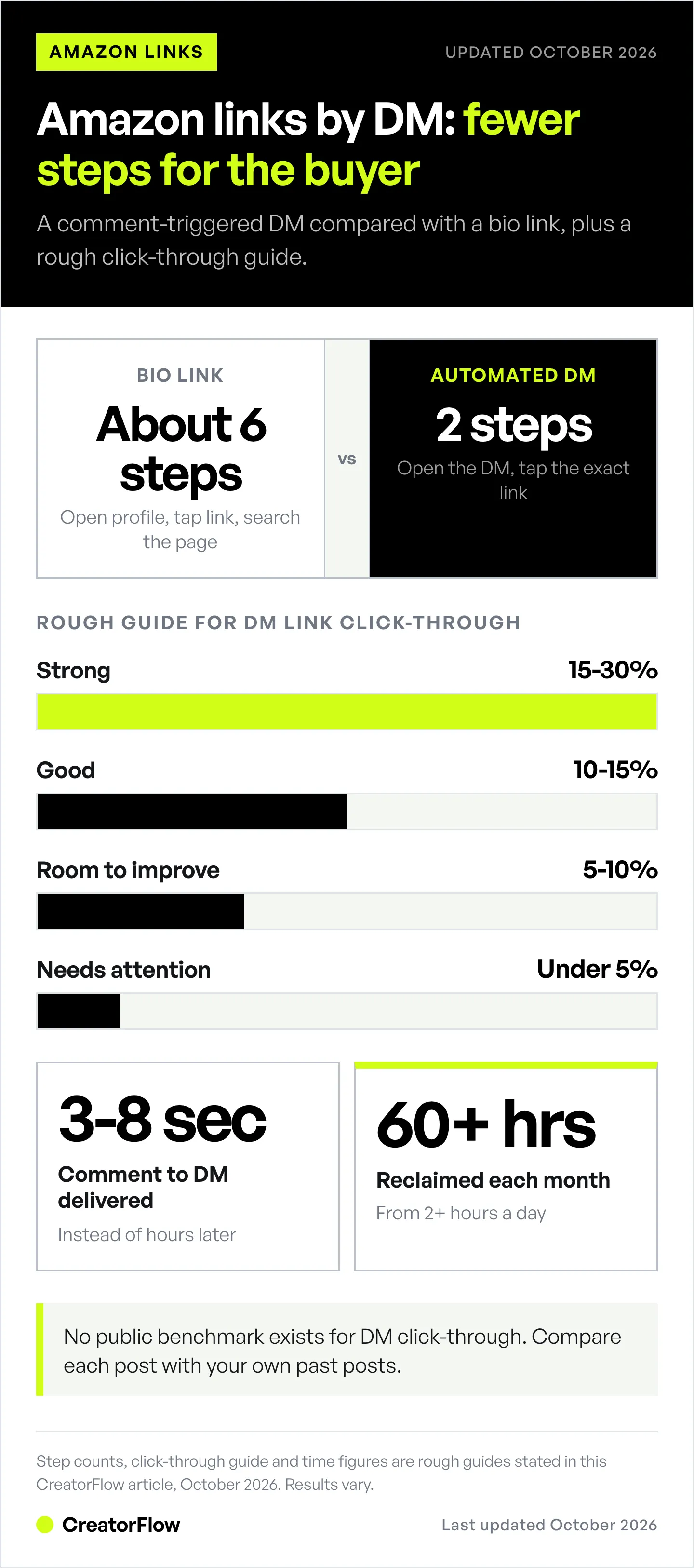
Instagram DM automation for Amazon influencers sends your affiliate link within seconds of a trigger comment, before followers scroll to the next creator. A DM puts the exact link in the person’s inbox, while a bio link makes them leave the post and search for it. Creators spending 2+ hours daily on manual link responses reclaim 60+ hours per month by automating delivery for Amazon Associates, LTK, and Mavely links.
Every delayed DM response can be a lost commission. Automating DM responses helps Amazon influencers capture interest while it’s hot-responding instantly instead of hours later. This can significantly improve click-through rates on affiliate links compared to delayed manual responses or bio links alone.
This guide shows you exactly how to automate Instagram DM link delivery for Amazon, LTK, and Mavely. You’ll learn which automation tools keep you safe from Instagram bans, how to set up instant product link delivery in 5 minutes, copy-paste message templates, and how to track which products actually convert. Whether you’re drowning in “link please” comments or tired of watching your bio link get ignored, you’re about to turn your Instagram into a 24/7 commission-generating machine.
Key Takeaways
- DM links beat bio links on effort: An automated DM puts the exact product link in the person’s inbox, with no searching through a bio page
- Response speed drives commissions: Sending Amazon links within seconds of a comment captures buying intent before followers scroll to the next creator
- Time savings: Creators spending 2+ hours daily on manual link responses reclaim 60+ hours per month with automation
- Multi-platform affiliate support: DM automation works with Amazon Associates, LTK, Mavely, Shopify, and any link type
- Rules to know: Meta allows one private reply per comment within 7 days, and follow-ups only after the person replies, inside 24 hours. Automation tools pace sends at about 200 DMs per hour, a tool-side convention, not a Meta limit
- Bottom line: Set up comment-to-DM automation with trigger words like “LINK” or “SHOP” to turn every product post into a 24/7 commission-generating system
Why Amazon Influencers Need Instagram DM Automation
Amazon’s Influencer Program pays you commissions when people buy products through your affiliate links, at the same rates Amazon Associates pays on the same click (here is how the two programs compare). The faster you get those links to interested buyers, the higher your conversion rate. Instagram DM automation sends your Amazon links instantly when someone comments on your post. No manual copying and pasting. No delayed responses. No lost sales.
Here’s what’s killing your Amazon commissions right now:
Slow response times = abandoned carts. Someone sees your skincare routine Reel. They comment “link!” They’re ready to buy right now. But you’re filming another video, or working your day job, or living your life. You respond 4 hours later. By then, they’ve scrolled past 200 other posts, DM’d three other creators, or just bought whatever Target had on the shelf. You lost the commission.
Immediate response timing matters for conversion. When affiliate links arrive within minutes instead of hours, users are more likely to click and purchase while their buying intent is still active. Response speed directly impacts whether someone follows through on their initial interest.
Bio links don’t work for product-specific requests. Your Linktree has 40 Amazon links. Someone comments “Where’s the pink sweater from?” They click your bio link. Scroll through 40 links. Can’t find the pink sweater. Give up. You lost the commission. DM automation lets you send the exact link they asked for, directly to their inbox. No searching. No confusion. Just click and buy.
You’re losing sales while you sleep. You post a fashion haul at 9pm. Go to bed. Wake up to 100+ comments asking for links. You spend your entire morning responding. Meanwhile, some of those people already bought similar items from creators who responded instantly (because they use automation). DM automation works 24/7. Post at 9pm. Automation sends links all night. Wake up to affiliate commissions, not 100 unanswered DMs.
A keyword call to action gives people a reason to comment. “Comment LINK” turns a silent viewer into a commenter, and comments are engagement Instagram can see. When every commenter gets the link in seconds, more people trust the call to action next time. That loop is simple: clear ask → more comments → links delivered → more sales.
You’re spending 2+ hours per day manually sending links. That’s 14 hours per week. 60 hours per month. You could create 15 more Reels in that time. More content = more reach = more followers = more commissions. Stop trading time for pennies. Automate the repetitive task and focus on what actually grows your income: creating great content.
How DM Automation Works for Amazon Affiliate Links
Instagram DM automation uses Instagram’s official Graph API to send messages automatically when someone takes a specific action. When someone comments “link” on your Amazon haul post, Instagram notifies the automation tool through the API. The tool immediately sends that person a pre-written DM with your Amazon affiliate links. This happens in 3-8 seconds.
The technical stuff happens in the background. What you need to know: it’s safe when used correctly (uses Instagram’s official system, not shady browser bots), it’s legal (Instagram allows this through their API), and it minimizes ban risk (as long as you use API-based tools like CreatorFlow, ManyChat, or LinkDM).
Here’s the step-by-step flow:
Step 1: You create the automation
- Connect your Instagram Business/Creator account to an automation tool
- Choose “Comment-to-DM” automation type
- Select which post to monitor (your Amazon haul, beauty routine, outfit post)
- Enter trigger words people will comment: “link”, “links”, “products”, “shop”, “Amazon”
- Write your DM message with Amazon affiliate links
- Activate the automation
Step 2: Someone comments your trigger word
- User scrolls Instagram, sees your Reel showing 10 skincare products
- Comments “link!” or “products!” or just “links”
- Instagram’s system registers the comment
Step 3: Instagram notifies your automation tool
- Instagram’s official system sends notification: “@beautylover23 commented ‘link’ on post 12345”
- Tool checks: Do I have a rule for this post? Yes.
- Tool checks: Does the comment contain a trigger word? Yes, “link.”
Step 4: Tool sends your pre-written DM
- Tool sends the message you wrote: “Hey! Here’s my full skincare routine with links: [Amazon URL]”
- Message appears in the user’s Instagram inbox within 3-8 seconds
- User clicks link, buys products, you earn commission
Step 5: Tool tracks performance
- Tool logs: DM sent successfully
- Tool tracks: Did they click the link? Yes.
- Tool saves: This person engaged with your “skincare routine” automation
- You check analytics later (example numbers): 47 people commented “link”, 42 got DMs successfully, 9 clicked the link (21% CTR)
The whole process is automatic. You write the message once. Set up the trigger once. Then it runs forever. Post 50 Amazon hauls? Your one automation handles all of them (or you can create different automations for different product categories).
Meta’s Instagram Graph API Limits You Need to Know
Instagram’s official system has safety limits to prevent spam. Every legitimate automation tool respects these limits automatically, but you should understand them:
About 200 DMs per hour (tool-side pacing, not a Meta limit). Meta’s rate-limit documentation sets 750 private replies to comments per hour on the Instagram Login API (checked October 2026). Many tools pace sends lower, at about 200 per hour per account. If you get 300 comments in an hour asking for links, a tool pacing at 200 replies to the rest a little later. For most Amazon influencers, this is never an issue. If you regularly get this many requests, you’re going viral consistently, and that’s a good problem.
Messaging windows. Meta allows one private reply to each comment, sent within 7 days of the comment. After that, you can only message the person again if they reply, and then only inside 24 hours of their last message. Story replies and DMs open the same 24-hour window. So you can’t send a reminder to someone who never replied, and you can’t send a nurture sequence 7 days later through Instagram DMs. For longer nurture sequences, capture emails through your DM automation and move them to email marketing. See how the DM step fits the bigger picture in our Instagram sales funnel guide.
Message Requests. When someone who doesn’t follow you gets your DM, Instagram can put it in their Message Requests folder instead of the main inbox. The person asked for the link, so they usually look for it. Telling people “check your DMs (and Message Requests)” in your caption or comment reply helps.
These limits keep Instagram safe from spam. They also mean you can’t abuse automation. That’s good for everyone. Amazon influencers using DM automation responsibly (only responding to people who asked for links) have nothing to worry about.

Setup Guide: Comment-to-DM for Amazon Links (5-Minute Tutorial)
Stop reading theory. Let’s set up your first automation right now. This takes 5 minutes. You’ll send your first automated Amazon link within 10 minutes.
Step 1: Pick Your Automation Tool
Three best options for Amazon influencers:
CreatorFlow - Free plan with 500 DMs/month; Pro is $15/month. Real-time phone preview (see exactly what your DM will look like as you write it), flat-rate pricing. Template-based setup takes 5 minutes. Best for: creators who want simple setup.
LinkDM - Free plan with 1,000 DMs/month; Pro is $19/month. An established Instagram-first tool: LinkDM’s homepage says 60,000+ creators, brands and agencies use it (checked October 2026). Flat-rate pricing. Best for: creators who want a long-established tool.
ManyChat - Free up to 25 active contacts, then $17–$199/month billed monthly ($14–$139 billed annually). The deepest flow builder of the three. Best for: creators who need complex workflows or multi-platform automation (Facebook, WhatsApp, SMS).
For this tutorial, I’ll use generic steps that work for all three. Pick one and start on a free tier or trial. Check the card policy before you sign up: some tools open a free plan with no card, while a paid trial usually asks for one at checkout.
Step 2: Connect Your Instagram Account
Click “Connect Instagram” or “Add Account” in your chosen tool. You’ll see an official Instagram/Facebook authorization screen.
IMPORTANT: You need a Business or Creator Instagram account. Meta’s Instagram Graph API doesn’t work with Personal accounts. Check your account type: Instagram app → Settings and activity → Account type and tools. If you see “Switch to professional account,” tap it (takes 30 seconds, free).
Log in with your Instagram credentials on the authorization screen. Grant permissions when asked (the tool needs permission to read comments and send DMs on your behalf).
Once connected, you’ll see your Instagram profile photo and username in the dashboard. You’re ready to create automations.
Step 3: Create Your Amazon Link Automation
Click “New Automation” or “Create Automation.” Choose template type: “Comment-to-DM” or “Post Trigger” (wording varies by tool).
Select trigger type: Comment on Post
Choose post: Select a recent Amazon haul or beauty routine post from your feed. Or set it to activate on your next post (when you post your next Amazon video).
Enter trigger words: Type the words people will comment. For Amazon influencers, use these:
- link
- links
- products
- shop
- Amazon
- list
- routine (for beauty/skincare content)
- outfit (for fashion content)
You can enter multiple trigger words. The automation will activate if someone comments any of them. “Link” is the most common. Keep it simple.
Step 4: Write Your DM Message with Amazon Links
This is the message people receive when they comment your trigger word. A simple structure that works:
Template:
“Hey {{first_name}}! Thanks for asking about my [product category]! Here’s the full list with links to everything I showed:
[Your Amazon storefront link or specific product links]
Quick tip: [one helpful tip about the products]
I earn from qualifying purchases. Let me know if you have questions!”
Real example (skincare):
“Hey Sarah! Thanks for asking about my skincare routine! Here’s the full list with links to everything I use:
[Amazon storefront link: amazon.com/shop/yourhandle]
Quick tip: Start with the cleanser and vitamin C serum. You’ll see results in 2-3 weeks.
I earn from qualifying purchases. Questions? Just reply!”
Real example (fashion):
“Hey! Here’s the outfit breakdown with links:
[Amazon storefront link]
Pro tip: The jeans run one size small, so size up!
I earn from qualifying purchases. Let me know if you need sizing help!”
Most tools let you insert the person’s name automatically with {{first_name}} or {{name}}. Use it. A message with their name reads like a reply from you, not a broadcast.
Step 5: Add Your Amazon Links
Where to send people:
Option 1: Your Amazon Influencer Storefront (easiest)
- Link: amazon.com/shop/[yourhandle]
- Pros: One link for everything. Easy to update products without changing DM message.
- Cons: People have to search through your storefront to find specific items.
- Best for: General “full product list” requests
Option 2: Amazon Idea Lists (most specific)
- Link: amazon.com/shop/[yourhandle]/list/[listID]
- Pros: Create lists for specific posts (“Summer Outfit 1”, “Morning Skincare Routine”). People see exactly what they asked for.
- Cons: You need to create a new list for every post.
- Best for: Product-specific requests, organized influencers
Option 3: Direct Product Links (highest conversion)
- Link: Individual ASIN product URLs (amazon.com/dp/B08XYZ123)
- Pros: People go straight to the product page. Highest conversion rate.
- Cons: Long message if you have 10+ products. Hard to update if products go out of stock.
- Best for: Posts featuring 1-3 specific hero products
Option 4: Link-in-Bio Tool with Amazon Links
- Link: Your Linktree, Beacons, Stan Store, or LTK page
- Pros: Organize multiple Amazon links on one landing page. Track clicks. Collect emails.
- Cons: Extra click before reaching Amazon (slightly lower conversion).
- Best for: Creators who want advanced analytics or email capture
LTK (rewardStyle) users: You can send your LTK shop link the same way. Many LTK creators use both Amazon and LTK, depending on what’s available. “Here’s the outfit on LTK: [link]. If you prefer Amazon: [link]”
Mavely users: Send your Mavely link the same way. Mavely pays you a commission when someone buys through it. “Here’s the exact one I’m wearing: [Mavely link]”
Pro tip: If your Amazon links are long, use Amazon’s own short links (amzn.to, from SiteStripe). Amazon’s Operating Agreement does not allow third-party shorteners or redirects that hide the Amazon destination.
Step 6: Add Required Affiliate Disclosure
Amazon’s Operating Agreement requires you to disclose your affiliate relationship, and it permits affiliate links in direct messages only when the recipient asked for them, which the Amazon Influencer Program rules cover in full. Instagram also requires disclosure. Add this to your DM:
Required disclosure:
- “I earn from qualifying purchases” (Amazon FTC compliant)
- “I earn a small commission if you purchase” (alternative)
- “Affiliate links-I may earn from purchases” (short version)
Place it at the end of your message. Most people understand affiliate marketing now. This protects you legally and builds trust.
Step 7: (Optional) Point People to Their Message Requests
DMs to people who don’t follow you can land in their Message Requests folder. Your automation still delivers them, but people may not see them right away.
Fix: In your caption or public comment reply, say “Sent! Check your DMs (and Message Requests).” Some tools can also ask people to follow you before they get the link. Treat that as an ask, not a check, and keep the link easy to get.
Step 8: Preview Your Automation
Most tools show a preview of exactly what your DM will look like. CreatorFlow has a real-time phone preview that updates as you type. Check:
- Does the message look good on mobile?
- Are your links working?
- Is the disclosure included?
- Is the trigger word spelled correctly?
If everything looks good, proceed to Step 9.
Step 9: Test It Yourself
Before going live with your audience, test it:
- Go to the Instagram post you selected
- Comment your trigger word (“link” or whatever you chose)
- Wait 5-30 seconds
- Check your Instagram DMs
- You should receive the automated message
Did you get it? Perfect. Your automation works. If not, troubleshoot:
- Is the automation turned ON? (check toggle switch)
- Is the trigger word spelled exactly right? (case doesn’t matter, but spelling does)
- Did you connect the correct Instagram account?
- Did you wait 30 seconds? Sometimes there’s a slight delay.
Step 10: Go Live and Monitor
Activate the automation. Post your next Amazon haul on Instagram (if you haven’t already). Watch the magic happen.
Monitor for the first hour:
- Check that DMs are sending (look at automation analytics)
- Verify links work (click them yourself)
- Watch for any error messages
- Check that people aren’t reporting spam (if 5+ people say “stop” or “spam”, pause and revise your message)
If everything looks good after an hour, let it run. Your automation is working 24/7 now.
Step 11: Check Analytics After 24 Hours
Go to your tool’s analytics dashboard. Look at:
- Comments captured: How many people commented your trigger word
- DMs sent: How many messages sent successfully
- Delivery rate: Percentage of successful deliveries (should be 90%+)
- Link clicks: How many people clicked your Amazon link
- Click-through rate (CTR): Percentage of people who received DM and clicked link
CTR guidelines (individual results vary):
- 15-30% = Strong performance (engaged audience, clear message)
- 10-15% = Good results (solid engagement, typical for many accounts)
- 5-10% = Room for improvement (improve message or link placement)
- Under 5% = Needs attention (check links work, test new message copy)
If your CTR is under 10%, jump to the “Message Templates” section below for better examples.

Message Templates for Amazon Affiliates (Copy-Paste Ready)
Your message determines your CTR. Customize these templates for your niche. The CTR expectations below are rough guides, not guarantees.
Template 1: General Amazon Storefront Link
Use when: You want one automation that works for all your Amazon content.
“Hey {{first_name}}! Thanks for asking! Here’s my full Amazon storefront with everything I post about:
[amazon.com/shop/yourhandle]
Pro tip: Check my ‘Favorites’ section for my most-used products.
I earn from qualifying purchases. Questions? Just reply!”
Why it works: Simple. One link. Easy to set up. Works for every post you make.
CTR expectation: 10-15%
Template 2: Specific Product List (Beauty/Skincare)
Use when: Your post features a specific routine or haul.
“Hey! Here’s my full skincare routine from today’s video:
[Amazon Idea List link with 8-10 products]
Quick tip: Start with the cleanser and moisturizer. Add serums later once your skin adjusts.
I earn from qualifying purchases. Let me know if you have sensitive skin-I can recommend swaps!”
Why it works: Specific to what they watched. Includes helpful tip. Invites conversation.
CTR expectation: 15-25%
Template 3: Fashion/Outfit Links (LTK or Amazon)
Use when: Posting try-on hauls or outfit breakdowns.
“Hey! Here’s the full outfit breakdown with sizing info:
[Amazon or LTK link]
Sizing note: The jeans run small (I sized up one size), but the top is true to size!
I earn from qualifying purchases. Need fit help? Just ask!”
Why it works: Solves the #1 question (sizing). Positions you as helpful, not just link-dropping.
CTR expectation: 18-28%
Template 4: Amazon + LTK Dual Links
Use when: Products are available on both platforms and you want to give options.
“Hey {{first_name}}! Here’s where to shop:
Amazon: [amazon link] LTK: [ltk link]
Both links work! Amazon usually has faster shipping, but LTK sometimes has better deals.
I earn from qualifying purchases on both. Questions? I’m here!”
Why it works: Gives options. Explains why both exist. No confusion.
CTR expectation: 12-20% (combined across both links)
Template 5: Mavely Link
Use when: The product is on Mavely, or a brand is running a Mavely Boost (a temporary commission increase).
“Hey! Here’s the exact one from my video:
[Mavely link]
I earn a small commission if you buy, at no extra cost to you.
Questions about sizing or colors? Just reply!”
Why it works: One product, one link, and a clear disclosure. Only mention a discount if the brand actually offers one.
CTR expectation: 15-22%
Template 6: Product-Specific with Multiple Options
Use when: Post features one hero product with variations (colors, sizes, bundles).
“Hey! Here’s the [product name] I showed in my video:
[Amazon product link]
It comes in 6 colors-I have the Dusty Rose and the Sage. Both are gorgeous!
I earn from qualifying purchases. Want help picking a color? Tell me your vibe!”
Why it works: Anticipates the next question (which color?). Opens conversation.
CTR expectation: 20-30% (high intent-they asked about a specific product)
Template 7: Email Capture Before Links
Use when: You want to build an email list for future promotions.
“I’d love to send you the product list! What’s your email? I’ll send:
- Full product links
- Exclusive discount codes
- Weekly new finds
(You can unsubscribe anytime!)”
Then after they reply with email:
“Perfect! Just sent everything to {{email}}. Check your inbox (and spam folder just in case).
Here’s the Amazon link too: [link]
I earn from qualifying purchases. See you in your inbox!”
Why it works: Builds your email list (most valuable asset). People who asked for the link are the most likely to share an email for it.
CTR expectation: 30-40% email capture rate, 60-70% link click rate from those who gave email (higher intent)
Template 8: Amazon Finds / Dupes / Budget Options
Use when: Posting budget-friendly finds or designer dupes.
“Hey! Here are the Amazon dupes I found:
[Amazon Idea List link]
Real talk: The jeans are 90% as good as the $200 designer version. The bag is identical. The shoes run narrow, so size up or skip if you have wide feet.
I earn from qualifying purchases. Want my honest review on any of these? Ask away!”
Why it works: Honesty sells. People trust reviews that mention flaws.
CTR expectation: 18-25%
Tracking Affiliate Clicks from Instagram (Analytics You Need)
You can’t improve what you don’t measure. Track these metrics to improve your Amazon commissions.
Metrics to Track Weekly
1. DMs sent per automation
- How many people are triggering your automation?
- Increasing trend = your content is resonating
- Decreasing trend = your posts aren’t getting traction, or trigger words aren’t clear
2. Click-through rate (CTR) on Amazon links
- Percentage of people who received DM and clicked your link
- Rough guide: 10-25%. No public benchmark exists, so compare each post against your own past posts
- Under 10% = message or links need optimization
- Over 25% = you nailed it, scale this strategy
3. Conversion rate (Instagram to Amazon purchase)
- Track this through Amazon Associates dashboard
- Look at: Clicks from your affiliate links → Orders placed
- Formula: (Orders / Clicks) × 100 = Conversion %
4. Earnings per DM sent
- Total Amazon commissions / Total DMs sent = Commission per DM
- Example: $800 commissions from 400 DMs = $2 per DM
- Track this monthly to see if automation is worth the $15-20/month tool cost (spoiler: it always is)
5. Top-performing posts and products
- Which posts generated the most link requests?
- Which products got the most clicks?
- Double down on what works. Stop posting what doesn’t.
Tools for Tracking
Your automation tool’s built-in analytics:
- DMs sent, delivery rate, click-through rate
- CreatorFlow, ManyChat, and LinkDM all provide this
- Check weekly
Amazon Associates dashboard:
- Clicks, conversion rate, earnings per product
- Filter by date range to match your Instagram posts
- Check weekly
Instagram Insights:
- Post reach, profile visits, link clicks
- Cross-reference with automation data to see which posts drove the most DMs
- Check weekly
Google Sheets tracking (manual but powerful):
- Create a sheet with columns: Date | Post Topic | DMs Sent | Link Clicks | CTR | Amazon Earnings
- Update weekly
- Spot trends: “Fashion try-ons consistently get 22% CTR. Home decor gets 8% CTR. Post more fashion.”
What to Do with This Data
If CTR is under 10%:
- Test new message templates (see “Message Templates” section)
- Simplify your Amazon link (storefront link instead of 10 individual links)
- Add a helpful tip or sizing info to your message
- Check that your links aren’t broken
If CTR is good (15%+) but Amazon conversions are low:
- Your DM automation works. Check your Amazon storefront or product selection.
- Check: Are products out of stock? Are prices too high? Are reviews bad?
- Curate better products
If certain posts perform 2-3X better than others:
- Double down. Make more content like your top performers.
- Example: “My skincare routine posts get 3X more link requests than makeup posts. I’m pivoting to 70% skincare content.”
If you’re sending 500+ DMs per week but earnings are flat:
- Your automation works. Your content reach is the bottleneck.
- Focus on: Better hashtags, Reels instead of static posts, posting consistently (5-7x per week), collaborations
Compliance: Amazon TOS + Instagram TOS (Stay Safe)
Breaking Amazon’s or Instagram’s rules can get you banned. Here’s how to stay compliant.
Amazon Associates Program Operating Agreement
Required disclosure: You MUST disclose your affiliate relationship. Amazon’s agreement requires it, and the FTC requires it. Include one of these in every DM:
- “I earn from qualifying purchases”
- “I earn a commission if you purchase through my links”
- “These are affiliate links”
Place it at the end of your message. Don’t hide it. Transparency builds trust.
Link policy: Only use your approved Amazon affiliate links. Don’t use shorteners or redirects that hide the Amazon destination (Amazon’s own amzn.to short links are fine). Don’t use someone else’s affiliate links. Don’t manipulate links to cheat the system. Since Amazon’s Operating Agreement update of 14 April 2026, purchases that come from paid or boosted ads do not earn commission, so don’t boost a post to push your affiliate link (affiliate-program.amazon.com, October 2026).
Content standards: Don’t claim products cure diseases, don’t post fake reviews, don’t use Amazon’s logo without permission. Use honest, personal recommendations.
Cookie duration: Amazon’s affiliate cookie lasts 24 hours. If someone clicks your link Monday at 2pm and buys Tuesday at 1pm, you get credit. If they buy Tuesday at 3pm (25 hours later), you don’t, unless they added the item to their cart within those 24 hours (Amazon then extends credit for that item to 90 days). This is why instant DM delivery matters-shorter time from link to purchase = higher commission rate.
Instagram Terms of Service and Community Guidelines
What’s allowed:
- Sending DMs to people who commented on your posts (they engaged first)
- Using Instagram’s official Graph API through approved tools (CreatorFlow, ManyChat, LinkDM)
- Promoting affiliate links in DMs (Instagram allows this)
What’s NOT allowed:
- Sending unsolicited DMs to people who never engaged with you (spam)
- Using browser bots that log into your account (violates ToS, gets you banned)
- Buying followers or using engagement pods (Instagram hunts for this)
- Sending the exact same message to 1,000 people in 5 minutes (looks like spam)
How to stay safe:
- Only message people who commented your trigger word (permission-based)
- Use natural, conversational language (not aggressive sales spam)
- Provide an easy opt-out: “Reply STOP anytime to unsubscribe”
- Let your tool pace sends (many pace at about 200 DMs/hour, a tool-side convention below Meta’s 750 private replies per hour)
- Only use API-based tools, never browser bots
LTK (rewardStyle) Guidelines
LTK links in Instagram DMs: Fully allowed. LTK encourages creators to share their shop links however they want. Same disclosure rules apply (FTC requires transparency).
LTK + Amazon dual promotion: Totally fine. Many creators offer both: “Here’s the outfit on LTK: [link]. Prefer Amazon? [link].” Customer chooses. You earn either way.
Mavely Compliance
Mavely links in DMs: Allowed. Mavely’s whole model is based on sharing links, and it pays you when someone buys through them. Disclose your affiliate relationship.
Savings claims: Only tell people they will save money if the brand offers a real discount or code. A plain commission link does not lower the shopper’s price.
FTC Disclosure Requirements (US Law)
Required disclosure: Any time you earn money from a link, you must disclose it. This applies to Amazon, LTK, Mavely, and every affiliate program. The FTC requires “clear and conspicuous” disclosure.
What qualifies as clear disclosure:
- ✅ “I earn from qualifying purchases” (at the end of your DM)
- ✅ “#ad” or “#affiliate” (in your Instagram caption)
- ✅ “Affiliate links” (anywhere in the message)
What doesn’t qualify:
- ❌ Hiding disclosure in a collapsed caption that requires “…more” click
- ❌ Using vague language like “I may be compensated” (too vague)
- ❌ No disclosure at all (illegal)
Where to disclose:
- Instagram caption: Use #ad or #affiliate in first 1-2 lines (visible without clicking “…more”)
- Instagram Stories: Text overlay saying “Paid partnership” or “#ad” (Instagram’s branded content tool handles this)
- Instagram DM: Include disclosure in your automated message (“I earn from qualifying purchases”)
Penalty for non-disclosure: FTC civil penalties run up to $53,088 per violation in 2026 (16 CFR 1.98; Federal Register, September 2026). The FTC’s Disclosures 101 for Social Media Influencers explains how to disclose. Not worth the risk. Just disclose.
Success Metrics to Track (Know What’s Working)
Amazon influencers who track these metrics can significantly improve their earnings. Know your numbers. (Individual results vary based on content quality, niche, and audience engagement.)
Weekly Metrics
Automation performance:
- DMs sent: Track total automated messages sent per week
- Delivery rate: Percentage successfully delivered (should be 90%+)
- Click-through rate (CTR): Percentage of recipients who clicked your Amazon link (target: 10-25%)
- Response rate: Percentage of people who replied to your DM (indicates message quality)
Content performance:
- Posts published: How many Amazon-related posts did you publish?
- Comments per post: More comments = more link requests = more commissions
- Link requests per post: How many people commented your trigger word?
- Top-performing posts: Which content types got the most link requests? (beauty hauls, fashion try-ons, home decor, Amazon finds)
Amazon Associates metrics:
- Total clicks: How many people clicked your affiliate links from Instagram?
- Ordered items: How many products were purchased?
- Conversion rate: (Orders / Clicks) × 100 (compare month over month)
- Earnings: Total commissions earned from Instagram traffic
- Earnings per click: Total commissions / Total clicks (helps you understand traffic quality)
Monthly Metrics
Growth and scale:
- Follower growth: Growing audience = more potential link clicks
- Total DMs sent this month: Should increase month-over-month as your content improves
- Total Amazon earnings: Track month-over-month growth
- Instagram reach: More reach = more comments = more commissions
Efficiency metrics:
- Time saved: Estimate hours saved by not manually responding to DMs (probably 10-20 hours per month)
- Cost per commission: Automation tool cost / Total commissions (example: $15 tool cost / $1,200 commissions = $0.0125 cost per dollar earned)
- ROI: (Earnings - Tool Cost) / Tool Cost × 100 (example: ($1,200 - $15) / $15 × 100 = 7,900% ROI)
Quarterly Metrics (Big Picture)
Business health:
- Average monthly earnings: Total Q1 earnings / 3 months
- Audience quality: Are your followers actually buyers, or just lurkers? (measure by: comments per 1,000 followers)
- Content-market fit: Which niches are performing best? (skincare, fashion, home, tech, kids products)
- Sustainability: Is growth consistent, or was Q1 a fluke?
Strategic decisions based on data:
- If fashion content consistently outperforms home decor by 3X, pivot to more fashion content
- If your audience clicks links but doesn’t buy (low conversion rate), curate better products or improve your content’s selling power
- If your tool’s hourly pacing (often about 200 DMs/hour) regularly leaves replies waiting, it’s time to hire a VA or scale to multiple platforms
Red Flags to Watch For
CTR dropping month-over-month:
- Cause: Message fatigue (people are seeing the same DM repeatedly), broken links, poor content quality
- Fix: Refresh your message template, test new CTAs, improve content
High link clicks but low Amazon conversions:
- Cause: Bad product curation (products out of stock, bad reviews, too expensive), mismatch between content and products
- Fix: Audit your Amazon storefront, only promote products you genuinely recommend
DMs sent decreasing:
- Cause: Content isn’t resonating, fewer posts, lower Instagram reach
- Fix: Post more consistently, try new content formats (Reels > static posts), improve hashtag strategy
Follower growth but no earnings growth:
- Cause: Wrong audience (followers not interested in buying), low engagement rate (bots or inactive followers)
- Fix: Focus on engaged followers, not vanity metrics. 5,000 engaged followers who buy > 50,000 dead followers who don’t
Common Mistakes to Avoid (Learn from Others’ Failures)
Amazon influencers make these mistakes. Don’t be one of them.
Mistake 1: Using One Generic Message for Everything
What they do: Set up one automation with a generic message: “Here’s my Amazon storefront: [link]” for every post they make (skincare, fashion, home, kids, tech, everything).
Why it fails: People asked about your pink sweater. You sent them to a storefront with 400 products. They can’t find the pink sweater. They give up. You lost the commission.
Fix: Create multiple automations for different content types. Skincare posts get skincare-specific DM with skincare product list. Fashion posts get fashion-specific DM with outfit breakdown. Specific links typically convert better than general storefront links.
Mistake 2: No Disclosure in DM
What they do: Send automated DMs with Amazon links but forget to include “I earn from qualifying purchases” disclosure.
Why it fails: Violates FTC law, violates Amazon Associates Operating Agreement. Risk: FTC civil penalties (up to $53,088 per violation in 2026), Amazon account termination.
Fix: Add disclosure to every automated message. “I earn from qualifying purchases” at the end. Takes 5 seconds. Protects you legally.
Mistake 3: Broken or Wrong Links
What they do: Set up automation, paste Amazon link, activate it. Never test it. Link goes to wrong product, or link is broken, or link doesn’t have their affiliate tag.
Why it fails: People click broken links, get error pages, lose trust, never come back. Or link works but has no affiliate tag, so you earn $0.
Fix: Test your automation yourself before going live. Comment your trigger word, receive the DM, click the link. Verify: Does it work? Does it go to the right product? Is your affiliate tag in the URL? Check monthly (products go out of stock, links break).
Mistake 4: Ignoring Message Requests
What they do: Send the link and assume everyone sees it.
Why it fails: DMs to people who don’t follow you can land in their Message Requests folder. Some people never open it, so the link sits unseen.
Fix: Tell people where to look. A short public reply like “Sent! Check your DMs and Message Requests” helps them find the link.
Mistake 5: Not Tracking Performance
What they do: Set up automation, let it run, never check analytics. No idea what’s working or what’s broken.
Why it fails: Can’t improve what you don’t measure. Maybe your CTR is 4% (terrible) and you don’t know. Maybe one post type performs 5X better than another and you’re missing the opportunity to scale.
Fix: Check analytics weekly. Look at: DMs sent, CTR, Amazon clicks, earnings. improve the message if CTR is low. Double down on content types that perform best.
Mistake 6: Spammy Message Language
What they do: Write DMs like email spam: “BUY NOW! LIMITED TIME OFFER! CLICK HERE!” All caps. Excessive emojis. Aggressive sales language.
Why it fails: People report it as spam. Instagram flags your account. CTR tanks because the message feels pushy, not helpful.
Fix: Write like you’re texting a friend. “Hey! Here’s the skincare routine you asked about: [link]. Quick tip: start with the cleanser and moisturizer. Let me know if you have questions!” Conversational. Helpful. Human.
Mistake 7: Sending to People Who Didn’t Ask
What they do: Set up automation to DM everyone who likes their post, or everyone who views their Story, or everyone who follows them (regardless of engagement).
Why it fails: That’s spam. People didn’t ask for a message. They’ll report you. Instagram will warn you, then ban you.
Fix: Only DM people who explicitly engaged and asked for information. Comment-to-DM automation is safe because they commented your trigger word (they asked). Story reply automation is safe because they replied to your Story (they engaged). Unsolicited DMs are not safe. Don’t do it.
Mistake 8: Not improving for Mobile
What they do: Write a DM message with 500 words and 15 links because “more information is better.”
Why it fails: People read DMs on their phones while scrolling. Walls of text get ignored. 15 links create decision paralysis. No one clicks anything.
Fix: Keep messages under 100 words. Include 1-3 links max (storefront link or Idea List link). Make it scannable. People should be able to read and click within 10 seconds.
Mistake 9: Forgetting About Email Capture
What they do: Send Amazon links via DM. People click, maybe buy, maybe don’t. That’s the end of the relationship. Never capture emails.
Why it fails: You’re building your audience on a rented platform (Instagram). If your account gets hacked or banned tomorrow, you lose everyone. Zero emails captured = zero owned audience.
Fix: Add email collection to your automation flow. “What’s your email? I’ll send you the product links + exclusive weekly finds.” Export your contacts as a CSV weekly, import the CSV into Kit.com or your email platform, nurture them over time. Long-term revenue comes from owned audiences (email), not rented platforms (Instagram).
Mistake 10: Using Browser Bots Instead of API Tools
What they do: Use cheap ($5/month) tools that log into Instagram and send DMs by pretending to be you (browser automation bots).
Why it fails: Violates Instagram’s ToS. Instagram actively hunts for these bots. Detection = instant warning or ban. Your account gets flagged, shadowbanned, or permanently suspended. Risk losing 50K followers and $2K/month income overnight.
Fix: Only use API-based tools (CreatorFlow, ManyChat, LinkDM, InstantDM). Each has a free plan, and paid plans start at about $12-19/month billed monthly. They keep your ban risk low. Pay for legitimate tools. Protect your income source.
FAQ
Can Amazon influencers use Instagram DM automation?
Yes. Instagram allows DM automation through its official API. Tools like CreatorFlow, ManyChat, and LinkDM use this API, which keeps them inside Instagram’s rules when you follow its guidelines. Amazon’s Associates Operating Agreement also allows promoting affiliate links via social media DMs, as long as the person asked for the link and you include proper disclosure (“I earn from qualifying purchases”).
Will Instagram ban me for sending Amazon links in automated DMs?
Minimal ban risk when following the rules. Instagram allows DM automation when you use API-based tools and only message people who engaged with you first (commented on your post, replied to your Story, or DM’d you). Instagram bans accounts that use browser bots (tools that log into your account and pretend to be you) or send unsolicited spam. If you’re using CreatorFlow, ManyChat, or LinkDM and only automating responses to people who asked for links, your risk stays low as long as you follow Instagram’s guidelines.
What’s the best DM automation tool for Amazon influencers?
CreatorFlow ($15/month) is the best for most Amazon influencers. It offers flat-rate pricing (5,000 DMs a month on Pro), real-time phone preview (see exactly how your DM will look), and template-based setup (5 minutes to launch). Its Pro plan costs $4 a month less than LinkDM Pro. LinkDM ($19/month) is an established Instagram-first tool that says 60,000+ creators, brands and agencies use it (linkdm.com, October 2026). ManyChat is best for complex workflows or multi-platform needs (Facebook, WhatsApp, SMS); its price scales with your contact count, from $17 to $199/month billed monthly.
Can I use DM automation for LTK (rewardStyle) links?
Yes. DM automation works for any link: Amazon, LTK, Mavely, ShopMy, or your own website. Set up the automation the same way, just paste your LTK shop link instead of your Amazon link. Many influencers use dual links: “Here’s the outfit on LTK: [link]. Prefer Amazon? [link].” Both platforms allow this.
How many Amazon link clicks can I expect from DM automation?
No public benchmark exists, so treat 10-25% click-through as a rough guide and measure your own. If you send 100 automated DMs at a 20% click-through rate, 20 people click. Your Amazon Associates dashboard then shows how many of those clicks became orders. Because the person asked for the link, a DM click usually takes fewer steps than a bio link click. Results vary based on audience size, engagement rate, product selection, and message quality.
Do I need to disclose my Amazon affiliate links in DMs?
Yes, legally required. The FTC (Federal Trade Commission) requires disclosure any time you earn money from a link. Amazon’s Associates Operating Agreement also requires disclosure. Include “I earn from qualifying purchases” or “These are affiliate links” in your automated DM message. Place it at the end. Failure to disclose can result in FTC civil penalties of up to $53,088 per violation in 2026 (16 CFR 1.98; Federal Register, September 2026) and Amazon account termination. Always disclose. It’s the law, and it builds trust.
Can I collect emails through Instagram DM automation?
Yes, and you should. Add an email collection step before sending your Amazon links. The flow: User comments “link” → DM asks “What’s your email?” → User replies with email → Tool sends Amazon link and saves email. Most automation tools (CreatorFlow, ManyChat, LinkDM) support this. Export your contacts as a CSV weekly, import the CSV into Kit.com or your email platform, and nurture them with weekly content and affiliate promotions. Since 5 October 2026, Meta no longer offers the one-tap email quick reply in Instagram DMs, so people type their email (developers.facebook.com, October 2026). Building an email list protects you from Instagram algorithm changes and account risks.
How much can Amazon influencers earn using DM automation?
Earnings vary widely based on follower count, engagement rate, niche, and content quality. Work it out from your own numbers. Example: an influencer posting 5X/week (about 21 posts a month), averaging 50 link requests per post, sends about 1,050 DMs a month. At 20% CTR that’s 210 clicks, and at 5% Amazon conversion about 10 orders. Your commission is your category’s Amazon rate on those orders, plus anything else the shopper buys within the 24-hour window. Individual results vary based on audience buying power, content quality, and product selection.
Does DM automation work for small Amazon influencers (under 10K followers)?
Absolutely. DM automation works especially well for smaller accounts because you’re maximizing every interaction. When you only get 20 comments per post asking for links, responding to all 20 instantly (via automation) can improve your conversion rate. You’re not “too small” for automation. If you’re manually sending Amazon links, you’re wasting time. Even micro-influencers (1K-5K followers) benefit from automation-it can save 2-5 hours per week. Most tools offer free trials. Test it for 7-14 days and measure the impact on your Amazon earnings. Results vary based on audience size, content quality, niche, and engagement rates.
Can I automate Instagram DMs for both Amazon and LTK at the same time?
Yes. Create separate automations for different platforms, or send both links in one DM. Option 1: Use different trigger words. “AMAZON” → sends Amazon link. “LTK” → sends LTK link. Option 2: Send both links in one DM: “Here’s where to shop: Amazon: [link] | LTK: [link].” Option 3: Create product-specific automations: Skincare post uses Amazon. Fashion post uses LTK. Test what works best for your audience. Many influencers find that giving both options increases overall conversion because customers have platform preferences.
How does Instagram DM automation increase Amazon affiliate commissions?
Instagram DM automation increases commissions by sending the product link within seconds of a “LINK” comment, instead of 4+ hours later with manual replies. That captures buying intent while it’s hot. The link arrives directly in the DM, so there’s no searching through a bio page. And because Amazon’s cookie lasts 24 hours, a click that happens while the person still wants the product is the click that pays.
Is it legal to use Instagram automation for affiliate marketing?
Yes, Instagram officially allows DM automation for affiliate marketing through the Graph API. Use approved tools (CreatorFlow, ManyChat, LinkDM) that connect via official API. Don’t use browser bots or tools asking for Instagram password. Follow the rules: Business/Creator account required, only message engaged users. Tools pace sends at about 200 DMs/hour, a tool-side convention rather than a Meta-published limit. Rules checked October 2026.
How do I set up Instagram DM automation for Amazon links?
Setup in 5 steps: (1) Switch to Instagram Business/Creator account (free, Settings and activity → Account type and tools → Switch to professional account). (2) Sign up for CreatorFlow, ManyChat, or LinkDM. (3) Connect Instagram via API permissions. (4) Create automation: trigger word “LINK” → message with Amazon storefront URL. (5) Test and activate. Takes 5-10 minutes total. Works immediately.
Do bio links or DM automation get more clicks for affiliates?
DM automation usually gets more clicks than bio links for affiliates, because it removes steps. With a bio link, the person leaves the post, opens your profile, taps the link, then searches a page of products (about 6 steps). With DM automation, they open the DM and tap the exact link (2 steps). Track both in your Amazon Associates dashboard with separate tracking IDs to see the difference for your own audience.
How much do Amazon influencers pay for Instagram automation?
Amazon influencers pay $12-19/month for an entry paid plan, billed monthly. CreatorFlow: $15/mo (Pro, 5,000 DMs), ManyChat: $17–$199/mo billed monthly, or $14–$139 billed annually (scales with contacts), LinkDM: $19/mo (flat rate), InstantDM: $12/mo, or $9.99/mo billed annually (Legend Pro). If automation adds $100-500/month in commissions, that’s a 5-25X return on a $20 tool. All four tools have a free plan to test before paying (each vendor’s pricing page, October 2026).
Conclusion: Start Automating Your Amazon Links Today
Every hour you spend manually copying and pasting Amazon links into DMs is an hour you’re not creating content. Every delayed response is a lost commission. Every person who comments “link?” and gets no reply is a commission you’ll never earn.
You now know exactly how to automate Instagram DM link delivery for Amazon, LTK, and Mavely. You know which tools are safe (CreatorFlow, ManyChat, LinkDM). You have copy-paste message templates for every type of product post. You understand Instagram’s rules and Amazon’s disclosure requirements. You know what metrics to track and what mistakes to avoid.
Your next step:
Pick one tool. CreatorFlow ($15/month) for simple setup and flat pricing, LinkDM ($19/month) for a long-established tool, or ManyChat (free up to 25 contacts) for maximum features. Start on the free plan. Connect your Instagram account. Create your first comment-to-DM automation using Template 1 or 2 from this guide. Test it yourself. Activate it on your next Amazon post. Check analytics after 24 hours.
You’ll see the first results in your analytics within a day: DMs sent, link clicks, and the hours you no longer spend copying links. Within 30 days, you’ll wonder how you ever managed Instagram without automation. Within 6 months, DM automation will feel like having a full-time assistant who works for $15/month.
Stop losing commissions to delayed DM responses. Automate it once. Let it run 24/7. Earn commissions while you sleep.
Ready to increase your Amazon affiliate clicks from Instagram? CreatorFlow’s Free plan includes 500 DMs a month, and new accounts start with a 14-day Pro trial (a card verifies your account at checkout and is not charged until it ends). Set up instant Amazon link delivery in 5 minutes, and never manually respond to “link please” comments again. Results vary based on your audience and content.
👉 Start your free trial at creatorflow.so
Related Resources for Amazon Influencers
Ready to start automating your Amazon affiliate links? Check out our dedicated landing page for Amazon influencers:
👉 Instagram DM Automation for Amazon Affiliates - See exactly how CreatorFlow helps Amazon influencers auto-send product links 24/7
Also explore these use cases:
- Send Links in DMs Automatically - Turn every comment into an instant affiliate link delivery
- Collect Emails via Instagram - Build your email list while sending affiliate links
- Auto-Respond to Comments - Never miss a “link please” comment again
Related Articles for Amazon Influencers
Want to dive deeper into specific strategies? Check out these hyper-targeted guides:
- The Complete Guide to Instagram DM Automation - Master the fundamentals of comment-to-DM, Story automation, and keyword triggers
- Comment-to-DM Automation Setup Guide - Step-by-step tutorial with screenshots for affiliate marketers
- Course Creator Instagram Launch Funnel - Sell digital products with automated sales sequences
- Collect Emails via Instagram DMs - Build your email list from Instagram DMs
- Instagram DM Automation Tool Comparison - In-depth feature, pricing, and user experience comparison for creators
- Instagram Graph API Rate Limits Explained - Complete guide to Meta’s published rate limits, the ~200/hour tool-side pacing convention, and the 24-hour messaging window
- How Instagram DM Automation Works - Convert followers into affiliate clicks and purchases
- Instagram Story Reply Automation - Story-specific automation tactics
- Instagram DM Automation Templates - 25 proven message templates that increase conversions
Disclaimer: Figures in this article come from the sources cited in it. Individual results vary based on audience size, content quality, engagement rates, and niche. CreatorFlow uses Meta's official Instagram API. Instagram/Meta may change features, rate limits, or terms at any time. Instagram is a trademark of Meta Platforms, Inc. CreatorFlow is not affiliated with, endorsed by, or sponsored by Meta Platforms, Inc. ManyChat, LinkDM, and InstantDM are trademarks of their respective owners. Users are responsible for complying with Instagram's Terms of Service and Community Guidelines.


