
LTK creators using instant DM responses earn up to 60% more than those who manually copy-paste links (LTK via BusinessWire, August 2024). That stat got attention. LTK built its own DM tool specifically because of it.
Good move. But here’s the catch: LTK DM only sends your generic shop link when someone comments “Shop.” That’s one keyword. One generic link. Someone asks about a specific dress from your try-on haul? They get your full 400-item storefront.
Product-specific DMs convert 4-5x higher than generic shop page links. Focused pages with 5-8 curated items see click-through rates around 12-18%, while cluttered link-in-bio or full storefront pages sit under 5% (Pop.Store, 2025). The question isn’t whether to automate DM responses. It’s which tool routes the right product link to the right commenter.
This guide compares LTK DM against four third-party alternatives: feature-by-feature, pricing, and which one generates the most LTK commissions for your content.
Key Takeaways
- LTK DM sends one generic link per keyword: The native tool triggers only on “Shop” and delivers your full storefront, not the specific product someone asked about.
- Product-specific DMs convert 4-5x higher: Sending the exact dress link vs. a 400-item shop page cuts friction and drives significantly more purchases.
- LTK’s own CEO admitted fragility: Amber Venz Box stated LTK DM could be “turned off” or “dinged” by Instagram since it lacks official Meta partnership status (eMarketer, 2024).
- Multi-keyword routing is the key gap: Third-party tools map “dress” to dress link, “boots” to boots link, “skincare” to beauty collection. LTK DM cannot.
- Pricing ranges from free to $199/month: LTK DM is free but limited. Third-party tools run $15-199/month with far more control and features.
- Story and Reel auto-reply coverage varies: LTK DM handles post comments only. Most third-party tools also automate Story replies and Reel comments.
- Click analytics close the loop: Track which product links get clicked and which templates convert. LTK DM does not offer this natively.
What Are the Best LTK DM Alternatives?
Four tools cover what LTK creators ask for most: CreatorFlow at $15/month flat, LinkDM at $19/month flat, ManyChat from $17/month for 250 contacts, and Chatfuel at $49/month. All four run on Instagram’s official API and support unlimited keywords, so “dress” and “boots” can send different links. All four also reply to Story replies and Reel comments. Three report full click analytics; Chatfuel’s click reporting is more limited. LTK DM stays free inside the LTK app on the “Shop” trigger.
What LTK DM Actually Does (And Where It Stops)
LTK launched its native DM automation tool in August 2024, and credit where it’s due: it solved a real problem. Before LTK DM, every creator was manually copying LTK links into hundreds of DMs daily. The tool made that pain disappear for the simplest use case.
Here’s how LTK DM works. When someone comments a trigger word on your Instagram post, LTK automatically sends them a DM with your LTK shop link. It’s built directly into the LTK app. No extra software. No extra cost. No extra setup beyond toggling it on.
For creators who post one product category and only need a single catch-all shop link, LTK DM works fine. Turn it on. Forget about it. Collect commissions.
The problem starts when your content gets more specific than a single shop link can handle.
Limitation 1: Single keyword trigger. LTK DM triggers on the keyword “Shop.” That’s it. You can’t set up “dress” to send your dress collection link, “boots” to send your footwear link, and “skincare” to send your beauty routine link. Every trigger word sends the same generic shop page. If someone comments “love the jacket!” they don’t get a response at all, because “jacket” isn’t a trigger word.
Limitation 2: Generic shop link, not product-specific. When your LTK shop has 200+ products, sending someone to that full page creates massive friction. They asked about one specific item. They got a page they need to scroll through for two minutes. Most won’t bother. They’ll close the DM and move on. Focused, curated links (5-8 items from the post) convert at much higher rates.
Limitation 3: Post comments only. LTK DM doesn’t respond to Story replies. It doesn’t respond to Reel comments in the same way third-party tools handle them. If a follower replies to your Instagram Story saying “where is that bag from?”, LTK DM won’t catch it. You’re back to manual responses for those interactions.
Limitation 4: No click analytics. You can’t see how many people clicked the link you sent. You can’t see which template versions perform better. You can’t A/B test message copy. LTK tracks commissions on their platform, but the DM tool itself doesn’t tell you which messages drove clicks and which ones were ignored.
Limitation 5: Instagram dependency risk. This is the biggest one, and it comes from LTK’s own leadership. LTK CEO Amber Venz Box publicly stated: “I have zero doubt that [LTK DM] will get turned off at some point, or dinged, or damaged” by Instagram (eMarketer, 2024). LTK is not listed in Meta’s partner programs. Their DM tool operates without a published Meta partner or Tech Provider status, which means Instagram could restrict or shut down the functionality at any time.
Third-party tools that use Meta’s official Instagram Graph API as certified partners have a fundamentally different risk profile. They operate with explicit permission from Meta.
LTK DM is a good starting point. Most creators outgrow it within 2-3 months as their content gets more product-specific and their audience asks for particular items, not general shopping pages.
Why Generic Shop Links Kill LTK Commissions
The math on this is straightforward, and it’s the single biggest reason to consider upgrading from LTK DM.
When someone comments “link” on your fall outfit Reel, they want the specific pieces from that outfit. They don’t want your entire closet. But LTK DM sends them your full shop page. That page might have 400 items across 15 categories. Your follower now needs to scroll, search, and guess which items match the video they watched.
Most don’t bother.
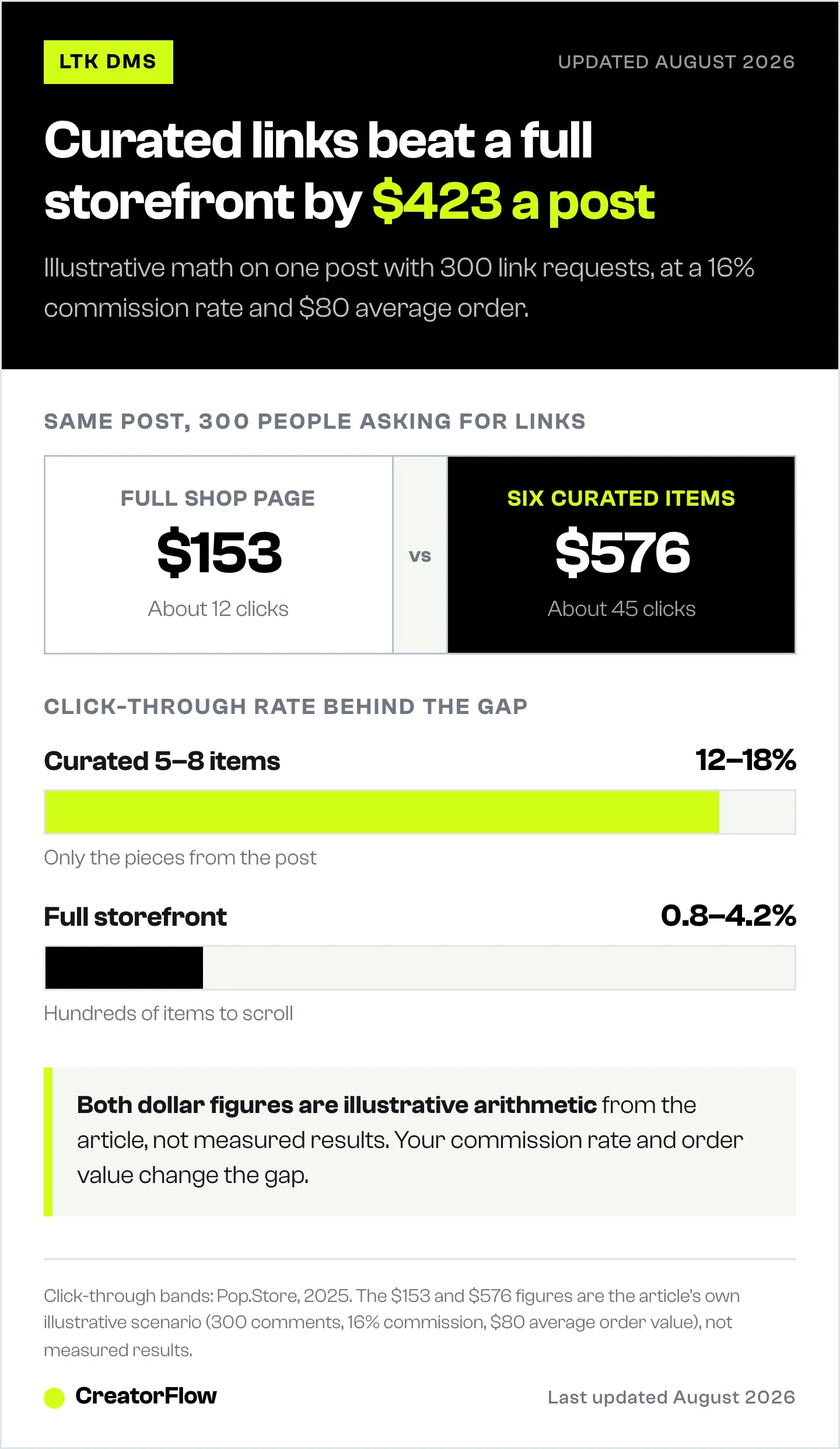
Here’s what the click data shows. Focused pages with 5-8 curated items see click-through rates of approximately 12-18%. Full storefront pages with hundreds of products? Those sit around 0.8-4.2% CTR (Pop.Store, 2025). That’s a massive gap. Curated links can convert 4-5x higher than generic shop links.
Now run the commission math on a single viral post.
Scenario A: Generic shop link (LTK DM default)
You post a fall wardrobe haul that gets 300 comments asking for links. LTK DM sends all 300 your generic shop page. At 4.2% CTR, about 12 people click through. With an average LTK commission rate of 16% on an $80 average order value, that’s roughly $153 in commissions from the post.
Scenario B: Product-specific link (third-party tool)
Same post. Same 300 comments. But your tool sends the exact fall collection with just the 6 items from the video. At 15% CTR, about 45 people click through. Same commission rate and order value. That’s roughly $576 in commissions.
The delta: $423 per viral post. If you create 10 posts per month that generate significant link requests, that’s $4,230 in recovered commissions per month. Even at half those numbers, you’re looking at $2,100 per month that generic links leave on the table.
This isn’t about which tool is fancier. It’s about whether you’re sending the right link to the right person at the right time. A $15-19/month tool that pays for itself with one extra sale is an obvious investment for any LTK creator earning commissions.
The relationship between link specificity and conversion applies across every LTK category: fashion, beauty, home, fitness. When someone asks about a specific product, they want that product. Not your entire catalog. Read more about how bio links compare to direct DM automation for affiliate clicks.

Head-to-Head: LTK DM vs CreatorFlow vs ManyChat vs LinkDM vs Chatfuel
Here’s the full comparison across every feature that matters for LTK creators.
| Feature | LTK DM | CreatorFlow | ManyChat | LinkDM | Chatfuel |
|---|---|---|---|---|---|
| Price | Free | $15/mo flat | $17-199/mo | $19/mo flat | $49/mo flat |
| Keywords supported | 1 (“Shop”) | Unlimited | Unlimited | Unlimited | Unlimited |
| Product-specific links | No (generic shop) | Yes | Yes | Yes | Yes |
| Reply to post comments | Yes | Yes | Yes | Yes | Yes |
| Reply to story replies | No | Yes | Yes | Yes | Yes |
| Reply to Reel comments | No | Yes | Yes | Yes | Yes |
| Click analytics | No | Yes | Yes | Yes | Limited |
| DM templates (save/reuse) | No | Yes | Yes | Yes | Yes |
| Email capture in DMs | No | Yes | Yes | Yes | Yes |
| Multiple accounts | N/A | 2-5 | 1 per plan | 3-10 | 1 |
| Official Meta partner program | No | Yes (Meta Tech Provider) | Yes | Yes | Yes |
| Setup time | 2 min | 5 min | 30+ min | 10 min | 15 min |
The core difference shows up in the first three rows. LTK DM gives you one keyword and one generic link. Every third-party tool gives you unlimited keywords with product-specific link routing. That’s the gap that determines how much commission you capture.
Pricing-wise, the spread runs from free (LTK DM on its single “Shop” trigger) up to $199/month on ManyChat’s top tier, with Chatfuel at $49/month for AI conversation features most LTK creators don’t need. The sweet spot for most LTK creators sits at $15-19/month with CreatorFlow or LinkDM.
Setup time is another real consideration. LTK DM takes 2 minutes because it’s already in the LTK app. CreatorFlow takes about 5 minutes. ManyChat, with its complex workflow builder, can take 30+ minutes for a first-time user.
All four third-party options operate through Instagram’s official API under Meta’s partner programs, with CreatorFlow listed as a Meta Tech Provider. LTK DM does not have that status.
CreatorFlow for LTK Creators
CreatorFlow is built for solo creators and small teams who want fast setup, flat pricing, and modern design without a complex workflow builder (creatorflow.so, April 2026).
For LTK creators specifically, the value is multi-keyword routing at a flat rate. You set up “dress” to send your fall dresses collection, “boots” to send your footwear collection, “skincare” to send your beauty routine collection. Each keyword maps to a different LTK link. Each follower gets the specific product they asked about.
Pricing: Free plan includes 500 DMs/month with 1 workspace. Pro costs $15/month flat rate (or $12/month billed annually) with 5,000 DMs/month and 2 workspaces. Growth costs $30/month flat rate with 10,000 DMs/month and 5 workspaces (creatorflow.so, April 2026).
No per-contact pricing. No scaling costs as your audience grows. An LTK creator with 10,000 followers pays the same $15/month as one with 500,000 followers on the Pro plan.
LTK-specific features that matter:
Real-time phone preview lets you see exactly what your follower will receive before you activate the automation. This matters for LTK messages because the link formatting, message tone, and product description need to look natural, not robotic.
Link click tracking through CreatorFlow Insights shows which product links get clicked and which get ignored. Cross-reference this with your LTK commission dashboard to see which content categories drive the most revenue.
Follow Gate asks someone to follow your account and confirm before receiving the link. This prevents non-followers from grabbing your LTK link without actually engaging with your content. Email Gate captures their email address before sending the link, building your email list simultaneously.
Best for: Solo LTK creators, fashion and beauty influencers, creators who want simple setup without a learning curve, anyone who values flat pricing over feature complexity.
Scope: Instagram, end to end. Every feature follows how Instagram behaves: the 7-day comment window on posts and Reels, the 24-hour window on story replies, and unlimited keywords routing to different LTK links. One trigger sends one message, so each post is easy to read at a glance, and longer journeys run as separate automations on separate triggers. 20,000+ creators and brands use it, across 2 Instagram accounts on Pro and 5 on Growth.
ManyChat for LTK Creators
ManyChat is the most powerful option on this list, and the most complex. If you need multi-step conversation flows, multi-platform reach, or AI-powered responses, ManyChat is the tool to consider (manychat.com/pricing, April 2026).
For LTK creators, ManyChat’s strength is its conditional logic builder. You can create flows like: someone comments “outfit” > ManyChat asks “Which piece? Top, bottoms, or shoes?” > they reply “top” > ManyChat sends the specific LTK link for that item. This level of routing goes beyond simple keyword-to-link matching.
Pricing: Free plan includes up to 25 contacts (very limited). Essential plan starts at $17/month for up to 250 contacts ($14 billed annually), scaling to $199/month on Advanced (25,000 contacts). If you have 7,500 contacts, you’re on Business at $99/month ($69 billed annually). Manychat AI is bundled into Pro and above (manychat.com/pricing, August 2026).
The pricing model is the thing to weigh. Per-contact pricing means your costs grow as your audience grows. An LTK creator with 5,000 active contacts lands on Business at $99/month ($69 billed annually). Compare that to $15/month flat with CreatorFlow.
LTK-specific features that matter:
Multi-step flows let you qualify which product someone wants before sending the link. Instead of guessing from a one-word comment, ManyChat can ask clarifying questions and route to the most relevant LTK link.
Multi-platform support means you can automate DMs on Instagram, Facebook Messenger, WhatsApp, and SMS from one dashboard. If your LTK content spans multiple platforms, this matters.
AI features, bundled into Pro and above, can handle open-ended questions about your products. Someone asks “do you have any petite-friendly jeans?” and the AI can respond with relevant LTK links from your catalog.
Best for: LTK creators who need complex multi-step sequences, agencies managing multiple creator accounts, creators who also sell on Facebook or WhatsApp, anyone who wants AI-powered conversations with followers.
Scope: Pricing scales with your active contact count. First-time setup runs about 30 minutes, because the flow builder is built for branching, multi-step automations rather than single keyword replies. Essential covers 1 Instagram account per plan (manychat.com/pricing, August 2026).
LinkDM for LTK Creators
LinkDM has established itself with over 50,000+ creators and a proven track record in the Instagram DM automation space (linkdm.com, July 2026).
For LTK creators, LinkDM offers a solid middle ground: more features than LTK DM, simpler than ManyChat, priced at a flat rate. The Pro plan at $19/month gives you 25,000 DMs/month, which handles even the highest-volume LTK creators comfortably.
Pricing: Free tier includes 1,000 DMs/month. Pro costs $19/month flat rate. Business and Enterprise tiers available for agencies and multi-brand operations (linkdm.com, July 2026).
LTK-specific features that matter:
DM scheduling lets you time your automated responses. If you post a try-on haul at 7pm, you can schedule the automation to be active during peak engagement hours and pause during off-hours.
Flow automation supports keyword-to-link routing with customizable templates per trigger word. Set up “dress” to send one message, “boots” to send another, “skincare” to send a third.
Multi-account support ranges from 3 to 10 Instagram accounts depending on your plan. LTK creators managing multiple brand Instagram handles (personal + brand + collab) can centralize their automations.
Best for: High-volume LTK creators consistently hitting 5,000+ DMs/month, creators who want more than LTK DM but don’t need ManyChat’s complexity, multi-account managers.
Scope: LinkDM is built around high-volume keyword-to-link delivery. Its public feature pages list campaign-level reporting rather than the deeper analytics breakdowns CreatorFlow and ManyChat publish, and the free tier covers 1,000 DMs/month (linkdm.com, July 2026).
Chatfuel for LTK Creators
Chatfuel is the premium option on this list at $49/month flat rate for its AI PRO plan, and it’s designed for a different audience than typical LTK creators (chatfuel.com/pricing, July 2026).
Chatfuel’s AI engine (Fuely AI) is its core selling point. It handles open-ended conversations, not just keyword triggers. A follower could message “hey, I saw your kitchen renovation stories from last week and I’m looking for the countertop material you used” and Chatfuel can parse that request and respond with relevant links.
Pricing: AI PRO is $49/month flat rate, alongside a free Light plan. Unlimited contacts. No per-contact scaling (chatfuel.com/pricing, July 2026).
For most LTK creators, that is more than the job needs. If 90% of your link requests come from simple keyword comments (“link,” “shop,” “outfit”), you don’t need an AI conversation engine at $49/month.
Best for: Service-based businesses with complex customer conversations, creators who get highly specific product questions that can’t be mapped to keywords, high-revenue LTK creators where the $49/month cost is negligible compared to commission income.
Most LTK creators won’t need this. The AI conversation capabilities solve a problem that most fashion, beauty, and home creators don’t have. If your followers comment simple trigger words, a $15-19/month tool handles it.
Product-Specific LTK DM Templates (Copy and Paste)
These templates are ready to paste into your automation tool. Replace the bracketed links with your actual LTK URLs. Each template is designed for a specific product category to maximize click-through rates.
For a deeper library of templates across all content types, see the full Instagram DM automation templates guide.
Template 1: Fashion Outfit Breakdown
Hey! Here’s everything from the outfit:
Top: [YOUR LTK LINK] Bottoms: [YOUR LTK LINK] Shoes: [YOUR LTK LINK]
I linked the exact pieces plus similar options in case anything sells out. Let me know what you end up grabbing!
Template 2: Beauty and Skincare Routine
Here’s my full routine in order:
Step 1 (cleanser): [YOUR LTK LINK] Step 2 (serum): [YOUR LTK LINK] Step 3 (moisturizer): [YOUR LTK LINK] Step 4 (SPF): [YOUR LTK LINK]
I put them in application order so you can build the routine step by step. The serum is the standout for me personally.
Template 3: Home Decor Room Reveal
Here’s the room breakdown:
Living room collection: [YOUR LTK LINK]
I linked every piece including the throw pillows, the rug, and the coffee table. A few items are on sale right now so I’d grab those fast.
Template 4: Shoe and Accessory Spotlight
Here’s the direct link: [YOUR LTK LINK]
They run true to size. I’m wearing a [YOUR SIZE] for reference. I also linked two similar styles in case this one sells out.
Template 5: Sale and Promo Alert
The sale ends [DATE]. Here’s my curated picks:
Sale collection: [YOUR LTK LINK]
I went through everything and pulled the pieces actually worth buying. The [SPECIFIC ITEM] at [DISCOUNT]% off is the best deal in the whole sale.
Template 6: Multi-Brand Haul
Here’s the haul organized by brand:
Zara pieces: [YOUR LTK LINK] Abercrombie pieces: [YOUR LTK LINK] Amazon finds: [YOUR LTK LINK]
Swipe through each collection. I sized up in the Zara blazer and went TTS on everything else.
Template 7: Seasonal Capsule Wardrobe
Here’s my [SEASON] capsule:
Full capsule collection: [YOUR LTK LINK]
These 12 pieces make 30+ outfits. I organized them by basics, statement pieces, and accessories. Start with the first 5 if you want to build gradually.
Template 8: Affordable Finds and Dupes
Here are the budget finds:
Under $25 collection: [YOUR LTK LINK]
Everything is under $25 and I’ve been wearing these pieces for [TIME]. The quality surprised me on all of them. The [SPECIFIC ITEM] is my top pick.
Template 9: Story Reply
Yes! Here’s the exact one: [YOUR LTK LINK]
I get asked about this constantly. It’s the [COLOR/SIZE] and I’ve had it for [TIME]. Worth every penny.
Template 10: Follow-Up Reminder
Hey, not sure if you saw my message earlier! Here’s that link again: [YOUR LTK LINK]
Just wanted to make sure you got it. A few items are selling fast so I wanted to send it one more time.
Quick tips for higher conversions:
Keep messages under 4 lines when possible. Longer messages feel like marketing emails, and followers scroll past them. Include sizing info when relevant (it reduces returns and increases purchase confidence). Send curated collections of 5-8 items instead of your full shop page. And always use the product-specific link from LTK, not your main storefront URL.
For fashion-specific templates and strategies, check out the full Instagram DM automation guide for fashion influencers.
Setting Up Multi-Keyword LTK Routing
This is where third-party tools pull ahead of LTK DM. Instead of one keyword sending one generic link, you build a routing table that maps specific trigger words to specific LTK collection links.
Here’s a sample routing table for an LTK creator who covers fashion, beauty, and home:
| Trigger Words | LTK Link Sent |
|---|---|
| ”dress” / “outfit” / “fit” | Fall Dresses collection (6 items) |
| “boots” / “shoes” / “sneakers” | Footwear collection (8 items) |
| “skincare” / “routine” / “serum” | Skincare Routine collection (5 items) |
| “bag” / “purse” / “tote” | Bags collection (7 items) |
| “home” / “decor” / “kitchen” | Home Favorites collection (6 items) |
| “link” / “shop” / “LTK” | Main LTK shop page (catch-all) |
The catch-all row at the bottom handles generic requests. If someone comments “link” without specifying what they want, they still get your shop page. But everyone who asks about a specific category gets the curated collection for that category.
Setting up one automation takes about 2-3 minutes:
Open your automation tool. Create a new Comment-to-DM automation. Select the post you want to attach it to (or set it as a default for all posts). Enter the trigger words for that category, separated by commas. Paste your DM template with the specific LTK link. Preview the message. Activate.
Repeat for each product category. Most LTK creators need 5-6 keyword groups to cover their main content areas. For a full step-by-step walkthrough, check the comment-to-DM automation setup guide.
The key decision: should you use broad keywords or narrow ones? Broad keywords like “link” catch more comments but send less specific links. Narrow keywords like “the black boots from the Friday Reel” catch fewer comments but send the exact product. The best approach is both: narrow keywords for specific products, with a broad “link” or “shop” catch-all for everything else.
One advanced tactic that works well for LTK creators: create post-specific automations for your best-performing content. When you post a try-on haul with 8 pieces, create 8 keyword triggers (one per item) plus a general “link” catch-all for that post. This takes 10 minutes and can increase commissions by 40-60% on high-performing posts.
Read the full guide on automating LTK link delivery for creators for post-specific automation strategies.
Click Analytics: How to Know Which LTK Links Actually Sell
Sending automated DMs is step one. Knowing which DMs actually drive sales is step two, and it’s where most LTK creators stop optimizing.
Your automation tool tracks link clicks on the DM side: how many people received the message, how many opened it, how many clicked the link. Your LTK dashboard tracks commissions on the purchase side: which products sold, commission amounts, order values.
The gap is connecting these two data sets. No automation tool directly integrates with LTK’s commission tracking. But you can cross-reference manually and the process takes about 15 minutes per week.
Weekly analytics review process:
Pull your click data from your automation tool. Sort by click-through rate. Identify your top 3 performing automations (which keywords + templates got the most clicks) and your bottom 3.
Compare against your LTK commission dashboard for the same time period. Check which product categories generated the most revenue. If your “skincare” keyword automation drives 200 clicks per week and your LTK shows $400 in skincare commissions, that automation is working. If “home” drives 50 clicks and $12 in commissions, something is off with the link quality or product selection.
For detailed analytics setup and tracking, read the full Instagram DM link tracking guide. And for the analytics dashboard built into CreatorFlow, check out the CreatorFlow Insights guide.
What to optimize based on click data:
Low click-through rate (under 10%) usually means your message copy is too long, the link isn’t prominent enough, or the template feels too promotional. Shorten the message. Put the link higher. Make it sound like a friend texting, not a brand marketing.
High click-through rate but low commissions usually means the LTK collection page isn’t matching expectations. The follower clicked thinking they’d find one product but landed on a page with different items. Tighten the curation. Feature fewer products. Make sure the collection matches the content they saw.
High commissions from specific categories tell you where to double down on content. If your beauty routine DMs consistently drive $500+ per week in LTK commissions, make more beauty content and build more beauty-focused automations.
Migration Guide: Moving from LTK DM to Third-Party Tools
Already using LTK DM? Good news: you don’t have to turn it off to try something else. The smartest approach is running both in parallel.
Step 1: Keep LTK DM running. Leave your existing LTK DM active on the “Shop” keyword. It’s free. It’s already set up. It catches generic link requests with zero effort. No reason to turn it off.
Step 2: Add a third-party tool for specific keywords. Pick one tool (CreatorFlow, ManyChat, or LinkDM). Connect your Instagram account through the official Meta OAuth process. This takes 2-5 minutes depending on the tool.
Step 3: Build product-specific automations. Set up your category-specific keyword triggers: “dress,” “boots,” “skincare,” etc. Map each keyword group to a curated LTK collection link. Write your DM template. Activate.
Step 4: Run both tools simultaneously for 2 weeks. LTK DM handles “Shop” comments. Your new tool handles product-specific keywords. They don’t conflict because they trigger on different words. Track the performance of both during this test period.
Step 5: Compare results. After 2 weeks, check which tool generated more clicks and more commissions. Look at LTK DM’s generic link clicks vs. your new tool’s product-specific link clicks. The numbers will tell you whether multi-keyword routing is worth the $15-19/month investment.
The risk of this approach is zero. You’re not turning off anything that works. You’re adding capability on top of what you already have. If the third-party tool doesn’t move the needle, cancel it after the trial period and stick with LTK DM.
Most LTK creators who test this approach see enough of a commission increase in the first week to justify the tool cost. One extra purchase from a product-specific link covers the monthly subscription.
For a version of this tailored to LTK creators, see CreatorFlow for LTK creators.
FAQ
Can I use LTK DM and a third-party tool at the same time?
Yes. They operate on different keywords, so they don’t conflict. LTK DM continues triggering on “Shop.” Your third-party tool triggers on product-specific keywords like “dress,” “boots,” “skincare.” Both send DMs to the same follower if both keywords appear, but in practice, people use one word per comment. This parallel approach lets you test without risk.
Will Instagram ban me for using third-party DM automation?
Tools like CreatorFlow, ManyChat, LinkDM, and Chatfuel send messages through Meta’s official Instagram API rather than by signing in to your account. CreatorFlow is a Meta Tech Provider; ManyChat and LinkDM are Meta Business Partners. Bans are associated with unofficial browser bots and screen scrapers, not with tools built on the official API. Meta’s developer documentation sets the rate limits and messaging windows every one of these tools has to work within (developers.facebook.com, April 2026).
Does CreatorFlow or LinkDM work with LTK affiliate links specifically?
Yes. Both tools send any URL you paste, including LTK links. There’s no restriction on link type. You paste your LTK product link, collection link, or shop page link into the DM template, and the tool sends it exactly as you wrote it. LTK links, Amazon affiliate links, Shopify links, Calendly links, anything with a URL works.
How do I send different LTK links for different products on the same post?
Multi-keyword routing. Create multiple keyword triggers per post: “dress” sends the dress LTK link, “boots” sends the footwear LTK link, “bag” sends the accessories LTK link. When a follower comments one of those words, they get the matching product link instead of your generic shop page. This is the primary advantage of third-party tools over LTK DM.
What happens if LTK DM gets shut down by Instagram?
LTK DM operates without official Meta partnership certification. LTK’s CEO acknowledged this risk publicly, stating it could be “turned off at some point” by Instagram (eMarketer, 2024). Third-party tools with Meta certification (CreatorFlow, ManyChat, LinkDM, Chatfuel) are protected by their official API access. If LTK DM gets restricted, certified tools continue operating. This is one reason to diversify your automation beyond a single platform-native tool.
How many keywords can I set up per post?
With most third-party tools, there’s no hard limit. You can create as many keyword triggers as your content requires. A single try-on haul post might have 8 keywords (one per outfit piece) plus a generic “link” catch-all. Across all your posts, you can have hundreds of active keyword automations running simultaneously. LTK DM supports only 1 keyword (“Shop”).
Can I automate Story replies with LTK links?
Yes, with third-party tools. CreatorFlow, ManyChat, LinkDM, and Chatfuel all support Story reply automation. When a follower replies to your Instagram Story with a keyword, the tool sends them a DM with the matching LTK link. LTK DM does not support Story replies. Since Stories drive significant engagement for fashion and beauty creators, this gap matters.
Do third-party tools track LTK commission data?
Not directly. No third-party DM automation tool integrates with LTK’s commission tracking system. The tools track link clicks (how many people clicked the LTK link in your DM). You then cross-reference clicks with your LTK dashboard to see which clicks converted into purchases and commissions. The weekly review takes about 15 minutes and gives you clear data on which automations drive the most revenue.
What is the cheapest option that supports product-specific LTK links?
CreatorFlow at $15/month flat rate or ManyChat Essential at $17/month for up to 250 contacts ($14 billed annually). Both support unlimited keywords, product-specific links, and full DM automation. The difference: CreatorFlow stays at $15/month regardless of audience size, while ManyChat’s price increases as your contact count grows. For a full comparison of all options, see the complete Instagram DM automation guide.
How do I connect multiple Instagram accounts for LTK automation?
CreatorFlow supports 2 accounts on Pro ($15/month) and 5 accounts on Growth ($30/month). LinkDM supports 3-10 accounts depending on your plan tier ($19/month+). ManyChat Essential includes 1 account per plan. Each account connects through Meta’s official OAuth process, which takes about 2 minutes per account. You manage all accounts from one dashboard.
Related Articles
- LTK Creator DM Automation: Stop Copy-Pasting Links - Full setup guide for automating LTK link delivery with keyword triggers, category templates, and performance tracking.
- Why Your LTK Instagram Comments Are Not Converting - Diagnose the conversion gap between high engagement and low commissions on your LTK content.
- Instagram DM Automation for Fashion Influencers - Fashion-specific DM strategies including outfit breakdowns, haul templates, and try-on Reel automations.
- Instagram DM Automation for Amazon Influencers - Apply the same multi-keyword routing strategies to Amazon affiliate links on Instagram.
- Bio Link vs DM Automation for Affiliate Clicks - Data-backed comparison showing why DM automation outperforms bio link pages for commission revenue.
- Comment-to-DM Automation Setup Guide - Step-by-step walkthrough for setting up your first comment-triggered DM automation in under 5 minutes.
- Instagram DM Link Tracking - Track which links get clicked, which messages convert, and how to optimize your DM strategy with data.
- Instagram DM Automation Templates - 50+ copy-and-paste templates organized by use case, industry, and conversion goal.
- Scale Affiliate Marketing with Instagram DM Automation - Growth strategies for increasing affiliate revenue through automated DM workflows.
- Instagram DM Automation: The Complete Guide - Everything you need to know about Instagram DM automation: tools, pricing, setup, templates, and best practices.


