

Instagram DM automation for fashion influencers sends outfit links automatically when followers comment on your posts or Reels. Instead of manually copy-pasting dress, shoes, and bag links 200+ times per post, automation delivers every item link in under 10 seconds. This saves 3+ hours daily and captures affiliate commissions before popular fast-fashion pieces sell out.
Fashion creators face a unique challenge other niches don’t: every outfit post contains 6-8 shoppable items, and followers want specific pieces, not a generic “outfit link.” You’re juggling dress links, shoe links, bag links, and jewelry links while items sell out in real time. Manual responses can’t keep up.
This guide covers how to automate outfit link delivery, the best tools for fashion influencers, multi-item DM templates, and step-by-step setup in under 10 minutes.
Key Takeaways
- Fast fashion window: Popular pieces can sell out within days, so instant link delivery decides whether you earn the commission
- Multi-item complexity: Each outfit post contains 6-8 shoppable items (dress, shoes, bag, jewelry), far more than other niches
- Time savings: Automation eliminates 3+ hours of daily copy-pasting links across comments and DMs
- Response speed impact: Automated DMs arrive in under 10 seconds vs. 3-6 hours for manual replies, capturing purchase intent at its peak
- Revenue per post: A single viral try-on Reel can generate 200+ link requests, each one a potential affiliate commission
- Bottom line: Fashion influencers who automate outfit link delivery capture sales that manual responders lose to stockouts and competitor links
What Makes Fashion Influencer Automation Different?
Fashion influencers face unique automation challenges that beauty, fitness, or lifestyle creators don’t:
Volume Problem: A popular outfit post can generate 200-300+ link requests. A beauty creator might get 50 “mascara link?” comments. You’re getting “dress link?”, “shoe link?”, “bag link?”, “jewelry link?”, “belt where from?”, “sunglasses??” for a single outfit.
If you run the label rather than promote it, the questions shift from “where is this from” to sizing, restocks, and drop timing. That brand-side setup is covered in our guide to Instagram DM automation for clothing brands.
Multi-Item Complexity: One mascara = one link. One outfit = 6-8 different items:
- Dress/top/bottom (2-3 links)
- Shoes (1 link)
- Bag (1 link)
- Jewelry (2-3 links)
- Accessories (belt, sunglasses, hat: 1-2 links)
You’re not sending a link. You’re sending a breakdown.
Speed Requirements: Fast fashion sells out FAST. Viral pieces at Zara, H&M, ASOS and Shein can go out of stock in your size within days, sometimes the same day a Reel takes off.
If you respond to comment #247 three hours later, that $49 Zara dress is sold out in size M. Your follower is frustrated. You lost the commission.
As CreatorFlow’s Instagram puts it:
The Manual DM Math:
- 1 outfit post = 250 comments asking for links
- Each response takes 45-60 seconds (copy link, paste, personalize, add size info)
- 250 comments × 60 seconds = 4.2 hours of copy-pasting
- You post 5x/week = 21 hours weekly in DMs
That’s a part-time job of link-sending. For free. While your items sell out.
This is why fashion influencer automation isn’t optional-it’s survival.
Best Instagram DM Automation Tools for Fashion Influencers (2026)
Here are the 5 best tools fashion influencers actually use, ranked by use case:
1. LTK Creator (Free Built-In DM Automation)
Best for: LTK creators with existing storefronts, established fashion influencers (5K+ followers)
LTK (formerly LikeToKnowIt) launched LTK DM in June 2024: a free, built-in Instagram automation feature that auto-sends a link to your LTK page when followers comment a trigger word such as “SHOP” (TechCrunch, June 2024).
How It Works:
- You create an LTK storefront with all outfit items curated
- Follower comments “SHOP” on your Reel
- LTK automatically DMs them your storefront link within seconds
- They shop all 6-8 outfit items in one page
Pricing: Free (included with LTK Creator account)
Key Features:
- Auto-DM with “SHOP” trigger word
- Links directly to your LTK page
- LTK has said creators who send links by instant DM earn up to 60% more in commissions (LTK’s own figure, via BusinessWire, August 2024)
- Available to LTK creators globally since launch
Scope:
- Invite-only platform (must be approved as LTK creator)
- Sends LTK links, not links to other retailers or your own shop
Best For:
- Fashion influencers already on LTK with active storefronts
- Creators who curate full outfit collections vs individual items
- Established creators (LTK approval requires proven track record)
Not Good For:
- New creators (can’t get approved yet)
- Influencers not on LTK platform
- Creators who want to link to retailers outside LTK
2. CreatorFlow ($15/Month)
Best for: Solo fashion creators, budget-conscious influencers, beginners (under 50K followers)
CreatorFlow is an Instagram DM automation tool built for creators who want simple, affordable Instagram automation with a fast setup.
How It Works:
- Set up trigger words: “LINK”, “OUTFIT”, “SHOP”, “DRESS”, “SHOES”, etc.
- Create outfit breakdown message with all 6-8 item links
- Follower comments any trigger word
- CreatorFlow auto-sends your full outfit breakdown in DM
Pricing: $15-30/month flat rate (no per-contact pricing)
Key Features:
- Up to 20 trigger words per automation (LINK, OUTFIT, DRESS, SHOES, BAG, SIZE, and more)
- 5,000 DMs/month ($15/mo) - enough for about 20 outfit posts at 250 requests each
- Full outfit breakdown in one DM (not just one link)
- Size guide automation (“What size?” → auto-send your measurements)
- Meta Tech Provider (since December 2025), on the official Instagram Graph API, minimal ban risk
- Setup in 5-10 minutes
Scope:
- Instagram, end to end: every feature is built around how Instagram actually behaves (7-day comment window, 24-hour story window, follow gate)
- One trigger, one message: predictable by design, and you build longer journeys by stacking separate automations on separate triggers
- 20,000+ creators & brands
Best For:
- Fashion influencers under 50K followers
- Creators who post 5-10 outfit posts weekly
- Influencers on tight budgets ($15 flat vs ManyChat’s $17–$199/mo billed monthly)
- Beginners who don’t need enterprise features
Fashion message templates you can build:
- Full outfit breakdown (8 items with links)
- Size guide (“I’m 5’6”, wearing M, TTS”)
- Sold-out alternatives (“Dress sold out? Try these 3 similar styles”)
- Styling tips (“Pairs with white sneakers or strappy heels”)
Special Offer for Fashion Creators:
See CreatorFlow pricing and start the 14-day trial
3. LinkDM ($19/Month)
Best for: Amazon influencers, fashion creators with Amazon storefronts, established creators
LinkDM is an established Instagram automation platform that says 60,000+ creators, brands and agencies use it (linkdm.com, October 2026), with many sending Amazon storefront links.
How It Works:
- Connect your Amazon Influencer storefront
- Set trigger words (LINK, SHOP, AMAZON, OUTFIT)
- Follower comments trigger word
- LinkDM auto-sends your Amazon storefront link
Pricing:
- Free Plan: 1,000 DMs/month
- Pro Plan: $19/month (3 Instagram accounts, 25,000 DMs/month)
- Platinum+: $99/month (10 accounts, 300,000 DMs/month)
Key Features:
- Large creator community (60,000+ creators, brands and agencies)
- Multi-account management (manage 3 fashion accounts on Pro)
- Inbox automation (auto-reply to story replies, DM keywords)
- Meta Business Partner since 2021 (as LinkDM states), official API
- Amazon affiliate policies compliant (Amazon’s Influencer Program terms don’t prohibit DM automation for link delivery; what matters is proper affiliate disclosure)
Scope:
- Popular with Amazon-focused creators
- Pro costs $19/month, $4 more than CreatorFlow Pro
Best For:
- Fashion influencers with Amazon storefronts
- Creators who primarily link Amazon fashion items
- Influencers managing 2-3 fashion accounts (brand + personal)
Check out our full tool comparison
4. InstantDM ($12-29.99/Month)
Best for: Micro-influencers (under 10K followers), budget beginners, testing automation
InstantDM is an Instagram automation platform built on Meta’s official API, with a free plan.
How It Works:
- Set up comment-to-DM automation with trigger words
- Create outfit link messages
- Follower comments → InstantDM auto-sends within seconds
Pricing (InstantDM’s pricing page, checked October 2026):
- Free Plan: 500 automations/month
- Legend Pro Plan: $12/month, or $9.99/month billed annually (“Unlimited automation, up to 800/hour”)
- Trendsetter Plan: $29.99/month, or $24.99/month billed annually (up to 2,000/hour)
- Trendsetter Pro: $59.99/month, or $49.99/month billed annually (no hourly cap)
Key Features:
- Free plan to test before paying
- Story reply automation
- Email/WhatsApp collection via DM
- Comment + DM + Story trigger support
- Meta Business Partner (as InstantDM states), official API
- API, webhooks and Meta Ads automation on Trendsetter
Scope:
- Hourly pace depends on the plan: 800/hour on Legend Pro, 2,000/hour on Trendsetter, no cap on Trendsetter Pro
Best For:
- Fashion micro-influencers under 10K followers
- Creators just starting with automation (test before paying)
- Influencers on $0 budget
When to Upgrade:
- If you consistently hit 500 automations/month, move to a paid plan
- If one post gets more than 800 comments in an hour, Legend Pro’s hourly cap will delay some DMs
5. ManyChat ($17–$199/Month)
Best for: Fashion agencies, large creators (100K+ followers), multi-platform needs
ManyChat is the enterprise-grade Instagram automation platform with the most advanced workflows and multi-platform support.
How It Works:
- Build complex automation workflows with conditional logic
- Segment followers by behavior, interests, purchase history
- Auto-send different outfit links based on follower type (repeat customer vs new follower)
- Cross-platform automation (Instagram + Facebook + WhatsApp + SMS)
Pricing (ManyChat’s pricing page, checked October 2026):
- Free Plan: 25 contacts
- Essential Plan: $17/month billed monthly (250 contacts) → Pro $39 (2,500) → Business $99 (7,500) → Advanced $199 (25,000). Billed annually: $14 / $29 / $69 / $139 per month.
Key Features:
- Advanced conditional logic (“if follower clicked last link, send discount code”)
- Multi-platform (Instagram + Facebook Messenger + WhatsApp + SMS)
- Full CRM and audience segmentation
- A/B testing for messages
- Email integration (Klaviyo, Mailchimp, etc.)
Scope:
- Priced per contact, from $17/month for 250 contacts to $199/month for 25,000 (billed monthly)
- The flow builder does more, so a first automation involves more steps
- Feature depth fits agencies and multi-platform teams more than solo creators
Best For:
- Fashion agencies managing 10+ client accounts
- Large fashion influencers (100K+ followers) with segmented audiences
- Creators who need multi-platform automation (IG + Facebook + WhatsApp + TikTok)
Outside its main audience:
- Solo fashion creators who want flat-rate pricing
- Creators who only need one comment trigger and one message per post
Read our detailed tool comparison
Instagram DM Automation Pricing Comparison (Fashion Influencers)
Here’s how the 5 tools compare on pricing for a typical fashion influencer posting 10 outfits a month (≈300 DMs/post = 3,000 DMs/month). Prices are billed monthly unless noted (checked October 2026):
| Tool | Free Plan | Paid Plan | Best For | DMs/Month |
|---|---|---|---|---|
| LTK Creator | ✅ Free for LTK creators | N/A | LTK creators only | Not published |
| InstantDM | ✅ 500 automations/mo | $12-29.99/mo ($9.99-24.99 billed annually) | Micro-influencers (under 10K) | 500 (free) → Unlimited, up to 800/hour ($12/mo) |
| CreatorFlow | ✅ 500 DMs/mo (Free) | $15/mo | Solo creators, 10K-50K followers | 5,000/mo |
| LinkDM | ✅ 1,000 DMs/mo | $19/mo | Amazon influencers | 1,000 (free) → 25,000 on Pro |
| ManyChat | ✅ 25 contacts | $17–$199/mo | Agencies, 100K+ followers | Scales with audience size |
Real-World Scenario:
-
Micro-influencer (5K followers, 100 comments/post, about 5 posts a month):
- Total: 500 DMs/month
- Best choice: InstantDM Free ($0) or CreatorFlow Free ($0)
-
Mid-tier influencer (25K followers, 300 comments/post, 10 posts a month):
- Total: 3,000 DMs/month
- Best choice: CreatorFlow ($15/mo) or InstantDM Legend Pro ($12/mo, or $9.99 billed annually)
-
Established influencer (100K followers, 800 comments/post, 15 posts a month):
- Total: 12,000 DMs/month
- Best choice: CreatorFlow Growth ($30/mo, 10,000 DMs) plus a DM top-up pack, or LinkDM Pro ($19/mo, 25,000 DMs)
-
Large influencer/agency (500K followers, 2,000+ comments/post):
- Total: 30,000+ DMs/month
- Best choice: ManyChat (Business $99/mo or Advanced $199/mo billed monthly at this contact volume)
Winner for Most Fashion Influencers: CreatorFlow at $15-30/mo flat rate (no per-contact fees, handles 5K-10K DMs)
How to Set Up Instagram DM Automation for Outfit Links (Step-by-Step)
Here’s how to automate outfit link DMs in under 15 minutes using CreatorFlow (works similarly for other tools):
Step 1: Choose Your Automation Tool
Based on your situation:
- LTK creator with storefront? → Use LTK Creator (free built-in)
- Amazon fashion influencer? → Use LinkDM ($19/mo)
- Budget under $15/mo? → Use CreatorFlow ($15/mo) or InstantDM (from $12/mo, or $9.99/mo billed annually)
- 100K+ followers, need multi-platform? → Use ManyChat ($17–$199/mo)
For this tutorial, we’ll use CreatorFlow (easiest setup, flat-rate pricing).
Step 2: Connect Your Instagram Account
- Sign up for CreatorFlow (Free plan, 500 DMs/month)
- Click “Connect Instagram Account”
- Log in via Instagram (OAuth - no password sharing)
- Grant permissions (CreatorFlow is a Meta Tech Provider (since December 2025))
- Instagram connects in 10-15 seconds
Safety Note: CreatorFlow uses Meta’s official Instagram Graph API. You’re NOT sharing your password, and there’s minimal ban risk when using the official API (unlike third-party bots).
Step 3: Create Your Outfit Link Message Template
Click “Create New Automation” → “Comment-to-DM”, then write your outfit message
Example Message:
Hey! Here's the full outfit breakdown:

👗 DRESS: [Zara Link] - Size M, TTS
👠 HEELS: [ASOS Link] - Size 8, run half-size small
👜 BAG: [Amazon Link]
💍 JEWELRY: [Mejuri Link]
😎 SUNGLASSES: [Quay Link]

I'm 5'6", 140lbs, wearing size M.

Questions? DM me anytime! 💕
Fashion DM Template Tips:
- ✅ Include ALL items (don’t make them ask twice)
- ✅ Add sizing info (“I’m 5’6”, wearing M, TTS”)
- ✅ Warn if items run small/large
- ✅ Include your LTK or Amazon storefront for full collection
- ✅ Add personality (emoji, friendly tone)
- ❌ Don’t just dump links (explain what each item is)
Step 4: Set Up Trigger Words
Add these trigger words (CreatorFlow allows up to 20 per automation):
- LINK (most common)
- OUTFIT
- SHOP
- DRESS (specific items)
- SHOES
- BAG
- DETAILS
- WHERE (as in “where is the dress from?”)
- SIZE (auto-send size guide)
Pro Tip: Use multiple variations because followers type differently:
- “Link?” vs “LINK” vs “link plz” vs “outfit link?”
- CreatorFlow matches whole words and ignores case, so all four of those trigger LINK. “links” or “linked” don’t, so add “links” as its own keyword
Step 5: Test Your Automation
Before going live:
- Post a test Reel/photo (can be to Close Friends)
- Comment your trigger word from a second account
- Check if DM arrives within about 30 seconds
- Verify all links work (click each one)
- Check message formatting (looks good on mobile?)
Common Issues:
- ❌ DM doesn’t send: Check if follower has DMs enabled (some accounts block DMs from non-followers)
- ❌ Links broken: Make sure you copied full URLs (include “https://”)
- ❌ Formatting weird: Instagram DMs support basic text only (no bold/italics)
Step 6: Publish Your Outfit Post
Post your outfit content (Reel, photo, carousel) with a clear call-to-action:
Caption Examples:
“Comment LINK for full outfit details!”
“Want to shop this look? Comment OUTFIT and I’ll DM you everything!”
“Dress, shoes, bag, and jewelry links 👇 Comment SHOP for instant DM!”
Pro Tip: Put the CTA at the END of your caption (after you’ve given value/story). Engagement first, link second.
Step 7: Monitor & Optimize
After your first few automated posts, check analytics:
- How many DMs sent? (If 250 comments but only 180 DMs sent, look for comments without your keyword as a whole word, and repeat comments from the same person)
- What trigger words work best? (for example, which share of triggers come from “LINK” versus “OUTFIT”)
- Are people clicking links? (Most tools show click tracking)
- Are you converting sales? (Check affiliate dashboard)
Optimization Tips:
- If click-through is low (under 10%), improve your DM copy (make it more helpful)
- If people ask “what size?” a lot, add sizing info to default message
- If items sell out, update automation message same-day with alternatives
Fashion-Specific Automation Strategies (Beyond Basic Links)
Here’s how advanced fashion influencers use automation. If your niche skews bridal, the same playbook applies; see our guide to Instagram automation for wedding influencers for dress links and vendor recommendation flows. To put a search-traffic layer on top of these DM flows, add Pinterest with the two-platform fashion affiliate setup.
Strategy 1: Size Guide Automation
Problem: You get 100+ “what size are you wearing?” comments per post
Solution: Create a separate automation for “SIZE” trigger word:
Trigger Word: SIZE, SIZING, TTS, FIT

Message:
"Here's my sizing info:
📏 Height: 5'6"
⚖️ Weight: 140 lbs
👗 Dress size: M (6-8)
👖 Jeans: 28
👠 Shoes: 8

THE DRESS:
- Wearing: Size M
- Fit: True to size
- Notes: Slightly stretchy, size down if between sizes

Questions? DM me! 💕"
Result: Far fewer follow-up DMs asking about sizing
Strategy 2: Sold-Out Item Alternatives
Problem: Fast fashion sells out fast, and your links can be dead within days
Solution: Update your automation daily with similar alternatives at 3 price points:
Original Message (Day 1-2):
"👗 DRESS: [Zara Link $49.99]"

Updated Message (Day 3+ when sold out):
"👗 DRESS: **SOLD OUT** 😭 But here are 3 similar styles:

💰 Budget ($29): [H&M similar dress]
💰💰 Mid ($49): [ASOS alternative]
💰💰💰 Splurge ($89): [Revolve premium version]

All have same vibe, different price points!"
Pro Tip: Bookmarkthis task in your calendar: “Update outfit automation - check for sold-out items” every 48 hours
Strategy 3: Styling Tips Automation
Problem: Followers ask “how would you style this differently?”
Solution: Create “STYLE” or “TIPS” trigger that sends styling variations:
Trigger Word: STYLE, STYLING, TIPS, IDEAS

Message:
"Here's how I'd style this dress 3 ways:

👟 CASUAL: White sneakers + denim jacket + crossbody bag
👠 DATE NIGHT: Strappy heels + mini bag + gold jewelry
👢 FALL: Ankle boots + leather jacket + tights

Links to all styling pieces:
[Sneakers] [Heels] [Boots] [Jackets] [Bags]"
Result: More affiliate clicks per follower (they buy outfit + styling pieces)
Strategy 4: Multi-Item Request Handling
Problem: Followers comment “bag and shoes link?” (asking for 2+ items)
Solution: Put both items in one breakdown message and add BAG and SHOES as keywords on the same automation. CreatorFlow matches whole words, so a comment that names either item gets the reply
Comment: "Love the bag and shoes! Link?"

Automated Response:
"Hey! Here's what you asked for:

👜 BAG: [Link] - $79, real leather
👠 SHOES: [Link] - $49, size up half size

Want the full outfit? Just comment OUTFIT!"
Strategy 5: Collection/Capsule Wardrobe Links
Problem: You posted a “10 outfit capsule wardrobe” Reel, now 400 people want all 10 outfit links
Solution: Create an LTK collection or Amazon Idea List, send ONE link:
Trigger Word: CAPSULE, COLLECTION, ALL

Message:
"Here's the full 10-outfit capsule wardrobe!

🛍️ Shop everything here: [LTK Collection Link]

All 10 outfits, 25 pieces total, sorted by category (tops, bottoms, shoes, accessories).

Mix and match to create 50+ outfit combos! 💕"
Pro Tip: LTK “Collections” and Amazon “Idea Lists” let you organize 20-50 items in one shoppable page
Fashion Influencer Automation Results (Illustrative Example)
The numbers below are an illustrative example to show the arithmetic, not measured results. Plug in your own comment counts and click rates.
Time Saved:
- Before automation: 3-5 hours daily responding to outfit link requests
- After automation: 10-15 minutes daily (updating messages, checking sold-out items)
- Time saved: 2.5-4.5 hours/day = 17-31 hours weekly
Engagement & Sales:
- Manual DMs: many commenters never get a link (you give up after 100 DMs)
- Automated DMs: everyone who comments the keyword gets the link within seconds
- What to track: the share of DM recipients who click, and the share of clickers who buy (in your affiliate dashboard)
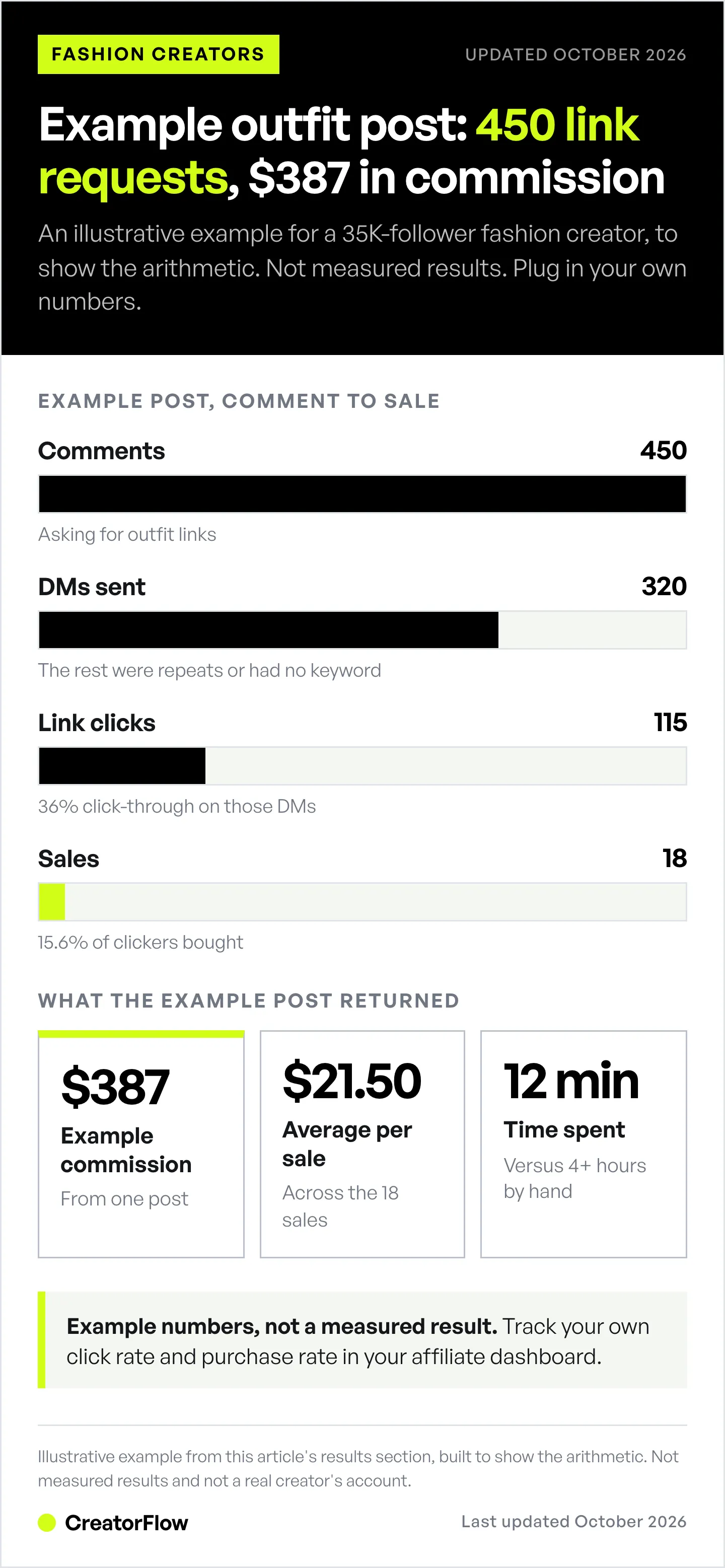
Example - Mid-Tier Fashion Influencer (35K Followers):
- Outfit post: 450 comments asking for links
- Automated DMs sent: 320 (the rest were repeat comments or didn’t use the keyword)
- Link clicks: 115 clicks (36% click-through rate)
- Purchases: 18 sales (15.6% conversion)
- Commission earned: $387 (average $21.50 per sale)
- Time spent: 12 minutes (vs 4+ hours manual)
ROI Calculation:
- Tool cost: $15/month (CreatorFlow)
- Commission from ONE automated post: $387
- ROI: 2,480% return on monthly investment (($387 - $15) / $15)
- Break-even: First post pays for entire month
Instagram DM Automation Best Practices for Fashion Influencers
Do’s:
-
✅ Update messages when items sell out (check every 48 hours for fast fashion)
-
Zara/H&M sell out fast - update your automation with alternatives
-
✅ Include sizing info in default message (height, weight, size wearing, TTS/runs small/large)
-
Cuts most follow-up “what size?” DMs
-
✅ Test links weekly (affiliate links expire, products get removed)
-
Dead links = lost commissions + frustrated followers
-
✅ Use multiple trigger words (LINK, OUTFIT, SHOP, DRESS, SHOES, BAG, DETAILS)
-
Followers type different variations
-
✅ Add personality to DMs (emojis, friendly tone, “Questions? DM me!”)
-
Automated doesn’t mean robotic
-
✅ Organize links clearly (label each item: ”👗 DRESS:”, ”👠 SHOES:”)
-
Don’t send wall of naked URLs
-
✅ Include LTK/Amazon storefront link (gives them full collection, not just this outfit)
-
“Want more? Shop my full closet: [Storefront Link]”
-
✅ Mention if items run small/large (saves returns, builds trust)
-
“Dress runs small - size up!” vs generic link
Don’ts:
-
❌ Don’t send generic “here’s the link” messages (be helpful, not spammy)
-
Add context, sizing, styling tips
-
❌ Don’t leave dead links for weeks (affiliate links expire, products discontinue)
-
Update regularly or followers lose trust
-
❌ Don’t only automate, never engage (still respond to personalized DMs manually)
-
Automation handles repetitive requests; YOU handle real conversations
-
❌ Don’t send 10 separate DMs for 10 items (send ONE DM with full breakdown)
-
Meta allows one private reply per comment, so the extra messages won’t send unless the person replies
-
❌ Don’t use sketchy third-party bots (only tools built on Meta’s official API)
-
Unofficial bots = ban risk. Stick to CreatorFlow, LinkDM, ManyChat, InstantDM
-
❌ Don’t forget to disclose affiliate relationships (#ad, #affiliate)
-
FTC requires disclosure even in automated DMs
-
❌ Don’t DM people who didn’t ask (they haven’t opted in)
-
Only reply to people who commented your keyword, replied to your Story, or messaged you first
FAQ
Is Instagram DM automation safe for fashion influencers?
Yes, Instagram DM automation is safe when used correctly with Meta-approved tools (CreatorFlow, LinkDM, ManyChat, InstantDM, LTK Creator). These tools use Instagram’s official Graph API, not third-party scraping. As of October 2026, Instagram allows automated DMs via the official API, within Meta’s messaging rules (one private reply per comment within 7 days, then 24 hours after the person’s last message).
Amazon’s Operating Agreement allows affiliate links in direct messages when the person asked for them. Disclose the affiliate relationship in the DM.
What’s NOT safe:
- Third-party browser bots (violate Instagram Terms of Service)
- Tools requiring your Instagram password (never share passwords)
- Unofficial scrapers (high ban risk)
Only use platforms built on Meta’s official API listed in this article. Minimal ban risk when using the official API and respecting tool-side pacing (most tools cap at ~200 DMs/hour as a behavioral safety margin under Meta’s per-second rate limits).
How much does Instagram DM automation cost for fashion influencers?
Free options:
- LTK Creator: $0 (free for approved LTK creators)
- InstantDM: $0 (500 automations/month free)
- CreatorFlow Free: $0 (500 DMs/month free)
- LinkDM Free: $0 (1,000 DMs/month free)
Paid options (best for active fashion influencers):
- InstantDM: $12-29.99/month, or $9.99-24.99/month billed annually (Legend Pro is unlimited up to 800/hour)
- CreatorFlow: $15/month (5,000 DMs/month, flat rate)
- LinkDM Pro: $19/month (3 accounts, 25,000 DMs/month)
- ManyChat: $17–$199/month billed monthly (scales with active contacts)
Recommendation: Start with free plans, then upgrade to CreatorFlow ($15/mo) when you consistently outgrow your free plan’s monthly DMs.
Can I automate outfit links for LTK, Amazon, and Shopify at the same time?
Yes! Most automation tools (CreatorFlow, LinkDM, ManyChat) let you include multiple link types in one automated DM.
Example multi-platform message:
Hey! Here's where to shop:

🛍️ FULL OUTFIT: [LTK Collection Link]
📦 AMAZON: [Amazon Storefront Link]
🛒 DIRECT: [Shopify/Brand Website]

Choose your preferred shopping platform!
All links are affiliate - I earn commission at no extra cost to you. Thanks for supporting! 💕
Pro Tip: Test which platform your audience prefers:
- Instagram-native followers often prefer Amazon (trust + Prime shipping)
- Fashion-savvy followers prefer LTK (curated, influencer-focused)
- Brand-loyal followers prefer direct Shopify links
How do I handle sold-out fast fashion items in automation?
3-Step Sold-Out Strategy:
Step 1: Update automation within 48 hours (Zara/H&M/ASOS sell out fast)
- Set calendar reminder: “Check outfit links every 2 days”
- When item sells out, update message with alternatives
Step 2: Provide alternatives at 3 price points:
👗 DRESS: **SOLD OUT** 😭

Similar styles:
💰 Budget ($29): [H&M Link]
💰💰 Mid ($49): [ASOS Link]
💰💰💰 Splurge ($89): [Revolve Link]
Step 3: Use “restock alerts” for popular items:
- Many retailers (Zara, ASOS) offer restock notifications
- Include in your DM: “Sold out? [Sign up for restock alert here]”
Fashion influencer secret: Partner with 2-3 retailers in same style category (if Zara sells out, send to ASOS/Mango/H&M alternatives). This maintains commission even when original item is gone.
What trigger words work best for fashion outfit automation?
Common trigger words fashion followers already type:
- LINK - “Link?”, “link pls”, “dress link?”
- OUTFIT - “outfit details?”, “full outfit?”
- SHOP - “shop link?”, “where to shop?”
- DETAILS - “outfit details”, “deets”
- Item-specific - “DRESS”, “SHOES”, “BAG”, “JEWELRY”
Fashion-specific triggers to add:
- SIZE → Triggers size guide automation
- STYLE or TIPS → Triggers styling ideas
- DUPES → Triggers budget alternatives
- SALE → Triggers discount code or sale items
Pro Tip: CreatorFlow matches keywords as whole words and ignores case, so these all trigger:
- “link?” = “LINK”
- “outfit deets” = “OUTFIT”
- “where r the shoes from” = “SHOES”
Plurals and other forms are different words (“links”, “shoe”), so add them as separate keywords.
Do I still need to respond to DMs manually if I use automation?
Short answer: Yes, but far less than before.
What automation handles (the repetitive majority):
- “Link?” → Automated
- “Outfit details?” → Automated
- “What size?” → Automated (if you set up SIZE trigger)
- “Where are shoes from?” → Automated
What YOU should handle manually (the rest):
- Personalized questions: “Does this dress work for pear-shaped body?”
- Custom requests: “Can you style this for a wedding?”
- Complaints/issues: “Link doesn’t work”
- Relationship building: “I love your content!” (say thank you!)
Best practice: Check DMs 2x daily (morning, evening) for 10-15 minutes. Respond to personalized messages manually. Automation handles repetitive requests 24/7.
Time savings:
- Before: 3-5 hours daily in DMs
- After: 15-20 minutes daily (handling personalized messages only)
Can I use Instagram DM automation for try-on hauls and outfit Reels?
Absolutely yes - try-on hauls and outfit Reels are the BEST content types for fashion DM automation.
Why try-ons convert better:
- Followers see how items fit real bodies (not models)
- They can gauge sizing (“She’s 5’6” wearing M, I’m 5’7” so I’ll get M too”)
- Multiple outfits = multiple link opportunities
- High engagement (Reels reach people who don’t follow you yet, so more of them comment)
Try-On Haul Automation Strategy:
Example: “5 Zara Try-Ons” Reel
Set up automation for each outfit:
Trigger Words:
- OUTFIT1, DRESS1 → Links for outfit #1
- OUTFIT2, DRESS2 → Links for outfit #2
- ALL → Links for all 5 outfits
- SIZE → Your sizing info
Or simplify with one comprehensive message:
Trigger: LINK, SHOP, OUTFIT

Message:
"Here are all 5 outfits from my try-on!

OUTFIT 1 (Black Dress):
👗 Dress: [Link] - Size M, TTS

OUTFIT 2 (Jeans + Sweater):
👖 Jeans: [Link] - Size 28, run small
🧶 Sweater: [Link] - Size S

[Continue for all 5...]

Full try-on collection: [LTK Link]"
Try-on content tips:
- Mention sizing in video (“I’m wearing M, it’s TTS”)
- Add text overlay: “Comment LINK for outfit details”
- Pin comment: “Want links? Comment OUTFIT below! 👇”
Results: Try-on hauls tend to bring more DM requests than single outfit posts (followers want to shop everything they saw you try).
How quickly does automated DM arrive after someone comments?
Typical timing with official-API tools: a few seconds after the comment is posted, and usually under 30 seconds. Meta does not publish a delivery time, so test your own setup from a second account.
What affects DM speed:
- Instagram server load (busy evening hours can be slower)
- Number of comments arriving at once, and your tool’s hourly pacing
- Tool’s server infrastructure
Why this matters for fashion: Follower comments “LINK” → Gets DM in 10 seconds → Clicks through → Item still in stock
vs.
Follower comments “link pls” → You respond 3 hours later → Item sold out → Lost sale
Fast automation = higher conversion rates for fast-fashion items (Zara, H&M, ASOS, Shein).
Is there a limit to how many outfit links I can include in one automated DM?
Instagram DM character limit: 1,000 characters per message
What this means for fashion influencers:
- Average outfit breakdown (6-8 items with descriptions): 400-600 characters ✅
- Full capsule wardrobe (15+ items): 900-1,200 characters ⚠️ (might get cut off)
Best practices:
✅ For single-outfit posts (5-8 items):
👗 DRESS: [Link] - $49.99, Size M, TTS
👠 HEELS: [Link] - $39, Size 8
👜 BAG: [Link] - $79
💍 EARRINGS: [Link] - $25
😎 SUNGLASSES: [Link] - $45

Sizing: I'm 5'6", 140lbs, wearing M
Full outfit: [LTK Collection]
Character count: ~350 characters ✅
❌ For multi-outfit/haul content (15+ items): Don’t cram all 15 outfit links in one DM. Instead:
Option 1: Send to curated collection page
Here's the full 10-outfit try-on!
🛍️ Shop everything: [LTK Collection Link]
All 10 outfits organized by look.
Option 2: Use trigger words for specific outfits
Comment OUTFIT1 for black dress look
Comment OUTFIT2 for jeans + sweater
Comment ALL for full collection
Pro Tip: If you hit the 1,000-character limit, shorten link URLs using LTK’s link shortener or Amazon’s native shortlinks. This saves 30-50 characters per link.
Can I use automation for Instagram Stories outfit links too?
Yes! All Meta-approved tools (CreatorFlow, LinkDM, ManyChat, InstantDM) support Story reply automation.
How Story automation works:
- You post outfit to Instagram Story
- Add text sticker: “Reply LINK for outfit details”
- Follower taps the reply box and sends “LINK”
- Automation instantly DMs them outfit breakdown
Story-specific strategies:
Strategy 1: Daily Outfit Series
- Post daily “OOTD” Story
- Text overlay: “Reply OUTFIT for links”
- Automation sends that day’s outfit links
Strategy 2: “Outfit or Nah?” Polls
- Post outfit, add poll sticker: “Outfit: Fire or Pass?”
- Text: “Reply SHOP to get links”
- Automation sends links to everyone who replies (even if they voted “Pass”)
Strategy 3: Try-On Story Highlights
- Save try-on Stories to Highlights (“Try-Ons”, “Outfit Inspo”)
- Evergreen: Followers who discover Highlight 2 weeks later can still reply “LINK”
- Automation sends links (as long as items still in stock)
Story automation advantages:
- Less public than comments (followers who don’t want to publicly ask for links will DM)
- Higher engagement (your most engaged followers watch Stories)
- More intimate (Story replies feel like private conversations)
Limitations:
- Stories disappear after 24 hours (unless saved to a Highlight)
- Harder to track (can’t see comment count like feed posts)
Best practice: Use BOTH feed + Story automation. Post outfit to feed with “Comment LINK”, reshare to Story with “Reply SHOP”. Capture all follower types (public commenters + private message senders).
Ready to Automate Your Fashion Influencer Outfit Links?
If you’re manually responding to 200+ “link?” DMs per post, you’re wasting 15-20 hours weekly-time you could spend creating content, building relationships, or living your life.
Instagram DM automation isn’t a “nice to have” for fashion influencers in 2026. It’s survival. Popular fast-fashion pieces sell out fast. If you’re responding to comment #200 three hours later, your dress is sold out. Your follower is frustrated. You lost the commission.
Here’s what to do next:
-
Choose your tool based on your situation:
- LTK creator? → Use LTK Creator (free)
- Amazon influencer? → Use LinkDM ($19/mo)
- Solo creator under 50K? → Use CreatorFlow ($15/mo)
- Just starting? → Use InstantDM (free)
-
Set up your first automation (10-15 minutes):
- Connect Instagram
- Create outfit breakdown message
- Add trigger words (LINK, OUTFIT, SHOP)
- Test with a friend
-
Post your next outfit with clear CTA:
- “Comment LINK for full outfit details!”
- Watch DMs go out automatically within seconds
-
Monitor results after first week:
- How many DMs sent?
- What’s your click-through rate?
- Are you converting sales?
- Time saved vs manual DMs?
Ready to automate your outfit links?
Start free with CreatorFlow - 500 DMs/month free. Best for solo fashion creators.
Bonus: Follow @creatorflow.so for more fashion creator automation tips.
Stop spending 4 hours daily copy-pasting links. Automate it. Capture sales before items sell out. Get your time back.
Turn interest into daily fashion sales. Don’t let fast-moving buyers slip away because you replied too late.
Questions? Check out our complete Instagram DM automation guide or compare all automation tools for creators.
Disclaimer: Performance figures in this article are illustrative examples, not measured results. Tool prices and plan limits were checked in October 2026. Individual results vary based on audience size, content quality, engagement rates, and niche. CreatorFlow uses Meta's official Instagram API. Instagram/Meta may change features, rate limits, or terms at any time. Instagram is a trademark of Meta Platforms, Inc. CreatorFlow is not affiliated with, endorsed by, or sponsored by Meta Platforms, Inc. ManyChat, LinkDM, LTK, and InstantDM are trademarks of their respective owners. Amazon Influencer Program and Amazon are trademarks of Amazon.com, Inc. Users are responsible for complying with Instagram's Terms of Service, Community Guidelines, and FTC disclosure requirements for affiliate marketing.


