

Instagram DM automation for wedding influencers sends dress links, venue info, beauty product recommendations, and registry links instantly when brides comment on your posts. Wedding purchases are big-ticket, so a single commission can be worth hundreds of dollars. But brides often shop on weekends, exactly when you’re at ceremonies with your phone off. One missed bride DM can cost you that commission.
Wedding influencers face a unique challenge: you’re unavailable during the exact hours your audience is most ready to buy. You also juggle 6+ different link types (LTK dresses, Amazon registry, venue programs, beauty products, planning tools) per post. Manual responses take 3-4 hours for one viral post.
This guide covers how wedding DM automation works, the 3 automations that handle most bride requests, and templates for dress links, beauty products, and planning resources.
Key Takeaways
- Wedding commission stakes: Dresses, venue referrals, and full bridal beauty routines are big purchases, so each commission is worth more than an everyday fashion sale
- The weekend timing problem: Brides often browse and shop on weekends, exactly when wedding influencers are at ceremonies and unavailable
- Fast decisions: Once a bride finds “the dress,” she often wants to buy quickly, which makes instant link delivery critical for capturing commissions
- Revenue with automation: The illustrative scenario below shows how answering every comment, not only the ones you see in time, multiplies monthly commissions
- Multi-link complexity: Wedding content requires 6+ different link types (LTK dresses, Amazon registry, venue referrals, beauty products), which automation organizes by category
- Bottom line: Start with 3 automations (dress links, beauty products, planning resources with email capture) to handle most bride requests automatically
LTK Wedding Automation: One Keyword Per Link Type
Give each link type its own keyword. DRESS sends your LTK wedding collection with your sizing notes, BEAUTY sends your LTK beauty collection, REGISTRY sends your Amazon list, VENUE sends the referral details. A bride comments the word, the DM lands in 8-15 seconds, and she taps while she is still shopping. That is what stops Saturday ceremony hours from costing you commissions.
How Instagram DM Automation Works for Wedding Content
Wedding influencer automation sends your links automatically when brides comment on your posts or reply to your Stories. When someone comments “dress link” on your bridesmaid try-on, they get an instant DM with your LTK wedding collection and sizing details.
Here’s the technical flow (simplified):
You set up a trigger keyword like “DRESS” or “VENUE.” When a bride comments that word, Instagram’s official system notifies your automation tool. The tool immediately sends your pre-written DM with the specific link they asked for. This happens in 8-15 seconds-while you’re at a ceremony, while you’re doing bridal makeup, while you’re sleeping.
Three automation types for wedding influencers:
1. Wedding Dress Link Automation
Use case: Bride asks about your dress, bridesmaids dresses, or wedding day outfit
Trigger keywords: DRESS, GOWN, OUTFIT, BRIDESMAIDS
Sample message:
“Love that you love this dress! Here’s my LTK wedding collection with all the dresses: [LTK URL]
I’m wearing the champagne bridesmaids dress in size 6 (I’m 5’7”). Everything runs true to size and most have rush shipping for tight timelines. Shopping through my link supports my content! 💕
Planning a spring or summer wedding? Let me know if you need help picking!”
Why this works: Brides get the link instantly (while shopping intent is hot), plus helpful context (sizing, shipping, seasonality). You’re not just sending a link-you’re being a helpful peer.
2. Wedding Planning Resources Automation
Use case: Bride asks for planning tools, checklists, vendor recommendations
Trigger keywords: PLANNING, CHECKLIST, HELP, RESOURCES
Sample message:
“Wedding planning is overwhelming-I get it! Here’s my free wedding planning guide: [Link to lead magnet]
Inside: 12-month timeline checklist, budget tracker, vendor contact templates, and my personal vendor recommendations.
What’s your wedding date? I’ll send you my seasonal planning tips! 🗓️”
Why this works: Captures emails through value-first approach. Brides who download your free guide become long-term followers who buy dresses, decor, and beauty products over 6-12 months.
3. Multi-Link Wedding Bundle Automation
Use case: Bride wants everything from your “get ready with me” content (dress + shoes + jewelry + beauty)
Trigger keywords: EVERYTHING, LINKS, ALL, SHOP
Sample message:
“Here’s everything from my bridal getting ready routine:
💍 Dress & Accessories: [LTK Fashion URL] 💄 Beauty Products: [LTK Beauty URL] 🎀 Decor & Details: [Amazon Wedding Registry URL]
Most items have Prime shipping or rush delivery for brides on tight timelines. Shopping through my link supports my content, and I’m happy to help you find your perfect look! ✨”
Why this works: Organized by category, easy to navigate, covers all revenue streams. Brides appreciate the structure instead of scrolling through 40 random links.
The wedding-specific advantage:
Unlike general fashion automation, wedding content has built-in urgency. Brides aren’t casually browsing-they’re actively shopping with deadlines. Wedding dates are fixed. Dress shopping windows are 4-9 months out. Brides move fast once they find “the one.”
Automation captures that hot intent before it cools off. Your automation works while you’re at ceremonies. While you’re touring venues. While you’re doing another bride’s makeup. 24/7 commission capture without sacrificing your actual wedding work.
5 Proven Wedding Influencer DM Templates That Convert
Don’t reinvent the wheel. Copy these templates and adapt them to your own voice.
Template 1: Wedding Dress & Bridesmaids Dress Link
Trigger keywords: DRESS, GOWN, BRIDESMAIDS, OUTFIT
Message:
“Ahh thank you! 💕 Here’s my LTK with all the wedding dresses: [YOUR LTK WEDDING COLLECTION URL]
The champagne bridesmaids dress is from Birdy Grey (size 6, true to size). The bride’s gown is linked there too-it comes in 12 colors and has rush shipping!
Shopping through my link supports my content. Planning a spring wedding? Most of these dresses ship in 2-4 weeks. Let me know if you need sizing help! 👗”
Why it works: Immediate value (the link), helpful context (sizing, shipping speed), a note that buying through your link supports you, opens conversation (sizing help offer). Brides feel helped, not sold to.
When to use: Dress try-on posts, bridesmaids content, wedding day outfit reveals
Template 2: Bridal Beauty & Makeup Products
Trigger keywords: MAKEUP, BEAUTY, PRODUCTS, SKINCARE, LIPSTICK
Message:
“Here’s my complete bridal beauty routine! 💄
All products linked here: [LTK BEAUTY COLLECTION URL]
I used: • Airbrush foundation (lasts 12+ hours) • Waterproof mascara (cry-proof!) • Setting spray (humidity-tested) • Lip stain in ‘Forever Rose’
Everything is bridal-tested and holds up through ceremonies, photos, and dancing. Shopping through my link supports my content! ✨”
Why it works: Product breakdown helps brides know exactly what they’re getting. Bridal-specific benefits (cry-proof, long-lasting) address wedding day concerns. Creates confidence in purchase.
When to use: Bridal makeup tutorials, getting ready content, beauty routine posts
Template 3: Wedding Venue Information & Referral
Trigger keywords: VENUE, LOCATION, WHERE
Message:
“This venue is STUNNING, right?! 😍 It’s [Venue Name] in [City].
They’re offering my followers 10% off 2027-2028 bookings. Here’s their info: [Venue Website or Referral Link]
Tell them I sent you! I get a referral fee when you book, and you get the discount-win-win. 💕
What’s your guest count? They do intimate weddings (50 people) and big celebrations (250+).”
Why it works: Transparent about referral relationship (builds trust), includes bride benefit (discount), opens qualification question (guest count helps venue sales process). You’re helping make a good match, not just dropping a link.
When to use: Venue tour content, wedding location reveals, ceremony setup posts
Template 4: Wedding Planning Resources & Lead Magnet
Trigger keywords: PLANNING, HELP, GUIDE, TIPS, CHECKLIST
Message:
“Planning a wedding is SO overwhelming-here’s what helped me! 📋
Free Wedding Planning Guide: [Link to PDF/Email Opt-in]
What’s inside: ✓ 12-month planning timeline ✓ Budget tracker spreadsheet ✓ Vendor question templates ✓ My personal vendor recommendations
What’s your wedding date? I’ll send you my seasonal tips (summer weddings need different planning than winter!). 🗓️”
Why this works: Provides massive free value upfront. Captures email for long-term nurture. Opens conversation (wedding date question) to build relationship. Brides who download your guide often buy dresses, decor, and beauty products over the following 6-12 months.
When to use: Q&A posts, wedding planning advice content, “things I wish I knew” posts
Template 5: Multi-Revenue Stream Bundle (Advanced)
Trigger keywords: EVERYTHING, LINKS, ALL, SHOP
Message:
“Here’s everything from my wedding day! 👰
💍 Dress, Shoes & Accessories: [LTK Fashion URL] 💄 Beauty & Hair Products: [LTK Beauty URL] 🎀 Decor & Details: [Amazon Registry URL] 📸 Photographer: [Photographer Referral Link - 10% off when you mention me]
Most items have rush shipping for brides on tight timelines. Shopping through my link supports my content!
What are you most excited to plan? 💕”
Why it works: Organized by category (easy navigation), covers all revenue streams (LTK + Amazon + photographer referral), includes discount benefit (photographer 10% off), opens engagement (planning question). Brides appreciate the comprehensive resource.
When to use: Full wedding day content, venue reveals with full decor, “shop my wedding” posts
Wedding Season Urgency: Why Timing Matters More for Bridal Content
Wedding influencers face unique timing constraints other niches don’t deal with. Understanding these urgency factors helps you position automation as essential, not optional.
The 6-12 Month Planning Window
Most brides start planning 6-12 months before their wedding date. Once they set a date, the clock starts. Dress shopping happens 4-9 months out. Venue booking happens 8-12 months out. Beauty product testing happens 2-6 months out.
Why this matters for automation:
A bride commenting on your dress post today is shopping within a specific timeline. If you respond 6 hours later, she might have already:
- Visited a bridal salon in person
- Ordered from another creator’s link
- Decided on a different style entirely
Wedding shopping isn’t “I’ll come back to this next month.” It’s “I need to decide this week.” Automation captures that now-or-never decision moment.
The Dress Decision Window
Once a bride finds “the dress,” she often wants to buy quickly. When a bride sees your try-on and thinks “that’s the one,” she’s ready to buy immediately.
Without automation:
- Bride comments at 11am Saturday
- You respond at 6pm Saturday (7-hour delay)
- She’s already visiting David’s Bridal at 2pm
- By 6pm, she’s committed to a different dress
- You lost the $400 commission
With automation:
- Bride comments at 11am Saturday
- Automation responds at 11:01am (instant)
- She clicks your LTK link at 11:05am
- She’s browsing your recommendations before visiting salons
- Her purchase is credited to your link under the retailer’s attribution rules
Fast responses don’t guarantee sales-but slow responses guarantee missed opportunities.
Wedding Season May-September
Most weddings fall in the warmer months, and bridal content engagement spikes with them. In a typical peak season you post more wedding content and get far more comments per post (the numbers below are an example).
The volume problem:
Off-season (October-April): 80 “link?” comments per post = manageable to respond manually Peak season (May-September): 300 “link?” comments per post = impossible to respond manually
Without automation, you’re choosing which 80 brides get responses and ignoring 220. That’s not a strategy-that’s leaking 73% of your potential commissions.
Weekend Shopping Behavior
Brides scroll Instagram on weekends when they have time to plan, often over a slow morning coffee while browsing wedding inspiration. Check your own Instagram insights to see the hours your audience is most active.
The cruel timing:
Your audience is most active exactly when you’re least available. Wedding industry professionals work weekends. You’re at ceremonies, venue tours, bridal appointments during peak shopping hours.
Automation works while you work. Brides get instant links while you’re unavailable. No lost sales. No weekend DM marathons. No choosing between client work and Instagram revenue.
Commission Math: Wedding Content Revenue Potential
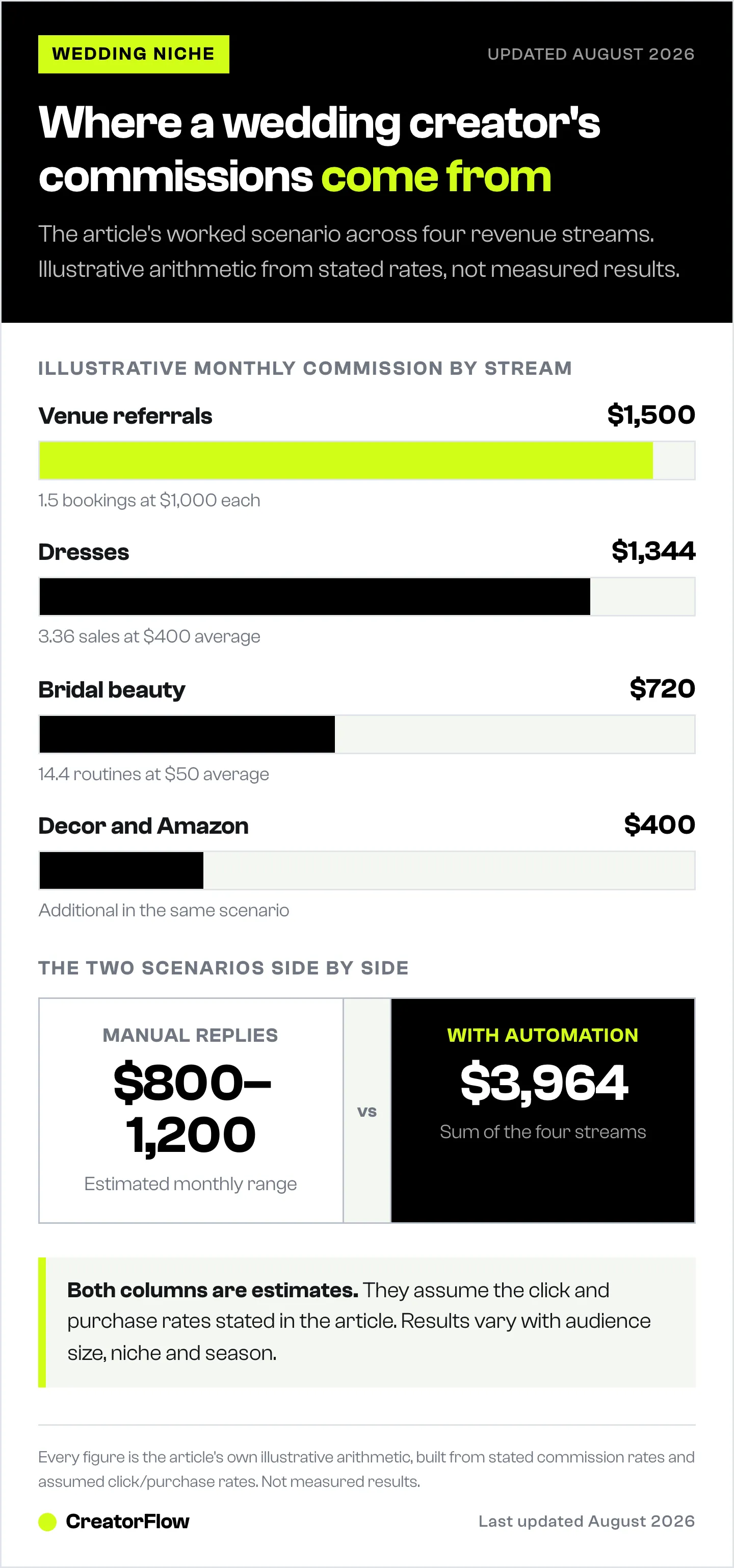
Wedding purchases are bigger than everyday fashion or beauty buys, so each commission is worth more. The scenarios below are illustrative: the commission rates, click rates, and purchase rates are assumptions, not measured results. Check the real rate for each product in your LTK or affiliate dashboard.
Wedding Dress Commissions: $300-500 Per Sale (Example)
Commission structure (assumed for this example):
- Wedding dresses: $2,000-5,000 retail
- Assumed commission rate: about 10% (real rates vary by retailer and are shown in your dashboard)
- Example commission per dress: $300-500
Without automation scenario:
- 5 wedding dress posts per month
- 150 “link?” comments per post
- You respond to 50 comments (miss 100 due to weekend work)
- 50 responses × 15% click rate = 7.5 clicks
- 7.5 clicks × 8% purchase rate = 0.6 dresses sold
- 0.6 dresses × $400 avg commission = $240/month
With automation scenario:
- 5 wedding dress posts per month
- 150 “link?” comments per post
- Automation responds to ALL 150 comments instantly
- 150 responses × 28% click rate (faster = higher CTR) = 42 clicks
- 42 clicks × 8% purchase rate = 3.36 dresses sold
- 3.36 dresses × $400 avg commission = $1,344/month
Automation impact: $1,104 more per month from dress content alone.
Individual results vary based on audience size, engagement rates, and commission structures.
Venue Referral Commissions: $1,000+ Per Booking
Some wedding venues pay referral fees for successful bookings. Amounts vary by venue and package, so ask each venue for its terms. The scenario below assumes $1,000 per booking.
Automation advantage for venue content:
Venue posts get fewer comments (50-80 per post) but higher intent. Brides asking about venues are serious shoppers, not casual browsers. Fast response = higher conversion.
Monthly scenario:
- 2 venue tour posts per month
- 60 venue inquiries per post
- Automation sends venue info + referral link instantly
- 60 × 25% click rate = 15 venue website visits
- 15 × 10% booking rate = 1.5 bookings/month
- 1.5 bookings × $1,000 referral = $1,500/month
One venue booking pays for 100 months of automation software.
Bridal Beauty Commissions: $50-200 Per Full Routine
Brides don’t buy one lipstick-they buy the entire bridal beauty routine. The example below assumes 15-20 products at a 10-15% commission rate; your real rates are in your dashboard.
Full routine breakdown:
- Foundation, primer, concealer: $100 × 10% = $10
- Eye makeup (5 products): $80 × 10% = $8
- Lip products (3 items): $50 × 15% = $7.50
- Brushes and tools: $60 × 10% = $6
- Skincare (4 products): $120 × 10% = $12
- Setting spray, touch-up items: $40 × 10% = $4
Total commission per full routine purchase: $47.50
Monthly scenario:
- 4 bridal beauty posts per month
- 100 “products?” comments per post
- Automation sends complete product list instantly
- 400 total × 30% click rate = 120 clicks
- 120 × 12% purchase rate = 14.4 purchases
- 14.4 × $50 avg commission = $720/month
Total Wedding Revenue Potential with Automation
Illustrative monthly projection (based on the assumed scenarios above):
- Dress commissions: $1,344
- Venue referrals: $1,500
- Beauty products: $720
- Wedding decor/Amazon: $400 (additional)
Total potential monthly revenue: $3,964
Without automation: Estimated $800-1,200/month (based on manual response limitations)
Automation impact: $2,764-3,164 additional monthly revenue
Annual difference: $33,168-37,968
These numbers reflect potential based on engagement levels and commission structures. Individual results vary widely based on audience size, content quality, niche authority, and seasonal fluctuations.
Step-by-Step: Set Up Wedding Content Automation in 10 Minutes
Stop planning-let’s set this up right now. You’ll have your first wedding automation running in 10 minutes.
Step 1: Choose Your Automation Tool (2 minutes)
CreatorFlow - $15/month. Best for wedding influencers who want beautiful design and simple setup. Real-time phone preview. Template-based. Flat-rate pricing.
LinkDM - $19/month. Established player: its homepage reports 60,000+ creators, brands, and agencies (checked October 2026). Good if you want a widely used, established tool.
ManyChat - Free up to 25 contacts, then $17-$199/month billed monthly (scales with contacts), according to its pricing page (checked October 2026). Best for multi-step sequences across Instagram, WhatsApp, and Messenger; plan more build time than a single template.
For wedding influencers, CreatorFlow or LinkDM are your best options. This tutorial works with both.
Step 2: Connect Your Instagram Account (3 minutes)
Requirements:
- Instagram Business or Creator account (not personal)
- A Facebook Page, only when your tool connects with Facebook Login (CreatorFlow uses Instagram Login, so no Page is needed)
Click “Connect Instagram” in your chosen tool. You’ll see Instagram’s official authorization screen. Log in and grant permissions (tool needs to read comments and send DMs).
Once connected, you’ll see your profile photo. Ready to create automations.
Step 3: Create Your First Wedding Automation (5 minutes)
Start with Wedding Dress Link automation (easiest, highest revenue):
-
Click “New Automation” or “Create Automation”
-
Choose template: “Comment-to-DM”
-
Select trigger type: Comment on Post
-
Choose which posts to monitor: “All new posts” (or select specific dress post)
-
Enter trigger keywords:
- DRESS
- GOWN
- OUTFIT
- BRIDESMAIDS
- LINK
-
Write your DM message (use Template 1 from this guide):
"Love that you love this dress! 💕 Here's my LTK wedding collection: [YOUR LTK URL]

I'm wearing the champagne bridesmaids dress in size 6 (true to size). Everything has rush shipping for brides on tight timelines!

Shopping through my link supports my content. Let me know if you need sizing help! 👗"- Replace [YOUR LTK URL] with your actual LTK wedding collection link
- Click “Test” to send a test DM to yourself (verify link works and formatting looks good)
- Click “Go Live” or “Activate”
Done. Your automation is running.
What happens next:
- Next bride comments “dress link” on your post
- She gets your DM within 10 seconds
- The conversation appears in your Instagram inbox
- Check analytics after 48 hours to see clicks and performance (link click tracking is on CreatorFlow’s Pro and Growth plans)
Advanced Wedding Influencer Strategies
Once your basic dress automation is running, add these advanced tactics.
Strategy 1: Seasonal Wedding Automations
The opportunity: Brides shopping for spring weddings have different needs than fall brides.
How to set up:
Spring/Summer Wedding Automation:
- Trigger: SPRING, SUMMER, OUTDOOR
- Message includes: Lightweight dresses, outdoor ceremony tips, humidity-proof beauty products
- LTK collection: Spring/summer wedding category
Fall/Winter Wedding Automation:
- Trigger: FALL, WINTER, INDOOR
- Message includes: Long-sleeve options, venue warmth considerations, cold-weather beauty
- LTK collection: Fall/winter wedding category
Update these quarterly to match wedding season trends.
Strategy 2: Email Capture for Long-Term Nurture
Why this matters: Wedding planning takes 6-12 months. A bride who downloads your free guide today might not buy a dress for 4 months. Email keeps you top-of-mind.
Email gate automation setup:
- Bride comments “PLANNING” or “HELP”
- Automation asks: “What’s your email? I’ll send you my free 12-month wedding planning checklist!”
- Bride replies with email
- Automation sends the checklist link in the DM: “Here’s your checklist: [link]. What’s your wedding date?”
- You manually add email to your list (Kit.com, Mailchimp, Klaviyo)
- Send weekly wedding tips email with affiliate links
Monthly email content ideas:
- Week 1: Dress shopping timeline and tips (LTK dress links)
- Week 2: Venue booking checklist (venue referral links)
- Week 3: Beauty routine for brides (LTK beauty links)
- Week 4: Decor trends and deals (Amazon affiliate links)
Brides who engage with your emails over 6 months convert at higher rates than one-time DM recipients.
Strategy 3: Multi-Link Bundle Optimization
The problem: Brides want your dress, shoes, jewelry, beauty products-all of it. Sending 8 separate links is messy.
The solution: Create LTK Idea Lists by category.
LTK wedding fashion list: [URL]
- Dress, bridesmaid dresses, mother-of-bride options
- Shoes (ceremony + reception)
- Jewelry and accessories
LTK bridal beauty list: [URL]
- Full makeup routine
- Skincare prep
- Hair products
Amazon wedding registry: [URL]
- Decor items
- Getting-ready robes
- Gift ideas for bridesmaids
Sample multi-link message:
Here's everything! 👰

💍 Dresses & Accessories: [LTK Fashion List]
💄 Beauty & Hair: [LTK Beauty List]
🎀 Decor & Gifts: [Amazon Registry]

All organized by category. Most items have rush shipping. Shopping through my link supports my content! ✨
Brides appreciate organization. Higher click rates. Higher average order value (they buy from multiple categories).
Strategy 4: Venue Referral Qualification
The opportunity: Venue referrals pay $1,000+ but require qualified leads (budget, guest count, date availability).
Automation flow with qualification:
- Bride comments “VENUE” or “LOCATION”
- Automation sends: “This venue is stunning! Quick questions to help match you: What’s your guest count? And preferred wedding date (month/year)?”
- Bride replies: “120 guests, June 2027”
- You manually respond: “Perfect! This venue does up to 200 guests. They’re booking 2027 dates now. Here’s their site: [Venue Link]. Tell them [Your Name] sent you-you’ll get 10% off AND I get a referral fee when you book. Win-win! 💕”
This extra qualification step increases venue booking rates. Venues appreciate pre-qualified leads. You increase your referral success rate.
Common Wedding Influencer Automation Mistakes
Mistake 1: Using Generic Fashion Templates for Wedding Content
The problem: You copy a standard fashion automation without wedding-specific context.
Generic message:
“Here’s the link: [URL]”
Wedding-optimized message:
“Love that you love this dress! Here’s my LTK: [URL]. I’m wearing size 6 (5’7”, true to size). It has rush shipping for brides on tight timelines! Shopping through my link supports my content. Planning a spring or fall wedding? 💕”
Why it matters: Brides need context. Sizing, shipping speed, seasonality. Generic links feel impersonal. Wedding-specific details build trust and increase conversion.
Mistake 2: Forgetting Weekend Availability
The problem: You set up automation but still try to manually respond on weekends.
The fix: Trust the automation. Turn off Instagram notifications during ceremonies and events. Your automation handles link requests. You focus on your actual wedding work. Check analytics once daily (not 15 times).
Mindset shift: Automation isn’t lazy-it’s professional. Brides get faster, better responses. You maintain work-life boundaries.
Mistake 3: Not Updating Links for Sold-Out Items
The problem: Your automation sends a dress link. The dress sold out 2 weeks ago. Brides click, see “out of stock,” lose trust.
The fix: Check your LTK collections weekly during wedding season. Remove sold-out items. Replace with similar alternatives. Update automation messages if primary recommendation changes.
Pro tip: Use LTK collections (not individual product links) in automations. When one dress sells out, add a new one to the collection-automation message stays the same.
Mistake 4: Ignoring Follow-Up Questions
The problem: Automation sends dress link. Bride replies: “Does this run small?” You never see the reply. She buys elsewhere.
The fix: Check Instagram DMs once daily. Respond personally to follow-up questions about sizing, shipping, alternatives. Automation handles the first touch. You handle the personal consultation.
Best practice: Set 15 minutes daily (9am or 9pm) to review DM conversations from automations. Quick personal replies increase conversion rates significantly.
Mistake 5: Not Capturing Emails from High-Intent Brides
The problem: Bride clicks your dress link but doesn’t buy today. You have no way to follow up. She’s gone forever.
The fix: Add email gate to your planning resources automation. Brides who download your free checklist give you their email. You can nurture them over 6-12 months with weekly wedding tips and affiliate links.
Why this matters: Wedding planning is long-cycle. A bride shopping 8 months out won’t buy a dress today. But if you have her email, you stay top-of-mind. When she’s ready to buy (4 months later), she comes back to you.
FAQ
Is Instagram DM automation allowed for wedding influencers?
Yes-as long as you use Instagram’s official Graph API. Tools like CreatorFlow, LinkDM, and ManyChat use Instagram’s official system. Instagram allows automated responses to user-initiated engagement (comments, Story replies, DMs).
What’s prohibited: Shady browser bots that fake human activity. Those violate Instagram’s Terms of Service and can get you banned.
Stick with API-based tools and your ban risk stays minimal.
Can I automate multiple link types (LTK + Amazon + venue referrals)?
Yes. Set up separate automations with different trigger keywords:
- DRESS → LTK wedding dress collection
- BEAUTY → LTK bridal beauty products
- VENUE → Venue referral link
- PLANNING → Free guide with email capture
- DECOR → Amazon wedding registry
Or use one “EVERYTHING” trigger that sends all links organized by category.
How do I handle brides asking about sold-out items?
Two approaches:
Stay ahead: Update your LTK collections weekly. Remove sold-out items. Add similar alternatives. Keep automation message generic (“Here’s my wedding dress collection”) so it doesn’t reference specific items that might sell out.
Reactive: When a bride DMs about a sold-out item, respond personally with alternatives. “That one sold out, but this dress is super similar: [link]. Want sizing help?”
Will automation feel impersonal to brides?
Only if you write impersonal messages. Your automation sends exactly what you write. Make it warm and helpful.
Impersonal:
“Link: [URL]”
Personal:
“Love that you’re planning a wedding! Here’s my LTK with all the dresses: [URL]. I’m wearing the champagne one in size 6 (5’7”). Shopping through my link supports my content. Let me know if you need sizing help or have questions! 💕”
Same automation. Different feel. Write messages like you’re texting a friend.
How many wedding automations should I set up?
Start with 3:
- Wedding dress links (highest revenue)
- Bridal beauty products (second highest volume)
- Planning resources + email capture (long-term nurture)
Add more later (venue referrals, decor, seasonal categories) once you’re comfortable.
Too many automations = hard to manage and update. Three core automations handle most bride requests.
Do brides need to follow me to receive automated DMs?
No. A private reply to a public comment reaches whoever commented, follower or not. If you do want the follow, use a follow gate: the automation asks the bride to follow you and confirm, then sends the link, which can turn a one-time link request into a new follower.
Trade-off: the extra step adds a little friction. Benefit: your dress and beauty posts grow the audience as well as the commission.
How do I track which automations drive the most commissions?
Use different tracking parameters in your links:
LTK wedding dresses: your LTK collection URL + ?tracking=ig-dress LTK beauty: your LTK collection URL + ?tracking=ig-beauty Venue referrals: Track manually (ask brides to mention your name when booking)
Check your LTK dashboard to see which tracking IDs generate clicks and sales. Double down on what works.
What if a bride has follow-up questions after getting the automated link?
Respond personally. Automation handles the first touch (instant link delivery). You handle follow-ups (sizing advice, alternatives, shopping help).
Check DMs once daily (15 minutes). Quick personal responses to follow-up questions significantly increase conversion rates.
Think of automation as your assistant handling repetitive tasks (sending links 300 times). You focus on high-value tasks (personal consultation, building relationships).
Stop Missing Weekend Sales-Start Automating
You didn’t become a wedding influencer to spend Saturdays copy-pasting LTK links 300 times. You create content. You attend weddings. You help brides plan their dream days.
DM automation handles the repetitive link delivery so you focus on what actually grows your business: creating beautiful wedding content that resonates with brides.
The setup takes 10 minutes. The time you get back depends on how many link requests you get each week, and faster responses can raise your wedding season earnings (individual results vary).
If you’re still manually responding to “link please?” comments 200 times per post while at ceremonies, you’re working harder than necessary and leaving money on the table.
Here’s what to do now:
- Choose your tool (CreatorFlow $15/mo recommended for wedding influencers)
- Set up dress link automation (use Template 1 from this guide)
- Test it (send to yourself, verify link works)
- Go live (activate on your next wedding post)
- Check analytics in 48 hours (see clicks, adjust if needed)
Brides want your links. They’re ready to buy. Give them what they want-instantly, automatically, 24/7. Even when you’re at ceremonies. Even when you’re doing bridal makeup. Even when you’re sleeping.
That’s how you turn Instagram into a real wedding season revenue stream.
Ready to automate your wedding content? Start your free trial of CreatorFlow. Set up your first automation in 10 minutes.
Related Articles
Learn more about automating affiliate link delivery:
- LTK Creator DM Automation Guide - Automate LTK links like top fashion creators
- Amazon Influencer Instagram Automation Guide - Amazon affiliate link automation
- Instagram DM Automation Templates: 25 Messages That Convert - Copy-paste message templates
- Scale Affiliate Marketing with Instagram DM Automation - Grow your affiliate income
- Bio Link vs DM Automation: Which Gets More Clicks? - Compare CTR for both strategies
Disclaimer: Commission, click, and purchase figures in this article are illustrative scenarios built on assumed rates, not measured results. LinkDM's user count and ManyChat's pricing were checked on their own sites in October 2026. Individual results vary based on audience size, content quality, engagement rates, and niche. CreatorFlow uses Meta's official Instagram API. Instagram/Meta may change features, rate limits, or terms at any time. Instagram is a trademark of Meta Platforms, Inc. CreatorFlow is not affiliated with, endorsed by, or sponsored by Meta Platforms, Inc. ManyChat, LinkDM, and InstantDM are trademarks of their respective owners. Users are responsible for complying with Instagram's Terms of Service and Community Guidelines.


