
LTK app deeplinks are LTK URLs that open inside the LTK app and pass shoppers straight into a retailer’s native app, while browser links open a mobile-web page first. App-to-app traffic converts 146% higher than mobile-web traffic when LTK app users click through to retailer apps (LTK OnBrand, accessed May 2026). Sending the deeplink format inside an Instagram DM is the single biggest free upgrade most LTK creators are missing.
You did everything right. Posted the Reel, the comment-to-DM automation fired in 6 seconds, the link landed in the follower’s inbox, they tapped it. Then LTK opened a mobile Safari tab, the retailer site loaded slowly, the cookie banner blocked the screen, and your follower bounced before the product page rendered. That entire chain happened because the link format you sent was the browser version, not the app deeplink.
This guide explains the difference between LTK app deeplinks and browser links, why LTK’s own data shows app-to-app routing earns dramatically more, how to grab the right link format from the LTK Creator app, and how to wire it into your Instagram DM automation so every commenter gets the version that actually tracks and converts.
Key Takeaways
- What an LTK deeplink is: A URL formatted to open inside the LTK app and pass the shopper into the retailer’s native app rather than a mobile browser tab
- The conversion gap: App-to-app traffic converts 146% higher than mobile-web traffic (LTK OnBrand, accessed May 2026), which is the single largest free lever LTK creators have outside of speed-to-DM
- Why mobile web underperforms: Cookie banners, login walls, slow loads, and the absence of saved payment credentials in mobile browsers all chip away at the moment of intent
- Where to grab the deeplink: Open the LTK Creator app, find the post or product, tap Share, and copy the link. The LTK Creator app generates the app-aware URL automatically as of May 2026
- How to deploy in DMs: Lead the message with the LTK app link, offer the browser fallback only as a secondary option for followers without the app installed
- What still hurts you: Wrapping the link in markdown, prepending “https://www.” manually, or using a URL shortener that strips LTK’s tracking parameters
- Cookie windows are still the ceiling: Even a perfect app deeplink loses if your follower clicks 26 hours later and Sephora’s 24-hour cookie has already expired (Sephora affiliate program docs, accessed May 2026)

Why LTK Cares So Much About App-to-App Traffic
LTK has been pushing creators toward in-app shopping since 2023, and the reason is mechanical, not marketing fluff.
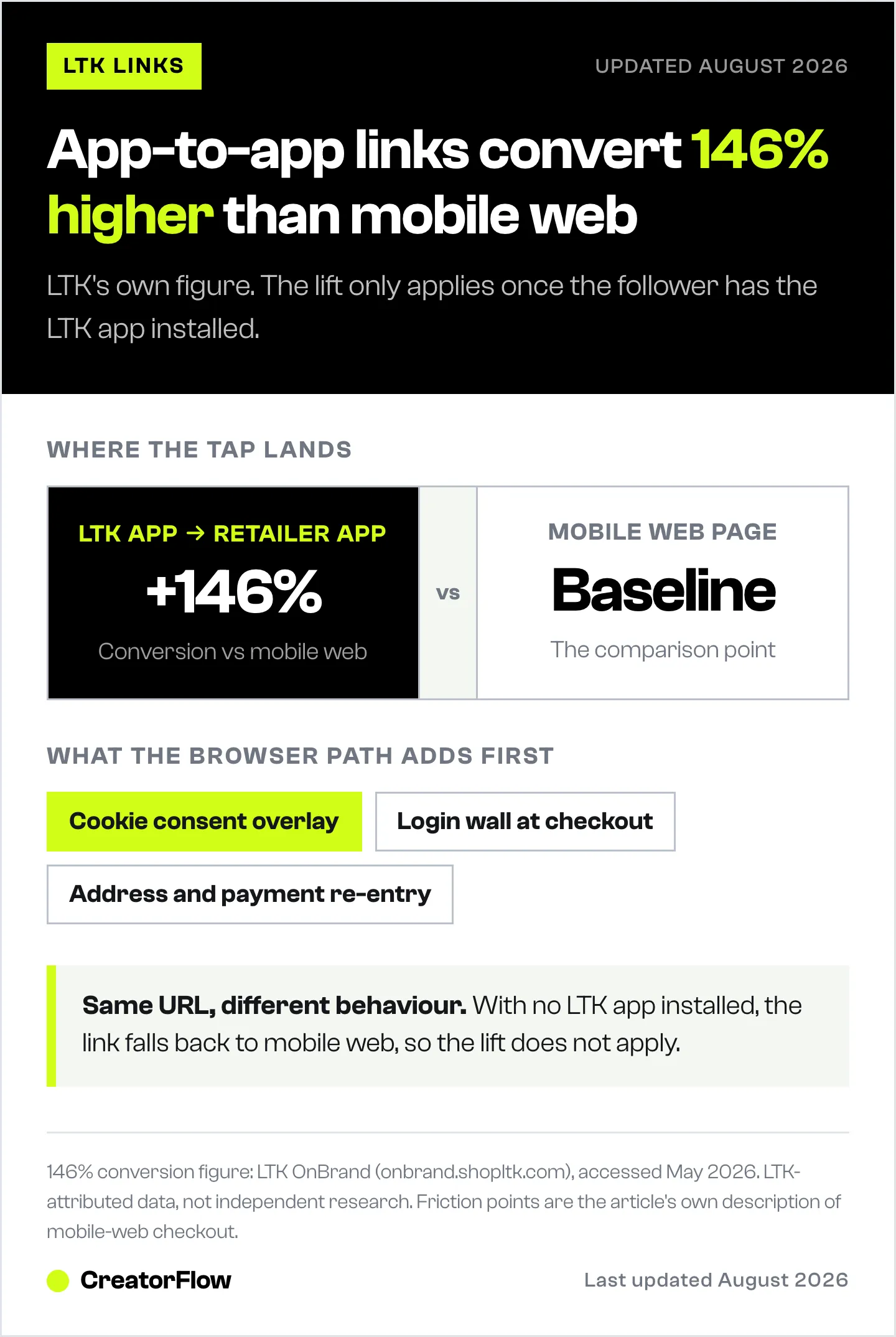
When someone shops inside the LTK app and taps a product, LTK can deeplink them directly into the retailer’s iOS or Android app where the shopper is already signed in, payment is saved, and shipping address autofills. The friction between “I want this” and “place order” collapses from minutes to seconds.
When someone shops in mobile Safari or Chrome through a browser link, LTK can only hand them off to the retailer’s mobile website. That site has to load, cookie banners have to be dismissed, the shopper may be logged out, payment isn’t saved, and address details have to be re-entered. Every one of those steps is an exit ramp.
LTK’s own published number on this gap is +146% conversion when in-app traffic deeplinks into retailer apps versus when shoppers route through mobile web (LTK OnBrand, accessed May 2026). Treat that as LTK-attributed data, not independent third-party research, but the directional claim lines up with how mobile commerce funnels generally behave.
What an LTK App Deeplink Actually Looks Like
The visible URL format LTK uses across its public surfaces is liketk.it/[code]. The same liketk.it URL behaves differently depending on where it is opened:
- Tapped on a phone with the LTK app installed: iOS or Android intercepts the link and opens the LTK app at the specific shop page, then deeplinks the shopper into the retailer app on click
- Tapped on a phone without the LTK app: Falls back to a mobile-web LTK page, then routes the shopper to the retailer’s mobile website
The link string itself looks the same. The behavior is determined by Universal Links on iOS and App Links on Android, which let LTK claim the liketk.it domain so the operating system routes those URLs into the app when the app is installed.
This means the link your follower experiences is mostly about whether they have the LTK app installed, not about whether you formatted the URL differently. So your job as the creator is twofold:
- Send the link format LTK generates from the Creator app (so Universal Links and App Links resolve correctly)
- Coach the follower in your DM message to install the LTK app for the best experience
Sending the link is necessary. Coaching the install is what delivers the 146% conversion lift, because the deeplink mechanic only kicks in once the app is on the phone.
Where the Conversion Leak Actually Happens
Three specific moments where mobile-web traffic loses the sale:
1. Cookie banner blocks the page. Most US and EU retailers now show a GDPR or CCPA cookie consent overlay on first visit. On a small phone screen, this overlay covers the product image entirely. Followers who came in hot off your Reel hit a wall of legal text and bounce. App-to-app routing skips the cookie banner because the shopper is already logged into the retailer app with consent recorded.
2. Login wall on cart actions. Sephora, Nordstrom, Revolve, and most fashion retailers either require login or strongly prompt for it before checkout. Mobile-web shoppers without saved credentials abandon at the password reset screen. Native app shoppers are usually already authenticated.
3. Address and payment re-entry. Mobile browsers do not reliably autofill address blocks. Native apps store the shopper’s last shipping address and saved payment method. The difference between “tap-tap-buy” and “type out 30 fields on a phone” is the difference between a converted sale and a closed tab.
These three friction points, stacked, are where most of the 146% conversion gap actually comes from. The deeplink itself is the technical enabler, but the user experience inside the retailer app is the underlying reason the math works.
How to Grab the Correct LTK Link Format
The cleanest source for an LTK link that respects Universal Links and App Links is the LTK Creator app itself.
From the LTK Creator app on your phone:
- Open the LTK Creator app
- Navigate to your shop, your post, or the specific product
- Tap the Share icon
- Select Copy Link
The link copied to your clipboard will be in the liketk.it/[code] format that the LTK app intercepts. Pasted into an Instagram DM, this URL behaves correctly on both iOS and Android: openers with the LTK app installed jump straight into the app, openers without the app fall back to the mobile-web LTK shop page.
What not to do:
- Do not type the URL by hand. Typos break Universal Links and force a mobile-web fallback even for app users.
- Do not prepend www. or https:// manually. The LTK Creator app generates the canonical format already.
- Do not pass the URL through a third-party shortener like bit.ly. Shorteners can strip tracking parameters, break the deeplink resolution, and add an extra redirect that some retailers’ affiliate systems treat as a different referral source.
The Creator app link is the canonical link. Copy it as-is, paste it as-is, and let the app routing handle itself.
Configuring Your DM Automation to Send the Right Link
The fastest setup for LTK creators is to push the deeplink-aware URL through your comment-to-DM automation. The mechanics are identical across CreatorFlow, ManyChat, LinkDM, and the LTK native DM tool. The differences are in which features each tool supports for prompting the app install.
A working DM message structure:
Here’s the shopping list for this look: [your LTK link copied from the Creator app]
Tap the link from the LTK app for the best price-checked, in-stock view, and faster checkout. Don’t have it? Free download here: [LTK app store link]
Three deliberate choices in this template:
1. The link is mentioned first, app prompt second. Followers who already have the LTK app installed will tap the link and never see the app prompt; the deeplink resolves correctly without intervention. Followers without the app see the prompt only after the link is delivered, so it never blocks the primary action.
2. The phrase “best price-checked, in-stock view” is concrete. Vague claims like “better experience” are less persuasive than specific reasons to install the app. LTK’s app shows real-time price and stock status that mobile web does not always reflect.
3. The follow-up question is intentionally absent here. This template is for the link delivery moment. A separate follow-up DM 2-6 hours later (using Meta’s 24-hour messaging window) is the right place to ask a yes/no question that reopens the conversation. For more on follow-up sequences, see why your LTK Instagram comments aren’t converting.
For a deeper walkthrough of trigger keywords, comment-to-DM setup, and the API limits that govern delivery, the LTK link in DM storefront automation guide covers the full setup chain.
What If Your Follower Doesn’t Have the LTK App?
Roughly 60-70% of US Instagram fashion engagers do not have the LTK app installed at the moment they comment on a Reel (LTK has not published a precise figure; this is a directional estimate based on LTK’s stated 38 million monthly shoppers (LTK Press Kit, accessed May 2026) versus the much larger Instagram fashion audience). For these followers, the link your DM sends will fall back to the mobile-web LTK page, which then routes them to the retailer’s mobile website. They get the worse-converting path by default.
Two ways to mitigate:
1. Coach the install in the DM message. Even a small share of followers installing the LTK app on the spot is meaningful, because the same person will then receive every future link from you in app-to-app format. The first install is a long-term conversion upgrade.
2. Capture an email backup. The conversion math gets less platform-dependent if you also have an email channel. Pro plans on third-party tools like CreatorFlow include an email gate that asks for an email before the LTK link is delivered. The link still goes through, but you also have a way to re-engage the follower outside Instagram if Meta restricts LTK’s DM tool, or if the LTK app install rate stays low for your audience. The risk hedge is covered in more depth in the shopmy vs LTK affiliate platform comparison.
Email capture also matters because Instagram is rented land. LTK CEO Amber Venz Box has publicly said she has “zero doubt” Meta will eventually restrict LTK’s DM functionality (eMarketer, 2024). An email list is yours regardless of what Meta does with the comment-to-DM API.
Verifying That the Deeplink Is Actually Working
A working deeplink is invisible by design, which makes it tricky to confirm. Three checks that catch most issues:
Check 1: Tap-test on your own phone with the LTK app installed.
Comment on your own Reel from a second Instagram account, receive the auto-DM, tap the link. The LTK app should open directly to the shop page, not a Safari or Chrome tab. If it opens a browser tab on a phone where you have LTK installed, Universal Links are not resolving correctly. Most common causes: link was retyped, link passed through a shortener, or the post was created from the LTK web tools rather than the Creator app.
Check 2: Verify the click registers in LTK Creator analytics.
Inside the LTK Creator app, click events on your links populate the analytics dashboard. A working deeplink registers a click immediately. If you tap-tested but the click does not appear in LTK’s analytics within a few minutes, the link has been mangled (likely by a shortener or formatting error).
Check 3: Check the retailer-side referrer when you click through.
If the deeplink works and the retailer app opens, check the browsing experience: are you logged in? Does the cart respect your saved address? If yes, app-to-app routing is functioning. If you land on the retailer’s mobile website instead, either the LTK app is not installed on your test phone or LTK’s deeplink for that retailer is unsupported. LTK’s app-to-app deeplinking does not cover every retailer; smaller niche brands sometimes route through mobile web even from the LTK app.
Common Mistakes That Break the Deeplink
1. Pasting the URL into a markdown link wrapper. Some creators wrap the URL in markdown link syntax, like the anchor text “shop here” pointing to liketk.it/abc123, when copying templates between tools. Instagram DMs do not render markdown, so the wrapper text shows up as literal characters and the link becomes unclickable. Paste the raw URL only.
2. Adding tracking parameters manually. UTMs added by hand can override LTK’s own tracking parameters and orphan the click. LTK manages its own attribution. Do not append your own UTMs to liketk.it links.
3. Sending screenshots instead of links. A surprising number of LTK creators reply to comments with a screenshot of their LTK shop page rather than the actual link. Screenshots cannot be tapped. The follower has to manually search for the product in the LTK app, which means most of them will not.
4. Linking to expired or deleted product pages. LTK products go out of stock, get pulled by the retailer, or get archived. A 404 from a dead link converts at zero. Test every link before scheduling it as the auto-DM response, and rotate links when products go out of stock for more than 48 hours.
5. Confusing the app-store install link with the LTK shop link. The LTK app store install link routes to the App Store or Google Play. The LTK shop link routes to your shop page inside the LTK app. Both are useful, but they are not interchangeable. The shop link is what the follower needs to see your products; the install link is what they need if they don’t have the app yet. Send both, in that order.
When App Deeplinks Won’t Save You
Worth being honest about the limits.
The deeplink advantage applies when the follower has the LTK app installed, taps your DM link inside the buying-intent window, and the retailer they’re shopping is one of LTK’s deeply integrated app partners. Outside of those conditions, the conversion lift narrows or disappears.
Specifically:
- For followers without the LTK app, app deeplinks behave identically to browser links. The 146% lift assumes app-to-app routing.
- For retailers that LTK has not deeply integrated with the native app handoff, the LTK app still routes to mobile web. Most major retailers (Amazon, Sephora, Nordstrom, Revolve, Target, Walmart) are integrated. Smaller boutique brands sometimes are not.
- Cookie windows still set the ceiling. A perfect deeplink that arrives 25 hours after a Sephora click loses anyway because Sephora’s 24-hour cookie has expired. Speed-to-DM still matters, and the LTK link in DM storefront automation guide covers the timing math.
- Some followers explicitly prefer browser shopping. A minority of users dislike being redirected into apps. Forcing the deeplink can read as aggressive. The “app first, browser fallback second” structure in the template above respects that preference.
The deeplink is a high-return upgrade, not a magic bullet. Stack it with fast comment-to-DM delivery, curated per-post links, and email capture, and the compound effect is significant. Use it alone and the lift is real but smaller than the headline number suggests.
How This Stacks With Other Conversion Levers
For an LTK creator running comment-to-DM automation, the conversion stack looks like this:
- Speed-to-DM: Auto-deliver within 8 seconds of the comment. This protects the buying-intent window and gets your cookie set before competing creator cookies overwrite. Setup is in the storefront automation guide.
- App deeplink format: Send the LTK Creator app link, not a hand-typed or shortened URL. This gives you app-to-app routing for followers who have the LTK app installed.
- Curated per-post links: Send the specific product or outfit collection, not your generic 400-item storefront. Decision paralysis on cluttered shop pages is covered in why your LTK Instagram comments aren’t converting.
- Coached app install in the DM copy: Frame the LTK app as the recommended path with a concrete reason (price-checked, in-stock view). First-time installs compound your conversion math across every future DM.
- Email capture as a backup channel: Reduces single-platform risk. Available on Pro plans of CreatorFlow, ManyChat, and LinkDM.
Each lever multiplies, not adds. A creator who is slow to DM and sends generic browser links is leaving most of the available revenue on the table. A creator stacking all five is operating at a fundamentally different conversion ceiling.
There is a page built specifically for LTK creators that walks through the setup end to end: CreatorFlow for LTK creators.
FAQ
What is an LTK deeplink and how is it different from a regular link?
An LTK deeplink is a URL that opens inside the LTK app on phones where the app is installed, then routes the shopper directly into the retailer’s native app instead of the retailer’s mobile website. The visible URL still looks like liketk.it/[code], but Universal Links on iOS and App Links on Android intercept the URL and hand it to the LTK app rather than the browser. The conversion advantage comes from app-to-app routing, where the shopper is already signed in, payment is saved, and address autofills inside the retailer app.
How much higher do LTK app deeplinks really convert versus browser links?
LTK reports a 146% higher conversion rate when in-app traffic deeplinks into retailer apps versus when shoppers route through mobile web (LTK OnBrand, accessed May 2026). This is LTK-attributed data, not independent third-party research, but the underlying mechanics (no cookie banners, no login walls, saved payment, address autofill) are well-understood mobile commerce fundamentals.
How do I get the correct LTK app deeplink to paste into a DM?
Open the LTK Creator app, navigate to the post or product you want to share, tap the Share icon, and select Copy Link. The link copied to your clipboard is the canonical format that respects Universal Links and App Links. Paste it raw into your DM automation. Do not retype it, do not add www. or https:// manually, and do not pass it through a third-party URL shortener.
Will the LTK deeplink still work for followers who do not have the LTK app installed?
Yes, but the deeplink mechanic does not activate. For followers without the LTK app, the link falls back to a mobile-web LTK page, which then routes them to the retailer’s mobile website. They get the worse-converting path. The realistic mitigation is to coach the LTK app install inside your DM message, since the same follower will then experience every future link from you in app-to-app format.
Should I use a URL shortener like bit.ly with my LTK links?
No. Shorteners can strip LTK’s own tracking parameters, break the Universal Link resolution that powers app deeplinking, and add an extra redirect that some retailers’ affiliate systems treat as a different referral source. The LTK Creator app already generates a short, canonical liketk.it URL. Use that one as-is.
Why does my LTK link sometimes open a browser even though my follower has the LTK app installed?
Three usual culprits: the link was retyped or hand-edited (which breaks Universal Link resolution), the link was passed through a URL shortener or copied from a screenshot rather than the Creator app, or iOS or Android cleared the Universal Link association after a system update (rare; usually fixes itself with a single direct app open). To check, tap-test from your own second account; if the LTK app does not open, regenerate the link from the Creator app and try again.
Does this only work for LTK or do other affiliate platforms have similar deeplinks?
Most major affiliate platforms now support some form of app-to-app deeplinking. Amazon Associates, ShopMy, and Mavely each have their own variations, and Amazon deep links for Instagram affiliates covers how Amazon’s version works and where it differs. The exact mechanics, retailer coverage, and conversion lift differ by platform. For a comparison of LTK and ShopMy specifically, see the shopmy vs LTK affiliate platform comparison. Mavely’s Instagram setup is covered in the Mavely Instagram DM automation guide.
Are there retailers where LTK app deeplinks don’t actually deeplink?
Yes. LTK has integrated deeply with most major fashion and beauty retailers (Amazon, Sephora, Nordstrom, Revolve, Target, Walmart, and similar), so app-to-app routing works on those. Smaller boutique brands sometimes route through mobile web even from the LTK app because LTK has not built the native handoff for that specific retailer. There is no public master list, so when in doubt, tap-test the deeplink end-to-end from your own phone before relying on it for a major Reel.
Should I still use Instagram DM automation if my followers mostly use mobile web?
Yes. Even with mobile-web routing, automated DM delivery still beats manual replies on speed and consistency, which keeps your cookie set inside the retailer’s tracking window and ahead of competing creator cookies. The 146% deeplink lift compounds on top of the speed advantage, but the speed advantage exists independently. The full setup chain for comment-to-DM automation is in the LTK link in DM storefront automation guide.
Pricing, follower thresholds, API limits, and platform features verified from creatorflow.so, shopltk.com, onbrand.shopltk.com, BusinessWire, eMarketer, and developers.facebook.com as of May 2026. The 146% conversion claim is LTK-attributed data and applies to in-app traffic deeplinking into retailer apps. Individual results vary by retailer integration, audience app install rate, and post performance.


