
Running multiple Instagram accounts for affiliate marketing means giving each niche its own account and its own workspace, so every account has separate automations, link tracking, and audience data. Affiliates do this because programs like LTK, Amazon Associates, and ShopMy convert better on tightly-themed accounts, and per-workspace analytics show exactly which niche earns the most commission. In CreatorFlow, one dashboard holds up to 5 workspaces on a flat plan.
You promote fashion finds, kitchen gadgets, and skincare from the same feed. The LTK link goes to one buyer, the Amazon link to another, the ShopMy storefront to a third. Your audience never knows what your account is actually about, so they follow, scroll, and rarely buy. Worse, you have no idea which niche pays the bills because every click lands in the same bucket.
This guide is for affiliates who run, or want to run, more than one Instagram account. It covers why niche separation lifts commissions, how workspaces map to your affiliate programs, the six benefits that matter for monetization, and how to set up your first affiliate workspace in five minutes.
Key Takeaways
- One feed, mixed niches, lower conversion: A single account promoting fashion, home, and beauty confuses the algorithm and your followers, which suppresses reach and click-through on every affiliate link
- A workspace is one connected Instagram account: CreatorFlow gives each account its own automations, contacts, templates, and analytics, with up to 5 workspaces on the Growth plan
- Affiliate programs reward niche accounts: LTK and the Amazon Influencer Program approve and convert per account, so a clean beauty account or home account outperforms a do-everything feed
- DM limits are counted per workspace, not shared: A viral Reel on your fashion account never drains the DM quota on your home-deals account
- Per-workspace link and geo analytics show what earns: You finally see which niche and which program drive the most clicks and commission, instead of guessing
- Flat pricing beats per-contact scaling: CreatorFlow charges per workspace, not per contact, so growing an audience across 5 accounts does not trigger surprise tier jumps
Why a Single Instagram Account Limits Affiliate Earnings
A mixed-niche account fights the algorithm. Instagram surfaces accounts to people who engage with a consistent topic. When your grid jumps from a Lululemon haul to a Kindle review to a retinol routine, the system cannot decide who to show you to, so it shows you to fewer people. Less reach means fewer comments, fewer link requests, and fewer affiliate sales.
It also weakens trust. Affiliate buying is driven by relevance. A follower who came for outfit inspiration will not click your air-fryer link, and the off-topic post pushes your fashion content down their feed. You are diluting the exact audience each affiliate program pays you to convert.
And it hides your numbers. With every program funneled through one account, you cannot tell whether LTK, Amazon, or ShopMy is carrying your income. You optimize blind. Splitting niches into separate accounts fixes the reach problem and the measurement problem at the same time.
How Workspaces Work in CreatorFlow
A workspace is a single connected Instagram account with its own automations, contacts, templates, link tracking, and analytics, fully isolated from your other accounts. You switch between workspaces in the same dashboard instead of logging in and out of the Instagram app. Each one runs its own comment-to-DM rules and keyword triggers without touching the others.
CreatorFlow includes 1 workspace on Free, 2 on Pro ($15/month), and 5 on Growth ($30/month), with DM volume counted separately for each workspace (creatorflow.so, June 2026). That isolation is the whole point for affiliates: your beauty account and your home account behave like two independent businesses that you happen to manage from one screen.
If you already juggle accounts the hard way, the operational side of this is covered in our guide to managing multiple Instagram accounts in workspaces.
Why Affiliate Marketing Works Better on Multiple Instagram Accounts
Affiliate platforms are built around niche accounts. The Amazon Influencer Program asks you to connect a social account and build a storefront, and it reviews your follower count and engagement per account (affiliate-program.amazon.com, June 2026). LTK approves creators through an application and pays commissions set by each retailer, with average rates of 10 to 25 percent and up to 30 percent (shopltk.com, June 2026). A focused account gives each program a clean, on-topic audience to approve and reward. The same split works for anonymous theme pages run without a personal brand.
The earnings case is real when the account is tight. LTK reports that its average UK creator earns about £1,200 a month posting three times a week (shopltk.com, June 2026). That kind of consistency is far easier to sustain on a single-niche account than on a feed that tries to serve five audiences at once.
Different programs also fit different niches. ShopMy advertises commissions of 10 to 30 percent with weekly payouts and an application step (shopmy.us, June 2026). Mavely, the link platform Later acquired for $250 million, lets you generate shoppable links with no application or follower minimum (joinmavely.com, June 2026). Running them on separate accounts keeps each program’s content native to its audience.
6 Benefits of Multiple Workspaces for Affiliate Marketers
Running multiple Instagram accounts for affiliate marketing pays off most when each account has its own isolated workspace. Here is what separation actually buys you.
1. Separate DM limits per account. CreatorFlow counts DMs per workspace, so a Reel that pops off on your fashion account uses that account’s quota and leaves your home-deals account untouched. On Growth, that is 10,000 DMs per workspace, not 10,000 shared across all five.
2. Per-account link tracking. Each workspace tracks its own clicks. You see that your beauty account’s “skincare” keyword drove 400 clicks this week while your tech account’s “deal” keyword drove 120, so you know where to post next.
3. Geo analytics per niche. Pro and Growth show clicks by country and city for each workspace. If your home account skews US and your fashion account skews UK, you can match each to the affiliate programs and retailers that pay in those regions.
4. Program-specific templates and keywords. “LINK” on your fashion account sends the LTK storefront. “DEAL” on your home account sends the Amazon list. Because the workspaces are separate, the wrong link never goes to the wrong buyer.
5. Independent email lists. CSV export on paid plans lets you build a beauty list and a home list separately, then push each into targeted email promos instead of one blended list nobody opens. For the delivery side, see how to add affiliate links on Instagram.
6. Cleaner approvals and compliance. A single-niche account is easier to get approved into LTK or the Amazon Influencer Program, and easier to keep FTC-compliant because every post follows the same affiliate disclosure rules for one product category.
Match Your Affiliate Programs to Workspaces
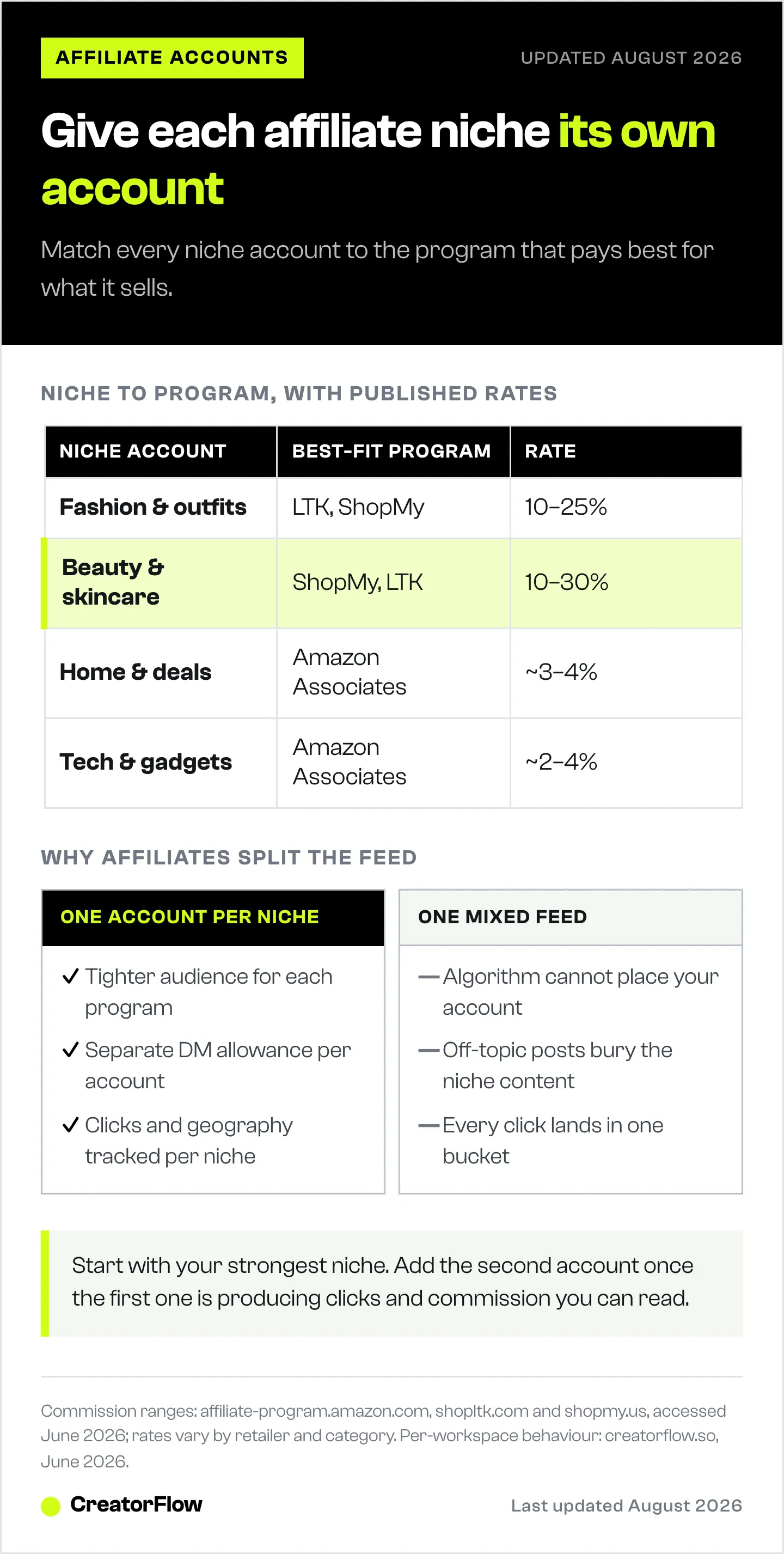
Map each niche account to the program that pays best for what it sells. A workable starting layout for a multi-niche affiliate:
| Workspace (niche account) | Best-fit program | What it earns on |
|---|---|---|
| Fashion and outfits | LTK, ShopMy | Apparel, shoes, accessories (LTK 10 to 25%) |
| Home and deals | Amazon Associates | Furniture, kitchen, home (Amazon roughly 3 to 4%) |
| Beauty and skincare | ShopMy, LTK | Luxury beauty (Amazon up to 10%), brand commissions 10 to 30% |
| Everyday finds and hauls | Mavely | Mass retail brands like Adidas and Nordstrom Rack |
| Tech and gadgets | Amazon Associates | Devices and electronics (Amazon roughly 2 to 4%) |
Commission figures: affiliate-program.amazon.com, shopltk.com, shopmy.us, joinmavely.com, all accessed June 2026. Rates vary by retailer and category, so confirm current terms inside each program before you lean on them.
You do not need all five accounts on day one. Most affiliates start with their strongest niche, prove the funnel, then spin up a second workspace once the first one is producing. For the LTK side specifically, the LTK creator DM automation workflow shows the link-delivery setup end to end.
Track Commissions Per Workspace With Link and Geo Analytics
The reason most affiliates plateau is that they cannot see which niche earns. When every program runs through one account, a good month and a bad month look identical in the data. Separate workspaces give each niche its own scoreboard.
Inside each workspace you see clicks per keyword, clicks over time, and clicks by location. Pair that with the commission report inside LTK, Amazon, or ShopMy and you can attribute income to a specific account. If your beauty workspace drives half your clicks but a quarter of your commission, the fix is obvious: promote higher-rate products or switch that account to a better-paying program.
This is also how you decide where to spend time. The account with the best clicks-to-commission ratio gets your next ten posts. For the Amazon workflow, our guide to Amazon affiliate DM automation covers storefront link delivery in detail.
Which CreatorFlow Plan Fits Multi-Account Affiliates
CreatorFlow is built for solo affiliates and small teams running 1 to 5 accounts on flat pricing. Here is how the plans line up for multi-account use:
| Plan | Workspaces | DMs per workspace | Affiliate features |
|---|---|---|---|
| Free ($0) | 1 | 500/month | Comment-to-DM, keyword triggers, link tracking |
| Pro ($15/mo) | 2 | 5,000/month | Adds follow gate, email gate, CSV export, geo analytics |
| Growth ($30/mo) | 5 | 10,000/month | Everything in Pro, plus 5 team members |
Pricing verified at creatorflow.so, June 2026. The flat structure is the affiliate advantage: you pay per workspace, not per contact, so growing your audience across accounts never triggers a surprise bill.
That matters when you compare models. ManyChat is a strong multi-platform tool that covers Instagram, Facebook, WhatsApp, SMS, and more, and it prices by contact count across five tiers from $17 to $199 per month billed monthly, or $14 to $139 per month billed annually (manychat.com/pricing, June 2026). For an affiliate scaling several accounts, contact-based pricing means cost rises with your audience. LinkDM is Instagram-first and covers more accounts per plan, with 3 Instagram accounts on its $19/month Pro tier and 10 on its $99/month Platinum+ tier (linkdm.com, July 2026), so if you need 6 or more accounts it covers that range. CreatorFlow’s fit is the 1-to-5-account affiliate who wants flat, predictable pricing with per-workspace separation. If you are weighing the jump, the CreatorFlow Free vs Pro upgrade guide breaks down when the second workspace pays for itself.
How to Set Up an Affiliate Workspace in 5 Minutes
You can have your first niche account automated before your coffee gets cold.
- Connect the account. In CreatorFlow, add a workspace and connect the Instagram Business or Creator account for that niche through Meta’s official login. No password sharing.
- Set your keyword trigger. Pick the word your audience already comments, like “link,” “deal,” or the product name. The automation watches for it on your posts and Reels.
- Write the DM. Drop in your LTK storefront, Amazon list, ShopMy link, or Mavely SmartLink for that niche, with a short on-brand message.
- Turn on the gate if you want it. On paid plans, add a follow gate to grow the account or an email gate to capture the lead before sending the link.
- Repeat for the next niche. Add a second workspace for your next account and load its own keyword, message, and program. The two never overlap.
That is the entire setup. Each new niche account is another five-minute workspace, and each one tracks its own clicks from day one.
FAQ
How many Instagram accounts can I run with CreatorFlow?
CreatorFlow supports 1 Instagram account on Free, 2 on Pro ($15/month), and 5 on Growth ($30/month). Each account is its own workspace with separate automations, contacts, and analytics. Agencies needing more than 5 accounts can request a custom plan (creatorflow.so, June 2026).
Can I run LTK, Amazon, and ShopMy accounts from one tool?
Yes. Each affiliate program lives in its own workspace, so one account can deliver LTK storefront links while another sends Amazon lists and a third sends ShopMy links. The keyword triggers, templates, and click tracking stay separate per account, which is the point of running them in different workspaces.
Should affiliates use separate Instagram accounts for different niches?
Usually yes, once a niche is producing. Instagram rewards topic consistency with reach, and affiliate programs convert better on tightly-themed accounts. A focused beauty or home account earns more clicks per post than a do-everything feed, and separate workspaces let you measure each niche’s commission independently.
Are DM limits shared across workspaces or counted separately?
Counted separately. Each workspace has its own monthly DM allowance, so a viral Reel on one account does not eat into another account’s quota. On Growth, that is 10,000 DMs per workspace rather than 10,000 shared across all five (creatorflow.so, June 2026).
Does CreatorFlow charge per contact like ManyChat?
No. CreatorFlow uses flat per-workspace pricing, so your cost does not rise as an account’s audience grows. ManyChat prices by contact count across five tiers, $17 to $199 per month billed monthly or $14 to $139 billed annually (manychat.com/pricing, July 2026), which means cost scales with audience size. For affiliates growing several accounts, flat pricing is more predictable.
Can I see which account earns the most affiliate commission?
Each workspace tracks its own clicks by keyword and by location, and Pro and Growth add geographic analytics. Pair that with the commission report inside LTK, Amazon, or ShopMy to attribute income to a specific account, then move your effort to the niche with the best clicks-to-commission ratio.
Is running multiple Instagram accounts against Instagram’s rules?
No. Instagram permits multiple accounts and lets you add several to one app. CreatorFlow connects each through Meta’s official Instagram API with OAuth, so there is no password sharing and no third-party login. Keep each account’s affiliate disclosures compliant and you are within platform rules.
Affiliate program rates and features verified from affiliate-program.amazon.com, shopltk.com, shopmy.us, and joinmavely.com, and competitor pricing from manychat.com and linkdm.com, as of June 2026. Individual results vary.