
CreatorFlow Free sends automated DMs when someone comments a keyword on your post. CreatorFlow Pro ($15/month) does the same thing plus captures emails before sending links (Email Gate), grows your follower count with every automation (Follow Gate), tracks which posts drive clicks (link tracking), and exports your contacts to any email platform (CSV export). The Free plan is a link delivery tool. The Pro plan is a growth engine that produces three outcomes from every single automation.
You signed up for CreatorFlow. Set up your first automation. Comments come in, DMs go out, links get delivered. It works. So why would you pay $15/month when the free plan already sends messages?
Because sending links is the easy part. Building an audience you own, knowing which content converts, and turning one-time commenters into long-term customers is where the money is. Free handles step one. Pro handles all three.
This guide breaks down every Pro and Growth feature, what it does, why it matters, and the specific scenarios where upgrading pays for itself in the first week.
Key Takeaways
- Email Gate (Pro) captures an email address before sending your link, turning every automation into a lead generation machine you own regardless of platform changes
- Follow Gate (Pro) asks for a follow before delivering the link, with 80-90% compliance rates that compound your audience growth with every automation
- Link tracking (Pro) shows click-through rates per automation, per post, and per keyword so you stop guessing which content drives revenue
- CSV export (Pro) lets you move contacts to Mailchimp, Kit, Klaviyo, or any email platform, making your data portable and your business independent
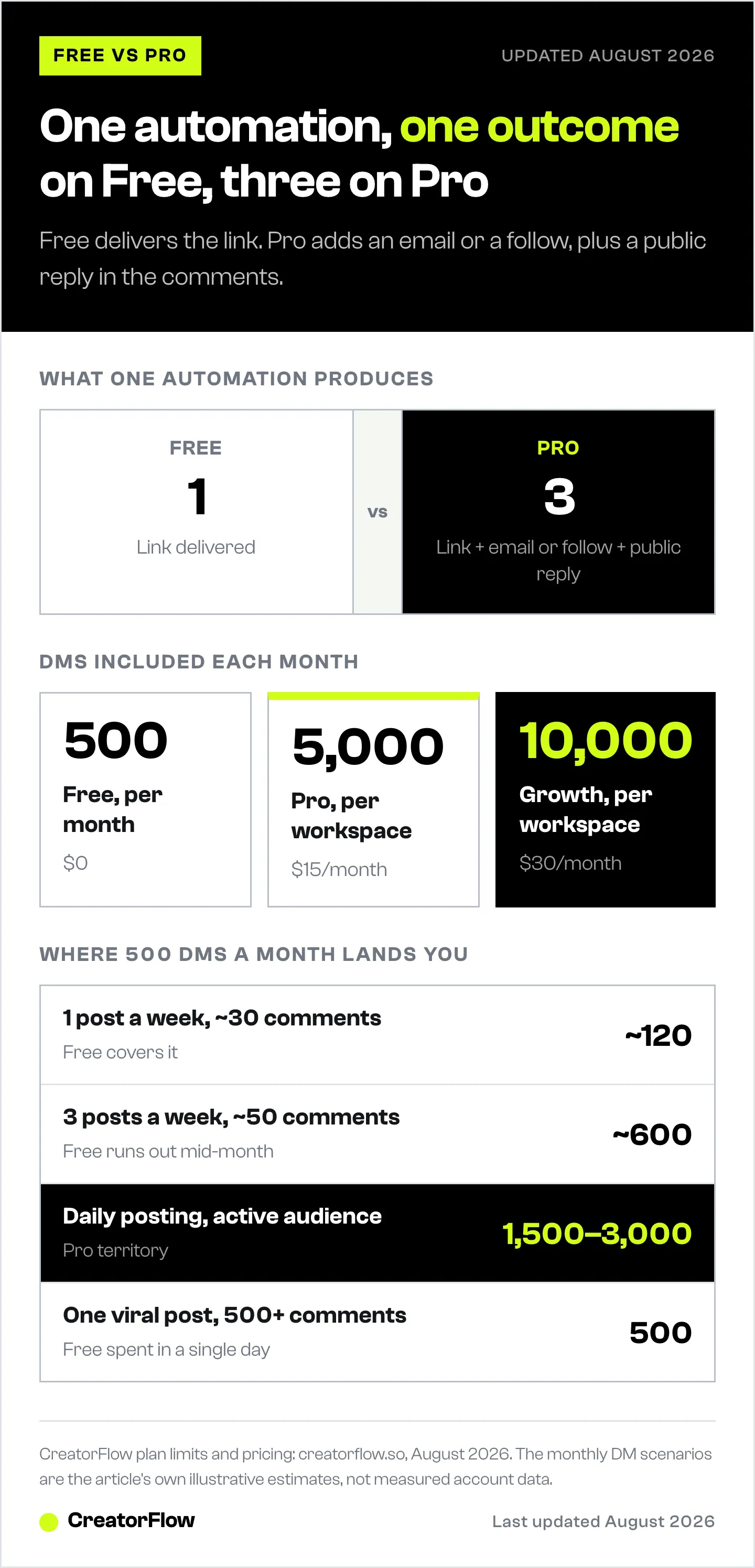
- The compound math: Free plan produces 1 outcome per automation (link sent). Pro produces 3 (link sent + email captured or follower gained + public reply driving more comments)
- DM volume reality: One viral post with 500+ comments burns through the Free plan’s 500 monthly DMs in a single day, pausing all automations until next month

CreatorFlow Free vs Pro: What You Get on Each Plan
CreatorFlow Free sends 500 automated DMs a month from one workspace, with unlimited automations across comment-to-DM, story replies, and keyword triggers. Pro is $15 a month and raises that to 5,000 DMs per workspace across two workspaces, then adds the Email Gate, the Follow Gate, public replies in the comment thread, geographic analytics, Rewind, and CSV export.
Email Gate: Build an Asset You Own
Instagram followers aren’t yours. One algorithm change, one shadowban, one account suspension and your audience disappears overnight. You have zero control over platform risk.
Email Gate captures an email address before sending the link. Every automation becomes a lead generation machine running on autopilot.
How it works:
- You post content with a keyword CTA (“Comment GUIDE for the free PDF”)
- Someone comments “GUIDE”
- CreatorFlow DMs them: “Drop your email and I’ll send the link”
- They reply with their email
- They get your link
Two outcomes from one interaction. The link gets delivered AND you captured a contact you own permanently.
That email list works on every platform. Mailchimp, Kit (formerly ConvertKit), Loops, Klaviyo. Export via CSV anytime. No lock-in.
Why this matters for your business:
Creators who collect emails have a direct line to their audience that no algorithm, no platform policy change, and no account issue can take away. Your email list is the one asset that transfers across every platform and every business model.
Without Email Gate, you’re sending links but building nothing permanent. Every DM is a one-time transaction that disappears the moment someone closes their inbox.
Best for: Course creators, coaches, digital product sellers, anyone building a long-term business on Instagram.
Follow Gate: Grow Your Audience With Every Automation
Before sending the link, the user sees a message: “Hey! Could you follow me first?”
Two buttons appear: “Visit Profile” and “I’m following.” Every automation becomes a follower growth engine instead of a link delivery tool.
The numbers:
- 80-90% compliance rate. People who want the link will follow.
- Compound effect: more followers = more reach = more comments = more DMs = more followers.
- Each automation cycle feeds the next one.
How to choose between Follow Gate and Email Gate:
You pick one per automation. Not both. Choose based on what you need more right now:
- Need followers? Follow Gate on your high-reach Reels
- Need emails? Email Gate on your product/offer content
- Strategy: Use Follow Gate on top-of-funnel content (entertainment, tips) and Email Gate on bottom-of-funnel content (products, courses, lead magnets)
Best for: Newer creators building their audience, anyone whose reach is limited by follower count, creators who monetize through brand deals (where follower count matters for rates).
Public Reply to Comments: Double Your Visibility
When someone comments your keyword, CreatorFlow auto-replies publicly in the comment thread: “Sent you a DM! Check your inbox.” Public Reply is a Pro and Growth feature.
That public reply is visible to everyone scrolling through comments. Not hidden in DMs. Right there in the comment section where thousands of people are reading.
Why this changes the game:
- Signals to other viewers that this creator is responsive and people are engaging
- Social proof effect: seeing others get replies encourages more people to comment the keyword
- Comment section looks alive instead of dead
- Instagram’s algorithm rewards posts with active comment threads (more replies = more reach)
You can write multiple reply variations so it doesn’t look automated. CreatorFlow rotates through them randomly.
Without Public Reply: People comment and get a silent DM. The comment section looks dead. Nobody else knows anything happened.
With Public Reply: The comment section shows visible activity. Other viewers think “everyone’s commenting this keyword and getting something, I should too.” That’s a feedback loop that scales your engagement.
Best for: Anyone who gets 20+ keyword comments per post and wants to amplify the social proof effect.
Link Tracking: Know What’s Working
Free plan sends links blindly. You know DMs went out, but you have no idea if anyone clicked. It’s like running ads with no analytics.
Pro shows:
- Click-through rate per automation: Which keyword triggers drive actual clicks
- Click-through rate per post: Which content formats convert (Reels vs carousels vs Stories)
- Geographic distribution: Which countries and cities your clicks come from
What this data tells you:
“My Tuesday Reel about skincare routines drives 3x more clicks than my Thursday carousel about product reviews.” Now you know where to invest your content energy.
For affiliates: link tracking tells you which products and which content formats convert. You stop promoting products nobody clicks and double down on what works.
The ROI calculation:
$15/month for attribution data that tells you exactly where your revenue comes from. If that data helps you focus on content that converts even 10% better, the tracking pays for itself with a single extra sale.
Best for: Affiliate marketers, anyone selling products/services, creators who want to optimize their content strategy based on data instead of guessing.
For a full walkthrough of the tracking dashboard, read CreatorFlow Insights: Link Tracking Guide.
Advanced Analytics and Geographic Data
The Pro analytics dashboard goes beyond basic counts.
Performance tab:
- DMs sent, link clicks, leads collected per automation
- Expandable rows showing per-post performance within each automation
- Side-by-side comparison of your automations
Engagement trends:
- Hourly and daily DM/click charts
- See your peak engagement times
- Post content right before peaks for maximum automation triggers
Geographic distribution:
- Top countries and top cities by clicks
- If 40% of your clicks come from Brazil, maybe your next post should be in Portuguese
- If your US clicks are concentrated in LA and NYC, that’s useful for brand deal pitches
Content performance:
- Total comments vs keyword comments vs trigger rate per post
- See which content drives automation engagement, not vanity metrics
- A post with 500 likes but 3 keyword comments is worse than a post with 50 likes and 40 keyword comments
Activity log:
- Last 50 DMs with status: sent, failed, skipped
- Troubleshoot failed DMs instantly: user doesn’t follow you, rate limit hit, 24-hour window expired
- No more wondering “did that DM go through?”
Free plan gives you basic counts. Pro gives you the data to make decisions.
Learn more about reading your analytics in Instagram Analytics for Creators: Metrics Guide.
CSV Export: Your Data, Your Way
Free plan captures contacts but keeps them inside CreatorFlow. Pro lets you take them anywhere.
What you export:
- Instagram handle
- Email address (if collected via Email Gate)
- Source automation (which keyword/post captured them)
- Last interaction date
What you do with it:
- Import directly into Mailchimp, Kit, Klaviyo, Loops, or any email platform
- Build segmented email campaigns: “everyone who commented RECIPE on my cooking posts” vs “everyone who commented DISCOUNT on my product posts”
- Load into a spreadsheet for custom analysis
- Back up your contacts outside CreatorFlow
Your contacts are your business asset. CSV export means you always have a copy and can use the data anywhere, with any tool, at any time.
For the full walkthrough on contacts and email capture, see CreatorFlow Contacts and Email Gate Guide.
Best for: Anyone building an email list, creators who use multiple marketing tools, businesses that need CRM integration.
Multiple Workspaces: Separate Brands, Separate Data
Each workspace connects one Instagram account with its own automations, contacts, and analytics. Everything is isolated.
Pro (2 workspaces):
- Run your personal brand + your business account
- Or your main account + a niche account
- Each workspace gets its own 5,000 DM monthly limit (not shared)
Growth (5 workspaces):
- Agencies managing client accounts
- Affiliate operators running multiple product-specific Instagram accounts
- Brands with regional accounts (US, EU, LATAM)
- Each workspace gets its own 10,000 DM monthly limit
Real use case: Affiliate marketers running 3-5 product-specific Instagram accounts, each with dedicated automations and separate contact lists. One account for fitness supplements, another for kitchen gadgets, another for tech accessories. Each with its own analytics so you know which niche performs best.
For multi-account management details, read Manage Multiple Instagram Accounts with Workspaces.
Best for: Anyone with more than one Instagram account, agencies, affiliate operators with multiple niches.
Rewind: Recover Missed Comments
Rewind scans past comments on your posts and sends DMs retroactively to people who commented your keyword but never got a response. Rewind is a Pro and Growth feature.
Why it’s a reason to upgrade: The day you connect CreatorFlow, your last 7 days of posts already have keyword comments sitting unanswered. People asked for your link and never got it. Rewind captures that backlog in one run, so your first week on Pro can pay for itself before you publish a single new post.
Why DM volume matters here: One Rewind run on a popular post with 200 keyword comments sends 200 DMs. On Pro’s 5,000 DMs per workspace, you can Rewind a week of content without watching the meter. Rewind is a Pro feature, so the recovery play becomes available when you upgrade.
The migration use case: Switching from another tool? Set up your comment-to-DM automations, then Rewind the last 7 days of comments so you keep the audience that already engaged. See how to migrate from ManyChat to CreatorFlow.
Best for: New Pro users recovering recent missed comments, and anyone migrating from another DM tool who wants to catch the backlog.
DM Volume: The Math That Matters
Here’s when each plan runs out:
| Scenario | DMs/month needed | Plan |
|---|---|---|
| 1 post/week, ~30 keyword comments each | ~120 | Free works |
| 3 posts/week, ~50 comments each | ~600 | Free runs out mid-month |
| Daily posting, active audience | 1,500-3,000 | Pro needed |
| Multiple accounts or viral content | 5,000-10,000+ | Pro or Growth |
| One viral post (500+ comments in a day) | 500 in one day | Free gone instantly |
When you hit the limit, automations pause. Every comment after that is someone asking for your link and getting silence. That’s lost revenue, not a hypothetical risk.
The math is simple: if you post 3+ times per week and get consistent engagement, the Free plan’s 500 DMs won’t last the month. You’ll hit the wall around week 2-3, and every keyword comment after that goes unanswered.
If you’d rather keep automations running than wait for the monthly reset, Pro and Growth users can top up with DM Add-On packs that never expire.
The Compound Effect: Why Pro Produces 3x the Results
Free plan = link delivery tool. Someone comments, they get a link. One input, one output. Done.
Pro plan = growth engine. Each automation does three things simultaneously:
- Delivers your link (same as Free)
- Captures an email OR grows your followers (Email Gate or Follow Gate)
- Amplifies your post with a public reply that drives more comments from other viewers
One automation on Pro produces 3 outputs. One automation on Free produces 1.
Over 30 days, that compounds:
- Free: 500 links sent. Nothing else built.
- Pro: 5,000 links sent + 2,000 emails captured (or followers gained) + hundreds of public replies driving additional engagement.
Over 6 months, the creator on Pro has an email list, a larger follower base, analytics showing exactly what content converts, and exported contact data feeding their email marketing. The creator on Free has sent some links.
The $15/month difference isn’t about features. It’s about whether each automation builds your business or is a one-time transaction.
Who Each Plan Is Built For
Free: Testing and Low Volume
- New to DM automation, exploring the product
- Small account with fewer than 500 DM-worthy comments per month
- Don’t sell products or collect leads yet
- Want core automation without paying anything
- Getting started with your first keyword automations
Free is a real plan, not a trial trap. It includes unlimited automations, comment-to-DM, story reply, and keyword triggers. For low-volume accounts, it’s enough.
Pro ($15/month): Creators Who Monetize
- Sell digital products, courses, coaching, or affiliate offers
- Want to build an email list from Instagram traffic
- Need to know which content drives clicks (link tracking)
- Post regularly and get consistent engagement (600+ DMs/month)
- Run 2 Instagram accounts
- 14-day free trial, cancel anytime
Pro is where CreatorFlow stops being a convenience tool and becomes a revenue tool. The email capture, tracking, and analytics turn guessing into data-driven decisions.
Growth ($30/month): Multi-Brand Operators and Agencies
- Manage 3-5 Instagram accounts
- Need team access (invite members with role-based permissions)
- High-volume DM needs (10,000 per workspace per month)
- Want priority support
- Running an agency or managing clients
Growth is for operators who need scale and team collaboration, not solo creators.
When Free Is Enough (And When It’s Costing You)
Free is enough when:
- You post 1-2 times per week
- You get fewer than 100 keyword comments per month
- You’re testing whether DM automation works for your niche
- You don’t sell anything yet
Free is costing you when:
- You’ve hit the 500 DM limit before the month ends (even once)
- You’re sending links but not capturing emails
- You have no idea which posts drive clicks
- You run more than one Instagram account
- You’re leaving money on the table because you can’t track conversions
If you’ve hit the DM limit even once, you’ve already lost more potential revenue than $15. Every unanswered keyword comment after the limit is someone who wanted your product and got nothing.
FAQ
Is the Free plan a limited trial?
No. CreatorFlow Free is permanent. You get 500 DMs per month, unlimited automations, and all core features (comment-to-DM, story reply, keyword triggers) forever. New users start with a 14-day Pro trial, then drop to Free if they don’t upgrade. Pro-only automations get paused, not deleted.
Can I switch between Email Gate and Follow Gate?
Yes. You choose one per automation, not per account. You can run Email Gate on your product posts and Follow Gate on your growth-focused Reels at the same time. Switch any automation between the two whenever you want.
What happens when I hit the DM limit?
Automations pause until the next billing cycle. Comments keep coming in, and your automations stay configured while sending is on hold. No data is lost. Once the limit resets (or you upgrade), automations resume automatically.
Does upgrading to Pro turn my paused automations back on?
Yes. If you set up Pro features (Email Gate, Follow Gate) during your free trial and then drop to Free, those automations pause but stay configured. Upgrading to Pro reactivates them instantly. No re-setup needed.
How are DMs counted with multiple workspaces?
Each workspace gets its own DM limit. Pro gives 5,000 DMs per workspace (2 workspaces = 10,000 total). Growth gives 10,000 DMs per workspace (5 workspaces = 50,000 total). Limits are independent, not shared.
Can I export contacts on the Free plan?
CSV export is a Pro feature. Free stores every contact you collect inside CreatorFlow, and upgrading to Pro gives you immediate access to export all of them, including the ones captured while you were on Free.
Is there a yearly discount?
Yes. Pro drops from $15/month to $12/month on annual billing ($144/year, saving $36). Growth drops from $30/month to $24/month annually ($288/year, saving $72). Both start with a 14-day free trial, so you can cancel before the first charge (creatorflow.so/refund-policy, August 2026).


