

DM Add-Ons are extra DM packs you buy on top of your monthly CreatorFlow limit. They range from 1,000 DMs ($5) to 5,000 DMs ($19), never expire, and stack on top of each other. When your monthly DMs run out, add-on DMs kick in automatically so your automations keep running instead of pausing. Add-Ons are available on the Pro and Growth plans.
A post takes off. Comments flood in. Then, right when the momentum is highest, your automation goes quiet because you hit your monthly DM cap. Every keyword comment after that is someone asking for your link and getting nothing back.
This guide covers what DM Add-Ons are, what each pack costs, how they kick in automatically, when to buy a pack versus upgrading your plan, and how to avoid burning through your limit in the first place.
Key Takeaways
- Add-Ons are top-up packs, not a plan change. You buy extra DMs once and they sit on your account until used.
- Four pack sizes: 1,000 DMs ($5), 2,000 ($9), 3,000 ($12), and 5,000 ($19). Bigger packs cost less per DM.
- They never expire and they stack. Unused add-on DMs roll over indefinitely and multiple packs add together.
- They auto-kick-in. When your monthly allowance hits zero, CreatorFlow starts drawing from your add-on balance with no action needed.
- Pro and Growth only. Add-Ons are not available on the Free plan. Free stays at 500 DMs per month with no top-up option.
- A monthly cap is not Instagram’s rate limit. Add-Ons raise your CreatorFlow allowance; they do not change the roughly 200-per-hour sending pace tools use to stay safe.

What Are DM Add-Ons?
DM Add-Ons are one-time packs of extra DMs added on top of your plan’s monthly allowance. Your plan gives you a fixed number of DMs each month (5,000 on Pro, 10,000 on Growth per workspace). An add-on pack sits alongside that allowance as a reserve. When the monthly number runs out, the reserve takes over.
They are not a subscription change and not a recurring charge. You buy a pack when you need it, and the DMs stay on your account until you use them. Think of your monthly allowance as the tank that refills on your billing date, and add-ons as spare fuel that never goes stale.
This matters most during the exact moments automation is supposed to help: a Reel that outperforms, a launch week, a giveaway, or the first Rewind run after you migrate from another tool. Those are the times you least want your automations to stop.
How Much Do DM Add-Ons Cost?
There are four pack sizes. Larger packs bring the cost per DM down, so buying one 5,000 pack is cheaper per message than five separate 1,000 packs.
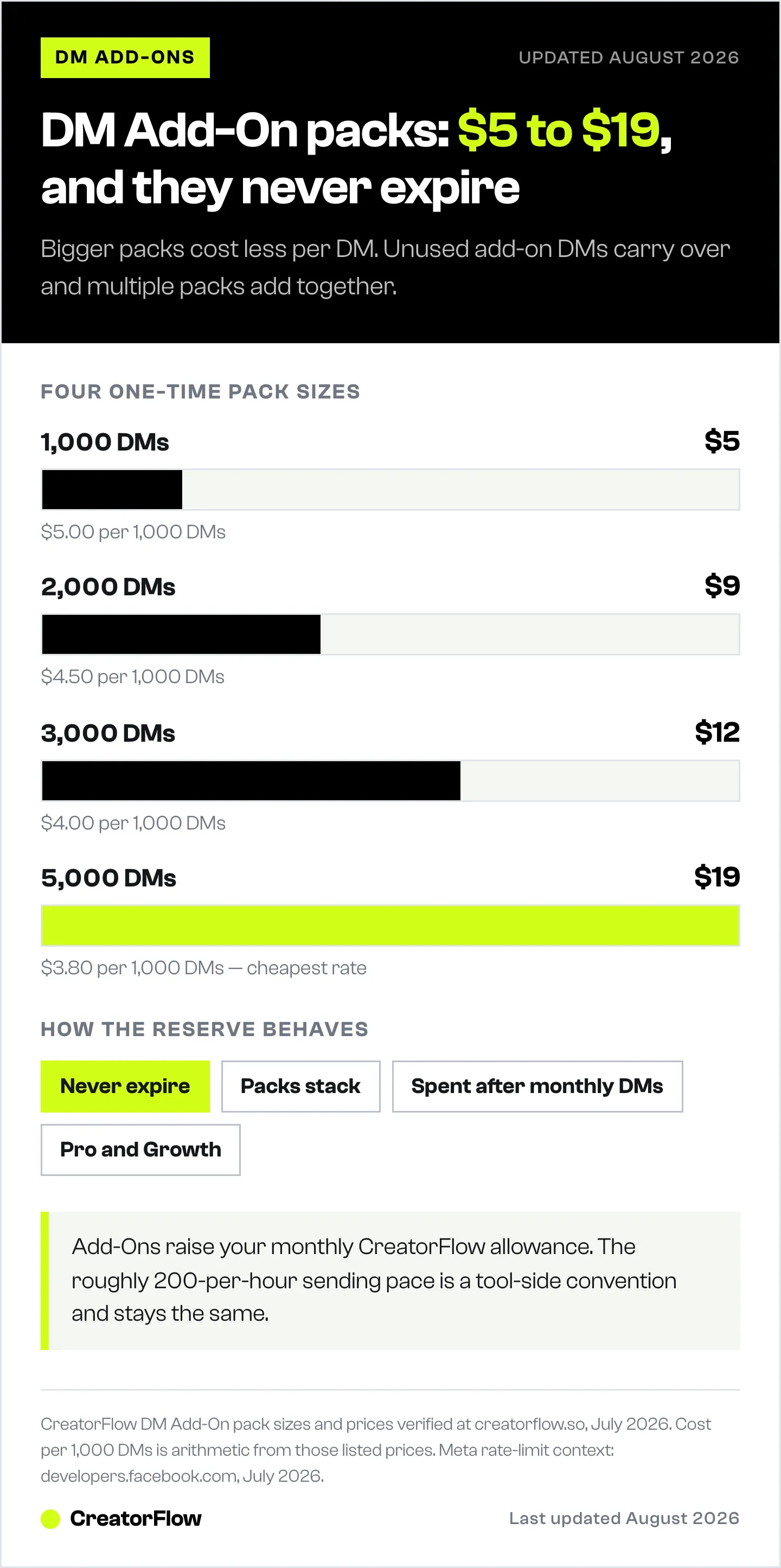
| Pack | Price | Cost per 1,000 DMs |
|---|---|---|
| 1,000 DMs | $5 | $5.00 |
| 2,000 DMs | $9 | $4.50 |
| 3,000 DMs | $12 | $4.00 |
| 5,000 DMs | $19 | $3.80 |
These are flat, one-time prices. There is no per-contact billing and no monthly commitment attached to a pack. You are paying for message capacity, not for the size of your audience, which keeps the cost predictable as you grow. For a wider view of what running automation costs across tools, see what Instagram automation costs.
How to Buy More DMs
Buying a pack takes under a minute. There are two entry points, both inside the app:
- Buy More DMs in the sidebar. This shortcut appears for Pro and Growth users and drops you straight onto the pack selection.
- Upgrade in Settings. Open Settings, find your billing and usage area, and choose a DM Add-On pack there.
Pick a pack size, confirm through the Stripe checkout, and the DMs land on your account immediately. Your monthly usage chart in Settings then shows both your plan allowance and your add-on balance so you always know how much runway you have left.
If you are on the Free plan, you will not see these options. Add-Ons require Pro or Growth. Moving up a plan is covered in the CreatorFlow Free vs Pro upgrade guide.
When Do Add-Ons Kick In?
Add-on DMs are held in reserve and used only after your monthly allowance is spent. CreatorFlow draws down your included monthly DMs first, and the moment that balance reaches zero it switches to your add-on balance automatically. You do not toggle anything and your automations never pause for the switch.
Because add-on DMs never expire, anything you do not use stays put. Buy a 5,000 pack during a launch, use 1,800 of it, and the remaining 3,200 wait on your account for the next spike. Multiple packs stack, so a 3,000 pack bought in March and a 5,000 pack bought in June give you an 8,000 reserve, all still valid.
This is the core reason add-ons exist: to keep delivery continuous. A paused automation during a viral moment is lost revenue, and topping up ahead of time removes that risk.
Add-Ons vs Upgrading Your Plan
Add-ons and plan upgrades solve different problems. An add-on is for a temporary spike. A plan upgrade is for a permanent increase in normal volume.
- Buy an add-on pack when you occasionally exceed your monthly DMs (a launch, a giveaway, one unexpectedly viral post) but your typical month fits inside your plan.
- Upgrade your plan when you consistently run out every month, or need more workspaces. Growth raises you to 10,000 DMs per workspace and adds up to 5 workspaces.
A quick rule: if you hit the cap once or twice a quarter, packs are cheaper. If you hit it every single month, the recurring value of a higher plan usually wins. The upgrade math for each feature is broken down in the Free vs Pro upgrade guide, and the Free plan’s 500 DMs guide covers the low-volume end.
Add-Ons vs Instagram’s Own Limits
This is the most common point of confusion, so it is worth being precise. There are two separate limits, and add-ons only touch one of them.
Your CreatorFlow monthly allowance is a plan quota. It resets on your billing date, and DM Add-Ons raise it. That is the limit people mean when they say they “ran out of DMs.”
Instagram’s sending pace is different. Automation tools pace sends at roughly 200 DMs per hour as a conservative safety convention to stay well under Meta’s technical rate limits. Meta’s own published limits are per-second, not per-hour: the Instagram messaging API allows on the order of 100 calls per second per professional account, and Instagram still enforces a 24-hour messaging window for replies (developers.facebook.com, July 2026). The “200 per hour” figure is a tool-side pacing choice, not a Meta-published DM cap.
Buying an add-on pack raises your monthly allowance. It does not, and cannot, speed up the hourly pace or extend the 24-hour window. If a big backlog delivers gradually rather than all at once, that pacing is why. For the full picture, read Instagram’s own daily DM limits and how the 200-per-hour pacing works.
How to Avoid Running Out in the First Place
Add-ons are the safety net, but a few habits stretch your monthly allowance so you reach for them less often:
- Automate high-performing posts, not everything. Put keyword triggers on the content that actually drives link requests instead of every post you publish.
- Use specific keywords. A precise keyword (“GUIDE”) filters genuine interest better than a broad one, so you spend DMs on people who want the link.
- Watch your usage chart. The Settings usage view shows how fast you are burning through the month. If you are at 80% by the halfway mark, buy a pack before the spike, not during it.
- Time your Rewind runs. Rewind can send hundreds of DMs in one pass, so run it when you have the headroom or a pack ready.
Do these and most months you will finish with allowance to spare. Add-ons then exist purely for the outlier weeks when something takes off.
FAQ
What happens when I run out of DMs on CreatorFlow?
If you have an add-on balance, CreatorFlow switches to it automatically and your automations keep running. If you have no add-ons and no monthly allowance left, automations pause until your billing date resets the allowance or you buy a pack. No comments or contacts are lost while paused.
Do DM Add-Ons expire?
No. Add-on DMs never expire. Any amount you do not use carries over indefinitely and stays available for future months.
Are DM Add-Ons available on the Free plan?
No. Add-Ons require the Pro or Growth plan. The Free plan stays at 500 DMs per month with no top-up option. To buy packs, upgrade to Pro.
Do add-on DMs get used before or after my monthly DMs?
After. CreatorFlow always spends your included monthly allowance first, then draws from your add-on balance once the monthly number hits zero.
How many add-on packs can I buy?
As many as you need. Packs stack, so multiple purchases add together into one reserve balance on your account.
Is buying add-ons cheaper than upgrading to Growth?
It depends on how often you exceed your limit. If you go over once or twice a quarter, packs are cheaper. If you run out every month or need more workspaces, upgrading to Growth is usually the better value.
Do DM Add-Ons change the 200-per-hour sending rate?
No. Add-Ons raise your monthly allowance only. The roughly 200-per-hour pace is a safety convention tools use to respect Instagram’s rate limits, and it stays the same no matter how many DMs you have available.
Keep Your Automations Running
CreatorFlow turns Instagram comments into delivered links, captured emails, and booked calls on autopilot. DM Add-Ons make sure that delivery never stops when your best content takes off. Explore CreatorFlow’s plans and Add-Ons.
Pricing and DM Add-On details verified from creatorflow.so as of July 2026. Instagram and Meta rate limits verified from developers.facebook.com as of July 2026. Individual results vary.


