
Migrating from ManyChat to CreatorFlow takes 20-30 minutes for most Instagram-only creators. Automations do not transfer automatically because the two tools are built differently. You export your ManyChat contacts as CSV, document your existing trigger words and DM templates, recreate each automation inside CreatorFlow’s template builder, then cancel ManyChat. Comments that came in during the switchover can be recovered using CreatorFlow Rewind, which sends DMs to eligible comments up to 7 days old.
You signed up for ManyChat two years ago because it was the default recommendation. Now you run one comment-to-DM flow on Instagram, pay $39 a month for five platforms you never touch, and spend 40 minutes every time you need to edit a keyword. CreatorFlow costs $15 a month flat, covers Instagram only, and sets up in under 5 minutes. The migration is straightforward if your use case is simple.
This guide covers who should migrate, what transfers versus what gets rebuilt, a step-by-step switching workflow, and how to recover comments that arrived during the transition window.
Key Takeaways
- Nothing transfers automatically: Automations, subscriber tags, custom fields, flow logic, and integrations stay inside ManyChat. You rebuild everything inside CreatorFlow’s template builder
- Contact export works: ManyChat allows CSV export of subscriber data from the Audience tab on paid plans, which you can import into your email tool
- Setup time: 20-30 minutes for 1-3 simple automations. Longer if you have complex ManyChat flows, since those get rebuilt as separate single-trigger automations
- Switching safety net: CreatorFlow Rewind scans past comments up to 7 days old and sends DMs to people who commented your keyword during the transition gap
- Savings at scale: At 2,500 contacts you save $288 per year. At 25,000 contacts you save $2,028 per year, because CreatorFlow uses flat-rate pricing while ManyChat scales per contact
- Not everyone should migrate: If you use multi-platform automation, advanced conditional flows, or native integrations like Shopify and Zapier, stay with ManyChat

Before You Migrate: Feature Reality Check
CreatorFlow is a simpler tool than ManyChat. That is the point, and it is also the risk. Run through this checklist before you cancel anything:
CreatorFlow covers these use cases well:
- Comment-to-DM automation on posts and Reels with keyword triggers
- Story reply automation on emoji reactions and text replies
- Keyword DM reply automation when someone messages you directly
- Email capture inside DMs using Email Gate (Pro and Growth plans)
- Follow Gate to ask for a follow before sending the link (Pro and Growth plans)
- Link tracking with geographic analytics (Pro and Growth plans)
- Multi-account management up to 5 Instagram accounts (Growth plan)
- Up to 20 keyword variations inside a single automation on a post
ManyChat stays the better fit if your workflow depends on:
- Visual flow builder with conditional branching or if/then logic
- Multi-step DM sequences or drip campaigns inside Instagram
- Facebook Messenger, WhatsApp, SMS, or email channels
- Native Shopify, Zapier, HubSpot, or CRM integrations
- A/B testing on message variations
- AI-powered conversational agents with intent detection
Welcome DMs to brand-new followers sit outside what Meta’s API allows any tool to send.
If your ManyChat setup depends on any item in that second list, keep ManyChat or pick a tool built for it. Our CreatorFlow vs ManyChat comparison covers the full breakdown.
Run Them in Parallel During Migration
If your ManyChat setup is more complex than 1-3 simple automations, run both tools side-by-side for 14 days before fully cutting over. Both tools connect to Instagram as separate Meta-approved apps with their own webhooks, so they can coexist on the same account as long as you avoid trigger overlap. Two safe routing patterns: route by post (existing posts stay on ManyChat, new posts published during the trial run through CreatorFlow only), or route by trigger type (move Comment-to-DM into CreatorFlow, leave Story replies and conditional flows in ManyChat). Trigger conflicts only happen when both tools have an active automation on the same post listening for the same keyword. Use CreatorFlow’s 14-day Pro trial as your data window: measure DMs delivered, CTR, and lead capture on equivalent content, then cancel ManyChat at day 14 once you have real performance numbers.
What Transfers and What Doesn’t
| Item | Transfers Automatically | Method |
|---|---|---|
| Subscriber contact list | No | Manual CSV export from ManyChat, used for email tool import |
| Automation flows | No | Rebuild manually inside CreatorFlow’s template builder |
| Keyword triggers | No | Document keywords in ManyChat, recreate in CreatorFlow |
| DM message templates | No | Copy message text from ManyChat flows, paste into CreatorFlow |
| Custom fields and tags | No | Export from ManyChat to your email platform, where tags and segments live |
| Analytics history | No | ManyChat analytics stay inside ManyChat. CreatorFlow starts fresh |
| Zapier and Shopify integrations | No | Hand contacts off with CreatorFlow’s CSV export into whichever platform you use |
| Instagram account connection | No | Disconnect ManyChat OAuth, connect CreatorFlow via Meta’s official flow |
Every migration path requires manual rebuilding. The payoff is a simpler system to maintain once the switch completes.
How to Migrate from ManyChat to CreatorFlow in 6 Steps
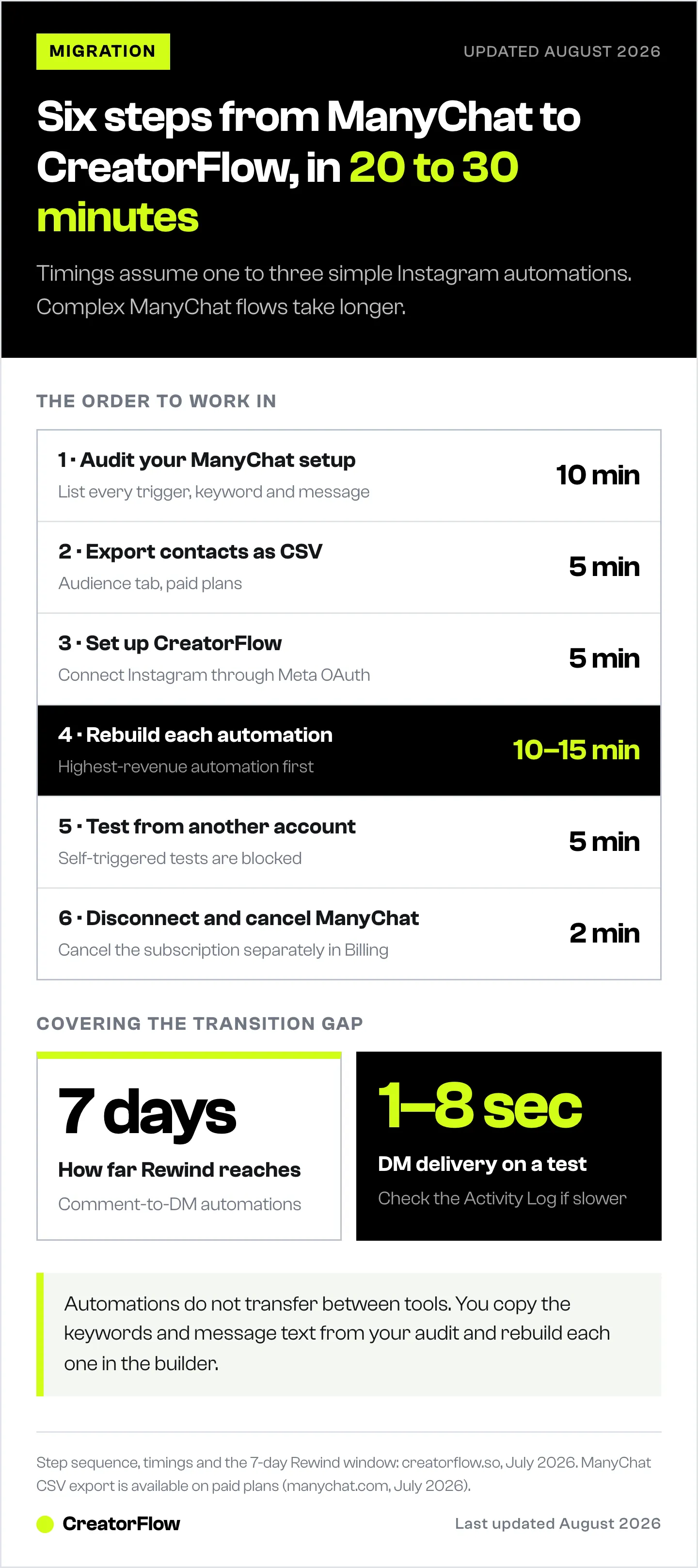
Audit every ManyChat automation and keyword (10 minutes), export your contacts as CSV (5 minutes), connect Instagram to CreatorFlow (5 minutes), rebuild each automation in the template builder (10-15 minutes), test every trigger from a second account (5 minutes), then disconnect ManyChat and cancel the subscription (2 minutes). Total: 20-30 minutes for one to three simple automations.
Step 1: Audit Your ManyChat Setup (10 minutes)
Open ManyChat and document the following in a spreadsheet or notes file:
- Every active automation including name, trigger type (comment, DM, story), and status
- Every trigger keyword you use across all flows (for example LINK, RECIPE, PRICE, JOIN)
- The exact DM message sent for each trigger including links and formatting
- Any email capture flows you’ve built, including which email platform receives the data
- Current contact count from ManyChat’s Audience tab (useful for the pricing math)
This audit shows which flows map cleanly. A visual flow with 10 conditional steps and tag-based segmentation is a ManyChat-native pattern worth keeping there. A simple “comment LINK, send affiliate URL” automation translates in 2 minutes.
Step 2: Export Your ManyChat Contacts (5 minutes)
ManyChat allows CSV export from the Audience tab on paid plans. Select all contacts, choose export, and save the file. The CSV includes Instagram handle, email address if captured, custom fields, and tags.
This CSV becomes your import source for your email platform. CreatorFlow builds its own contact list from new interactions inside the tool. Your ManyChat contact history lives wherever you send the CSV (Mailchimp, ConvertKit, Beehiiv, Loops, HubSpot, or any platform that accepts CSV imports).
Step 3: Set Up CreatorFlow (5 minutes)
Sign up at creatorflow.so. New accounts start with a 14-day Pro trial; you add a card at checkout to verify your account and are not charged until the trial ends. After it ends you drop to the Free plan with 500 DMs per month included.
Connect your Instagram Business or Creator account through Meta’s official OAuth flow. Requirements include:
- Instagram Business or Creator account (not Personal)
- A Facebook Page linked to that Instagram account
- Admin access to that Facebook Page
The OAuth flow uses Meta’s approved provider name “CreatorFlowSO-IG”. No password is shared. Tokens can be revoked from Instagram settings at any time.
Step 4: Rebuild Each Automation (10-15 minutes)
Open CreatorFlow and click New Automation. For each ManyChat automation in your audit, complete the 4-step builder:
- Choose trigger type matching your ManyChat flow (comment on post, story reply, or keyword DM reply)
- Set keywords from your audit. Up to 20 keywords per automation, case-insensitive, text-based (avoid emojis and special characters)
- Optional: configure Email Gate or Follow Gate for lead capture or follower gating (Pro and Growth plans)
- Write the DM message by copying the text from your ManyChat flow. Character limit is 1,000
Before activating, use the real-time phone preview to see exactly how the DM will render on a mobile screen. Once activated, the automation runs immediately on new matching comments.
Rebuild in order of revenue and engagement impact, not in the order ManyChat happens to list them. This way your most valuable automation is live first if you run out of time:
- Comment-to-DM automations first. Highest volume and tied directly to post engagement and lead capture.
- Story reply automations next. High intent and often tied to a live campaign.
- Welcome or keyword DM replies after that. Lower urgency, steady contact-building.
- Any qualification or multi-step flows last. Rebuild and test these thoroughly before activating, since they have the most moving parts.
Run through your full automation list before moving to Step 5. Keep both tools disconnected at this stage to avoid conflicts.
Step 5: Test Every Automation (5 minutes)
Never test from your own Instagram account. CreatorFlow blocks self-triggered automations by design to prevent accidental loops. Use a friend, a second account, or a team member.
For each rebuilt automation:
- Have the tester comment your trigger keyword on a recent post
- Confirm the DM arrives in 1-8 seconds
- Verify links, Email Gate prompts, and Follow Gate prompts work
- Check that the public reply (if enabled) posts correctly
If any test fails, check the Activity Log inside CreatorFlow Analytics. It shows the last 50 DM events with status, trigger source, and failure reason. Most failures come from keyword mismatches, messaging window expiry, or testing from the account owner. The automation troubleshooting guide covers specific errors.
Step 6: Disconnect ManyChat (2 minutes)
Once all CreatorFlow automations are tested and live:
- Open ManyChat Settings > Integrations
- Disconnect your Instagram account from ManyChat
- Go to Settings > Billing
- Cancel your subscription
ManyChat automations stop immediately when you disconnect Instagram. Subscription cancellation prevents future charges. Your CSV export from Step 2 preserves subscriber data outside ManyChat’s platform.
Do not run ManyChat and CreatorFlow on the same Instagram account simultaneously. Both tools would trigger on the same comment, causing duplicate DMs, rate limit issues, and confused contacts.
Use CreatorFlow Rewind to Catch the Transition Gap
Between disconnecting ManyChat and activating CreatorFlow automations, a window opens where new comments arrive but neither tool responds. On a high-traffic Reel, that window can mean hundreds of missed comments.
CreatorFlow Rewind solves this by scanning past comments on your posts and sending DMs to anyone who commented your keyword but never received a message. Comments up to 7 days old qualify.
How to use Rewind after migration:
- Complete Steps 1-6 above
- Open the Rewind page from the CreatorFlow sidebar
- Select the automation you want to run Rewind on
- Rewind scans matching comments on eligible posts from the last 7 days
- Review the count of eligible comments and confirm
- Rewind sends DMs to every missed user
Rewind includes built-in deduplication, so anyone who already received a DM during the ManyChat era gets skipped automatically. You can run Rewind multiple times after adding new keywords or fixing typos.
One caveat: Rewind-sent DMs count toward your monthly DM limit. If you have 500 missed comments and you’re on the Free plan (500 DMs per month), you may need to upgrade to Pro for the catch-up run.
Rewind covers comment-to-DM automations, where Meta’s 7-day comment window leaves room for recovery. Story replies and keyword DM replies run on Meta’s 24-hour messaging window instead.
Post-Migration Checklist
Run through this list in the first 48 hours after switching:
- DM delivery speed is 1-8 seconds on test comments
- All migrated automations show as Active in the dashboard
- Keyword coverage matches your ManyChat audit (no missed triggers)
- Email Gate and Follow Gate prompts render correctly on mobile
- Link tracking is capturing clicks in Analytics
- Activity Log shows no repeat failures on specific keywords
- CSV export from ManyChat is imported into your email tool
- ManyChat Instagram integration is fully disconnected
- ManyChat subscription is canceled and billing confirmed
- Rewind has been run for automations where transition comments were missed
If any item fails, check the CreatorFlow help center for troubleshooting by feature area.
Who Should Not Migrate
CreatorFlow replaces ManyChat cleanly for creators running simple Instagram automations. ManyChat stays the better fit for these use cases:
- Multi-platform automation: Instagram plus Facebook Messenger plus WhatsApp plus SMS in one dashboard. CreatorFlow is Instagram only. If you use two or more Meta platforms today, ManyChat or Chatfuel stay the better fit
- Advanced conditional flows: If-then branching with 10+ decision points, quick reply buttons that route to different sub-flows, or tag-based segmentation driving message variations. ManyChat’s visual builder is built for exactly that
- Agency managing 20+ accounts: ManyChat’s Advanced tier covers 25,000 contacts and is built for large rosters (manychat.com/pricing, July 2026). CreatorFlow’s Growth plan covers 5 workspaces, with an application-based agency program above that
- Native CRM or e-commerce integrations: Native Shopify, Zapier, HubSpot, Klaviyo, or Salesforce connections. CreatorFlow hands contacts off by CSV export
- AI-powered conversational agents: ManyChat’s AI add-on and tools like Inro offer multi-turn conversational agents with intent detection. CreatorFlow’s automations are template-based
Honest summary: If your ManyChat dashboard has eight tabs open and your flows contain conditional logic, stay with ManyChat. If your dashboard has one tab open and your flows are three steps long, CreatorFlow feels correct. Match the tool to the actual workload.
For a side-by-side comparison of alternatives, see Best ManyChat Alternative for Instagram-Only Creators.
Pricing Comparison: ManyChat vs CreatorFlow at Scale
ManyChat’s per-contact pricing (manychat.com/pricing, July 2026) versus CreatorFlow’s flat rate (creatorflow.so, July 2026). ManyChat figures below are the monthly-billed prices; billed annually they come down to $14, $29, $69, and $139 per month.
| Audience Size | ManyChat Monthly | CreatorFlow Monthly | Annual Difference |
|---|---|---|---|
| 250 contacts | $17 (Essential) | $15 (Pro) | $24 |
| 2,500 contacts | $39 (Pro) | $15 (Pro) | $288 |
| 7,500 contacts | $99 (Business) | $15 (Pro) | $1,008 |
| 25,000 contacts | $199 (Advanced) | $30 (Growth) | $2,028 |
At every published tier, CreatorFlow’s flat rate costs less, and the gap widens as your audience grows. On ManyChat the bill moves up each time your contact count crosses a tier. On CreatorFlow, the bill stays flat.
We keep a side-by-side page on this: CreatorFlow vs ManyChat.
FAQ
Is it safe to switch from ManyChat to CreatorFlow?
Yes. Both tools use Meta’s official Instagram Graph API with OAuth authentication. Switching involves disconnecting one OAuth token and authorizing another through Instagram’s standard flow. No password sharing, no browser automation, and no risk to your Instagram account status. CreatorFlow is a Meta Tech Provider (since December 2025).
Will I lose my ManyChat subscribers if I cancel?
Your subscriber data stays inside ManyChat until you cancel. Before canceling, export the full subscriber list as CSV from ManyChat’s Audience tab (available on paid plans). The CSV includes Instagram handles, email addresses, custom fields, and tags. Import that CSV into your email platform (Mailchimp, ConvertKit, Beehiiv, Loops, HubSpot, or similar) to preserve the contact history. CreatorFlow builds its own contact list from new interactions inside the tool.
How long does the migration take?
Most creators complete the migration in 20-30 minutes for 1-3 simple automations. The breakdown: 10 minutes auditing ManyChat, 5 minutes exporting contacts, 5 minutes setting up CreatorFlow, 10-15 minutes rebuilding automations, 5 minutes testing, 2 minutes disconnecting ManyChat. Complex ManyChat setups with conditional logic take longer because those flows cannot be recreated directly.
Can I run ManyChat and CreatorFlow on the same Instagram account?
Not recommended. Both tools would respond to the same trigger words, causing duplicate DMs and potential rate-limit issues (tools share the same ~200 DMs/hour pacing budget per account). Disconnect ManyChat before activating CreatorFlow, or vice versa. Running them sequentially with a brief transition gap works. Running them simultaneously creates conflicts.
What about comments that came in during the transition gap?
Use CreatorFlow Rewind after migration completes. Rewind scans past comments up to 7 days old on your posts, identifies anyone who commented your keyword but never received a DM, and sends the DMs retroactively. It includes automatic deduplication so users who received DMs through ManyChat get skipped. Rewind works on comment-to-DM automations only, not story replies or keyword DM replies.
How does CreatorFlow’s automation builder work?
CreatorFlow uses a template-based system with a 4-step builder: pick trigger type, set keywords, configure optional gates, write the DM. Longer journeys get built as separate automations on separate triggers. For simple use cases this is faster to set up. ManyChat’s visual builder is the better fit when you want conditional branching, quick reply routing, and A/B testing on one canvas.
What happens to my ManyChat billing after I disconnect Instagram?
Disconnecting Instagram from ManyChat stops automations but does not cancel billing. You need to go to Settings > Billing inside ManyChat and cancel the subscription separately. ManyChat typically prorates the remaining period or honors the current billing cycle depending on plan. Confirm cancellation via the email receipt from ManyChat.
What support do I get during the migration?
The migration workflow is designed to be self-serve in 20-30 minutes. For specific issues, email info@creatorflow.so (included on all plans) or use priority support on the Growth plan.
Pricing verified from manychat.com/pricing and creatorflow.so (April 2026). CreatorFlow is a Meta Tech Provider. Both tools use Meta’s official Instagram Graph API with OAuth authentication.


