
CreatorFlow Rewind retroactively sends DMs to missed comments on your Instagram posts and Reels. It scans past comments that match an existing automation’s keywords and sends DMs to users who never received one. Comments up to 7 days old are eligible. You pick an automation, Rewind scans for matching comments, and sends DMs to everyone who was missed. DMs sent via Rewind count toward your monthly DM limit.
You published a Reel three days ago. It picked up 200 comments with your trigger word. But the automation wasn’t linked to that post. Or you had a typo in your keyword. Or you just switched from ManyChat and those comments came in before CreatorFlow was connected. Those 200 people asked for your link and never got it. That engagement is gone.
Until now. Rewind goes back through your post comments and recovers every missed opportunity within the last 7 days. No manual copy-paste. No scrolling through hundreds of comments. Select the automation, let Rewind scan, and watch the DMs go out.
Rewind’s catch-up runs got more dependable in our May 2026 update, which shipped reliability fixes across DM automations and Rewind.
Key Takeaways
- Rewind sends DMs to past comments you missed - scans comments matching your automation keywords and sends DMs to users who never received one
- 7-day window - only comments from the last 7 days are eligible for Rewind
- Works with any comment-to-DM automation - select from active or paused automations; Rewind is built around public post and Reel comments
- Built-in deduplication - users who already received a DM are automatically skipped, so nobody gets double-messaged
- Run it multiple times - useful after adding new keywords to an existing automation or fixing a keyword typo
- Rewind History tracks everything - see eligible comments found, DMs sent, failures, and skipped users for each run
- DMs count toward your monthly limit - Rewind uses the same DM quota as regular automations

When You Need Rewind
Rewind solves five specific problems that every creator runs into at some point.
Switching from Another Tool
You used ManyChat, LinkDM, or Instachamp before CreatorFlow. Comments came in during the transition. Those users commented your keyword, expected a DM, and got nothing. Rewind scans those posts and sends the DMs through your new CreatorFlow automation.
For a breakdown of how CreatorFlow compares to other tools, see our DM automation tool comparison.
Forgot to Link a Post
You published a Reel with “Comment LINK for the guide” in the caption. But you forgot to create the automation first. Or you created the automation but linked it to the wrong post. By the time you noticed, 50 comments were sitting there unanswered. Rewind catches them.
Keyword Typo Recovery
Your automation triggers on “RECIPE” but you accidentally set it to “RECIP” without the E. You fixed it two days later. Every comment with “RECIPE” during those two days went unanswered. Rewind picks them up with the corrected keyword.
Downtime Recovery
Meta’s API had an outage. Or CreatorFlow had scheduled maintenance. Comments came in during that window and automations couldn’t fire. Once things are back online, Rewind fills the gap.
New User Catch-Up
You signed up for CreatorFlow and connected your account. Your recent posts already have hundreds of comments with trigger words from the past week. Instead of starting from zero, Rewind recovers engagement from posts published before you joined.
How CreatorFlow Rewind Works
CreatorFlow Rewind follows a 4-step process, all of it inside the Rewind page in the left sidebar of your dashboard. You pick a comment-to-DM automation, Rewind scans that post’s past comments for your keywords, it sends DMs to everyone eligible, and it writes the result to Rewind History. Comments from the last 7 days qualify, and anyone who already received a DM is skipped.
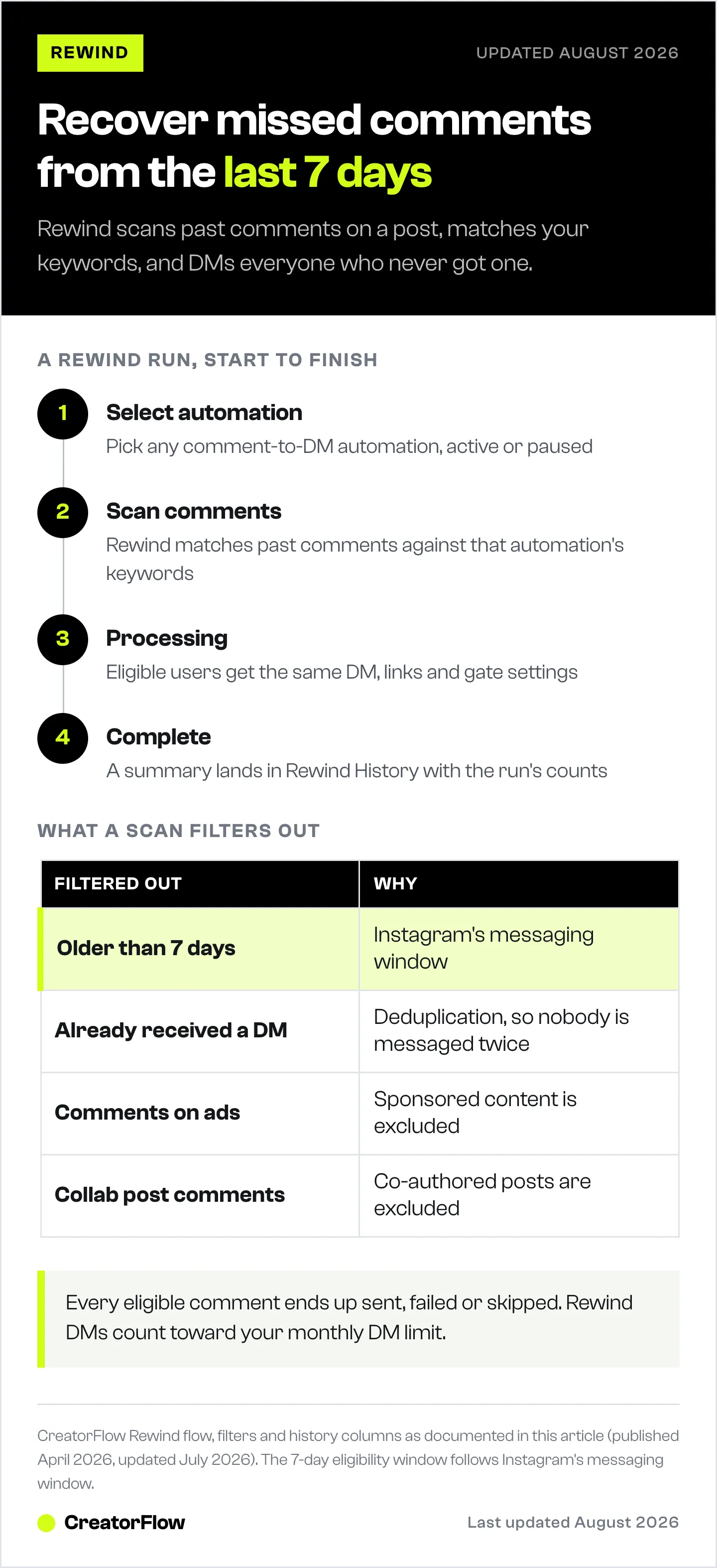
Step 1: Select Automation
You see all your comment-to-DM automations displayed as cards. Each card shows the post thumbnail, “Comments -> DM” label, keywords, DM preview text, and a status badge (Active or Paused).
Only comment-to-DM automations appear here. Rewind’s job is recovering public comments on posts and Reels, which is a trigger type that stays readable after the fact. Stories expire, and keyword DMs fire on incoming messages rather than public comments.
If you have more than 10 automations, click “Load 10 more” to see the rest.
Step 2: Scan Comments
After selecting an automation, Rewind scans past comments on the linked post. It matches comments against the automation’s keywords and filters out ineligible ones.
Comments that get filtered out:
| Filter | Reason |
|---|---|
| Older than 7 days | Instagram’s API messaging window restriction |
| Already received a DM | Deduplication prevents double-messaging |
| Comments on ads | Sponsored content is excluded |
| Collab post comments | Co-authored posts are excluded |
Step 3: Processing
Rewind sends DMs to all eligible users. Each DM uses the same message template from your selected automation. The same content, the same links, the same Email Gate settings (if enabled).
DMs sent during this step count toward your monthly DM limit, and they respect the ~200 DMs per hour pacing convention most tools enforce.
Step 4: Complete
You get a summary showing how many DMs were sent. The results also appear in the Rewind History table at the bottom of the page.
Reading Rewind History
Every Rewind run creates a row in the Rewind History table. Here is what each column means:
| Column | What It Shows |
|---|---|
| Status | Whether the Rewind completed successfully |
| Post | The Instagram post ID that was scanned |
| Eligible | Number of comments that matched your keywords and passed all filters |
| Sent | DMs that were delivered successfully |
| Failed | DMs that encountered an error during delivery |
| Skipped | Users who already received a DM (deduplication in action) |
| Date | When the Rewind was run |
How to read the numbers:
- Eligible = Sent + Failed + Skipped. Every eligible comment results in one of three outcomes.
- High Skipped count is normal if you’re running Rewind on a post where the automation was already active for part of the time. Those users got their DM through the regular automation.
- Failed count should be zero in most cases. If you see failures, it usually means Instagram’s API rate limit was hit or there was a temporary connectivity issue. Running Rewind again will retry failed users.
- Use the refresh button (top-right of the table) to update results while a Rewind is processing.
Rewind Constraints
Before running Rewind, keep these rules in mind:
What Rewind works with:
- Comment-to-DM automations (both active and paused)
- Comments up to 7 days old
- Multiple runs on the same post (safe to repeat)
Outside Rewind’s scope:
- Story reply automations
- Keyword DM reply automations
- Comments older than 7 days
- Comments on ads or sponsored posts
- Comments on collab/co-authored posts
Resource usage:
- DMs sent via Rewind count toward your monthly DM limit
- The ~200 DMs/hour pacing convention most tools enforce applies
- Running Rewind does not affect your regular automation performance
Practical Workflows
Migration Workflow (ManyChat/LinkDM to CreatorFlow)
- Set up your comment-to-DM automations in CreatorFlow with the same keywords you used in your previous tool
- Disconnect your old tool
- Go to Rewind and select each automation
- Run Rewind on each one to catch comments from the transition period
- Check Rewind History to confirm DMs were sent
This recovers up to 7 days of engagement that would otherwise be lost during the switch.
Keyword Fix Workflow
- Notice your automation has the wrong keyword (e.g., “RECIP” instead of “RECIPE”)
- Fix the keyword in your automation settings
- Go to Rewind and select that automation
- Run Rewind to catch all comments with the corrected keyword
- Run it again if you added more keyword variations
Weekly Audit Workflow
- Check your CreatorFlow Insights for automations with lower-than-expected DM counts
- Cross-reference with post engagement (lots of comments but few DMs = missed comments)
- Run Rewind on those automations to recover any missed engagement
- Review Rewind History to quantify how many DMs were recovered
FAQ
Can Rewind send DMs to comments older than 7 days?
No. Instagram’s API enforces a messaging window that limits automated messages to users who interacted within the last 7 days. Comments older than that are not eligible for Rewind.
Will Rewind send duplicate DMs to people who already got one?
No. Rewind automatically checks whether a user already received a DM from that automation. If they did, they are skipped. The Skipped column in Rewind History shows how many users were deduplicated.
Which automations can I rewind?
Comment-to-DM automations, active or paused. Rewind reads public comments on posts and Reels, so that is the trigger type it recovers. Story replies and keyword DMs run on their own live automations with different trigger types.
Do Rewind DMs count toward my monthly limit?
Yes. Every DM sent through Rewind counts toward your monthly DM quota, the same as regular automation DMs. Check your current usage in the CreatorFlow dashboard before running a large Rewind.
Can I run Rewind multiple times on the same post?
Yes. This is useful when you add new keywords to an existing automation. Rewind will find comments matching the new keywords while skipping users who already received a DM from a previous run.
What happens if Rewind shows failed DMs?
Failed DMs are usually caused by Instagram’s API rate limit being reached or a temporary connectivity issue. Run Rewind again after a few minutes. It will retry failed users while skipping users who were successfully sent a DM.
Is Rewind available on the Free plan?
Rewind is available on all CreatorFlow plans, including Free ($0/month with 500 DMs), Pro ($15/month with 5,000 DMs), and Growth ($30/month with 10,000 DMs). DMs sent through Rewind count against your plan’s monthly DM limit.


