
CreatorFlow shipped six features between January and April 2026 that creators kept asking for: Rewind for recovering missed DMs from past comments, DM Add-Ons for buying extra messages without changing plans, three new paid plans (Free, Pro, Growth), Email Gate inside DMs, link tracking with geographic insights, and a 13-language help center with video walkthroughs. Every one of them came from a specific complaint we kept hearing in support tickets.
The pattern across all six is the same. Someone hit a wall (limit ran out mid-launch, automation was set up too late, no way to learn the product without a 1:1 onboarding call) and asked for the fix. We built the fix. This post walks through each one, what it solves, and where to find it inside the app.
Key Takeaways
- Rewind sends DMs to people who commented before your automation was active. 7-day window, comment-to-DM only, available on every plan.
- DM Add-Ons are one-time DM packs that never expire and kick in automatically when your monthly limit runs out. Pro and Growth only.
- Three paid plans went live April 1, 2026: Free ($0, 500 DMs), Pro ($15/mo, 5,000 DMs, 2 workspaces), Growth ($30/mo, 10,000 DMs, 5 workspaces, 5 team members).
- Email Gate collects emails inside DMs before sending your link, so you build a list while running affiliate or product flows. Pro feature.
- Link tracking + geographic insights show per-link clicks plus country and city breakdowns, so you can see which posts drive real traffic and where it’s coming from.
- Help center in 13 languages at creatorflow.so/help with video walkthroughs covers setup, automations, billing, and the most common errors.

New CreatorFlow Features in 2026
Six features shipped between January and April 2026. Rewind and basic click counts work on every plan, including Free. Email Gate, geographic insights, and DM Add-On packs sit on Pro and Growth. The three plans went live on April 1: Free at $0 with 500 DMs a month, Pro at $15 with 5,000 per workspace, Growth at $30 with 10,000. The help center at creatorflow.so/help covers all of it in 13 languages.
Rewind: For When You Forgot to Add the Link
Rewind retroactively sends DMs to people who commented before the automation was running. It scans past comments on a linked post, matches them against the automation’s keywords, and sends DMs to the matched commenters who haven’t been DMed via Rewind yet.
The complaint we kept hearing: “I posted the Reel, forgot to set up the automation, and now 200 people are sitting there wondering why I never sent the link.”
What it does: Pick any comment-to-DM automation (active or paused) from the Rewind page. Rewind scans the linked post for matching comments from the last 7 days, filters out anyone already DMed, and sends. Built-in deduplication means nobody on the matched list gets double-messaged. DMs sent through Rewind count toward your monthly DM limit and the ~200 DMs/hour pacing convention most tools enforce.
Where to find it: Sidebar, between Contacts and Analytics.
Rewind works for tool migrations (you switched from another platform mid-week), keyword typos (you fixed the spelling two days late), forgotten setups, and downtime recovery. It runs on comment-to-DM automations, which is where the backlog of missed link requests builds up. Full breakdown in the Rewind guide.
DM Add-Ons: For When You Hit the Limit Mid-Launch
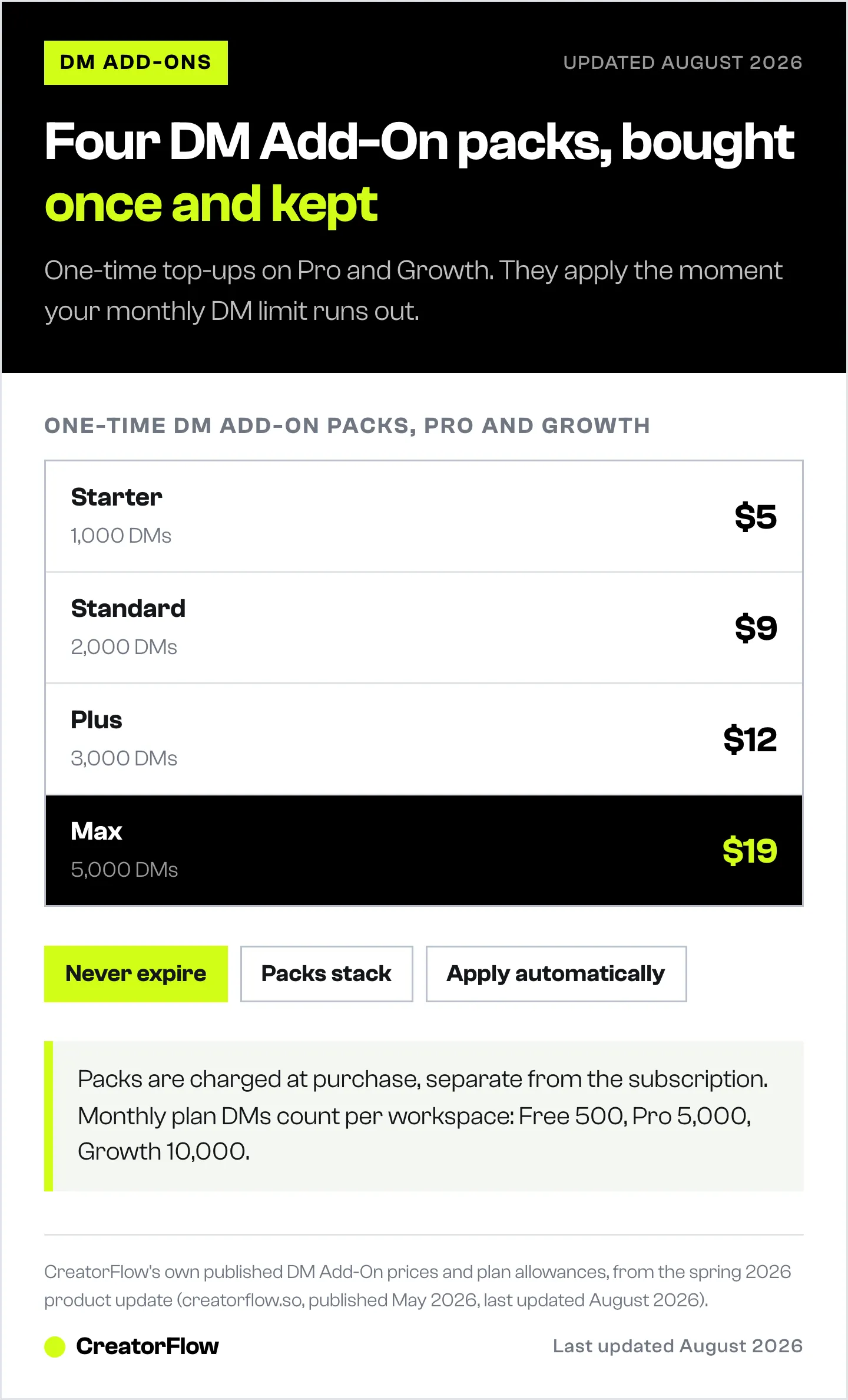
DM Add-Ons are extra DM packs you buy on top of your plan. One purchase, no subscription change. They never expire, they stack, and they kick in the moment your monthly limit runs out. No manual switch, no upgrade flow, no interrupted automations.
The complaint we kept hearing: “I’m in the middle of a launch, my Reel went viral, I hit the 5,000 DM cap, and my automation just stopped.”
What it does: Pro and Growth users can buy any of four packs as a one-time purchase. Buy once, use whenever. If your monthly limit resets before you’ve burned through the pack, the leftover DMs stay in your account permanently. Multiple packs combine.
| Pack | DMs | Price |
|---|---|---|
| Starter | 1,000 | $5 |
| Standard | 2,000 | $9 |
| Plus | 3,000 | $12 |
| Max | 5,000 | $19 |
Where to find it: Click Buy More DMs in the sidebar, just below your monthly DM usage counter. Or open Settings, click Upgrade, and pick a pack. Settings also shows a monthly usage breakdown so you can see how fast you’re burning through your limit.
Plan eligibility: Pro and Growth only. Free plan users need to upgrade before buying packs. The 14-day free trial applies to the Pro and Growth subscriptions themselves. Top-up packs are bought separately and charged at purchase.
New Paid Plans: For Making This Sustainable
From January through April 2026, CreatorFlow was free for everyone while we built it out. On April 1 the paid plans went live. Existing users got free Pro through April 20, then auto-transitioned to Free if they didn’t upgrade. No data was deleted on the transition. Paused automations stayed paused, ready to resume on upgrade.
The complaint we kept hearing: “I love this. How do I pay you so you don’t disappear?”
What it does: Three plans, no contracts, no setup fees, cancel anytime.
- Free: $0, 500 DMs/month, 1 workspace, unlimited automations, comment-to-DM, story reply, keyword reply, link tracking. Permanent.
- Pro: $15/month or $144/year (saves about 20%). 5,000 DMs/month per workspace, 2 workspaces, Follow Gate, Email Gate, CSV export, geographic analytics.
- Growth: $30/month or $288/year. 10,000 DMs/month per workspace, 5 workspaces, 5 team members, priority email support.
DMs are counted per workspace, not per account. Hit your limit and either wait for next month, upgrade, or buy a DM Add-On pack (Pro and Growth only). Side-by-side breakdown in the Free vs Pro upgrade guide.
Email Gate: For Building a List Inside Instagram DMs
Email Gate asks for an email address before sending the user your link. It runs inside the DM conversation, so users never leave Instagram. The email lands in your Contacts page, ready to export to whatever email tool you use.
The complaint we kept hearing: “Instagram is rented audience. I need to own my list, but I can’t get people to leave the app to sign up.”
What it does: Toggle Email Gate on in Step 3 of the automation builder. The automation sends a short message asking for an email, the user replies, the email gets captured to Contacts, and then your final DM with the link goes out. CSV export is one click from Contacts. No third-party form, no extra step for the user.
Where to find it: Step 3 of any automation, right under Follow Gate. Pro feature. Email Gate and Follow Gate are mutually exclusive on a single automation, so pick one or the other.
Setup walkthrough and template ideas in the Email Gate guide.
Link Tracking and Geographic Insights: For Knowing What Actually Worked
Every link CreatorFlow sends is trackable. The Insights page shows clicks per automation, click-through rate against DMs sent, and a geographic breakdown by country and city.
The complaint we kept hearing: “I send hundreds of DMs a week. I have no idea which posts actually drive clicks or where my real audience is.”
What it does: Each automation gets its own click counter and CTR. Drop into Analytics > Overview to see top-performing automations sorted by clicks, link tracking on every button you add to a final DM (up to 3 per DM), and a geographic dashboard that breaks down clicks by country and city. The geo data is useful for affiliate creators figuring out where their commission is converting, and for coaches deciding which timezones to schedule launches in.
Where to find it: Analytics in the sidebar. Geographic data is a Pro feature. Basic click counts are on every plan.
Full setup and reading-the-data guide in the Insights walkthrough.
Help Center in 13 Languages: For Self-Serve Answers
A full help center at creatorflow.so/help with step-by-step guides, screenshots, and a built-in video course. Translated into 13 languages with the workspace language picker syncing across the app.
The complaint we kept hearing: “I’d love to figure this out without booking a call. Where are the tutorials?”
What it does: Browseable knowledge base covering setup, every automation type, billing, common errors, and migration from other tools. Search built in. The video course walks through the full workflow from connecting Instagram to running your first launch. The app itself runs in English, Portuguese, and Spanish (more languages on the help center side), switchable from the workspace dropdown.
Where to find it: creatorflow.so/help, or click Help in the bottom-left of the app sidebar.
The full breakdown is in the help center launch post.
FAQ
Are DM Add-Ons a subscription or a one-time purchase?
One-time. You buy a pack, the DMs sit in your account, and they kick in automatically when your monthly limit runs out. No recurring charge, no auto-renewal.
Do DM Add-Ons expire?
No. Pack DMs stay in your account until you use them. If your monthly plan resets before you’ve used the pack, the leftover DMs roll into the next month and beyond.
Can Free plan users buy DM Add-Ons?
Not yet. DM Add-Ons are available on Pro and Growth only. Free users hitting the 500 DM monthly cap need to upgrade to Pro or Growth first.
Will Rewind re-send DMs to people I already contacted?
No. Rewind has built-in deduplication. Anyone who already received a DM from your automation, or from a previous Rewind run on the same automation, is automatically skipped.
What happened to the features I had during the free period?
Nothing was deleted. Existing users (anyone who signed up before April 7, 2026) got free Pro access through April 20, 2026. After that, accounts that didn’t upgrade transitioned to Free. Pro-feature automations like Follow Gate and Email Gate are paused, not deleted. Upgrade and they resume instantly.
Where do I see how many DMs I’ve used this month?
Two places: the sidebar shows a usage counter under your workspace name, and Settings shows a full monthly breakdown chart. The Buy More DMs link sits right under the sidebar counter for fast top-ups.
What’s Next
Every feature on this list came from somewhere specific: a Reddit thread, a support ticket, a Discord message, a one-off email. If there’s something you wish CreatorFlow did, send it to hello@creatorflow.so. Half the things in this post started exactly that way. That feedback loop has been the model since day one; the story of why we built CreatorFlow explains where it started.
The work kept going after April. Our May 2026 update surfaced your latest posts and reels for one-click automation setup, simplified the New Automation window, and fixed bugs across DM flows and Rewind.
For setup walkthroughs and troubleshooting, the help center is the fastest path. For deeper guides on each feature, the rest of the CreatorFlow blog covers comparisons, use cases, and creator playbooks.


