CreatorFlow is an Instagram DM automation tool built around five things a food creator uses every week: comment-to-DM automations, an email gate that captures subscribers inside the DM, Rewind for missed comments, geographic analytics, and multiple workspaces. Everything runs on Meta’s official Instagram API, sets up in about five minutes, and is template-first, so you point and click instead of building flowcharts (creatorflow.so, June 2026).
You post a recipe Reel, it does well, and 200 people comment “recipe.” Most tools make you build a branching flow to answer them. CreatorFlow shows you the post, you pick a keyword, you write one message, and you are live before the next post goes up. The short walkthrough below shows how little there is to learn.
This is a visual walkthrough of the features food creators reach for most, what each one does, and why it matters for recipe content. For the underlying mechanics, pair it with our comment-for-recipe setup guide.
Key Takeaways
- Template-first setup. You pick a post, set a keyword, and write one message. No flow builder, no branching diagrams, live in about five minutes (creatorflow.so, June 2026).
- Email gate built in. Followers can save a recipe to their inbox inside the DM, so every link request can become a subscriber, exported to CSV when you want it.
- Rewind recovers missed comments. Turn on an automation and retroactively send DMs to people who commented your keyword before you set it up.
- Geographic analytics. See which countries and cities your clicks come from, useful for seasonal recipes and brand-deal pitches.
- Multiple workspaces. Run more than one Instagram account from one login (2 on Pro, 5 on Growth).
- Flat pricing. Free to start (500 DMs/month), then $15/month Pro, the same whether you have 5,000 followers or 500,000.
The Home Dashboard: Your Posts, One-Tap Automations
The home screen lists your recent Instagram posts and Reels with an automation status on each one. You see what is live, what is paused, and a performance snapshot up top: DMs sent, link clicks, leads collected, and total followers over the last seven days. There is one green button you use most, New Automation.

For a food creator, this is the whole point. You do not log in to manage a system. You log in, see your latest recipe Reel, and attach a keyword to it in a few taps. The visual layout mirrors your Instagram grid, so the post you want is the post you click. That is the easy-to-use, visual approach CreatorFlow is built around, and it is the biggest day-to-day difference from tools that open to a blank flow canvas. You can watch the full flow in the video above.
Templates sit one click away. Instead of writing every DM from scratch, you start from a pre-built message for recipe links, product links, or newsletter signups, then change the wording to sound like you. See the full Instagram automation workflow for food bloggers for how creators structure these.
Contacts and the Email Gate: Turn Link Requests Into Subscribers
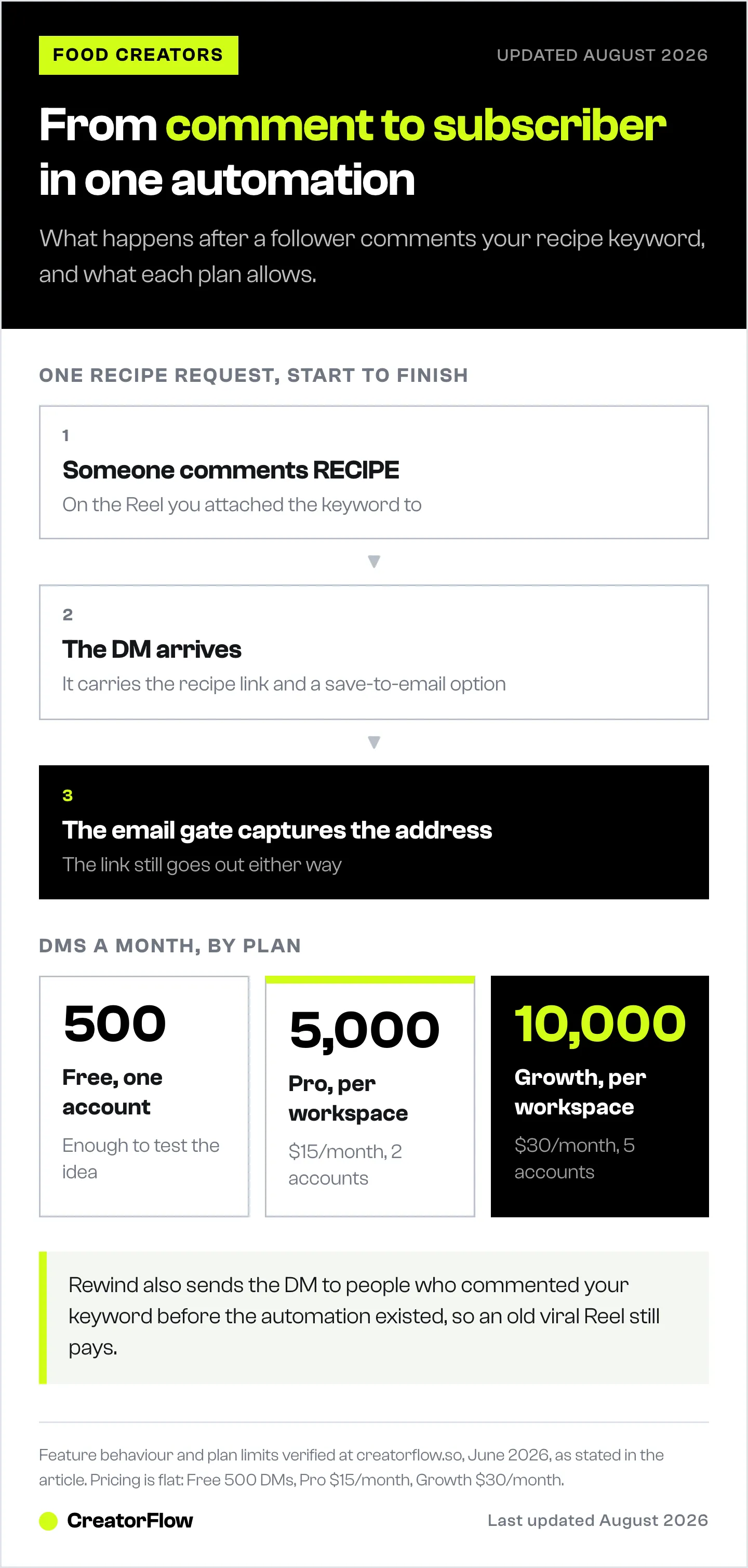
Every time someone asks for a recipe, that is a person who wants to hear from you again. The email gate captures that. When a follower comments your keyword, the DM offers the recipe link plus an option to save it to their email. If they tap it, CreatorFlow captures the address inside the conversation and still delivers the link.
The Contacts page is where those leads land. You see total contacts, how many came with an email, who is active, and the source of each one. The Export to CSV button hands the list to whatever newsletter tool you use, so the audience you build on Instagram becomes an audience you own. That matters more every year as search and social reach get harder to predict. Our guide on how to collect emails through Instagram DMs breaks the flow down step by step.
For recipe creators, the email list is the asset. A weekly newsletter brings readers back to your blog on a schedule the algorithm cannot touch, and it is the first thing brand partners ask about.
Rewind: Recover the Comments You Missed
Here is a feature most tools do not have. You post a Reel, it goes viral overnight, and a thousand people comment “recipe” before you ever set up an automation. Normally those are lost. Rewind goes back and sends the DM to everyone who already commented your keyword.
You pick a comment-to-DM automation, CreatorFlow scans the post’s comments, processes the matches, and sends. For a food creator who posts first and thinks about systems later, this recovers traffic and subscribers that would otherwise sit dead in an old post. It also means a recipe that resurfaces months later keeps working for you. We cover the mechanics in the Rewind feature guide.
Analytics: See Where Your Recipes Land
CreatorFlow’s analytics show engagement trends and geographic distribution. The trend view plots DMs sent and link clicks by hour and day over the last week, so you can see when your audience acts. The geographic view ranks the top countries and cities behind your clicks.

Why a food creator cares: timing and location change what you post. If most of your clicks come from a few US cities at 6pm, that is your dinner-recipe window. If a brand wants to know where your buyers are before signing a deal, this is the report that answers it. Knowing the city behind a click also helps with seasonal content, since a summer-grilling recipe lands differently across regions.
Multiple Workspaces: Run More Than One Account
Plenty of food creators run a main account plus a niche one, a recipe page and a meal-prep page, or manage a client’s account alongside their own. CreatorFlow handles that with workspaces. You switch accounts from one login instead of juggling separate tools.
Pro includes 2 workspaces and Growth includes 5, with team members on Growth so a VA or partner can help run automations (creatorflow.so, June 2026). DMs are counted per workspace, so each account gets its own allowance. For creators scaling past one page, this keeps everything under a single, simple dashboard.
CreatorFlow Features at a Glance
| Feature | What it does | Why food creators use it |
|---|---|---|
| Comment-to-DM | Sends a DM when a follower comments your keyword | Delivers recipe links the moment someone asks |
| Story reply automation | Auto-replies to Story replies | Turns “want the recipe?” Story prompts into links |
| Keyword triggers | Different keywords send different messages | One post can offer a recipe, a tool list, or a newsletter |
| Email gate | Captures emails inside the DM | Builds a recipe newsletter you own |
| Follow gate | Asks for a follow before the link | Converts commenters into followers |
| CSV export | Exports your contacts | Moves leads into Kit, Mailchimp, or Beehiiv |
| Rewind | DMs people who commented before setup | Recovers traffic from viral or older posts |
| Geographic analytics | Clicks by country and city | Times recipes and supports brand pitches |
| Multiple workspaces | Runs 2 to 5 accounts | Manages a recipe page plus a side account |
All features verified at creatorflow.so, June 2026.
How to Get Started in About Five Minutes
- Create a free account and connect your Instagram Business or Creator account through Instagram’s official login. No password sharing.
- Pick your most popular recipe post or Reel from the home dashboard.
- Set a simple keyword like RECIPE, and start from a template message.
- Turn on the email gate so the DM offers a save-to-email option.
- Test it from a friend’s account, then leave it running.
The free plan covers 500 DMs a month on one account, which is enough to see whether comment-to-DM moves traffic before you pay anything. You can watch the whole flow on the CreatorFlow Instagram account, and compare it against other options in our best Instagram DM tools for food bloggers guide.
Check the layout before you publish using the free feed preview tool.
FAQ
Is CreatorFlow easy to use for non-technical food creators?
Yes. CreatorFlow is template-first, so you pick a post, choose a keyword, and start from a pre-written message instead of building a flowchart. Most creators set up their first comment-to-DM automation in about five minutes. The home dashboard mirrors your Instagram grid, so the post you want to automate is the one you tap (creatorflow.so, June 2026).
What does CreatorFlow cost?
CreatorFlow is flat-rate. The free plan covers 500 DMs a month on one account. Pro is $15 a month, or $12 a month billed annually, with 5,000 DMs per workspace and two accounts. Growth is $30 a month with 10,000 DMs per workspace and five accounts. The price does not change with your follower count (creatorflow.so, June 2026).
Can CreatorFlow capture email subscribers from Instagram?
Yes. The email gate offers a save-to-email option inside the DM. When a follower asks for a recipe, they can save it to their inbox, and CreatorFlow captures the address while still delivering the link. You can export those contacts to CSV and load them into your newsletter tool.
What is Rewind?
Rewind sends DMs to people who commented your keyword before you set up the automation. You choose a comment-to-DM automation, CreatorFlow scans the post’s past comments, and it sends the link to everyone who matched. It recovers traffic and subscribers from viral Reels and older posts that would otherwise be lost.
Can I manage more than one Instagram account?
Yes. CreatorFlow uses workspaces. Pro includes two and Growth includes five, so you can run a recipe page and a side account, or help manage a client account, from one login. DMs are counted per workspace, so each account has its own monthly allowance.
Is CreatorFlow safe for my Instagram account?
CreatorFlow connects through Meta’s official Instagram API using Instagram’s own login, so you never share your password. It is a Meta Tech Provider (since December 2025). Using the official API keeps automation within Instagram’s terms, unlike browser bots that sign in as you.
Does CreatorFlow work for creators outside food?
Yes. The same features fit coaches, affiliates, e-commerce, and service creators. Food creators lean on recipe-link delivery and the email gate, but comment-to-DM, the follow gate, and analytics work for any niche that turns Instagram comments into links.
CreatorFlow features and pricing verified at creatorflow.so as of June 2026. Individual results vary.