
The best Instagram DM tools for food bloggers are CreatorFlow for Instagram-first creators who want flat pricing, GRO for recipe bloggers driving traffic to a WordPress site with Amazon affiliate links, ManyChat for multi-platform automation, and LinkDM for flat-rate high-volume sending. Your pick depends on where your audience lives and how you earn: pageviews, affiliate links, or product sales.
You post a Reel of a 20-minute pasta. Within an hour, 80 comments say “recipe please.” By the time you paste the link into each DM, dinner is over and half of them have scrolled on. Comment-to-DM automation sends your recipe link the second someone comments your trigger word, so every “recipe please” turns into a click while the post is still hot.
This guide compares four Instagram DM automation tools through a food creator’s eyes: how each handles recipe links, what it costs, and who it fits. For a wider view of the workflow, read our breakdown of Instagram automation for food bloggers.
Key Takeaways
- No single winner: The best tool depends on your business model. WordPress + Amazon affiliate creators, Instagram-first creators, and multi-platform creators each have a different best fit.
- GRO is purpose-built for recipe bloggers: Grocer’s List (gro.co, June 2026) adds Amazon deep links and a WordPress plugin that converts existing Amazon links, which fits creators monetizing pageviews and affiliate commissions.
- CreatorFlow keeps pricing flat: CreatorFlow charges the same regardless of follower count, starting free and moving to $15/month, which suits Instagram-first creators who do not want a bill that climbs as they grow.
- ManyChat covers the most channels: ManyChat (manychat.com, June 2026) automates Instagram, WhatsApp, Messenger, TikTok, SMS, and email, fitting creators who want everything in one place.
- LinkDM ships high DM volume cheaply: LinkDM (linkdm.com, July 2026) offers flat-rate plans with large monthly DM caps for Instagram and Facebook.
- All four are Meta-safe: Every tool here connects through Meta’s official Instagram API via OAuth, so there is no password sharing on any of them.
- Match the tool to where you earn: Pick by pageviews vs. affiliate links vs. product sales vs. email list, not by feature count alone.

See how the comment-to-DM flow looks inside the product in the short video above, and follow CreatorFlow on Instagram for more examples.
What to Look For in a DM Tool as a Food Creator
Food content has a problem most niches do not: the payoff lives somewhere else. A travel creator sells a preset. A fitness coach books a call. A recipe creator points people to a written method, a shopping list, or an affiliate cart. The DM is a relay, and the tool you pick decides how smoothly that relay runs. Six things separate a good fit from a bad one.
Recipe-link delivery speed
The window between “recipe please” and a click is short. Algorithms reward early engagement, and a comment that gets an instant reply tells Instagram the post is worth pushing. A tool that fires the DM within a second or two of the comment keeps the post hot and the click warm. All four tools here trigger on a keyword in real time, so this is table stakes, but it is the reason automation beats copy-pasting links one at a time.
Email capture
Pageviews and affiliate commissions both rise and fall with the algorithm. An email list is the one asset a food creator owns outright. A weekly recipe newsletter, a free meal-plan PDF, a “30 dinners in 30 minutes” download: these all start with capturing an address inside the DM before the link goes out. Look for an email gate (collect the address as a condition of the link) and an export path (CSV or a direct integration to Klaviyo, Mailchimp, or ConvertKit).
Affiliate and Amazon handling
If your income leans on Amazon Associates, the mechanics matter. Amazon deep links route a click straight to a specific product with your tag attached. A plugin that scans your existing blog posts and converts plain Amazon links into trackable ones saves hours of manual work. Most general Instagram DM tools send any link you paste, but only some are built around the Amazon affiliate model specifically. For the niche-specific playbook, see these Amazon affiliate tips for food creators on Instagram.
Pricing model
Three models show up across these tools, and they behave quite differently as you grow:
- Flat-rate: one price, the same at 10K followers or 500K. Predictable, easy to budget.
- By follower count: the price climbs in tiers as your audience grows. You pay more at scale in exchange for features built for that scale.
- Per-contact: you pay for the number of unique people you have messaged, with overage fees once you pass a plan’s contact cap. Costs track reach, which can spike after a viral Reel.
There is no “correct” model. A 12K-follower creator and a 400K-follower creator should weight this differently, which is why the cost-at-scale section below runs the numbers.
Account safety
Any tool worth using connects through Meta’s official Instagram API with OAuth. You authorize access through Instagram’s own login screen and never hand over your password. Tools outside the official API, the ones that log in as you or scrape the app, are the ones that put accounts at risk. All four tools in this guide are on the official API, so safety is consistent across them. CreatorFlow is a Meta Tech Provider (since December 2025) and GRO is a Meta Tech Partner.
Blog and website integration
A recipe creator who runs a WordPress site has a different center of gravity than one who keeps everything on Instagram. If the goal is to drive readers to a recipe card, a WordPress plugin and link automation that plays with your site become the deciding feature. If your “site” is a link-in-bio and the recipe lives in a Reel caption or a Notion page, integration matters far less and a simpler Instagram-only tool fits better.
Instagram DM Tools for Food Bloggers at a Glance
| Feature | CreatorFlow | GRO (Grocer’s List) | ManyChat | LinkDM |
|---|---|---|---|---|
| Pricing model | Flat-rate | By follower count | Per-contact | Flat-rate |
| Free-tier cap | 500 DMs/mo, 1 account | Under 15K followers | 25 contacts | 1,000 DMs/mo |
| Entry paid price | $15/mo ($12 annual) | $30/mo (Plus) | $17/mo ($14 annual) | $19/mo (Pro) |
| Comment-to-DM | Yes | Yes | Yes | Yes |
| Story replies | Yes | Yes (story automations) | Yes | Yes |
| Carousel DMs | Outside scope | Yes (Plus) | Yes | Outside scope |
| Email capture | Email gate + CSV export (Pro) | Save-to-email (Plus), Klaviyo (Pro) | Yes (email channel) | Outside scope |
| Amazon deep links | Outside scope | Yes (Pro) | Outside scope | Outside scope |
| WordPress plugin | Outside scope | Yes (Pro) | Outside scope | Outside scope |
| Memberships | Outside scope | Add-on ($0 + 15%/txn) | Outside scope | Outside scope |
| Channels | Instagram, Facebook | Instagram, WhatsApp, Messenger, TikTok, SMS, email | Instagram, Facebook | |
| Migration in | Standard setup | Self-serve from ManyChat/LinkDM (Plus) | Standard setup | Standard setup |
| Best for | Instagram-first, flat pricing | WordPress recipe bloggers on Amazon affiliate | Multi-platform automation | High-volume flat-rate sending |
Pricing verified June 2026. See source footer for citations.
CreatorFlow
CreatorFlow is an Instagram DM automation tool built for creators who want predictable costs. When a follower comments your trigger word, it sends your recipe link, lead magnet, or shop link in seconds. It is a Meta Tech Provider (since December 2025) and connects through Meta’s official Instagram API via OAuth, so you never share your password.
For food creators, the standout is flat-rate pricing. The plan costs the same whether you have 5,000 followers or 500,000. That predictability is the whole pitch: a creator who lands a viral pasta Reel and triples their following does not open a surprise invoice the next month.
Pricing
The Free plan covers 500 DMs per month on one account, which is enough to test the comment-to-DM flow on a single post and see how many “recipe please” comments convert. Pro is $15/month, or $12/month billed annually, and includes 5,000 DMs per workspace across two accounts, a follow gate, an email gate, CSV export, and geographic analytics. Growth is $30/month for 10,000 DMs per workspace across five accounts, which suits a creator running a main account plus a niche side account or two.
Recipe-relevant features
The email gate and CSV export are the features that matter most for a recipe business. You can require an email before the recipe link goes out, then export those contacts to your email platform to seed a newsletter. The follow gate (ask for a follow before the link) turns a one-time recipe request into a new follower. Geographic analytics show which countries your link-clickers come from, useful if your audience spans the US, UK, and EU and you want to know whether to feature metric or imperial measurements. For more on this, see how to collect emails through Instagram DMs.
What it focuses on
CreatorFlow focuses on the Instagram side of the funnel: it delivers the recipe URL or Amazon affiliate link you already have straight into the DM, with click tracking and geographic analytics on top. If your recipes live on a WordPress blog and your income leans on Amazon affiliate commissions, GRO is built around that specific workflow and covers that ground more directly.
Best for: Instagram-first food creators who want flat pricing that stays the same as they grow, plus email capture for a recipe newsletter. For screenshots of the automations, email gate, and analytics in action, see the visual tour of CreatorFlow for food creators.
GRO (Grocer’s List)
GRO, also called Grocer’s List, is built specifically for food and recipe bloggers, and it shows. Its feature set maps directly to how recipe creators earn money: driving readers to a WordPress site and collecting Amazon affiliate commissions. It automates Instagram and Facebook, is a Meta Tech Partner, and connects through Meta’s official Instagram API via OAuth. GRO reports a 70% click-through rate on its visual DMs (gro.co, June 2026), which speaks to how the carousel format performs for recipe content where people want to see the dish before they click.
Pricing
GRO prices by follower count rather than a flat rate (gro.co, June 2026), and the tiers reward small accounts while charging larger ones for the heavier feature set. The Free plan covers creators under 15,000 followers, so a newer recipe account can run automations at no cost. The Plus plan starts at $30/month for accounts between 15,000 and 150,000 followers and includes carousel DMs, story automations, save-to-email, and self-serve migration from ManyChat or LinkDM; it scales to $60/month at 500K followers, $100 at 2M, and $200 at 3M. The Pro plan starts at $80/month in the same 15K-150K band and adds broadcast DMs, Facebook automation, Klaviyo and Google Analytics integrations, ad-network attribution, and the two features recipe bloggers ask about most: Amazon deep links and a WordPress plugin that converts your existing Amazon links. Pro scales to $110/month at 500K, $150 at 2M, and $250 at 3M. A memberships add-on is $0/month plus 15% per transaction, which lets creators sell paid recipe access without a base fee.
Recipe-relevant features
The Amazon deep links and WordPress plugin are the reason GRO is genuinely the strongest pick for one specific creator: the food blogger running a recipe site on WordPress who monetizes through pageviews and Amazon affiliate commissions. The deep links send a click straight to the right product with your Associates tag attached. The plugin scans your existing posts and converts the Amazon links you have already published, which is hours of work you do not have to redo by hand. Carousel DMs let you send a recipe as a swipeable card set rather than a bare link, and the 70% click-through figure GRO reports suggests that visual format earns the click. Save-to-email on Plus and Klaviyo on Pro cover the newsletter side.
Outside its scope
GRO’s pricing rises with your follower count, so a creator with a large audience pays more than they would on a flat-rate tool. That is the trade for the recipe-specific features. GRO automates Instagram and Facebook; it does not extend to WhatsApp, TikTok, or SMS the way a multi-platform tool does. For a direct feature-by-feature look, see our CreatorFlow vs GRO comparison.
Best for: Recipe bloggers running a WordPress site who monetize Amazon affiliate links and pageviews, and want Amazon deep links plus a plugin to convert existing links.
ManyChat
ManyChat is the broadest tool on this list by channel coverage. It automates Instagram, WhatsApp, Messenger, TikTok, SMS, and email from one dashboard, and its visual flow builder lets you map multi-step conversations with branching logic. For a food creator running more than one platform, that single-dashboard reach is the draw: a recipe that goes out on Instagram can trigger a follow-up on WhatsApp or an email a day later. ManyChat connects through Meta’s official Instagram API via OAuth.
Pricing
ManyChat prices per contact (manychat.com, June 2026). The Free plan covers up to 25 contacts, which is enough to test a flow but not to run a live recipe account. Essential is $17/month, Pro is $39/month, Business is $99/month, and Advanced is $199/month billed monthly; billed yearly those become $14, $29, $69, and $139 per month. Each plan includes a contact allowance, and overage fees apply once you pass it, so the cost tracks how many unique people you have messaged rather than holding flat. For a food account, a single viral Reel can add thousands of new contacts in a week, which is the mechanic to plan around.
Recipe-relevant features
The advanced flow builder is where ManyChat earns its place. Instead of a single comment-to-DM send, you can build a sequence: a follower comments, gets the recipe, then a follow-up asks if they want a weekly meal-plan email, and a yes routes them into a nurture flow. That depth fits creators who want longer automated conversations across several platforms, not a one-step link delivery. The email channel means you can run light newsletter automation inside the same tool. If you are weighing it against flat-rate options, our guide to ManyChat alternatives lays out the trade-offs.
Outside its scope
ManyChat’s depth spans many platforms beyond Instagram, and its per-contact model means cost scales with audience size. It does not include Amazon deep links or a WordPress plugin, so the Amazon-affiliate WordPress workflow that GRO is built around sits outside what ManyChat does.
Best for: Food creators who run multiple platforms and want one tool to automate Instagram, WhatsApp, TikTok, SMS, and email with branching flows.
LinkDM
LinkDM is a flat-rate Instagram and Facebook automation tool with high monthly DM caps. For a food creator posting viral Reels that pull thousands of “recipe please” comments, the appeal is volume at a fixed price: you pay the same whether you send 1,000 DMs or tens of thousands, and a post that blows up does not change the bill. LinkDM connects through Meta’s official Instagram API via OAuth.
Pricing
LinkDM keeps pricing simple (linkdm.com, July 2026). The Free plan covers 1,000 DMs per month, a generous ceiling for testing. Pro is $19/month and includes 25,000 DMs. Platinum+ is $99/month and includes 300,000 DMs. Because the price is flat and counted by DMs rather than contacts, a creator whose post goes viral is not hit with per-contact overage on top of the base fee.
Recipe-relevant features
The high DM ceiling on the Pro and Platinum+ plans suits accounts that post frequently and pull large comment volume. A recipe account that ships three Reels a week, each drawing hundreds of recipe requests, can run the whole month inside the Pro cap without thinking about it. The flat rate keeps the bill predictable as those numbers climb, which is the same predictability argument as CreatorFlow but tuned for high send volume.
Outside its scope
LinkDM covers Instagram and Facebook. It does not include Amazon deep links, a WordPress plugin, or a built-in email gate, so the affiliate-WordPress workflow and the newsletter-capture workflow both sit outside its scope. Its strength is raw send volume at a flat price. If you want a side-by-side with two other tools, read our CreatorFlow vs ManyChat vs LinkDM breakdown.
Best for: Food creators sending high DM volume on Instagram and Facebook who want a flat rate with a large monthly cap.
What Each Tool Costs at Scale
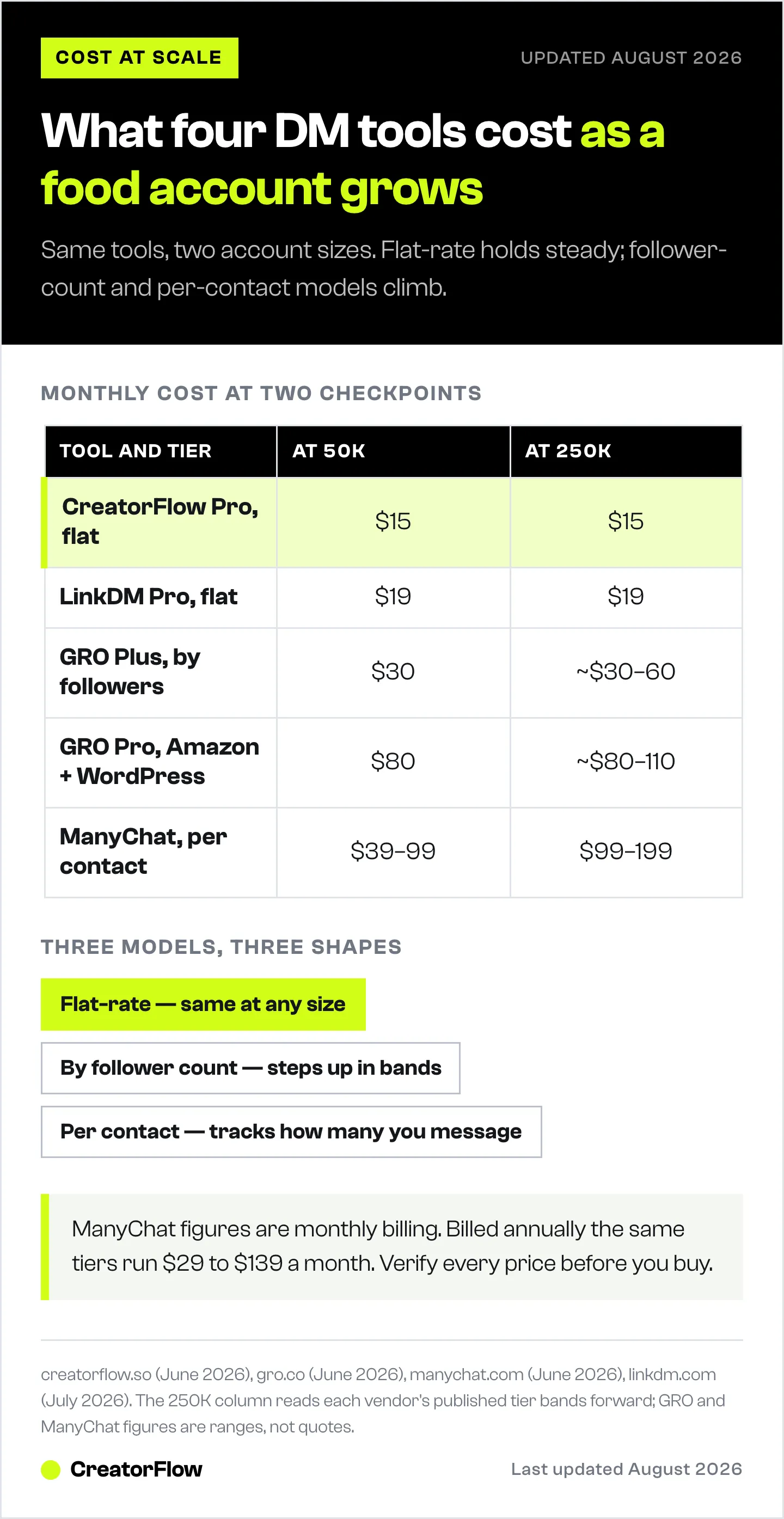
Pricing models read the same on a feature page and behave completely differently once your account grows. Here is what a food creator pays at two real checkpoints, computed from the verified June 2026 pricing above. The numbers assume the paid tier each tool puts a growing food account on.
| Tool (tier) | At 50K followers | At 250K followers |
|---|---|---|
| CreatorFlow (Pro, $15/mo flat) | $15/mo | $15/mo |
| LinkDM (Pro, $19/mo flat) | $19/mo | $19/mo |
| GRO (Plus, 15K-150K then scaling) | $30/mo | ~$30-60/mo |
| GRO (Pro, with Amazon + WordPress) | $80/mo | ~$80-110/mo |
| ManyChat (Pro/Business band) | $39-99/mo | $99-199/mo+ contact-dependent |
A few things fall out of this. CreatorFlow and LinkDM hold a single price at both checkpoints because they are flat-rate; the only thing that changes as you grow is how much of your DM cap you use. GRO’s Plus tier holds at $30/month through 150K followers and then steps up toward $60 as you cross into the higher follower bands (it reaches $60/month at 500K), so a 250K account sits in the climbing zone. GRO’s Pro tier carries the Amazon and WordPress features at $80/month and scales to $110 at 500K, which is the premium you pay for the recipe-specific toolkit. ManyChat is the hardest to pin to a single number because the per-contact model means a viral month can push you from Pro into Business or trigger overage; the range reflects that a 250K account messaging a large share of its audience lands in the $99-199/month band or higher (those are the monthly-billed prices; billed annually they are $69-139/month).
The takeaway is not that one model is cheaper. It is that flat-rate tools trade features for a price you can predict years out, follower-count tools charge more at scale but hand you features built for scale, and per-contact tools track your reach closely, which can be efficient for a small list and expensive after a hit Reel.
How to Choose the Right Tool for Your Food Blog
Match the tool to where your money comes from, not the feature count. If you have not mapped your income lines yet, this overview of how food creators make money on Instagram lays out the options before you pick tooling. Six common creator profiles, each mapped to a recommended pick:
New recipe creator under 15K followers
You are testing whether automation is worth it and do not want to spend yet. Start free. CreatorFlow’s free plan gives you 500 DMs a month, and GRO is free entirely under 15,000 followers. If you already run a WordPress site and plan to monetize Amazon links, start on GRO’s free tier so you are on the right platform when you cross 15K. Otherwise CreatorFlow’s free tier is the simplest place to learn the comment-to-DM flow.
WordPress food blogger heavy on Amazon affiliate
GRO. This is the profile it was built for. The Amazon deep links and the WordPress plugin that converts your existing affiliate links do work no general Instagram tool does, and the $80/month Pro tier is the price of that toolkit. If pageviews and Amazon commissions are your two main income lines, GRO maps to your model more closely than anything else here.
Multi-platform creator who also uses Facebook and WhatsApp
ManyChat. If your audience splits across Instagram, WhatsApp, Messenger, and TikTok, and you want one dashboard and branching flows rather than four separate tools, ManyChat covers the most channels by a wide margin. Plan for the per-contact cost as your reach grows.
High-volume sender
LinkDM. If you ship Reels constantly and each one pulls hundreds or thousands of recipe requests, you want a large DM cap at a flat price. LinkDM’s Pro plan ($19/month, 25,000 DMs) and Platinum+ ($99/month, 300,000 DMs) are sized for that volume without per-contact overage stacking on top.
Instagram-only creator wanting flat cost
CreatorFlow. If everything you do lives on Instagram and you want a bill that reads the same at 20K and 200K followers, flat-rate pricing at $15/month is the cleanest fit. You also get the email gate and CSV export to start a newsletter, which is the one owned asset that survives an algorithm change.
Agency managing several food accounts
It depends on the accounts. CreatorFlow’s Growth plan ($30/month, 5 accounts) handles a handful of Instagram-first clients on one flat bill. If those clients are WordPress recipe sites on Amazon affiliate, GRO per account fits each one’s model better, billed by each account’s follower count. For a roster spread across multiple platforms, ManyChat’s single-dashboard reach may consolidate the work, with cost tracking each account’s contact count.
How to Try or Switch Tools
You do not have to commit blind. Every tool here has a free entry point, and switching later is straightforward because they all connect through the same official Instagram API.
Start on a free tier
- CreatorFlow: Free plan, 500 DMs/month on one account. Enough to run automation on a few posts and watch the conversion.
- GRO: Free for accounts under 15,000 followers, with the full automation set, so newer recipe accounts can run it at no cost until they grow.
- ManyChat: Free up to 25 contacts. Good for building and previewing a flow, not for a live account at volume.
- LinkDM: Free up to 1,000 DMs/month, a high ceiling for testing comment-to-DM on real posts.
Run one keyword on one post for a week on whichever free tier matches your model. Watch two numbers: how many commenters open the DM, and how many click the link. That tells you more than any feature comparison.
Migration notes
Switching tools means reconnecting through Instagram’s OAuth screen and rebuilding your keyword triggers in the new tool. Because nobody shares passwords, you authorize the new tool and revoke the old one through Instagram’s connected-apps settings. GRO offers self-serve migration from ManyChat or LinkDM on its Plus plan, which moves your setup over without rebuilding from scratch. For the others, your triggers and templates are quick to recreate since most food accounts run a small number of keywords (“recipe,” “link,” the dish name). Keep your old tool live until the new one is tested, then disconnect.
For a deeper look at the mechanics of turning a keyword into a recipe link, see comment-for-recipe automation for food creators.
For a version of this tailored to food creators, see CreatorFlow for food creators.

FAQ
What is the best Instagram DM tool for food bloggers?
There is no single best tool. GRO fits recipe bloggers running a WordPress site who earn from Amazon affiliate links and pageviews. CreatorFlow fits Instagram-first creators who want flat pricing. ManyChat fits creators automating several platforms. LinkDM fits high-volume senders who want a flat rate. Match the tool to how your blog earns money.
Which DM tool is best for sending recipe links from Instagram?
All four send a recipe link when a follower comments your trigger word. GRO adds Amazon deep links and a WordPress plugin that converts existing affiliate links, which fits creators driving traffic to a recipe site. CreatorFlow, ManyChat, and LinkDM all deliver the link to the DM, with CreatorFlow and LinkDM using flat-rate pricing and ManyChat using per-contact pricing.
How much do Instagram DM automation tools cost for food creators?
Entry prices vary by model. CreatorFlow is free up to 500 DMs, then $15/month flat. GRO is free under 15,000 followers, then $30/month and up by follower count. ManyChat is free to 25 contacts, then $17/month and up per contact ($14 billed annually). LinkDM is free up to 1,000 DMs, then $19/month flat. Verify current pricing before you buy.
Are Instagram DM automation tools safe to use?
Yes, when the tool uses Meta’s official Instagram API. CreatorFlow, GRO, ManyChat, and LinkDM all connect through Meta’s official Instagram API via OAuth, so you authorize access without sharing your password. CreatorFlow is a Meta Tech Provider and GRO is a Meta Tech Partner. Using official API connections keeps your account aligned with Meta’s terms.
Do any of these tools work with a WordPress recipe blog?
GRO is the one built for this. Its Pro plan includes a WordPress plugin that converts your existing Amazon links and adds Amazon deep links, which fits recipe bloggers monetizing pageviews and affiliate commissions. CreatorFlow, ManyChat, and LinkDM work from the Instagram side: they deliver the recipe URL or affiliate link you already have straight into the DM.
Can I collect emails from my Instagram DMs for a recipe newsletter?
Yes. CreatorFlow’s Pro plan includes an email gate that asks for an email before sending your recipe link, plus CSV export to move those contacts into your email platform. GRO’s Plus plan includes save-to-email, and its Pro plan adds Klaviyo integration. Both let recipe creators turn DM traffic into newsletter subscribers.
Which tool is cheapest as my following grows?
Flat-rate tools stay the same as you grow. CreatorFlow ($15/month) and LinkDM ($19/month for 25,000 DMs) hold their price regardless of follower count. GRO scales by follower count up to $200-$250/month at 3 million followers, and ManyChat scales by contact count with overage fees. If predictable cost at scale matters most, a flat-rate tool fits best.
What happens to my automations when a Reel goes viral?
It depends on your pricing model. On a flat-rate tool like CreatorFlow or LinkDM, a viral Reel uses more of your monthly DM cap but does not change your bill. On GRO, your follower count may cross into a higher tier over time, which is a gradual step rather than a same-day spike. On ManyChat’s per-contact model, a viral post can add many new contacts at once and push you past a plan’s contact limit into overage, so it is the model to watch most closely during a spike.
Sources: CreatorFlow pricing and features (creatorflow.so, June 2026); GRO / Grocer’s List pricing, features, and 70% click-through figure (gro.co, June 2026); ManyChat pricing and channels (manychat.com, June 2026); LinkDM pricing and DM caps (linkdm.com, July 2026). All four tools verified to connect through Meta’s official Instagram API via OAuth as of June 2026.