
Comment for recipe is an Instagram setup where followers type a keyword in your comments and get the recipe link sent to their DMs in seconds. You build it with a comment-to-DM tool: pick a keyword, write the DM message with your link, and turn the automation on. The tool watches your post, replies privately, and can ask for an email before sending the link.
You post a 30-second pasta Reel. It hits the right feed and takes off. By the next morning there are 400 comments and most of them say one word: recipe. You start pasting the link by hand, fall behind by lunch, and the people who asked first have already scrolled away. The recipe was the whole reason they stopped, and the slow reply lost them.
This guide walks through the comment-for-recipe mechanic end to end: how the full loop works, how to pick a keyword that sticks, the caption wording that triggers it, a complete worked example on a pasta Reel, copy-ready DM templates, a step-by-step setup, troubleshooting for when it goes quiet, and the numbers worth watching. If you want the broader picture first, see this overview of Instagram automation for food bloggers.
Key Takeaways
- The mechanic is one keyword: A follower comments a word like RECIPE, and the recipe link lands in their DMs automatically within seconds.
- Speed is the point: Recipe intent is perishable. A link that arrives while the viewer is still on the post converts far better than one they get an hour later.
- Keyword choice decides reply rate: Short, obvious words tied to the dish get typed correctly; clever phrases get misspelled and miss.
- The caption does the asking: Your Reel caption and on-screen text must tell people the exact word to comment, or the automation has nothing to catch.
- Email capture turns a link into a list: An optional email step before the link sends builds a subscriber list from the same comment that asked for the recipe.
- Comments help reach and keep you safe: The one-word ask pulls engagement that widens reach, and CreatorFlow runs on Meta’s official Instagram API with paced sends so high-volume Reels do not trip a spam flag.

See how the comment-to-DM flow looks inside the product in the short video above, and follow CreatorFlow on Instagram for more examples.
What Does Comment for Recipe Mean on Instagram?
Comment for recipe means you invite followers to type a specific word under your post, and an automation sends the recipe link straight to their DMs. The word is the trigger. The DM is the payoff.
The flow has three moving parts. Your post or Reel asks for the keyword. A tool like CreatorFlow watches the comments. When the keyword shows up, the tool opens a DM and sends your message and link.
Nothing posts the link publicly, so your comment section stays clean and your funnel stays private. The follower gets the recipe where they already read messages, and you never touch the keyboard. For the mechanics across any keyword, here is the comment-to-DM automation setup.
The Full Loop: What the Follower Experiences
The mechanic looks simple from the outside, but four small moments decide whether a casual viewer becomes a recipe reader or an email subscriber.
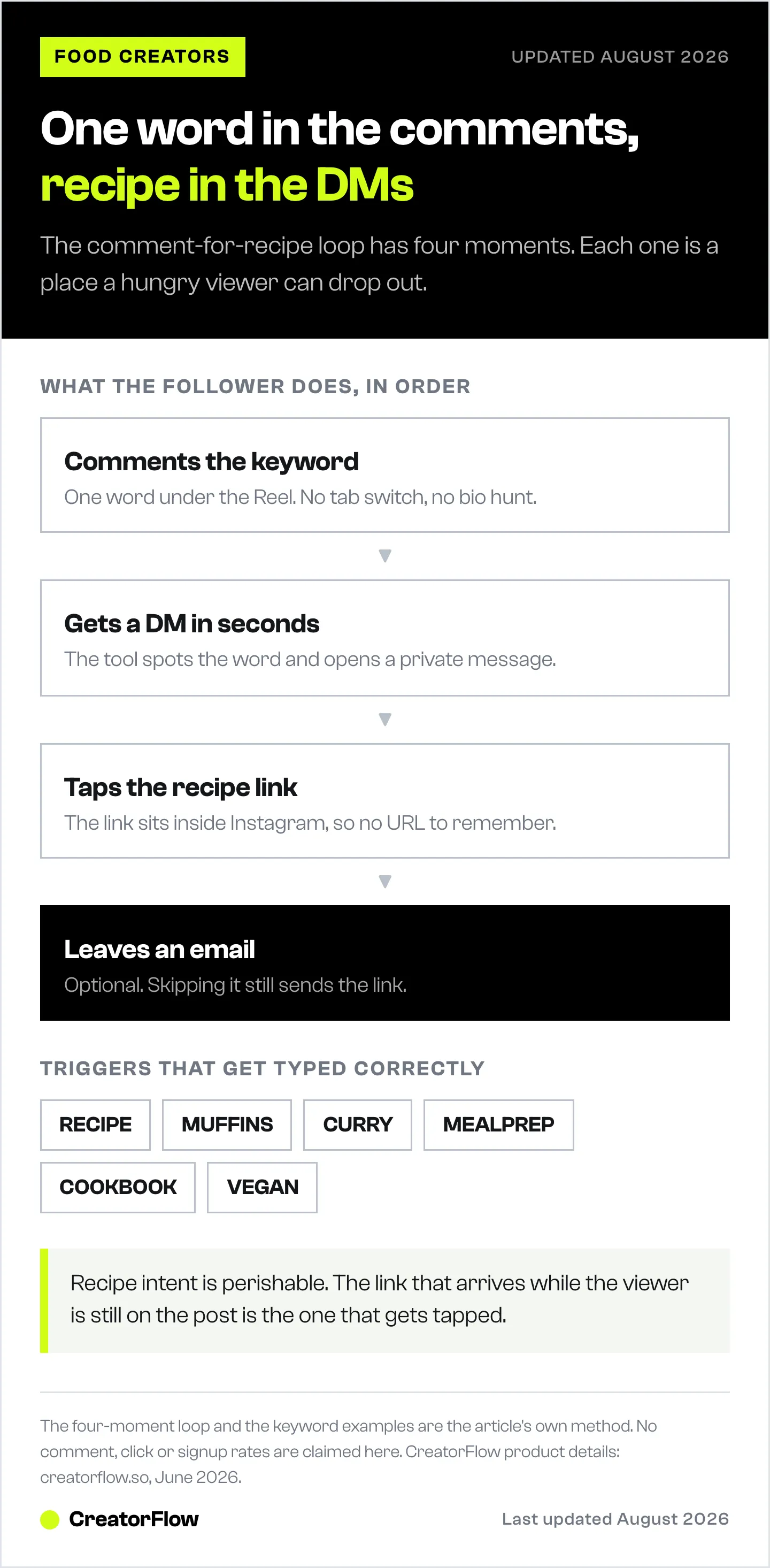
Moment one, the comment. A viewer watches your Reel, wants the recipe, and types the keyword. This is the lowest-effort action on the platform: one word, no tab switch, no leaving the feed. The bar is low on purpose, because every extra step loses people.
Moment two, the instant DM. Within seconds, a message appears in their inbox and the phone often buzzes. That buzz, arriving while the viewer is still on your post, is the difference-maker. They asked, and the thing they asked for showed up before their attention drifted.
Moment three, the link. The DM carries a friendly line and a tappable link. Because it lands inside Instagram, the viewer does not have to remember a URL, search your bio, or hunt through a link-in-bio page. They tap and they are reading the recipe.
Moment four, the optional save-to-email. Before or alongside the link, the message can offer to send the recipe card to their email. Some say yes, drop their address, and join your list. Others skip it and still get the link. Either way, the recipe gets delivered.
Timing carries the whole thing. Recipe intent is perishable in a way a discount code is not. A viewer who wants to cook that pasta wants it now, while the craving is fresh and the Reel is on screen. A link that arrives in seconds catches that craving at its peak. A link you paste by hand an hour later reaches someone who has scrolled past forty other videos and forgotten yours. Instant delivery is why the setup beats manual replies.
The build is short. You do it once per Reel, reuse the same keyword pattern across posts, and the tool runs on its own from there. A follower comments, the DM goes out, and you watch the clicks roll in from the dashboard. The full setup, step by step, is below. First, the two pieces that decide whether it works at all: the keyword and the caption.
Recipe Keyword Strategy
The keyword has one job: get typed correctly by a half-distracted viewer on a phone. Simple beats clever every time. One word, easy to spell, tied to what they want. Map it to what the post offers so the viewer never has to guess: a single dish gets a single-dish word, a meal plan gets a meal-plan word, a newsletter pitch gets a newsletter word.
| Content type | Example keyword | Why it works |
|---|---|---|
| Single recipe Reel | RECIPE | Obvious, matches the common ask |
| Specific dish name | TOMATO | Short dish name, hard to mistype |
| Specific dish name | MUFFINS | The food itself, one word |
| Specific dish name | CURRY | Short, memorable, on-theme |
| Kitchen tool feature | PAN | The tool is the point of the post |
| Kitchen tool feature | BLENDER | Names the gadget the viewer wants |
| Weekly meal plan | MEALPREP | The payoff in one word |
| Weekly meal plan | PLAN | Short, matches a planning post |
| Newsletter signup | NEWSLETTER | Names what they sign up for |
| Newsletter signup | INBOX | Short, tied to email delivery |
| Cookbook or ebook | COOKBOOK | Direct, no ambiguity |
| Cookbook or ebook | EBOOK | Short word for a download |
| Multi-recipe roundup | MENU | Signals a set of dishes |
| Diet-specific roundup | VEGAN | Names the diet, filters the viewer |
Four rules keep keywords working at volume:
- Keep it simple. One word, no spaces, no punctuation, no emoji. Anything a viewer has to think about gets typed wrong by a slice of your audience, and the automation cannot fire on a misspelling.
- Make it memorable. The word should connect to the content so a viewer who scrolls back can recall it. RECIPE under a recipe Reel sticks; a random brand word does not.
- One keyword per post. Two keywords on the same Reel split your comments and confuse viewers. Pick one trigger, repeat it, and let it own the post.
- Stay consistent. If RECIPE is your default for single dishes, use it every time. Regulars learn your pattern and comment it on reflex, which lifts your reply rate.
Keep a short list of your standard keywords pinned somewhere so each Reel gets a clean trigger. Picking words that match real searcher intent is its own small craft, covered in this guide to comment keywords that convert.
Caption Formula That Triggers the Automation
The automation only catches words people type, so your caption has to ask for the exact word. The structure that works follows three beats: hook, value, call to action.
Hook. The first line stops the scroll and names the dish or result. It shows before the “more” cutoff, so it has to carry weight on its own.
Value. One line on why the recipe is worth saving. Fast, cheap, high-protein, five ingredients, kid-approved. Give the viewer a reason the link is worth a comment.
Call to action. Spell out the exact word and what happens next. “Comment RECIPE and I’ll DM you the full thing” tells the viewer what to do and what they get. Vague lines like “link in bio” send them away from the comment box, where the trigger lives.
Four captions a food creator can copy and adapt:
- “The 4-ingredient creamy tomato pasta everyone keeps asking for. Ready in 12 minutes, about three dollars a plate. Comment TOMATO and I’ll send the full recipe to your DMs.”
- “High-protein banana muffins, 12 grams each, zero refined sugar. Meal-prep a batch Sunday and breakfast is done. Comment MUFFINS for the recipe in your inbox.”
- “My 5-ingredient curry for nights I have no energy to cook. One pan, twenty minutes, freezer-friendly. Type CURRY below and the recipe lands in your DMs in seconds.”
- “A full week of dinners under thirty minutes each, no repeats, grocery list included. Comment MEALPREP and I’ll DM you the whole plan.”
On the Reel itself, add a one-line overlay near the end: “Comment RECIPE.” People watch Reels with sound off, so the on-screen prompt catches viewers the caption misses. Show the word both ways so readers and watchers know what to type.
Worked Example: A Pasta Reel From Comment to Email
You post a 30-second creamy tomato pasta Reel. The keyword you set is TOMATO, one short word tied to the dish. The caption reads: “The 4-ingredient creamy tomato pasta everyone keeps asking for. Comment TOMATO and I’ll DM you the recipe.” The last frame shows a one-line overlay: “Comment TOMATO.”
A viewer named Sam watches with the sound off, reads the overlay, and types TOMATO. The DM arrives in seconds:
“Hey Sam, here’s that creamy tomato pasta. Want the printable recipe card sent to your email too, plus a new recipe every week? Reply with your email and I’ll send it over. Prefer the quick version? Here’s the link: [recipe link].”
Sam taps the link and is reading the recipe before the next Reel loads. The email step is optional, so anyone who skips it still gets the link. Sam replies with an email, and that address lands in your contact list.
Over a month of pasta Reels, those single-word comments turn into a real subscriber list you own and export with CSV on CreatorFlow’s Pro plan. One comment became a recipe delivered, a click tracked, and a subscriber gained, all hands-free.
DM Template Library
The DM is where the comment turns into a click, an email, or both. Keep it short, warm, and clear about the next step. Below are five ready-to-use messages. Swap the bracketed parts for your dish, link, and voice.
Template 1, straight recipe link. For delivering the recipe with no email step.
“Hey, thanks for asking. Here’s the full creamy tomato pasta recipe: [recipe link]. Save it so you can find it later, and tag me if you make it.”
Template 2, kitchen-tool affiliate. For a post featuring a pan, blender, or gadget you earn on.
“Here’s that recipe, plus the exact pan I used in the Reel: [recipe link] and [affiliate link]. Heads up, the second is an affiliate link, so it supports the channel at no extra cost to you.”
Template 3, newsletter signup. For list growth, with the recipe as the incentive.
“Glad you want this one. Reply with your email and I’ll send the printable recipe card to your inbox, plus a new recipe every week. Prefer the quick version? Here’s the link: [recipe link].”
Template 4, multi-recipe roundup. For a post that points to a set of recipes, like a weekly menu.
“Here’s the full week of dinners I mentioned: [roundup link]. Five recipes, all under thirty minutes, grocery list at the bottom. Let me know which one you try first.”
Template 5, diet-specific delivery. For filtering on a diet keyword and confirming fit before the link.
“You commented VEGAN, so here’s the fully plant-based version: [recipe link]. Every ingredient swaps in cleanly, nothing fancy to buy. Want the rest of my vegan recipes? Reply YES and I’ll send the collection.”
For a wider set of message structures across niches, see these Instagram DM automation templates. The shorter and friendlier the message, the more taps the link gets. A DM that reads like a wall of text gets skimmed, not clicked.
Step-by-Step Setup
The full setup, in order, the first time you build one.
- Switch to a Creator or Business account. Comment-to-DM automation runs on Instagram’s professional account types. On a personal account, open Settings, find the account type option, and switch. It is free and reversible.
- Connect through the official Instagram API. In CreatorFlow, connect your account and approve access through Meta’s official login. This uses OAuth, so you never hand over your password and the connection is the approved one.
- Create the keyword trigger. Start a new automation, attach it to the Reel or post you want, and set the keyword. Use one of your standard words like RECIPE or the dish name. Keep it to one word.
- Write the DM message. Drop in one of the templates above, swap in your dish name and recipe link, and keep it to a few short lines. Read it out loud once; if it sounds stiff, loosen it.
- Add the email option. To grow a list, turn on the email step so the automation asks for an email before or alongside the link. On CreatorFlow this email gate is part of the Pro plan, which also gives you CSV export to move addresses into your email tool later. More detail here on how to collect emails through Instagram DMs.
- Test it on your own account. Before you go live, comment the keyword from a second account or ask a friend to. Confirm the DM arrives, the link works, and the email step behaves as expected. Fix anything that reads wrong.
- Go live and post the Reel. Activate the automation, then publish the Reel with a caption that names the exact keyword and an overlay that shows it. The tool runs on its own from there while you watch the clicks in the dashboard.
Troubleshooting and Common Mistakes
When a comment-for-recipe setup underperforms, the cause is almost always one of these fixable issues.
The automation is not firing. Confirm it is active and attached to the right post, not a draft or an old Reel. Check that your account is a Creator or Business account and the API connection is still authorized; reconnect through the official login if it dropped. Last, make sure the keyword you set matches what your caption asks people to type. A mismatch means viewers comment one word while the tool watches for another.
The keyword is too complex. If comments come in but the DM does not go out, viewers are mistyping the trigger. A long word, a phrase, or tricky spelling produces misspellings the automation cannot match. Move to a single, obvious word and watch the reply rate climb.
There is no CTA in the caption. If the post gets views but few keyword comments, the caption never asked clearly. “Link in bio” or a vague “let me know” gives viewers nothing to type. State the exact word and what they get.
You are still replying by hand and arriving late. Some creators set up the automation but keep answering comments by hand, then fall behind on a viral Reel. Let the tool handle delivery so every asker gets the link in seconds, not whenever you next pick up your phone.
The link is broken or points to the wrong recipe. A surprising share of failed setups send a perfect DM with a dead link. Test the exact link inside the live DM before you scale a post. One typo in the URL turns the funnel into a dead end.
Measurement: What to Track and How to Read It
Once the flow runs, four numbers tell you whether it is working and where to improve.
Comment volume. How many people commented the keyword. This measures the front of the funnel, your hook and caption. Strong views but few keyword comments means the ask was weak or buried. Sharpen the caption CTA and the overlay first.
DM click-through. How many people who got the DM tapped the link. This measures the message. A low click rate on a well-read Reel usually means the DM is too long, too salesy, or the value is unclear. Trim it and make the link the obvious next step.
Email signups. How many people handed over an email at the gate. This measures the incentive. High clicks but low signups means the recipe card or weekly-recipe promise is not worth an address yet. Strengthen the offer or move the email step so it does not block the link.
Blog or recipe-page visits. Where the link points, traffic should show up. Watch visits against comment volume to see how much of the funnel survives end to end. This is where Instagram attention turns into traffic you own and can build on, covered in this guide to turning Instagram into blog traffic for food creators.
Read the four as a chain. A drop between any two steps points at what to fix. Lots of comments but few clicks means fix the DM. Lots of clicks but no signups means fix the offer. Strong clicks and steady page visits mean the funnel is healthy, so the lever to pull is reach: more Reels asking for the comment. Once the loop runs, the same mechanic delivers kitchen-product links too; these Amazon affiliate tips for food creators cover that side of the funnel.
Why More Recipe Comments Also Help Your Reach
The comment-for-recipe move delivers the link and pulls a wave of comments to the post at the same time. Comments are one of the engagement signals Instagram reads when it decides who else to show a Reel to. A one-word ask lowers the effort, so more people act, and that early wave can push the Reel to a wider audience and more recipe requests. You get the link out and a stronger Reel from one action. For more ways to turn that signal into distribution, see how food creators get more comments and reach.
Pacing, Limits, and Keeping Your Account Safe
A viral Reel can pull hundreds of recipe comments in an hour, and that is where safety matters. CreatorFlow connects through Meta’s official Instagram API using OAuth, so you never share your password and the connection is the approved one.
Tools pace their sends, around 200 DMs per hour as a behavioral convention. Meta’s own published limits are measured per second, not as an hourly cap, but pacing keeps your account from looking like a spam burst. A 24-hour messaging window also applies, so the DM goes out while the conversation is active.
CreatorFlow has been a Meta Tech Provider since December 2025 and is built by CreatorFlow Labs, S.L. The free plan sends up to 500 DMs a month on one account, enough to test the flow. Pro at $15 a month (or $12 a month billed annually) raises that to 5,000 DMs per workspace and adds the email gate, CSV export, and geographic analytics. Growth at $30 a month covers higher volume across more accounts. CreatorFlow is Instagram-only.
For a version of this tailored to food creators, see CreatorFlow for food creators.

FAQ
What does “comment for recipe” mean on Instagram?
It means a creator asks followers to type a keyword, like RECIPE, in the comments of a post or Reel. An automation tool watches for that word and sends the recipe link to the commenter’s DMs in seconds. The link never appears publicly, so the comment section stays clean while every asker gets the recipe privately.
How do I set up a comment-to-DM recipe automation?
Switch to a Creator or Business account, connect to a comment-to-DM tool through the official login, pick the Reel, set your keyword, and write the DM message with your recipe link. Turn on the optional email step if you want to collect addresses first. Test it from a second account, then post the Reel with a caption that names the exact keyword to comment.
What keyword should I use for comment for recipe?
Use one short word that is easy to spell and tied to the dish. The generic word RECIPE works when a post is clearly one dish. The dish name, like TOMATO or MUFFINS, works when you post often and want each Reel to trigger its own link. Avoid phrases, emojis, and anything a distracted viewer might mistype, and use one keyword per post.
Why is my comment-for-recipe automation not sending DMs?
Check four things. Confirm the automation is active and attached to the right post. Confirm your account is a Creator or Business account with the API connection still authorized. Make sure the keyword in the tool matches the word your caption asks for. And test the link inside a live DM, since a broken link can make a working automation look dead.
Will a comment-for-recipe setup get my account banned?
Risk stays low when you use an official integration and reasonable pacing. CreatorFlow connects through Meta’s official Instagram API via OAuth, so no password sharing happens. Tools pace sends, around 200 DMs per hour as a convention, to avoid looking like a spam burst. No tool can promise absolute safety, but the official API and pacing keep the setup within normal use.
Can I collect emails when someone comments for a recipe?
Yes. With an email gate, the automation asks for an email before sending the recipe link, so a single recipe comment can grow your subscriber list. On CreatorFlow the email gate is part of the Pro plan, which also includes CSV export so you can move those contacts into your email platform and send recipes directly later.
How many recipe DMs can I send for free?
CreatorFlow’s free plan sends up to 500 DMs per month on one Instagram account, which fits a creator testing the comment-for-recipe flow. If your Reels pull more requests, the Pro plan at $15 a month (or $12 a month billed annually) covers 5,000 DMs per workspace and adds the email gate, CSV export, and geographic analytics.
Does asking for recipe comments really help my reach?
It can. Comments are one of the engagement signals Instagram weighs when deciding who else sees a Reel. A one-word comment ask lowers the effort to engage, so more viewers act. That early wave of comments can push the Reel to a wider audience, which brings more recipe requests, which feeds the same loop again.
CreatorFlow details from creatorflow.so as of June 2026. Individual results vary.