
Food creators get more comments and reach by giving viewers one easy thing to type, then rewarding it instantly. A clear comment prompt on a recipe Reel pulls replies, and Instagram reads early comments as a sign the post is worth pushing to more feeds. Pair the prompt with comment-to-DM so each comment also delivers the recipe link, and the activity compounds into reach.
You post a chicken pasta Reel at 6pm. The cooking is tight, the plating shot lands, and you know it is one of your better ones. By morning it has 1,200 views and eleven comments, then it flattens. A neighboring creator posts a worse-looking dish the same night, ends the caption with one short line, and wakes up to 600 comments and 90,000 views. The food was not the difference. The ask was.
Comments are the lever most food creators ignore because they feel out of their control. They are not. You decide whether a post gives viewers a reason to type, and you decide whether that comment gets rewarded the second it lands. This guide breaks down why comments move reach, the comment flywheel that turns one recipe post into more of them, 15-plus CTA ideas that earn comments on food content, the formats that pull replies, and how to wire a comment-to-DM keyword so the comments you ask for deliver value on contact. For the broader playbook on comment volume, start with this guide on how to get more comments on Instagram.
Key Takeaways
- Comments are an engagement signal: Instagram generally rewards posts that pull engagement, and comments are heavier and harder to fake than a quick like, so they carry weight in the first hour.
- The flywheel is the point: A clear CTA earns comments, comment-to-DM fires and adds visible activity, that activity widens reach, and wider reach brings more comments. The loop feeds itself.
- Specific asks beat generic ones: “Comment DINNER for the link” outpulls “let me know what you think” because it tells the viewer the exact word and the exact reward.
- Format does half the work: Process Reels, plating reveals, 5-ingredient hooks, and before/after shots create natural questions that comments answer.
- Comment-to-DM makes the ask honest: When the keyword you request sends the recipe link in seconds, viewers comment more because the payoff is real and immediate.
- CreatorFlow keeps it easy and on-brand: Set one keyword, write a DM in your own voice, and the tool sends it through Meta’s official Instagram API at a paced rate so a viral Reel does not trip a spam flag.

See how the comment-to-DM flow looks inside the product in the short video above, and follow CreatorFlow on Instagram for more examples.
Why Food Creators Need More Comments for Instagram Reach
Instagram decides which posts to show to more people based on how the first viewers react. A view is passive. A like is one tap. A comment takes effort, words, and a few seconds of attention, which makes it a stronger signal that the post is worth more distribution. When a recipe Reel collects comments fast, the platform reads that as proof the content is landing and tends to push it into more feeds.
You do not need an invented percentage to act on this. The pattern is consistent across creators: posts that earn comments early get shown wider than posts that only get passive views. That is how the algorithm generally behaves, and it is the single biggest reason a worse-looking dish can out-reach a better one when its creator asked for a comment and yours did not.
Comments also stack a second benefit. Each one is a fresh signal of activity that other viewers can see. A post with 400 comments looks alive in a way a post with eleven does not, and that social proof nudges new viewers to add their own. The comment count becomes both a ranking signal and a conversion prompt at the same time.
For food content specifically, comments are unusually easy to earn because viewers already have a question. They want the recipe, the swap, the measurement, the brand of pan. Every recipe Reel sits on top of a pile of natural questions. Your job is to convert that latent curiosity into a typed comment, then reward the comment so people keep doing it.
The Comment Flywheel for Recipe Creators
The flywheel is a loop where each step makes the next one stronger. For a food creator it runs in five moves, and once it is spinning it needs less push from you.
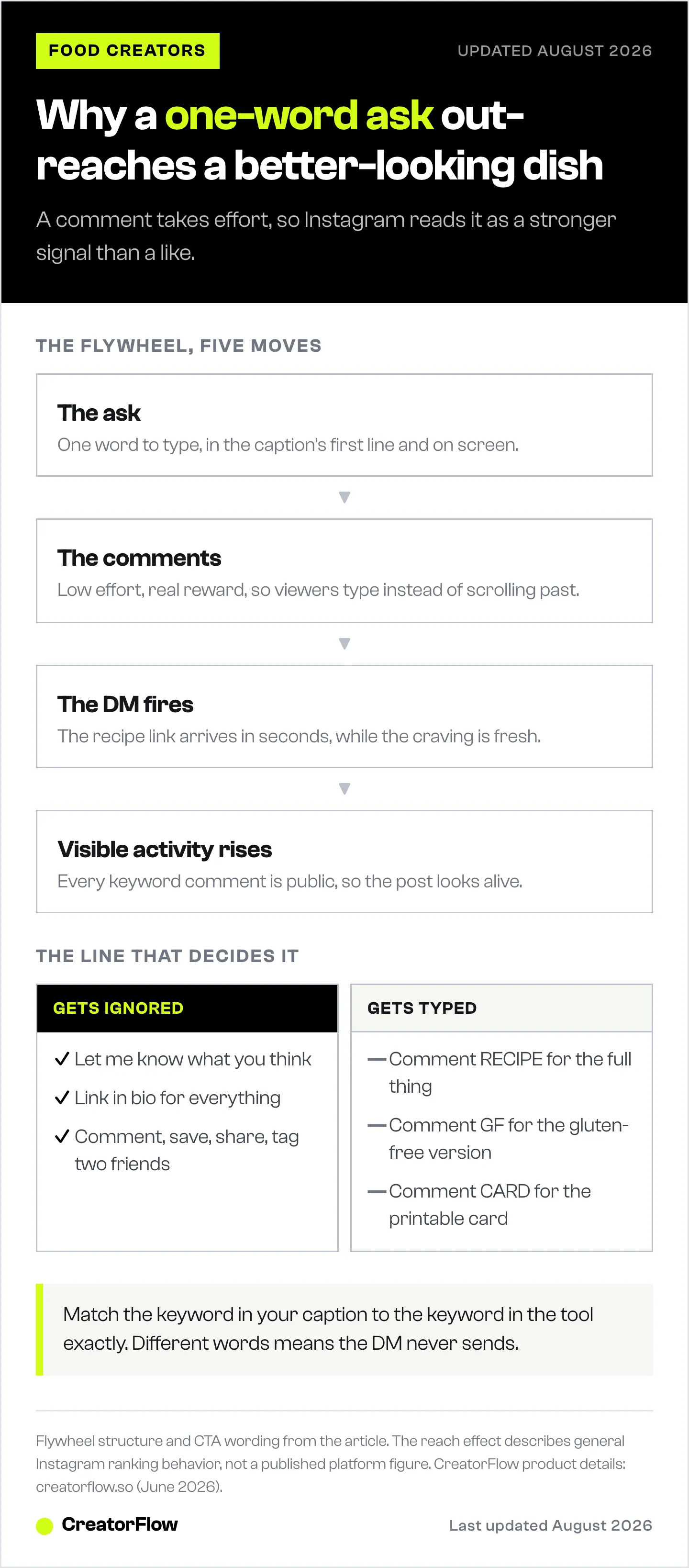
Step one, the CTA. Your caption and on-screen text give viewers one clear thing to type. “Comment PASTA and I will send you the full recipe.” The ask is specific, the reward is obvious, and the effort is one word.
Step two, the comments. Viewers type the word. Because the bar is low and the reward is real, a large share of the people who wanted the recipe comment instead of scrolling past. This is the input the whole loop depends on.
Step three, the comment-to-DM fires. A tool like CreatorFlow watches the post, catches the keyword, and sends the recipe link straight to the commenter’s DMs in seconds. The viewer gets exactly what they asked for while the craving is fresh.
Step four, visible activity rises. Every keyword comment is a public comment. The count climbs, the post looks busy, and Instagram registers a burst of engagement in the early window when it matters most. New viewers landing on the post see an active comment section and are more likely to join in.
Step five, reach widens and feeds the loop. The engagement signal earns the post more distribution. More people see it, more people comment the keyword, more DMs go out, the count climbs again. The loop has turned one good Reel into a self-feeding source of comments and reach.
The reason the flywheel works is that the reward is real. If you ask for a comment and give nothing back, the loop stalls after the first spin because people learn the ask is empty. When the comment instantly delivers the recipe, viewers keep commenting and tell friends to do the same. The comment-to-DM step is what keeps the wheel turning instead of grinding to a stop. For a deeper look at the exact mechanic on recipe posts, see comment for recipe setup for food creators.
15-Plus CTAs and Hooks That Earn Comments on Food Content
The CTA is the highest-impact line in your post. Vague asks like “thoughts?” get ignored. Specific asks tied to the dish, with a one-word reply and a clear reward, get typed. Below are CTA patterns that work on food content, sorted by what they do.
| CTA / hook | Example wording | Why it earns comments |
|---|---|---|
| Ask for the recipe | ”Comment RECIPE and I will DM you the full thing” | One word, instant reward, matches the most common ask |
| Branded keyword | ”Comment DINNER for tonight’s recipe link” | Tells the exact word and the exact payoff |
| This-or-that | ”Pesto or marinara? Comment your pick” | A choice is easier to answer than an open question |
| Guess the ingredient | ”One secret ingredient makes this. Guess it below” | Curiosity plus a low-stakes guess pulls replies |
| Dietary swap | ”Comment GF and I will send the gluten-free version” | Serves a specific need and gives a tailored reward |
| Spice level | ”How spicy do you go? 1 to 10 in the comments” | A number is the lowest-effort comment there is |
| Name the dish | ”What would you call this? Best name wins” | Playful, invites creativity, no wrong answer |
| Portion / scale ask | ”Comment 4 if you want this scaled for a family” | Useful intent that doubles as a reply |
| Hot take prompt | ”Pineapple belongs on this. Fight me below” | A mild opinion invites people to weigh in |
| Save-and-tell | ”Comment WHO you are cooking this for” | Personal, easy, and primes a share |
| Fill in the blank | ”This sauce is missing one thing: ____“ | Open slot is irresistible to complete |
| Two-ingredient quiz | ”Bet you cannot guess the two ingredients” | A challenge framing pulls confident guessers |
| Calendar ask | ”Weeknight or weekend dish? Comment one” | Binary choice, instant reply |
| Recipe-card request | ”Comment CARD for the printable recipe card” | Delivers a tangible asset for one word |
| Substitution help | ”No buttermilk? Comment SWAP for the fix” | Solves a real problem the second they ask |
| Rate the plating | ”Rate this plate 1 to 10. Brutal honesty welcome” | Permission to judge lowers the effort to reply |
| Tag-a-cook | ”Tag the friend who needs this recipe” | Pulls a comment and a share in one action |
A few rules make any of these stronger. Put the ask in the first line of the caption and as on-screen text in the Reel, because most viewers never expand the caption. Use one word in caps for the keyword so it is obvious and easy to type. Keep the reward concrete: a link, a card, a swap, not “engagement.” And ask for one thing, not three. A single clear action outpulls a stacked list every time. For more on the words that convert into DMs, see Instagram comment keywords that convert.
Content Formats That Drive Comments
The format you choose decides how many natural questions the post generates before you even write a CTA. Some formats are comment machines because they leave viewers wanting one more piece of information, and that gap is what the comment fills.
Process Reels. Showing the dish come together from raw ingredients to plated holds attention and raises questions at every step. What pan is that, how long did it bake, what temperature. A process Reel ends with the viewer holding three unanswered questions, and a “Comment RECIPE for every step and measurement” turns all of them into one comment.
Plating reveals. A messy pan that resolves into a beautiful plate gives a satisfying payoff and a natural pause where viewers react. The reveal moment is where people comment without prompting, so adding a keyword ask right at the reveal catches them at peak attention.
5-ingredient hooks. Open with “This needs five ingredients” and you have set a constraint that viewers want to test. They scan for the five, wonder if they have them, and a “Comment LIST and I will send all five” converts that wondering into a reply. Short ingredient counts also feel achievable, which lowers the barrier to wanting the recipe.
Before and after. A sad sandwich next to a stacked, dripping one. A flat dough next to a risen loaf. The contrast does the persuading, and the comment ask collects the people the contrast convinced. Before-and-after also invites “how” comments on its own, which you then answer with the recipe link.
The pattern across all four is the same: the format opens a curiosity gap, and the comment closes it. Pick formats that leave questions on purpose, then point the CTA at the biggest one. If you want the broader automation picture for recipe accounts, this guide on Instagram automation for food bloggers covers how the pieces fit together.
How to Set Up a Comment-to-DM Keyword
The comment-to-DM keyword is what turns your CTA from a promise into a delivery. You ask people to comment a word, and the tool sends the recipe link the moment they do. The setup is short, you do it once per post, and CreatorFlow runs it on its own from there. Here is the full sequence.
-
Connect your Instagram account. In CreatorFlow, link your professional Instagram account through Meta’s official login. CreatorFlow has been a Meta Tech Provider since December 2025 and connects over the official Instagram API with OAuth, so you never share a password and there is no third-party login to your account.
-
Pick the post and the keyword. Choose the Reel or post the automation should watch, then set the trigger word. Use one short word in caps that matches your CTA exactly: RECIPE, PASTA, DINNER, CARD. The keyword in the caption and the keyword in the tool have to be the same word, or nothing fires.
-
Write the DM in your own voice. Compose the message that goes out when someone comments the word. Keep it warm and on-brand, the way you would text a friend the link. Something like “Here you go, friend, the full recipe is right here, enjoy” followed by the link reads like you, not a robot. This is where the DM feels personal instead of automated.
-
Add the link and an optional email step. Drop in the recipe URL. On the Pro plan you can add an email gate that asks for an address before sending the link, which turns the same comment into a newsletter subscriber. You can also add a follow gate that asks non-followers to follow before they get the link.
-
Set the public reply, then turn it on. Many creators have the tool post a short public comment reply too, like “Sent it to your DMs, check your inbox,” which signals to other viewers that the system works and nudges them to comment as well. Switch the automation on and post your Reel with the matching CTA.
Once it is live, every keyword comment gets the link in seconds, your comment count climbs, and you watch the clicks from the dashboard without touching the keyboard. The build is the same every time, so after the first one you are setting up new posts in under a couple of minutes.
A note on safety and volume. CreatorFlow paces sends at around 200 DMs per hour as a tool-side convention to stay well clear of spam triggers. Meta’s own published limits are measured per second, not per hour, and the paced rate keeps a viral Reel sending steadily without flooding. Running on the official Instagram API rather than a scraper is what keeps the account out of trouble when a recipe post takes off.
Posting and Reply Habits That Compound Engagement
The CTA and the automation do the heavy lifting, but a few habits decide whether the early signal is strong enough to trigger reach. These are small, repeatable, and free.
Post when your audience is awake. The first hour matters most because that is when Instagram decides how far to push the post. Posting into a sleeping audience wastes the window. Check your account insights for when your followers are active and aim for the start of those windows, which for many food accounts means late afternoon and early evening when people are thinking about dinner.
Reply to early comments fast. Every reply you leave in the first hour is another comment on the post and a reason for that person to come back, which both feed the early signal. Answer the first wave of comments yourself, ask a follow-up question, and keep the thread going. A comment you reply to often turns into three.
Pin a comment that prompts more. Pin a comment that either repeats the keyword ask (“Comment RECIPE and I will DM you the full thing”) or poses a question that is fun to answer. The pinned comment sits at the top and primes every new viewer to participate.
Ask follow-up questions in replies. When someone comments, reply with a question instead of a thumbs-up. “Are you a spicy or mild person?” gets another comment back. Conversations in the comments stack engagement far better than a wall of one-word replies.
Reuse what works. When a CTA or format pulls comments, run it again on the next dish. You are not looking for novelty, you are looking for a repeatable ask that your audience reliably responds to. The flywheel rewards consistency more than cleverness.
Stack these habits on top of the comment-to-DM loop and the early-hour signal gets strong enough to earn the wider distribution that brings the next wave of comments. The traffic those DMs send to your recipes also builds over time. For how comments turn into off-platform readers, see how food creators turn Instagram into blog traffic.
Common Mistakes That Kill Comments
Most comment problems come from a handful of avoidable errors. Fix these and the rest of the system works.
Vague CTAs. “Let me know what you think” gives the viewer nothing specific to do, so they do nothing. Replace it with a one-word ask and a clear reward. The more specific the action, the more people take it.
No keyword behind the ask. Asking people to comment for the recipe and then making them dig through your bio for the link breaks the promise. The comment was the easy part. If the reward is not instant and effortless, people stop commenting once they learn the payoff is a chore.
Asking for too much. Stacking three requests in one caption (“comment, save, share, and tag two friends”) splits attention and lowers the response on all of them. Pick the one action that matters most for this post and ask for only that.
Ignoring early comments. Leaving the first wave of comments unanswered wastes the exact window where engagement matters most. Those early replies are free signal and free repeat visits. Skipping them is leaving reach on the table.
Burying the ask. Putting the CTA at the end of a long caption means most viewers never see it, because most never expand the caption. Lead with the ask and mirror it as on-screen text in the Reel.
Inconsistent keywords. Asking for RECIPE in the caption but setting the tool to watch for LINK means the automation never fires, the DMs never send, and the loop dies on the first spin. Match the word in the caption to the word in the tool exactly, every time.
Avoid these six and the flywheel has what it needs: a clear ask, an instant reward, and an early-hour signal strong enough to earn reach.

FAQ
Why do comments matter more than likes for reach?
A like is a single tap, while a comment takes effort and attention, so Instagram treats comments as a stronger signal that a post is worth showing to more people. Comments in the first hour carry the most weight. They also add visible activity that prompts new viewers to comment too, which is why a recipe Reel with hundreds of comments tends to out-reach one with a handful.
How does comment-to-DM increase reach?
Comment-to-DM does not directly boost reach, but it makes your comment ask worth doing. When commenting a keyword instantly sends the recipe link, far more viewers comment instead of scrolling past. Those extra comments raise the early engagement signal Instagram uses to decide distribution. More comments lead to more reach, which brings more comments, so the DM step is what keeps the loop spinning.
What is the best CTA to get comments on a recipe Reel?
The best CTA names one word and one reward. “Comment RECIPE and I will DM you the full thing” works because the effort is a single word and the payoff is immediate and concrete. Put it in the first line of the caption and as on-screen text in the Reel, since most viewers never expand the caption. Avoid stacking multiple asks, which lowers response on all of them.
Do I need a paid tool to set up comment-to-DM?
No. CreatorFlow’s Free plan includes comment-to-DM, story reply automation, keyword triggers, and templates, with 500 DMs a month at no cost. That is enough to test the comment flywheel on real posts. The Pro plan at $15 a month, or $12 a month billed annually, adds the email gate, the follow gate, geographic analytics, and 5,000 DMs per workspace for when a Reel takes off and you want to capture emails too.
Is comment-to-DM automation safe for my Instagram account?
CreatorFlow runs on Meta’s official Instagram API through OAuth and has been a Meta Tech Provider since December 2025, so there is no password sharing and no third-party login. Sends are paced at around 200 DMs per hour as a tool-side convention to stay clear of spam triggers, which keeps a viral recipe Reel sending steadily without flooding. Using the official API rather than a scraper is what keeps the account safe when volume spikes.
How fast does the recipe link reach the commenter?
The DM goes out within seconds of the keyword comment, while the viewer is often still on the post. Speed is the point, because recipe intent is perishable. A link that arrives while the craving is fresh converts far better than one a viewer gets an hour later after scrolling past dozens of other videos.
How many comments do I need before reach picks up?
There is no fixed number, and it varies by account size and audience. What matters more than a total is the pace in the first hour. A burst of comments early signals the post is landing, which is what earns wider distribution. The comment flywheel is built to create that early burst by giving viewers an easy ask with an instant reward.
Can I reuse the same keyword across different recipe posts?
Yes, and many creators do. Reusing a keyword like RECIPE trains your audience to know exactly what to type, which raises response over time. You can also vary the keyword per dish (PASTA, TACOS, SOUP) when you want the comment to feel tailored to the recipe. Either way, the keyword in your caption and the keyword set in CreatorFlow have to match exactly, or the automation will not fire.
Sources: CreatorFlow product and pricing, creatorflow.so, June 2026. Meta Tech Provider status and Instagram API rate limits per Meta’s Instagram Platform documentation, developers.facebook.com, June 2026. Engagement and reach behavior described reflects general Instagram ranking patterns, not published platform percentages.