A weekly Instagram content plan for food creators is a fixed Monday-to-Sunday schedule that mixes Reels for reach, carousels for trust, and Stories for connection, with every recipe post ending in a comment-to-DM CTA that delivers the recipe link and captures an email. It turns scattered posting into a repeatable loop that grows blog traffic and a newsletter on autopilot.
You post a 45-second pasta Reel on a Tuesday because you felt like it. It pops. Then Wednesday comes and you have no idea what to film, so you skip a day. Then three days. Then a week. The algorithm forgets you, your saves drop, and the “recipe?” comments you never answered are now reading someone else’s blog. Random posting is the single biggest reason food creators stall.
A plan fixes that. Not a rigid corporate calendar, but a rhythm you can keep while you also shop, cook, edit, and live. This guide gives you a day-by-day weekly plan, the job each post does, the CTA that fits, and the automation loop that turns comments into recipe-link clicks and email signups. If you want a deeper framework for mapping content months out, pair this with our Instagram content calendar guide once your weekly rhythm is locked.
Key Takeaways
- A fixed weekly rhythm beats inspiration. A repeatable Monday-to-Sunday plan keeps you consistent without deciding what to post every morning.
- Each format has one job. Reels chase reach, carousels build trust and saves, Stories deepen connection and warm up DMs. Match the CTA to the job.
- Every recipe post ends in a comment-to-DM CTA. “Comment RECIPE and I’ll send the link” turns a public comment into a private DM that delivers your blog link and asks for an email.
- Batch once, post all week. Film 4-6 pieces in one session, schedule them, and reuse the best ones. The plan only works if it survives a busy week.
- Two versions of the week. A minimum viable week is 3 posts. A growth week is daily. Both follow the same loop.
- Automation closes the loop. CreatorFlow ($15/month Pro) sends the recipe link and captures the email automatically through Instagram’s official API, so links never get dropped.
- Watch five numbers weekly. Saves, shares, comment volume, DM clicks, and email signups tell you what to repeat and what to cut.
See how the comment-to-DM flow looks inside the product in the short video above, and follow CreatorFlow on Instagram for more examples.
Why a Weekly Plan Beats Random Posting
Food content has a short shelf life on intent. Someone sees your sheet-pan dinner at 5pm and wants to make it tonight. If you are not showing up consistently, you are not in their feed when that craving hits.
A weekly plan does three things random posting cannot.
It keeps you in the algorithm’s good graces. Instagram rewards regular activity. A predictable cadence teaches your audience when to expect you and gives the algorithm fresh signal. Gaps reset that momentum.
It removes the daily decision. Deciding what to post every morning is exhausting, and it is why most creators quit. When Monday already means “Reel,” you skip the agonizing and go straight to making.
It builds a system, not a streak. A streak depends on motivation. A system depends on a structure that holds even on a bad week. The plan below is built to bend, not break, when life gets full.
The goal is not to post more. It is to post with intent, end every recipe post with a clear next step, and let automation handle delivery so nothing slips.
What Each Content Type Does for You
Before the schedule, understand the job each format does. Each type pulls a different lever, and each deserves a different CTA.
Reels: Built for Reach
Reels are how new people find you. The algorithm pushes short video to non-followers more aggressively than any other format, which makes Reels your top-of-funnel engine. A 30-to-60-second recipe clip with a strong first second and a clear payoff is your best shot at landing on a new feed.
The job: Reach. Get in front of people who do not follow you yet.
The CTA that fits: A comment-to-DM trigger. End the Reel and the caption with “Comment RECIPE and I’ll DM you the full recipe.” New viewers comment, you capture them in DMs, and you turn a one-time view into a relationship.
Carousels: Built for Trust and Saves
Carousels make people stop and study. A step-by-step recipe carousel, a “5 pantry dinners” swipe, or an ingredient-swap guide earns saves because it is useful enough to keep. Saves are a strong trust signal to the algorithm and a sign your content has staying power.
The job: Trust and saves. Show depth, earn the bookmark.
The CTA that fits: “Save this for your next grocery run” plus a comment-to-DM line for the full version: “Comment GUIDE and I’ll send the printable.” Saves feed reach, and the DM line still captures intent.
Stories: Built for Connection and Conversion
Stories reach the people who already like you. They are where you build the relationship that makes someone click a link, reply, or buy. Behind-the-scenes cooking, polls, and “this or that” ingredient questions turn followers into fans.
The job: Connection and warm conversion. Deepen the bond and move people to act.
The CTA that fits: Story reply triggers and direct asks. “Reply RECIPE and I’ll send it” or a poll sticker that leads into a DM. Story replies are intimate, so a personal-feeling automated DM fits the format perfectly.
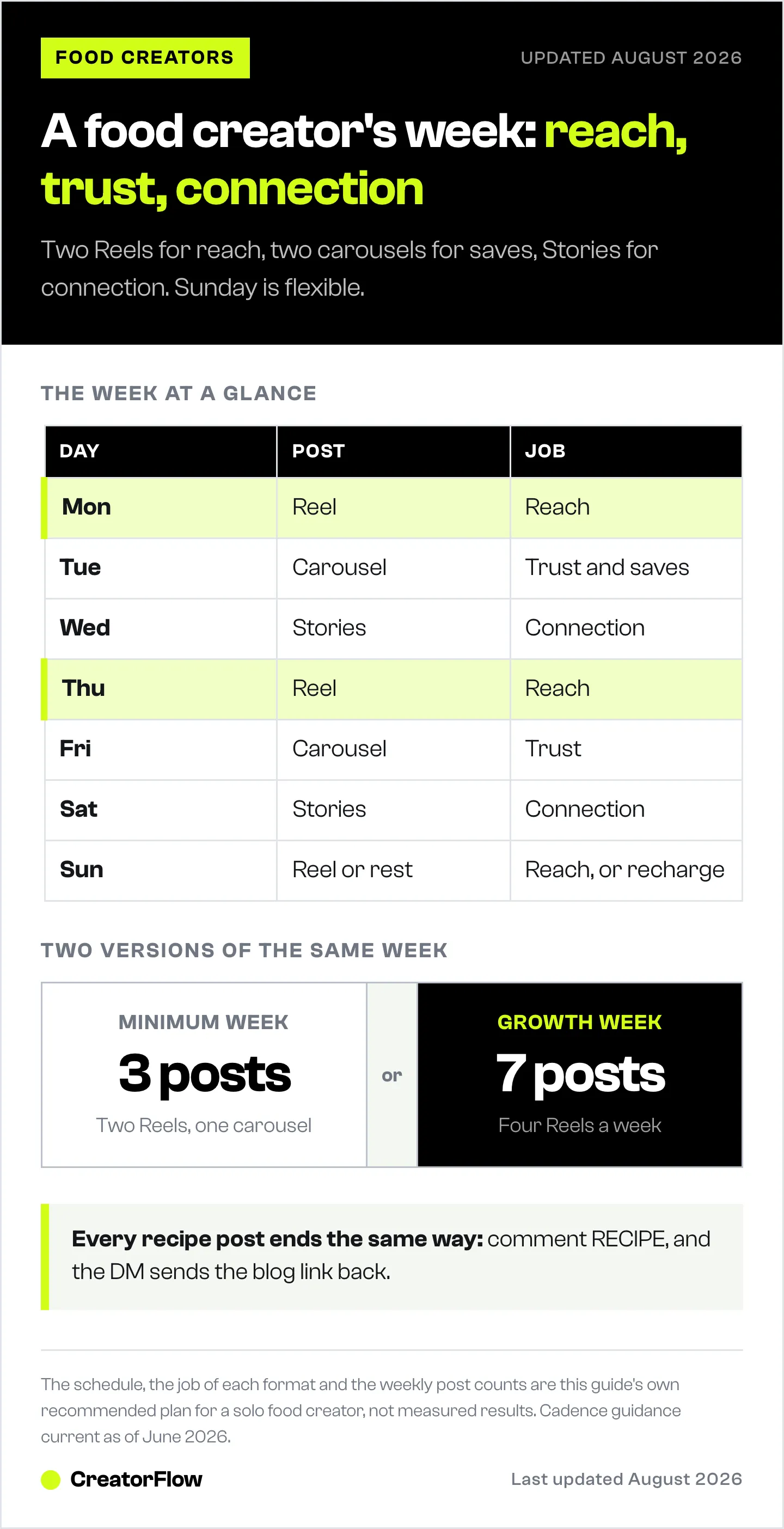
The Day-by-Day Instagram Content Plan for Food Creators
Here is a realistic week a solo food creator can sustain. It assumes you batch once (more on that below) and lean on automation to deliver links. Adjust the exact times to when your audience is online. Our guide to the best times to post on Instagram helps you find your specific windows.
| Day | Post Type | Job | Topic Idea | CTA |
|---|---|---|---|---|
| Monday | Reel | Reach | Quick weeknight dinner (under 30 min) | Comment RECIPE for the link |
| Tuesday | Carousel | Trust + saves | 5 pantry meals, step-by-step | Save + comment GUIDE for printable |
| Wednesday | Stories (3-5 frames) | Connection | Behind-the-scenes cooking + poll | Reply with your pick, DM trigger |
| Thursday | Reel | Reach | Viral-style food hack or swap | Comment RECIPE for the link |
| Friday | Carousel or single | Trust | Weekend baking project or meal prep | Comment PREP for the plan |
| Saturday | Stories | Connection | Grocery haul, “what should I cook?” poll | Reply to vote, DM follow-up |
| Sunday | Reel (or rest) | Reach | Best clip from your batch, reposted | Comment RECIPE for the link |
A few notes on this table.
Monday and Thursday Reels are your reach days. Anchor the week with new video twice, spaced apart, so you stay in front of non-followers without burning out on filming.
Tuesday and Friday carousels do the trust work. These earn saves and are the easiest to batch because they are mostly photos and text.
Wednesday and Saturday Stories carry connection. No production pressure here. Film raw, post in the moment, and use polls and replies to keep DMs warm.
Sunday is flexible. Repost your best batch clip, or take the day off. Rest is part of a sustainable plan, not a failure of it.
Every recipe post on this calendar ends the same way: a comment-to-DM CTA. That consistency is what turns a content calendar into a traffic and email machine.
The Repeatable Loop: Comment to DM to Link to Email
This is the engine that makes the whole plan pay off. Without it, you are posting pretty food and hoping people find your blog. With it, every recipe post runs the same four-step loop automatically.
Step 1: The post ends with a keyword CTA. Your Reel caption and on-screen text say “Comment RECIPE and I’ll send you the full recipe link.” This is clearer than “link in bio,” and it invites a comment, which the algorithm loves.
Step 2: Automation sends the DM instantly. When someone comments the keyword, a tool sends them a DM within seconds with your blog link. No waiting six hours. No copy-pasting. The link goes out while their craving is still hot.
Step 3: The DM captures an email. Before or alongside the recipe link, you ask for an email in exchange for a bonus, like a printable version or a weekly recipe roundup. With an email gate, the recipient enters their email to reveal the link, and you grow a list you own.
Step 4: The blog and newsletter compound. Every click is a page view and an ad impression. Every email is a subscriber you can reach without the algorithm. Over weeks, this turns Instagram engagement into traffic and a list that drives revenue.
Here is how to set this loop up once so it runs on every post.
- Connect your Instagram professional account to your automation tool through Instagram’s official API. With CreatorFlow this takes about 5 minutes through OAuth, with no password sharing.
- Pick a keyword. “RECIPE” is the obvious one for food creators. You can add variations like “LINK” or “FULL” so typos still trigger it.
- Write the DM template. Keep it personal and on-brand: “Hey! Here’s the recipe you asked for [link]. Want my weekly recipe roundup too? Drop your email and I’ll add you.”
- Turn on the email gate (Pro feature) if you want to collect emails before sending the link, or keep it optional to maximize clicks.
- Set it live and test it from a friend’s account to confirm the DM arrives in seconds.
CreatorFlow is template-first, so you are picking from prebuilt flows rather than wiring a complex builder. It is Instagram-only and flat-rate, which fits a solo food creator who does not need a multi-channel system. The free plan covers 500 DMs a month with comment-to-DM, story reply, and keyword triggers. The Pro plan ($15/month, or $12/month billed annually) adds the follow gate, email gate, CSV export, and geographic analytics, with 5,000 DMs per workspace (creatorflow.so, June 2026). CreatorFlow has been a Meta Tech Provider since December 2025.
For a deeper walkthrough of the keyword flow specifically for food posts, see our setup guide on comment for recipe Instagram automation.
Batch Once, Post All Week
A weekly plan only survives if you are not filming every day. The secret is batching: produce a week of content in one focused session, schedule it, and reuse the strongest pieces.
Pick one cooking day. Choose a day you are already in the kitchen. Cook two or three recipes and film all of them in one go, capturing B-roll, hero shots, and talking moments while the food is fresh and the light is good.
Capture multiple formats from one cook. A single recipe gives you a Reel (the process), a carousel (the steps), and Story frames (behind the scenes). One cooking session can feed three or four days of posting if you shoot with that intent.
Edit in a block. Set aside a second session to cut your Reels, build your carousels, write your captions, and load everything into a scheduler. Batching the edit keeps you out of daily app rabbit holes.
Schedule and walk away. Queue posts for your best times. The only daily task left is posting raw Stories, which take minutes, and replying to comments and DMs.
Reuse what works. Your Sunday slot is a repost slot for a reason. A strong clip can run again weeks later for a fresh audience. Recycle your best content rather than chasing new ideas every day.
Batching plus automation is what makes the plan repeatable. You front-load the work into two sessions, then the schedule and the DM loop carry the week.
The Minimum Viable Week (3 Posts)
Some weeks you are slammed. A wedding, a launch, a sick kid, a full-time job. The plan should still hold. Here is the minimum version that keeps your momentum and your loop intact with only three posts.
| Day | Post Type | Job | CTA |
|---|---|---|---|
| Monday | Reel | Reach | Comment RECIPE for the link |
| Wednesday | Carousel | Trust + saves | Save + comment GUIDE |
| Friday | Reel | Reach | Comment RECIPE for the link |
Three posts, two reach plays and one trust play, all running the comment-to-DM loop. Sprinkle in Stories whenever you have a spare minute, but do not stress them. The non-negotiable is that every recipe post still ends with the keyword CTA, so even a light week feeds your blog and email list.
This is the floor, not the goal. But hitting the floor every week beats hitting the ceiling once a month and disappearing.
The Growth Week (Daily Posting)
When you have the time and the appetite to grow faster, post daily. More reach plays mean more new followers, more comments, and more DMs feeding the loop. Here is the daily version.
| Day | Post Type | Job |
|---|---|---|
| Monday | Reel | Reach |
| Tuesday | Carousel | Trust + saves |
| Wednesday | Reel | Reach |
| Thursday | Stories series + carousel | Connection + trust |
| Friday | Reel | Reach |
| Saturday | Carousel or single post | Trust |
| Sunday | Reel | Reach |
Four Reels a week is aggressive reach. This pace grows accounts fast, but only attempt it if your batching system can support it. A growth week with no batching plan turns into burnout by week three. Build the habit at three posts, prove you can sustain it, then add days.
Whether you run the minimum or the growth version, the structure is identical: reach posts open the funnel, trust posts earn saves, connection posts warm the relationship, and the comment-to-DM loop captures every recipe request.
How the Plan Feeds Blog Traffic and Email Over Time
The weekly plan rewards compounding, not one-time virality. Each week stacks on the last.
Blog traffic grows with every recipe post. When the recipe lives on your blog and the DM sends people there, every keyword comment becomes a page view. Two recipe Reels a week, each pulling dozens or hundreds of comments, sends a steady stream of qualified readers to your site. Over a quarter, that is thousands of visits you would have lost to “link in bio.” Our guide on how food creators drive blog traffic from Instagram breaks down the full funnel.
Email grows because you own the gate. Followers are rented. Email is owned. When your DM captures an email in exchange for the recipe or a roundup, you build a list that reaches inboxes regardless of the algorithm. A list of even a few thousand engaged recipe lovers is a durable asset for driving repeat blog traffic, selling a cookbook, or promoting affiliate gear.
The loop pays off without more effort. Once the automation is set, each new recipe post costs you nothing on the delivery side. You post, people comment, the DM goes out, the email comes in. The plan does the heavy lifting while you focus on cooking and filming.
For the mechanics of setting all this up specifically for a food blog, our full guide to Instagram automation for food bloggers covers the recipe-link workflow end to end.
Metrics to Watch Every Week
You cannot improve what you do not measure. Check these five numbers every week, ideally on the same day, so you spot patterns and double down on what works.
Saves. The strongest trust signal. High saves mean your content is useful enough to keep. Carousels and detailed recipe Reels should drive these. If saves are flat, your content is entertaining but not useful enough to bookmark.
Shares. Shares expand reach beyond your followers. A high share count means people are sending your post to friends, which is the best free distribution there is. Recipe content that is genuinely save-and-cook worthy earns shares.
Comment volume. Comments fuel both the algorithm and your DM loop. Because your CTAs ask for keyword comments, this number directly maps to how many people are entering your funnel. Track which posts pull the most comments and make more of those.
DM clicks. This is the conversion that matters most for traffic. Of everyone who got your recipe DM, how many clicked the link? A low click rate means your DM copy or your offer needs work. A tool with geographic analytics also shows you where your clickers live, which helps you time posts.
Email signups. The ownership metric. Track how many emails you collect each week through the DM gate. This is the asset that outlasts any algorithm change. Steady weekly growth here means the whole system is compounding.
Review these together. If comments are high but DM clicks are low, fix your DM message. If saves are high but reach is flat, you need more Reels at the top of the funnel. The numbers tell you exactly which lever to pull next week.
Common Mistakes That Kill the Plan
Most weekly plans fail for predictable reasons. Avoid these and you are ahead of the majority of food creators.
Posting without a CTA. A gorgeous recipe Reel with no next step is a dead end. The viewer enjoys it, scrolls on, and never reaches your blog or list. Every recipe post needs the comment-to-DM CTA. No exceptions. This is the single most common and most costly mistake.
Inconsistency. Posting five times one week and zero the next confuses the algorithm and your audience. A steady three posts a week beats an unpredictable burst-and-vanish pattern. Pick a cadence you can hold and hold it.
No automation, so links get dropped. Promising to “DM the recipe” and then forgetting, or replying six hours later, breaks the loop. Manual delivery does not scale past a few comments, and missed DMs are lost traffic and lost emails. Automation sends the link in seconds, every time, even while you sleep.
Treating every post the same. Putting a hard sell on a reach Reel, or no CTA on a trust carousel, wastes the format. Match the CTA to the job: reach posts grow the audience, trust posts earn saves, connection posts warm the DMs.
Skipping the email capture. Sending the blog link but never asking for an email leaves your most valuable asset on the table. The recipe is the trade. Use it to grow a list you own.
Chasing trends instead of a system. Jumping on every viral audio without a plan produces a few spikes and a lot of noise. Build the weekly rhythm first, then layer trends onto your reach days.
FAQ
How many times a week should a food creator post on Instagram?
Three posts a week is the sustainable minimum that keeps you in the algorithm and feeds your DM loop. Two Reels for reach and one carousel for saves covers the essentials. If you can batch content and have the time, daily posting grows accounts faster, but only attempt it once your batching system is solid. Consistency at three beats burning out at seven.
What should I post on each day of the week?
Anchor the week with Reels on reach days (Monday and Thursday work well), carousels on trust days (Tuesday and Friday), and Stories for connection (Wednesday and Saturday). Sunday is flexible for a repost or rest. The exact days matter less than keeping a fixed, repeatable rhythm your audience can expect.
How do I turn recipe comments into blog traffic automatically?
End every recipe post with a comment-to-DM CTA like “Comment RECIPE and I’ll send the link.” A tool then DMs the commenter your blog link within seconds. CreatorFlow handles this through Instagram’s official API with about a 5-minute setup and template-first flows, so you are not building complex automations. Every keyword comment becomes a page view.
What is the email gate and why does it matter for food creators?
An email gate asks for an email address before delivering the recipe link in the DM. The follower trades their email for the recipe, and you build a list you own. CreatorFlow includes the email gate on the Pro plan ($15/month). Email outlasts the algorithm, so it is the most durable asset a food creator can build from Instagram.
How do I keep up with a weekly plan when I’m busy?
Batch your content. Film two or three recipes in one cooking session and pull a Reel, a carousel, and Story frames from each. Edit in a separate block, schedule everything to your best posting times, and let automation handle DM delivery. Front-loading the work into two sessions means the rest of the week runs itself.
Which metrics should I check every week?
Track five: saves (trust), shares (reach), comment volume (funnel entry and algorithm fuel), DM clicks (traffic conversion), and email signups (the asset you own). Review them together on a fixed day. If comments are high but clicks are low, fix your DM copy. If saves are high but reach is flat, post more Reels.
Do I need a paid tool to run this plan?
No. CreatorFlow’s free plan covers 500 DMs a month with comment-to-DM, story reply, and keyword triggers, which is enough to test the loop. Upgrade to Pro ($15/month) when you want the email gate, CSV export, and geographic analytics, or when you outgrow 500 DMs. Start free, prove the loop works, then scale.
Can I run this plan without daily filming?
Yes, and you should. The plan is built around batching so you film once and post all week. A single cooking session can feed three or four days of content across formats. Combined with automated DM delivery, the only daily tasks left are posting raw Stories and replying to your community.
Sources: CreatorFlow pricing, features, and Meta Tech Provider status verified at creatorflow.so, June 2026. Posting cadence and format guidance reflect current Instagram creator best practices as of June 2026.