
GRO (formerly Grocer’s List) and CreatorFlow both turn Instagram comments into automated DMs, but they price and target differently. GRO scales by follower count ($0 free under 15K, $30 Plus, $80 Pro) and is built for food and recipe bloggers driving traffic to a WordPress site. CreatorFlow charges a flat $15-30/month for any Instagram-first creator. The best GRO alternative depends on whether you need GRO’s website-and-Amazon stack or simple flat-rate DM automation (gro.co, June 2026).
You run comment-to-DM on Instagram. Someone comments a keyword, they get your link in a DM, and you capture an email along the way. GRO and CreatorFlow both do that core job. So when a creator searches for a GRO alternative, the real question is not “which tool sends DMs,” it is “which pricing model and feature set match how I make money.”
This is a focused, two-way comparison. We cover GRO’s follower-based pricing in full, a 12-month cost breakdown at three follower sizes, where GRO wins, where CreatorFlow costs less, and which type of creator each tool is built for. No filler tools padding the list.
🤖 New to DM automation? Start with our complete guide to Instagram DM automation to understand how the official API, rate limits, and email capture work.
Key Takeaways
- GRO prices by follower count, not flat or per-contact. Free under 15K followers, then $30/mo (Plus) or $80/mo (Pro), scaling to $100-250/mo at 2-3M followers (gro.co, June 2026).
- CreatorFlow is flat-rate. $15/mo Pro or $30/mo Growth, the same whether you have 5,000 followers or 2 million (creatorflow.so, June 2026).
- GRO is purpose-built for food and recipe bloggers who own a WordPress site and monetize pageviews plus Amazon affiliate. Its Amazon deep links and WordPress plugin are the reason that audience picks it.
- CreatorFlow is Instagram-first for any niche and includes a follow gate, email gate, CSV export, and geographic analytics on its Pro plan.
- The trade-off is DM volume vs follower volume. CreatorFlow caps monthly DMs (5,000 Pro, 10,000 Growth per workspace); GRO caps by follower tier instead.
- Bottom line: Pick GRO if your business is blog traffic plus Amazon affiliate on a website. Pick CreatorFlow if you want flat, predictable cost for Instagram DM automation without the website stack.

See how the comment-to-DM flow looks inside the product in the short video above, and follow CreatorFlow on Instagram for more examples.
GRO vs CreatorFlow at a Glance
GRO and CreatorFlow both run on Meta’s official Instagram API, both automate comment-to-DM, and both capture emails inside the DM. The differences are pricing model, channel coverage, and who each tool is designed to serve. The table below summarizes it; the sections after go deeper.
| Feature | CreatorFlow | GRO (Grocer’s List) |
|---|---|---|
| Pricing model | Flat-rate | Scales by follower count |
| Entry paid price | $15/mo (Pro) | $30/mo (Plus) |
| Free plan | 500 DMs/mo, any follower count | Up to 15K followers, Instagram only |
| Comment-to-DM | Yes | Yes |
| Story reply automation | Yes | Yes (Plus and up) |
| Carousel / visual DMs | Single-message DMs | Yes (carousel DMs, Plus and up) |
| Email capture in DM | Yes (email gate) | Yes (save to email) |
| Follow gate | Yes (Pro) | Not listed (gro.co, June 2026) |
| Geographic analytics | Yes (Pro) | Google Analytics integration (Pro) |
| Amazon deep links | Outside scope | Yes (Pro, plus WordPress plugin) |
| Paid memberships | Outside scope | Yes (add-on) |
| Channels | Instagram only | Instagram and Facebook |
| Best for | Instagram-first creators, any niche | Food and recipe bloggers with a website |
All CreatorFlow figures from creatorflow.so; all GRO figures from gro.co, June 2026.
How Each Tool Makes You Money
Before pricing, understand what each tool is built to monetize. The two follow different theories of where a creator’s income comes from, and that shapes every feature decision underneath.
GRO is built around the website. Its whole model assumes you own a WordPress recipe site and earn three ways: display-ad revenue on pageviews, Amazon affiliate commissions on the products you recommend, and optional paid memberships for an ad-free experience. The DM is a delivery vehicle that pushes a follower from a comment to your blog post or your Amazon link. Carousel DMs, save-to-email, the Amazon deep-link app, and the WordPress plugin all exist to feed that website-and-affiliate engine. If you do not have a website, most of that machinery has nothing to power.
CreatorFlow is built around the Instagram-native link and the owned email list. The job it does is move a commenter from a public comment to a private DM that carries your link, your follow gate, and your email capture, then export that contact to wherever you nurture leads. It does not assume a website exists. The link can point to a recipe blog, a Linktree, a course checkout, a booking page, or a product URL. Money is made at the link click and at the email captured, not at a pageview. That is why the feature set is focused and the price is flat: it solves one slice of the funnel, cleanly.
The practical read: GRO wins when your revenue lives on your own site and Amazon. CreatorFlow wins when your revenue lives at the link and in your inbox, wherever that link happens to send people.
How GRO Prices by Follower Count
GRO ties its price to how many followers you have, which is unusual. Most Instagram DM tools charge either a flat rate or by contact count. GRO’s free plan covers accounts under 15,000 followers. Above that, you move to a paid tier, and the price climbs as your audience grows. This is the single biggest factor in whether GRO or a flat-rate alternative is cheaper for you.
Here is GRO’s published ladder for its two main plans, plus where CreatorFlow’s flat pricing lands at each size:
| Follower count | GRO Plus | GRO Pro | CreatorFlow |
|---|---|---|---|
| Under 15K | Free | — | Free or $15/mo |
| 15K to 150K | $30/mo | $80/mo | $15/mo (Pro) |
| Up to 500K | $60/mo | $110/mo | $15-30/mo |
| Up to 2M | $100/mo | $150/mo | $15-30/mo |
| Up to 3M | $200/mo | $250/mo | $15-30/mo |
GRO figures from gro.co/pricing; CreatorFlow from creatorflow.so, June 2026. GRO above 3M followers is custom-quoted.
GRO Plus removes GRO branding from your DMs and adds carousel DMs, story automations, save-to-email, and a self-serve migration from ManyChat or LinkDM. GRO Pro adds broadcast DMs, lead-magnet DMs, Facebook automation, the Amazon deep-link app plus WordPress plugin, Klaviyo and Google Analytics integration, ad-network attribution, and white-glove migration (gro.co, June 2026).
The pattern is clear: at small sizes the two are close, and the larger your following, the more a flat-rate tool saves. A creator with 1.5 million followers pays GRO $100/mo on Plus or $150/mo on Pro, while CreatorFlow stays at $15-30/mo for the same audience.
The two models also split on how volume is priced. CreatorFlow includes a monthly DM allowance on every plan (5,000 on Pro, 10,000 on Growth, per workspace), and the Agency tier is custom-quoted for creators whose posts generate tens of thousands of keyword comments a month. GRO prices on follower count instead. So the real comparison is a flat bill with a set DM allowance versus a bill that climbs with your audience.
The 12-Month Cost Comparison at Three Follower Sizes
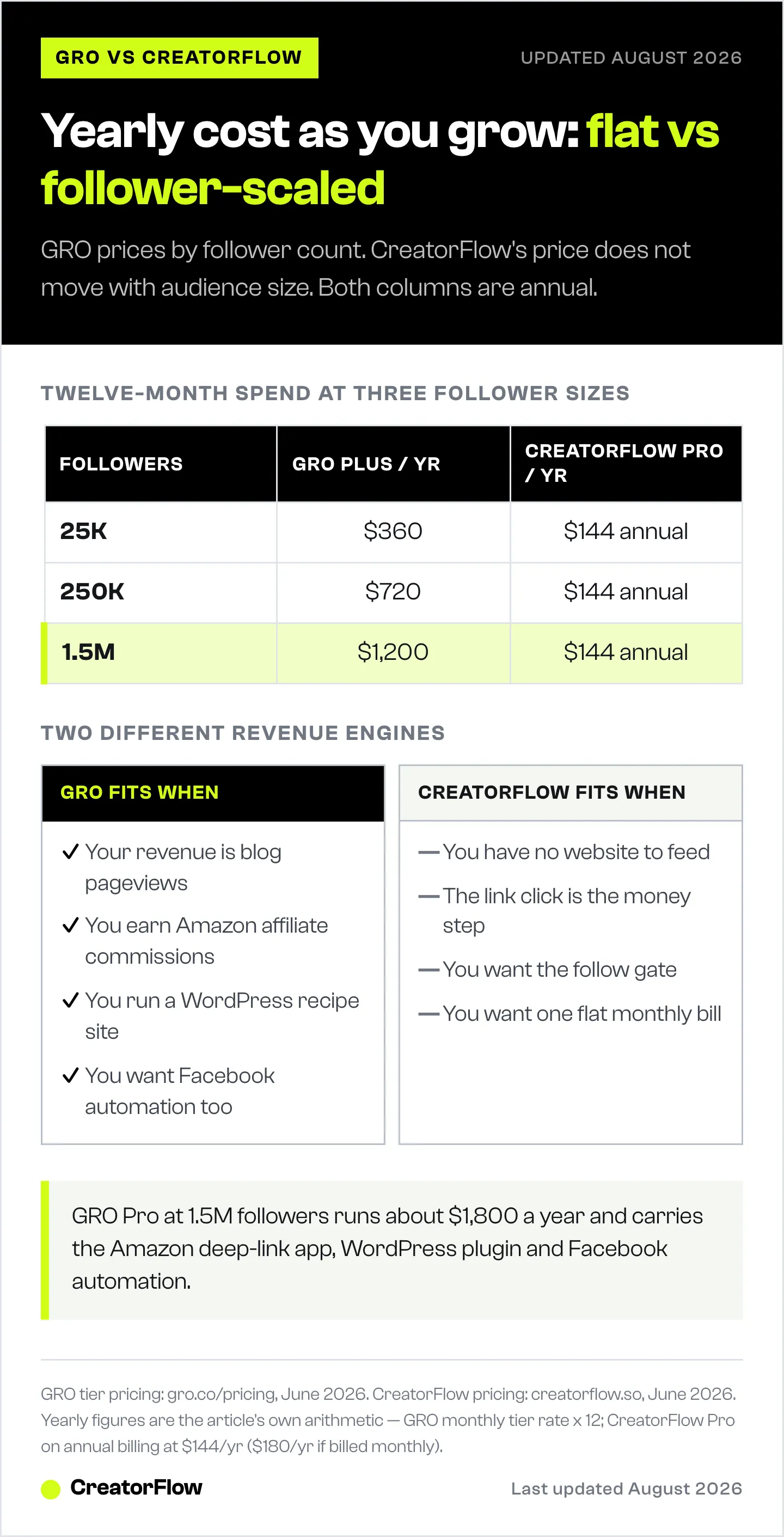
Monthly numbers hide the real gap. Here is the annual spend at three follower sizes, computed from the verified prices above. CreatorFlow’s annual billing is the cheaper of its two paths ($144/yr Pro, $288/yr Growth); the monthly path is shown alongside so you can see both. GRO is billed at the monthly tier rate times twelve.
| Follower size (GRO tier) | GRO Plus / year | GRO Pro / year | CreatorFlow Pro / year | CreatorFlow Growth / year |
|---|---|---|---|---|
| 25K (15K-150K tier) | $360 | $960 | $144 (annual) / $180 (monthly) | $288 (annual) / $360 (monthly) |
| 250K (up to 500K tier) | $720 | $1,320 | $144 / $180 | $288 / $360 |
| 1.5M (up to 2M tier) | $1,200 | $1,800 | $144 / $180 | $288 / $360 |
All figures computed from gro.co/pricing and creatorflow.so, June 2026. GRO yearly = monthly tier rate x 12. CreatorFlow Pro annual = $144/yr; Growth annual = $288/yr.
Read the rows top to bottom and the math tells a single story. At 25K followers, the cheapest like-for-like comparison is GRO Plus at $360/yr against CreatorFlow Pro at $144/yr, a difference of $216 a year. Step up to 250K followers and GRO Plus rises to $720/yr while CreatorFlow Pro holds at $144/yr, a $576 gap. At 1.5M followers GRO Plus reaches $1,200/yr and GRO Pro reaches $1,800/yr, while CreatorFlow Pro stays at $144/yr and Growth at $288/yr. The flat-rate tool does not move because the price was never attached to your follower count.
That gap is not the whole decision, and it should not be read as one. GRO Pro at 1.5M followers costs roughly $1,800/yr, but it carries the Amazon deep-link app, the WordPress plugin, Facebook automation, broadcast DMs, and ad-network attribution. If those features are driving real Amazon commissions and pageview revenue on your own site, the higher bill can pay for itself many times over. The flat-rate saving only matters if you would not use what the extra spend buys. A food blogger clearing four figures a month in Amazon commissions is not choosing on a $200 subscription line. A coach with no website and no Amazon income is. Match the spend to the revenue engine, not to the sticker price alone.
For a wider price field that includes per-contact and multi-platform tools, our CreatorFlow vs ManyChat vs LinkDM comparison lays out how each pricing model behaves as you scale.
What GRO Does Best
GRO is the stronger tool for one specific creator: the established food or recipe blogger who owns a WordPress site and earns money from pageviews and Amazon affiliate links. Its feature set is built around that business, and it does that job better than a general DM tool. If you are that creator, GRO’s stack is hard to beat.
Walk through a concrete food-blogger workflow and you can see why the pieces fit together:
- Carousel recipe-roundup DMs. A creator posts a Reel of a sheet-pan dinner and ends with “comment DINNER for the recipe.” The keyword fires a carousel DM that shows three or four related recipes as swipeable cards, each linking to a blog post. GRO reports 70% click-through on these visual DMs (gro.co, June 2026). For a food blogger, that carousel is a mini recipe index delivered straight into the DM thread.
- Save-to-email capture. Inside that same flow, the follower can save the roundup to their inbox, which hands you an email address while delivering the recipe links. The follower gets something they wanted, and you get a list contact, in one tap.
- The Amazon deep-link app-to-app flow. When the recipe calls out a specific blender or sheet pan, GRO’s Pro app generates an Amazon link that opens directly in the Amazon app rather than a logged-out mobile browser. Opening in the app keeps the follower logged in and reduces checkout friction, which matters for affiliate conversion. We break down the mechanics in our guide to Amazon deep links for Instagram affiliates.
- The WordPress plugin. GRO bundles a WordPress plugin that converts existing Amazon affiliate links across your site automatically (gro.co, June 2026), so the deep-link treatment applies to the back catalog of recipes you already published, not only new posts.
On top of that workflow, GRO offers a paid memberships add-on (priced at $0/mo plus 15% per transaction) for an ad-free site experience and member-gated content, and it automates Facebook alongside Instagram. If your income depends on blog pageviews, Amazon commissions, a WordPress site, and Facebook reach, those are real reasons to choose GRO over a general Instagram tool.
Where CreatorFlow Fits Instead
CreatorFlow is built for the Instagram-first creator in any niche who wants simple, predictable cost. Its scope is the Instagram side of the funnel rather than a website growth suite. It automates Instagram DMs well, keeps the price flat as you grow, and adds a few conversion features that GRO does not list publicly. Here is what each of those features does and when a food creator benefits.
- Follow gate. Before the link is sent, CreatorFlow can require the commenter to follow you. The flow holds the link until the follow is confirmed, then delivers it. For a recipe creator running a giveaway or a high-reach Reel that pulls in non-followers, this converts one-time commenters into followers in the same motion that delivers the recipe. GRO does not list a follow gate on its site (gro.co, June 2026).
- Email gate. CreatorFlow can ask for an email before releasing the link, turning a recipe request into a list signup. A food blogger building a weekly recipe newsletter benefits directly: the people most motivated to get your recipe are the people most likely to opt in. See how it works in our walkthrough on collecting emails through Instagram DMs.
- Geographic analytics. CreatorFlow shows clicks by country and city. A creator with affiliate links that pay differently by region, or one deciding whether to localize content or pitch a regional brand deal, can see where the buying audience truly sits rather than guessing from follower demographics.
- CSV export. Every email and contact captured in the DM can be exported as a CSV and loaded into your email platform. There is no lock-in: the list you build is portable. For a food creator who runs newsletters in Mailchimp, ConvertKit, or anything else, the contacts collected on Instagram move out cleanly.
CreatorFlow is Instagram only, and every feature is built around how Instagram behaves. That focus is the point: a tighter feature set, lower flat cost, faster setup. A creator can be live with a working comment-to-DM automation in about five minutes without touching a website. For screenshots of these features in a food-creator context, see the visual tour of CreatorFlow for food creators.
Feature-by-Feature Comparison
The glance table near the top covers the headlines. This one goes row by row for creators who want the full picture before deciding.
| Capability | CreatorFlow | GRO (Grocer’s List) |
|---|---|---|
| Pricing model | Flat-rate, fixed by plan | Scales by follower count |
| Free-tier cap | 500 DMs/mo, any follower count | Under 15K followers |
| Comment-to-DM | Yes | Yes |
| Story reply automation | Yes | Yes (Plus and up) |
| Carousel / visual DMs | Single-message DMs | Yes (Plus and up) |
| Email capture | Yes (email gate) | Yes (save to email) |
| Follow gate | Yes (Pro) | Not listed (gro.co, June 2026) |
| Amazon deep links | Outside scope | Yes (Pro) |
| WordPress plugin | Outside scope | Yes (Pro) |
| Paid memberships | Outside scope | Yes (add-on, $0/mo + 15% per transaction) |
| Facebook automation | Outside scope | Yes (Pro) |
| Analytics | Geographic analytics (Pro) | Google Analytics + ad-network attribution (Pro) |
| Migration | Rebuild keyword automations manually | Self-serve from ManyChat / LinkDM (Plus); white-glove (Pro) |
| Channels | Instagram only | Instagram and Facebook |
| Best for | Instagram-first creators, any niche | Food / recipe bloggers with a website |
CreatorFlow figures from creatorflow.so; GRO figures from gro.co, June 2026.
The shape of the difference is consistent across every row. GRO carries more surface area aimed at the website-and-Amazon business: deep links, the plugin, memberships, Facebook, attribution. Those features sit outside CreatorFlow’s scope on purpose. CreatorFlow carries the follow gate and a flat bill that GRO does not match. Neither list is right or wrong; they describe two different jobs.
Switching Between the Tools
Migration cuts both ways, and the two tools handle it differently.
Moving to GRO is the smoother path on paper. GRO advertises a self-serve migration on its Plus plan that imports your recent Instagram posts and keywords from ManyChat or LinkDM, and Pro adds a white-glove migration where the GRO team handles the move for you (gro.co, June 2026). If you are coming from one of those two tools, GRO has built the on-ramp.
Moving to CreatorFlow is a manual rebuild. There is no automatic transfer of flows from GRO, ManyChat, or any other tool; templates and keyword automations do not port across vendors. In practice that means recreating your core keyword triggers by hand: open CreatorFlow, set the keywords, paste the links, configure the follow gate and email gate, and switch the automation on. Most creators run a handful of high-traffic automations rather than dozens, so the rebuild is usually under an hour for the ones that matter. The upside of doing it by hand is that you audit your own funnel in the process and drop the automations that were never converting.
One safety note for either direction: both tools connect through Meta’s official Instagram API using OAuth, so switching does not involve sharing or changing your Instagram password. You authorize the new tool, revoke the old one in your Instagram settings, and the account stays inside Meta’s terms throughout.
Which Should a Food Creator Pick
Pricing models and feature lists only matter against a real situation. Here are five food-creator profiles mapped to a recommendation.
The 8K-follower new recipe creator. You are under the 15K free-tier line on GRO, and CreatorFlow’s free plan runs comment-to-DM with 500 DMs a month at no cost and no follower cap. Both are free at this stage, so pick on direction of travel. If you are building a WordPress recipe site and plan to monetize Amazon and pageviews, start learning GRO now. If you are sending followers to a Linktree, a newsletter, or a single landing page, start on CreatorFlow’s free plan and keep the bill at zero longer.
The 120K WordPress food blogger heavy on Amazon. This is GRO’s core profile. You own the site, you earn from display ads and Amazon commissions, and the Amazon deep-link app plus the WordPress plugin convert your whole back catalog of recipe links. GRO Pro at this size ($80/mo) is built for exactly your business, and the features can return far more than the subscription. Choose GRO.
The 600K creator who only posts Reels and has no blog. Your reach is large, you do not run a website, and most of GRO’s stack would sit idle. On GRO you would pay the up-to-500K-or-2M tier ($60-100/mo Plus) for features you cannot use. CreatorFlow holds at a flat $15-30/mo and gives you the follow gate and email gate to convert that Reel reach into followers and list contacts. Choose CreatorFlow.
The coach who shares meal plans. You sell programs and capture leads, not pageviews. The email gate and CSV export feed your nurture sequence directly, and the follow gate grows the audience you sell to. You do not need Amazon deep links or a WordPress plugin. CreatorFlow’s flat pricing and email focus fit the coaching funnel. Choose CreatorFlow.
The creator with no website at all. GRO’s defining features assume a website to send traffic to, so without one you are paying for machinery you cannot run. CreatorFlow works fully without a site: the link can point to any URL, and the email capture builds an asset you own regardless of where you publish. Choose CreatorFlow, and revisit GRO if and when you launch a blog.
If you want the niche-specific setup either way, our guide to Instagram automation for food bloggers walks through the recipe-link and affiliate workflows in detail, and our roundup of the best Instagram DM tools for food bloggers covers the broader field of options. For the income side, the money map in how food creators make money on Instagram shows where each tool fits across affiliate, ads, and products.

FAQ
What is GRO and is it the same as Grocer’s List?
Yes. GRO is the rebranded name of Grocer’s List, an Instagram and Facebook comment-to-DM automation tool aimed at creators who drive traffic to their own websites. Its app and help pages still reference the Grocer’s List origin. It uses Meta’s official API and markets itself as a Tech Partner for Meta, and it is built for food and recipe bloggers driving traffic to a WordPress site (gro.co, June 2026).
How much does GRO cost?
GRO prices by follower count. It is free under 15,000 followers, then $30/mo on the Plus plan and $80/mo on the Pro plan for accounts up to 150,000 followers. Above that, prices scale: Plus reaches $200/mo and Pro reaches $250/mo at 3 million followers, with custom pricing beyond. There is also a memberships add-on at $0/mo plus 15% per transaction (gro.co/pricing, June 2026).
Is GRO worth it for food bloggers?
For a food blogger who owns a WordPress site and earns from Amazon affiliate and display-ad pageviews, GRO’s feature set is built around that exact business: carousel recipe DMs, save-to-email, the Amazon deep-link app, and a WordPress plugin that converts existing affiliate links (gro.co, June 2026). The cost rises with your follower count, so the question is whether the Amazon and pageview revenue those features drive exceeds the subscription. For a creator without a website or without Amazon income, most of that value goes unused.
What is the best GRO alternative for Instagram-first creators?
CreatorFlow is a strong GRO alternative for creators whose business lives on Instagram rather than on a website. It matches GRO on the core job (comment-to-DM with email capture), adds a follow gate GRO does not list, and charges a flat $15-30/mo regardless of follower count (creatorflow.so, June 2026). If your income depends on Amazon app deep links, a WordPress site, or paid memberships, GRO is the tool built around that stack.
How does CreatorFlow handle Amazon affiliate links?
CreatorFlow drops your existing Amazon or affiliate URL straight into the DM, with click tracking and geographic analytics on top. App-to-app Amazon deep links and a WordPress plugin that rewrites affiliate links across an existing site are GRO Pro features, so if those are central to your affiliate income, GRO is built for that. If you mainly need comment-to-DM and email capture on Instagram, CreatorFlow covers that at a flat rate.
Which is cheaper, GRO or CreatorFlow?
It depends on follower count. Under 15,000 followers, GRO is free and CreatorFlow’s free plan covers 500 DMs a month. Above 15,000 followers, CreatorFlow’s flat $15-30/mo is usually cheaper than GRO’s $30-80/mo, and the gap widens as your following grows. At 1.5M followers, CreatorFlow Pro runs $144/yr against GRO Plus at $1,200/yr. The other axis is volume: GRO does not cap DMs by tier, while CreatorFlow includes a set monthly DM allowance (5,000 on Pro, 10,000 on Growth) and custom-quotes its Agency tier above that.
Can I move my keywords from GRO or ManyChat to another tool?
GRO advertises a self-serve migration that imports your recent Instagram posts and keywords from ManyChat or LinkDM, with white-glove migration on its Pro plan (gro.co, June 2026). Moving to CreatorFlow means recreating your keyword automations there; templates and flows do not transfer automatically between tools. Most creators rebuild a handful of core automations in under an hour.
Is GRO or CreatorFlow safe for my Instagram account?
Both connect through Meta’s official Instagram API using OAuth, so neither requires your password. GRO describes itself as a Tech Partner for Meta, and CreatorFlow is a Meta Tech Provider. Both tools pace sends at around 200 DMs/hour, a tool-side pacing convention rather than a Meta hourly cap, and both respect Meta’s 24-hour messaging window. Using the official API keeps automation within Instagram’s terms, unlike browser bots that log into your account.
Do food bloggers need a website to use these tools?
For GRO, a website is the point. Its features assume you are sending followers to a WordPress blog and Amazon links. CreatorFlow works without a website. You can send a Linktree, a landing page, a booking link, or any URL, which makes it a fit for creators who are not running a blog.
GRO pricing and features verified from gro.co and gro.co/pricing as of June 2026. CreatorFlow details from creatorflow.so. Competitor details change; check official sites for the latest. Individual results vary.