

Handle Instagram collaboration requests by qualifying each one fast: ask whether it’s paid, gifted, or a content trade, then collect the one detail that decides fit (budget, product value, or what they’re offering). The bottleneck is volume and speed, so set up a keyword intake flow that delivers your media kit and rate range automatically, then triage qualified requests in one focused session instead of monitoring DMs all day.
A brand DMs you about a partnership. You see it three days later, buried under fan replies, meme tags, and “love your content” messages. By then they’ve moved on to the next creator.
This is the quiet way creators lose brand deals. Not by saying no, but by never replying in time. Instagram’s inbox gives you no labels, no priority flags, and no way to tell a real budget from a spam pitch. Every collab request sits in the same undifferentiated pile.
This guide fixes that. You’ll get a qualification framework for the five types of collaboration requests, the questions that sort them in one or two messages, and how to automate the intake so genuine opportunities surface instead of sinking.
Key Takeaways
- Qualify in one question first: paid, gifted, or content trade. That single answer branches everything else.
- Then ask one detail per type: budget (paid), product value (gifted), what they offer (trade).
- Manual triage breaks past ~2 requests/week. No intent labels, no qualification data, no routing in Instagram’s inbox.
- Automate the intake, not the judgment. A keyword flow delivers your media kit and collects details; you make the call.
- Speed converts. A fast, professional reply (even an automated intake) signals you run collabs like a business.
- CreatorFlow scope: keyword-, comment-, and story-triggered DM automation on Meta’s official API. It’s intake automation, not AI that reads arbitrary inbound messages.

What Are Instagram Collaboration Requests?
Instagram collaboration requests are inbound DMs from brands, agencies, or other creators asking to partner on sponsored content, gifted product mentions, paid posts, or content trades. They’re not the same as Instagram’s native collab post feature, which invites a co-author onto a post you’ve already made. A collaboration request is a business inquiry that needs your response and evaluation.
Above a few thousand followers, these can arrive in the double digits per week. Some carry real budget and genuine fit; most are low-effort or poorly matched. The problem is Instagram gives you no way to tell them apart at a glance.
Why Manual Triage Fails at Scale
Three structural gaps make hand-managing a collab inbox unworkable past a certain volume:
- No intent labels. Instagram doesn’t flag messages by topic. “Wanted to reach out about a partnership” looks identical to a fan DM in your list. You open each one to find out.
- No qualification data. Most inbound collab DMs include no budget, deliverable, or timeline, because the sender assumes you’ll ask. That back-and-forth runs multiple messages over multiple days.
- No routing or tracking. Answers live inside separate DM threads with no way to tag, sort, or compare. Weighing five opportunities means juggling five conversations in your head.
The manual workflow holds at one or two requests a week. Past that, the default outcome is missed revenue.
The Five Request Types and How to Qualify Them
Lead with one question to categorize: “Is this a paid partnership, a gifted collaboration, or a content trade?” Then ask the single detail that decides fit.
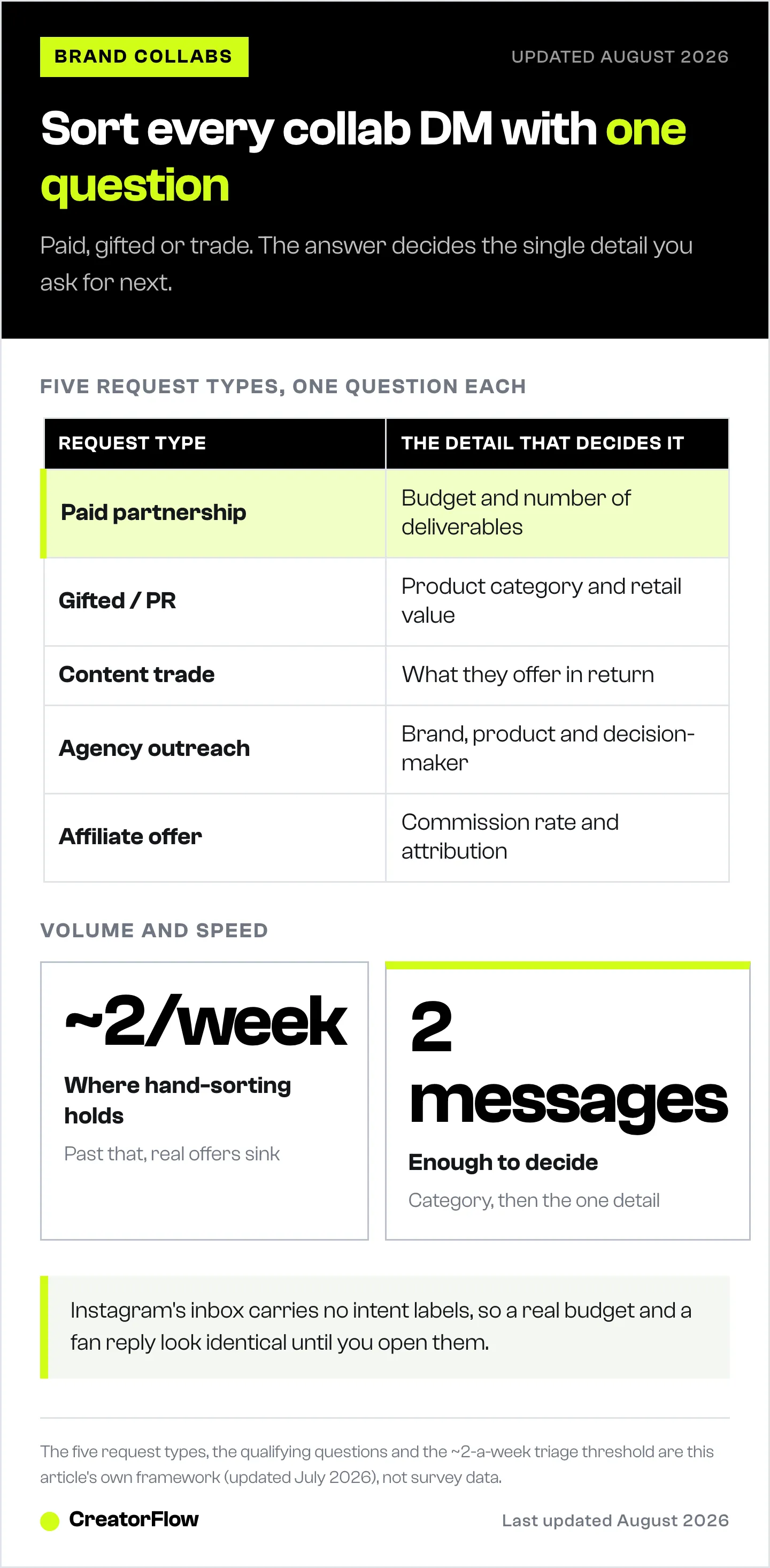
| Request type | Key qualifying question | Check before saying yes |
|---|---|---|
| Paid partnership | Budget range and number of deliverables | Audience alignment, exclusivity, usage rights |
| Gifted / PR | Product category and retail value | Disclosure requirements, genuine product fit |
| Content trade | What they offer in return | Follower overlap, audience quality |
| Agency outreach | Brand, product, and decision-maker | Whether they can actually negotiate terms |
| Affiliate / commission | Commission rate and attribution | Whether the product converts, cookie window |
Two messages should be enough to decide whether a request is worth your time. Anything that can’t answer a direct budget or product question usually isn’t. If the pitch is a co-hosted giveaway, the entry tracking and FTC rules deserve their own plan: see brand collab giveaways with Instagram DM automation.
How to Automate the Intake With CreatorFlow
You can’t automate the judgment, but you can automate everything up to it: capturing the request, delivering your media kit, and collecting the basics. Here’s the honest scope first.
CreatorFlow is keyword-, comment-, and story-triggered DM automation on Meta’s official Instagram API. It fires a predefined DM when someone uses a trigger you set. It does not read and interpret arbitrary inbound messages with AI. So the play is to create a clear, public intake path that funnels brands into that trigger.
Set up a collab intake flow:
- Create a public intake trigger. Add a line to your bio and pin a post: “Brands: comment COLLAB or DM COLLAB for my media kit and rates.” This points every interested brand at a keyword you control.
- Auto-deliver your media kit. Set the keyword COLLAB to send an instant DM with your media kit link, rate range, and a one-line ask: “Is this a paid, gifted, or trade collaboration?” Now every inbound starts pre-qualified, 24/7, even at 2am.
- Capture the email with the Email Gate. On a paid plan, require an email before the kit is sent, so you build a brand contact list you own and can export via CSV.
- Route Story replies too. Turn on story reply automation so a brand reacting to a “open to collabs” Story gets the same intake DM.
- Triage in one session. Because qualified requests carry your media kit and a category answer, you review them in a single focused block instead of monitoring DMs all day.
For more on this pattern, see Instagram story DM automation use cases and the comment-to-DM setup guide.
This runs on Meta’s official API at a flat $15/month on Pro, with no per-contact fees, so a surge of inbound interest after a viral post doesn’t cost more to handle.
Manual Steps for Everything Else
Automation handles intake; you handle the decision. For requests that clear the keyword flow:
- Confirm the category if the brand didn’t answer in-thread.
- Check fit against the table above before negotiating.
- Reply fast. Even a same-day “thanks, here’s my kit, is this paid or gifted?” keeps you in the running.
- Log it. Track brand, type, budget, and status so you can compare offers instead of holding them in your head.
For landing collaborations in the first place (media kit, pitching, timing), see how to get Instagram collaborations and the Creator Marketplace guide.
Start your free trial at creatorflow.so
FAQ
What are Instagram collaboration requests?
Inbound DMs from brands, agencies, or creators wanting to partner on paid posts, gifted product content, or content trades. They arrive in your general inbox with no labels or qualification data. Unlike Instagram’s native collab post feature, they’re business inquiries that need your response and evaluation.
How do I handle a high volume of collab DMs without missing real ones?
Create a public intake path (bio and pinned-post CTA) that funnels brands into a keyword. A tool like CreatorFlow then auto-delivers your media kit and a qualifying question the moment someone uses it, so every inbound arrives pre-qualified and you triage them in one session instead of watching your inbox.
What questions should I ask to qualify a collaboration request?
One categorizing question first: paid, gifted, or trade. Then the detail that decides fit: budget range for paid, product value for gifted, what they offer for trade. Those answers let you decide in about two messages.
Is it safe to use automation for collaboration DMs?
Yes, when the tool uses Meta’s official API. CreatorFlow connects through Meta’s official Instagram API with no password sharing and paces sends within rate limits, so your account stays compliant. It triggers DMs from keywords, comments, and story replies rather than scraping your inbox.
Can CreatorFlow detect a collab request automatically from any message?
No, and it’s worth being clear: CreatorFlow fires on triggers you set (keywords, comments, story replies), not by reading and interpreting arbitrary inbound DMs with AI. The reliable approach is to publish a collab keyword so brands route themselves into your intake flow.
How do I tell a genuine brand from spam?
The qualifying questions do most of the filtering. Real brands answer about budget, product, or deliverables; spam drops off when asked a direct question. Check the sender’s follower count, account age, and post history before replying to anything that clears the first step.
Disclaimer: Features and best practices were accurate as of May 2026 and may change. Instagram is a trademark of Meta Platforms, Inc. CreatorFlow (CreatorFlow Labs, S.L.) is a Meta Tech Provider and is not affiliated with, endorsed by, or sponsored by Meta Platforms, Inc. Results vary by audience, niche, and execution.


