
Instagram Story DM automation triggers an instant DM when someone replies to your Story or mentions your account in theirs. The seven highest-converting use cases are pre-launch waitlists, affiliate link drops, discovery call bookings, product Q&A handoffs, webinar and event signups, email list capture, and gated community invites. Each runs through Meta’s Instagram API, stays inside the 24-hour messaging window, and follows tool-side pacing of around 200 DMs/hour as a behavioral safety cap (developers.facebook.com, May 2026).
Most creators treat Stories like a billboard. Post a poll, watch the votes roll in, do nothing. Every one of those replies is a hand raised. A reply to “Would you take a $297 course? Reply YES” is a buying signal. A reply to a “DM me PRICING” sticker is a lead. Without automation, half of those signals decay before you open the app, and the 24-hour Meta messaging window keeps shrinking.
This guide breaks down the seven Story DM automation use cases that move money. For each: the trigger, primary message template, follow-up template, who it works for, the metric to watch, and what to A/B test. It also covers verified Meta API rules, current tool pricing as of May 2026, and the setup steps that take a use case from idea to live in under 20 minutes.
Key Takeaways
- Story replies are the highest-intent surface on Instagram. They are private, personal, and time-sensitive. Industry data shows Story DM automations hit 35-65% open rates and 12-28% click-through, well above feed-post automations (communipass.com, May 2026)
- Seven proven use cases convert reliably: waitlist capture, affiliate link drops, discovery bookings, product Q&A, webinar signups, email capture, and community access. Each maps to a specific revenue model
- Stickers warm people up, the keyword reply captures them. Poll votes and sticker answers stay in your Story activity view, so pair a sticker with a keyword prompt on the next slide. Stories with polls, questions, or CTA stickers boost reply rates to 4-7% of viewers (manychat.com, May 2026)
- Speed compounds conversions. Brands responding within 1 minute see conversion rates roughly 21x higher than brands taking 30+ minutes (leadresponse.co, May 2026). Automation closes that gap to under 10 seconds
- Tool pricing has shifted in 2026. ManyChat restructured in March 2026 (free plan now 25 contacts, down from 1,000), LinkDM Pro is $19/month, and CreatorFlow Pro is $15/month flat
- Bottom line: Pick one use case, run it for 14 days, then layer the next. Stacking all seven on day one creates spaghetti automations no one maintains

Why Story DM Automation Converts Better Than Comment-to-DM
Comments are public. Stories are private. That difference changes how people engage, and the exact rule on who can see a story reply is worth reading before you design the prompt.
A follower who comments “link” is broadcasting their intent to everyone who sees the post. Some don’t want to. They scroll past. A follower who replies to a Story is in a 1-to-1 conversation already. They are warmer, more committed, and more likely to take the next step.
Story interactions also expire fast. Stories disappear in 24 hours, and Instants disappear the moment the recipient opens them. Meta’s 24-hour messaging window starts ticking the moment someone interacts and resets every time they reply (keyapi.ai, May 2026). If you respond manually 5 hours later, the moment is gone. Automation closes that gap to under 10 seconds.
Industry data backs this up. Story DM automations report 35-65% open rates and 12-28% click-through, with 70-85% response rates and high purchase intent (communipass.com, May 2026). Compare that to typical email marketing benchmarks of 35-45% open rates and 2.5-3.5% click rates (mailchimp.com, May 2026), and Story DMs win on click-through by 4-10x.
Volume looks different too. Stories will not produce comment-section spikes of 200 replies. They produce a steady drip of high-intent ones. That drip compounds. For a deeper dive on the broader mechanics, see the Instagram DM automation complete guide.
What Counts as a Story Interaction (Meta API Rules)
Meta’s messaging API fires when an Instagram user sends your account a message. On Stories, exactly two things do that (developers.facebook.com, May 2026):
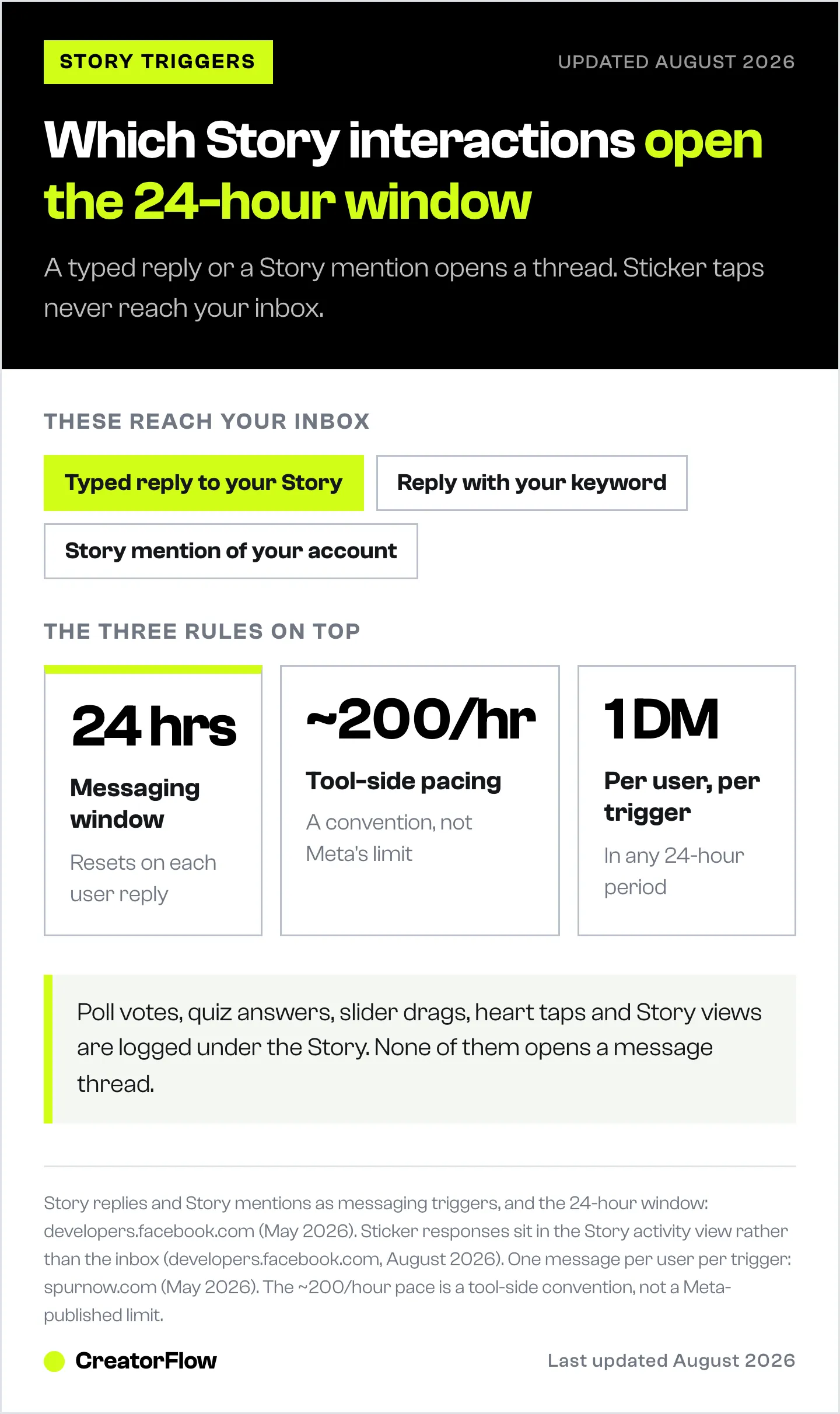
- A typed reply to your Story, including a reply that is your trigger keyword
- A Story mention, where someone tags your account in their own Story
Sticker interactions are the common misunderstanding. A poll vote, a quiz answer, a question sticker response and an emoji slider drag are all recorded in the activity view attached to your Story. They never arrive in your inbox, so no automation can fire on them (developers.facebook.com, August 2026). Heart taps and Story views do not count either.
Stickers still earn their place. Use one to warm the audience up, then put the keyword prompt on the next slide so the interaction ends in a message you can answer. The Instagram quiz funnel guide walks through that build.
Three additional rules are non-negotiable:
- 24-hour window — you can only send automated DMs to users who interacted in the last 24 hours. The window resets each time the user replies (keyapi.ai, May 2026).
- About 200 DMs per hour per account — a tool-side pacing convention on a rolling 60-minute window, applied regardless of follower count or verification status (Meta’s own published limits are per-second, developers.facebook.com/docs/graph-api/overview/rate-limiting, May 2026).
- One automated message per user per 24-hour period from a single comment or Story trigger — you cannot blast the same person twice from the same trigger (spurnow.com, May 2026).
Tools that respect these limits stay safe. Tools that bypass them risk account suspension. CreatorFlow, ManyChat, and LinkDM all use the official Graph API and stay inside these limits.
Use Case 1: Pre-Launch Waitlist Capture
Trigger: Story reply with the keyword WAITLIST Best for: Course creators, SaaS founders, product launches, cohort programs
You are launching something in 2-6 weeks. You need a list of people who care before launch day. Cold outreach on launch day converts terribly. A warmed waitlist converts at 5-15% on day one (in line with the 7-20% DM-to-sale range cited by napolify.com, May 2026).
Story format: Post a teaser Story showing what you are building. End with a plain prompt: “Want early access? Reply WAITLIST.”
Primary DM template:
Thanks for raising your hand. The [product name] waitlist opens [date] and seats are capped at [number]. Drop your email here and you will get the link 24 hours before everyone else: [link]
Follow-up DM (24 hours later, only if they replied to the first one):
Quick check — did you grab your waitlist spot? If you ran out of time, here is the link again: [link]. Doors close on [date].
Metric to watch: Reply-to-email-capture rate. Healthy is 40-60%. Below 30% means your waitlist value prop is weak.
What to A/B test: Prompt framing (“Reply WAITLIST for early access” vs “Reply WAITLIST to pre-order”). Framing changes who self-selects in. For a full playbook, see Instagram DM waitlist for pre-launch.
Use Case 2: Affiliate Link Drop
Trigger: Story reply with a product question, or the keyword LINK Best for: Amazon affiliates, ShopMy and LTK creators, fashion and beauty influencers
You post a Story showing a product. Someone replies “where is that from?” or types LINK. Without automation, you screenshot, paste a link, repeat 40 times. With automation, every reply gets the affiliate link in under 8 seconds.
Story format: Show the product. Add a plain prompt: “Want the link? Reply LINK.” A poll can sit alongside it to warm people up, but the typed reply is the part that reaches your inbox.
Primary DM template:
Here it is: [affiliate link]. Sizing runs [true to size / size up]. I have had mine for [time] and the [color] is the one I would buy again.
Follow-up DM (12-24 hours later):
Did you grab it? If you have any sizing or color questions, I am here. Also — this brand restocks slow, so worth checking now if you were on the fence.
Metric to watch: Click-through rate on the DM link. Affiliate Story DMs commonly land in the 12-28% CTR range reported across automation platforms (communipass.com, May 2026), with hyper-relevant product matches pushing higher. Compare to typical bio-link CTRs of 1-3%.
What to A/B test: The keyword itself (LINK vs SHOP vs the product name). Short, obvious words get typed correctly; clever ones get mistyped and never match.
Pair this use case with the bio link versus DM automation breakdown if you are still routing affiliate traffic through Linktree.
Use Case 3: Discovery Call Bookings
Trigger: Story reply with a keyword like “CALL” Best for: Coaches, consultants, agencies, freelancers
A coach posts a Story explaining a transformation a client went through. Ends with: “DM CALL if you want to see if this would work for you.” Replies trigger an automated DM with a Calendly link and 2-3 qualifying questions.
Story format: Share a client win or a contrarian opinion in your space. CTA: “DM CALL for a free 20-minute fit chat.”
Primary DM template:
Glad you reached out. Quick book here so we can talk: [Calendly link]. Before the call, two questions:
- What are you working on right now?
- What is the biggest blocker? Answers help me prep so we do not waste your 20 minutes.
Follow-up DM (if they replied but did not book within 24 hours):
Just looped back — saw you replied but did not see a booking come through. The calendar fills up by Thursday each week if that helps with timing: [Calendly link].
Metric to watch: Booking rate from DM (replies booked / replies received). Healthy is 30-50%. Below 20% means the offer is misaligned with the audience.
What to A/B test: Whether to ask qualifying questions in the first DM or wait until after the booking. Asking up front filters tire-kickers but reduces book rate. Asking after maximizes bookings but increases no-shows. Local businesses run the same play for tables instead of calls; the restaurant Instagram automation guide shows how to auto-send OpenTable and Resy links from DMs.
See the Instagram Calendly DM automation guide for the full integration walkthrough.
Use Case 4: Product Q&A and Objection Handling
Trigger: Story reply with a keyword (“PRICING”, “SHIPPING”, “REFUND”) Best for: E-commerce, SaaS, info products, online courses
Most product questions repeat. “How much?” “Is there a refund?” “Does it work for [use case]?” Manual answers eat hours and the answer arrives too late. Automation pre-loads answers for the top 5-10 objections and delivers them instantly.
Story format: A series of slides, each tied to one keyword: “Reply PRICING / SHIPPING / REFUND.”
Primary DM template (per keyword):
PRICING: [Product] is $[price] one-time, no subscription. Everything is included: [bullet 1, bullet 2, bullet 3]. Ready to grab it? [link]
Follow-up DM (4-12 hours after the first):
Quick nudge — if pricing was the only blocker, we are running [discount/payment plan/guarantee] right now: [link]. Otherwise happy to answer anything else.
Metric to watch: Conversion rate from objection-DM to purchase. The keyword “PRICING” tends to convert in the 7-20% range cited as typical DM-to-sale conversion (napolify.com, May 2026), with hyper-targeted Q&A flows hitting closer to 18%. “SHIPPING” and “REFUND” convert lower but reduce abandoned-cart drag.
What to A/B test: Whether to lead with the price or with the value stack. “It is $297” before social proof underperforms. “[Three benefits], available for $297” outperforms.
Use Case 5: Webinar and Event Signups
Trigger: Story reply with the keyword WEBINAR Best for: B2B creators, course launches, live workshops, virtual summits
You are running a webinar in 5 days. Stories are your highest-frequency surface. Every Story between now and the event becomes a registration funnel. The DM delivers the registration link plus a calendar add and a reminder opt-in.
Story format: Tease the webinar topic. CTA: “Reply WEBINAR for the link.” Or a countdown sticker on the slide before it, with the same prompt underneath.
Primary DM template:
Locked in. Here is the link: [registration URL]. Add it to your calendar: [calendar link]. I will send a 1-hour reminder DM the day of. We are covering [3 promises], and there will be Q&A at the end.
Follow-up DM (1 hour before the event, sent inside the messaging window):
Starting in 60 minutes. Here is the link: [URL]. Bring a question for the Q&A and I will pick a few to answer live.
Metric to watch: Registration rate from Story DM versus from feed posts. Story DM commonly outperforms feed CTAs because of the messaging-window effect and the higher engagement rate on Story polls (which boost 3-second view rates roughly 9x per industry data cited by communipass.com, May 2026).
What to A/B test: A countdown sticker above the prompt versus a plain text slide. Countdowns add urgency; plain slides read faster. If the event itself runs on Instagram Live, the Live DM automation guide covers capturing leads from viewers in real time.
Use Case 6: Email List Capture
Trigger: Story reply with the keyword GUIDE on a lead magnet teaser Best for: Newsletters, lead-magnet funnels, email-driven businesses
DMs hit response rates well above email. But you do not own the DM channel. Email you own. Automation bridges the two: capture intent in the DM, convert it to an email subscriber inside the same conversation.
A useful frame: average email open rates across Mailchimp accounts in 2025 were 35-45%, inflated by Apple Mail Privacy Protection (mailchimp.com, May 2026). Click-to-open rate is the more reliable signal. Story DMs convert into email subscribers at 50-70% when the lead magnet matches the audience — and those subscribers then engage with email at standard industry rates.
Story format: Show a preview of the lead magnet (PDF cover, video thumbnail). CTA: “Reply GUIDE for the free [thing].”
Primary DM template:
Here is what is inside [guide name]: [3-bullet preview]. Drop your email below and I will send the PDF straight to your inbox so you have it forever, even after Instagram eats this conversation: [email capture link]
Follow-up DM (12-24 hours later, if no email submitted):
Saw you wanted the [guide] but did not catch your email yet. Here is the direct link if it is easier: [link]. The guide covers [one specific outcome] — worth keeping handy.
Metric to watch: DM-to-email opt-in rate. Healthy is 50-70%. The trick is anchoring email capture to a real reason (“so you have it forever”) rather than asking for it cold.
What to A/B test: Lead-magnet format (PDF vs video vs Notion template). Different audiences prefer different formats; the same offer can swing 20-40 percentage points based on format alone.
For the full breakdown, see collecting emails from Instagram DMs.
Use Case 7: Gated Community and Membership Access
Trigger: Story sticker reply with a community keyword (“DM JOIN”, “DM SKOOL”, “DM DISCORD”) Best for: Skool and Whop community owners, paid Discord servers, Circle communities, paid memberships
You run a paid community. Stories are how you nurture interest between launches. The DM delivers either the join link (for free communities) or a sales-page link with a discount code (for paid).
Story format: Share a snippet of community value: a member win, a thread, an event recap. CTA: “DM JOIN to get inside” or “DM SKOOL for the link plus a $20 discount.”
Primary DM template (paid community):
Glad you want in. Here is the link: [community sales page]. Code WELCOME20 takes $20 off the first month. Inside you get: [3 specific things]. Any questions before joining, just reply here.
Follow-up DM (24-48 hours after first DM, if not joined):
Quick check — the WELCOME20 code is good through [date]. If you had questions before pulling the trigger, drop them here. Most-asked are: pricing after month one, time commitment, and whether it works for [common objection]. Happy to answer.
Metric to watch: DM-to-paid-conversion rate. Communities with strong existing social proof land in the 7-20% DM-to-sale range cited as the Instagram-wide benchmark (napolify.com, May 2026). New communities convert lower until you stack member testimonials.
What to A/B test: Discount-code framing vs no discount. Some audiences convert better with a price anchor (“normally $97, today $77”); others convert better with no discount and stronger social proof.
See building a Skool community with Instagram DM automation for the full launch playbook.
Quick Comparison: Use Case Difficulty and ROI
| Use Case | Setup Time | Reply Volume | Revenue per Reply | Best Tool Tier |
|---|---|---|---|---|
| Pre-launch waitlist | 15 min | Medium | High (compounds at launch) | Free / $15 |
| Affiliate link drop | 10 min | High | Low-medium per click | Free / $15 |
| Discovery calls | 20 min | Low-medium | Very high ($500-5K) | $15 |
| Product Q&A | 30 min (multi-keyword) | High | Medium | $15 |
| Webinar signups | 15 min | Medium | High at scale | Free / $15 |
| Email capture | 15 min | Medium-high | Indirect (LTV) | Free / $15 |
| Community access | 20 min | Low-medium | High ($30-300/month) | $15 |
Tool Pricing for Story DM Automation (May 2026)
All three tools below run on Meta’s official Instagram Graph API and support every Story interaction type listed earlier.
| Tool | Free Tier | Entry Paid Tier | Mid Tier | Notes |
|---|---|---|---|---|
| CreatorFlow | 500 DMs/month, 1 workspace | Pro $15/mo flat (5,000 DMs, 2 workspaces) | Growth $30/mo (10,000 DMs, 5 workspaces) | Flat-rate pricing, no per-contact scaling |
| ManyChat | 25 active contacts, 2 channels | Essential $17/mo (250 contacts) | Pro $39/mo most common, Business $99/mo (7,500 contacts), Advanced $199/mo (25,000 contacts) | Contact-based scaling. Free tier dropped from 1,000 to 25 contacts in March 2026 (manychat.com, July 2026) |
| LinkDM | 1,000 DMs/month | Pro $19/mo (3 IG accounts) | Platinum $99/mo (10 accounts, 300K DMs) | Meta Business Partner; multi-account focused (linkdm.com, July 2026) |
ManyChat’s March 2026 pricing change is the biggest shift in the space. The free tier dropping from 1,000 to 25 contacts pushed many small creators to evaluate alternatives. For a deeper comparison, see free Instagram DM automation tools.
How to Pick Your First Use Case
Do not run all seven on day one. Pick the one that maps to revenue you already understand.
- Already affiliate marketing? Start with use case 2 (affiliate drops). The infrastructure is the simplest.
- Selling 1-on-1 services? Start with use case 3 (discovery calls). Highest revenue per reply.
- Building an email list? Start with use case 6 (email capture). Compounds for years.
- Pre-launching anything? Use case 1 (waitlist). The 2-6 week window forces urgency.
- Running a paid community? Use case 7 (community access). DM is the highest-converting channel for membership signups.
Run the chosen use case for 14 days. Track replies, conversions, revenue. Then layer the next one.
Setup Walkthrough (Under 20 Minutes per Use Case)
The setup is roughly identical across CreatorFlow, ManyChat, and LinkDM. The pattern:
- Connect your Instagram Business or Creator account. Personal accounts cannot use the Graph API. Switching is free in the Instagram app under Settings → Account type.
- Pick the trigger type. Story reply or story mention. Each tool exposes these as separate trigger options.
- Set the keyword(s) if applicable. “PRICING”, “WAITLIST”, “CALL”, etc. Match the keyword to the Story CTA exactly.
- Write the primary DM. Keep it under 80 words. Lead with the link or the answer.
- Add a follow-up DM (optional). Schedule 12-24 hours after the first, inside the messaging window. This is where most creators leave money on the table by skipping it.
- Test with your own account. Reply to the Story from a second device. Confirm the DM lands in under 10 seconds.
- Activate. Post the Story. Watch the dashboard.
The whole flow takes 15-20 minutes for the first use case. Subsequent use cases take 10 minutes or less because the trigger setup is reusable.
Common Mistakes That Kill Story DM Conversion
Vague CTAs. “Let me know what you think” produces zero automatable replies. “DM PRICING for the breakdown” produces 4-7% reply rates from viewers (manychat.com, May 2026).
Generic DM responses. Copy-pasting the same message for every keyword feels robotic. Each keyword should match the Story context.
Skipping the follow-up DM. The single highest-return tactic in Story automation is a 12-24 hour follow-up. Most creators skip it. The window is open; use it.
Ignoring response speed. Brands responding within 1 minute see conversion rates roughly 21x higher than those taking 30+ minutes (leadresponse.co, May 2026). Manual response cannot match automated speed.
No metric tracking. Story automation without analytics is a black box. Use a tool that shows reply volume, click-through rate, and conversion per Story.
Stacking too many automations. Seven use cases sounds great. Running seven simultaneously means none of them get optimized. Start with one.
Ignoring the 24-hour window. If you respond manually after 24 hours, your DM lands but you cannot send follow-ups via automation. Plan everything inside that window.
FAQ
Do Instagram Story polls and question stickers trigger DM automation?
No. Poll votes, quiz answers, question sticker responses and slider drags are recorded in the activity view attached to your Story, not in your inbox. Meta’s messaging API fires when a user sends your account a message, so only a typed Story reply and a Story mention open the 24-hour window (developers.facebook.com, August 2026). Use a sticker to warm the audience up, then ask for a keyword reply on the next slide. Reactions (heart taps) and Story views do not count either.
What is the 24-hour messaging window for Story DM automation?
When someone replies to your Story or mentions you in theirs, Meta opens a 24-hour window during which your automation tool can send them DMs. The window resets every time the user sends another reply, so an active conversation can extend indefinitely. After 24 hours of no user action, the window closes and automated DMs stop sending (keyapi.ai, May 2026).
How many Story DMs can I send per hour?
Most automation tools pace automated DMs at about 200 per hour per account on a rolling 60-minute window. That is a tool-side convention, not a Meta-published limit. Meta’s documented caps are per-second, plus 750/hour for post-comment private replies (developers.facebook.com, July 2026). The pacing is the same regardless of follower count or verification status. For most creators this is plenty, since Story replies trickle in over the 24-hour life of the Story rather than spiking like comments.
Is Story DM automation safe? Will my account get banned?
Yes, when you use a tool that connects through Meta’s official Instagram Graph API. CreatorFlow is a Meta Tech Provider; ManyChat and LinkDM are also API-based and certified Meta Business Partners (linkdm.com, July 2026). Avoid Chrome extensions or any tool that asks for your Instagram password. Those use unofficial methods and risk account suspension.
Can I run Story automation on a personal Instagram account?
No. Story DM automation requires an Instagram Business or Creator account because the Graph API only accesses those account types. Switching from personal to Business is free and takes about 2 minutes inside the Instagram app under Settings → Account type. There are no follower minimums.
What conversion rate should I expect from Story DM automation?
It varies by use case, audience, and offer. Industry benchmarks reported across automation platforms cluster around 35-65% open rates and 12-28% click-through for Story DMs (communipass.com, May 2026). DM-to-sale conversion typically lands in the 7-20% range, with hyper-targeted automations hitting closer to 18% and generic broadcasts under 5% (napolify.com, May 2026). Below those ranges, the issue is usually the CTA or the offer, not the automation.
How is Story DM automation different from comment-to-DM automation?
Comments are public and spike (50-200+ replies on a viral post). Story interactions are private and trickle in steadily across 24 hours. Story DMs convert higher per reply because the conversation is already 1-to-1 and warmer. Most creators run both: comment-to-DM for volume, Story DM for high-intent conversions. See the comment-to-DM setup guide for the comment side.
How much does Story DM automation cost?
Free tiers exist on every major tool: CreatorFlow Free (500 DMs/month), LinkDM Free (1,000 DMs/month), and ManyChat Free (25 active contacts, restructured March 2026). Paid tiers start at $17/month (ManyChat Essential, $14 billed annually), $15/month (CreatorFlow Pro), and $19/month (LinkDM Pro), all verified July 2026. ManyChat scales with contact count; CreatorFlow and LinkDM scale with DM volume.
Why did ManyChat change pricing in 2026?
In March 2026, ManyChat restructured from two tiers to five (Free, Essential, Pro, Business, Advanced) and dropped the free plan from 1,000 contacts to 25 (manychat.com, July 2026). The change pushed many small creators to evaluate flat-rate alternatives. If you are starting fresh, compare CreatorFlow ($15/month flat) and LinkDM ($19/month) before committing to a contact-scaled platform.
CreatorFlow runs the distribution layer for all seven of these use cases on Meta’s official Instagram Graph API. Free plan gets you started, Pro at $15/month flat adds email capture, follow gates, and CSV export. See pricing or start free.
Use case templates and Meta API rules verified from developers.facebook.com, ManyChat, LinkDM, and CreatorFlow product documentation as of May 2026. Conversion benchmarks sourced from communipass.com, napolify.com, manychat.com, and leadresponse.co. Individual results vary by audience and offer fit.


