

Instagram Live DM automation sends links, lead magnets, and booking calendars to viewers who comment a keyword during your broadcast. Instagram Live generates up to 10x more engagement than regular posts, with average watch time of 14.2 minutes in 2026 (Cropink, April 2026). Meta’s API treats Live comments the same as post comments for automation triggers, meaning you can capture leads in real time without interrupting your presentation.
You go Live with 200 viewers. Comments fly in asking for links and signups. You try responding while talking on camera. Miss half the comments. The Live ends and those leads are gone. Most creators waste their highest-engagement format because they have no capture system.
This guide covers how Live DM automation works, the setup workflow, tool requirements, real engagement benchmarks, and the complete Live-to-sale playbook.
Key Takeaways
- Engagement multiplier: Live generates up to 10x more engagement than regular posts, with average watch time of 14.2 minutes in 2026 (Cropink, April 2026).
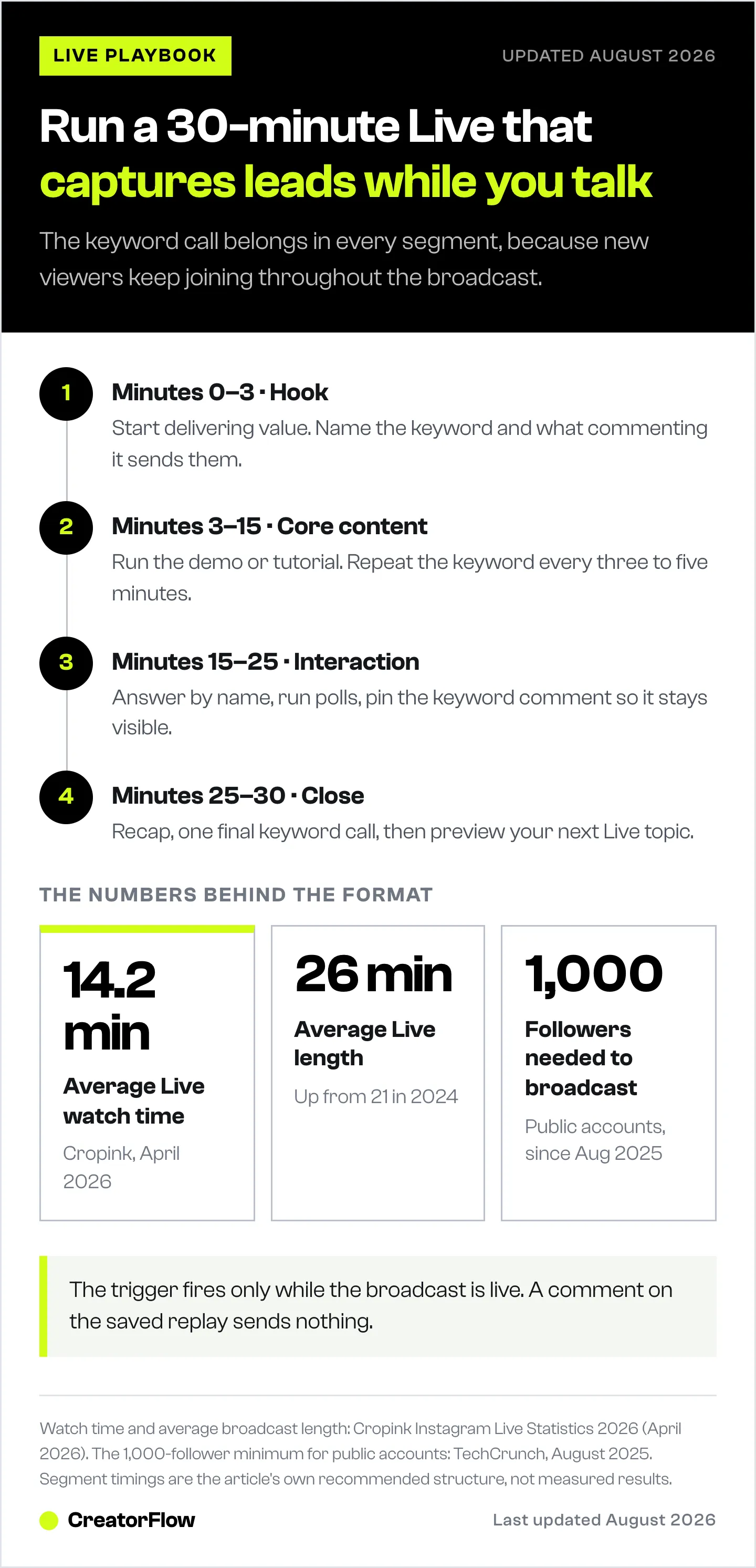
- API compatibility: Meta’s API treats Live comments the same as post comments for automation, but triggers only fire while the broadcast is active.
- Follower requirement: Since August 2025, public accounts need at least 1,000 followers to go Live on Instagram (TechCrunch, August 2025).
- CTA frequency: Repeat the keyword CTA every 3-5 minutes because new viewers join throughout, and mentioning it once means 70% of your audience never hears it.
- Optimal Live length: 20-30 minutes. The average Live stream in 2026 lasts 26 minutes (Cropink, April 2026).
- Bottom line: Set up keyword triggers before going Live, pin a comment with the CTA, and follow up within 24 hours with a second DM to catch non-clickers.

Why Instagram Live Is Underrated in 2026
Instagram Live is the only format where your audience watches in real time with zero algorithmic filtering. Every viewer made a conscious choice to tap your profile picture and stay.
The numbers back this up:
| Metric | Instagram Live | Reels | Stories | Static Posts |
|---|---|---|---|---|
| Engagement rate | Up to 10x regular posts | 3.31% median | 12-18% sticker interaction | 4.44% median |
| Reach | Notification-driven | 30.81% (highest reach) | Follower-based | Lower than Reels |
| Watch time | 14.2 min average | 3-15 seconds | 5-7 seconds per frame | N/A |
| Viewer intent | Highest (active choice) | Low (algorithmic feed) | Medium (sequential) | Low (passive scroll) |
| Real-time interaction | Yes (comments, Q&A, polls) | No | Limited (replies, polls) | No |
Sources: Cropink Instagram Live Statistics 2026; Social Insider 2026 Instagram Benchmarks; Buffer State of Social Media Engagement 2026, all accessed April 12, 2026
Reels win on reach. Carousels win on per-impression engagement. But Live wins on intent and depth. A viewer who spends 14 minutes watching you is far more likely to buy than someone who scrolled past your Reel in 3 seconds.
The problem? Most creators end the Live and let all that attention evaporate. No follow-up. No lead capture. No system.
How Instagram Live DM Automation Works
The concept is straightforward:
- You go Live and tell viewers to comment a keyword (e.g., “LINK”, “GUIDE”, “BOOK”)
- Your automation tool monitors Live comments in real time
- When a viewer comments the keyword, they receive an instant DM
- The DM contains your product link, lead magnet, booking calendar, or whatever you promised
- You keep presenting without interruption
This works because Meta’s Instagram Graph API treats Live comments the same as post comments for automation purposes. The same comment-to-DM triggers that work on Reels and feed posts also fire during Live broadcasts.
One critical limitation: The automation trigger only works while the Live is active. It does not fire on saved Live replays or archived broadcasts. Viewers who find your saved Live later won’t trigger the automation. Plan your CTA accordingly.
What You Can Send via Live DM Automation
- Product links (Shopify, Gumroad, Amazon affiliate links)
- Lead magnets (PDFs, checklists, templates, free guides)
- Booking calendars (Calendly, Acuity)
- Discount codes (exclusive to Live viewers)
- Email capture (collect emails within the DM conversation)
- Event registration links (webinars, workshops, launches). See how to automate webinar registration through Instagram DMs
- Course enrollment links (Teachable, Kajabi, Skool)
The Instagram Live Sales Playbook (Since Live Shopping Died)
Here’s context most guides skip: Instagram Live Shopping is gone. Meta discontinued product tagging in Live broadcasts on March 16, 2023 (Inro, April 2026). You can no longer tag products for in-stream purchases.
The comment-to-DM flow is the replacement. And in many ways, it works better. Product tags required viewers to tap, browse, and check out inside a multi-step in-app flow. DMs create a direct, personal conversation where you can answer objections and close.
The Old Flow (Dead)
Go Live → Tag products → Viewer taps tag → In-app checkoutThe 2026 Flow (What Works)
Go Live → "Comment SHOP for the link" → Instant DM with product link → Follow-up DM sequence → SaleThe livestream commerce market in the US reached $14.64 billion in 2025 (Fit Small Business, April 2026). Instagram Shopping converts at roughly 2.1% as a platform, and since Meta removed native in-app checkout in August 2025 every one of those sales completes on the seller’s own site (sellerscommerce.com and ppc.land, August 2026). Comment-to-DM flows push conversion rates higher because the DM format gets 90%+ open rates compared to the passive product tag experience.
Step-by-Step: Set Up Instagram Live DM Automation
Step 1: Plan Your Live Topic and CTA Keyword (10 minutes)
Pick one clear topic. One offer. One keyword. Trying to promote three things in one Live dilutes everything.
Good examples:
| Creator Type | Live Topic | Keyword | DM Content |
|---|---|---|---|
| Fitness coach | ”My exact meal prep for cutting” | MEALPLAN | PDF download link |
| Affiliate marketer | ”5 Amazon finds under $20” | LINK | Amazon affiliate link |
| Course creator | ”Free training: How I got 10K followers” | FREE | Webinar registration |
| E-commerce owner | ”New collection reveal” | SHOP | Product page link |
| Coach | ”Live Q&A: Starting your business” | BOOK | Calendly booking link |
| Real estate agent | ”Market update for [city]“ | INFO | Consultation booking link |
Choose keywords that are:
- Short (one word, all caps)
- Easy to type on mobile
- Unlikely to appear in normal comments
- Action-oriented
Step 2: Set Up Your Automation Before Going Live (5 minutes)
Open your automation tool. Create a new comment-to-DM trigger with your chosen keyword.
In CreatorFlow:
- Go to your dashboard at creatorflow.so
- Create a new automation
- Set trigger type to “Comment contains keyword”
- Enter your keyword (e.g., “LINK”)
- Write your DM message (see templates below)
- Enable the automation
- Test it before going Live
The DM message should include:
- A personal greeting (use the viewer’s name if possible)
- What you promised (“Here’s the meal plan you asked for!”)
- The actual link or content
- A soft secondary CTA (“Reply if you have questions”)
Step 3: Promote Your Live in Advance (24-48 hours before)
A Live nobody knows about is a Live nobody watches. Instagram’s scheduling feature lets you set broadcasts up to 90 days in advance, and followers can set reminders (instagram.com, April 2026).
Promotion checklist:
- Post a Story with countdown sticker 24 hours before
- Create a Reel teasing what you’ll cover (48 hours before)
- Announce in your Broadcast Channel (if you have one)
- Schedule the Live in Instagram so followers get a reminder notification
- Post a feed reminder 2-4 hours before
Tell your audience the keyword in advance. “Tomorrow at 7 PM I’m going Live to show you my exact content workflow. Comment GUIDE during the Live and I’ll DM you the template free.” This primes viewers to comment immediately when they join.
Step 4: Go Live with Structure (20-30 minutes)
The average Live stream in 2026 lasts 26 minutes, up from 21 minutes in 2024 (Cropink, April 2026). That’s your target range. Long enough to deliver value, short enough to maintain energy.
The Live structure:
Minutes 0-3: Hook and setup
- Start with energy. Don’t wait for viewers to trickle in with “Hey, waiting for more people to join.” Start delivering value immediately. Early viewers can replay.
- State what viewers will learn and what they’ll get for commenting the keyword
- “I’m going to show you exactly how I meal prep for the week. Comment MEALPLAN at any point and I’ll DM you the full plan with macros.”
Minutes 3-15: Core content delivery
- Deliver your main content (demo, tutorial, Q&A, showcase)
- Repeat the keyword CTA every 3-5 minutes. New viewers join throughout. If you only mention the keyword once, most people miss it.
- Pin a comment with the keyword instruction so it stays visible
Minutes 15-25: Interaction and depth
- Answer questions using the Q&A feature
- Respond to comments by name (builds connection)
- Use polls to keep engagement high
- Share exclusive details only for Live viewers
Minutes 25-30: Close and final CTA
- Recap what you covered
- Final keyword CTA: “Last chance, comment MEALPLAN and I’ll send it right now”
- Tell viewers to share the Live with friends who’d benefit
- Preview your next Live topic to build recurring viewership
Step 5: Post-Live Follow-Up (Within 24 hours)
The Live ends. The automation keeps working. Here’s your post-Live checklist:
Immediately after:
- Save the Live to your Archive
- Check your automation dashboard for DM delivery and link click stats
- Share a Story with the Live replay and a reminder of the keyword
Within 2-4 hours:
- Send a follow-up DM to everyone who received the initial DM: “Did you get a chance to check it out? Any questions?”
- This second touchpoint catches people who opened the DM but didn’t click
Within 24 hours:
- Post a Reel with the best clip from your Live
- Share the replay in your Stories
- If you captured emails, add contacts to your email sequence
The key insight: A Live should not end when the stream ends. The DM automation creates a conversation thread you can nurture long after the camera turns off.
Instagram Live DM Templates That Convert
Template 1: Lead Magnet Delivery
Hey [Name]!

Thanks for watching the Live!

Here's the [lead magnet name] I mentioned:
[Link]

It covers [brief description of what's inside].

Got questions? Reply here, I read every message.
Template 2: Product Link
Hey [Name]!

Great timing, here's the direct link to [product name]:
[Link]

Live viewers get [exclusive offer, e.g., 15% off with code LIVE15].

Let me know if you need help choosing a size/plan!
Template 3: Booking Calendar
Hey [Name]!

Here's my calendar to book a free [consultation/discovery call/session]:
[Calendly link]

Pick any time that works for you. Looking forward to chatting!
Template 4: Affiliate Link
Hey [Name]!

Here's the [product] I showed on the Live:
[Affiliate link]

I've been using it for [timeframe] and [brief personal endorsement]. Let me know what you think!
Instagram Live Requirements and Limits
Before you plan your Live strategy, know the rules:
Eligibility (Updated August 2025):
- Account must be public (private accounts cannot go Live)
- Minimum 1,000 followers required (TechCrunch, August 2025; Social Media Today, August 2025)
- App must be fully up to date
- Users under 16 need parental permission
This 1,000-follower minimum was introduced in August 2025. If you’re under 1,000 followers, focus on growing through Reels and comment-to-DM automation on regular posts first.
Live Features Available:
- Schedule up to 90 days in advance (minimum 1 hour)
- Invite up to 3 guests for co-hosting
- Assign a moderator for comment management
- Use Q&A stickers, polls, and pinned comments
- Save broadcast to Archive after ending
- Share replay in Stories
- View Live Insights (viewer count, peak viewers, interactions)
- Badges for eligible creators (viewer-funded support)
Instagram DM Automation Limits:
- Most automation tools pace sends at roughly 200 DMs per hour as a tool-side safety convention, not a Meta-published figure. Meta’s own limits are per-second on the Instagram Login path: 100/sec for text and links, 10/sec for audio and video, plus 750/hour for private replies to comments (developers.facebook.com, April 2026)
- 24-hour messaging window starts when a viewer comments or interacts
- Messages must comply with Meta’s Messaging Policy (no spam, no unsolicited promotional content outside the 24-hour window)
- For full details on rate limits, see our Instagram Graph API rate limits guide
Best Times to Go Live on Instagram
General patterns show higher active user numbers during weekday evenings and weekend middays (Sprout Social, April 2026). But your audience data is more reliable than any general rule.
How to find YOUR best time:
- Open Instagram Insights
- Go to Your Audience > Most Active Times
- Check which days and hours show peak activity
- Schedule your Lives during those windows
- Test different times over 3-4 Lives and compare viewer counts
Recurring schedule tip: Going Live at the same time each week trains your audience to expect it. “Every Tuesday at 7 PM” builds a habit. Random Lives at random times get random turnout.
Instagram Live vs Other Formats: When to Use Each
Live isn’t a replacement for Reels or Stories. Each format serves a different role in your content strategy:
| Format | Best For | Funnel Stage | Automation Opportunity |
|---|---|---|---|
| Reels | Reach and discovery | Top of funnel | Comment-to-DM on post |
| Stories | Daily engagement, polls | Mid-funnel | Story reply automation |
| Instagram Live | Deep engagement, trust-building, real-time conversion | Mid-to-bottom funnel | Comment-to-DM during broadcast |
| DMs | 1:1 conversion, lead nurture | Bottom of funnel | Keyword trigger automation |
| Broadcast Channels | Announcements, community | Retention | One-to-many messaging |
The recommended system: Reels attract new followers (reach). Stories keep them engaged daily. Live converts the most interested viewers into leads. DM automation captures and nurtures those leads into customers.
For a complete funnel breakdown, see our Instagram sales funnel guide.
5 Instagram Live Strategies by Creator Type
1. Coaches and Educators: The “Free Training” Live
Format: 30-minute live training on a specific topic Keyword: “BOOK” or “CALL” DM Content: Calendly link for a free discovery call
The structure: teach for 20 minutes, then offer a free call for anyone who wants personalized help. “If this resonated and you want a custom plan, comment BOOK and I’ll DM you my calendar.”
Coaches convert at the highest rates from Live because the format builds trust. Viewers see your expertise in real time, hear your voice, and feel a personal connection before they ever get on a sales call.
2. Affiliate Marketers: The “Product Demo” Live
Format: 15-20 minute product showcase or review Keyword: “LINK” DM Content: Affiliate link with UTM tracking
Show the product in action. Unbox it. Compare it. Give your honest review. When viewers ask “where can I get this?”, they comment the keyword and get the link instantly. Track which Lives drive the most clicks with UTM parameters and link tracking.
3. E-commerce Owners: The “Launch Drop” Live
Format: 20-minute new product reveal or behind-the-scenes Keyword: “SHOP” DM Content: Direct product page link, optional discount code
Build anticipation with countdown stickers in Stories. Reveal the product Live. Offer an exclusive discount for Live viewers only (“Comment SHOP for 15% off, Live viewers only”). This creates urgency because the discount is tied to the Live moment.
4. Service Businesses: The “Office Hours” Live
Format: 30-minute Q&A answering common questions Keyword: “INFO” DM Content: Service page or consultation booking link
Position yourself as the expert. Answer questions your ideal clients ask every day. When someone asks a question that your paid service solves, direct them to the keyword. “That’s a great question, if you want to go deeper, comment INFO and I’ll send you the details on working together.”
5. Content Creators: The “Behind the Scenes” Live
Format: 20-minute casual behind-the-scenes look Keyword: “FREE” or “GUIDE” DM Content: Free resource, template, or content calendar
Show your creative process. Share what tools you use. Reveal your content strategy. This format works because it feels authentic and unscripted. Viewers see the real you, which builds trust and curiosity.
Common Instagram Live Mistakes (And How to Fix Them)
Mistake 1: “Waiting for people to join” Don’t sit there saying “Let’s wait for more people.” Start delivering value immediately. The replay captures everything. People who join late will catch up. Dead air in the first 60 seconds kills your viewer retention.
Mistake 2: Only mentioning the keyword once New viewers join throughout your Live. If you mention your CTA keyword only at the beginning, 70% of your audience never hears it. Repeat it every 3-5 minutes. Pin a comment with the keyword.
Mistake 3: No automation set up Going Live without DM automation means manually responding to every “where’s the link?” comment. Set it up before you go Live. Test it with a friend.
Mistake 4: No follow-up after the Live ends The Live ends. The leads cool off. If you don’t follow up within 24 hours, you lose most of them. Send a second DM. Share the replay. Keep the conversation going.
Mistake 5: Going Live without promotion An unannounced Live gets a fraction of the viewers. Promote it at least 24 hours before through Stories, Reels, and your Broadcast Channel.
Tools That Support Instagram Live DM Automation
| Tool | Price | Live Comment Trigger | Key Strength | Best For |
|---|---|---|---|---|
| CreatorFlow | $15/mo flat | Works on Live comments | Simple setup, Meta Tech Provider | Creators who want Instagram automation at a flat rate |
| ManyChat | $17-199/mo by contact tier | Dedicated Live trigger | Multi-platform workflows | Teams running Instagram alongside Facebook, WhatsApp, or SMS |
Sources: creatorflow.so (April 2026); manychat.com/pricing (April 2026)
Key difference: ManyChat offers a specific “Instagram Live Comments Trigger” designed for Live broadcasts (manychat.com, April 2026). CreatorFlow’s comment-to-DM automation works across all comment types including Live comments. Both achieve the same result, sending DMs to viewers who comment keywords during your Live.
For a full tool comparison, see our Instagram DM automation tool comparison.
FAQ
Does Instagram Live DM automation work after the Live ends?
No. Comment-to-DM automation only triggers during the active Live broadcast. Once you end the Live, comments on the saved replay do not fire automation triggers. Make sure viewers comment the keyword during the Live, not after.
How many followers do I need to go Live on Instagram?
You need at least 1,000 followers on a public account. This requirement was added in August 2025 (TechCrunch, August 2025). If you’re under 1,000, focus on growing with Reels and comment-to-DM automation on regular posts first.
Is Instagram Live DM automation safe?
Yes, when using tools that connect through Meta’s official Instagram Graph API. CreatorFlow and ManyChat both use the official API, which means no password sharing, no scraping, and minimal ban risk. The API enforces Instagram’s own rate limits automatically.
Can I automate responses to Live comments without a tool?
No. Instagram does not offer native DM automation for Live comments. You need a third-party tool that connects via Meta’s API to detect keywords and send automated DMs.
What’s the best keyword to use during an Instagram Live?
Short, all-caps, one-word keywords work best. Examples: LINK, FREE, GUIDE, BOOK, SHOP, INFO. Avoid common words that viewers might type accidentally (like “yes” or “love”). The keyword should be unique enough that it only triggers when someone intentionally types it.
How many DMs can I send during an Instagram Live?
Most automation tools pace sends at roughly 200 DMs per hour as a tool-side safety convention. Meta itself publishes per-second limits on the Instagram Login path (100/sec for text and links) rather than an hourly DM cap (developers.facebook.com, April 2026). For most Lives with under 200 keyword comments per hour, this is not a constraint. If you expect higher volume, space your CTAs or use CreatorFlow’s built-in rate limit management.
Can I use multiple keywords during one Live?
Yes. Set up separate automation triggers for different keywords. For example, use “GUIDE” for your free PDF and “BOOK” for your calendar link. Mention different keywords at different points during the Live based on what you’re discussing.
Does Instagram Live automation work with co-hosted Lives?
Yes. If you invite guests to your Live, comments from viewers still trigger your automation. This makes co-hosted Lives especially powerful, your guest’s audience comments the keyword, and your tool sends them a DM from your account.
What happens if someone comments the keyword multiple times?
Most automation tools (including CreatorFlow and ManyChat) send only one DM per user per trigger. Repeat comments from the same viewer don’t generate duplicate messages.
Is Instagram Live still worth it in 2026?
For creators with 1,000+ followers who pair it with DM automation, yes. The combination of real-time engagement (14.2 min avg watch time), high intent (viewers chose to join), and instant lead capture (comment-to-DM) makes Live one of the highest-converting formats on Instagram.


