

Two CreatorFlow updates went live in August 2026. A DM queue holds messages when a post gets busy and sends them on its own as capacity frees up. A Connection Health card in Workspace Settings tests four parts of your Instagram connection and tells you which ones are working. Both are already on for every account. Since October 2026 the app also includes CreatorFlow Academy, short lessons that each end with an automation you can start.
They answer the two questions creators send us most. Did everyone who commented actually get the link? And when automations go quiet, is the connection the problem or is it my setup?
Key Takeaways
- DM queue: Messages that reach the hourly send pace wait in a queue and go out as capacity frees up. Nothing for you to do.
- Queue count on your home page: The number waiting shows right under DMs Sent, so a busy post is visible instead of silent.
- Connection Health card: Four checks on one screen: Instagram login, activity updates, comment access, message sending.
- Test connection button: Runs all four on demand and gives a plain-words result for each.
- Re-authenticate to fix it: Refreshing the connection keeps your automations, contacts, and history. Disconnect is the destructive one.
- Already live: Both changes are on every account. No setting to switch on, no plan change.

A Queue for Your Busiest Posts
CreatorFlow sends automated DMs at a steady pace of about 200 per hour. Sending in a burst is what gets accounts flagged, so the tool spaces messages out and stays under Instagram’s messaging limits on purpose.
On a normal day you never come close. On a post that takes off, you can pass it in half an hour.
Messages that reach that pace now wait in a queue and send themselves as the hour frees up. There is nothing to click, nothing to restart, and no automation to re-enable.
Your home page shows how many are waiting, on a Queue line directly under DMs Sent. Most of the time it reads zero, which is the point. When it doesn’t, you know why: a post is pulling comments faster than an hour of sending can clear them.
For the full picture of what Instagram allows versus what tools choose to do, see how many DMs you can send on Instagram and Instagram API rate limits.
Check Your Instagram Connection in One Click
Open Workspace Settings, then the IG Account tab. There is a new Connection Health card with a Test connection button.
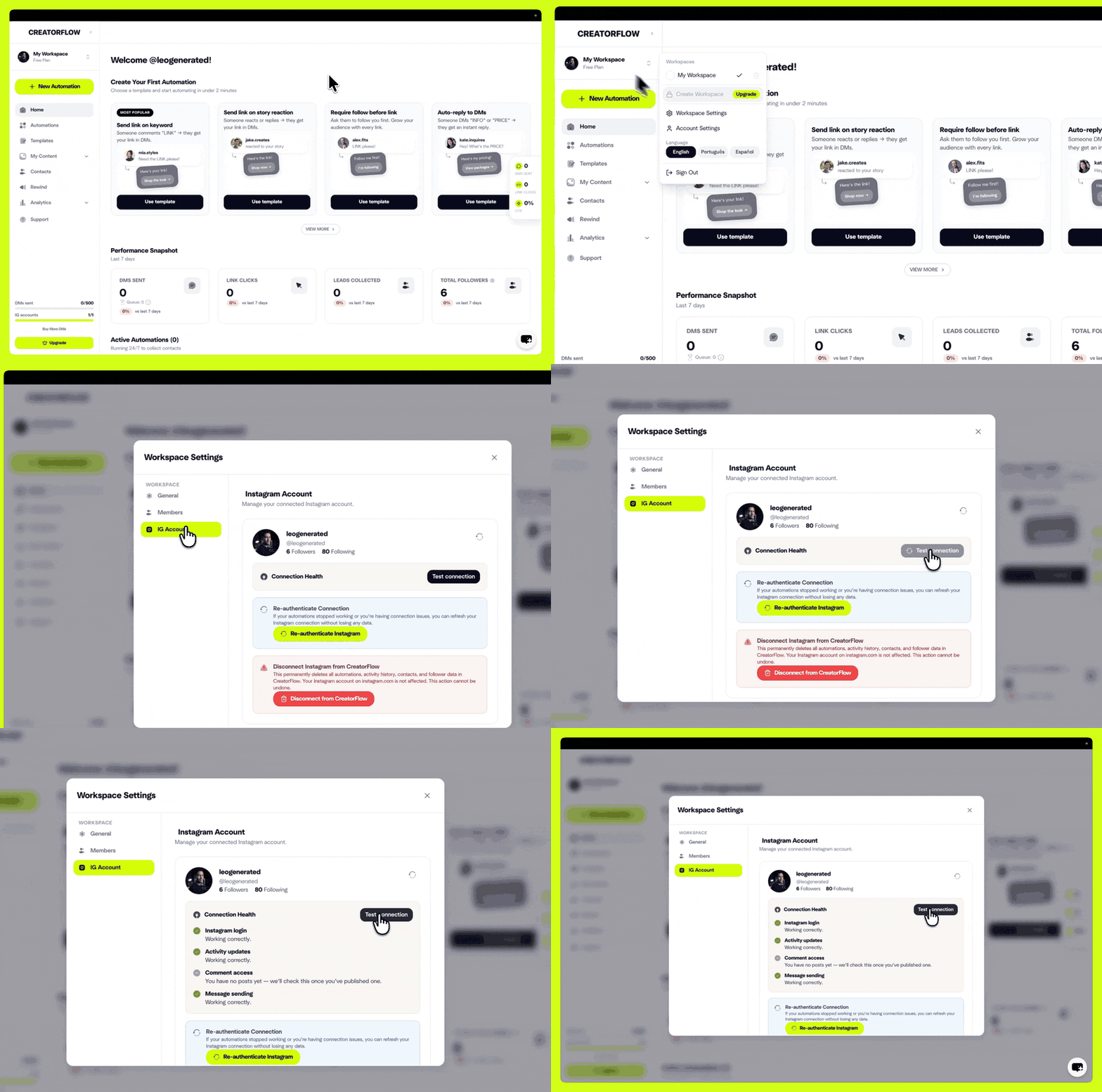
Press it and CreatorFlow checks four things against your live connection and reports each one separately. No support ticket, no waiting on a reply.
What Each Check Means
The four checks map to the four things that have to work for a comment to become a DM, in the order they happen. That is what makes the result useful: the first one that fails is where the chain breaks.
| Check | What it confirms | If it fails |
|---|---|---|
| Instagram login | Your account is still connected to CreatorFlow | Nothing runs until the connection is refreshed |
| Activity updates | New activity is reaching CreatorFlow from Instagram | CreatorFlow never hears about new comments or DMs |
| Comment access | Your automations can read comments on your posts | Comment triggers cannot fire |
| Message sending | Your automations can send DMs | Triggers fire but no DM goes out |
A check can also come back as not tested yet. On a new account with nothing published, comment access says it will be checked once you publish your first post. That is a normal result, not a fault.
Run this before you assume an automation is broken. A live automation that sends nothing is far more often a keyword or a testing mistake, and we cover those first in comment-to-DM not sending. Connection Health rules the connection in or out so you can stop looking there.
If a Check Fails
Use the Re-authenticate Instagram button on the same page. It refreshes the connection and keeps your automations, contacts, and activity history exactly as they are.
Do not use Disconnect for this. Disconnect is for permanently moving a workspace to a different Instagram account. It deletes that workspace’s automations, activity history, and follower data, and that deletion cannot be undone.
If a check still fails after re-authenticating, email hello@creatorflow.so with your handle and the four results. The team fixes connection issues on the backend with no data loss, and sending the results up front skips a round of back-and-forth.
For problems that start at signup rather than mid-flight, can’t connect your Instagram account covers the setup side.
The CreatorFlow August 2026 Update Is Live Now
This follows the reliability work in the May 2026 update and pairs with Rewind, which goes back and DMs people whose comments were missed in the previous seven days.
Nothing to switch on. Set up your first flow with comment-to-DM automation, or open the app and check your home page.
FAQ
Do I need to turn the DM queue on?
No. The queue is on for every CreatorFlow account and every plan. Messages that reach the hourly send pace wait automatically and go out as capacity frees up.
Do queued DMs count toward my monthly limit?
Yes. A queued message counts once, when it sends. Free includes 500 DMs a month, Pro includes 5,000 per workspace, and Growth includes 10,000 per workspace.
How long do queued DMs wait?
That depends on how far past the pace the spike pushed you. At roughly 200 sends an hour, a few dozen queued messages clear inside the hour and several hundred work through over the next few.
What does the Queue number on my home page mean?
It is the count of automated DMs waiting to send right now. Zero means everything has gone out. Any other number means a post is generating comments faster than an hour of sending clears them.
How often should I run Test connection?
Only when something looks wrong. It is a diagnostic, not a maintenance task. The Re-authenticate button also turns orange on its own when the connection needs attention.
Does re-authenticating delete my automations?
No. Re-authenticate refreshes your Instagram connection and keeps your automations, contacts, and activity history. Disconnect is the destructive action, and it is only for permanently switching a workspace to a different Instagram account.
Why does Comment access say it has not been checked?
The check needs a published post to run against. On a new account with nothing posted, CreatorFlow reports that it will check once you publish. Publish a post or reel, then run Test connection again.
Product details verified against CreatorFlow on August 22, 2026. Instagram messaging behaviour reflects Meta’s Instagram Platform documentation as of August 2026. Meta publishes its messaging rate limits per second rather than per hour; the roughly 200 DMs per hour figure is CreatorFlow’s own send pace, chosen to stay well under those limits.


