

CreatorFlow Academy is a library of short lessons inside the CreatorFlow app, at app.creatorflow.so/learn. Each lesson shows one Instagram DM idea, such as sending a free guide, building a waitlist or booking calls. Each one ends with a Use this idea button that opens the automation for you. You read for a few minutes, check the words, and turn it on.
Most people who connect Instagram to CreatorFlow do not get stuck on the tool. They get stuck on the empty screen that comes after it. Which post? Which keyword? What should the DM say? What do I send people, and what happens after they tap?
We already answer those questions on this blog, in more than 500 articles. But a long guide in another tab is not where you are when you need the answer. You are in the app, with an automation half made. So we moved the most practical ideas into the app, cut each one to the part you can use today, and connected it to the automation it describes.
Key Takeaways
- CreatorFlow Academy is live in the app under app.creatorflow.so/learn. Sign in to open it.
- Every lesson is one idea. A free guide, a product link, a waitlist, a booking page, outfit links.
- Every lesson ends with an automation. The Use this idea button opens it with the keyword, DM text and button ready to edit.
- Filters match the job. Launch, Sell, Collect emails, Get followers and Book calls.
- Short formats. Articles of 2 to 5 minutes and short videos.
- Some ideas use Pro features, such as Email Gate for collecting emails. Each lesson says which.
What is CreatorFlow Academy?
CreatorFlow Academy is the learning section of the CreatorFlow app. It holds short, practical lessons for Instagram DM automation. Each lesson covers one result, for example “send a free guide to everyone who comments”. It shows the steps, the DM text to copy and one mistake to avoid. Then it opens a ready-made automation for that idea, so you go from reading to a live automation in one place.
Open it from the app at app.creatorflow.so/learn. If you are not signed in, CreatorFlow asks you to sign in first and then takes you to the Academy.
Why we built it
A tutorial that ends with “now go and build it” leaves the hard part to you. You close the guide, open the builder and try to remember the keyword, the wording and the button text. Some of it gets lost on the way.
The Academy closes that gap. The lesson and the automation are the same thing. When you press Use this idea, the parts the lesson described are already in the form: the trigger, the keywords, the DM and the button. You change the words to your own, add your link and turn it on.
We also wanted to put the small rules in the place where they matter. Meta allows one private reply to each comment, sent within 7 days of the comment, and more messages only if the person replies to you, according to its private replies documentation (checked October 2026). That one rule changes how you write a DM: everything the person needs goes in the first message. A lesson can say that in one line, next to the DM you are about to send.
What is included
The Academy opens with a featured lesson and a grid of idea cards. Each card shows the format and the read time, the keyword a follower would comment, and one line on what the idea does.
| Filter | Example idea | What the automation sends |
|---|---|---|
| Launch | Build a waitlist before you launch anything | Asks for an email, then confirms the person is on the list |
| Launch | Use Instagram DM automation to launch a course | The waitlist first, then the sales page by email on launch day |
| Sell | Sell a product from a reel with one keyword | The product page to everyone who comments the keyword |
| Sell | Share your outfit links without “link in bio” | Every item from the outfit in one DM, one button per item |
| Collect emails | Send a free guide to everyone who comments | Asks for an email, then sends the guide |
| Book calls | Book discovery calls from your DMs | Your booking page to people who ask for help |
Short articles and short videos
Most lessons are articles of 2 to 5 minutes. Some are short videos of 3 to 6 minutes, with a Watch video button. Both end the same way: one button that opens the automation.
Filters by job
You do not need to read every lesson. Choose the filter for what you want this week: Launch, Sell, Collect emails, Get followers or Book calls. All ideas shows everything.
The parts of every lesson
Every lesson follows the same pattern, so the second one is faster than the first:
- Who it is for and what you get.
- The steps, numbered, in the order you do them in the app.
- Text to copy: the DM, the button and a caption line.
- One mistake to avoid.
- Use this idea, which opens the automation.
How to use an Academy idea
Here is the full path, from opening the Academy to a live automation.
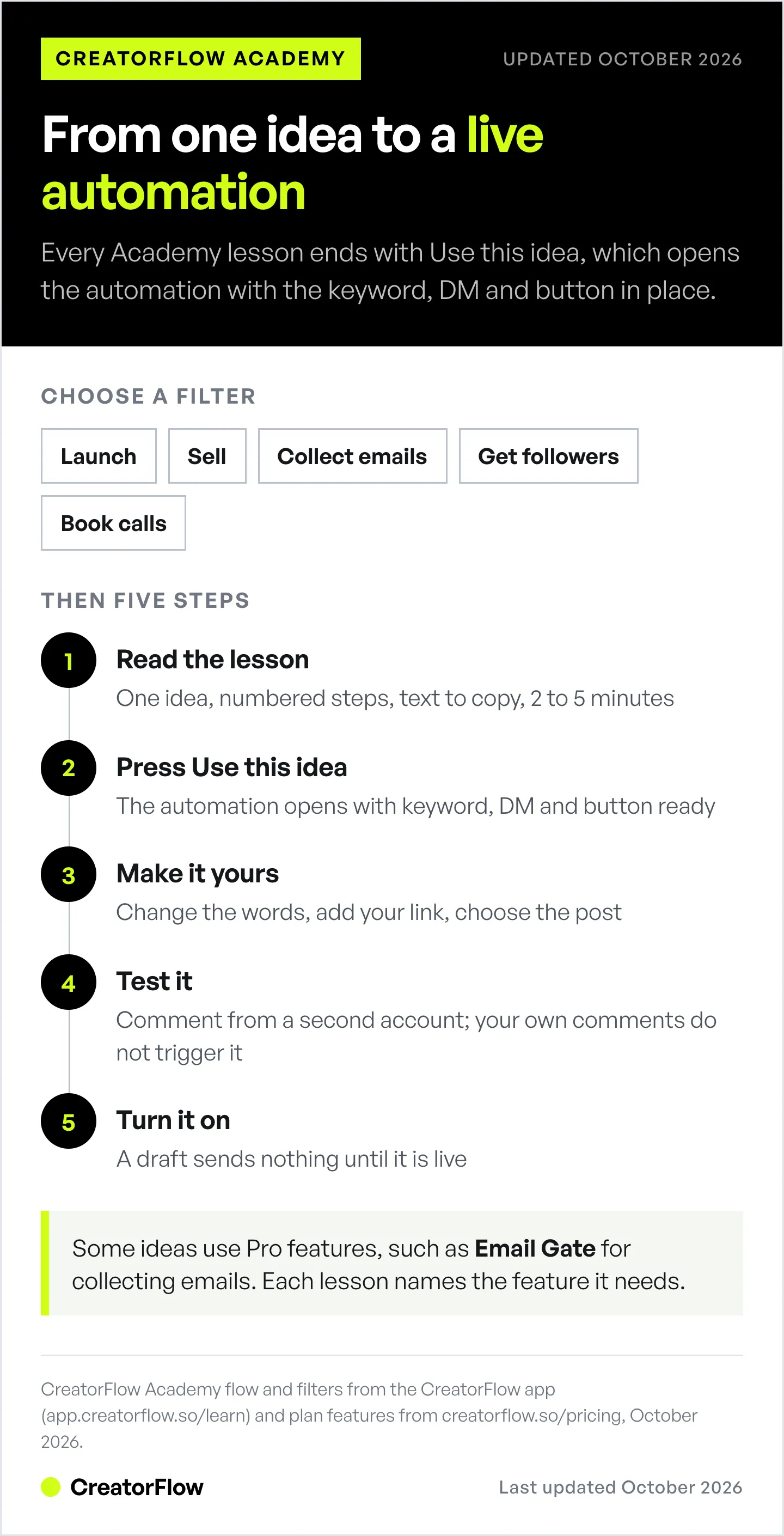
- Open the Academy at app.creatorflow.so/learn.
- Choose a filter for your goal, or start with the featured lesson.
- Read the lesson. It takes 2 to 5 minutes.
- Press Use this idea. The automation opens with the keyword, the DM and the button in place.
- Make it yours. Change the words, add your link and choose the post.
- Test it with a second account. Your own comments do not start an automation.
- Turn it on. A draft does not send anything.
If you have never made an automation before, the comment-to-DM setup guide covers each screen in more detail.
Which plan do you need?
The Academy is part of the app on every plan, including Free. Most ideas use comment-to-DM, story reply or keyword DM reply automations, and those work on Free with 500 DMs a month.
A few ideas use Pro features. Collecting emails before the link uses Email Gate, which is on Pro ($15/month, or $12/month billed annually) and Growth. Each lesson names the feature it needs, so you know before you start. For the full picture of how email collection works, see the Email Gate and Contacts guide.
What comes next
We are adding lessons in the same format. Two groups are next:
- Start here: your first automated DM, testing before you post, choosing a keyword people will type, and why some people do not get your DM.
- Seasonal ideas for October to December: Halloween, Black Friday on November 27, gift guides, the last day to order before Christmas, and a January waitlist. If you sell during the holidays, the Black Friday DM playbook covers the full plan today.
If there is an idea you want in the Academy, send us a message in the support chat. The best ideas come from what creators already do in their DMs, like a waitlist before a launch.
FAQ
What is CreatorFlow Academy?
CreatorFlow Academy is a library of short lessons inside the CreatorFlow app. Each lesson explains one Instagram DM automation idea, such as sending a free guide or booking calls. It ends with a Use this idea button that opens the matching automation, ready to edit and turn on.
Where do I find CreatorFlow Academy?
Open app.creatorflow.so/learn. If you are not signed in, CreatorFlow asks you to sign in first and then takes you to the Academy.
Is CreatorFlow Academy free?
Yes. The Academy is part of the app on every plan, including Free. Some ideas use Pro features, such as Email Gate for collecting emails, and each lesson says which feature it needs.
What does the Use this idea button do?
It opens a new automation for that idea, with the keyword, the DM text and the button already in place. You change the words to your own, add your link, choose the post, test it and turn it on.
Do I need experience with DM automation?
No. The lessons are written for people who have never made an automation. Each one has numbered steps in the order you do them in the app, and the Start here lessons cover your first DM and how to test it.
Are the lessons videos or articles?
Both. Most lessons are articles of 2 to 5 minutes. Some are short videos of 3 to 6 minutes. Every lesson ends with the same Use this idea button.
Will more lessons be added?
Yes. The next groups are a Start here set for new users and seasonal ideas for October to December 2026, including Black Friday on November 27.
CreatorFlow Academy details, plans and features checked in the CreatorFlow app and on creatorflow.so/pricing as of October 2026. Meta’s private reply rules checked on developers.facebook.com in October 2026.


