
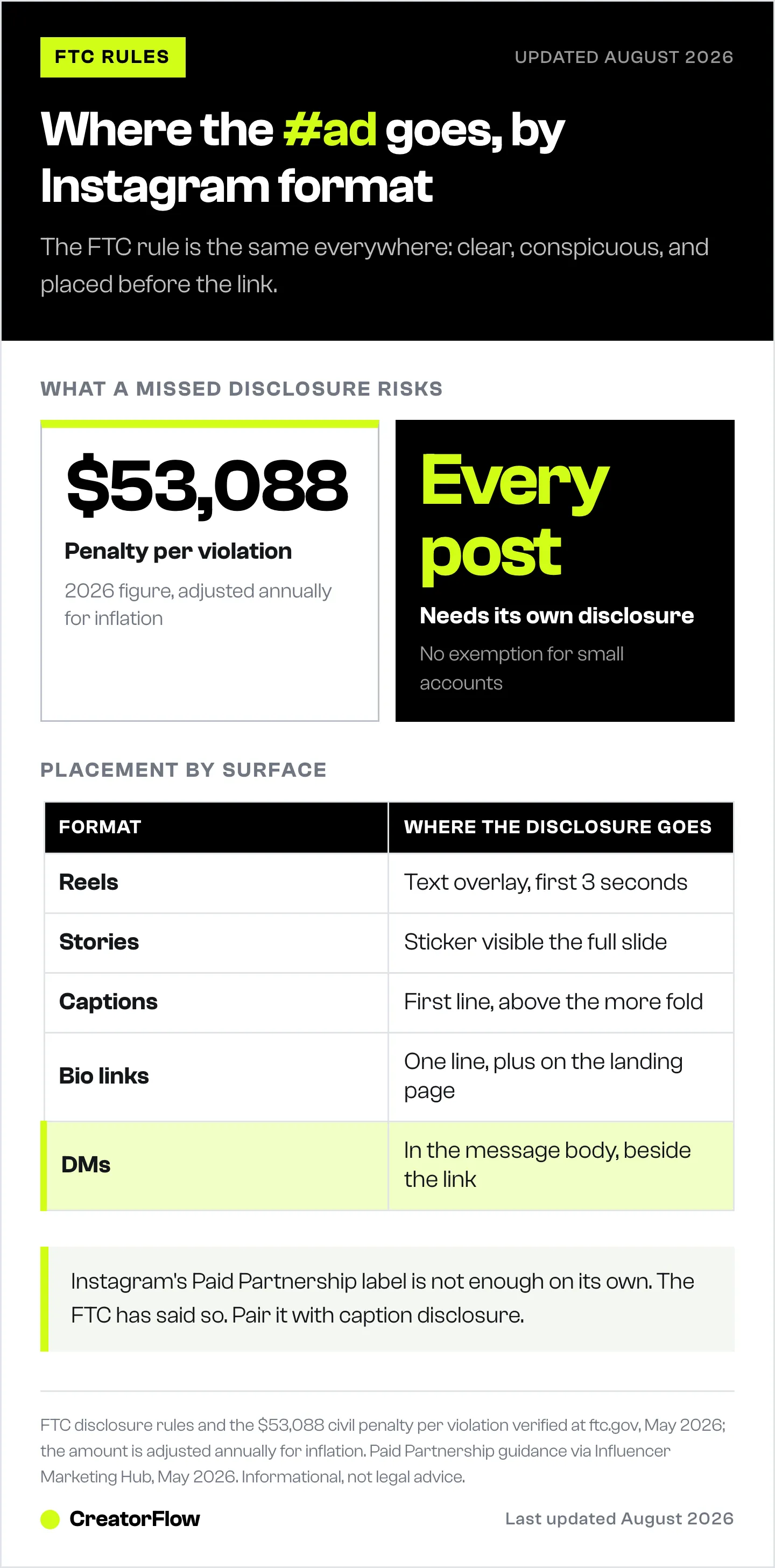
Instagram affiliate disclosure is a clear, conspicuous statement that a post contains links you earn commission from. The FTC requires it on every affiliate post, in every format, before the link or recommendation. As of 2026, civil penalties reach $53,088 per undisclosed post (FTC.gov, May 2026). On Instagram, that means “#ad” or “affiliate link” in the first line of the caption, a text overlay in the first three seconds of Reels, and visible disclosure for the full duration of any Story.
You posted ten affiliate Reels last month. Three converted. One went viral. Then you got a screenshot from a follower asking why you never disclosed the partnership. That single missed “#ad” can cost more than every commission you earned that quarter, because the FTC counts each post as a separate violation.
This guide covers what counts as compliant disclosure on Instagram, the exact placement rules per format (Reels, Stories, captions, bio, DMs), templates that protect you legally without tanking conversions, and why the platform’s “Paid Partnership” label alone won’t save you.
Key Takeaways
- Disclosure is required on every affiliate post: Affiliate links count as a material connection under FTC rules, even if you weren’t paid upfront. The disclosure must appear before the link, in plain language (FTC.gov, May 2026)
- Penalties are per post, not per account: Civil penalties reach $53,088 per violation in 2026, adjusted annually for inflation. Ten undisclosed affiliate posts can exceed $530,000 in exposure (FTC.gov, May 2026)
- Format matters: Reels need a text overlay in the first 3 seconds AND caption disclosure. Stories need disclosure visible for the full duration. Captions need “#ad” in the first line, above the “more” fold
- Instagram’s Paid Partnership label is not enough: The FTC has stated platform-provided labels do not satisfy disclosure rules on their own. Add explicit caption language like “I earn commission from links” (Influencer Marketing Hub, May 2026)
- Disclosures do not kill conversions: Research shows transparent disclosures maintain or improve trust, click-through, and conversion rates over time (Impact.com, May 2026)
- DMs need disclosure too: When automation sends an affiliate link via DM, include “(affiliate link)” or “I earn commission” in the message body. The 1-on-1 nature does not exempt you

What Counts as an Affiliate Disclosure on Instagram
A compliant Instagram affiliate disclosure has three traits: it is clear, conspicuous, and placed before the recommendation or link. Vague hashtags buried in a wall of tags do not qualify. Neither does a disclosure that appears only after a follower taps “more” to expand the caption.
The FTC defines a “material connection” as any financial, employment, or personal relationship that could affect how a follower interprets your endorsement. Affiliate links are 100% a material connection because you earn money when someone buys through your link, regardless of whether the brand pays you a flat fee on top (FTC.gov, May 2026).
Compliant disclosure language:
- “#ad” placed at the start of the caption
- “Paid partnership with [Brand]” plus #ad
- “Affiliate link, I earn commission”
- “I get a small kickback if you buy through this link”
Non-compliant language:
- “#sp” (too vague, not widely understood)
- “#thanks[Brand]” (does not signal financial relationship)
- “#collab” or “#partner” (ambiguous, FTC has flagged these)
- Disclosure buried at the end of caption, after 20 hashtags
- Native “Paid Partnership” label with no caption disclosure
The principle: a typical follower scrolling fast on a phone should not have to hunt for the disclosure. If they have to expand, scroll, tap, or squint, it is not conspicuous.
FTC Penalties: What You Risk Without Disclosure
Affiliate creators tend to underestimate enforcement because most disclosure violations end with a warning letter, not a fine. The FTC has been escalating, especially for accounts with reach above 10,000 followers. Civil penalties for non-disclosure reached $53,088 per violation in 2026, adjusted annually for inflation (FTC.gov, May 2026).
Public examples of enforcement:
| Case | Issue | Outcome |
|---|---|---|
| Kim Kardashian (2022) | Undisclosed crypto promotion (SEC action, not FTC) | $1.26 million settlement and a three-year pause on crypto promotions |
| Lord & Taylor (2016) | 50 influencers with no #ad disclosure | FTC settlement, mandatory compliance program |
| Warner Bros. (2016) | Sponsored YouTube reviews without disclosure | FTC settlement, multi-year monitoring |
| CSGO Lotto (2017) | Influencer-owned site promoted without disclosure | FTC settlement, mandatory disclosure requirements |
The pattern: high-reach creators get singled out for headline cases, but the FTC also targets brands and networks that fail to police their affiliates. If a network sends you a takedown notice asking you to add disclosure, comply immediately. Networks face their own liability and will drop affiliates who put them at risk.
What triggers an FTC investigation:
- A direct complaint from a follower or competitor
- A press story about an undisclosed promotion
- Routine sweeps of high-engagement Instagram accounts in regulated categories (health, finance, beauty)
- A network audit that finds a pattern of non-compliant posts
You do not need to be famous to be at risk. The FTC applies the same disclosure rules to every endorser, regardless of follower count (FTC Disclosures 101, May 2026).
How to Disclose Affiliate Links by Placement
Every Instagram surface has its own placement rule. Get any of them wrong and the post is non-compliant, even if your other content is clean.
Reels
Reels are the highest-risk format because they autoplay and the caption is collapsed by default. The FTC requires disclosure to be unmissable.
The rules:
- Add a text overlay disclosure in the first 3 seconds of the video. “#ad” or “Affiliate link” works
- Include disclosure in the caption, in the first line, before any “…more” cutoff
- If the video has voiceover, include a brief verbal disclosure (“This is sponsored”)
- Tag the brand using Instagram’s Paid Partnership feature when applicable
- Keep the text overlay on screen for at least 3 seconds so it is readable
Example compliant Reel caption:
“#ad Affiliate link below. My everyday skincare routine, all from @brand. Comment ROUTINE for the full list.”
The text overlay reads “Affiliate links” or “#ad” in the first 3 seconds. The caption opens with the disclosure before any selling language.
Stories
Stories vanish in 24 hours, which makes some creators assume disclosure is optional. The FTC treats them the same as feed posts. The disclosure must be visible for the full duration of the Story slide.
The rules:
- Add a text sticker reading “#ad” or “Affiliate” placed where it will not be cropped on smaller screens
- Keep the sticker on screen for the full Story duration (typically 15 seconds)
- Use a high-contrast background or sticker style so it is legible
- Place the disclosure near the link sticker, not in a corner where it gets covered by the profile photo or progress bar
Example compliant Story:
A Story slide showing a product with a link sticker. The text “#ad - affiliate link” sits next to the link sticker in white text on a dark background, visible the entire 15 seconds.
Captions and Feed Posts
Feed post captions are where most creators get tripped up. The “more” fold cuts captions after about 125 characters on mobile, and anything below it is not considered conspicuous.
The rules:
- Place “#ad” in the first line of the caption, before the “more” fold
- Do not bury it in a block of 20+ hashtags at the end
- Capitalize for visibility (“AD” or “#AD”) if the post is high-stakes
- Pair with explicit language for clarity, such as “affiliate link earns me commission”
Example compliant feed caption:
“#ad. The kitchen blender I use every morning. Affiliate link in bio. (I earn a small commission when you buy through it, no extra cost to you.)”
The “#ad” is the first thing readers see. The plain-English disclosure follows, and the link itself is referenced before the comment-to-DM prompt.
Bio Links
Bio links are passive, but they still need disclosure because clicks lead to monetized destinations. The bio itself does not need “#ad” in every line, but if the link goes to a Linktree or affiliate landing page, that destination must disclose.
The rules:
- Add a single line in the bio: “All links contain affiliate codes” or similar
- On the landing page (Linktree, Beacons, your own site), add a clear disclosure block at the top
- If a specific bio link goes to a single product, add “(affiliate)” next to that link
For more on placement strategy, see our guide on bio link vs DM automation for affiliate clicks.
DMs and Comment-to-DM Automation
This is the placement most creators forget. When a follower comments a trigger word and your automation sends them an affiliate link via DM, that DM is still a promotional message under FTC rules.
The rules:
- Include disclosure in the body of the automated DM, not just the originating post
- Use plain language: “Here’s the link (affiliate, I earn commission when you buy)”
- If the DM contains multiple affiliate links, disclose once at the top
Example compliant DM template:
“Hi! Here’s the moisturizer from my Reel: [link]. (Affiliate link, I earn a small commission at no cost to you.) Let me know if you have questions about the routine.”
Adding the disclosure does not change click-through in a meaningful way as long as it is honest and brief.
Affiliate Disclosure Templates That Don’t Kill Conversions
The fear that disclosure tanks conversions is not supported by data. Research consistently shows that transparent disclosures maintain or improve click-through rates because they signal honesty (Impact.com, May 2026). The trick is keeping the language plain and conversational.
Caption templates:
“#ad The exact protein powder I use post-workout. Affiliate link in bio (I earn commission at no extra cost to you).”
“#ad. Comment SHOP for the full list. Heads up, these are affiliate links.”
“Paid partnership with @brand. I also earn commission from the link in my bio. #ad”
Reels overlay templates (3-second text overlays):
“#ad - affiliate”
“Paid partnership”
“Affiliate links”
Story sticker templates:
“#ad - I earn commission”
“Affiliate - link below”
DM templates (for automated comment-to-DM flows):
“Here’s the link you asked for: [URL]. (Affiliate link, no extra cost to you, I earn a small commission.) Have a great day!”
“Thanks for commenting! Here’s the product: [URL]. Affiliate disclosure: I earn commission from this link.”
The pattern: lead with the disclosure or place it in the same sentence as the link. Do not separate them with paragraphs of selling copy. Followers respect transparency, and the FTC requires it.
For more on building DM flows that convert without sounding robotic, see our comment-to-DM automation setup guide.
Why Instagram’s “Paid Partnership” Label Isn’t Enough
Many creators rely on Instagram’s native Paid Partnership label and assume it covers them. The FTC has explicitly addressed this and ruled the label is not, by itself, sufficient disclosure (Influencer Marketing Hub, May 2026).
Reasons the label falls short:
- It only appears at the very top of the post, in small text, easily missed on mobile
- It does not specify the financial nature of the relationship (paid? affiliate? gifted?)
- Instagram’s UI changes can move or hide the label
- It applies only to posts where the brand has authorized you, which excludes most affiliate-only setups
The fix: always pair the Paid Partnership label with caption disclosure. The label handles Instagram’s internal policies. The caption disclosure handles the FTC. You need both.
Note: for affiliate links where you have no direct brand relationship (Amazon Associates, ShopMy, LTK), you cannot use the Paid Partnership label at all because there is no brand to tag. In that case the caption disclosure is your only protection.
Common Disclosure Mistakes (and How to Avoid Them)
The most common compliance failures share a pattern: the creator did some form of disclosure but placed it wrong, used vague language, or relied on the platform alone.
Mistake 1: Disclosure buried below the “more” fold
The first 125 characters of an Instagram caption show by default. Anything after is hidden until the user taps “more.” Disclosure that lives there does not count.
Fix: put “#ad” in the first 30 characters.
Mistake 2: “#sp” or “#collab” instead of “#ad”
The FTC has flagged these as ambiguous. Followers may not connect them to advertising or commission.
Fix: use “#ad” or “#advertisement.” Use “affiliate link” in plain text when in doubt.
Mistake 3: Reels with no text overlay
The caption disclosure alone is not enough on Reels because the autoplay UI hides captions until the user taps. The text overlay is mandatory.
Fix: always add a 3-second text overlay reading “#ad” or “Affiliate link.”
Mistake 4: One-time disclosure on a Highlight or pinned post
A pinned bio post that says “all my links are affiliate” does not cover individual posts. Each post needs its own disclosure.
Fix: disclose on every post that contains an affiliate link or recommendation.
Mistake 5: Forgetting to update DM automation
Many creators set up comment-to-DM flows years ago and never updated the message body to include disclosure.
Fix: audit every active DM template now. Add “(affiliate, I earn commission)” to any message that sends a monetized link.
Mistake 6: Assuming Stories are exempt because they expire
Stories vanish in 24 hours, but the FTC does not care about ephemerality. While the Story is live, it must comply.
Fix: add a “#ad” sticker on every affiliate Story slide for the full duration.
How DM-Delivered Affiliate Links Handle Disclosure
DM automation creates a unique opportunity for compliance because the link arrives in a private message you fully control. Unlike a Reel where you have 3 seconds to communicate disclosure, in a DM you have a full message body.
The compliant DM flow:
- Follower comments the trigger word on a Reel or post
- Automation sends a DM containing the affiliate link
- The DM body includes plain-language disclosure right next to the link
- The originating post also has its caption disclosure in case the follower checks the source
This dual disclosure (post + DM) is the safest setup. Even if a follower screenshots only the DM, the disclosure is present. If they screenshot only the post, the disclosure is also present.
Where automation tools help:
- Pre-built templates that include disclosure language by default
- Variable insertion for “#ad” or “(affiliate link)” across all DM responses
- Centralized template editing so you update disclosure in one place, not 50 active flows
- Audit logs showing which DMs went out, useful if you ever need to prove compliance
For comparison of DM automation tools that handle compliance well, see our Instagram DM automation complete guide or our scaling guide for affiliate marketing on Instagram.
With CreatorFlow, the disclosure line lives inside the DM template itself, so every automation running that template sends the link and the disclosure together.
Working with affiliate creators? We keep a dedicated setup page for exactly that: CreatorFlow for affiliate creators.
FAQ
Do I need to disclose every affiliate link, even on small posts?
Yes. The FTC does not exempt small accounts. Every post containing an affiliate link or paid recommendation requires disclosure, regardless of follower count. The same rule applies whether you have 500 followers or 5 million (FTC.gov, May 2026).
Is “#ad” enough on Instagram?
In most cases, yes, if it is placed correctly. “#ad” must appear in the first line of the caption, before the “more” fold, and on Reels it must also appear as a text overlay in the first 3 seconds. For high-stakes posts (regulated categories like health, finance, or supplements), pair “#ad” with plain-language explanation like “affiliate link, I earn commission” for extra protection.
Does Instagram’s Paid Partnership label count as FTC disclosure?
No, not on its own. The FTC has stated that platform-provided labels are insufficient because they may be small, easily missed, or hidden by UI changes. Always pair the Paid Partnership label with explicit caption disclosure (Influencer Marketing Hub, May 2026).
What happens if I forget to disclose once?
A single missed disclosure is unlikely to trigger FTC enforcement on its own, but it adds to your risk profile if a complaint or audit happens later. The safest move is to edit the post immediately and add disclosure to the caption. For Stories that have already expired, add disclosure to any future affiliate posts and update your default templates.
How do I disclose affiliate links in Instagram DMs?
Include disclosure in the body of the DM, not just the originating post. Use plain language like “(affiliate link, I earn commission at no cost to you)” placed near the link. If you use comment-to-DM automation, set this as a default footer in your DM templates so it goes out automatically.
Do I need to disclose affiliate links in Stories that disappear in 24 hours?
Yes. Stories are subject to the same disclosure rules as feed posts. While the Story is live, “#ad” or “Affiliate” must be visible for the full duration of the slide containing the link. The fact that the Story expires does not exempt you.
Can I use #aff or #commissionsearned instead of #ad?
The FTC has not blessed those specific tags. “#ad” remains the safest universal disclosure. Some creators add “#commissionsearned” or “#affiliate” alongside “#ad” for clarity, but these should supplement, not replace, the standard “#ad” disclosure.
Do affiliate disclosures actually reduce my conversion rate?
No. Research from multiple affiliate networks shows that disclosed posts maintain or improve click-through and conversion rates compared to non-disclosed equivalents. Followers who feel respected through transparency are more likely to click and buy (Impact.com, May 2026).
FTC disclosure rules and penalties verified from FTC.gov, Influencer Marketing Hub, and Impact.com as of May 2026. Penalty amounts are adjusted annually for inflation. This article is informational, not legal advice. Consult a lawyer for case-specific guidance.


